

Zeus virus is a banking Trojan that has been used by criminals to scam users and steal their personal information for years
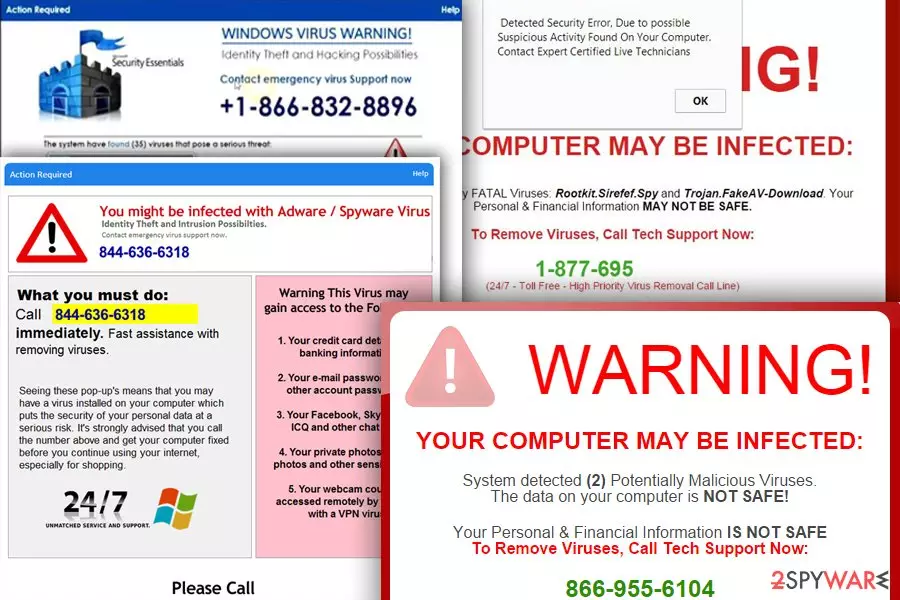
The infamous Zeus Trojan, or Panda Banker, as it is alternatively known, falls under the category of Trojan horse malware[1]. Emerging in 2007, this malware quickly rose to notoriety, successfully infiltrating millions of computers globally. However, its reign was cut short when its source code was leaked in 2011[2]. Despite this, the Trojan's name continues to be associated with numerous scams circulating on the internet, especially those targeting MacOS users.
It's important to clarify that Zeus Trojan primarily targets banking institutions in countries such as the United States, Canada, and Australia. The main objective of this malware, broadly referred to as a virus, is to harvest credentials for online accounts associated with banking sites or other payment-involved services. It then transfers funds from the victims' accounts into those managed by hackers, turning a significant profit.
Although Zeus Trojan has evolved into several versions, each variant maintains its original purpose. It adapts and alters certain functions, but the core tactics and goals of exploiting victims remain unchanged. These variants are particularly insidious, as they often capitalize on global crises to enhance their reach.
In 2020, amidst the COVID-19 pandemic, the Zeus Sphinx variant launched a malicious spam (malspam) campaign targeting individuals seeking government refunds in the US, Canada, and Australia. The cybercriminals orchestrated the campaign in such a way that the malware appeared in push notifications promoting fake Trojan infection alerts, marked as ZeuS.2023.
While the original Zeus Trojan malware cannot infect MacOS, the name has been exploited in scams to create a sense of fear among MacOS users. Pop-ups and warnings such as “Zeus virus detected” should be disregarded as these are false alerts intended to deceive users. It is, however, crucial to identify and remove any adware associated with these fake alerts on your computer.
| Name | Zeus virus |
| Type | Trojan horse, Tech support scam/adware |
| Danger level | High. Can cause the leakage of credit card details and other personal information because the scam is seeking to connect you with scammers |
| Alternatively known as |
|
| First detected in | 2007 |
| Versions | |
| Distribution | Spam (from FedEx, Royal Mail, etc.), malicious software, bundling, malvertising, BlackHat SEO (malicious links appear in Google search results) |
| Symptoms | Random ads interrupting your browsing, unknown sites appearing instead of the start page/the default search engine, slowdowns on the web browser and the entire system, crashes, and similar abnormal system behavior |
| Elimination | To stop unwanted redirects and malware infection prompts on your system, you should check it for infections with SpyHunterCombo Cleaner. Make sure you do not call the provided phone number in messages which claim virus infections were found on your PC |
| Recovery | System damage done by the virus or adware can be easily fixed with FortectIntego |
How scammers operate misleading messages about Zeus
Witnessing the efficacy and fear-inducing nature of the original virus amongst PC users, scammers have begun to strategically incorporate its name into their fabricated alerts. When dealing with this type of scam, you can also be informed about YahLover.worm and similar fictitious viruses and additionally be asked to contact the given number to reach tech support from Microsoft. In reality, you would only reach scammers who will do anything to scare you into one of these scenarios:
- install suspicious software;
- pay for useless software;
- give an attacker a remote control to your computer;
- reveal your personal data.
Computer users should keep in mind that the virus is no longer active. If you were interrupted by a fake virus alert reporting about the potential danger of the Trojan horse for your system, make sure you check your system for adware. After being installed on the system behind the user's back (these PUPs have mostly been relying on bundling), it alters system settings, modifies web browsers, and additionally starts producing fake ads.
Keep in mind that the virus removal should start as short as possible. To execute this procedure and bring your system back to normal, we highly recommend you select only reliable security software. We recommend using SpyHunterCombo Cleaner to run a full system scan. Additionally, you should run FortectIntego to fix the potential damage caused by malware.

The main functionality of the data-stealer
Zeus virus was one of the first malware variants developed for taking over people's banking details, so it is not surprising that there are hundreds of sources claiming that almost every banking Trojan has a part of the virus.[3] In fact, by altering the configuration files in the Trojan’s toolkit, scammers could have customized the virus according to their needs. The closest alternative for this malware is Panda Banker, which was the most active banking trojan in 2018.[4]
If you are interested in what the virus does, you should know that its main aim is to gather personal information by recording the victim's keywords or using similar techniques. However, it can also rely on these methods used to take over valuable data:
- Once the virus infects the computer, the FTP, POP3, or Internet Explorer passwords are gathered automatically from a Protected Storage (PStore);
- The virus monitored the websites victims were visiting and, once in a while, added extra fields to the fill-in forms to trick users into providing additional information.
Malware could also contact the command-and-control server, which allowed it to carry out other malicious activities on the infected computers. It could download files, shut down and reboot your device, and also delete the system files, which could lead the OS to crash.
At the moment, the closest copy of this malware is Panda Banker, which has been actively spread via spam and exploit kits. Its main targets are financial organizations, social media companies, crypto exchange services, and similar companies from US, Europe, and Japan. The virus can additionally drop ransomware, adware, and similar malware on the system.[5]
There is no doubt that you must remove the virus from Windows as soon as you start thinking that you can be tracked. Otherwise, the virus can steal your essential information. The removal procedure is challenging, and we do not recommend trying to identify and delete this virus manually. Consider using a trustworthy malware eraser tool instead. To recover from virus damage, use FortectIntego.

What is this alert on your web browser
Zeus virus alert is a fake popup that has been actively spread over the Internet to scare computer users and trick them into contacting scammers and, later on, paying money for useless services. No matter which OS is used, MacOS or Windows, scammers hijack web browsers, alter their settings and start interrupting the victim with fake ads from tech support, which is also fake. The takeover of the web browser is typically implemented with the help of adware which can be easily installed together with other installers.
The cybercriminals who are working behind the virus have also been spreading fake email messages misusing the names of well-known companies, such as Amazon, eBay, Lloyds Bank, etc. One such example was described on the Apple Discussions website:
Received an email from Cox. It stated Cox has identified that one or more of your computersbehind your cable modem are likely infected with the Zeus Trojan/bot, also known as Zbot. I called Cox and they verified they sent the email. Now what do I do?
Thank you
Beware that the Zbot virus popup is seeking to make its victim go thru the following sequence of actions:
- get scared about the PC's security, compromised data, and similar attacks;
- dial the telephone number given in the alert to contact “tech support experts” and find some help;
- provide the scammer with a remote desktop connection;
- install “recommended” software that is fake or even malicious;
- pay for the useless help.
The fake virus alert has been using different phone numbers. Tech support scammers have been actively changing them to prevent being unveiled. Recently, Microsoft security researchers announced a long list of Tech support scam numbers,[6] including the following ones:
- 1-800-014-8826
- 1-844-324-6233
- 1-844-859-0337
- 1-844-680-1071
- 44-800-090-3820
- 1-800-014-8826
- 1-844-313-7003
- 1-888-944-5714
- 1-866-249-2994
- 1-888-202-7560
- 1-877-224-2995
Note that scammers might use hundreds of different numbers that you should never call. The main principle of these attacks is the same. People are warned about the virus-detected issue on the system and asked to call the number to get needed help. Scammers might ask to purchase useless programs or services. Additionally, you can be asked to provide personal information or remote access to the computer.
Do not share any of these details with scammers because they are definitely going to use it for malevolent purposes! If you think that you could be infected, you should run a full system scan with anti-malware software to perform malware removal. Most probably, you are infected with an adware-type virus that altered your web browsers to help itself start right after you browse the web. Remove this unsafe app and reset each of your web browsers.
Fortunately, several virus researchers have already tried to look at this case from a different angle. For example, a researcher presenting himself as Kitboga has already contacted 3,577 “tech support experts” and, by hiding under the image of an old lady Edna, tried to waste scammers' time.[7]

Types of the scams actively spreading on the Internet
The list of current tech support scams that warn about fake virus attacks:
Windows detected Zeus virus scam
Windows detected Zeus virus scam operation relies on phishing websites that display deceptive information for whoever enters them. Usually, the victim experiences redirections to such fraudulent websites after being infected with certain adware or tech support scam malware. The full text of the message:
Security Warning
Windows Defender Alert: Zeus Virus
Detected in Your Computer!!
Please Do Not Shut Down or Reset Your Computer.
The following data will be compromised if you continue:
1. Passwords
2. Browser History
3. Credit Card Information
4. Local Hard Disk Files.
This virus is well known for complete identity and credit card theft. Further action through this computer or any computer on the network will reveal private information and involve serious risks.
Call Microsoft Technical Department (866) 249-2994 (Toll Free)
The deceptive website typically plays an audio message, displays a warning, and urges to call support at 0800-014-8826. Such web pages display the warning despite of whether the computer is infected with the indicated malware or not.
Scammers working behind this scam seek to swindle money from computer users by convincing them to buy bogus security software or asking them to provide sensitive information. 
You have a Zeus virus scam
You have a Zeus virus scam is another scam that urges victims to call tech support scammers at 1-844-859-0337 and possibly other similar numbers. Once such a malicious program compromises the victim's system, it starts causing redirecting to bogus websites that show various alerts. There are a few versions of the virus. One of them delivers a pop-up message saying:
WARNING! Your Hard drive will be DELETED if your close this page. You have a ZEUS Virus! Please call Support Now!. Call Toll-Free: 1-844-859-0337 To Stop This Process
Another version of the scam delivers this threatening message:
****Dont Restart Your Computer ****
Windows Detected ZEUS Virus, The Infections detected, indicate some recent downloads on the computer which in turn has created problems on the computer.Call technical support 1-844-859-0337 and share this code B2957E to the Agent to Fix This.
Experts from senzavirus.it[8] say that this scam aims to convince the victim to call fraudsters immediately by stating that the entire hard drive will be deleted if the victim closes the web page that displays the warning. There is no logic there, and victims should close such sites immediately to begin malware removal using reputable anti-malware tools. This virus is very similar to “Your Computer Has Been Infected With Virus” malware.

Windows Defender alert: Zeus virus
Windows Defender alert: Zeus virus is yet another malicious warning triggering redirects to fake websites that are designed to look like Windows Blue Screen of Death; these websites contain Windows logos and display a list of information that will be stolen by the virus if the victim won't contact technical support immediately. The message says:
Security Warning
Windows Defender Alert: Zeus Virus
Detected in Your Computer!!
Please Do Not Shut Down or Reset Your Computer.
The following data will be compromised if you continue:
1. Passwords
2. Browser History
3. Credit Card Information
4. Local Hard Disk Files.
This virus is well known for complete identity and credit card theft. Further action through this computer or any computer on the network will reveal private information and involve serious risks.
Call Microsoft Technical Department (866) 249-2994 (Toll Free)
There are hundreds of sites that display such deceptive warnings and suggest calling +1-844-313-7003, (866) 249-2994, (888) 202-7560, and other numbers for “help.” If such alerts start bothering you, perform a system check using anti-malware software to delete the tech support malware. Most likely, there is no virus in the system, and the malicious program is simply trying to put you in touch with fraudsters.

Security Update Error 0xB6201879. Authentication required
Technical support scammers continue using the name of Zeus to perform their malicious activities. This time, crooks decided to take advantage of the adware program to redirect users to the website, which triggered Security update error 0xB6201879. Authentication required pop-up informing about the virus attack and the danger to the files and personal information. The warning says:
Windows Defender Alert: Zeus Virus Detected In Your Computer!!
Please Do Not shutdown or Reset Your Computer.
** Windows Warning Alert **
Malicious Spyware/Riskware Detected
Error # 0x80072ee7
Please call us immediately at: 44-800-090-3820
Do not ignore this critical alert.
If you close this page, your computer access will be disabled to prevent further damage to our network.
Your computer has alerted us that it has been infected with a Spyware and risk ware.
The following information is being stolen…
Financial Data
Facebook Logins
Credit Card Details
Email Account Logins
Photos stored on this computer
You must constant us immediately so that our expert engineers can walk you through the removal process over the phone to protect your identity. Please call us within the next 5 minutes to prevent your computer from being disabled or from any information loss.
Call Technical Support Immediately at 44-800-090-3820
The malicious site pretends to be a notification from Windows Defender and has the design that resembles Microsoft's. The scam warns about Security Update Error 0xB6201879 which is a non-existent problem. Scammers want victims to call their tech support staff via 44-800-090-3820 or +1 (888) 944-5714 toll-free number to get the necessary help. It goes without saying that calling scammers is not recommended.

Your System Has Detected Zeus Virus
This technical support scam trying to scare people into thinking that their PCs are infected with malware was detected in the second half of March 2018. Potential victims of the scam can be exposed to the “Your System Has Detected Zeus Virus” new tab URL on a regular basis if the system is infected with an adware program. In some cases, people can be redirected to this fake domain after clicking on a malicious link or advertisement.
The pop-up mimics the design of official Windows Support Alerts. Besides, it pretends to be generated by the support.microsoft.com domain and claims that Microsoft's support detected the virus on the system, which might lead to identity theft. The warning says:
Windows Support Alert
Your System Has Detected Zeus Virus
It might harm your computer data and track your financial activities.
Please report this activity to +1-877-224-2995.
Crooks are trying to intimidate PC users by making them call for a supposed Microsoft Support staff member. However, dialing the provided toll-free number can end up in one of the following scenarios:
- The number may feature higher charges than usual, so you may receive an increased telephone bill;
- Scammers on the other side of the handset can trick you into subscribing to useless services;
- Inexperience users might provide scammers with the information required to establish a remote connection with the PC;
The scam is typically displayed in a new tab window. It consists of several layers. The background is usually covered with Microsoft-related or neutral tech-related information. The second layer is the most explicit. It indicates malware detection, provides an error code (0x80072ee7), and explains all the possible consequences that the current PC's condition can end up with.
However, keep in mind that this pop-up is a hoax that can be removed by running a scan with a security tool and resetting the web browser that displays it. Also, running a scan with FortectIntego would guarantee the best recovery.

Virus versions
Zbot
Zbot is another name for the notorious Trojan that is used by many security experts. If your security software detects Zbot in your system, it means that you have been infected with serious malware that silently tracks your activities and records passwords and other sensitive information. You must remove Zbot immediately and change all your passwords as soon as possible! Otherwise, the malware can find out all passwords, credit card details, and similar information which is considered personal.
There is no doubt that attackers can use such data for malevolent purposes, and loss of financial information leads to disastrous consequences. Unfortunately, such malware operates silently, and it is unlikely that you will spot it on your system without having strong anti-malware software.
Gameover Zeus virus
GameOver Zeus is yet another malicious Trojan horse that is based on components of the main virus. According to reports, this malicious software is distributed using the Cutwaii botnet. The Trojan employs an encrypted peer-to-peer communication scheme to communicate between its noted and C&C servers. The deceptive malware was used for the distribution of the infamous CryptoLocker.
The activity of this malware was suspended in June 2014 once the communication between the Trojan and the C&C servers was intercepted and shut down. A year later, the FBI announced a $3 million reward for information about Russian hacker Evgeniy Mikhailovich Bohachev[9]. The hacker hasn't been caught yet.
Zeus Panda banking trojan
Zeus Panda is also known as Panda Banker, and it is known to be the version of the infamous Trojan. This virus is hazardous as it intercepts network traffic and uses legitimate processes to inject its malicious scripts. The Trojan aims to steal the victim's bank credentials and login details associated with as many online accounts as possible.
It first emerged in 2016, but its distribution continued in 2017. Lately, security researchers discovered a new technique that virus authors use for its distribution. This time, fraudsters were caught using BlackHat SEO strategies to make malicious Trojan-serving links appear in the top Google search results positions. The new technique adds to previously known ones – malvertising and malicious spam.
Terdot
Terdot virus emerged in mid-2016 as a banking trojan. The virus aimed at customers of banks and financial organizations in the US, Canada, the UK, Germany, and Australia. However, the trojan was updated and, since November 2017, has been stealing people's social media credentials.[10]
Terdot is communicating via malicious spam emails that are usually pushed by a Sundown exploit kit. These phishing emails include a malicious PDF file that includes malicious code. Once clicked or opened, it starts malware's installation on the device. This data-stealing trojan also operates as a man-in-the-middle proxy and can change information of the visited websites in order to steal sensitive information.

Zeus Sphinx Trojan
Sphinx was a version of this trojan that surfaced briefly back in 2017, but then it had other names like Zloander and was considered to be the same Terdot. However, 2020 came with another campaign of the Trojan when malicious actors decided to take advantage of the global situation when COVID-19 resulted in a pandemic all over the world. Some of the campaigns were spotted at the end of December 2019, but in March 2020, researchers noticed a major increase in the attacks. It is believed that December was the start of the testing period for Zeus Sphinx creators.[11]
These campaigns are COVID-19 themed and target people who are waiting for government payments because documents in the spam email campaigns are named “COVID 19 relief”. Even though it is not new in this family, Sphinx shows a few new features and slight differences from previous trojan versions. Most of them are in the delivery of the threat, for example, the focus on the current pandemic situation in the world.
The distribution relies on malicious document spam campaigns when the trending Coronavirus theme attracts people to the email that includes files allegedly with information about the monetary compensation for having to stay at home. People are encouraged to fill out the included form so the document gets opened without raising many questions about the legitimacy of the notification itself.
The infection happens when malicious macros get enabled, and the user executes the first step of the malware installation chain. When all steps are complete, the malicious executable can be downloaded from the C&C server and Sphinx is dropped on the infected computer that harvests various credentials from banking platforms via the web injections. These campaigns are ongoing at the time of writing this update, so there might be additional features presented in the later attacks. 
Methods used for banking trojan delivery
The virus is actively spread via misleading emails[12] that report undelivered items. Beware that they look very trustworthy and present themselves as FedEx, Royal Mail, and other reputable courier companies. However, you should also be aware of emails that include PDF files or icons because it's the main distribution method of Terdot.
If you received such mail, be sure to ignore it and never click on the link, which leads to the infiltration of the Trojan. However, this malware is known to be distributed using some other techniques, including:
- Malvertising;
- BlackHat SEO tactics (making malicious links appear in Google search results).
In addition, we also recommend avoiding illegal websites, unlicensed programs, and misleading messages on social networks[13] because they may also be involved in the distribution of this Trojan. As soon as it enters the system, it modifies its settings and starts initiating dangerous activities. To avoid the loss of your credit card details and money, you should waste no time and remove the virus from the system.

Fake popups are a sign of adware infection
Even though the Zeus virus itself is extremely dangerous, the pop-up messages that claim the infection are fake. Unfortunately, not many people are aware of that and often believe the fraudulent claims.
The truth is fake alerts that display notifications about virus infections are mostly initiated by the adware program that is installed on the system. In most cases, such applications are cleverly hidden in the installers of freeware and shareware and populated on third-party websites.
This technique is nothing new and has been used by free software developers since Microsoft introduced the bundled application package MS Office back in 1990. Over the years, not-so-fair individuals managed to improve the technique, increasing the installation rate drastically. Namely, such tricks as confusing descriptions, pre-ticked boxes, grayed-out buttons, and similar, combined with users' inattentiveness during the installation process, resulting in a massive surge of potentially unwanted programs like adware installation all over the world.
To protect yourself from PUPs, you should practice these precautionary measures:
- Install comprehensive security software and run it at all times;
- Pick reputable sources for your downloads;
- Avoid third-party sites that are generally unknown;
- Scan the installer with Virus Total before opening it;
- Do not rush the installation procedure – read the instructions carefully;
- When prompted, opt for Advanced or Custom installation mode in order to remove optional software like media players, system optimizers, driver updaters, codec packs, software uninstallers, and similar bloatware your computer is better off without.
Finally, those who encountered fake popups once or twice should probably not be worried because it's the domain itself that shows the notifications, not the infection of adware, and users might merely be redirected after clicking on an insecure link online. In the case of infection, it's the redirects that lead to such phishing sites that are the problem. In such a case, removing these popups can only be achieved if adware applications are uninstalled from the device.

Malware elimination steps
If you want to remove malware from your computer, you should scan the system with anti-malware software. These tools will let you identify the type of malware you are infected with. Be sure to use updated versions to check your system thoroughly and find your virus. Recommended software will also fix virus damage and prevent additional issues on the system.
As we have already said, the trojan horse was terminated several years ago, so if you were reported about the virus infiltration on your computer, you are most probably infected with adware. Such ad-supported software gets into the system via bundling and additionally hijacks web browsers to start showing fake warning messages about a need to contact tech support. Make sure you ignore such an offer and delete the virus instead.
To finish Zeus virus removal without leaving its leftover files, you may need to reboot your computer system to Safe Mode or Safe Mode with Networking and then run a full system scan or try deleting malicious files yourself. The latter option is not recommended for inexperienced computer users, however.
Uninstall from Windows
Uninstall from Windows 10/8:
- Type Control Panel into the Windows search box and open the result.
- Under Programs, select Uninstall a program.


Uninstall from Windows 7/XP:
- Click on Windows Start > Control Panel (Windows XP users should click on Add/Remove Programs).
- In Control Panel, select Programs > Uninstall a program.


Remove the unwanted program:
- In the Programs and Features window, look for any recently installed suspicious entries, select them, and click Uninstall.
- If User Account Control appears, click Yes to confirm, then complete the removal.


Delete from macOS
Remove the unwanted application:
- From the menu bar, select Go > Applications.
- In the Applications folder, look for any suspicious entries, then drag them to Trash (or right-click and pick Move to Trash).


Delete leftover files and folders:
- Select Go > Go to Folder.
- Enter /Library/Application Support and remove any suspicious folders related to the unwanted program.
- Repeat the same check in the /Library/LaunchAgents and /Library/LaunchDaemons folders, deleting any suspicious entries.

- Finally, empty the Trash to permanently remove the leftovers.

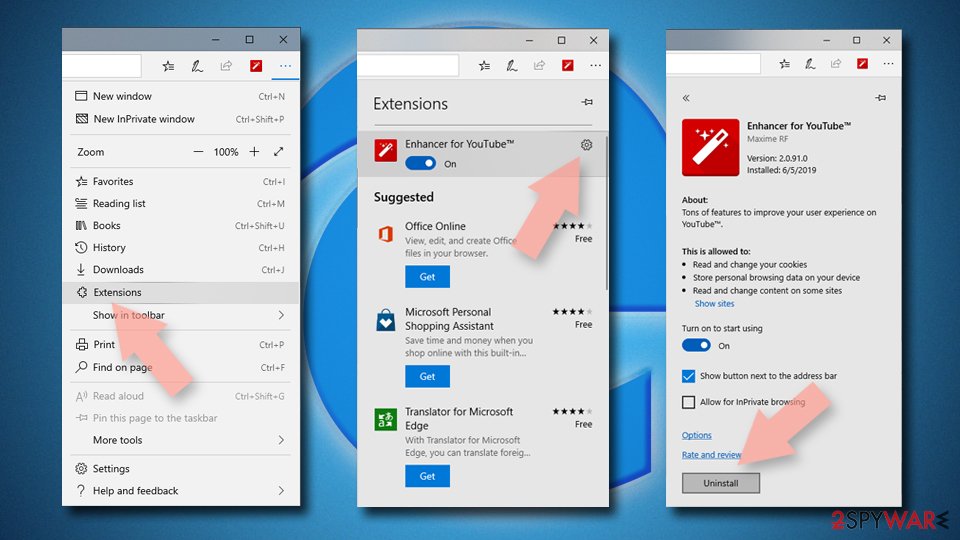
Remove from Microsoft Edge
Delete unwanted extensions from MS Edge:
- Select Menu (three horizontal dots at the top-right of the browser window) and pick Extensions.
- From the list, pick the extension and click on the Gear icon.
- Click Remove.

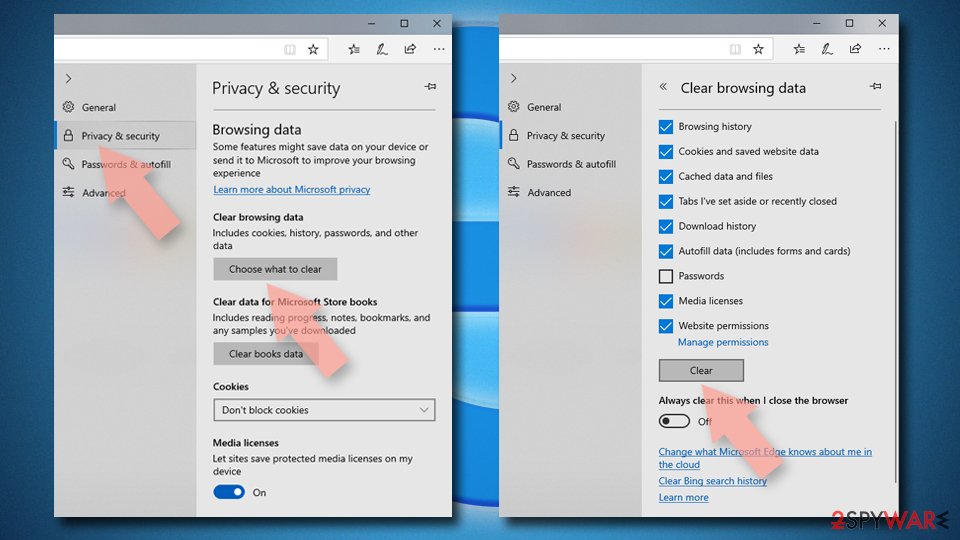
Clear cookies and other browser data:
- Click on the Menu (three horizontal dots at the top-right of the browser window) and select Settings > Privacy, search, and services..
- Under Clear browsing data, pick Choose what to clear.
- Select Cookies and other site data and Cached images and files. (apart from passwords, although you might want to include Media licenses as well, if applicable) and click on Clear.

Restore new tab and homepage settings:
- Click the menu icon and choose Settings.
- Then find On startup section.
- Click Remove next to any suspicious startup page.
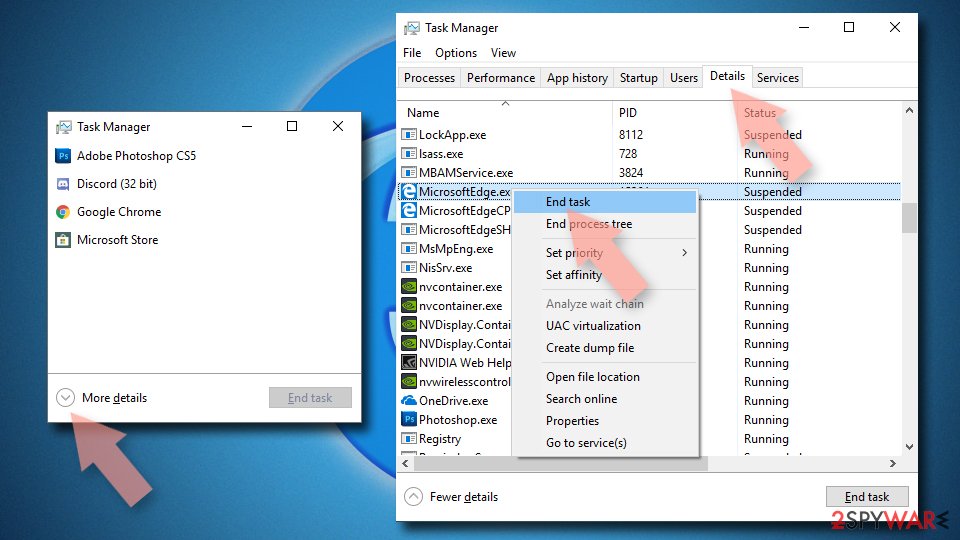
Reset MS Edge if the above steps did not work:
- Press on Ctrl + Shift + Esc to open Task Manager.
- Click on More details arrow at the bottom of the window.
- Select Details tab.
- Now scroll down and locate every entry with Microsoft Edge name in it. Right-click on each of them and select End Task to stop MS Edge from running.

Instructions for Chromium-based Edge
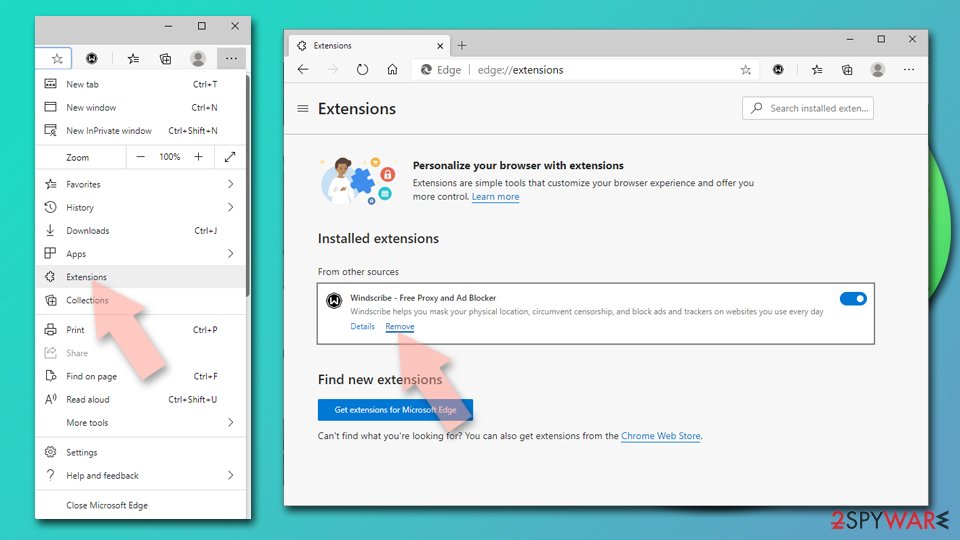
Delete extensions from MS Edge (Chromium):
- Open Edge and click select Settings > Extensions.
- Delete unwanted extensions by clicking Remove.

Clear cache and site data:
- Click on Menu and go to Settings.
- Select Privacy, search and services.
- Under Clear browsing data, pick Choose what to clear.
- Under Time range, pick All time.
- Select Clear now.


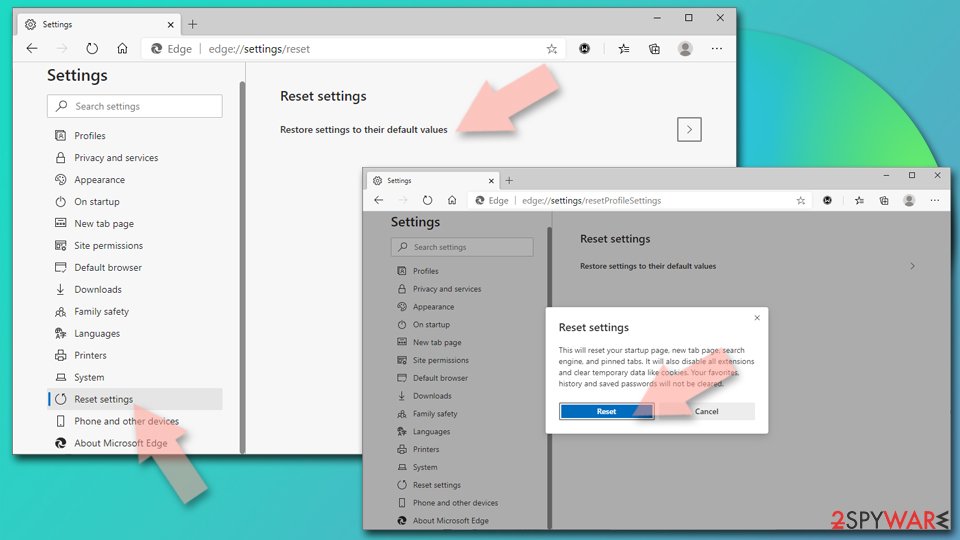
Reset Chromium-based MS Edge:
- Click on Menu and select Settings.
- On the left side, pick Reset settings.
- Select Restore settings to their default values.
- Confirm with Reset.
- This will disable extensions and reset startup pages but will not delete bookmarks, saved passwords, or browsing history.

Remove from Mozilla Firefox (FF)
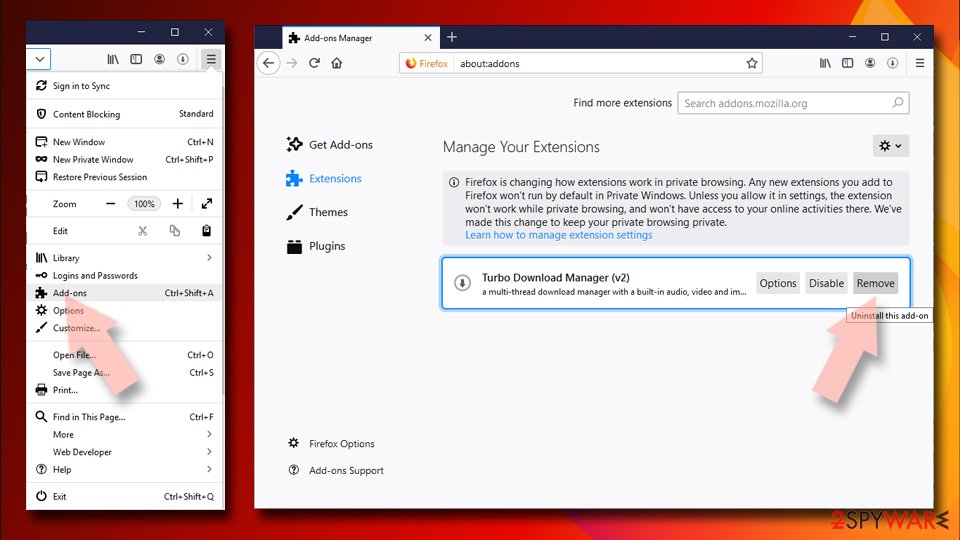
Remove dangerous extensions:
- Open Mozilla Firefox browser and click on the Menu (three horizontal lines at the top-right of the window).
- Select Add-ons.
- In here, select the unwanted extension and click Remove.

Reset the homepage:
- Click three horizontal lines at the top right corner to open the menu.
- Choose Settings.
- Under Home, set your preferred homepage and new tab settings.
Clear cookies and site data:
- Click Menu and pick Settings.
- Go to Privacy & Security section.
- Scroll down to locate Cookies and Site Data.
- Click on Clear Data...
- Select Cookies and Site Data and Temporary cached files and pages, then click Clear.


Reset Mozilla Firefox
If clearing the browser as explained above did not help, reset Mozilla Firefox:
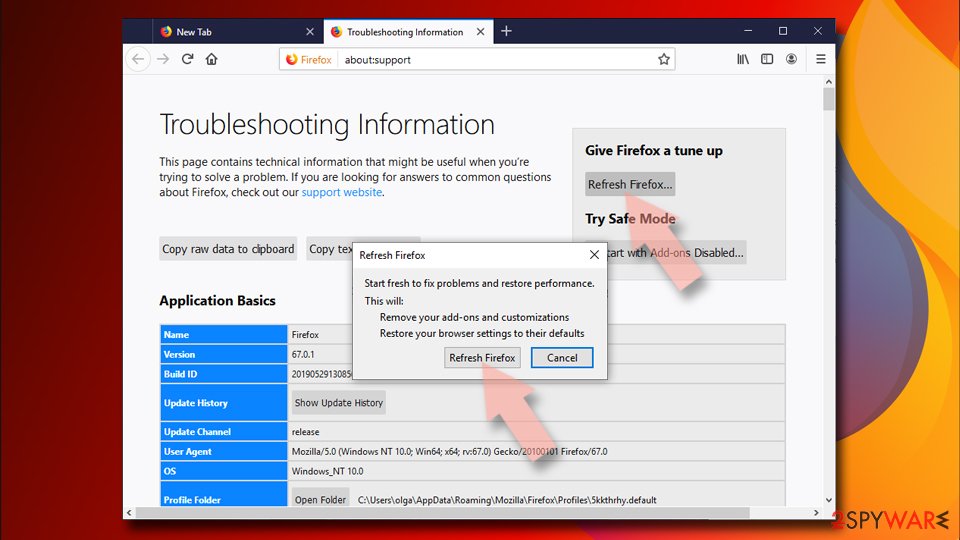
- Open Mozilla Firefox browser and click the Menu.
- Go to Help and then choose Troubleshooting Information.
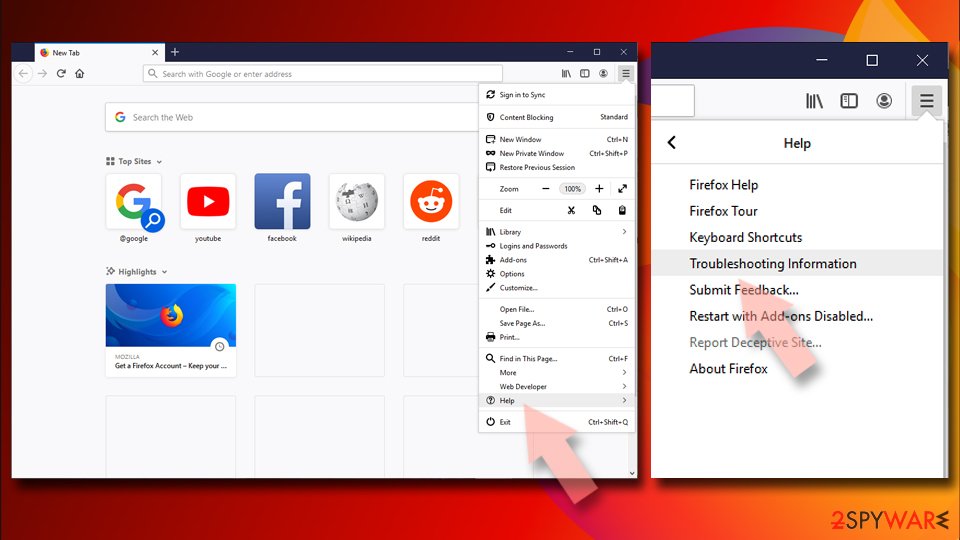
- Under Give Firefox a tune up section, click on Refresh Firefox...
- Once the pop-up shows up, confirm the action by pressing on Refresh Firefox.


Remove from Google Chrome
Delete malicious extensions from Google Chrome:
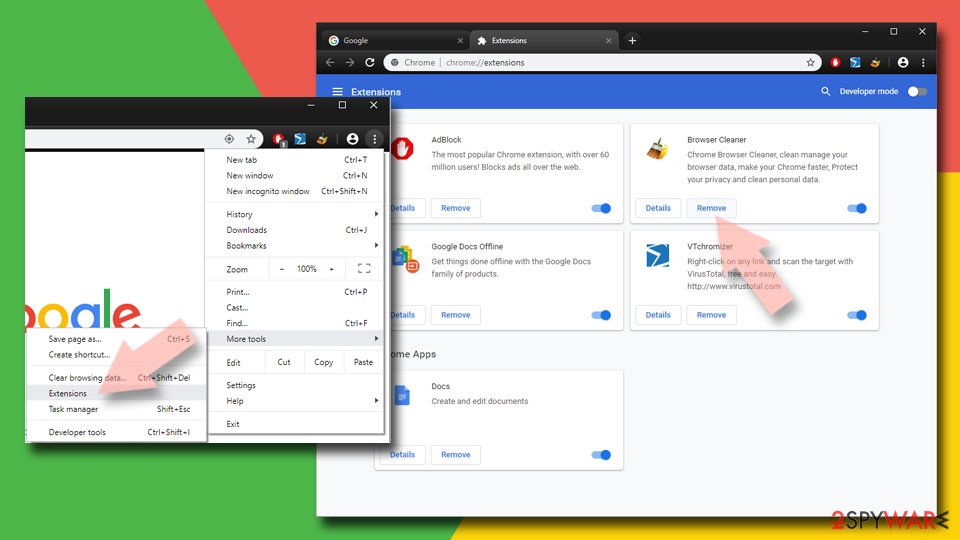
- Open Google Chrome, click on the Menu (three vertical dots at the top-right corner) and select More tools > Extensions.
- In the newly opened window, you will see all the installed extensions. Uninstall all suspicious extensions related to the unwanted program by clicking Remove.

Clear cache and web data from Chrome:
- Click on Menu and pick Settings.
- Under Privacy and security, select Clear browsing data.
- Select Browsing history, Cookies and other site data, as well as Cached images and files.
- Click Clear data.


Change your homepage:
- Click menu and choose Settings.
- Look for a suspicious site in the On startup section.
- Click on Open a specific or set of pages and click on three dots to find the Remove option.
Reset Google Chrome:
If the previous methods did not help you, reset Google Chrome to eliminate all the unwanted components:
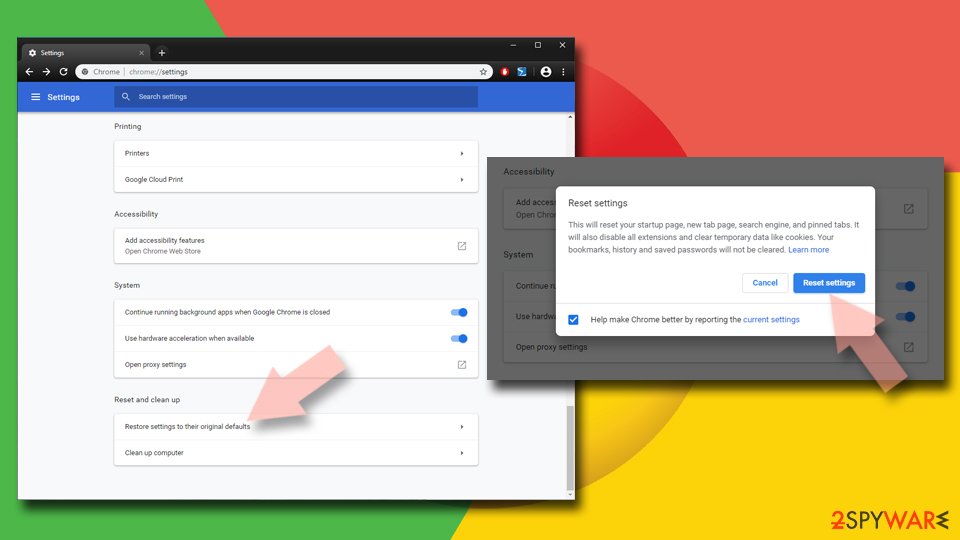
- Click on Menu and select Settings.
- In the Settings, scroll down and click Advanced.
- Scroll down and locate Reset and clean up section.
- Now click Restore settings to their original defaults.
- Confirm with Reset settings.

Delete from Safari
Remove dangerous extensions:
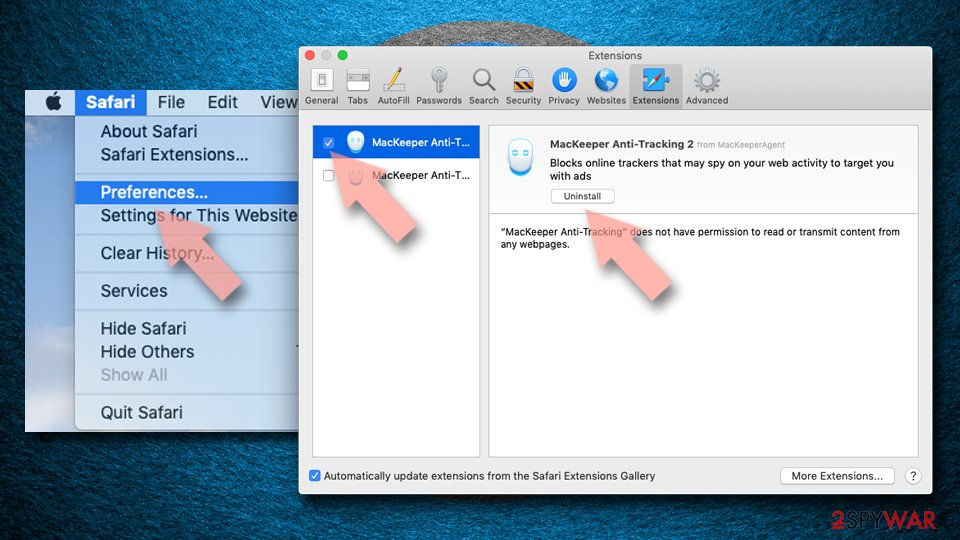
- Open Safari, click Safari in the menu at the top-left of the screen, and select Preferences.
- Go to the Extensions tab, look for any suspicious entries, and click Uninstall to remove them.

Clear history and website data:
- Click Safari in the menu and pick Clear History.
- Set Clear to all history and confirm with Clear History.


Reset Safari:
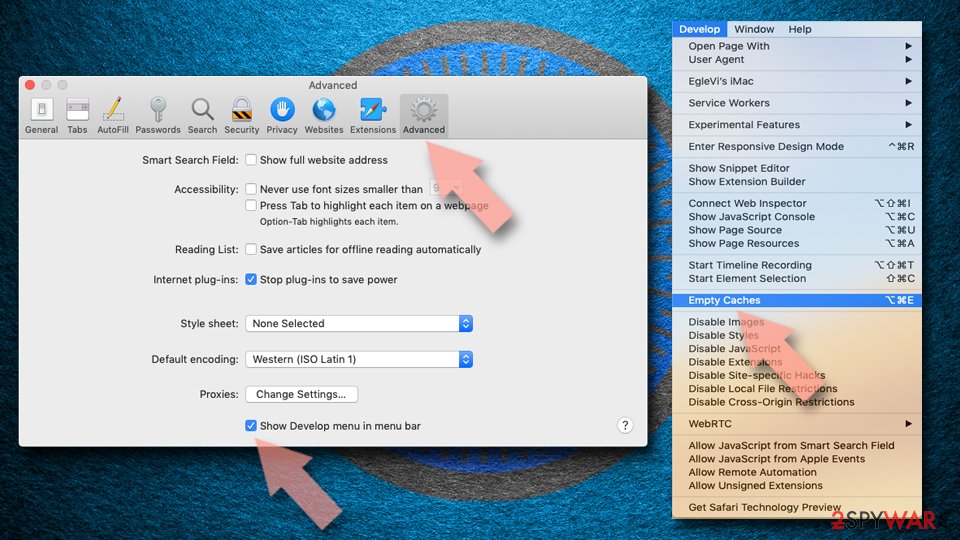
- Click Safari in the menu and select Preferences > Advanced.
- Enable Show Develop menu in menu bar.
- From the menu bar, click Develop and select Empty Caches.

Did this guide help?
3 comments
PlaySkool
This isn't "a harmless trojan, which is able to perform annoying actions only", it's a powerful bank info stealing botnet.
Alex
I have spy hunter, but I still have Zeus Trojan, what should I do?
Pam
Is the hard drive virus and Zeus virus the same thing??