
A.Visadd.com pop ads: what it is and how to remove it
There are lots of PC users who claim that they are forced to look at continuous Visadd.com ads. They claim: Why do I see ads by A.Visadd.com?
Facts checked October 6, 2026. Removal steps tested on Windows 11 (26H2) and checked against Microsoft's and the browser makers' current documentation. Sections marked as our earlier report are the original text: they describe the threat as it was then and have not been reviewed since. The 2026 status, the removal steps and the questions are current.
Automatic
Get a free scan and check if your PC is infected.
Fortect finds malware, unwanted programs and the Windows damage they leave behind, and repairs it in one pass.
Clicked a notification from visadd.com and installed something? A free scan checks programs and browsers in one pass.
Do it yourself · free Remove A.Visadd.com pop ads yourself 2 steps, about 6 minutes, no software needed.
A.Visadd.com pop ads: summary
| Detection names | No Microsoft detection name is known |
|---|---|
| Distribution | Not recorded in the old report |
| Damage | Not recorded in the old report |
| Name | A.Visadd.com pop |
| Type | Push-notification spam site |
| Symptoms | Notification spam from a website |
| Removal | Scan the PC with security software to find and remove the malware and anything installed with it. Fortect scans Windows for malware and repairs the system files and settings it damaged. Remove it nowTo use the full-featured product, you have to purchase a license for Fortect. The scan is free. |
Show 7 more facts
| Evidence | One write-up by a security site; details still limited |
|---|---|
| Domains | visadd.com |
| Ads shown as | Desktop notifications |
| Browsers | Chrome, Edge and Firefox |
| Installed on the PC | Nothing; a browser notification permission only |
| First seen | 6 July 2016 |
| Facts checked | 6 October 2026 |
Is A.Visadd.com pop ads dangerous?
From our report of Jul 2016 · not reviewed since
What is Visadd.com ads?
There are lots of PC users who claim that they are forced to look at continuous Visadd.com ads.
They claim: Why do I see ads by A.Visadd.com? Are they trustworthy? In reality, Visadd.com pop-up ads are commercial advertisements that are caused by misusing legitimate marketing platform. They are displayed only for those whose computers are affected by questionable browser add-ons that are also known as adwares.
Because of their distribution methods and additional activities, such adwares are also categorized as potentially unwanted programs (PUPs), so you should never keep them on your computer. If you have been experiencing lots of annoying pop-ups, in-text links, banner ads and other advertisements during your browsing, you should check your computer with a reputable anti-spyware.
No matter that Visadd.com is promoted as a useful tool, it can hardly do what it promises. Just like ShopperPro, PremiumPlayerUpdates.com ads or Saver Box, A.Visadd.com virus may start causing annoying issues during peoples browsing on the Internet. You may notice such issues as redirects to its affiliate websites, enormous amount of ads by Visadd.com and also slow downs on each of your web browsers.
Besides, such potentially unwanted programs may also start tracking people and may accumulate information about their browsing habits. They are especially interested in people's search terms, mostly visited websites, data that they enter when visiting them, their PCs' IP address, location, etc. If you are experiencing Visadd.com redirects, don't waste your time and remove this plug-in that is related to this questionable program.
Otherwise, you may run into other issues related to your computer. If you want to fix everything without wasting your time, you should think about scanning your machine with or .

From our report of Jul 2016 · not reviewed since
How can Visadd.com pop-up ads appear on my computer?
In most of the cases, Visadd.com pop-up ads start appearing out of nowhere.
That's because they are caused by adwares or potentially unwanted programs that mostly infiltrate systems unnoticed. Don't worry, you can prevent A.Visadd.com infiltration. You just need to know that such dubious extensions/plug-ins/add-ons are often promoted via free programs, games or applications. Developers of these adwares are actively using this unfair distribution method because people fail to check what programs they are installing and what will come attached to them.
However, we can give you a couple of useful tips for avoiding A.Visadd.com virus: you should never rush the installation process of the freeware; read terms of agreement section before you start the installation; select advanced or custom installation method and follow the entire installation process one step at a time. Along the way, opt out of any additional attachments you don't know.
Check your browser and PC
- Address:
visadd.com
How to remove A.Visadd.com pop ads
How to stop A.Visadd.com pop notifications
Do this in every browser you use, and in every profile inside it: each keeps its own list of sites allowed to send notifications.
Nothing has to be uninstalled for the notifications themselves.
Which browser shows the ads?
Step 1: Remove visadd.com from Chrome's notification list
Open More (the three dots) > Settings > Privacy and security > Site settings > Notifications, or paste
chrome://settings/content/notificationsinto the address bar.Under Allowed to send notifications, open the menu next to
visadd.comand choose Remove or Block, and do the same for any other address you do not recognise.Next to Not allowed to send notifications, click Add and enter visadd.com, so the site cannot ask again. The menus are the same in Chrome on Windows 11 and Windows 10, and each Chrome profile keeps its own list.
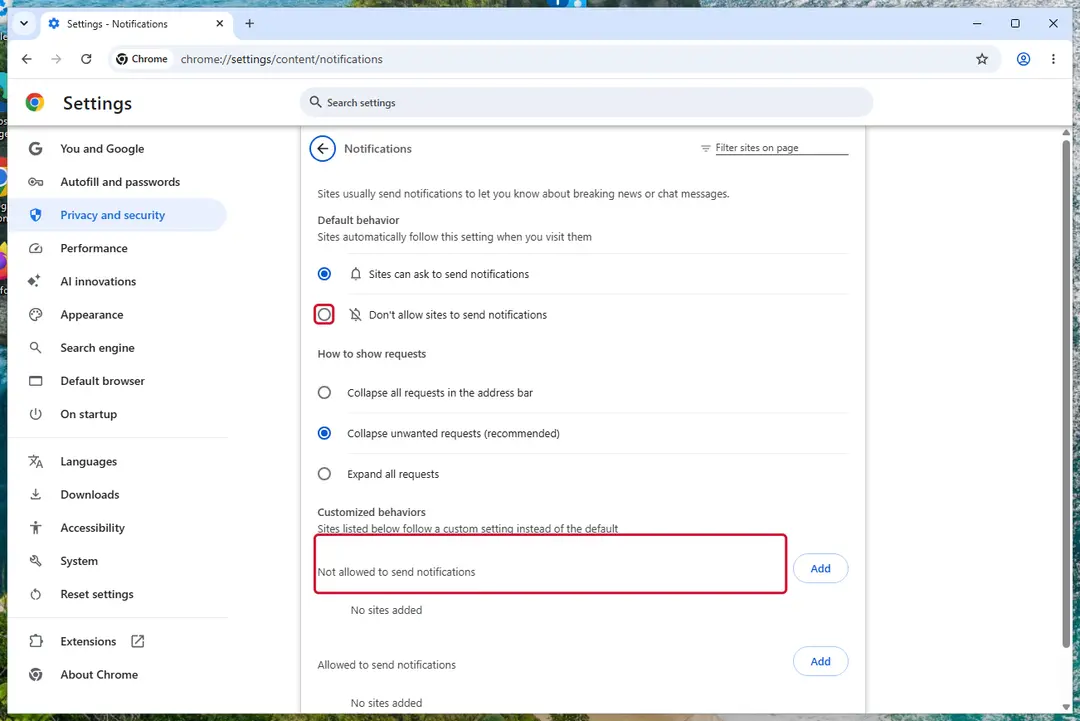
Chrome on Windows 11: Settings > Privacy and security > Site settings > Notifications. Full procedure with screenshots: Stop website notifications and pop-ups
Instructions for Google Chrome
Remove from Google Chrome
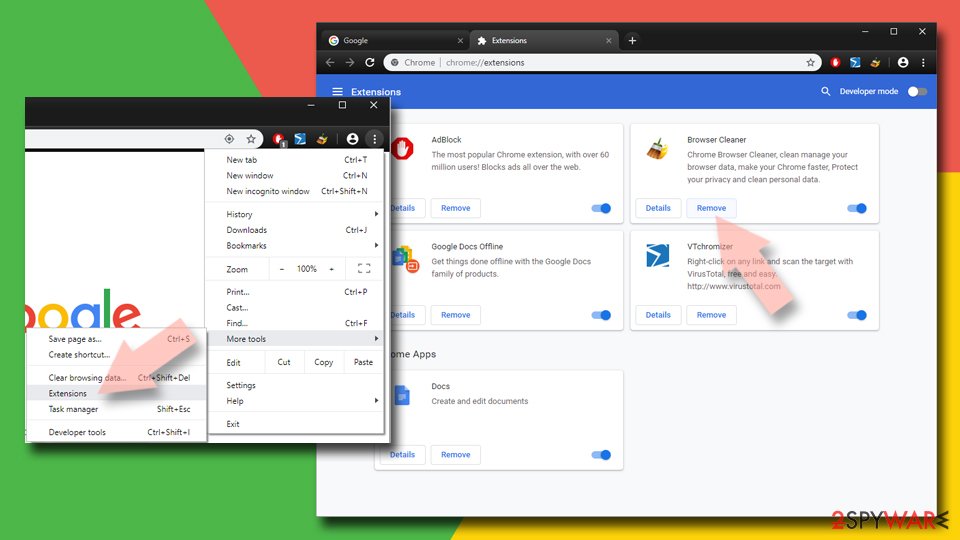
Delete malicious extensions from Google Chrome:
- Open Google Chrome, click on the Menu (three vertical dots at the top-right corner) and select More tools > Extensions.
- In the newly opened window, you will see all the installed extensions. Uninstall all suspicious extensions related to the unwanted program by clicking Remove.
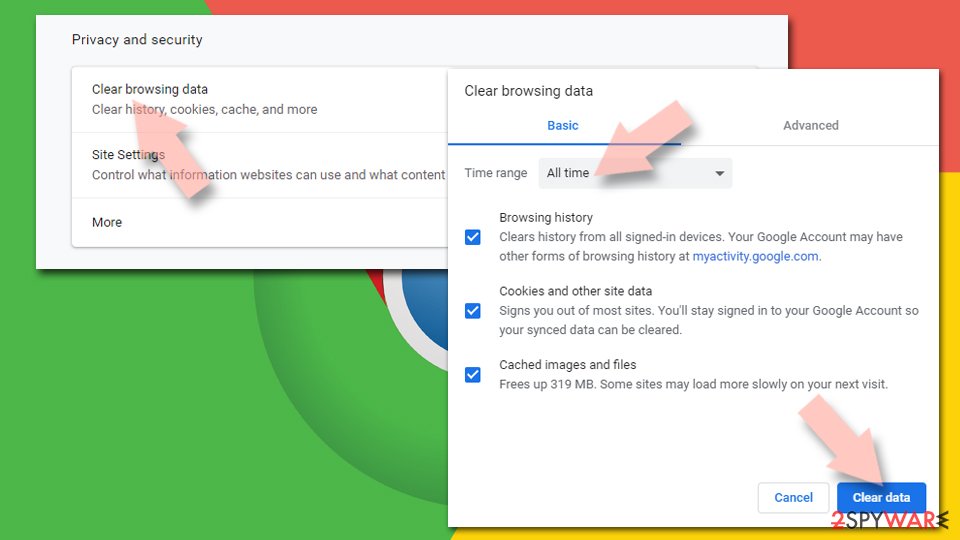
Clear cache and web data from Chrome:
- Click on Menu and pick Settings.
- Under Privacy and security, select Clear browsing data.
- Select Browsing history, Cookies and other site data, as well as Cached images and files.
- Click Clear data.
Change your homepage:
- Click menu and choose Settings.
- Look for a suspicious site in the On startup section.
- Click on Open a specific or set of pages and click on three dots to find the Remove option.
Reset Google Chrome:
If the previous methods did not help you, reset Google Chrome to eliminate all the unwanted components:
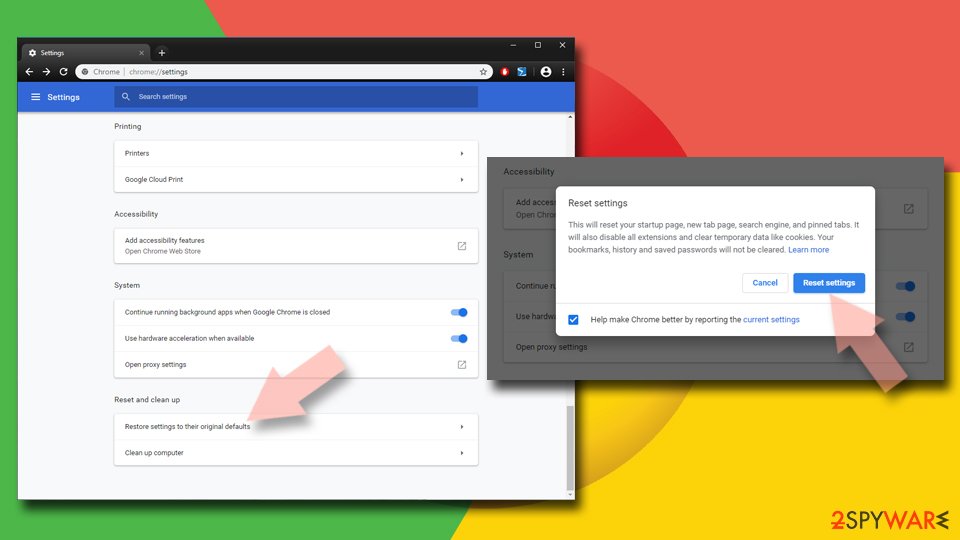
- Click on Menu and select Settings.
- In the Settings, scroll down and click Advanced.
- Scroll down and locate Reset and clean up section.
- Now click Restore settings to their original defaults.
- Confirm with Reset settings.
Step 1: Remove visadd.com from Edge's notification list
Edge stores its own permission list, separate from Chrome's, and it is often the browser behind these pop-ups on Windows 11 and Windows 10.
Go to Settings > Privacy, search, and services > Site permissions > All permissions > Notifications, or paste
edge://settings/content/notifications. Removevisadd.comfrom Allowed, then add it under Not allowed to send notifications. Notifications that show the Edge logo come from this list.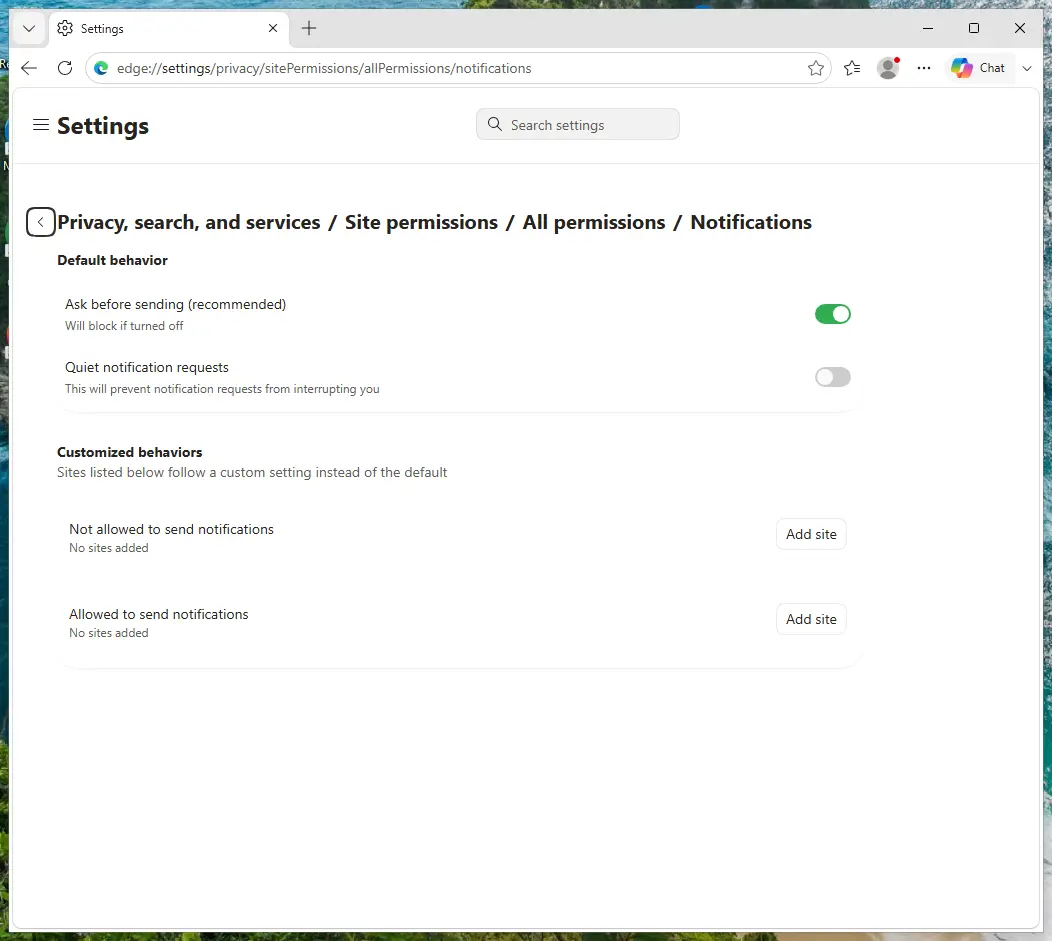
Edge on Windows 11: Site permissions > All permissions > Notifications. Full procedure with screenshots: Stop website notifications and pop-ups
Instructions for Microsoft Edge
Remove from Microsoft Edge
Delete unwanted extensions from MS Edge:
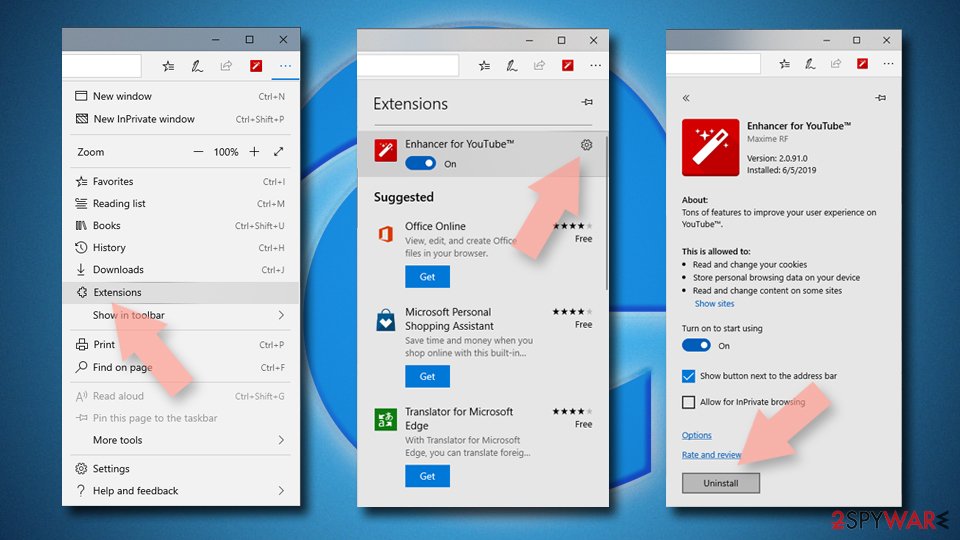
- Select Menu (three horizontal dots at the top-right of the browser window) and pick Extensions.
- From the list, pick the extension and click on the Gear icon.
- Click Remove.
Clear cookies and other browser data:
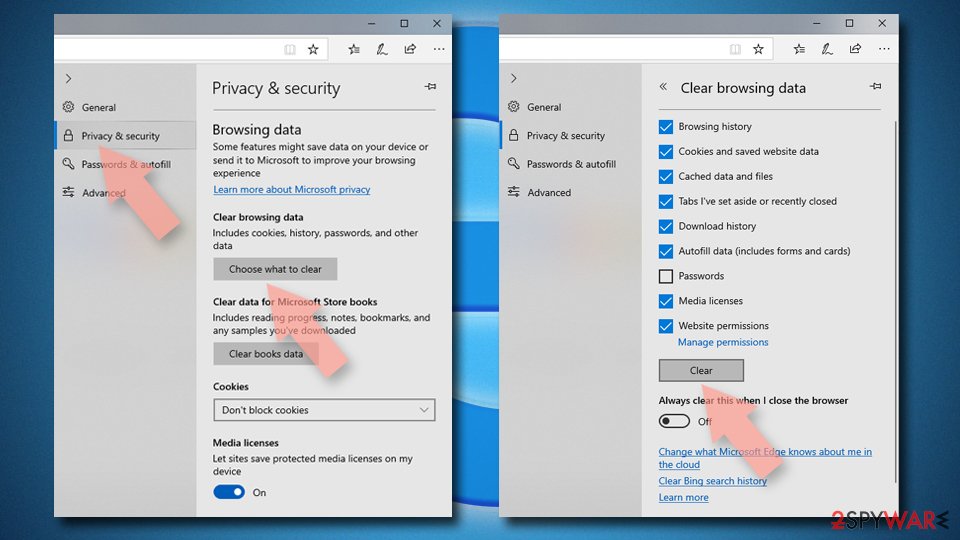
- Click on the Menu (three horizontal dots at the top-right of the browser window) and select Settings > Privacy, search, and services..
- Under Clear browsing data, pick Choose what to clear.
- Select Cookies and other site data and Cached images and files. (apart from passwords, although you might want to include Media licenses as well, if applicable) and click on Clear.
Restore new tab and homepage settings:
- Click the menu icon and choose Settings.
- Then find On startup section.
- Click Remove next to any suspicious startup page.
Reset MS Edge if the above steps did not work:
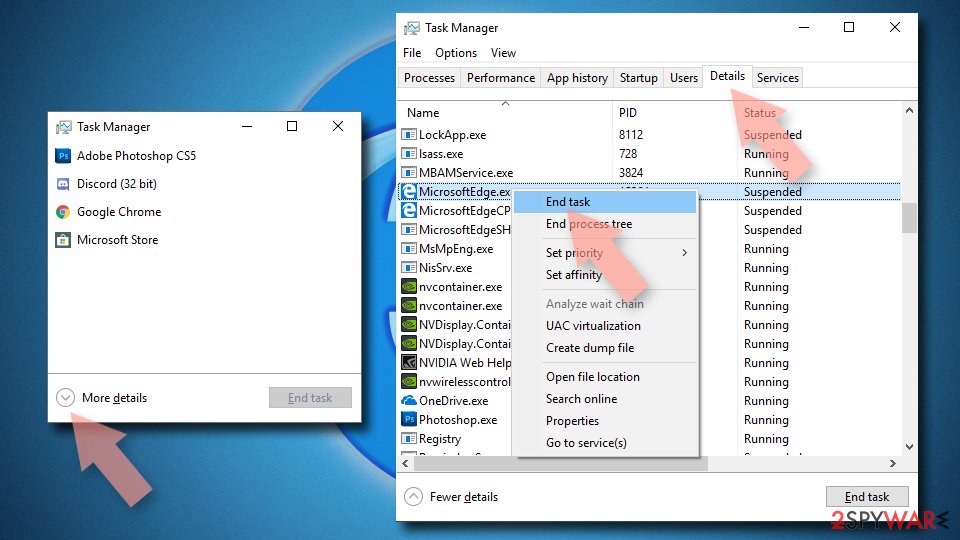
- Press on Ctrl + Shift + Esc to open Task Manager.
- Click on More details arrow at the bottom of the window.
- Select Details tab.
- Now scroll down and locate every entry with Microsoft Edge name in it. Right-click on each of them and select End Task to stop MS Edge from running.
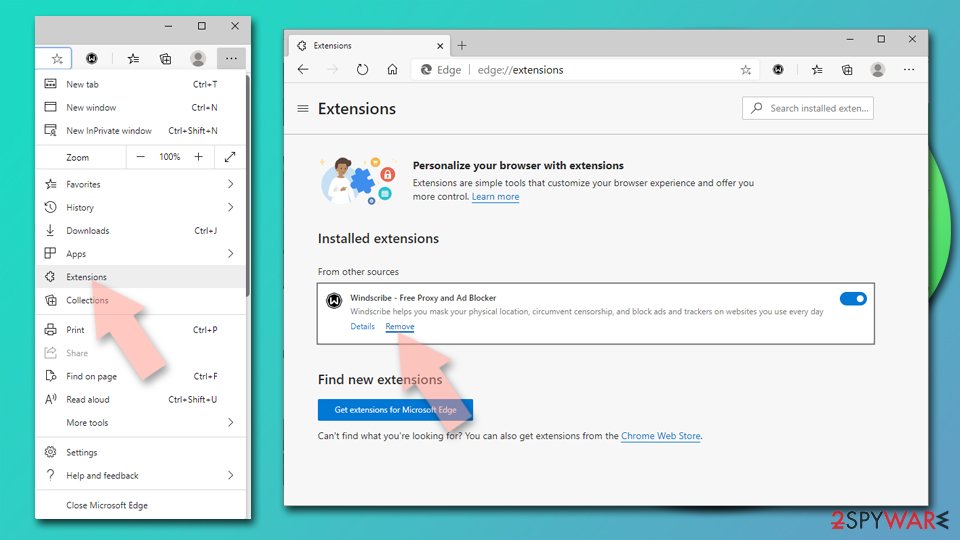
Delete extensions from MS Edge (Chromium):
- Open Edge and click select Settings > Extensions.
- Delete unwanted extensions by clicking Remove.
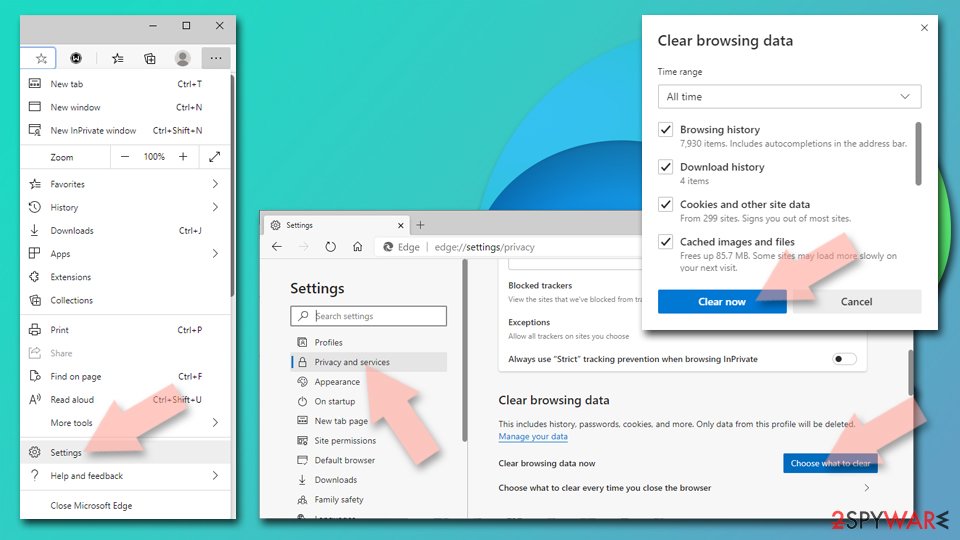
Clear cache and site data:
- Click on Menu and go to Settings.
- Select Privacy, search and services.
- Under Clear browsing data, pick Choose what to clear.
- Under Time range, pick All time.
- Select Clear now.
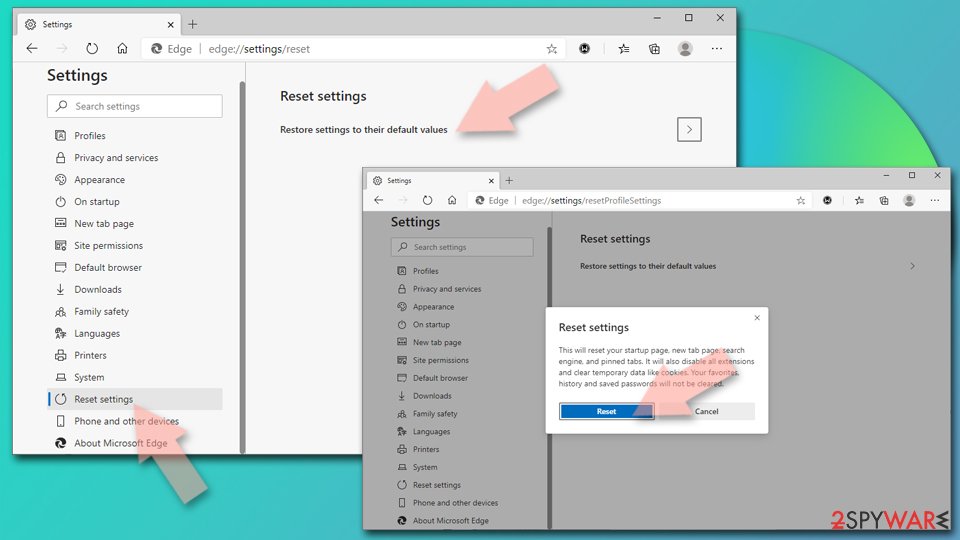
Reset Chromium-based MS Edge:
- Click on Menu and select Settings.
- On the left side, pick Reset settings.
- Select Restore settings to their default values.
- Confirm with Reset.
- This will disable extensions and reset startup pages but will not delete bookmarks, saved passwords, or browsing history.
Step 1: Remove visadd.com from Firefox's notification permissions
In Firefox the permission sits in Settings > Permissions and data > Notifications (in older versions Privacy & Security > Notifications > Settings). Select
visadd.comin the list, click Remove Website, and confirm with Save Changes.Firefox only shows these notifications while it is open, so if they stopped after closing Firefox, this is the browser to clean. The steps are the same on Windows 11 and Windows 10.
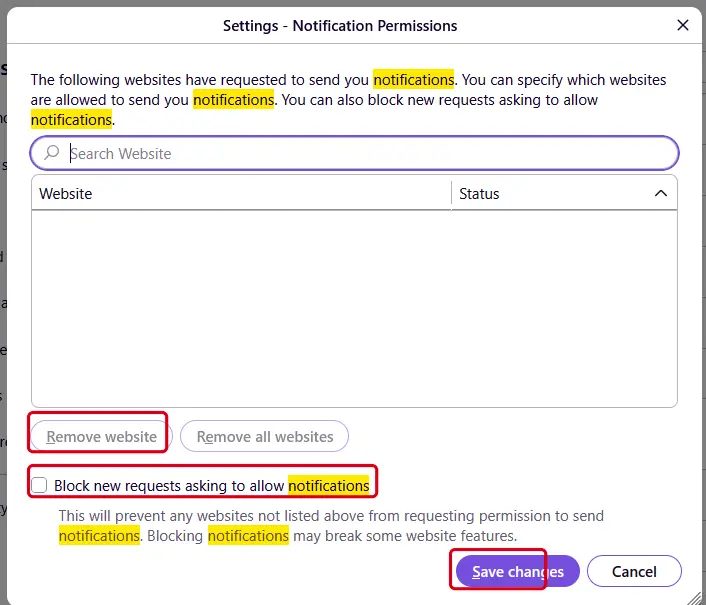
Firefox on Windows 11: the Notification Permissions window. Full procedure with screenshots: Stop website notifications and pop-ups
Instructions for Mozilla Firefox
Remove from Mozilla Firefox (FF)
Remove dangerous extensions:
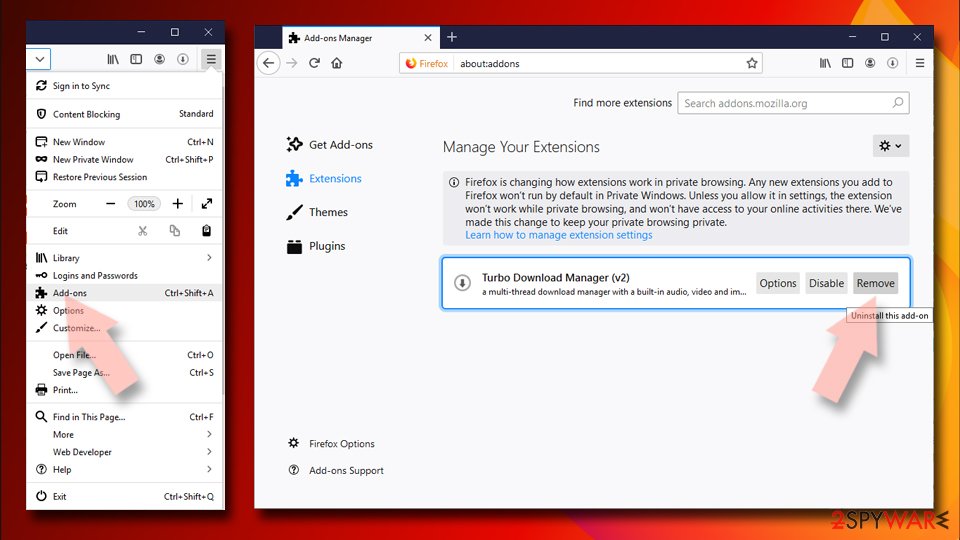
- Open Mozilla Firefox browser and click on the Menu (three horizontal lines at the top-right of the window).
- Select Add-ons.
- In here, select the unwanted extension and click Remove.
Reset the homepage:
- Click three horizontal lines at the top right corner to open the menu.
- Choose Settings.
- Under Home, set your preferred homepage and new tab settings.
Clear cookies and site data:
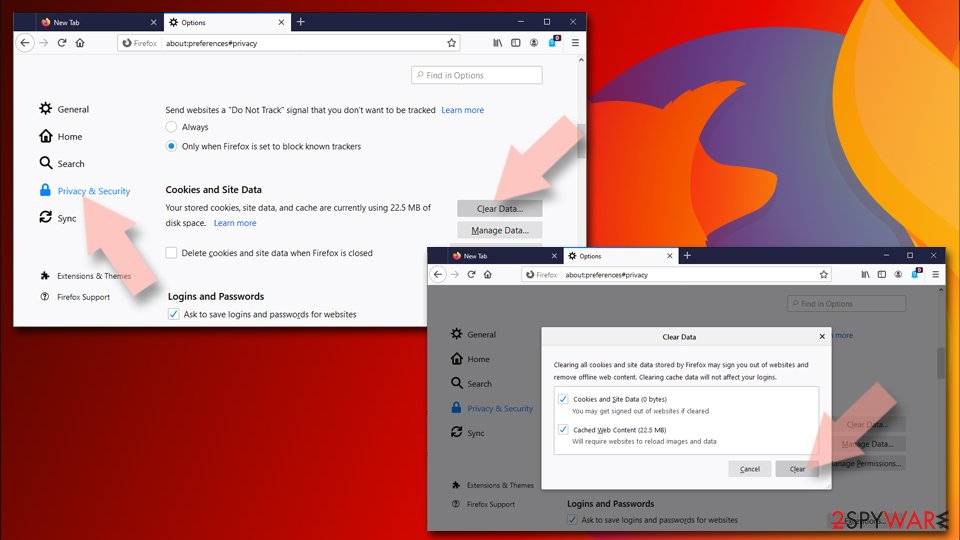
- Click Menu and pick Settings.
- Go to Privacy & Security section.
- Scroll down to locate Cookies and Site Data.
- Click on Clear Data...
- Select Cookies and Site Data and Temporary cached files and pages, then click Clear.
Reset Mozilla Firefox
If clearing the browser as explained above did not help, reset Mozilla Firefox:
- Open Mozilla Firefox browser and click the Menu.
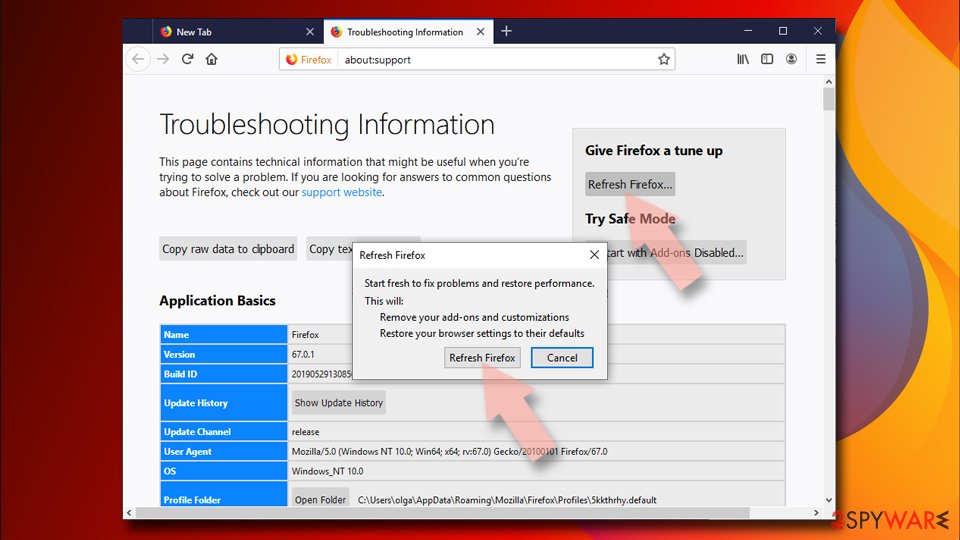
- Go to Help and then choose Troubleshooting Information.
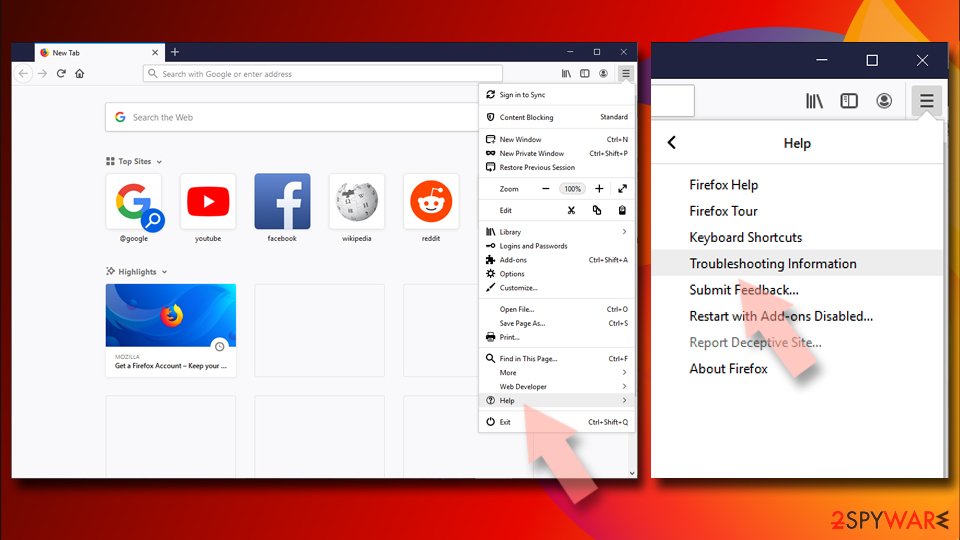
- Under Give Firefox a tune up section, click on Refresh Firefox...
- Once the pop-up shows up, confirm the action by pressing on Refresh Firefox.
Our tested steps are for Windows 11 and 10. For Safari (Mac), use the instructions below.
Instructions for Safari (Mac)
Delete from Safari
Remove dangerous extensions:
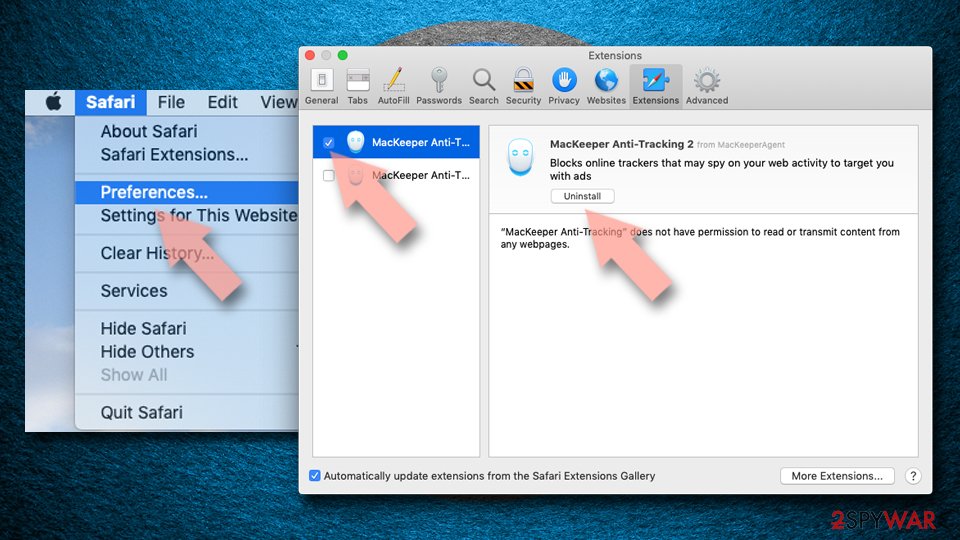
- Open Safari, click Safari in the menu at the top-left of the screen, and select Preferences.
- Go to the Extensions tab, look for any suspicious entries, and click Uninstall to remove them.
Clear history and website data:
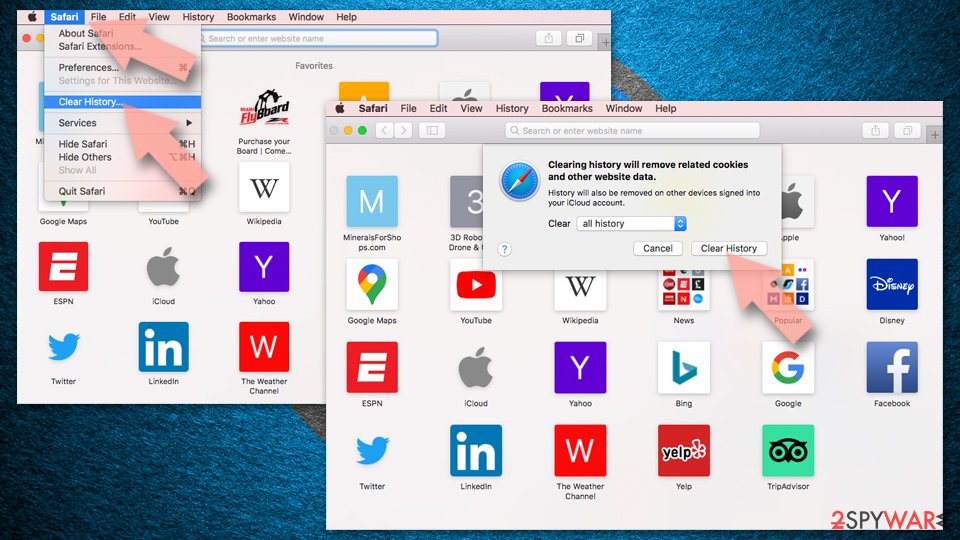
- Click Safari in the menu and pick Clear History.
- Set Clear to all history and confirm with Clear History.
Reset Safari:
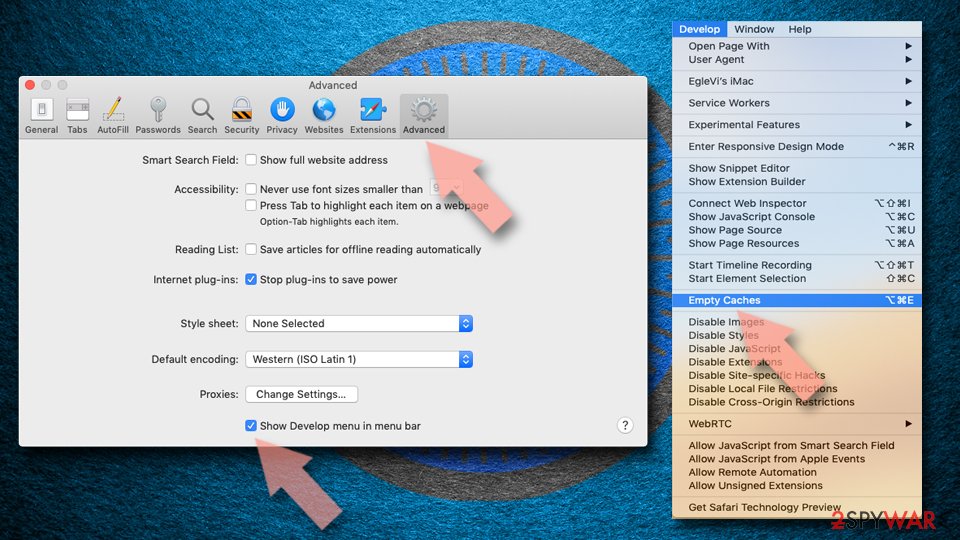
- Click Safari in the menu and select Preferences > Advanced.
- Enable Show Develop menu in menu bar.
- From the menu bar, click Develop and select Empty Caches.
Delete from macOS
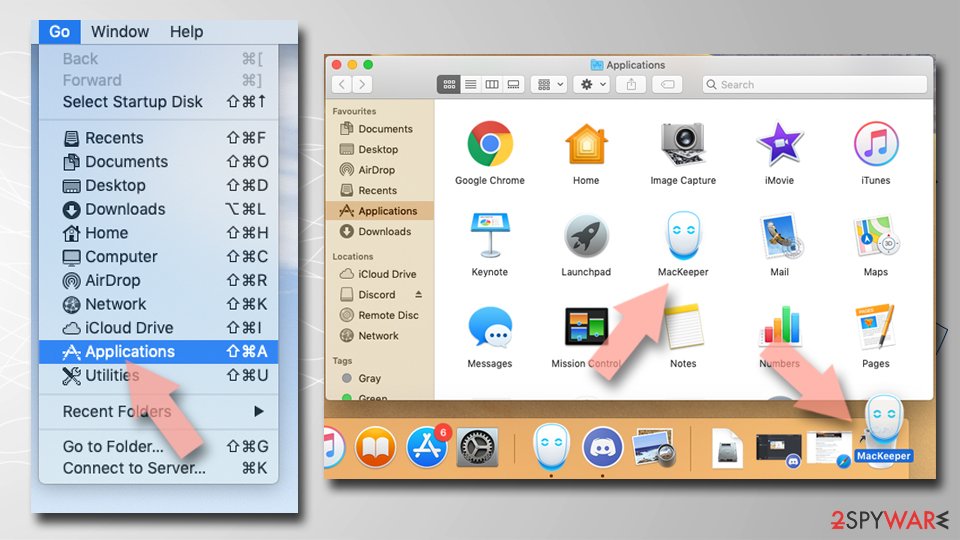
Remove the unwanted application:
- From the menu bar, select Go > Applications.
- In the Applications folder, look for any suspicious entries, then drag them to Trash (or right-click and pick Move to Trash).
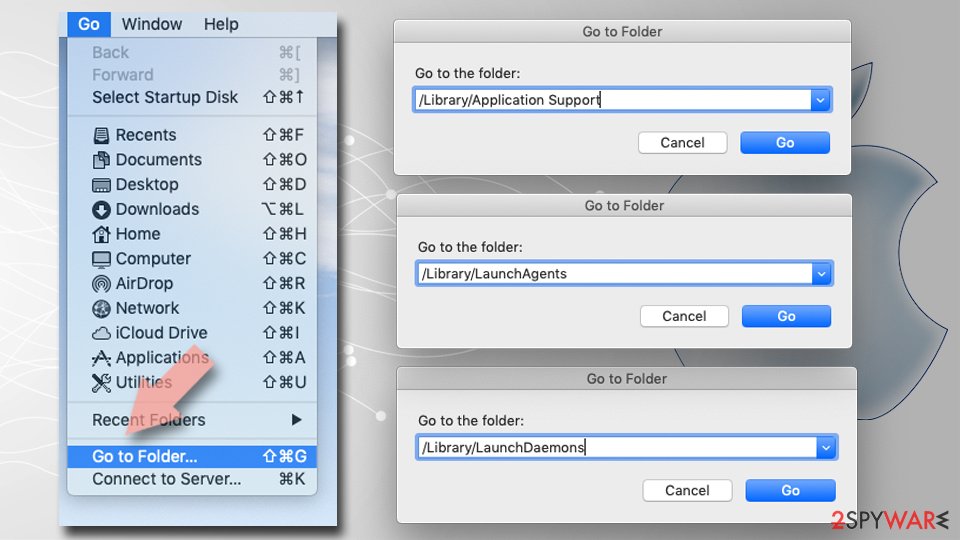
Delete leftover files and folders:
- Select Go > Go to Folder.
- Enter /Library/Application Support and remove any suspicious folders related to the unwanted program.
- Repeat the same check in the /Library/LaunchAgents and /Library/LaunchDaemons folders, deleting any suspicious entries.
- Finally, empty the Trash to permanently remove the leftovers.
Then, whichever browser you use
Step 2: Scan the PC if you downloaded anything from the ads
Most people who only saw the notifications can skip this step. If a notification or the page it opened made you download or run a file, delete the file and run a full scan, then a Microsoft Defender Offline scan.
In Windows 11 and Windows 10 open Windows Security > Virus & threat protection > Scan options, select Microsoft Defender Antivirus (offline scan) and click Scan now. The PC restarts and the scan takes about 15 minutes, so save your work first.

Windows 11: Windows Security > Virus & threat protection > Scan options. Full procedure with screenshots: Run a Microsoft Defender Offline scan
More removal instructions
For programs installed on the PC and older browsers. Open the one you need.
How to remove A.Visadd.com pop-up ads from my computer?
They will help you to remove recently installed freeware, such as RightSaver, SafeSaver, DP1815, Video Player, Convert Files for Free, Plus-HD 1.3, BetterSurf, Media Player 1.1, PassShow, LyricsBuddy-1, YutubeAdBlock 1.2, Media Player 1.1, Savings Bull, Feven Pro 1.1, Websteroids, Savings Bull, HD-Plus 3.5, QuickShare and other unfamiliar extensions and similar entries.
Uninstall from Windows
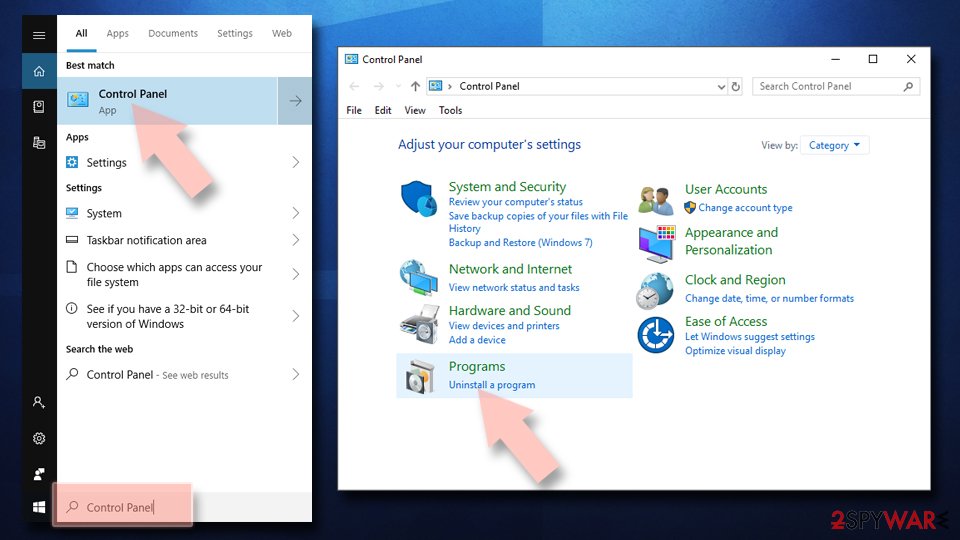
Uninstall from Windows 10/8:
- Type Control Panel into the Windows search box and open the result.
- Under Programs, select Uninstall a program.
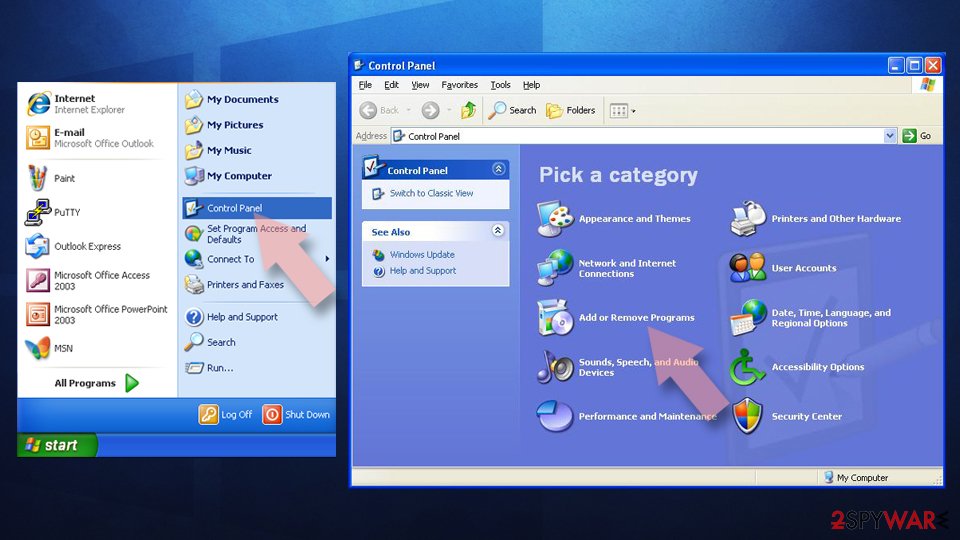
Uninstall from Windows 7/XP:
- Click on Windows Start > Control Panel (Windows XP users should click on Add/Remove Programs).
- In Control Panel, select Programs > Uninstall a program.
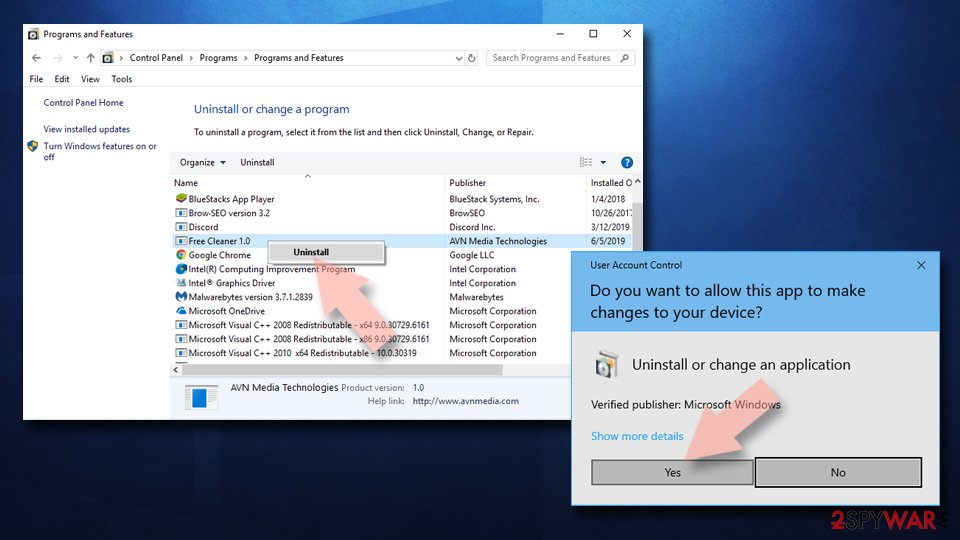
Remove the unwanted program:
- In the Programs and Features window, look for any recently installed suspicious entries, select them, and click Uninstall.
- If User Account Control appears, click Yes to confirm, then complete the removal.
Access your website securely from any location
When you work on the domain, site, blog, or different project that requires constant management, content creation, or coding, you may need to connect to the server and content management service more often. The best solution for creating a tighter network could be a dedicated/fixed IP address.
If you make your IP address static and set to your device, you can connect to the CMS from any location and do not create any additional issues for the server or network manager that needs to monitor connections and activities. VPN software providers like can help you with such settings and offer the option to control the online reputation and manage projects easily from any part of the world.
Recover files after data-affecting malware attacks
While much of the data can be accidentally deleted due to various reasons, malware is one of the main culprits that can cause loss of pictures, documents, videos, and other important files.
More serious malware infections lead to significant data loss when your documents, system files, and images get encrypted. In particular, ransomware is is a type of malware that focuses on such functions, so your files become useless without an ability to access them.
Even though there is little to no possibility to recover after file-locking threats, some applications have features for data recovery in the system. In some cases, can also help to recover at least some portion of your data after data-locking virus infection or general cyber infection.
Questions about A.Visadd.com pop ads
Why do I get notifications from visadd.com when the browser is closed?
Chrome and Edge can keep a small part running in the background so that sites can deliver notifications, and Windows shows them in its notification area. That is why messages from visadd.com keep arriving with no browser window open.
The permission to send them was granted when someone clicked Allow on a prompt from that site, often disguised as a robot check or a video player. Closing the browser does not remove it; only the notification settings do.
Remove visadd.com from the allowed sites and the background messages stop. You can also stop the browser from running in the background in its system settings, but the permission is the real fix.
Did a notification from visadd.com infect my computer?
A notification cannot infect a PC. It is a short text with a link that the browser displays. Clicking it opens a page, and a page cannot install anything unless you agree to a download and run the file.
So the answer depends on what you did after clicking. Looked and closed: you are fine. Downloaded but did not open: delete the file.
Opened a downloaded file: uninstall what it added and scan the PC. Typed card or login details: contact the bank and change the password. In every case, remove visadd.com from the browser's allowed notifications so the messages stop.
What is A.Visadd.com pop?
A.Visadd.com pop is a push-notification spam site, a kind of adware. It earns money by showing desktop notifications, and each view, click or redirect pays whoever runs it. It is not something people usually choose; it arrives through a free download, a fake button or a misleading prompt.
A.Visadd.com pop does not encrypt files or take control of Windows, but its ads are sold to anyone, including scam operators, so they can lead to fake virus warnings and unwanted downloads. The steps in this guide remove it from Windows and from each browser.
Why does visadd.com keep showing up?
There are two possible reasons. If it appears as desktop notifications, a browser on this PC was given permission to receive them from visadd.com, usually through a misleading prompt. That permission stays until you remove it in the browser's site settings.
If it appears as tabs or redirects, an ad on a site you visit is opening it, or an extension or program on the PC is. Test a private window: if visadd.com never appears there, an extension is the likely cause. The plan above covers each case.
Do I have to change settings in every browser?
Only in the browsers that allowed visadd.com, but checking all of them takes a minute and is worth it. We saw the notifications in Chrome, Edge and Firefox. Chrome and Edge keep their notification lists under site settings, and Firefox under Privacy & Security > Permissions.
Remove visadd.com and any other unfamiliar site from each list, then turn off new notification requests if you do not need them. Remember that every browser profile has its own list, so a second profile can keep the messages coming after you clean the first.
Are the pop-ups I see really from A.Visadd.com pop?
Compare them with the details in the table above. A.Visadd.com pop produces desktop notifications, and the clearest sign of it is notifications from visadd.com. Other adware looks similar, so check the name of the sending site at the bottom of a notification, the address in the tab that opened, or the newest entries on the extensions page.
If those match, this guide fits. If you see a different name, the same kind of steps apply, but remove the item you actually find rather than guessing.
My scan found nothing, but the ads continue. Why?
Because the source may not be a file a scanner looks for. Browser notifications are a permission stored in the browser, and many adware extensions are not flagged because they come from an official store.
Some ad-supported programs are only reported if you enable detection of potentially unwanted apps. So a clean scan does not mean the job is done. Check each browser's notification permissions and extension list by hand, and turn on Potentially unwanted app blocking in Windows Security before scanning again.
Is it safe to click Block or Allow on a notification prompt?
Clicking Block is safe; it only tells the browser not to show notifications from that site. Clicking Allow is not dangerous to your files either, but it gives the site a channel to your desktop that spam sites abuse at once.
The prompt itself is part of the browser, so you can trust its buttons. What you cannot trust is the text on the page around it. If a page explains why you must click Allow, choose Block or close the tab.
I let a "support technician" from an ad connect to my PC. What should I do?
Act quickly but calmly. Disconnect the PC from the internet first, so the connection ends. Uninstall the remote access tool they asked you to install and check Installed apps for anything else added during the call.
Run a Microsoft Defender full scan and offline scan. From another device, change your e-mail and banking passwords and sign out of all sessions.
If you paid by card, bank transfer or gift card, contact your bank or the card issuer immediately, and report the scam to the police. Do not answer if they call back.
Will Fortect remove A.Visadd.com pop?
No program removes A.Visadd.com pop itself, because there is nothing on the PC to remove: the notifications come through a permission saved in the browser, and only the browser's settings take it away, as the steps above show.
What Fortect can do is check the rest of Windows. Its free scan looks for malware, unwanted programs and damaged system files, which is useful if you clicked the ads, downloaded something from the pages they opened, or are not sure what else changed on the PC.
If the scan finds nothing and the notifications stopped after you removed the permission, this problem is solved. Use Microsoft Defender as a second opinion whenever you have downloaded files from pages like these.
Sources
- Google Chrome Help: Use notifications to get alerts (no longer online) (read October 6, 2026)
- FTC: How to recognize, remove and avoid malware (read October 6, 2026)
- Microsoft Learn: Microsoft Defender Offline (read October 6, 2026)
- Microsoft Learn: How Microsoft names malware (read October 6, 2026)