
Ads by DiscountPlace: what it is and how to remove it
DiscountPlace is a browser extension, which promises to help users improve their online shopping experience. Unfortunately, once installed on the system, it may appear annoying and even dangerous.
Facts checked October 6, 2026. Removal steps tested on Windows 11 (26H2) and checked against Microsoft's and the browser makers' current documentation. Sections marked as our earlier report are the original text: they describe the threat as it was then and have not been reviewed since. The 2026 status, the removal steps and the questions are current.
Automatic
Get a free scan and check if your PC is infected.
Fortect finds malware, unwanted programs and the Windows damage they leave behind, and repairs it in one pass.
A quick scan confirms that the softonic.com notifications did not lead to anything being installed.
Do it yourself · free Remove Ads by DiscountPlace yourself 2 steps, about 6 minutes, no software needed.
Ads by DiscountPlace: summary
| Detection names | No Microsoft detection name is known |
|---|---|
| Distribution | Not recorded in the old report |
| Damage | Not recorded in the old report |
| Name | Ads by DiscountPlace |
| Type | Push-notification spam site |
| Symptoms | Notification spam from a website |
| Removal | Scan the PC with security software to find and remove the malware and anything installed with it. Fortect scans Windows for malware and repairs the system files and settings it damaged. Remove it nowTo use the full-featured product, you have to purchase a license for Fortect. The scan is free. |
Show 7 more facts
| Evidence | One write-up by a security site; details still limited |
|---|---|
| Domains | softonic.com |
| Ads shown as | Desktop notifications |
| Browsers | Chrome, Edge and Firefox |
| Installed on the PC | Nothing; a browser notification permission only |
| First seen | 26 April 2021 |
| Facts checked | 6 October 2026 |
Is Ads by DiscountPlace dangerous?
From our report of Apr 2021 · not reviewed since
What is DiscountPlace?
DiscountPlace is a browser extension, which promises to help users improve their online shopping experience.
Unfortunately, once installed on the system, it may appear annoying and even dangerous. This intrusive program promises to show people coupons, discounts and other deals that are available on shopping websites. In fact, it does what it promises but in an unexpected manner. Many users complain that DiscountPlace displays a huge amount of ads that appear everywhere whether you want to see them or not.
Moreover, they have also reported that those ads often do not match the idea of this program. We believe that some of these commercial offers generated by DiscountPlace are real. However, be careful and do not click on those ads that are apparently out of context. Such ads may report you that you need to update something, download a specia program for viewing some content and so on.
In addition, it is probable that some of these ads may redirect you to questionable websites used for spreading other adwares. In addition, beware that the most of adware or potentially unwanted programs are able to accumulate information about the victim, such as IP addresses, browser's type and version, search queries that are entered by the user, websites visited, pages viewed, and similar details.
Although this information is not the personally identifiable information, it is possible that DiscountPlace virus may be used for collecting other information. To get rid of its pop-up ads and other issues that are typically caused by this program, all you need to do is to remove it from your system.
From our report of Apr 2021 · not reviewed since
How can DiscountPlace hijack my computer?
As DiscountPlace is an adware or potentially unwanted program, it typically does not spread alone.
So, if you decide to download any kind of free program from the aforementioned sites and choose Quick or Recommended installation option, you may allow automatic installation of additional applications. Therefore, you should always avoid downloading unfamiliar programs without monitoring their installation. To avoid entrance of such potentially dangerous programs, it is advisable to choose Custom or Advanced installation option, which allows you to decline installation of additional applications.
If you have already noticed 'Ads by DiscountPlace' and similar notifications, you have failed to do that. Please, remove all browser extensions, toolbars, plug-ins, and other questionable programs if you want to get rid of those ads. For more information explaining how you can do that, read the guide provided below.
Check your browser and PC
- Address:
softonic.com
How to remove Ads by DiscountPlace
How to stop Ads by DiscountPlace notifications
Do this in every browser you use, and in every profile inside it: each keeps its own list of sites allowed to send notifications.
Nothing has to be uninstalled for the notifications themselves.
Which browser shows the ads?
Step 1: Remove softonic.com from Chrome's notification list
Chrome keeps a list of every site you once allowed to send notifications, and
softonic.comis on it. Pastechrome://settings/content/notificationsinto the address bar, find softonic.com under Allowed to send notifications, open the three-dot menu next to it and pick Remove.Then click Add next to Not allowed to send notifications and type softonic.com, so the site cannot ask a second time. Repeat it in every Chrome profile you use on Windows 11 or Windows 10, since each profile has its own list.
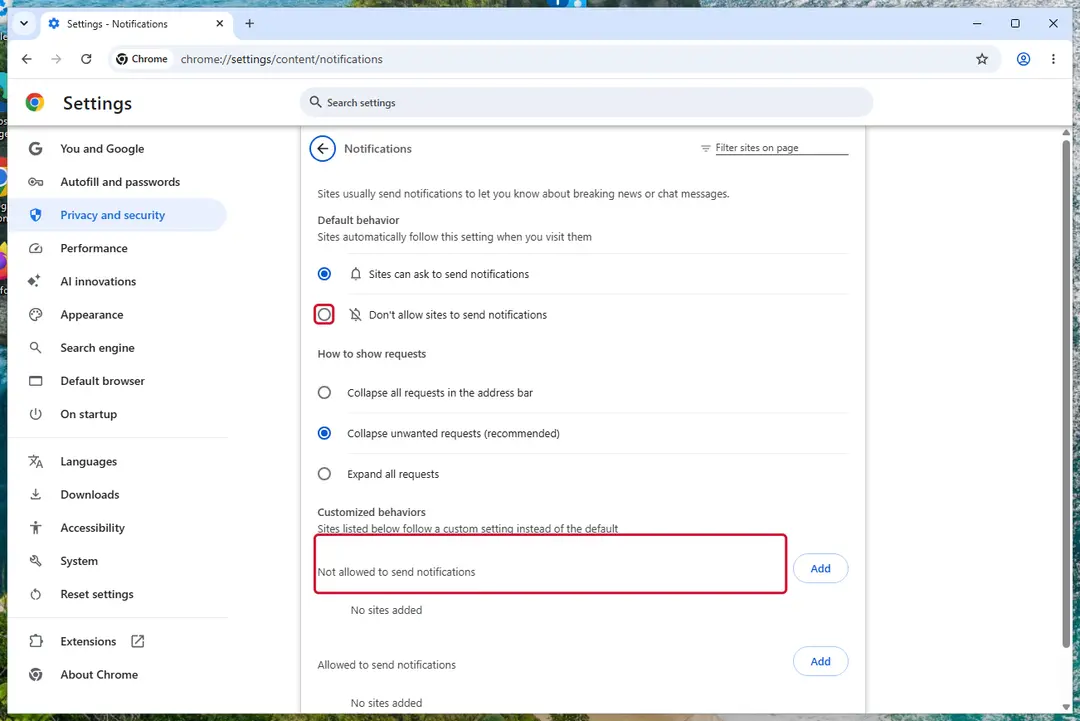
Chrome on Windows 11: Settings > Privacy and security > Site settings > Notifications. Full procedure with screenshots: Stop website notifications and pop-ups
Instructions for Google Chrome
Remove from Google Chrome
Delete malicious extensions from Google Chrome:
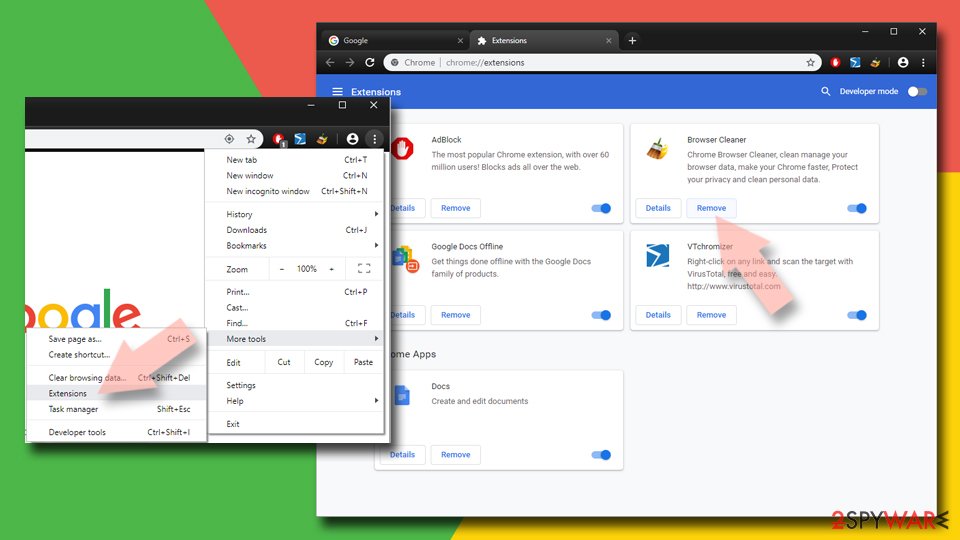
- Open Google Chrome, click on the Menu (three vertical dots at the top-right corner) and select More tools > Extensions.
- In the newly opened window, you will see all the installed extensions. Uninstall all suspicious extensions related to the unwanted program by clicking Remove.
Clear cache and web data from Chrome:
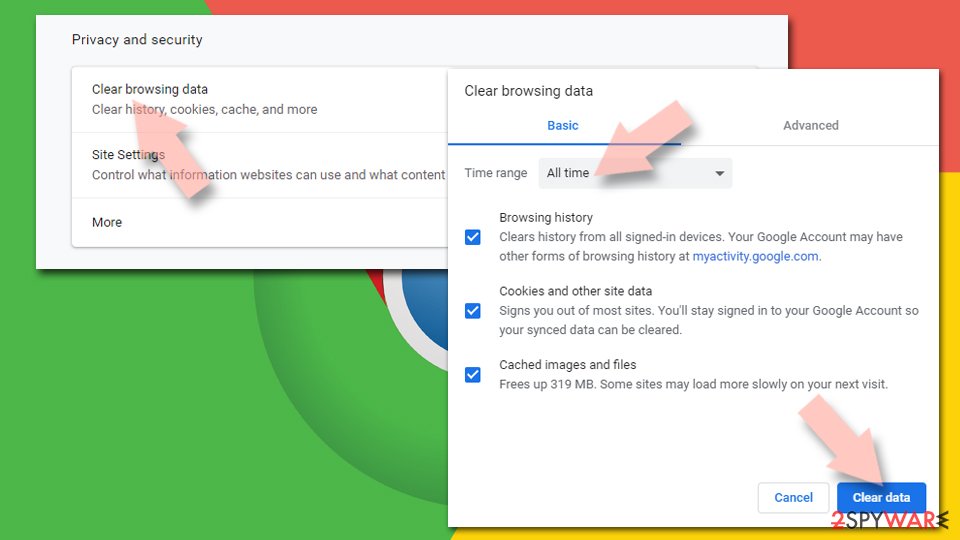
- Click on Menu and pick Settings.
- Under Privacy and security, select Clear browsing data.
- Select Browsing history, Cookies and other site data, as well as Cached images and files.
- Click Clear data.
Change your homepage:
- Click menu and choose Settings.
- Look for a suspicious site in the On startup section.
- Click on Open a specific or set of pages and click on three dots to find the Remove option.
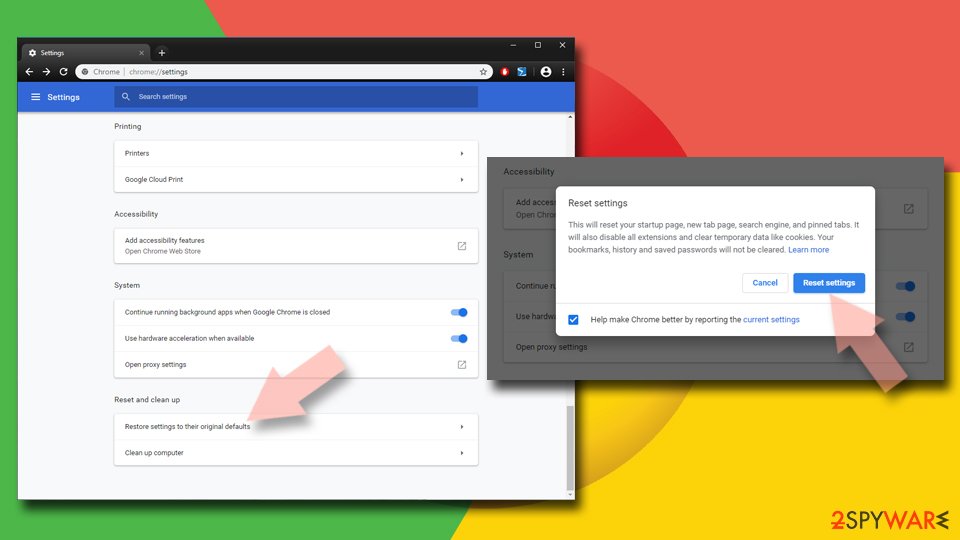
Reset Google Chrome:
If the previous methods did not help you, reset Google Chrome to eliminate all the unwanted components:
- Click on Menu and select Settings.
- In the Settings, scroll down and click Advanced.
- Scroll down and locate Reset and clean up section.
- Now click Restore settings to their original defaults.
- Confirm with Reset settings.
Step 1: Remove softonic.com from Edge's notification list
Open Settings and more (the three dots) > Settings > Privacy, search, and services > Site permissions > All permissions > Notifications. Remove
softonic.comfrom the Allowed list, then click Add site next to Not allowed to send notifications and enter it there.Edge is built into both Windows 11 and Windows 10, so check it even if you normally use another browser. If the notifications came with the Edge logo, this is the browser that holds the permission.
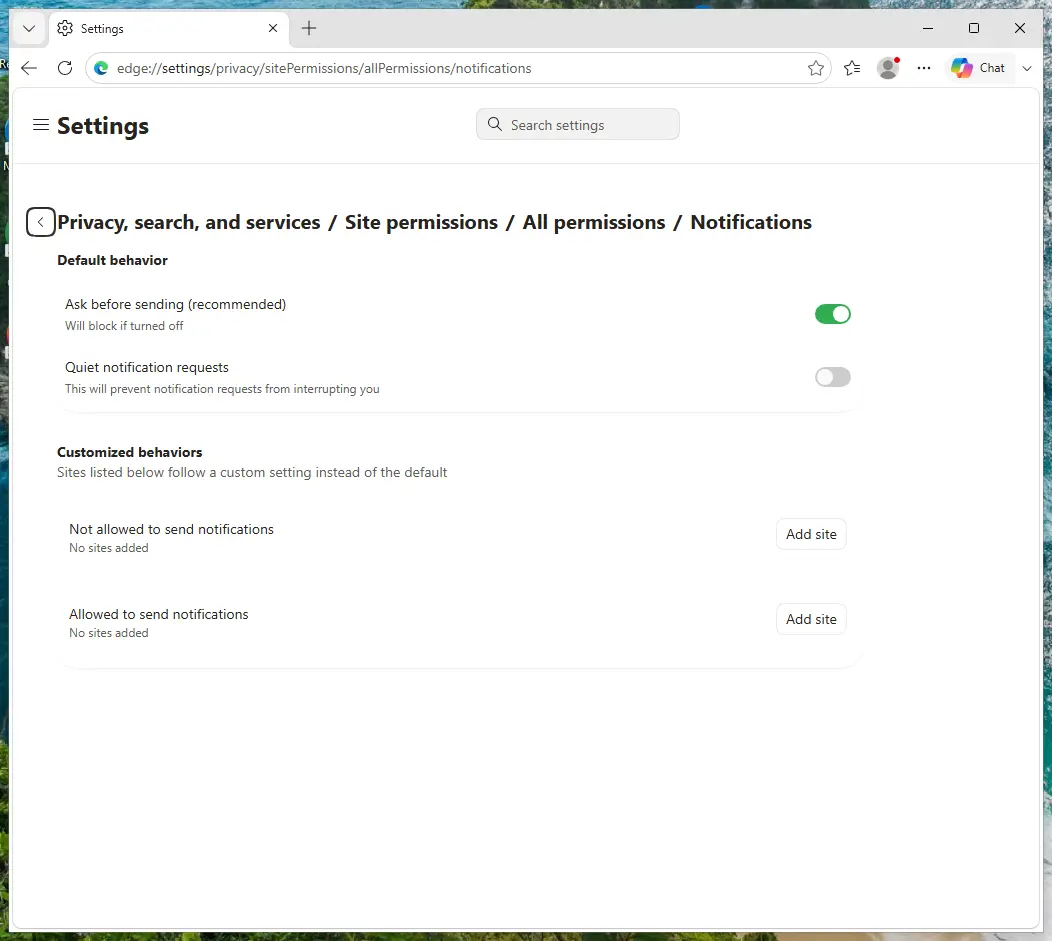
Edge on Windows 11: Site permissions > All permissions > Notifications. Full procedure with screenshots: Stop website notifications and pop-ups
Instructions for Microsoft Edge
Remove from Microsoft Edge
Delete unwanted extensions from MS Edge:
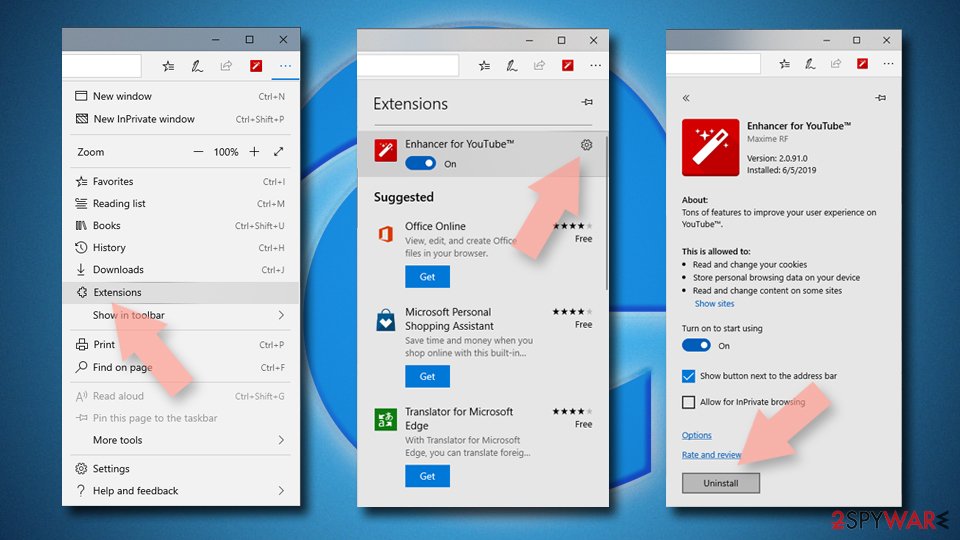
- Select Menu (three horizontal dots at the top-right of the browser window) and pick Extensions.
- From the list, pick the extension and click on the Gear icon.
- Click Remove.
Clear cookies and other browser data:
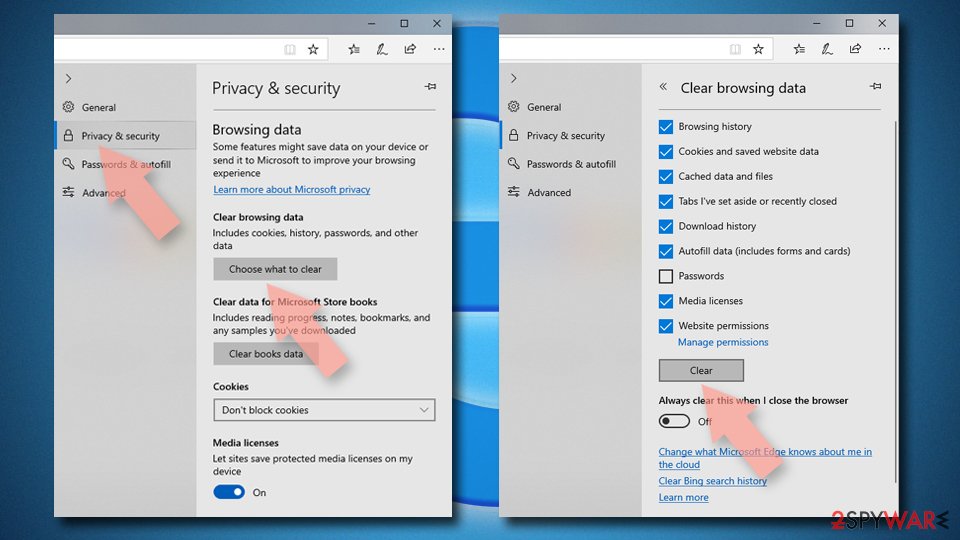
- Click on the Menu (three horizontal dots at the top-right of the browser window) and select Settings > Privacy, search, and services..
- Under Clear browsing data, pick Choose what to clear.
- Select Cookies and other site data and Cached images and files. (apart from passwords, although you might want to include Media licenses as well, if applicable) and click on Clear.
Restore new tab and homepage settings:
- Click the menu icon and choose Settings.
- Then find On startup section.
- Click Remove next to any suspicious startup page.
Reset MS Edge if the above steps did not work:
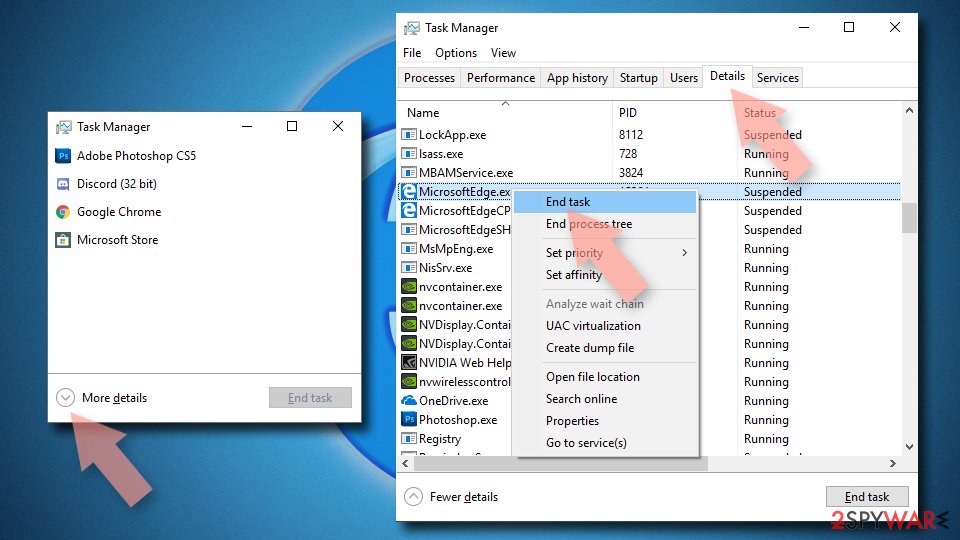
- Press on Ctrl + Shift + Esc to open Task Manager.
- Click on More details arrow at the bottom of the window.
- Select Details tab.
- Now scroll down and locate every entry with Microsoft Edge name in it. Right-click on each of them and select End Task to stop MS Edge from running.
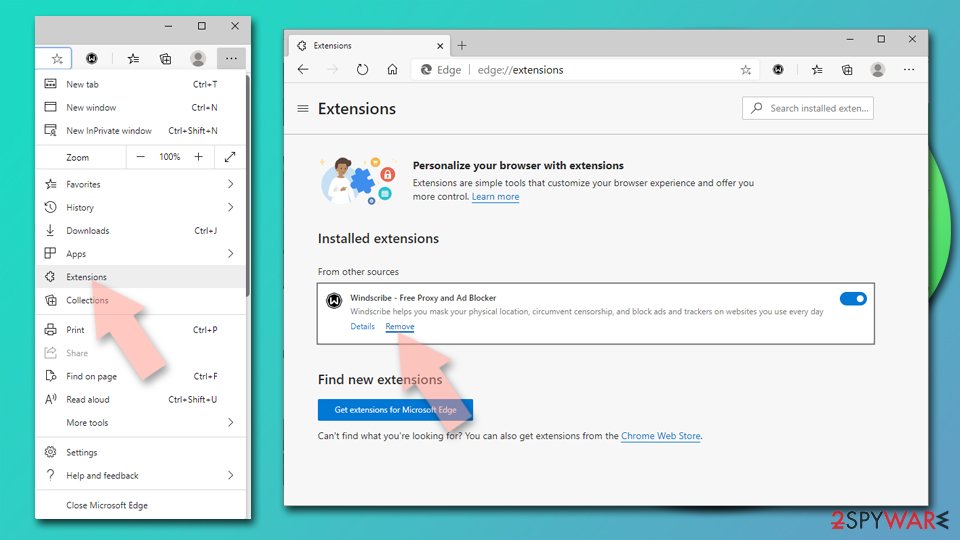
Delete extensions from MS Edge (Chromium):
- Open Edge and click select Settings > Extensions.
- Delete unwanted extensions by clicking Remove.
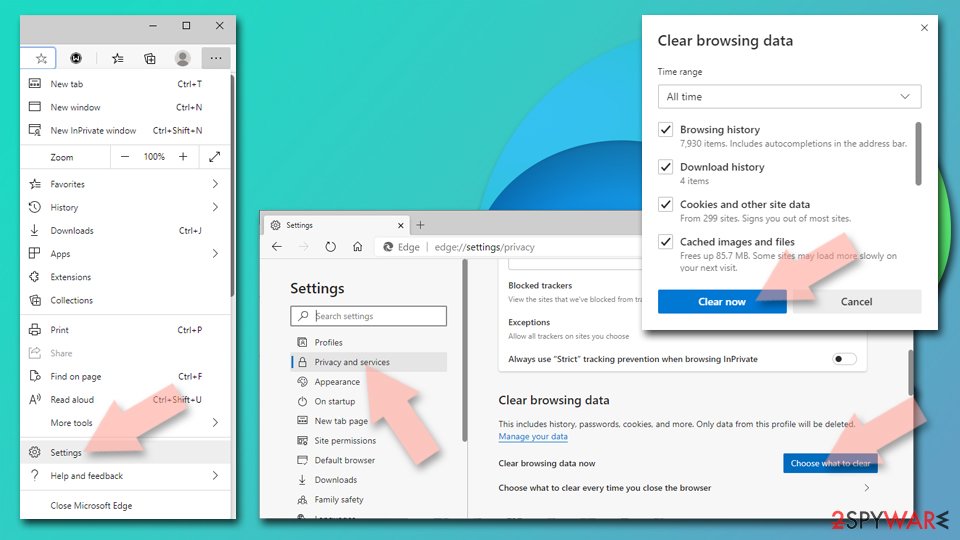
Clear cache and site data:
- Click on Menu and go to Settings.
- Select Privacy, search and services.
- Under Clear browsing data, pick Choose what to clear.
- Under Time range, pick All time.
- Select Clear now.
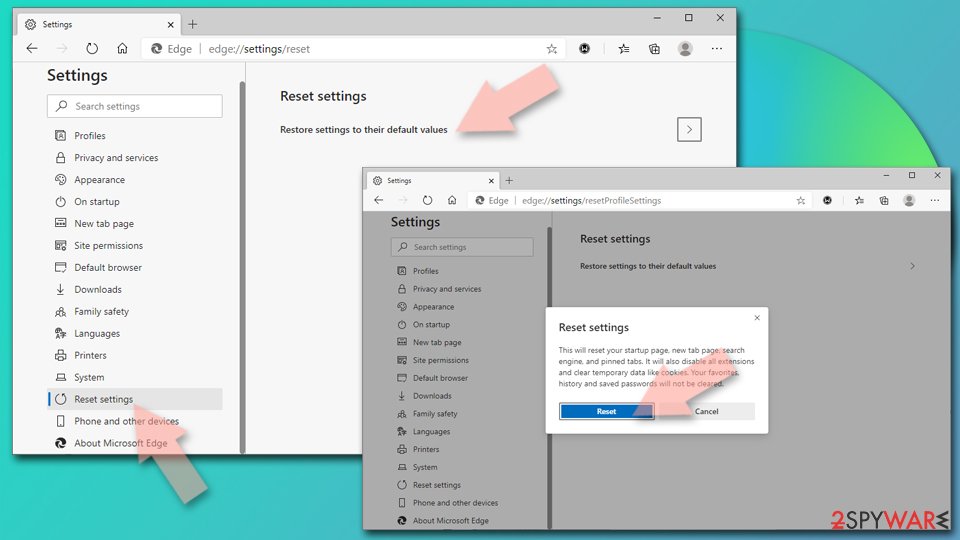
Reset Chromium-based MS Edge:
- Click on Menu and select Settings.
- On the left side, pick Reset settings.
- Select Restore settings to their default values.
- Confirm with Reset.
- This will disable extensions and reset startup pages but will not delete bookmarks, saved passwords, or browsing history.
Step 1: Remove softonic.com from Firefox's notification permissions
Open the menu (three lines) > Settings and click Permissions and data in the left list, then Notifications. Select
softonic.com, click Remove Website and confirm with Save Changes.In versions older than Firefox 152 the same list sits under Privacy & Security, behind a Settings button next to Notifications. Firefox shows these notifications only while it is running, on Windows 11 and Windows 10 alike.
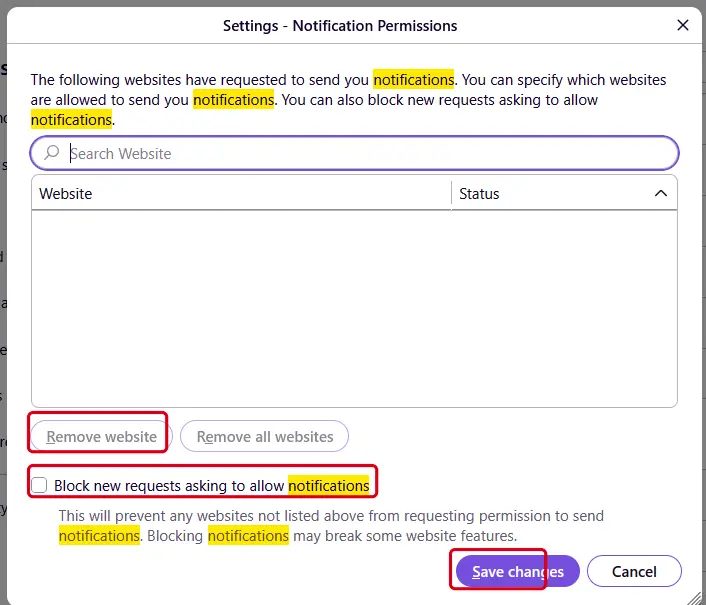
Firefox on Windows 11: the Notification Permissions window. Full procedure with screenshots: Stop website notifications and pop-ups
Instructions for Mozilla Firefox
Remove from Mozilla Firefox (FF)
Remove dangerous extensions:
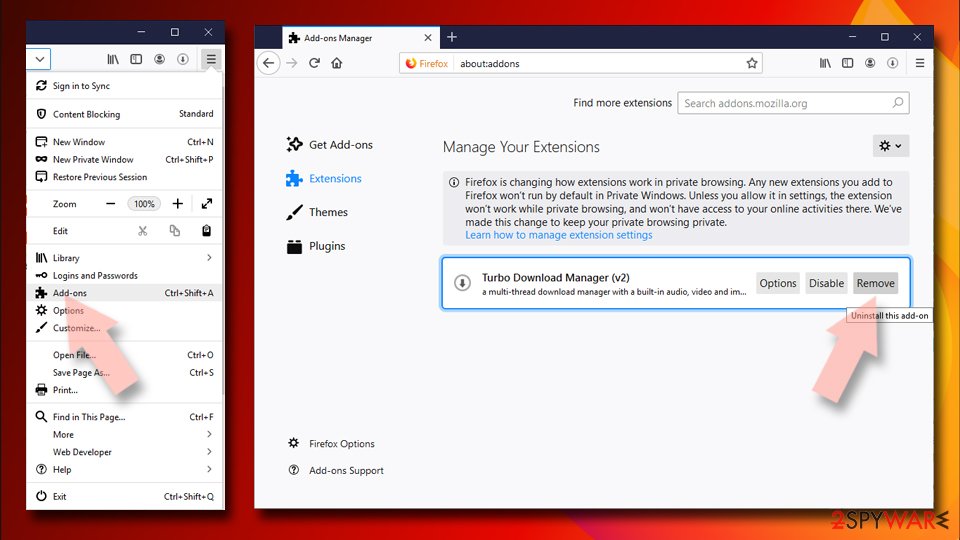
- Open Mozilla Firefox browser and click on the Menu (three horizontal lines at the top-right of the window).
- Select Add-ons.
- In here, select the unwanted extension and click Remove.
Reset the homepage:
- Click three horizontal lines at the top right corner to open the menu.
- Choose Settings.
- Under Home, set your preferred homepage and new tab settings.
Clear cookies and site data:
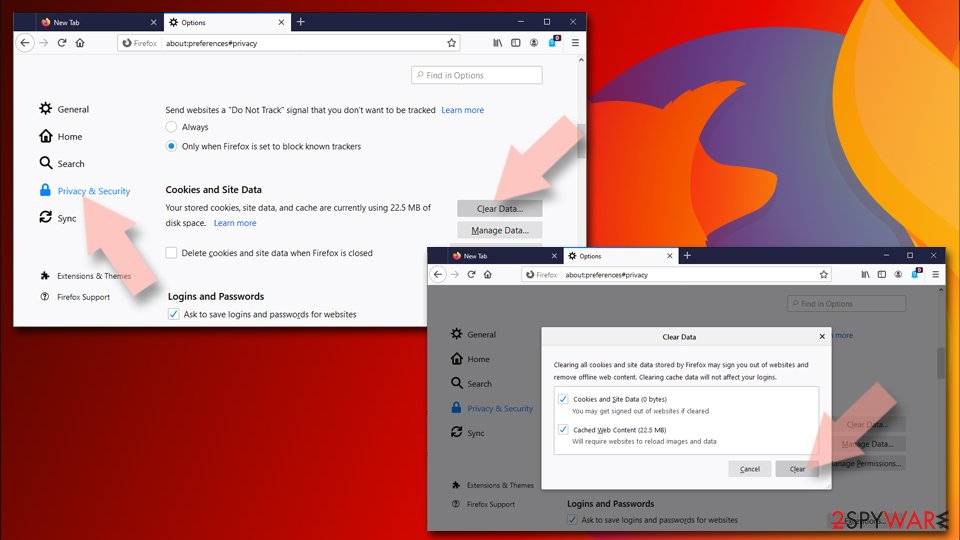
- Click Menu and pick Settings.
- Go to Privacy & Security section.
- Scroll down to locate Cookies and Site Data.
- Click on Clear Data...
- Select Cookies and Site Data and Temporary cached files and pages, then click Clear.
Reset Mozilla Firefox
If clearing the browser as explained above did not help, reset Mozilla Firefox:
- Open Mozilla Firefox browser and click the Menu.
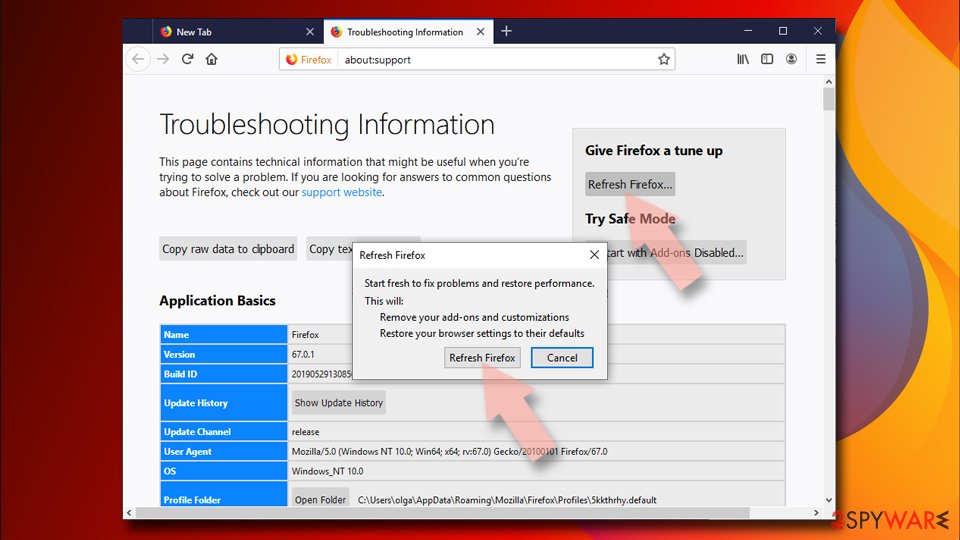
- Go to Help and then choose Troubleshooting Information.
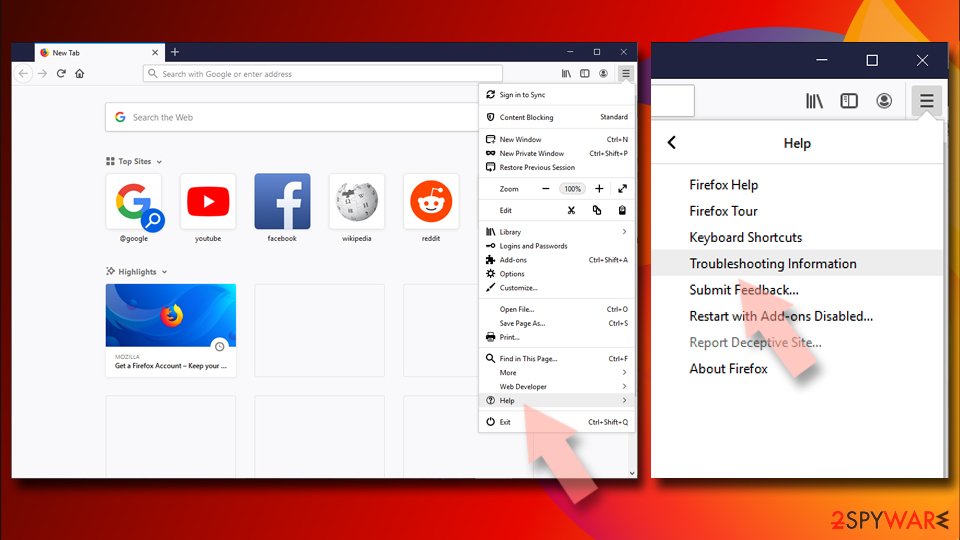
- Under Give Firefox a tune up section, click on Refresh Firefox...
- Once the pop-up shows up, confirm the action by pressing on Refresh Firefox.
Our tested steps are for Windows 11 and 10. For Safari (Mac), use the instructions below.
Instructions for Safari (Mac)
Delete from Safari
Remove dangerous extensions:
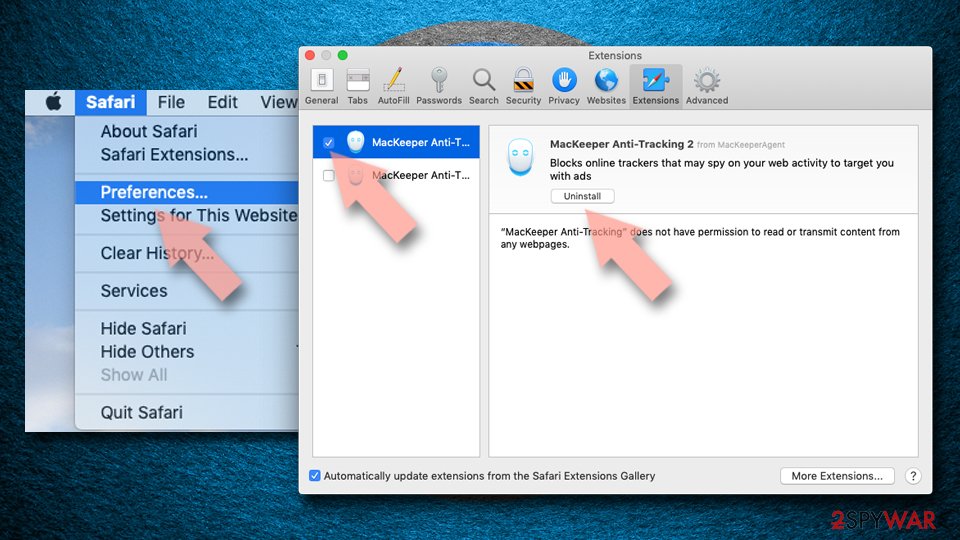
- Open Safari, click Safari in the menu at the top-left of the screen, and select Preferences.
- Go to the Extensions tab, look for any suspicious entries, and click Uninstall to remove them.
Clear history and website data:
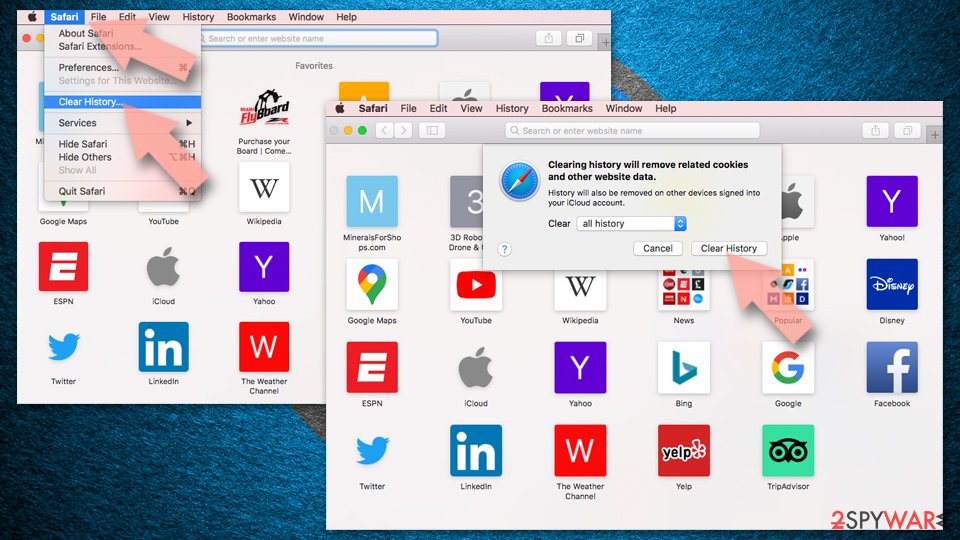
- Click Safari in the menu and pick Clear History.
- Set Clear to all history and confirm with Clear History.
Reset Safari:
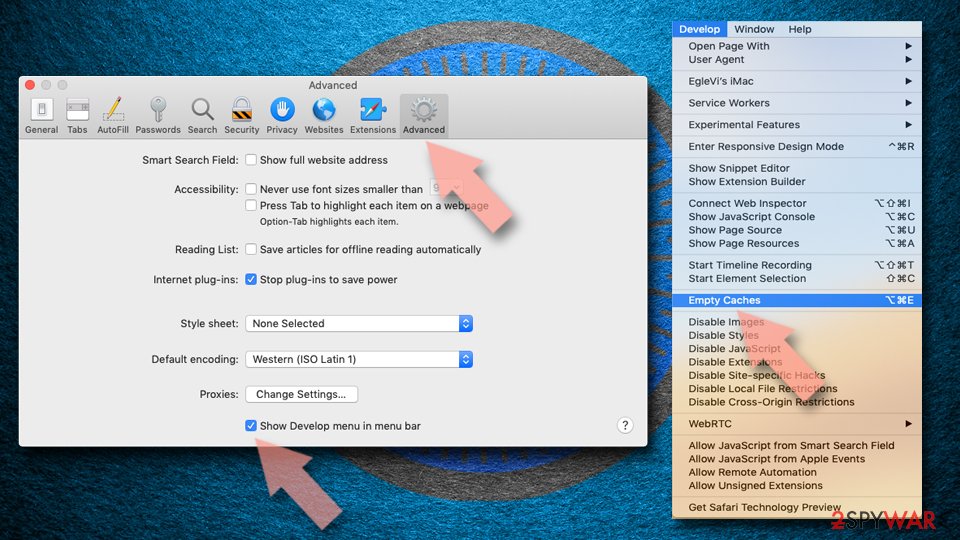
- Click Safari in the menu and select Preferences > Advanced.
- Enable Show Develop menu in menu bar.
- From the menu bar, click Develop and select Empty Caches.
Delete from macOS
Remove the unwanted application:
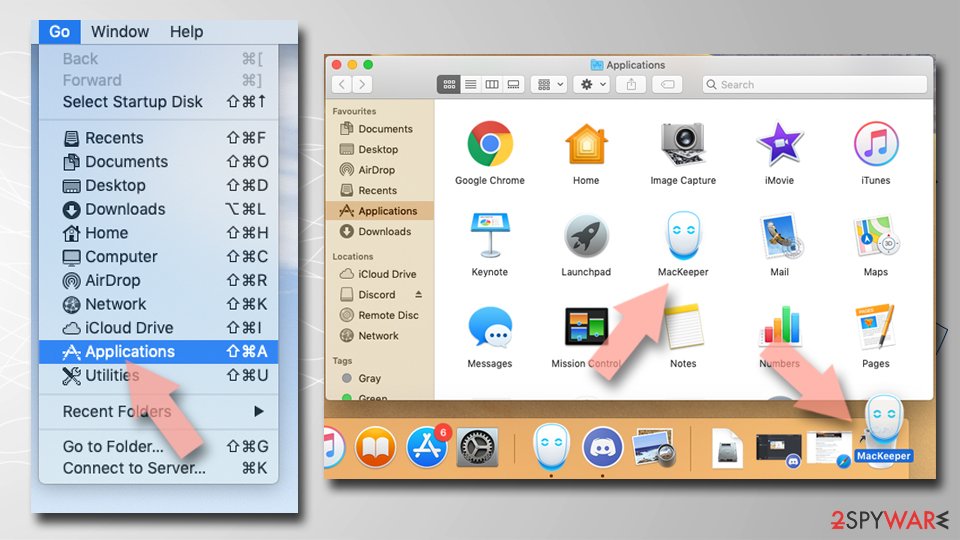
- From the menu bar, select Go > Applications.
- In the Applications folder, look for any suspicious entries, then drag them to Trash (or right-click and pick Move to Trash).
Delete leftover files and folders:
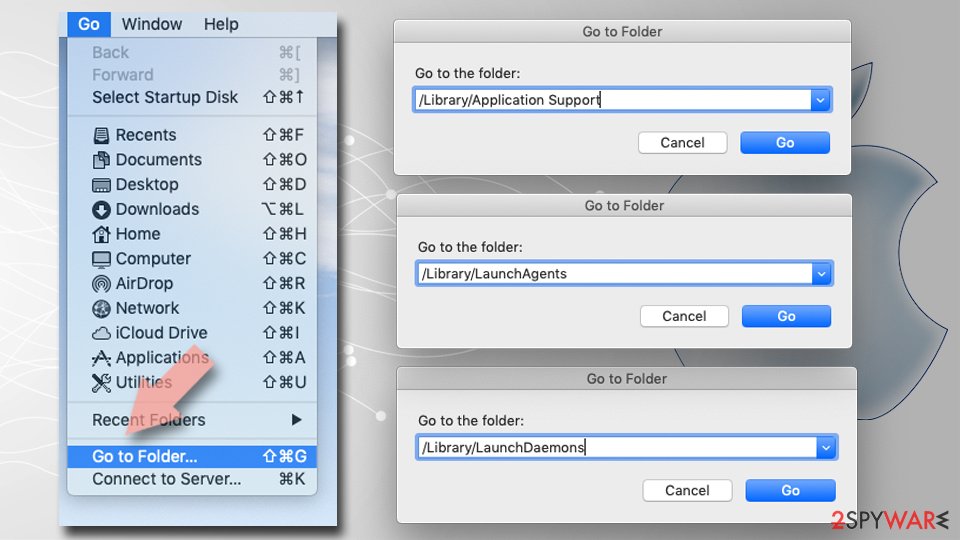
- Select Go > Go to Folder.
- Enter /Library/Application Support and remove any suspicious folders related to the unwanted program.
- Repeat the same check in the /Library/LaunchAgents and /Library/LaunchDaemons folders, deleting any suspicious entries.
- Finally, empty the Trash to permanently remove the leftovers.
Then, whichever browser you use
Step 2: Scan the PC if you downloaded anything from the ads
If you only saw the notifications and clicked nothing, you can stop before this step. If a notification led you to download or run something, delete that file, then scan Windows.
In Windows Security > Virus & threat protection > Scan options, run a Full scan, then choose Microsoft Defender Antivirus (offline scan) and Scan now. The offline scan restarts the PC and takes about 15 minutes on Windows 11 and Windows 10.

Windows 11: Windows Security > Virus & threat protection > Scan options. Full procedure with screenshots: Run a Microsoft Defender Offline scan
More removal instructions
For programs installed on the PC and older browsers. Open the one you need.
How to remove DiscountPlace virus?
It should not be difficult to remove DiscountPlace virus from the system, especially if you select manual removal.
Uninstall from Windows
Uninstall from Windows 10/8:
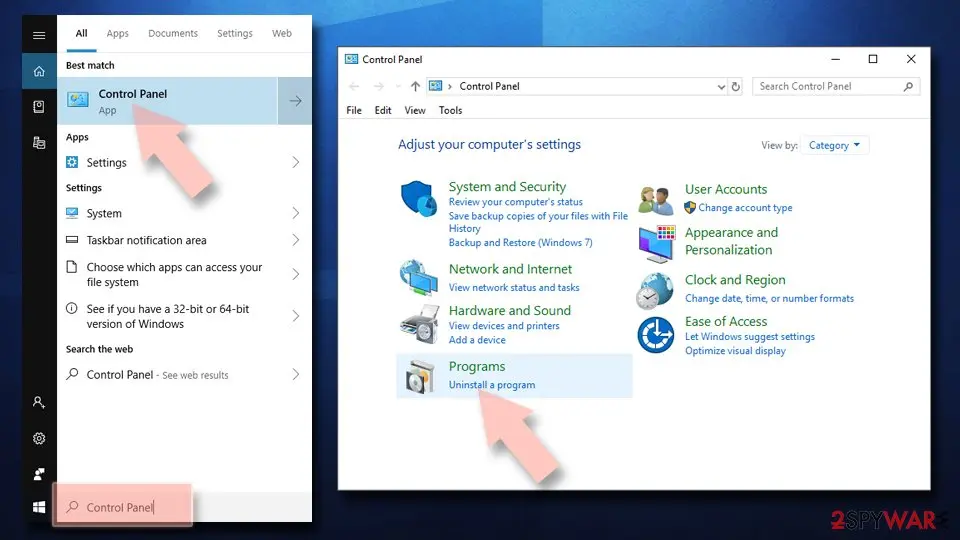
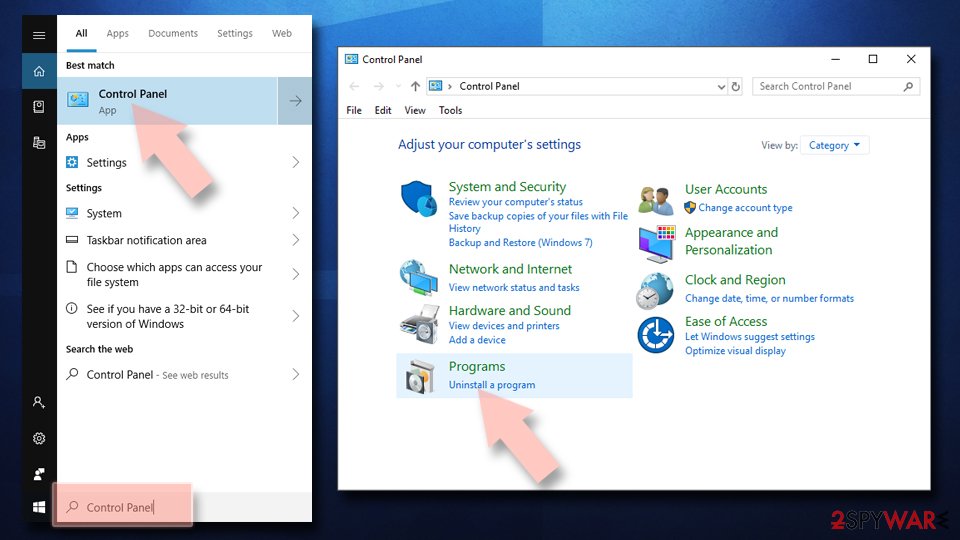
- Type Control Panel into the Windows search box and open the result.
- Under Programs, select Uninstall a program.
Uninstall from Windows 7/XP:
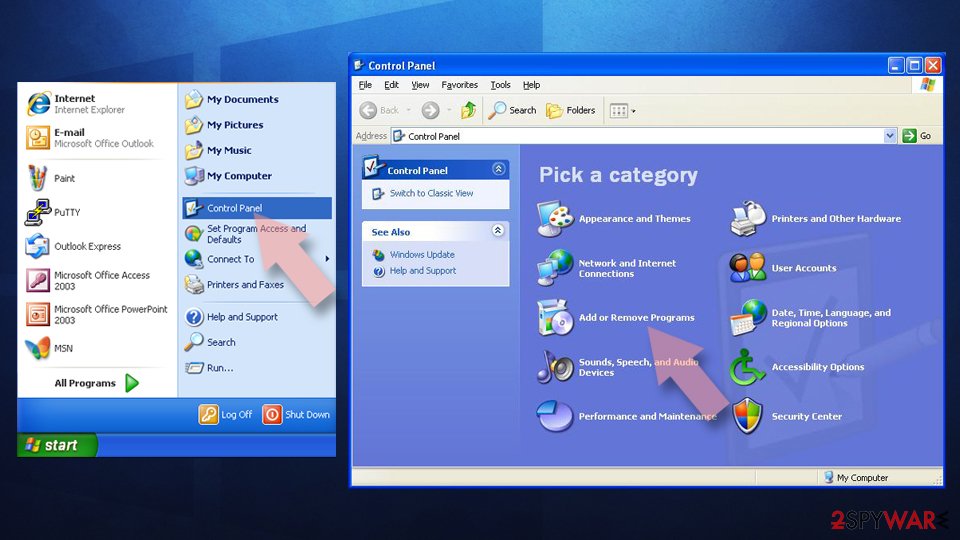
- Click on Windows Start > Control Panel (Windows XP users should click on Add/Remove Programs).
- In Control Panel, select Programs > Uninstall a program.
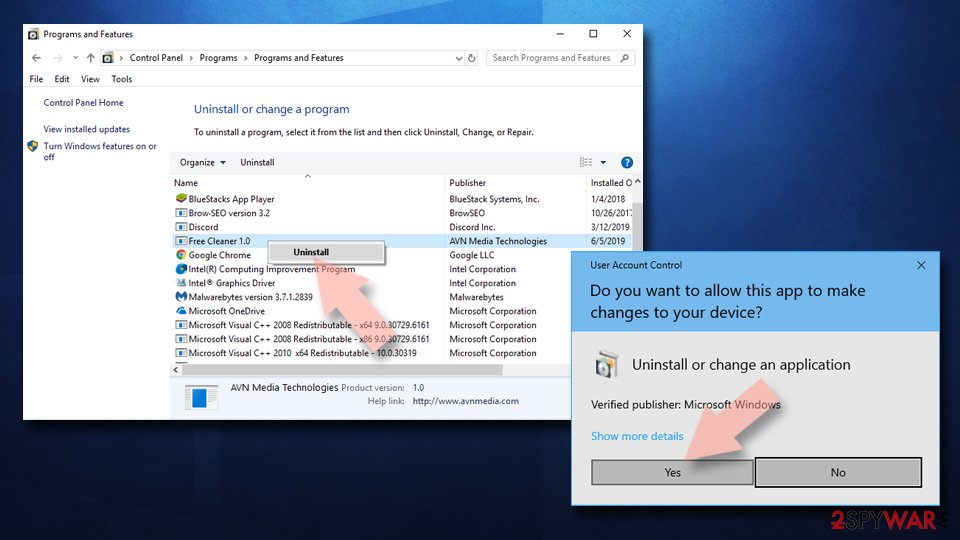
Remove the unwanted program:
- In the Programs and Features window, look for any recently installed suspicious entries, select them, and click Uninstall.
- If User Account Control appears, click Yes to confirm, then complete the removal.
Protect your privacy - employ a VPN
There are several ways how to make your online time more private - you can access an incognito tab.
However, there is no secret that even in this mode, you are tracked for advertising purposes. There is a way to add an extra layer of protection and create a completely anonymous web browsing practice with the help of VPN. This software reroutes traffic through different servers, thus leaving your IP address and geolocation in disguise.
Besides, it is based on a strict no-log policy, meaning that no data will be recorded, leaked, and available for both first and third parties. The combination of a secure web browser and VPN will let you browse the Internet without a feeling of being spied or targeted by criminals.
No backups? No problem. Use a data recovery tool
If you wonder how data loss can occur, you should not look any further for answers - human errors, malware attacks, hardware failures, power cuts, natural disasters, or even simple negligence.
In some cases, lost files are extremely important, and many straight out panic when such an unfortunate course of events happen. Due to this, you should always ensure that you prepare proper data backups on a regular basis.
If you were caught by surprise and did not have any backups to restore your files from, not everything is lost. is one of the leading file recovery solutions you can find on the market - it is likely to restore even lost emails or data located on an external device.
Questions about Ads by DiscountPlace
How do I stop notifications from softonic.com?
Remove its permission in the browser. The bottom line of each notification names the browser, so open that browser's notification settings and look under Allowed. Remove softonic.com and any other site you do not recognise.
In Chrome and Edge this is under the site settings for notifications; in Firefox it is under Settings, Permissions and data, Notifications. Do this in every browser profile, because each one keeps its own list.
Restart the browser and wait a few minutes. If a message still arrives, read its bottom line again: the sending address can differ from the site you remember, and that is the entry still left in the list.
I clicked a notification from softonic.com. What should I do?
If you only opened the page and closed it, nothing else is needed besides removing the permission from softonic.com. If the page asked for card details, a phone number or a password and you entered them, act on that: call the bank to block the card, or change the password from another device.
If it offered a download, delete the file unopened, or uninstall it from Installed apps if you ran it, then run a full scan. If you called a number shown on the page, follow the steps for callers in this guide. Finally, remove the permission so that no more messages arrive.
Why does Ads by DiscountPlace show me ads?
Because that is its whole purpose. Ads by DiscountPlace is a push-notification spam site, and its operators are paid for every ad it displays and every click it gets. In this case the ads take the form of desktop notifications.
They are chosen by ad networks that accept almost any advertiser, which is why so many look like warnings or prizes. The ads are not a sign that your PC is broken or infected with something worse; they are a sign that something on it, or in the browser, has permission to advertise. Removing that permission or program stops them.
Is softonic.com safe to visit?
No. The site softonic.com exists to push visitors towards ads, and the pages it leads to include fake virus warnings, fake updates, prize scams and notification prompts. Visiting it once does not infect an up-to-date PC, but anything you click or download there is a gamble.
Do not enter personal details, do not allow notifications and do not call phone numbers it shows. If it opens by itself, close the tab and check the browser's extensions and notification permissions. Blocking the single domain helps little, because the operators register new names regularly.
Which browser is sending the softonic.com notifications?
Each notification shows the name of the browser and the site in its small print. In the cases we saw, the messages from softonic.com came through Chrome, Edge and Firefox. Permissions are stored per browser and per profile, so removing the site in one browser does not affect another.
If you use several Chrome or Edge profiles, check each one. If you sync the browser with an account, remove the permission while signed in, otherwise another computer may still hold it and keep receiving the same messages.
How do I know the ads come from Ads by DiscountPlace?
Look for notifications from softonic.com. That is the trace Ads by DiscountPlace leaves, and it shows up as desktop notifications. Ads that appear on every site, including ones that never carried ads before, point to something on your PC or in the browser rather than to the sites themselves.
A quick test is a private window, where extensions are off by default: if the ads disappear there, an extension is responsible. If they appear even with the browser closed, the source is a notification permission or a program in Windows.
Did clicking Allow install anything on my PC?
No. Allowing notifications stores a permission in the browser and nothing else. No file is downloaded and no program is added to Windows, which is also why antivirus scans find nothing. The risk comes later, from the notifications themselves: they lead to scam pages, fake updates and phishing forms.
Remove the permission in each browser where you allowed it. If you clicked a notification and downloaded something afterwards, delete that file and run a Microsoft Defender full scan and offline scan.
I clicked on one of the ads. Am I infected?
Probably not. Clicking an ad usually only opens a page, and a page cannot install programs on an up-to-date Windows PC without your help.
You are at risk only if you then downloaded and ran a file, allowed notifications, entered card or login details, or called a phone number shown on the page. Delete any download and run a full and offline scan.
Change passwords you typed, from a clean device. Call your bank if you gave card details. If you called a number or allowed remote access, see the next question.
An ad showed a phone number and I called it. What now?
The number belongs to scammers, not to Microsoft or an antivirus company. If you only talked, hang up and do not call back. If you let them connect to the PC, disconnect it from the internet, uninstall the remote access program they used, such as AnyDesk, TeamViewer, ScreenConnect or UltraViewer, and run a full and offline scan.
If you paid or gave bank details, call your bank at once on the number printed on your card. Change any passwords you typed while they were connected, and report the call.
Will Fortect remove Ads by DiscountPlace?
No program removes Ads by DiscountPlace itself, because there is nothing on the PC to remove: the notifications come through a permission saved in the browser, and only the browser's settings take it away, as the steps above show.
What Fortect can do is check the rest of Windows. Its free scan looks for malware, unwanted programs and damaged system files, which is useful if you clicked the ads, downloaded something from the pages they opened, or are not sure what else changed on the PC.
If the scan finds nothing and the notifications stopped after you removed the permission, this problem is solved. Use Microsoft Defender as a second opinion whenever you have downloaded files from pages like these.
Sources
- Google Chrome Help: Use notifications to get alerts (no longer online) (read October 6, 2026)
- FTC: How to recognize, remove and avoid malware (read October 6, 2026)
- Microsoft Learn: Microsoft Defender Offline (read October 6, 2026)
- Microsoft Learn: How Microsoft names malware (read October 6, 2026)