
How to delete a Flirt account and stop Flirt dating ads on Android and iPhone
Flirt.com is a paid dating site run by Apricot West LLC, not a virus, so there is no program to uninstall from your Android phone or iPhone. Stop the billing and delete the account in My Settings on the site, then remove the icon and block the dating notifications in your browser.
Facts checked October 9, 2026. Steps checked against Apple's and Google's current documentation and the reports we cite. We have not run the app or the link on a phone ourselves.
Do it yourself · free Remove Flirt dating site yourself 6 steps, about 18 minutes, no software needed.
Start the steps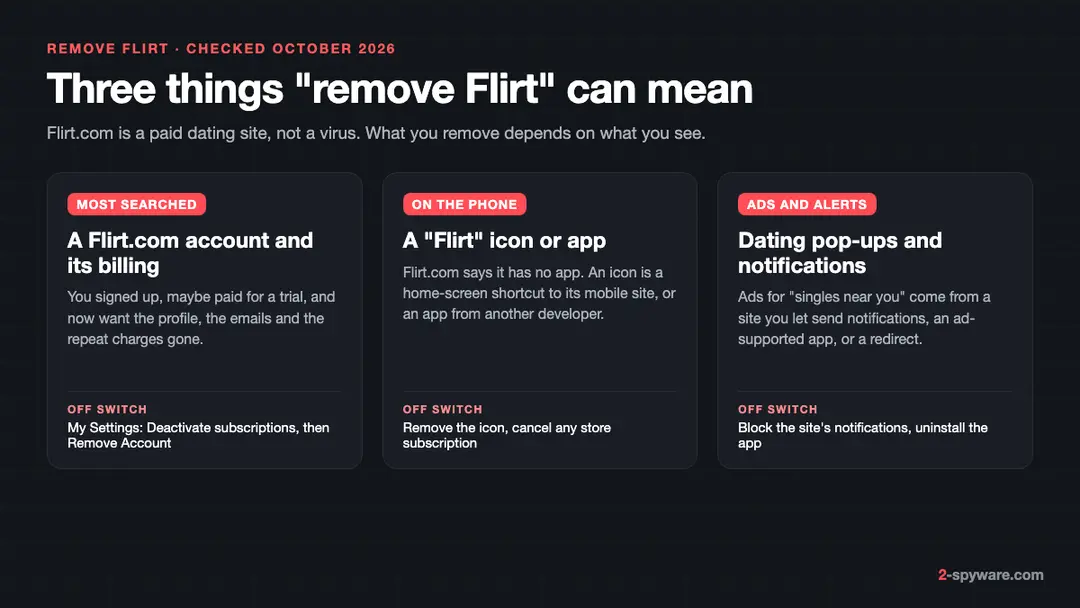
Flirt dating site: summary
| Name | Flirt.com (Flirt dating site), operated by Apricot West LLC, St. Petersburg, Florida |
|---|---|
| Type | Paid online dating site with automatic renewal; dating notifications and ads on phones and browsers; not malware |
| Risk | Low for the site itself; medium for forgotten repeat charges; high if someone you met asks for money |
| Symptoms | Flirt.com charges and match emails, a Flirt icon on the phone, dating alerts on the lock screen, "singles near you" pop-ups |
| How to get rid of it | My Settings > Billing History > Deactivate subscriptions, then My Settings > Remove Account; remove the icon; block site notifications |
| Our check (9 October 2026) | Desk check of Flirt.com's help pages and terms; no account created and no payment made |
Show 5 more facts
| Running since | Our reader asked how to uninstall it in 2017; the terms are dated 2026 and name Apricot West LLC |
|---|---|
| Microsoft detection | No Microsoft detection name is known: Flirt.com is a website, not a program, so nothing is installed for an antivirus to detect |
| Distribution | You sign up yourself on flirt.com or m.flirt.com; dating ads from other sites arrive through notifications, ad-supported apps and redirects |
| Damage | Repeat charges until cancelled, match emails and alerts, a profile left visible; romance scams by other users are a risk on any dating site |
| Facts checked | 9 October 2026 |
Facts checked on 9 October 2026 against Flirt.com's own help pages and terms of use and the FTC's advice on romance scams. We did not create an account or pay, so the Settings route is Flirt's written description, not our test.
What Flirt is, and what you are removing
Flirt.com is a paid online dating site run by Apricot West LLC of St. Petersburg, Florida, according to its own terms. It is not a virus and installs nothing on your phone, so "uninstalling" it means closing the account, stopping the billing and switching off the notifications and ads that come with it.
| What you see | What it really is | What removes it |
|---|---|---|
| Charges, match emails and a profile on Flirt.com | Your own account on the dating site, with a membership that renews by itself | Deactivate subscriptions, then Remove Account, both in My Settings on the site |
| A Flirt icon on the home screen | A shortcut to the mobile site m.flirt.com, or an app with "Flirt" in its name from another developer | Remove the shortcut or uninstall the app; cancel a store subscription separately |
| Alerts about new matches on the lock screen | Push notifications from Flirt.com or another dating site you allowed | Block the site in the browser's notification settings |
| "Hot singles near you" pop-ups you never asked for | Ads from a notification site, an ad-supported app or a redirect, often for other dating sites | Find the source (table further down) and switch it off |
- Operator
- Apricot West LLC, 7901 4th St N, Suite 300, St. Petersburg, FL 33702 (Flirt.com terms, read 9 October 2026)
- App
- None from Flirt.com: its help page says it has a mobile site, m.flirt.com, instead of an app
- Billing
- Free and Full Membership; paid plans renew automatically at the same rate until you cancel
A reader sent us this question in 2017: "Need to uninstall Flirt dating site but don't know how." There is still nothing to uninstall from the system. Close the account on the website, then clean up the phone; our Android adware guide covers phone ads in general.
Is Flirt dating site dangerous?
What we checked, and what we did not
This was a desk check on 9 October 2026 of Flirt.com's own help pages and terms, plus the US search data for Flirt. We did not sign up, pay or install anything, so the steps below follow Flirt's written instructions, not a test account.
Flirt.com · desk check · 9 October 2026
- Who runs itThe terms name Apricot West LLC in St. Petersburg, Florida, with support@flirt.com and a toll-free number.
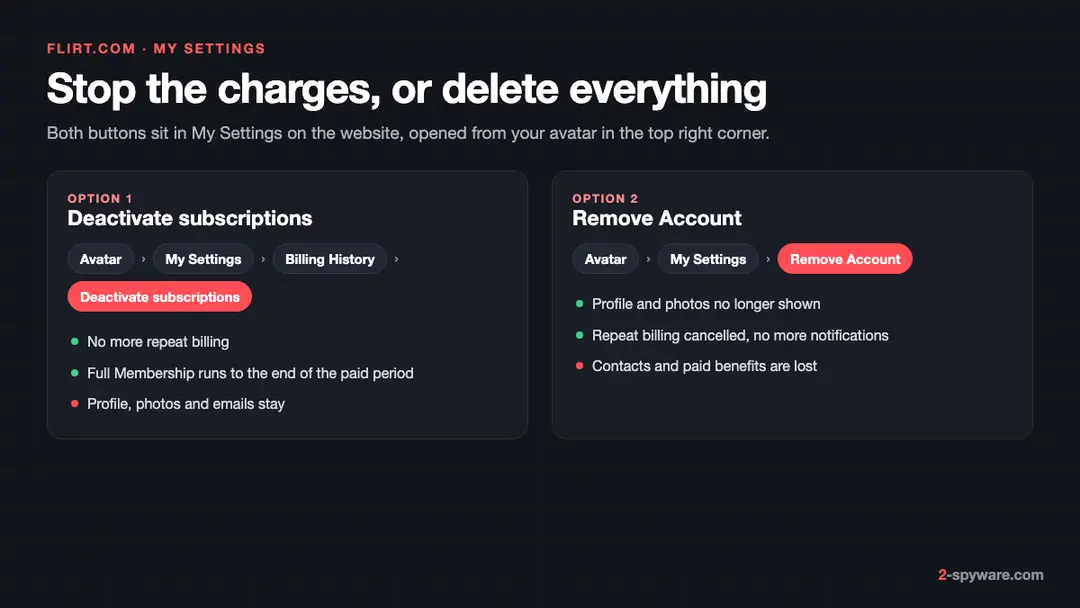
- Cancel billingAvatar > My Settings > Billing History > Deactivate subscriptions. Full Membership runs to the end of the paid period.
- Delete the accountAvatar > My Settings > Remove Account. The help page says this also cancels repeat billing and stops notifications.
- Automatic renewalThe terms say paid plans renew at the same rate with the same payment method until you cancel before the renewal date.
- App or notOne help page says Flirt has no app; another mentions settings "in the mobile app". We found no Flirt.com app.
- Not testedWe did not create an account, so we did not see the Settings screens, the emails or the push notifications ourselves.
A real dating service, not malware Flirt.com is a subscription dating site with a written cancel and delete route. The risks are repeat charges you forgot, emails you did not want and the scams that every dating site attracts. Nothing on this desk check points to malware.
The Flirt icon or app on your phone
Flirt.com's help page says it does not have an app and points phone users to m.flirt.com. So a Flirt icon on your phone is either a shortcut to that site or an app made by someone else.
- 1
A shortcut to the mobile site
Chrome on Android and Safari on iPhone can add a site to the home screen. The icon opens m.flirt.com in a browser window, so deleting it removes nothing from your account. Remove it like any icon, then delete the account on the site.
- 2
An app from another developer
Google Play and the App Store list several dating apps with "Flirt" in the name. They are not Flirt.com and have their own accounts and billing. Delete your profile inside that app first if you can, then uninstall it.
- 3
A subscription bought in the store
Uninstalling an app does not cancel a subscription bought through Google Play or the App Store. Cancel it in the store, as the plan below shows. Flirt.com's own membership is billed by Flirt, not by the store.
- 4
An app you did not choose
If a dating app appeared without you installing it, treat it as adware: see our lock-screen ads guide for safe mode and Play Protect.
What can go wrong, highest risk first
The site itself is not the main danger. The risks are money you did not plan to spend and people or pages that use dating as bait.
- High
Someone you met asks for money
The FTC says romance scammers on dating sites and apps build trust, avoid meeting in person and then ask for money, gift cards, wire transfers or cryptocurrency. This applies to any dating site, Flirt.com included. Never send money to someone you have only met online.
- Medium
Charges that keep coming
Flirt's terms say paid plans renew automatically at the same rate with the same card. A 3-day trial is offered once, and the billing page says a membership renews when it expires unless you cancel before the collection date. Cancelling billing alone also leaves your profile on show; only Remove Account hides it.
- Medium
Dating ads that lead elsewhere
Ads and notifications for "singles near you" can open pages that ask for card details or push app installs. Our guides to dating notification sites show examples.
How Flirt dating site got onto your phone
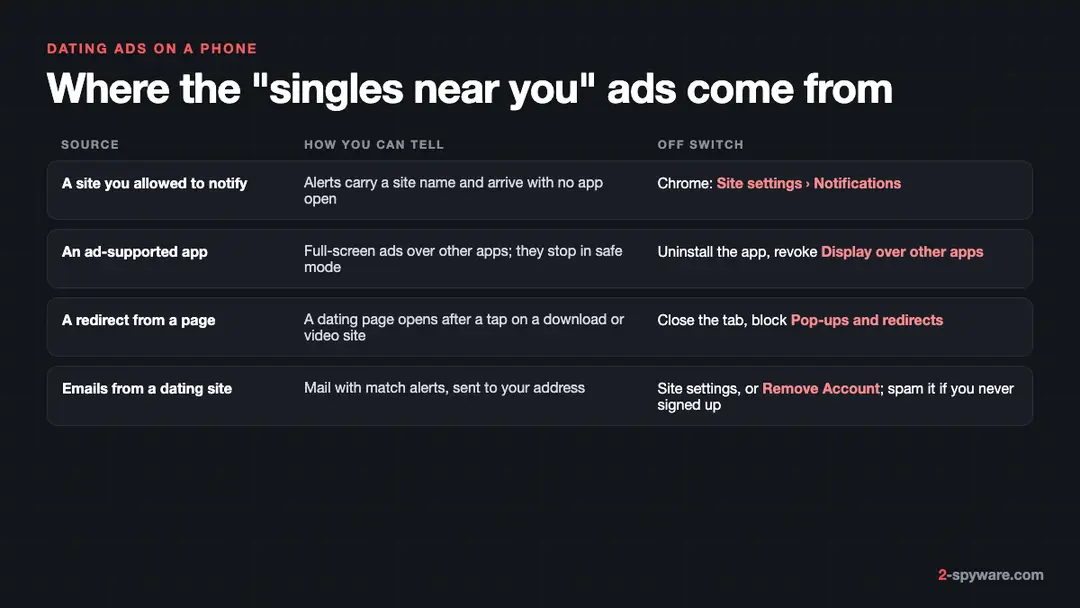
Most "singles near you" ads on a phone are not from Flirt.com. They come from a site you once allowed to send notifications, an app that shows ads, or a page that redirects you.
| Source | How to tell | What to do |
|---|---|---|
| A site allowed to send notifications | The alert names a website and arrives when no browser tab is open. | Block the site in Chrome's or Safari's notification settings (plan, step 5). |
| An ad-supported app | Ads fill the screen over other apps or on the lock screen and stop in safe mode. | Find and uninstall the app; switch off Display over other apps for it. |
| A redirect from a web page | A dating page opens in a new tab after a tap on a streaming or download page. | Close the tab; keep Pop-ups and redirects blocked in Chrome. |
| Emails from a dating site | Match alerts and offers in your inbox from a site you joined, or never joined. | Change the site's email settings or delete the account; report mail from a site you never joined as spam. |
We have written up many of the notification sites that push dating ads, with the steps for each. Examples are dating-roo.xyz, romancedating.top, datingcentral.top and hookupfornights.com. If the alerts name a different site, check the address or search our site for it.
How to remove Flirt dating site
These steps follow Flirt.com's help pages as read on 9 October 2026, plus the standard settings on Android 14 and 15 (Samsung One UI where it differs) and iPhone.
Most readers need only steps 1 and 2. More phone settings are on our Android help page.
Step 1: Stop the repeat billing on Flirt.com
Open flirt.com in Chrome or Safari on your Android phone or iPhone and log in. Press your avatar in the top right corner and choose My Settings.
Scroll to Billing History and press Deactivate subscriptions, then follow the prompts. You keep Full Membership until the paid period ends, and no further money is taken.
Step 2: Remove the account
In the same My Settings page, scroll down and press Remove Account, then follow the prompts. Flirt's help page says your personal information and photos are then no longer shown, repeat billing is cancelled and the site stops sending notifications.
Your contacts and any paid benefits are lost. If you cannot log in, email support@flirt.com with your screen name and email address.
Step 3: Delete the Flirt icon or app
On Android, touch and hold the icon and choose Uninstall, or Remove for a shortcut; you can also use Settings > Apps, pick the app and tap Uninstall. On a Samsung phone the route is Settings > Apps as well.
On an iPhone, touch and hold the icon, tap Remove App and then Delete App. A shortcut to m.flirt.com only disappears from the screen; the account goes in steps 1 and 2.
Step 4: Cancel a store subscription
If you paid for a Flirt-named app through the store, uninstalling it does not stop the charge.
On Android open Google Play, tap your profile picture, then Payments & subscriptions > Subscriptions, pick the app and tap Cancel subscription. On an iPhone open Settings, tap your name, then Subscriptions, pick the app and tap Cancel Subscription.
Step 5: Block dating notifications in the browser
In Chrome on Android tap the three-dot menu > Settings > Site settings > Notifications, find flirt.com or the dating site and set it to Don't allow.
Samsung Internet keeps its own list under its Settings > Sites and downloads. On an iPhone, a site added to the home screen sends alerts like an app:
- open Settings > Notifications
- pick it
- turn off Allow Notifications
Step 6: Scan the phone if ads continue
If dating pop-ups keep coming after steps 1 to 5, an app is showing them. Restart the Android phone in safe mode; if the ads stop there, uninstall recently added apps one at a time.
Then open Google Play, tap your profile picture > Play Protect and run a scan. Our Android adware guide walks through each part.
After removal: keep the ads from coming back
On a computer: Chrome, Edge, Firefox and Safari
If Flirt or other dating alerts pop up on a PC or Mac, the cause is a site's notification permission, not a program. Nothing has to be uninstalled from Windows 11 or 10 for it.
- 1
Chrome
Open Settings > Privacy and security > Site settings > Notifications, or type
chrome://settings/content/notificationsin the address bar. Find flirt.com or the dating site under Allowed to send notifications, open the three-dot menu next to it and choose Block or Remove. - 2
Microsoft Edge
Go to Settings > Cookies and site permissions > Notifications (or
edge://settings/content/notifications). Under Allow, open the menu next to the site and choose Block or Remove. - 3
Firefox
Open Settings > Privacy & Security, scroll to Permissions and click Settings next to Notifications. Select the site, choose Block or Remove Website and click Save Changes.
- 4
Safari on a Mac
Choose Safari > Settings > Websites > Notifications, select the site and set it to Deny, or remove it.
Stop Flirt emails
Flirt's help page says the site sends personal alerts, admin messages, offers and new matches by email and push. You can switch them off without deleting the account.
- 1
Change the email settings
Press your avatar, choose My Settings and scroll to Email and push notifications. Clear the boxes for the messages you do not want and save.
- 2
Or remove the account
Flirt's help page says that after Remove Account you will not get any notifications from the site. That is the cleanest stop if you no longer use it.
- 3
If you never signed up
Do not click links or log in from the email; mark it as spam. If someone used your address, reset the password on flirt.com itself, not from the link, then remove the account.
If you cannot log in, or a charge is still coming
You can cancel without the Settings page. Flirt's terms give two other routes, and your card issuer is the last one.
- 1
Email or call Flirt
The terms say you may cancel your registration or subscription by email to support@flirt.com or by phone on 1 (800) 951-5944. Include your screen name and the email address of the account, or the request cannot be verified.
- 2
Keep proof of the date
The terms say a cancellation takes effect when Flirt receives it, and one made by a third-party company for you is not valid. Write yourself and keep the sent email.
- 3
Charges you do not recognise
If you never joined Flirt.com or the charge continues after you cancelled, call your card issuer, ask it to block future payments to the merchant and dispute the charge.
- 4
If you paid someone you met
The FTC tells people who paid a scammer to contact their bank, card company or gift card company right away and ask for the money back. Report it at ReportFraud.ftc.gov.
How to keep dating charges and ads away
Do
- Put a reminder in your calendar a day before any trial or paid period ends, because Flirt's plans renew by themselves.
- Use Remove Account when you are done with any dating site, not just cancel billing, so your profile stops being shown.
- Answer a site's "Allow notifications?" box with Block unless you know you want its alerts.
- Keep Pop-ups and redirects blocked in Chrome and keep Scan apps with Play Protect on.
- Install dating apps only from Google Play or the App Store, and check who publishes them.
Don't
- Send money, gift cards or crypto to someone you have only met online.
- Give your Flirt login to a company that offers to cancel for you; Flirt's terms say it will not accept that cancellation.
- Tap "singles near you" ads or install apps they offer.
Questions about Flirt dating site
How do I delete my Flirt.com account?
Log in on flirt.com, press your avatar in the top right corner and choose My Settings. Scroll down to Remove Account and follow the prompts. Flirt's help page says your personal information and photos are then no longer shown, repeat billing is cancelled and the site stops sending notifications.
You lose your contacts and any paid benefits left. The same route works in a phone browser. If you cannot log in, write to support@flirt.com from the account's email address with your screen name.
How do I cancel a Flirt.com subscription without deleting my account?
Press your avatar, choose My Settings, scroll to Billing History and press Deactivate subscriptions, then follow the prompts.
Flirt's help page says no more money is taken after that, and you stay a Full Member until the paid period ends. Your profile, photos and contacts stay on the site. Do it before the renewal date:
- the terms say memberships renew automatically at the same rate
- with the same payment method
- until you cancel
Can I get a refund from Flirt.com?
It depends on where you live. Flirt's terms say residents of the UK and the European Union can cancel within 14 days of the subscription confirmation and get a pro-rated refund based on their use of the service.
Elsewhere the terms describe automatic renewal and promise no refund for a period that has started, so cancel before the renewal date. If you were charged after cancelling, or never joined, contact support@flirt.com and then your card issuer.
How do I stop Flirt emails?
If you have an account, press your avatar, open My Settings and scroll to Email and push notifications. Clear the boxes for the alerts, offers and match emails you do not want. Removing the account stops all notifications from the site, according to its help page.
If you never signed up for Flirt.com, do not click anything in the message and do not log in from it. Mark it as spam in your mail app instead, because a mail that borrows a dating site's name to get a password is phishing.
Is there a Flirt app I need to uninstall?
Not from Flirt.com. Its help page says the site has no app and offers a mobile version at m.flirt.com with the same login. A Flirt icon on your phone is usually a home-screen shortcut to that site, which you can simply remove.
Apps with Flirt in the name in Google Play or the App Store come from other companies. Uninstall those like any app, and cancel any subscription bought for them in the store, because uninstalling does not stop the charge.
Is Flirt.com legit or a scam?
Flirt.com is a real, paid dating service with a named operator, Apricot West LLC in St. Petersburg, Florida, published terms and a written way to cancel and delete. No security vendor or official source we read calls it malware.
Whether the people you meet there are genuine is another question we cannot test. The FTC warns that romance scammers use dating sites and apps, avoid meeting in person and then ask for money, gift cards or crypto. Treat any such request as a scam, on Flirt.com or anywhere else.
Why do I get dating ads and pop-ups on my phone?
Usually because a website was allowed to send notifications, an app on the phone shows ads, or a page you visited redirects to dating offers. Flirt.com is rarely the source.
Notifications name the site that sends them; block it in Chrome under Settings > Site settings > Notifications. Ads that cover other apps come from an app: restart in safe mode, and if the ads stop, uninstall the newest apps one at a time.
Is Flirt a virus?
No. Flirt.com is a website, and visiting or joining it installs nothing on your phone or computer. Nothing we read from security vendors or official sources calls it malware. What feels like a virus is usually something you can switch off yourself:
- browser notifications you allowed
- emails from an account you created
- an ad-supported app
Removing the account stops Flirt's own messages, and the browser and app steps on this page stop the rest.
I deleted the app but Flirt still charges me. Why?
Because the subscription is not tied to the icon. Flirt.com bills you directly for a membership bought on its site, so you must press Deactivate subscriptions or Remove Account in My Settings, or cancel by email or phone as its terms describe.
If the charge is for a Flirt-named app from another developer, the store bills you, and you cancel in Google Play under Payments & subscriptions or on an iPhone under Settings > your name > Subscriptions. Check your card statement for the merchant name to see which one it is.
Sources
- Flirt.com Support: Membership Cancelation (cancel subscription, delete account, difference between the buttons) (read October 9, 2026)
- Flirt.com Support: Membership and Billing Questions (trial, automatic renewal) (read October 9, 2026)
- Flirt.com Support: Does Flirt Have a Mobile App? (read October 9, 2026)
- Flirt.com Support: My Notifications (email and push settings) (read October 9, 2026)
- Flirt.com Terms of Use (operator, automatic renewal, cancellation by email or phone, UK and EU refunds) (read October 9, 2026)
- FTC Consumer Advice: What To Know About Romance Scams (read October 9, 2026)
- Google Chrome Help: Use notifications to get alerts (no longer online) (read October 6, 2026)