
Is Honeytoon a scam? What we found for iPhone and Android users
Honeytoon is a webtoon app for iPhone and Android, and the people who search whether it is a scam mostly mean its charges. We found a working service with many billing complaints, not a proven scam and not malware. Check your charges, cancel in the App Store or Google Play, and ask for a refund quickly.
Facts checked October 11, 2026. Steps checked against Apple's and Google's current documentation and the reports we cite. We have not run the app or the link on a phone ourselves.
Do it yourself · free Remove Honeytoon scam yourself 7 steps, about 21 minutes, no software needed.
Start the steps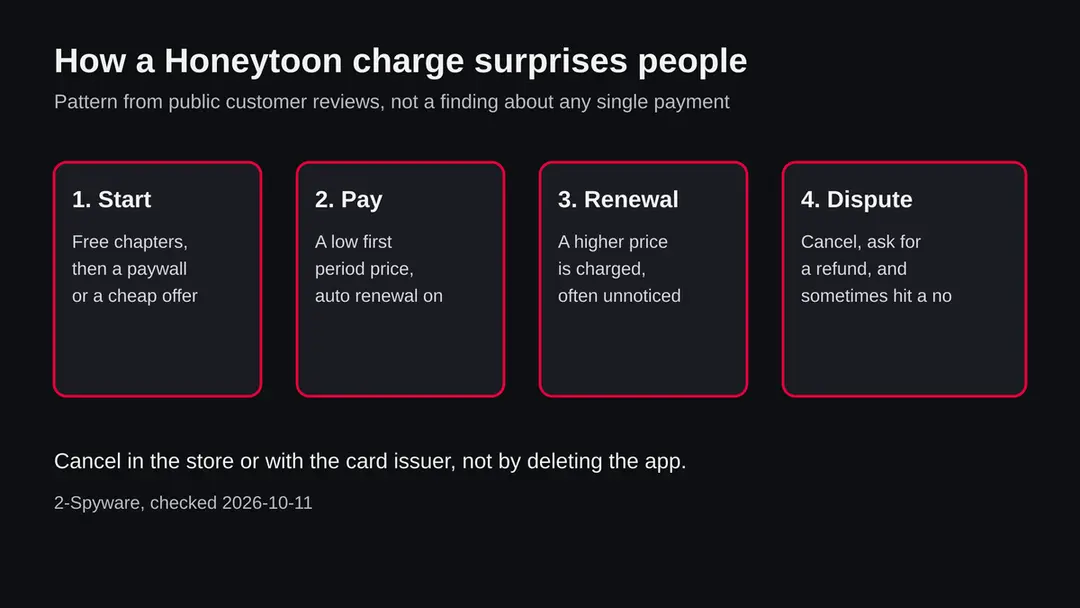
Honeytoon scam: summary
| Name | Honeytoon (honeytoon.com), a webtoon reading app and website |
|---|---|
| Type | Digital comics service with paid memberships; the question is about billing, not about malware |
| Risk | Medium for your wallet: auto renewal and cancelling complaints. No malware report found |
| Symptoms | A charge you did not expect, a higher price at renewal, a refund that was refused, a cancel option you cannot find |
| How to get rid of it | Cancel the subscription in the App Store or Google Play, ask the store for a refund, uninstall the app if you do not want it |
| Our check (11 October 2026) | Desk research only: no site test, no app test, no URLhaus entry in our data |
Show 10 more facts
| Devices | iPhone and Android phones, and the website in a browser |
|---|---|
| Microsoft detection | No Microsoft detection name is known: this is a subscription question, not a Windows threat |
| Evidence | 0 write-ups by security sites; details still limited |
| Domains | honeytoon.com |
| Ads shown as | Redirects through ad pages |
| Browsers | Chrome, Edge and Firefox |
| First seen | 11 October 2026 |
| Distribution | Typically ad scripts on free streaming, file-hosting and adult sites, typo domains and hacked websites |
| Damage | Redirects to scam pages, fake updates and tech support scams |
| Facts checked | 11 October 2026 |
Facts checked on 11 October 2026 from public pages found by search:
- customer reviews on Trustpilot
- an independent review
- Google Play and Apple help pages
- legal coverage of the FTC click to cancel rule
We did not install the app, make a purchase, or test the website, and we did not read the official store listing.
Is Honeytoon a scam? The short answer
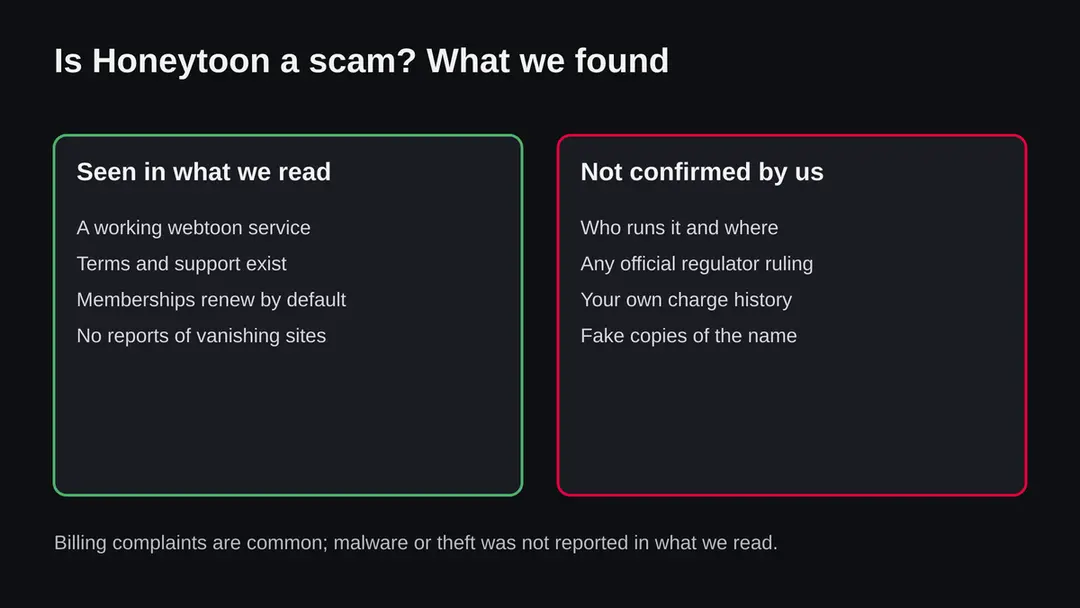
Honeytoon is not shown to be a scam in the sense of a fake shop, but it draws many complaints about charges. What we read describes a real webtoon service, which means comics made for scrolling on a phone, and the complaints are about automatic renewals, cancelling and refunds. We found no report of malware and no ruling by a regulator.
That answer needs care, because the question people type, honeytoon scam, covers three different worries. One worry is a charge you do not understand. A second is whether the app can harm the phone.
A third is whether a message, a page or a download that uses the Honeytoon name is fake. This guide takes them in turn, says what is confirmed and what is not, and ends with steps you can follow today.
We name a real business here, so we hold to a simple rule. We call something a scam only when a primary source says so, such as a regulator, a court or the company itself. We have no such source for Honeytoon. What we do have is a pattern in customer reviews, and a pattern in reviews is a reason to be careful with your money, not a verdict.
- What it is
- A webtoon platform: vertically scrolling digital comics for phones, with free and paid parts
- What people complain about
- Unexpected charges, auto renewal, unclear price after a first period, hard to cancel, refunds refused
- What we did not find
- A malware report, a regulator ruling, or a report of a site that takes money and disappears
- What we could not confirm
- The company behind it, its exact prices, and the official store description
- Your first move
- Look at your App Store or Google Play purchase history and your card statement
Is Honeytoon scam dangerous?
What we checked for this guide, and what we could not
This guide rests on desk research done on 11 October 2026. We did not install the app, we did not make a purchase and we did not test the website, because the subject of this page is a name, not an address, and our server made no request. Everything below is therefore a reading of public pages, not a test of the app.
Honeytoon · desk research · 11 October 2026
- Is it a working serviceAn independent review we read describes Honeytoon as an operating webtoon service with published terms, customer support and a large number of users.
- Renewal termsThe same review reports that the company's checkout information says memberships renew automatically unless cancelled, and that the first discounted period can cost less than the renewal.
- Customer reviewsTrustpilot reviewers describe unexpected charges, unclear renewal plans, trouble cancelling and refused refunds. One reviewer said they bought a 49.99 dollar subscription by mistake, cancelled at once and was still refused a refund. This is one person's account, which we cannot verify.
- Trust scoresScoring sites disagree: one gives a low score of 31.9 and another gives a score as high as 77. We do not rely on either.
- Search results for the nameMany pages that rank for the name are copied templates on unrelated domains. We gave them no weight and cite none of them.
- Official store listingWe did not read the Google Play or App Store description, so we do not state the owner, the country or the prices.
- Malware listsOur job data held no URLhaus entry for this name. That is not a clearance, because no address was tested.
A billing risk, not a confirmed scam A working service with a pattern of billing complaints. Not proven to be a scam, not shown to be malware, and not cleared either.
How a Honeytoon charge surprises people
The surprise usually comes from the order of events, not from a hidden trick: free chapters, a paywall, an offer, and then a renewal that arrives weeks later at a different price. The diagram shows the common path described in reviews.
None of the steps is unusual by itself. Together they are easy to miss, because the renewal happens when you are not looking at the app. The store sends a receipt by email, and many people never open it. The first useful habit is to read that receipt on the day you buy and note the renewal date in your calendar.
Fake Honeytoon messages, pages and downloads
A popular name attracts imitations. We have no list of fake Honeytoon pages, so we do not claim that any exist today, but you should assume that a message using the name can be false until you check it inside the real app.
Common signs of a fake are the same everywhere. The message creates a deadline, such as your account will be closed in 24 hours. The link goes to an address that is not the one you know. The page asks for a full card number, a one time code or a password.
A download is offered outside the store, as an APK or a profile to install. A real subscription problem can be checked without any link: open the store's Subscriptions screen or the app's own account page and look there.
If you already entered card details on a page you doubt, call the bank, ask for the card to be blocked and replaced, and watch the statements for some weeks. If you entered a password, change it everywhere you used it.
If you installed a file from outside the store on Android, uninstall it, search Settings for Install unknown apps and switch it off for the browser and messengers, then run Play Protect.
How Honeytoon scam got onto your phone
What is Honeytoon
Honeytoon is a digital platform for webtoons. A webtoon is a comic laid out as one long vertical strip, made to be read by scrolling on a phone. Write-ups describe genres such as romance, fantasy, action and drama, and say the app is offered for iPhone and Android with a website as well.
Like most reading apps of this kind, it mixes free and paid content. Some chapters can be read at no cost, and others sit behind coins, passes or a membership. That mix is the root of most of the trouble people describe.
A free start, a paywall at an exciting moment and a cheap first offer are normal in this business, and they make it easy to subscribe in a hurry and forget the renewal.
We could not read the official store description in this research, so we do not state who owns Honeytoon, where it is based or what each plan costs. Those facts belong to the company and the stores. If you need them, open the app's page in the App Store or Google Play and its terms of service, which are linked from the app and the website.
Why people search for honeytoon scam
People search for honeytoon scam mostly because of a payment. The common stories in reviews are a charge on a card statement that the person did not expect, a subscription that renewed at a higher price, and a cancellation that did not seem to work.
Reviewers also describe what they call a lack of direct unsubscribe links and of renewal reminders. Refund requests are a frequent theme. A single review is not proof, but when many unrelated people describe the same steps, it tells you where to look first. The pattern is also common to many subscription apps, which is why regulators in several countries have looked at automatic renewal rules.
In the United States, the Federal Trade Commission tried to tighten these rules with a click to cancel rule. According to legal coverage we read, a federal appeals court vacated that rule on 8 July 2025 on procedural grounds, so it is not in force, and the same coverage says state automatic renewal laws still apply.
We make no claim that any rule was broken by Honeytoon. The point for you is that the store settings and your card issuer are your dependable tools, more than any promise of an easy cancel button.
A second reason for the search is fear that the name hides something worse. Anyone can write a scam message that uses a known brand, so a text that says you owe money to Honeytoon, or that your account will be closed unless you click, deserves the same suspicion as any unexpected message. We cover that case further down.
| What you notice | Most likely meaning | What to do |
|---|---|---|
| A charge you did not expect from the store | A subscription or pass renewed, perhaps after a cheap first period | Check Subscriptions in the store, cancel, ask for a refund |
| A charge from the website on your card | A web purchase renewed automatically | Cancel in the account on the site, then ask the card issuer if the company refuses |
| A charge for a purchase you never made | Another person used your card or account | Call your bank, change passwords, check family devices |
| A text or email about an overdue Honeytoon bill | Possible phishing that borrows the name | Do not click; check inside the real app or your bank statement |
| A file or APK called Honeytoon from a link | Not the official app; treat as unsafe | Delete it and install only from the store listing |
How to remove Honeytoon scam
How to cancel Honeytoon and protect your money on iPhone and Android
There is nothing to remove from the phone except the app itself.
The work is to stop the billing, ask for a refund and block a repeat.
Step 1: Find the charge
Search your email for a receipt from Apple, Google Play or Honeytoon, and look at your card statement for the exact date and amount.
A store receipt means you cancel in the store. A receipt from Honeytoon itself means you cancel on its website. Write down the date of the next renewal if one is shown.
Step 2: Cancel on iPhone
Open Settings, tap your name and choose Subscriptions (iOS 26). Select Honeytoon and tap Cancel Subscription.
If no Cancel option is shown, the subscription is probably already cancelled. Deleting the app does not stop billing, so do this first.
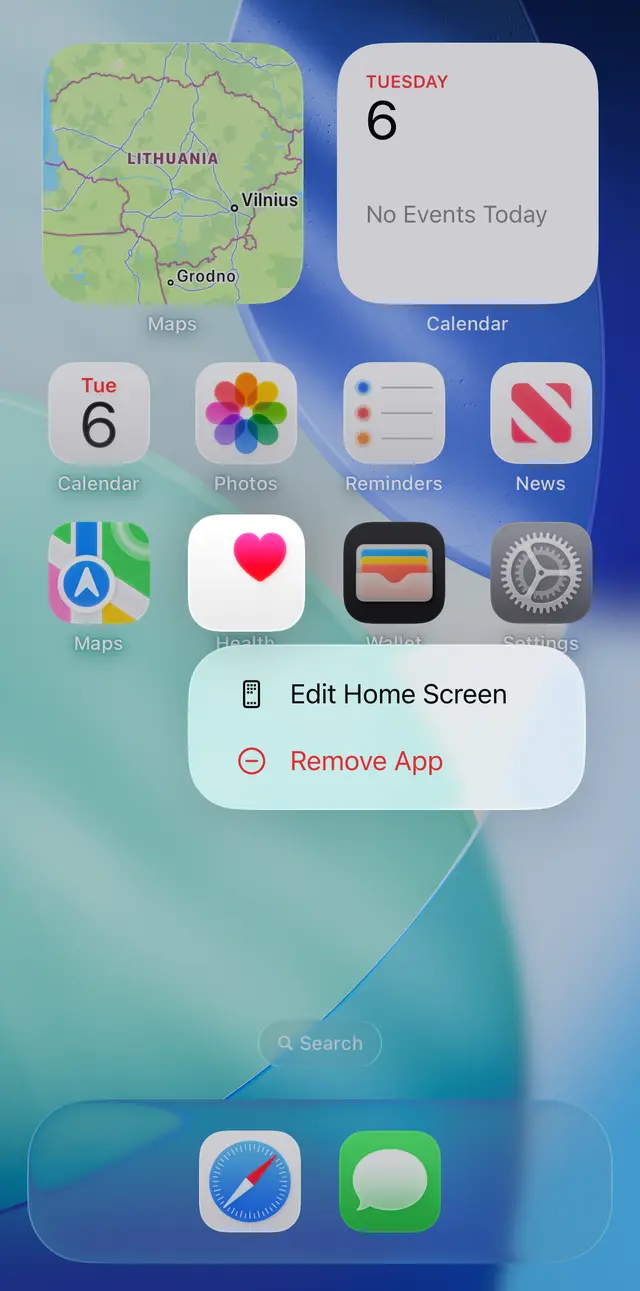
iOS 26: touch and hold the app icon, then choose Remove App, but only after you have cancelled the subscription. Step 3: Cancel on Android
Open Google Play, tap your profile picture and choose Payments and subscriptions > Subscriptions (Android 14). Pick Honeytoon and tap Cancel subscription.
Google's help page says you can also pause payments from the same screen. A payment plan that was already charged may still be owed for its term.
Step 4: Ask the store for a refund
On iPhone use Apple's Report a Problem page, choose the charge and give a reason. On Android use the refund request page in Google Play help and pick the subscription.
State plainly if the purchase was a mistake or the renewal was not clear to you. The store decides, and approval is not guaranteed.
Step 5: Handle a website payment
Sign in to your Honeytoon account on the website and cancel the membership there, then keep a screenshot of the confirmation. If the charges continue, call your card issuer and ask about a dispute. Give your dates and proof of cancelling, and do it soon.
Step 6: Uninstall the app if you are done
On iPhone touch and hold the icon and choose Remove App. On Android touch and hold the icon and choose Uninstall, or open Settings > Apps.
Only do this after cancelling. If Uninstall is greyed out on Android, search Settings for Device admin apps and switch the app off first.
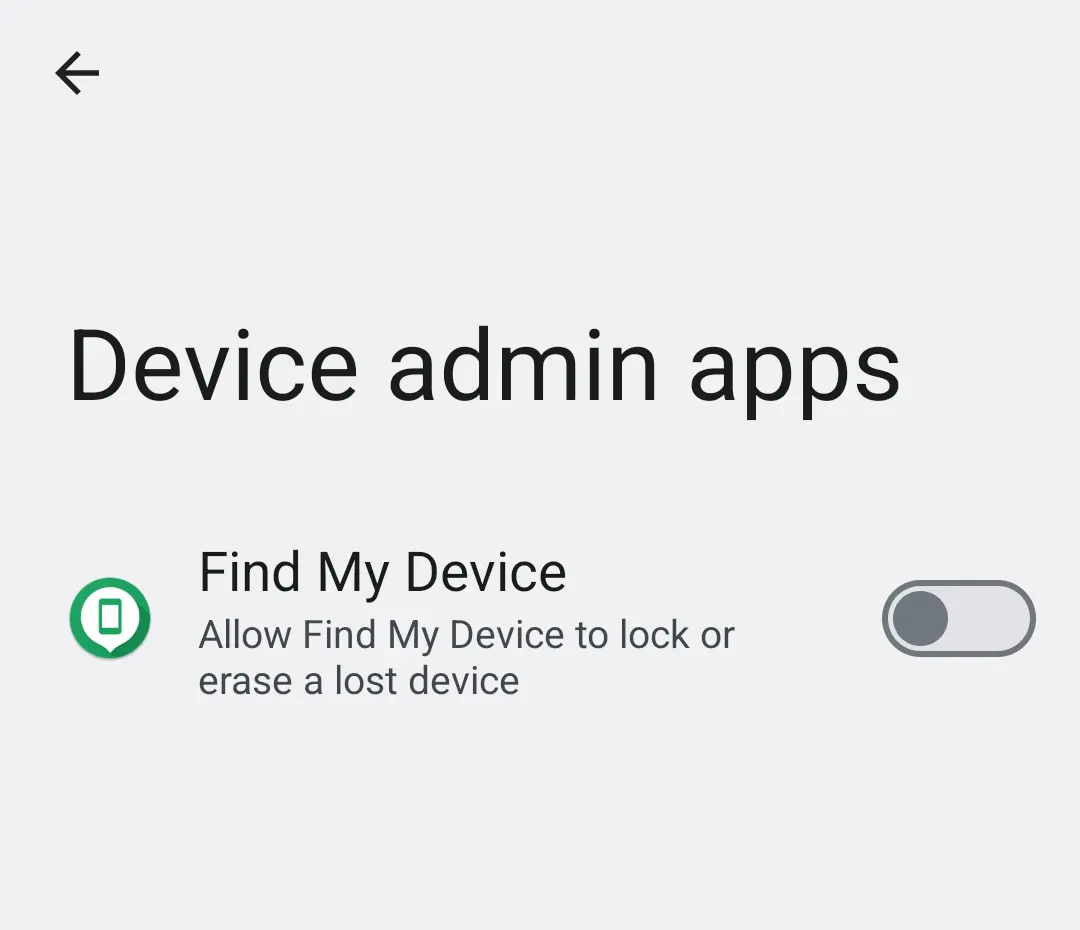
Android 14: Settings, Device admin apps. A comic reader has no reason to appear here switched on. Step 7: Protect the account and the card
If you reused your Honeytoon password anywhere, change it everywhere. Watch your statements for several weeks.
Warning: Do not click links in messages that claim you owe Honeytoon money, and do not pay for a Honeytoon remover.
Nothing of the kind is needed.
What to do if you were charged
Work from the money backwards: find the charge, cancel the renewal, ask for a refund, and only then think about the app. The diagram gives the order. Speed matters, because stores judge refund requests on how recent the purchase is.
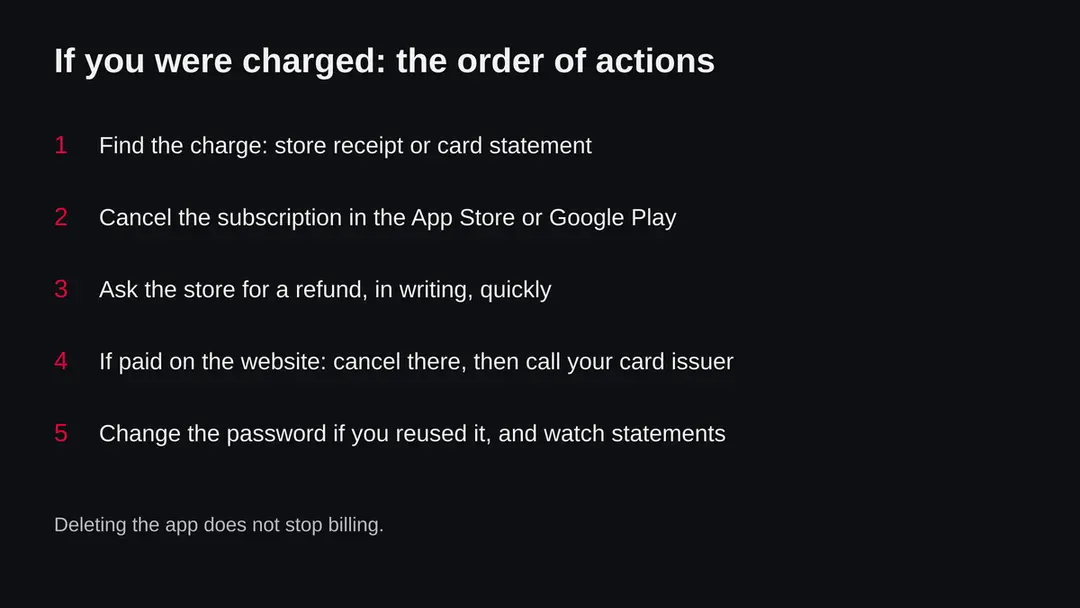
- 1
Find where you paid
Open your email and search for a receipt from Apple, Google Play or Honeytoon. A receipt from Apple or Google means a store purchase. A receipt from Honeytoon, or a card line with the Honeytoon name, means a website purchase. The two are cancelled in different places.
- 2
Cancel a store subscription
On iPhone open Settings, tap your name, then Subscriptions, choose Honeytoon and tap Cancel Subscription. On Android open Google Play, tap your profile picture > Payments and subscriptions > Subscriptions, choose Honeytoon and tap Cancel subscription. Google's help page notes that you can stop a plan from renewing, but a payment plan already charged may still be owed for its term.
- 3
Ask for a refund
Cancelling does not refund the last charge. For an App Store purchase use Apple's Report a Problem page, pick the charge and give a reason. For Google Play use the refund request page in Google's help. Write briefly what happened, such as a purchase by mistake or a renewal you did not expect. Approval is not guaranteed and the decision is the store's.
- 4
Cancel a website purchase
Sign in to your account on the Honeytoon website, find the membership page and cancel there. Keep a screenshot of the confirmation. If you cannot find the option, write to the support address in the terms and keep a copy of your message.
- 5
Use your card issuer if needed
If a web charge continues after you cancelled, or the company refuses a refund you think is fair, call your bank or card issuer and ask about a dispute. Give the dates, the amounts and your cancellation proof. Do this soon, because banks set time limits.
After removal: keep the ads from coming back
We do not know who owns the service, how many people were charged by mistake, or whether a regulator has ever looked at it. We also do not know whether the complaints we read are typical of all users or only of the unhappy ones, since people with a problem write reviews more often than people without one.
The scoring sites we saw disagree, and the independent write-ups conflict in tone. For that reason this page does not give a verdict of safe or unsafe.
It says that the evidence points to a billing risk, and it tells you how to protect yourself against that risk. If a primary source appears later, such as a regulator notice or a statement by the company, we will update this guide and say what changed.
A quiet record is also not a clearance. The lack of a malware report in what we read does not prove that none exists, and we did not test the app. Treat the app like any other app that charges money.
Questions about Honeytoon scam
Is Honeytoon a scam?
Honeytoon is not a scam in the sense of a site that takes your money and vanishes, but it is a service with many billing complaints, and we cannot call it harmless. What we read describes a working webtoon service, which is vertically scrolling comics made for phones, with published terms and customer support.
Reviewers on Trustpilot mostly complain about automatic renewals, unclear prices after a cheap first period, difficulty cancelling and refused refunds. We found no regulator ruling and no malware report. Check your own charges before you decide anything.
Is Honeytoon safe?
Based on what we read, Honeytoon is more of a billing risk than a safety risk. An app from the App Store or Google Play is reviewed before listing, and we found no report that Honeytoon installs a virus or steals data.
We did not install it or test it ourselves, so we cannot promise anything about the app's code. The sensible precautions are the usual ones:
- do not give it permissions it does not need
- pay through the store rather than typing a card into unknown pages
- read the renewal terms before you subscribe
What is Honeytoon?
Honeytoon is described by independent write-ups as a digital platform for webtoons, vertically scrolling comics built for reading on a phone, with romance, fantasy and drama among its genres. Part of the content is free and part sits behind coins, passes or a membership.
We could not read the official store description in this research, so the details of its catalogue, owner and pricing are not confirmed here. Read the terms inside the app or on the official site before paying.
How do I cancel a Honeytoon subscription?
Open the place where you paid. On iPhone go to Settings, tap your name, then Subscriptions, choose Honeytoon and tap Cancel Subscription. On Android open Google Play, tap your profile picture, then Payments and subscriptions, then Subscriptions, choose Honeytoon and tap Cancel subscription.
If you paid on the website with a card, cancel in your account there and keep the confirmation. Deleting the app does not stop billing. If no Cancel option is shown, the subscription is probably already cancelled.
Can I get a refund from Honeytoon?
You can ask, but a refund is never guaranteed. For a purchase made through the App Store, use Apple's Report a Problem page, pick the charge and explain what happened. For Google Play, use the refund request page in Google Play's help and choose the subscription.
Do it soon after the charge, and say plainly if the purchase was by accident or the renewal was not clear. Reviewers report that Honeytoon itself refused some refunds, so the store request is usually the better route. If the charge came by card on the website and the company refuses, ask your card issuer about a dispute.
Why was I charged by Honeytoon?
The most likely reason is an automatic renewal. The company's checkout information, as summarised by an independent review, says memberships renew unless cancelled, and the first period can cost less than the later price.
Check your App Store or Google Play purchase history and your card statement for the exact amount and date. If you do not recognise any purchase at all, someone else may have used your card or a family member may have used your account, so change your password and tell your bank.
Are the Honeytoon reviews good or bad?
Reviews are mixed, and we cannot give a single score. We saw a Trustpilot page with hundreds of reviews and many complaints about charges and cancelling, and aggregators that gave very different trust scores, one low and one high.
Several pages that rank for the name are low quality copies written for search engines, so we gave them no weight. Read recent reviews that describe a specific charge, and treat a single score with care.
Can someone use the Honeytoon name to scam me?
Sometimes, because the name is popular. Anyone can copy a well known name for a fake download page, a fake login or a text message that claims you owe money.
Only install the app from the official App Store or Google Play listing, never from a link in a message or an APK file sent by someone. A message that says your Honeytoon account is suspended and asks for a card number is a phishing attempt until you have checked it inside the real app.
Do I need a Honeytoon remover or antivirus?
No. This page does not recommend any removal tool and nothing here needs one. Honeytoon is a service, not an infection, so the work is to cancel what you pay for, uninstall the app if you no longer want it, and watch your statements.
Any page that offers a Honeytoon remover or cleaner is selling you something. The free steps in this guide, using Apple's and Google's own settings, are all that is needed.
Sources
- Trustpilot: HoneyToon reviews (customer complaints about charges and cancelling) (read October 11, 2026)
- Independent write-up: Is Honeytoon safe (low quality domain, used only for the general description, treated as unverified) (read October 11, 2026)
- Google Play Help: Cancel, pause, or change a subscription on Google Play (read October 11, 2026)
- Apple Support: Cancel a subscription from Apple (read October 11, 2026)
- JD Supra: FTC click to cancel rule struck down by the Eighth Circuit (8 July 2025) (read October 11, 2026)