
loop-lumen.com: a Mac stealer download site (AMOS, ClickFix) and what to do if you pasted its command
loop-lumen.com is a website that URLhaus lists for serving Mac malware tagged AMOS (Atomic macOS Stealer) and ClickFix, and it answered our test with a Cloudflare 520 error. If you pasted a command from it into Terminal, treat the Mac as compromised:
- change your passwords from another device
- move any crypto
- then erase the Mac
Facts checked October 6, 2026. Removal steps checked against Apple's current documentation and the security vendors' reports. We have not run the malware on a Mac.
Automatic
Get a free scan and check if your Mac is infected.
Fortect for Mac scans for malware and unwanted programs, and its free scan shows what it finds before you decide anything.
An automatic scan checks installed programs, startup items and browser extensions for anything that came with a download or a pasted command from loop-lumen.com.
Do it yourself · free Remove loop-lumen.com (AMOS, ClickFix) yourself 7 steps, about 21 minutes, no software needed.
Start the steps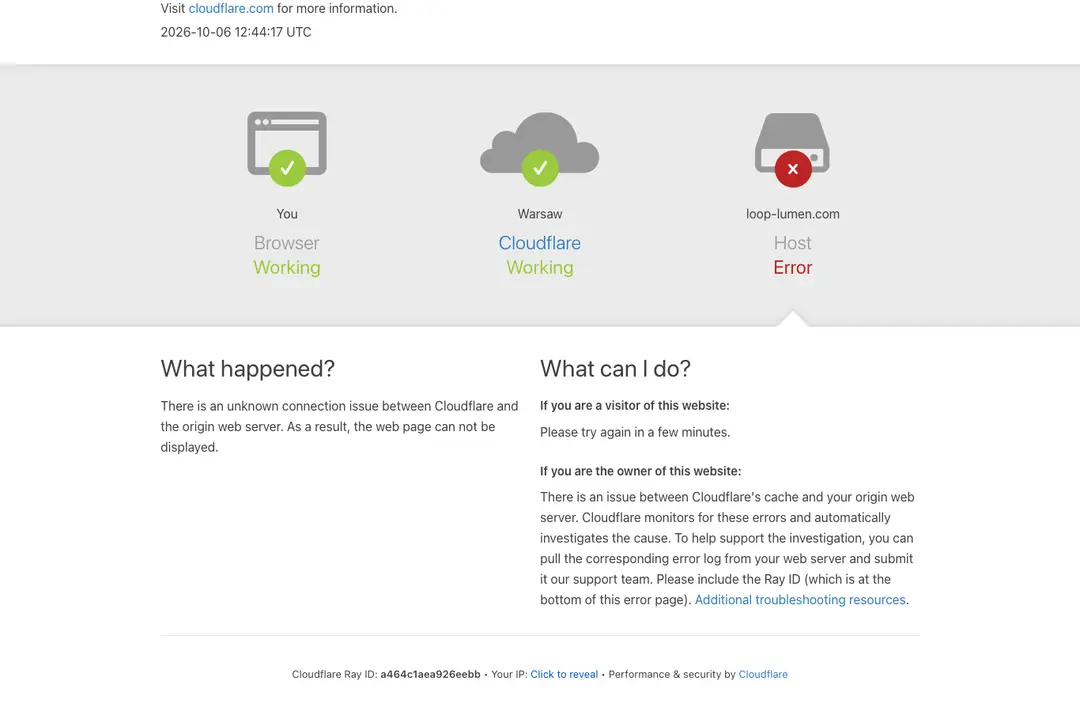
Loop-lumen.com (AMOS, ClickFix): summary
| Type | A malware download site for Macs: URLhaus tags it amos (Atomic macOS Stealer), stealer and ClickFix |
|---|---|
| Risk | High if you pasted its command or opened its zip: passwords, cookies, Keychain, wallets and files may have been taken |
| Symptoms | Often none. A fake password box, Terminal asking for access and hidden folders are the signs in the reports |
| How to get rid of it | Change passwords from another device, move crypto, revoke sessions and keys, then back up documents and erase the Mac |
| Our check (6 October 2026) | One visit: Cloudflare error 520, no page. A quiet or broken site clears nothing; the danger rating comes from URLhaus |
| Running since / first seen | Domain registered 1 September 2026; three malware URLs reported 9 September 2026 |
| Removal | Scan the Mac with security software to find the malware and anything installed with it. Fortect for Mac scans for malware and unwanted programs. Remove it nowTo use the full-featured product, you have to purchase a license for Fortect. The scan is free. |
Show 10 more facts
| Platform | macOS, by the tags; no source says Windows or phones are affected |
|---|---|
| Detection names | No Microsoft detection name is known (a Mac threat). For AMOS in general, Trend Micro uses Trojan.MacOS.Amos.PFH and Symantec lists OSX.Trojan.Gen and WS.Malware.1; none of these was checked against the loop-lumen.com files |
| Blocked by | Spamhaus DBL, SURBL, Quad9, AdGuard DNS, Cloudflare DNS, ProtonDNS, OpenBLD |
| Name | Loop-lumen.com |
| Domain registered | 1 September 2026 |
| Evidence | 3 write-ups by security sites; details still limited |
| First seen | 9 September 2026 |
| Distribution | Typically fake installers, cracked programs, e-mail attachments, fake "verify you are human" pages and ads for popular apps |
| Damage | Installs other malware, often several programs at once |
| Facts checked | 6 October 2026 |
Facts checked on 6 October 2026 against the URLhaus pages for loop-lumen.com and app.zip, RDAP, one browser visit of our own, and published reports by Kaspersky, Unit 42, Sophos, Broadcom, Trend Micro, Malwarebytes, Huntress, Apple and Ledger. We did not download the files and we infected no Mac; the removal steps follow Apple's pages and the vendors' advice and were not tried on a live infection.
What loop-lumen.com is, and what we know about it
loop-lumen.com is not a program on your Mac. It is a web address that the abuse.ch project URLhaus lists as a place where Mac malware was served. There is no public write-up of this one site that we could find, so what follows is what URLhaus shows, what we saw ourselves, and what security vendors have published about the malware family it is tagged with.
- 1
What URLhaus lists
Three file addresses on loop-lumen.com, all in a folder called zxc and all added on 9 September 2026: app.zip, apptwo.zip and appex.zip. Each carries the same five tags: amos, macos, stealer, wallet-hijack and ClickFix. The reporter is anonymous. URLhaus marks app.zip as online and the other two as offline.
- 2
What the tags mean
amos is the Atomic macOS Stealer, a password and wallet thief for Macs. ClickFix is a trick in which a fake verification page makes you run a command yourself. macos says the target is the Mac. wallet-hijack is the reporter's own label; URLhaus gives no explanation, but vendors describe AMOS swapping hardware-wallet apps for fake ones, which fits it.
- 3
What we could not confirm
We did not download the zip files and we did not see the page that tells visitors to paste a command. So we do not know what lure loop-lumen.com used, what exactly is inside the zip files, or whether anything on Windows is affected. The AMOS label is the reporter's tag; URLhaus shows no malware signature for the file.
- 4
What this means for you
If you only saw the name in a log, a link or a warning, you are not infected by that alone. The risk is for people who downloaded something from the site or pasted a command it showed them into Terminal on a Mac.
- Kind of threat
- A malware download site for macOS; the malware is tagged as the Atomic macOS Stealer (AMOS)
- Delivery trick
- ClickFix: a fake verification page that asks you to copy a command and paste it into Terminal
- Domain registered
- 1 September 2026, expires 1 September 2027, registrar Dominet (HK) Limited (RDAP, read 6 October 2026)
- URLhaus entries
- 3 file addresses, all added 9 September 2026; 1 online, 2 offline when we read the page
- Hosted behind
- Cloudflare: both addresses URLhaus saw for the domain belong to Cloudflare, so the real server is not visible
- Platform
- macOS, by the tags. Whether Windows, iPhone or Android are hit is not stated by any source we read
What loop-lumen.com (AMOS, ClickFix) does on an infected Mac
What we checked on 6 October 2026, and what we could not
We opened loop-lumen.com once, from Lithuania, in an automated Chromium browser set to English. The site did not load: Cloudflare answered with a 520 error. That tells you nothing good about the site, and it clears nothing.
Our site test, 6 October 2026, 12:44 UTC
- The site did not answerStatus 520, title "loop-lumen.com | 520: Web server is returning an unknown error". Cloudflare explains a 520 as an unknown connection problem between Cloudflare and the origin web server. The server behind it did not give a page to our visit.
- Why that is not a clean resultA 520 can mean the criminals took the server down, that it blocks our kind of visitor, or that it was briefly broken. We cannot tell which from one visit. Sites that hand out malware often show different things by country, device or visit.
- Notification request, pop-ups, redirects, ad networksNone seen. There was nothing to see: only the Cloudflare error page loaded.
- URLhaus listingThree malware URLs on this domain, tagged amos, macos, stealer, wallet-hijack and ClickFix. URLhaus listed app.zip as online when we read its page on 6 October 2026.
- BlocklistsSpamhaus DBL (abused domain, malware), SURBL, Quad9, AdGuard DNS, Cloudflare DNS, ProtonDNS and OpenBLD block it. DNS4EU and Control D HaGeZi did not, when URLhaus checked.
- Downloads and the page itselfWe did not download the zip files and we did not reach the page that shows the command. We cannot tell you what the page says or what the files do.
Dangerous: treat it as a malware site The site test was one visit that ended in an error, so it proves nothing either way. The danger rating comes from the three URLhaus reports and the blocklists, not from our visit. Do not open the site, and do not run anything it gives you.
What happened to loop-lumen.com, from registration to our test
The timeline is short: the domain is five weeks old. The dates come from RDAP and from the URLhaus pages for the host and for app.zip.
1 September 2026
The domain is registered
RDAP shows loop-lumen.com registered on 1 September 2026 through the registrar Dominet (HK) Limited, valid until 1 September 2027. URLhaus records the registration at 11:02 UTC the same day.
9 September 2026
Three malware URLs are reported
At about 15:59 UTC an anonymous reporter adds app.zip, apptwo.zip and appex.zip, all under the folder zxc, with the tags amos, macos, stealer, wallet-hijack and ClickFix. This is the first time URLhaus sees the host.
10 September 2026
URLhaus fetches a file and complains to Cloudflare
URLhaus retrieved a zip file from app.zip, with the SHA-256 beginning f8d09bb7, shortly before 05:00 UTC. It has no malware signature and no VirusTotal result on the page. At 04:47 UTC an abuse complaint was sent to Cloudflare's abuse address.
6 October 2026
Still listed, and our test gets a 520
URLhaus shows app.zip as online and says it has spread malware for more than 26 days. Our browser test the same day reaches only Cloudflare's error page.
Our test of loop-lumen.com on 6 October 2026, 12:44 UTC: Cloudflare error 520. The error is at the host behind Cloudflare, not at your browser.
How the ClickFix trick works on a Mac
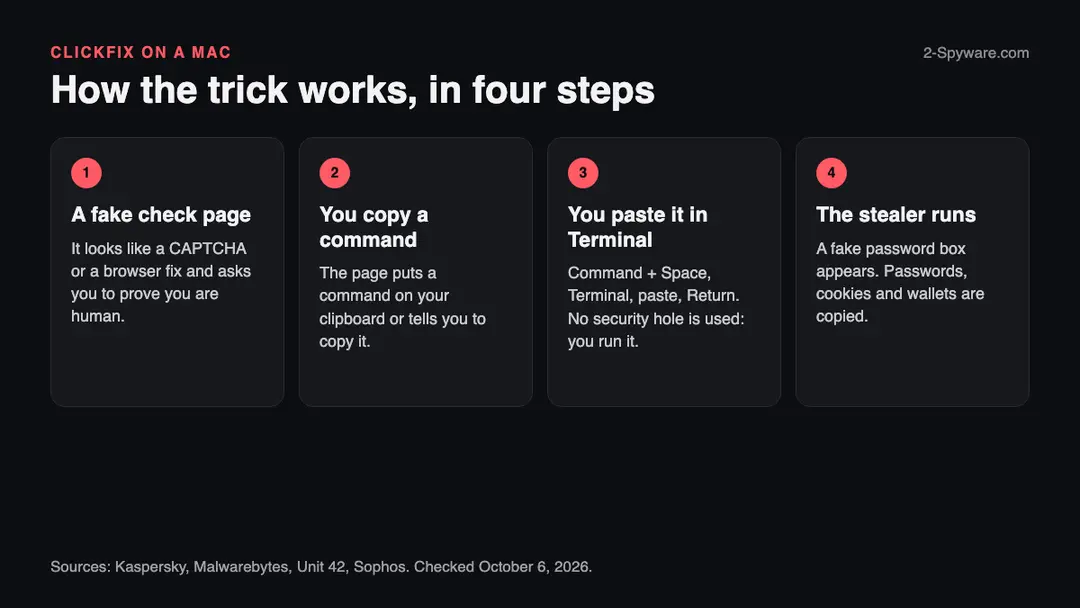
ClickFix does not use a security hole. It makes you do the infecting yourself, so your Mac's own warnings are part of the "instructions" you ignore. We did not see loop-lumen.com's page; this is how Kaspersky, Malwarebytes and Unit 42 describe the trick on Macs.
- 1
You land on a page with a check
It looks like a CAPTCHA, a human check, a browser fix or an install guide. Malwarebytes documented a fake Cloudflare check; Unit 42 documented a "macOS toolkit" quick-setup page. Both end with a command to copy.
- 2
It tells you to open Terminal
The Mac version of the instructions is: press Command + Space, type Terminal, paste the command and press Return. Kaspersky describes the same scene and notes the Windows version uses the Run window instead.
- 3
The command downloads the real malware
What you paste is a short line that fetches a script from the attackers' server. Kaspersky describes one variant that pulls a disk image to the /tmp folder under a random name, mounts it without showing it in Finder and launches the app inside. Unit 42 describes a variant that pulls a Zsh script, which unpacks a second script and a Mach-O program.
- 4
A password box appears
Kaspersky, Sophos and Unit 42 all describe a fake macOS password prompt. If you type your Mac password, the malware can use it to act as an administrator. Sophos adds that AMOS repeats the prompt until you give a correct password.
- 5
Nothing seems to happen
That is the point. A Terminal window that closes, or a CAPTCHA that never finishes, is the whole experience for most victims. Unit 42 saw Terminal ask for access to Finder, Desktop, Documents and Notes during the infection.
Unit 42 points out that a "quick setup" page like the toolkit one is not strictly ClickFix, because ClickFix usually poses as a check to reach a site you wanted; the copy-and-paste step and the result are the same.
What AMOS (Atomic macOS Stealer) is
AMOS is a ready-made password and wallet stealer for Macs that criminals rent or buy. The sources agree on the basics and differ on dates and on what each version does.
| Question | What the sources say | Source |
|---|---|---|
| What is it? | An information stealer for macOS that takes system information, logins and other data from browsers and crypto wallets | Unit 42, 16 September 2026 |
| Who sells it? | Sophos calls it part of a malware-as-a-service offering, so the people who use it are not the people who write it | Sophos, 14 May 2026 |
| How old is it? | Sophos says public reporting goes back to at least April 2023. Unit 42 says it was advertised on Telegram as early as April 2024. The sources disagree; we do not pick one | Sophos; Unit 42 |
| How common is it? | Sophos says AMOS made up almost 40% of its macOS protection updates in 2025, more than twice any other macOS family | Sophos |
| Does it change? | Yes. Unit 42 says domains, URLs, IP addresses, file names, hashes and paths change often, and calls it a family in active development. Trend Micro says AMOS rotates domains to dodge blocklists | Unit 42; Trend Micro |
| How does it arrive? | ClickFix commands, cracked-app downloads, malicious ads and fake installers | Unit 42; Sophos; Trend Micro |
| Which version is this site's? | Not known. Broadcom, citing Unit 42, describes a C++ variant called Odyssey that persists with LaunchAgents; Sophos describes one that persists with a LaunchDaemon. URLhaus does not say which one loop-lumen.com's file is | Broadcom, 24 June 2026; Sophos |
What loop-lumen.com (AMOS, ClickFix) can steal or download
What AMOS steals from a Mac
The list is long because AMOS collects everything it can find in one sweep and zips it for the attackers. Each item below is named by at least one of the sources; no single report lists all of them.
Reported as taken
- Browser passwords
- Browser cookies and session tokens
- Autofill data
- Saved bank cards
- Apple Keychain
- Your Mac login password
- Safari cookies
- Apple Notes
- Crypto wallet apps
- Crypto browser extensions
- Telegram data
- Discord data
- VPN profiles (OpenVPN)
- PDF, TXT and RTF files
- Files from Desktop, Documents and Downloads
- Cloud and server config files (aws, docker, gcloud, FileZilla)
- Shell history (zsh_history)
| Data | Detail | Source |
|---|---|---|
| Browsers | Cookies, saved logins and passwords, autofill and saved cards from Chrome, Edge, Brave, Opera, Arc, Vivaldi, CocCoc, Yandex and Firefox-based browsers such as Tor Browser and Waterfox | Kaspersky |
| Crypto | Desktop wallets (Exodus, Electrum, Atomic Wallet, Wasabi, Bitcoin Core, Binance and others) and data from more than 200 wallet browser extensions | Kaspersky |
| Hardware wallets | Replaces the Ledger Wallet and Trezor Suite apps with malicious fakes. The seed phrase, not the device, is the target | Kaspersky; Broadcom; Sophos |
| Apple's own data | Safari cookies, Apple Notes and passwords in the Keychain | Kaspersky; Sophos |
| Developer files | In Unit 42's test: folders for aws, docker, filezilla and gcloud, and the zsh history, packed into a file called out.zip | Unit 42 |
| How it leaves | Packed into a ZIP and sent to the attackers' server; Unit 42 saw HTTP POST requests with stage names such as credentials, browsers and wallets | Unit 42; Kaspersky |
What this can cost you
Reading the site or seeing its name costs nothing. The risks below apply to a Mac where the command was pasted or the zip was opened.
- High
Account takeover
Cookies and session tokens let someone use your logged-in email, social and work accounts without your password. Sophos calls the goal rapid account takeover.
- High
Crypto theft
Wallet files and seed phrases are the main prize. The wallet-hijack tag and the fake Ledger and Trezor apps point at the same thing. Stolen crypto cannot be reversed; Ledger says only law enforcement can pursue it.
- High
Your Mac password in the attackers' hands
The malware asks for it and keeps it. With it, an attacker can open the Keychain and approve actions on that Mac, so changing it matters as much as changing the web passwords.
- Medium
Keys and tokens from your work
Unit 42 saw cloud, container and file-transfer config folders taken. If you are a developer, keys and API tokens on the Mac are exposed.
- Medium
A hidden program that starts again
Sophos and Unit 42 describe AMOS leaving programs in hidden folders that start at login or boot. Until they are gone, the Mac keeps talking to the attackers.
- Low
Nothing, if you only saw the name
A name in a warning, a firewall log or a blocked link is not an infection.
What you may notice, and what you may not
Most victims notice nothing. The signs below are the ones the reports describe, and the first three happen during the infection, not after it.
| Sign | What the reports show |
|---|---|
| A password box you did not expect | A fake macOS system prompt for your login password, repeated until you enter the right one (Kaspersky, Sophos, Unit 42) |
| Terminal asks for permissions | Unit 42 saw requests to control Finder, and to reach the Desktop, Documents and Notes during the infection |
| A Terminal window that closes by itself | Malwarebytes describes a first-stage script that deletes itself and closes Terminal |
| Hidden folders and files | Names that start with a dot, for example .com.apple.accountsd and .com.apple.metadata.mds in Application Support (Unit 42), or .helper and .pass in your home folder (Huntress, Sophos) |
| Accounts you did not touch | Logins from new places, password-reset emails and messages sent from your accounts. This follows from stolen sessions; it is our reading, not a quote |
| Missing crypto | Balances that fall after the infection; the tag wallet-hijack points at it |
| Nothing at all | Stealers are built to finish in minutes and stay quiet |
How to check the Mac for loop-lumen.com (AMOS, ClickFix)
How people end up on a page like this
We do not know how visitors reach loop-lumen.com, and no source says. The routes below are the ones the sources name for AMOS and for ClickFix on Macs.
- 1
A fake human check on a site you wanted
A hacked or fake page shows a CAPTCHA and sends you on. Kaspersky and Malwarebytes describe this form.
- 2
A malicious ad or a search result
Unit 42 says AMOS has been spread through malicious ads. Huntress documented chat-answer links from ChatGPT and Grok that led to AMOS, and Sophos names AI-themed lures as a trend.
- 3
A cracked or free copy of Mac software
Trend Micro traced one AMOS campaign to a site hosting cracked Mac apps, and Unit 42 saw cracked-software and fake toolkit pages.
- 4
A link in an email or message
In a different Mac stealer case, Huntress says the victim followed a link in an email. That was not AMOS, but the route is the same.
- 5
A download you started
The three URLhaus files are zip archives. Opening a downloaded zip that claims to be an app is the other way in.
Check your Mac before you delete anything
Start with the question that matters: did you paste a command from a website into Terminal, or open a zip from loop-lumen.com? If yes, stop here and follow the numbered plan on this page (the Mac plan), because a clean-looking check does not clear a Mac. If you are not sure, do these checks first. None of them deletes anything.
While you check, stop using the Mac for banking, email, work or crypto, and disconnect it from Wi-Fi and network cables if you can: Malwarebytes tells people who ran such a command to stop sensitive use at once, and Huntress says the machine should be isolated.
- 1
Look at what you pasted
Open Terminal and scroll up in its window to see earlier commands. Do not run them again. Be warned that Huntress saw a different Mac stealer's command erase the Terminal history, so an empty history proves nothing.
- 2
Open the folders other reports found
In Finder choose Go > Go to Folder and type a path, as Apple's help describes. Try
~/Library/Application Support/and look for hidden folders starting with a dot: .com.apple.accountsd and .com.apple.metadata.mds (Unit 42). Hold Option and open the Go menu to see Library (Apple's tip). - 3
Look for files in your home folder
Sophos and Huntress list names such as .helper, .pass, .agent and .mainhelper in the home folder, and /Library/LaunchDaemons/com.finder.helper.plist. In Terminal,
ls -la ~lists hidden files; it only lists. These names come from other versions of the malware, so a match is a strong sign and no match does not clear the Mac. - 4
Look at Login Items and background items
Open Apple menu > System Settings > General > Login Items & Extensions. Apple says this is where apps allowed to run in the background are listed. Look for names you did not install, including names that copy Apple's, such as softwareupdate, accountsd or mdworker.
- 5
Look at running processes
Open Activity Monitor (Applications > Utilities). Apple's guide shows how to sort by CPU and quit a process. Names that imitate Apple's, such as AccountsHelper or mdworker_shared in Unit 42's test, are worth noting, but do not guess: write them down before quitting anything.
- 6
Look in /tmp and the LaunchAgents folder
Malwarebytes suggests checking /tmp and ~/Library/LaunchAgents. Unit 42, Huntress and Sophos name the other paths above. Huntress says that for the malware it studied, deleting the leftover files was enough and it did not return. That was a different malware, so do not take it as proof for this one.
- 7
Check your accounts
Look at the sign-in activity of your email, Apple Account, banks and exchanges for places and devices you do not know. Look at your crypto balances. This is quicker than any file check.
- 8
A scan helps, but it does not clear the Mac
A scan with a Mac security product can find known files. Treat a clean result the way you treat a clean site test: one data point. Do not rely on it to say the Mac is safe. No vendor publishes a removal procedure we could test for this site's file and we did not infect a Mac, so the order of the plan is our judgement from Malwarebytes, Huntress and Apple's pages, not a tested result.
How to remove loop-lumen.com (AMOS, ClickFix)
How to remove loop-lumen.com from a Mac
Start with the passwords and crypto, from another device: a stealer copies them in seconds.
Then clean the Mac, or erase it.
Step 1: Change passwords from another device first
If you pasted a command into Terminal or opened a downloaded file from loop-lumen.com, assume the passwords saved in the browsers and in Keychain on this Mac are known to the attacker.
From a phone or a clean computer, change the e-mail password first, then banking, shopping, social and work accounts, and sign out of all other sessions on each one.
Move any cryptocurrency to a new wallet created on a clean device, because a seed phrase that was stored on this Mac is compromised. Do this before cleaning the Mac: cleaning does not undo the theft.
Full procedure with screenshots: Turn on two-step verification / secure a hacked account
Step 2: Quit what is running that you do not recognize
Open Activity Monitor (in Applications > Utilities, or search for it with Command + Space).
In the CPU or Network tab, look for a process you did not install or whose name is random, select it, click the stop button (the octagon with an X) and choose Quit or Force Quit.
Note the name first: you will look for the same name in the next steps. Malware that comes back after a restart is handled in the next two steps.
Step 3: Remove unknown login items and background items
Open System Settings > General > Login Items & Extensions. Under Open at Login and Allow in the Background, switch off or remove anything you do not recognize, especially items whose developer is shown as an unknown name or that appeared on the day you ran the command.
Then open Finder, choose Go > Go to Folder and check
~/Library/LaunchAgents,/Library/LaunchAgentsand /Library/LaunchDaemons for property list (.plist) files you did not add. Drag suspicious ones to the Bin, then restart the Mac.Step 4: Delete apps and downloads you did not intend to install
Open the Applications folder and your Downloads folder. Drag any app you did not install, and any disk image (
.dmg), installer (.pkg) or archive (.zip) that came from loop-lumen.com or a site you do not trust, to the Bin, then empty the Bin.Also check
~/Library/Application Supportfor a folder with the same name as the app you removed.Step 5: Check the browsers for extensions and changed settings
In Safari open Settings > Extensions and General (homepage). In Chrome open
chrome://extensions, in Firefoxabout:addons.Remove any extension you did not add, and reset the homepage and search engine if they changed. Browsers hold saved passwords and cookies, which is why the password step comes first.
Step 6: If it was an infostealer, erase and reinstall macOS
Stealers copy data and often leave persistence you cannot be sure you found.
The only complete fix is to back up your personal files only (documents, photos, not apps or settings), then open System Settings > General > Transfer or Reset > Erase All Content and Settings, or use macOS Recovery to erase the disk and reinstall macOS, as Apple describes in its support articles.
Restore only your files afterwards, and install apps again from their official sources.
Step 7: Report it and watch your accounts
Report the site and the command to the authorities in your country, and tell your bank if any card was saved in a browser or in Keychain.
Over the next weeks watch your e-mail, bank and exchange accounts for sign-ins and transfers you did not make. Keep the notes you made, such as the process names and the file dates, in case a bank or the police ask for them.
Full procedure with screenshots: Report a cyber attack or scam to the authorities
If you use Windows, an iPhone or an Android phone
The tags and every source we read describe a Mac threat. We found nothing that says the three loop-lumen.com files run on anything else.
| Your device | What we know | What to do |
|---|---|---|
| Windows PC | The URLhaus tags say macos. A zip meant for a Mac does not run on Windows. ClickFix itself exists for Windows (Kaspersky), but we do not know what the loop-lumen.com page shows a Windows visitor | If you pasted a command on Windows, treat it as the same case with Windows steps and see our other guides; do not follow the Mac steps |
| iPhone or iPad | No source describes AMOS on iOS. The trick needs Terminal, which iPhones do not have | Nothing to remove. If you typed passwords on a page, change them |
| Android | No source mentions it | Nothing to remove for the Mac malware; change passwords if you entered any |
After removal: passwords, accounts and prevention
After a clean Mac: protect what was taken
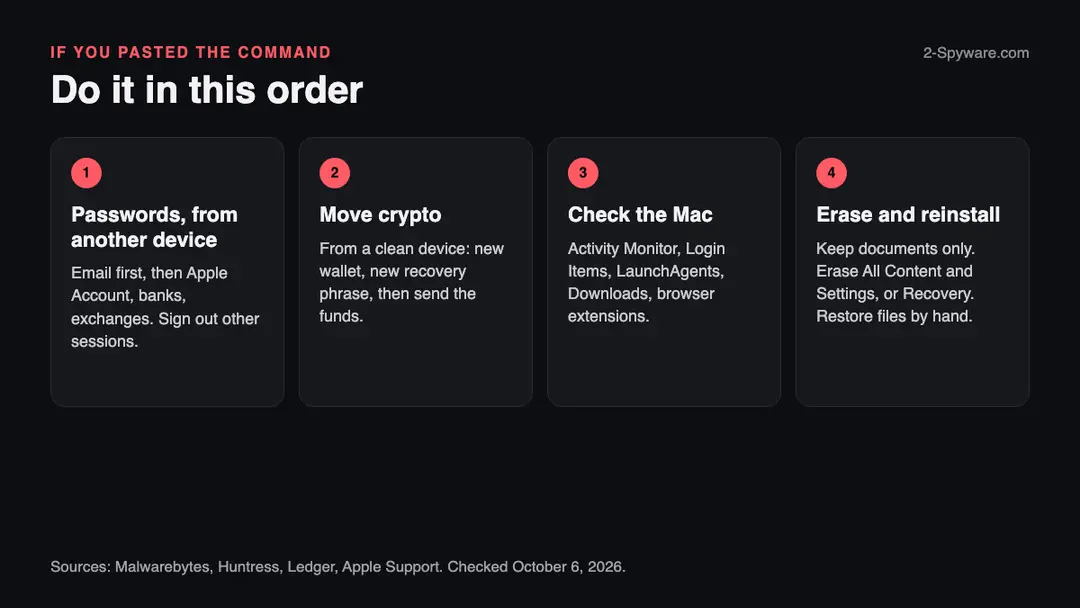
The Mac is one half. The other half is everything that was on it, which the attackers may already have. The order matters: other device first, then crypto, then the Mac.
- 1
Change Apple Account and other passwords from a clean device
Apple's page says to open Settings and choose your name, Sign-In & Security, Change Password, and to choose Remove Other Devices if offered. Passwords typed on the infected Mac go to the attackers too.
- 2
Sign out other sessions and revoke keys
Cookies were taken, so a new password alone may not end a stolen session. In each important account use the option to sign out everywhere. Revoke API tokens, SSH keys and cloud keys that were on the Mac, as Malwarebytes advises.
- 3
Move crypto first if a wallet was on the Mac
Ledger's guidance: if the 24-word recovery phrase may have been exposed, move funds to a temporary wallet, generate a new recovery phrase, add new accounts and send the funds there. Do this from a clean device, not the Mac.
- 4
Erase the Mac: what to keep and how
Erasing is the only step that removes unknown leftovers. Copy your documents and photos to an external drive; leave out apps and system folders. On a Mac with Apple silicon, or an Intel Mac with the T2 chip, open System Settings > General > Transfer or Reset > Erase All Content and Settings, enter your administrator information and follow the prompts (Apple). On other Intel Macs restart holding Command-R, use Disk Utility to erase the volume and choose Reinstall macOS (Apple).
- 5
Set up as new and restore only your files
Restoring a full Time Machine backup could bring back the malware if it was already in it. Restore documents by hand, install apps from their makers, and change your passwords once more once the Mac is clean.
- 6
Watch your money and your crypto
Check card statements and exchange logs for a few weeks. Turn on alerts. Thieves of crypto may drain slowly, as Huntress described for a different Mac stealer.
- 7
Rebuild logins in a password manager
After the erase, do not let the browser save passwords again. Use a password manager and two-step sign-in, ideally with an app or a security key rather than text messages.
- 8
Rotate Telegram and Discord
Both are named as targets. Log out other sessions and, in Telegram, remove devices you do not know.
- 9
Report it
File a report with your national cybercrime service. Ledger's page lists IC3 for the US, Action Fraud for the UK and Europol's report page for Europe. A police report is also what exchanges and banks ask for.
- 10
Tell the people you message
If your accounts were used to send links, tell your contacts not to open them.
Keep a Mac out of this kind of trap
The rule that would have stopped this site is one line: a website never needs you to paste something into Terminal.
Do
- Treat a request to paste a command into Terminal from a web page as an attack. Close the tab.
- Enter your Mac password only into the prompts you started yourself (Kaspersky).
- Install macOS updates; set them to automatic in System Settings > General > Software Update (Kaspersky).
- Get apps from the App Store or from their makers' own sites.
- Keep a backup of documents on a disk you unplug.
- Keep your recovery phrase offline and never type it into a computer (Ledger).
Don't
- Do not copy and paste a command to pass a CAPTCHA, to fix a browser or to "verify" you are human.
- Do not run cracked Mac apps or downloads from sites that promise free versions of paid software.
- Do not trust that macOS will warn you: Kaspersky's test command did not trigger a warning on macOS Tahoe 26.5.2.
- Do not open a zip that arrives by link or message and claims to be an app.
- Do not rely on a quiet scan to say that you are safe.
Questions about loop-lumen.com (AMOS, ClickFix)
What is loop-lumen.com?
It is a website that URLhaus lists for handing out Mac malware, not a program on your computer. Three file addresses on it, added on 9 September 2026, carry the tags amos, macos, stealer, wallet-hijack and ClickFix. The domain was registered on 1 September 2026, so it is only weeks old.
On 6 October 2026 our test visit got a Cloudflare 520 error instead of a page, so we cannot say what it shows visitors today. If you only saw the name in a warning or a log, you are not infected by that. If you ran a command or opened a zip from it, use the cleaning steps.
Is loop-lumen.com safe to open?
No, do not open it. URLhaus lists three malware downloads on the domain, and Spamhaus, SURBL, Quad9, AdGuard DNS, Cloudflare DNS, ProtonDNS and OpenBLD block it.
Our one visit on 6 October 2026 returned only an error page, which tells you nothing good about the site and clears nothing: sites that spread malware often show different content by country, device or visit.
Simply loading a page is a smaller risk than running what it tells you to run, but there is no reason to take either risk. Close the tab and block the domain.
What is AMOS, the Atomic macOS Stealer?
AMOS is an information-stealing program for Macs that criminals buy or rent. Sophos describes it as a malware-as-a-service offering and says it made up almost 40% of its macOS protection updates in 2025.
Kaspersky and Unit 42 say it takes browser passwords, cookies, saved cards, the Keychain, Apple Notes, crypto wallets, Telegram and Discord data and some documents, and sends them to the attackers as one zip file.
Its domains and file names change often. The tags on loop-lumen.com name AMOS, but URLhaus gives no signature for the file, so treat that as the reporter's label.
What is ClickFix and why does a page ask me to paste a command?
ClickFix is a trick that makes you run the malware yourself. A page shows a fake CAPTCHA, browser error or install guide and tells you to copy a command, open Terminal on a Mac, paste it and press Return.
Because you start it, macOS does not treat it as a download and may show no warning; Kaspersky's test command raised none on macOS Tahoe 26.5.2. No real CAPTCHA or website needs a command in Terminal. If a page asks for one, close the tab, and if you already ran it, do not wait to see what happens.
I pasted the command into Terminal. What do I do now?
Stop using the Mac for banking, email and crypto and disconnect it from the network. From a different device change your passwords, starting with email and your Apple Account, and sign out of all sessions. If a crypto wallet was on the Mac, move the funds from a clean device and follow Ledger's steps for a possibly exposed recovery phrase.
Then back up your documents and erase the Mac. Do not enter the new passwords on the infected Mac, because the malware may still be watching. Check the Login Items and hidden folders only as extra information.
How do I remove AMOS from my Mac?
The only way that leaves no unknown leftovers is to erase the Mac and set it up again. We found no vendor procedure for this exact file, so the cleaning steps are our reading of Apple's pages and of Malwarebytes' and Huntress's advice.
You can look for the hidden folders and launch items the reports name and delete them, but those names change between versions, and a clean look does not clear the Mac. On a Mac with Apple silicon, use System Settings, General, Transfer or Reset, Erase All Content and Settings, after backing up documents.
What does AMOS steal?
It takes whatever it finds in one sweep. Reports name browser passwords, cookies, autofill and saved cards, the Keychain, Safari cookies, Apple Notes, desktop crypto wallets and wallet browser extensions, Telegram and Discord data, VPN profiles, PDF, text and document files, and in one test cloud and server config folders and shell history.
It also asks for your Mac login password with a fake prompt, which lets it act as an administrator. Some versions replace the Ledger and Trezor apps with fakes. No single report lists everything, and versions differ.
Does loop-lumen.com affect Windows, iPhone or Android?
We found no source saying it does. The URLhaus tags say macos, and every vendor report we read about AMOS describes a Mac threat. A zip built for a Mac does not run on Windows, and ClickFix on an iPhone fails because it needs Terminal.
ClickFix itself exists for Windows, where the command goes in the Run window, and we do not know what the loop-lumen.com page shows a Windows visitor. If you pasted a command on Windows, treat it as a separate infection and do not follow the Mac steps. Change passwords on any device where you typed them.
Will erasing my Mac remove it, and are my crypto funds safe?
Erasing the Mac removes everything on it, including hidden files you did not find, but it does not undo theft. Anything already sent to the attackers, passwords, cookies and wallet files, stays theirs, so change passwords and sessions from a clean device and move crypto using a new recovery phrase.
Ledger says the device itself stays usable, because a leaked phrase does not break the hardware, and that no one can reverse a blockchain transfer; only law enforcement can pursue the thief. Restore documents by hand, not a full backup, in case the malware is in it.
Will Fortect remove loop-lumen.com?
Fortect for Mac scans for malware and unwanted programs, and its free scan shows what it finds on your Mac before you decide anything.
For loop-lumen.com, follow the plan on this page as well: removing a launch item or an app is done in macOS itself, and a scanner cannot undo what was typed or entered on the infected Mac, such as saved passwords that were copied.
Change your passwords from another device first, and if the page tells you to erase the Mac, a scan is not a substitute. The free scan costs nothing and the full-featured product needs a license.
Sources
- URLhaus (abuse.ch): host page for loop-lumen.com (read October 6, 2026)
- URLhaus (abuse.ch): entry for the app.zip address on loop-lumen.com (read October 6, 2026)
- Kaspersky: ClickFix on macOS, how the Terminal-based attack works (read October 6, 2026)
- Palo Alto Networks Unit 42: Atomic macOS (AMOS) Stealer Activity (16 September 2026) (read October 6, 2026)
- Sophos X-Ops: Why AMOS matters, the macOS malware stealing data at scale (14 May 2026) (read October 6, 2026)
- Broadcom Symantec: AMOS malware deployed in latest ClickFix campaign targeting macOS users (24 June 2026) (read October 6, 2026)
- Trend Micro: An MDR analysis of the AMOS stealer campaign targeting macOS via cracked apps (4 September 2025) (read October 6, 2026)
- Malwarebytes: Infiniti Stealer, a macOS infostealer using ClickFix (a different stealer; used for the ClickFix steps and the what-to-do list), 26 March 2026 (read October 6, 2026)
- Huntress: Wallet-depleting macOS malware wants your crypto (a different stealer; used for the isolation advice and the history-clearing detail), 6 August 2026 (read October 6, 2026)
- Apple Support: Open items automatically when you log in on Mac (Login Items & Extensions) (read October 6, 2026)
- Apple Support: Go directly to a specific folder on Mac (read October 6, 2026)
- Apple Support: Activity Monitor User Guide for Mac (read October 6, 2026)
- Apple Support: Erase your Mac (Erase Assistant) (read October 6, 2026)
- Apple Support: Erase and reinstall macOS (Intel Macs without the T2 chip) (read October 6, 2026)
- Apple Support: Change your Apple Account password (read October 6, 2026)
- Ledger Support: Loss of funds (updated 9 September 2026) (read October 6, 2026)