
quillchant14.com: a Mac ClickFix site that serves the Amos stealer, and what to do if you pasted its command
quillchant14.com is a website that URLhaus lists for Mac malware downloads tagged ClickFix and Amos, and it answered our test with a Cloudflare error instead of a page. If you pasted a command from it into Terminal on your Mac, treat the Mac as compromised: change your passwords from another device, move any crypto, then erase and reinstall macOS.
Facts checked October 10, 2026. Removal steps checked against Apple's current documentation and the security vendors' reports. We have not run the malware on a Mac.
Automatic
Get a free scan and check if your Mac is infected.
Fortect for Mac scans for malware and unwanted programs, and its free scan shows what it finds before you decide anything.
If a script or program from quillchant14.com, or a command pasted from its page into Terminal keeps coming back after uninstalling, a scan can find what reinstalls it.
Do it yourself · free Remove quillchant14.com (ClickFix, Amos, macOS) yourself 7 steps, about 21 minutes, no software needed.
Start the steps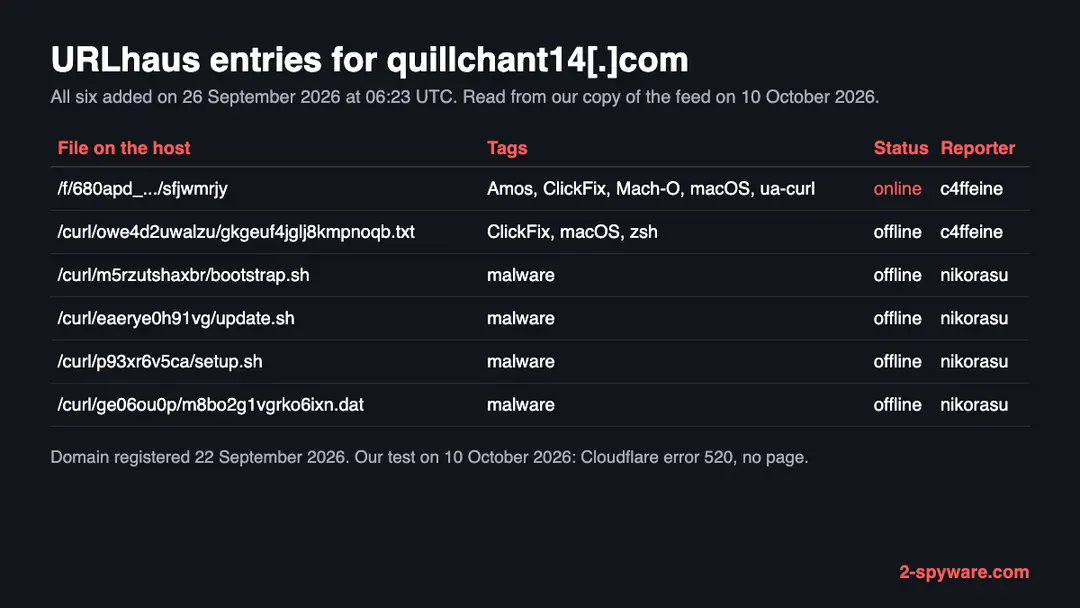
Quillchant14.com (ClickFix, Amos, macOS): summary
| Type | A malware download address for Macs: URLhaus lists a Mach-O program tagged Amos and zsh scripts tagged ClickFix |
|---|---|
| Risk | High if you pasted its command or opened its files: passwords, sessions, crypto and developer keys may have been taken |
| Symptoms | Often none. A strange line in the Terminal history, an unexpected password prompt or an unknown Login Item are the signs |
| How to get rid of it | Disconnect, change passwords from another device, move crypto, back up documents, then erase the Mac and reinstall macOS |
| Our check (10 October 2026) | One visit: Cloudflare error 520, no page. A quiet or broken site clears nothing; the danger rating comes from URLhaus |
| Running since / first seen | Domain registered 22 September 2026; first malware URLs reported 26 September 2026 |
| Removal | Scan the Mac with security software to find the malware and anything installed with it. Fortect for Mac scans for malware and unwanted programs. Remove it nowTo use the full-featured product, you have to purchase a license for Fortect. The scan is free. |
Show 9 more facts
| Platform | macOS, by the tags macOS, Mach-O and zsh |
|---|---|
| Detection names | No Microsoft detection name is known for the files on this server, because we did not open them and we did not check them against Microsoft's list. The URLhaus tags are Amos, ClickFix, Mach-O, macOS and zsh |
| Name | Quillchant14.com |
| Domain registered | 22 September 2026 |
| Evidence | 6 write-ups by security sites; details still limited |
| First seen | 26 September 2026 |
| Distribution | Typically fake installers, cracked programs, e-mail attachments, fake "verify you are human" pages and ads for popular apps |
| Damage | Installs other malware, often several programs at once |
| Facts checked | 10 October 2026 |
Facts checked on 10 October 2026 against our copy of the URLhaus data for quillchant14.com, RDAP, one browser visit of our own, Palo Alto Networks Unit 42, Malwarebytes and Apple Platform Security. We did not download the files and we infected no Mac; the removal steps and menu paths were not tried on a live infection.
What quillchant14.com is, and what we know about it
quillchant14.com is a web address, not a program on your Mac. It is a domain that the abuse.ch project URLhaus lists as a place where Mac malware was served. One of its six entries is a Mach-O program tagged Amos, which is the name of a well-known family of Mac information stealers. No public write-up of this one domain exists that we could find, so this page rests on what URLhaus shows, what we saw ourselves and what Palo Alto Networks, Malwarebytes and Apple have published about the same trick.
- 1
What URLhaus lists
Six file addresses on quillchant14.com, all added on 26 September 2026 at about 06:23 UTC. The reporter c4ffeine added a Mach-O program under /f/ with the tags Amos, ClickFix, Mach-O, macOS and ua-curl, and a text file under /curl/ with the tags ClickFix, macOS and zsh. The reporter nikorasu added four more files under /curl/ named bootstrap.sh, update.sh, setup.sh and a .dat file, each tagged only malware. All six carry the threat type malware_download.
- 2
What the tags mean
Mach-O is the program format of macOS. zsh is the shell that Terminal uses by default on a modern Mac. ua-curl says the file was fetched with the curl command line tool, not with a browser. ClickFix is a trick in which a fake page makes you copy a command and run it yourself. Together they describe a command that a visitor pasted into Terminal, which then pulled a script and a program from this server.
- 3
What we could not confirm
We did not download any of the files and we never saw the page that tells visitors what to paste. So we do not know the lure, what the scripts do, or whether the six files belong to one chain. Amos and ClickFix are the reporters' labels, not our own findings.
- 4
What this means for you
If you only saw the name in a log, a link or a warning, you are not infected by that alone. The risk is for people who pasted a command from the site into Terminal, or who opened a file from it.
- Kind of threat
- A malware download address for Macs; one entry is a Mach-O program tagged Amos
- Delivery trick
- ClickFix: a fake page asks you to copy a command and paste it into Terminal
- Domain registered
- 22 September 2026, expires 22 September 2027, registrar Dominet (HK) Limited (RDAP, read 10 October 2026)
- URLhaus entries
- 6 file addresses, all added on 26 September 2026; 1 online and 5 offline when we read them
- Platform
- macOS, by the macOS, Mach-O and zsh tags
What quillchant14.com (ClickFix, Amos, macOS) does on an infected Mac
What we checked on 10 October 2026, and what we could not
We opened https://quillchant14.com/ once, from Lithuania, in an automated Chromium browser set to English. Cloudflare answered with error 520 and no page loaded. That tells you nothing good about the site, and it clears nothing.
Our site test, 10 October 2026
- The site showed only an errorThe page was titled 520: Web server is returning an unknown error. Cloudflare says this means an unknown connection problem between its network and the origin server. Cloudflare itself was working, so the domain sits behind Cloudflare and the server behind it did not give a usable answer to us.
- Why that is not a clean resultA 520 can mean the server is down, that the operators have shut it, or that it refuses our kind of visitor. We cannot tell which from one visit. Sites that hand out malware often show different things by country, device or visit, and a command line fetch with curl can get a file that a browser never sees.
- Notification request, pop-ups, redirects, ad networksNone seen. There was nothing to see: no page loaded on this one visit.
- URLhaus listingSix malware addresses on this domain. The Mach-O file tagged Amos was online when we read the database; the five script and data files were offline.
- Downloads and the page itselfWe did not download the files and we did not reach any page that shows a command. We cannot tell you what the scripts do.
Dangerous: treat it as a malware site The site test was one visit that ended in an error page, so it proves nothing either way. The danger rating comes from the six URLhaus reports, not from our visit. Do not open the files, and do not run anything this site gives you.
What happened to quillchant14.com, from registration to our test
The history is short: the domain was registered four days before URLhaus saw it and is under three weeks old at our test. The dates come from RDAP and from the URLhaus database.
22 September 2026
The domain is registered
RDAP shows quillchant14.com registered on 22 September 2026 through the registrar Dominet (HK) Limited, valid until 22 September 2027. Nothing we found shows a real business behind the name.
26 September 2026
Six files are reported within one second
At about 06:23 UTC two reporters add six addresses to URLhaus: c4ffeine adds the Mach-O program tagged Amos and a zsh text file tagged ClickFix, and nikorasu adds four scripts and data files. This is the first time URLhaus sees the host.
10 October 2026
Our test gets a Cloudflare error
Our single visit at 08:51 UTC returns error 520. When we read the database the Mach-O file is still marked online and the other five are offline.
Fourteen days passed between the first reports and our test, and the main program was still listed as online. That says the operators did not take it down quickly. It does not say that anyone is still being sent to the page.
How the ClickFix trick works on a Mac
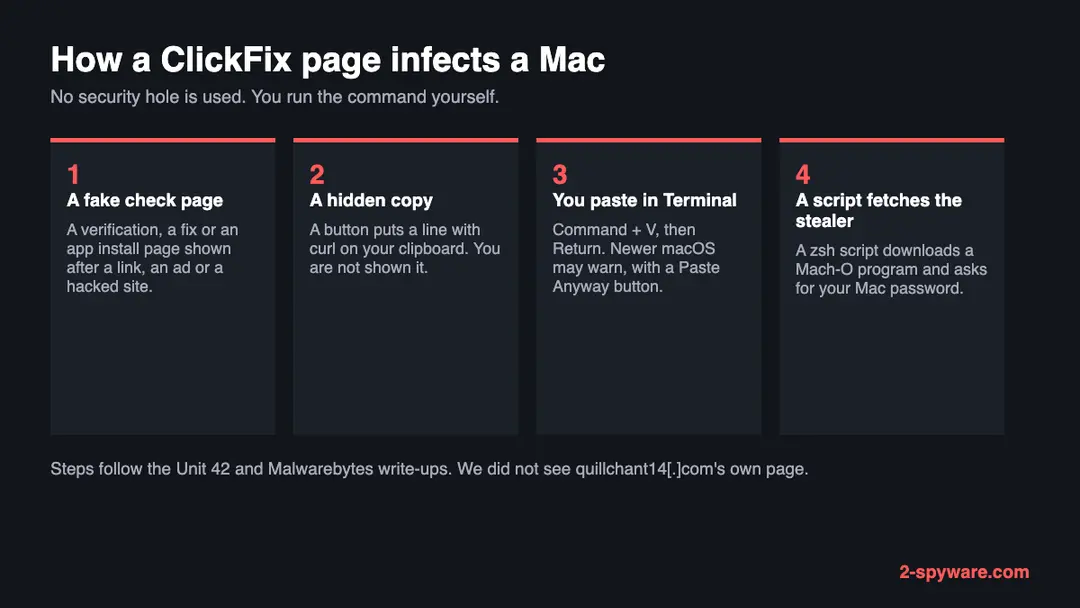
ClickFix does not use a security hole. It makes you do the infecting yourself, so the checks that Apple builds into downloads often never get a say. We did not see quillchant14.com's page; this is how Palo Alto Networks and Malwarebytes describe the trick on macOS.
- 1
You land on a page with a reason to open Terminal
The lure can be a verification prompt, a fix for a problem, or a setup page for a tool. Unit 42 describes a page that offered a macOS toolkit with quick setup instructions. Malwarebytes notes that lures also pose as cracked software and as guides to free up disk space.
- 2
The page copies a command for you
A button puts a line on your clipboard without showing it, or the page shows a line you are told to copy. In the cases described the line starts with curl and hands what it downloads straight to a shell.
- 3
You open Terminal and paste
The page tells you to open Terminal, press Command + V and press Return. Terminal runs whatever is in the line with your rights. Nothing you downloaded was opened through Finder, so the first-open check described below never happens.
- 4
A script fetches the real malware
In Unit 42's case the line pulled a zsh script, which held a compressed block of text that unpacked into a second script, which then downloaded a Mach-O program into the /tmp folder and ran it. The program asked for the Mac's password.
- 5
The stealer collects and sends
Unit 42 saw the data collected into a zip file in /tmp and sent out in stages named boot, credentials, browsers, wallets, messengers and local_data.
Apple says that Gatekeeper is designed to help ensure that only trusted software runs on a Mac, and that it asks for approval before downloaded software opens for the first time. A command you paste yourself is a different path: you started it, so the Mac treats it as you doing your own work.
The six files: what each name suggests, and what we do not know
File names are weak evidence. We list what each one could be and mark which statements are only a reading of the name.
| File on quillchant14.com | What URLhaus says | What it may be (our reading) |
|---|---|---|
| /f/ path, last part sfjwmrjy | Online, tagged Amos, ClickFix, Mach-O, macOS and ua-curl, added 26 September 2026 by c4ffeine | A Mac program with no file ending. This is the final stage, the stealer itself. The Amos label is the reporter's |
| /curl/ path ending in .txt | Offline, tagged ClickFix, macOS and zsh, added 26 September 2026 by c4ffeine | A zsh script saved with a text ending. This is the kind of file a pasted curl line hands to the shell |
| bootstrap.sh | Offline, tagged malware, added 26 September 2026 by nikorasu | A shell script, likely an early stage. Not confirmed |
| update.sh | Offline, tagged malware, added 26 September 2026 by nikorasu | A shell script with a name made to look routine. Not confirmed |
| setup.sh | Offline, tagged malware, added 26 September 2026 by nikorasu | A shell script posing as an installer. Not confirmed |
| a .dat file under /curl/ | Offline, tagged malware, added 26 September 2026 by nikorasu | A data file with a harmless ending, maybe a payload or settings. Not confirmed |
Five different paths under /curl/ with different random folder names suggest that the server made a fresh address for each script or each visitor. That is as much as the names allow. We did not fetch the files, so we give no verdict on what each does.
What quillchant14.com (ClickFix, Amos, macOS) can steal or download
What Amos is and what a Mac stealer takes
We do not know that the file on this server is Amos, only that a reporter tagged it so. Here is what Unit 42 and Malwarebytes publish about Amos infections that began the same way, as a guide to what may be at stake.
What Unit 42 saw collected on one infected Mac
- Cryptocurrency wallets (Binance and TonKeeper data)
- Cloud and developer credentials (AWS, Docker, Google Cloud, FileZilla)
- Shell history (the .zsh_history file)
- Telegram data
- System information and the user name
- Browser data and messenger data (stage names in the upload)
| Kind | What it does to you | Source |
|---|---|---|
| Information stealer | Collects saved browser logins, wallet data and other files, packs them into one archive and sends them to the attacker's server | Palo Alto Networks Unit 42 |
| Password request | The installer asks for your Mac password. On an administrator account, which is the normal case, this lets it go further than a normal app could | Palo Alto Networks Unit 42 |
| Access prompts | Terminal then asked for access to control Finder and Notes and to files in Desktop and Documents. A prompt like this on a Mac that you were not using is a sign | Palo Alto Networks Unit 42 |
| Persistence | Hidden folders under Library/Application Support whose names start with .com.apple, a launch plist and scripts started at login. Unit 42 saw these in one case; we do not know if this host does the same | Palo Alto Networks Unit 42 |
What this can cost you
Reading the site name or seeing a warning costs nothing. The risks below apply to a Mac where the command was pasted and run, or a file from the site was opened.
- High
Account takeover
A stealer takes saved logins and browser sessions, which let someone use your email, social and work accounts. Changing a password alone may not end a stolen session.
- High
Crypto theft
Wallet files and wallet apps are a main target. Stolen crypto cannot be reversed, so move funds before you do anything else on the Mac.
- High
Developer and cloud keys
Unit 42 saw cloud credentials and shell history taken. A key found there can be used to run services or read data on your bill.
- Medium
A hidden program that starts again
Some Amos infections install files that start at login. Until they are gone the Mac keeps contacting the attackers.
- Medium
Work accounts and company data
On a work Mac the passwords and sessions in the browser reach company systems. Tell your IT or security team at once; they can block the accounts.
- Low
Nothing, if you only saw the name
A name in a warning, a firewall log or a blocked link is not an infection.
What you may notice, and what you may not
Most victims notice nothing. The signs below follow from how these chains work; the first two are the best evidence you have.
| Sign | What it means |
|---|---|
| A line in Terminal that you did not write | Terminal keeps its history. Open it and scroll up: a long line with curl, a web address, base64, zsh or bash is the command that was pasted |
| A password prompt you did not expect | A window that asks for your Mac password right after you pressed Return in Terminal is how the installer in Unit 42's case gained rights |
| Terminal asking to control Finder or Notes, or to reach Desktop and Documents | This is the prompt Unit 42 saw after the infection started. A normal use of Terminal rarely needs it |
| Items you did not add in Login Items | Persistence entries show up in System Settings under Login Items & Extensions, or as files in the LaunchAgents folders |
| Accounts you did not touch | Logins from new places, password-reset emails and messages sent from your accounts. This follows from stolen sessions; it is our reading, not a quote |
| Missing crypto | Balances that fall after the infection |
| Nothing at all | Stealers are built to finish in minutes and stay quiet |
How to check the Mac for quillchant14.com (ClickFix, Amos, macOS)
How people end up on a page like this
We do not know how visitors reach quillchant14.com, and no source says. The routes below are the ones published for Mac ClickFix campaigns in general.
- 1
A search for cracked or free software
Malwarebytes lists cracked software among the lures. A page that offers a paid Mac app for free and then asks you to run a line in Terminal belongs here.
- 2
A page about tools or fixes
Unit 42 describes a fake macOS toolkit, and Malwarebytes cites pages that pose as Apple guides to free up disk space. They look like help and end in the same paste step.
- 3
A fake verification step
A page that asks you to prove you are human by copying something and pasting it into a window on your Mac. A real check never needs this.
- 4
A hacked website or an ad
A normal site that was broken into, or a paid ad, can send you to such a page. We have no source that ties this to quillchant14.com.
Check your Mac before you delete anything
Start with the question that matters: did you paste a command from a website into Terminal, or open a file from quillchant14.com? If yes, follow the numbered plan on this page, because a clean-looking check does not clear a Mac. If you are not sure, do these checks first. None of them deletes anything.
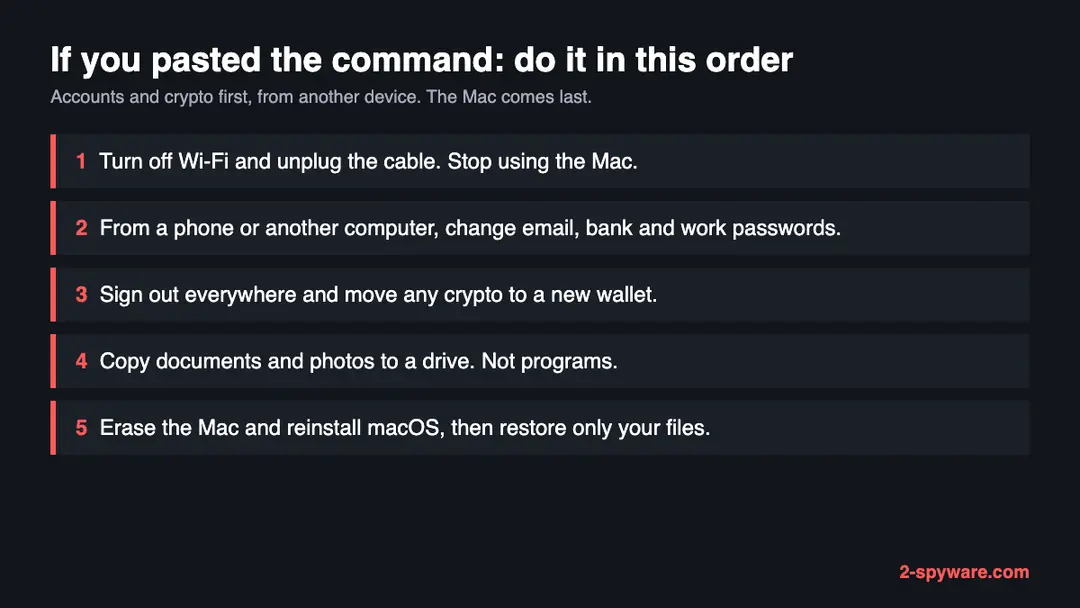
While you check, stop using the Mac for banking, email, work or crypto, and turn Wi-Fi off in the menu bar or unplug the network cable.
- 1
Read the Terminal history
Open Terminal (Finder, Applications, Utilities) and look at the lines on screen and the ones above. If the window was closed, Terminal's Shell menu and its saved window history may still show it. Look for a line that names quillchant14.com or contains curl, base64, zsh or bash and a web address. Write it down or photograph it. Do not run it.
- 2
Look at Login Items
Open System Settings > General > Login Items & Extensions on macOS Ventura, Sonoma, Sequoia and newer. Read the list under Open at Login and under Allow in the Background. Note any name you do not know, including a name that starts with a dot or looks like an Apple tool.
- 3
Look in the LaunchAgents folders
In Finder choose Go > Go to Folder and open
~/Library/LaunchAgents, then/Library/LaunchAgentsand/Library/LaunchDaemons. A file you did not install, with a recent date from after you pasted the command, is worth noting. Do not delete it yet. - 4
Look for hidden folders
Open
~/Library/Application Supportand press Command + Shift + . to show hidden items. Unit 42 found hidden folders there with names starting .com.apple. in its case. The real Apple files do not live in a hidden folder with that pattern in your user Library, but we cannot promise that for every Mac, so note what you find and do not rely on it. - 5
Remember what a clean check means
Removing a file you find does not remove what was already sent. A clean check lowers the doubt; it does not remove it, because a stealer can finish and delete itself in minutes.
How to remove quillchant14.com (ClickFix, Amos, macOS)
How to remove quillchant14.com from a Mac
Start with the passwords and crypto, from another device: a stealer copies them in seconds.
Then clean the Mac, or erase it.
Step 1: Change passwords from another device first
If you pasted a command into Terminal or opened a downloaded file from quillchant14.com, assume the passwords saved in the browsers and in Keychain on this Mac are known to the attacker.
From a phone or a clean computer, change the e-mail password first, then banking, shopping, social and work accounts, and sign out of all other sessions on each one.
Move any cryptocurrency to a new wallet created on a clean device, because a seed phrase that was stored on this Mac is compromised. Do this before cleaning the Mac: cleaning does not undo the theft.
Full procedure with screenshots: Turn on two-step verification / secure a hacked account
Step 2: Quit what is running that you do not recognize
Open Activity Monitor (in Applications > Utilities, or search for it with Command + Space).
In the CPU or Network tab, look for a process you did not install or whose name is random, select it, click the stop button (the octagon with an X) and choose Quit or Force Quit.
Note the name first: you will look for the same name in the next steps. Malware that comes back after a restart is handled in the next two steps.
Step 3: Remove unknown login items and background items
Open System Settings > General > Login Items & Extensions. Under Open at Login and Allow in the Background, switch off or remove anything you do not recognize, especially items whose developer is shown as an unknown name or that appeared on the day you ran the command.
Then open Finder, choose Go > Go to Folder and check
~/Library/LaunchAgents,/Library/LaunchAgentsand /Library/LaunchDaemons for property list (.plist) files you did not add. Drag suspicious ones to the Bin, then restart the Mac.Step 4: Delete apps and downloads you did not intend to install
Open the Applications folder and your Downloads folder. Drag any app you did not install, and any disk image (
.dmg), installer (.pkg) or archive (.zip) that came from quillchant14.com or a site you do not trust, to the Bin, then empty the Bin.Also check
~/Library/Application Supportfor a folder with the same name as the app you removed.Step 5: Check the browsers for extensions and changed settings
In Safari open Settings > Extensions and General (homepage). In Chrome open
chrome://extensions, in Firefoxabout:addons.Remove any extension you did not add, and reset the homepage and search engine if they changed. Browsers hold saved passwords and cookies, which is why the password step comes first.
Step 6: If it was an infostealer, erase and reinstall macOS
Stealers copy data and often leave persistence you cannot be sure you found.
The only complete fix is to back up your personal files only (documents, photos, not apps or settings), then open System Settings > General > Transfer or Reset > Erase All Content and Settings, or use macOS Recovery to erase the disk and reinstall macOS, as Apple describes in its support articles.
Restore only your files afterwards, and install apps again from their official sources.
Step 7: Report it and watch your accounts
Report the site and the command to the authorities in your country, and tell your bank if any card was saved in a browser or in Keychain.
Over the next weeks watch your e-mail, bank and exchange accounts for sign-ins and transfers you did not make. Keep the notes you made, such as the process names and the file dates, in case a bank or the police ask for them.
Full procedure with screenshots: Report a cyber attack or scam to the authorities
What a scan can and cannot do on a Mac
A Mac has no scan that proves it is clean. Apple builds in checks for known malware, but a stealer you ran yourself may already be gone or may not be known yet.
- 1
Update macOS first
Open System Settings > General > Software Update and install what is offered. Apple's built-in malware definitions update through the system, so a current macOS is the best first defence for the next time.
- 2
Check what is allowed to read your files
Open System Settings > Privacy & Security > Full Disk Access, then Automation and Files and Folders. Remove any entry for Terminal or an app you do not know, if you did not grant it yourself.
- 3
Run a scanner that reads the Mac
A second-opinion scanner can find known Amos files and the persistence entries. A quiet result lowers the risk and does not clear the Mac, because the data may already be taken.
- 4
Do not stop there
If you pasted a command and ran it, the safest end of the plan is to back up documents and erase the Mac. A scan that finds nothing is not the end.
If you use Windows, an iPhone or an Android phone
The macOS, Mach-O and zsh tags point at Macs. We found nothing that says these files run on anything else.
| Your device | What we know | What to do |
|---|---|---|
| Windows PC | A Mach-O program does not run on Windows. ClickFix itself also exists for PCs, where it uses the Run box and PowerShell, but we do not know what the page shows a PC visitor | If you pasted a command into Run or PowerShell, treat it as a separate case and use our Windows guides |
| iPhone or iPad | The trick needs a place to paste a command, which phones do not have | Nothing to remove. If you typed passwords on a page, change them |
| Android | No source mentions it | Nothing to remove for these scripts; change passwords if you entered any |
After removal: passwords, accounts and prevention
After a clean Mac: protect what was taken
The Mac is one half. The other half is everything that was on it, which the attackers may already have. The order matters: another device first, then crypto, then the Mac.
- 1
Change passwords from a clean device
Use a phone or another computer. Start with your email, then banking, then work and social accounts. Passwords typed on the infected Mac go to the attackers too. Change your Apple Account password in System Settings > your name > Sign-In & Security on a clean Mac, or at account.apple.com.
- 2
Treat the Keychain as exposed
If the stealer read the Keychain, every password saved there is known to the attacker. Change the important ones and use a new login keychain after the reinstall.
- 3
Sign out other sessions and revoke keys
Cookies were possibly taken, so a new password alone may not end a stolen session. In each important account use the option to sign out everywhere. Revoke API tokens, SSH keys and cloud keys that were on the Mac.
- 4
Move crypto first if a wallet was on the Mac
If a recovery phrase may have been exposed, move the funds to a new wallet with a new phrase made on a clean device.
- 5
Turn on two-factor sign-in
Use an authenticator app or a security key where the account allows it.
- 6
Back up documents and erase the Mac
Copy only documents and photos to an external drive, not apps. Then open System Settings > General > Transfer or Reset > Erase All Content and Settings on a Mac with Apple silicon or a T2 chip, or use macOS Recovery to erase the disk and reinstall macOS. Set the Mac up as new and do not restore from a full backup made after the infection.
- 7
Watch your accounts
For some weeks look at your bank, email and crypto for activity you did not start, and tell your bank at once if you see any.
Keep a Mac out of this kind of trap
The rule that would have stopped this site is one line: a website never needs you to paste something into Terminal.
Do
- Treat a request to paste a command into Terminal from a web page as an attack. Close the tab.
- Keep macOS and your browser up to date. Malwarebytes reports a Terminal warning about suspicious pasted commands in macOS Tahoe 26.4; Apple has not documented it, so do not count on it.
- Install Mac apps from the App Store or from the developer's own site, and open them the normal way.
- Keep a backup of documents on a disk you unplug.
- Use an authenticator app for your important accounts.
Don't
- Do not copy and paste a command to pass a check, to fix a Mac or to free disk space.
- Do not click Paste Anyway on a Terminal warning about a command you did not write yourself.
- Do not type your Mac password into a window that appeared after a pasted command.
- Do not run files from sites that promise free versions of paid software.
- Do not rely on a quiet scan to say that you are safe.
Questions about quillchant14.com (ClickFix, Amos, macOS)
What is quillchant14.com?
It is a website that URLhaus lists for handing out malware, not a program on your computer. Six file addresses on it were added on 26 September 2026. One is a Mach-O program tagged Amos, and another is a zsh script tagged ClickFix.
The domain was registered on 22 September 2026, so it is only weeks old. On 10 October 2026 our test visit got a Cloudflare error, so we cannot say what the site shows visitors today.
If you only saw the name in a warning or a log, you are not infected by that. If you ran a command or opened a file from it, use the cleaning steps on this page.
Is quillchant14.com a virus?
A website is not a virus, but this one is listed as a source of Mac malware. The danger comes from what it hands you, not from visiting the address.
URLhaus tags one file as Amos, a family of Mac information stealers, and tags two files ClickFix. A stealer takes saved logins, wallet data and files. If you opened the site and did nothing else, you did not run any of this.
The risk starts when you paste a command from it into Terminal or open a file from it. In that case treat the Mac as compromised and follow the plan above.
What does ClickFix mean on a Mac?
ClickFix is a trick in which a web page makes you infect yourself. The page shows a fake check, a fix or a setup guide, and tells you to copy a line and paste it into Terminal. The line usually starts with curl and downloads a script that fetches the real malware.
No security hole is used, so the usual first-open check for downloaded apps does not run. Palo Alto Networks notes that some Mac lures, such as a fake toolkit setup page, do not match the strict definition, but they use the same copy and paste step. The defence is simple: never paste a command from a page.
I pasted the command. What do I do first?
Turn off Wi-Fi and unplug the network cable, and stop using the Mac for anything that matters. From another device, such as a phone, change your email password first, then banking, work and social accounts, and sign out of every session.
Move any crypto to a new wallet created on a clean device. Only then deal with the Mac: copy documents and photos to a drive, erase the Mac and reinstall macOS. The order matters because the data may already be sent, so the accounts are at risk before the Mac is.
What is Amos, the Atomic macOS stealer?
Amos is a family of information stealers for macOS. Palo Alto Networks describes an infection that collected cryptocurrency wallet data, cloud and developer credentials, shell history and Telegram data into one archive and sent it to a server in stages. The installer asked for the Mac password.
We do not know that the file on quillchant14.com is Amos; URLhaus lists it with that tag, added by a reporter, and we did not open it. Treat the tag as a strong warning, not as a confirmed identification. The family changes often, so indicators from one report may not match another.
Will Apple's Gatekeeper or XProtect stop this?
Not reliably. Apple says Gatekeeper is designed to help ensure that only trusted software runs on a Mac, and that it asks for approval before downloaded software opens for the first time. A command you paste into Terminal downloads and starts things without the usual Finder open, so that first-open check is not the barrier in these cases.
Malwarebytes reports that macOS Tahoe 26.4 shows a Possible malware, Paste blocked warning for some pasted commands, and that you can choose Paste Anyway. Apple has not documented it and it does not flag everything. Treat both as a help, not a guarantee.
Can I just delete the files and be done?
Deleting a file you find removes the file, not the damage. A stealer takes your data in minutes and may remove itself, so the main risk is what was already sent:
- saved passwords
- sessions
- wallet data
- keys
Some Amos infections also leave hidden folders and login entries that start the program again. If you ran the command, the safest result is to change your passwords from another device, move crypto, and erase the Mac and reinstall macOS. If you only visited the site and pasted nothing, there is nothing to delete.
Do I need to reinstall macOS?
If you pasted the command and it ran, yes, it is the safest choice, because you cannot see everything a stealer or a second-stage program changed. Back up documents and photos only, not apps, and set the Mac up as new.
In System Settings choose General, then Transfer or Reset, then Erase All Content and Settings on a Mac with Apple silicon or a T2 chip, or erase the disk from macOS Recovery. If you did not paste anything and only opened the page, you do not need to reinstall; close the tab and clear the site data in your browser.
How do I know if I ran the command?
Think back to whether a page told you to open Terminal and paste something. If so, open Terminal and look at the lines on screen. A long line with curl, a web address, base64, zsh or bash is the command.
Next, check whether a password prompt appeared right after you pressed Return, and whether Terminal asked to control Finder or Notes or to reach Desktop and Documents.
Look in System Settings under General and Login Items & Extensions for items you did not add. If you are unsure, assume you did and use the plan, since the cost of checking is small.
Will Fortect remove quillchant14.com?
Fortect for Mac scans for malware and unwanted programs, and its free scan shows what it finds on your Mac before you decide anything.
For quillchant14.com, follow the plan on this page as well: removing a launch item or an app is done in macOS itself, and a scanner cannot undo what was typed or entered on the infected Mac, such as saved passwords that were copied.
Change your passwords from another device first, and if the page tells you to erase the Mac, a scan is not a substitute. The free scan costs nothing and the full-featured product needs a license.
Sources
- URLhaus (abuse.ch): host page for quillchant14.com (entries read from our copy of the feed) (read October 10, 2026)
- RDAP registration record for quillchant14.com (read October 10, 2026)
- Palo Alto Networks Unit 42: Atomic macOS (AMOS) stealer activity (read October 10, 2026)
- Malwarebytes: New macOS security feature will alert users about possible ClickFix attacks (read October 10, 2026)
- Apple Platform Security: Gatekeeper and runtime protection in macOS (read October 10, 2026)