
power.belyxhost.in: a Mirai botnet download address for routers and cameras, and what to do if a device of yours may be infected
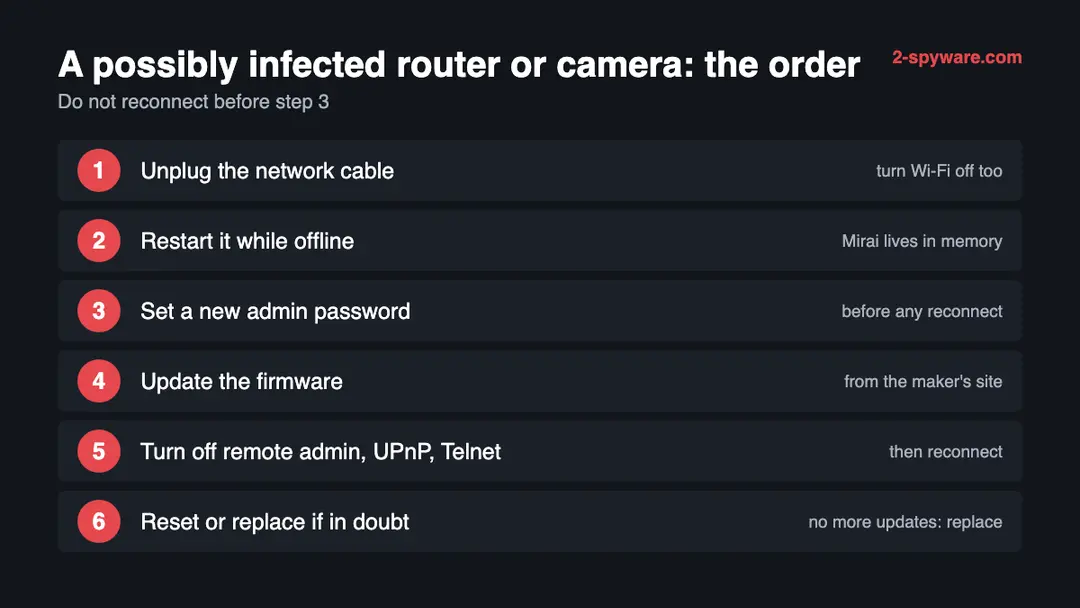
power.belyxhost.in is a web address that URLhaus lists for 15 malware downloads, 14 of them tagged mirai, a botnet that takes over routers, cameras and other small network devices. The name no longer resolves when we look it up. If a router, camera or recorder of yours contacted it, unplug the device, restart it while it is offline, set a new password and only then reconnect it.
Facts checked October 10, 2026. Removal steps tested on Windows 11 (26H2) and checked against Microsoft's and the browser makers' current documentation.
Automatic
Get a free scan and check if your PC is infected.
Fortect finds malware, unwanted programs and the Windows damage they leave behind, and repairs it in one pass.
An automatic scan checks installed programs, startup items and browser extensions for anything that came with a file or script that a device or a shell command fetched from power.belyxhost.in.
Do it yourself · free Remove power.belyxhost.in (Mirai botnet files) yourself 5 steps, about 15 minutes, no software needed.
Start the steps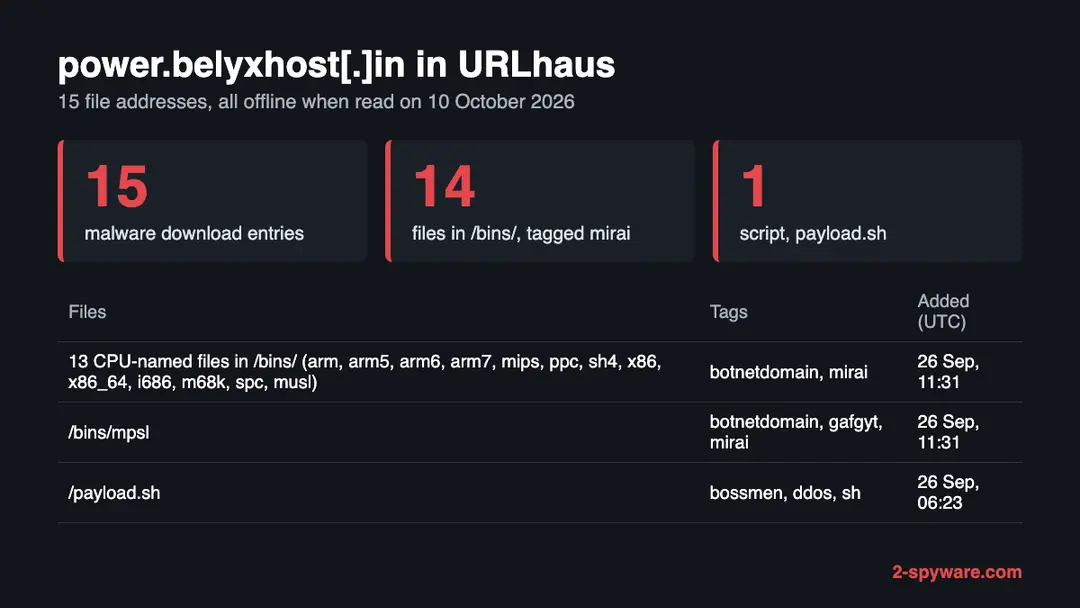
Power.belyxhost.in (Mirai botnet files): summary
| Type | A malware download host for network devices: URLhaus lists 15 files, 14 tagged mirai |
|---|---|
| Risk | High for a router, camera or recorder that contacted it: the device may be part of a botnet |
| Symptoms | Often none. A factory login, remote admin switched on, a slow or hot device, or an abuse notice are the signs |
| How to get rid of it | Unplug the device, restart it offline, set a new password, update the firmware, turn off remote admin and UPnP, reset or replace it if in doubt |
| Our check (10 October 2026) | One lookup: the name did not resolve, no page. A dead site clears nothing; the danger rating comes from URLhaus |
| Running since / first seen | First malware URLs reported 26 September 2026; the parent name belyxhost.in was registered on 3 February 2026 |
| Removal | Scan the PC with security software to find and remove the malware and anything installed with it. Fortect scans Windows for malware and repairs the system files and settings it damaged. Remove it nowTo use the full-featured product, you have to purchase a license for Fortect. The scan is free. |
Show 9 more facts
| Platform | Routers, cameras and other Linux-based devices, by the processor names and the mirai tag |
|---|---|
| Detection names | No Microsoft detection name is known for the files on this server, because we did not open them and they are built for network devices, not Windows. The URLhaus tags are mirai and, for one file, gafgyt. On a router the only check is the firmware and the steps on this page |
| Name | Power.belyxhost.in |
| Domain registered | 3 February 2026 |
| Evidence | 15 write-ups by security sites; details still limited |
| First seen | 26 September 2026 |
| Distribution | Typically fake installers, cracked programs, e-mail attachments, fake "verify you are human" pages and ads for popular apps |
| Damage | Installs other malware, often several programs at once |
| Facts checked | 10 October 2026 |
Facts checked on 10 October 2026 against our copy of the URLhaus data for power.belyxhost.in, one browser test of our own, a registration record for belyxhost.in, the CISA Mirai alert TA16-288A, a USENIX Security paper on Mirai, the FTC page on home Wi-Fi and an Uptycs analysis of Gafgyt and Mirai code reuse.
We did not download the files and we infected no device; the removal steps follow CISA and were not tried on a live infection.
What power.belyxhost.in is, and what we know about it
The abuse.ch project URLhaus tracks addresses that hand out malware, and it has 15 entries for power.belyxhost.in. Fourteen carry the tag mirai. That family goes after devices running a small Linux system, meaning home routers, cameras and video recorders, and not after ordinary Windows or Mac computers.
We found no public write-up about this particular address. This page therefore rests on the URLhaus entries, one lookup of our own, a registration record for the parent name and what CISA and academic researchers have published about Mirai in general.
- 1
What URLhaus lists
Fifteen file addresses, every one marked malware_download and every one added on 26 September 2026. The script hxxp://power[.]belyxhost[.]in/payload.sh arrived first, at 06:23:31 UTC, from a reporter called deepfield. The other 14 followed at 11:31:18 and 11:31:19 UTC from a second reporter, burger. When we read the entries, all 15 showed as offline.
- 2
What the tags say
The 14 files in the /bins/ folder are tagged botnetdomain and mirai, and one of them, /bins/mpsl, adds gafgyt. The script payload.sh has three other tags: bossmen, ddos and sh. File names in /bins/ read like processor types: arm, arm5, arm6, arm7, mips, ppc, sh4, x86 and x86_64 among them.
- 3
What we could not confirm
We downloaded nothing, and we found no analysis of these exact files. Which Mirai variant they are, which logins they try and where they report to all remain unknown. The tags come from the two reporters, not from us. We also found no source that explains the tag bossmen.
- 4
What this means for you
Meeting the name in a log or on a block list does not mean a device is infected. A device that connected to the address, or ran a file from it, should be treated as infected, and the plan further down applies.
- Kind of threat
- A malware download host: 15 files, 14 tagged mirai, 1 shell script tagged ddos
- Malware family
- Mirai, an IoT botnet (the reporters' tag; not confirmed by us). One file is also tagged gafgyt
- Registration
- The parent name belyxhost.in was registered on 3 February 2026 through the registrar HOSTINGER operations, UAB; the record shows an expiry of 3 February 2027 and a change on 20 August 2026. It does not say who runs the name
- URLhaus entries
- 15 file addresses, all added on 26 September 2026; all 15 offline when we read them
- Platform
- Routers, cameras and other Linux-based network devices. Not an ordinary PC threat
What power.belyxhost.in (Mirai botnet files) does on an infected PC
Our own lookup on 10 October 2026, and its limits
We opened https://power.belyxhost.in/ once, from Lithuania, with an automated Chromium browser set to English. The browser said the name could not be found and loaded nothing. That is a gap in our evidence, not a point in the host's favour.
Our site test, 10 October 2026
- No address for the nameThe browser reported ERR_NAME_NOT_RESOLVED, so there was no server to talk to. URLhaus shows all 15 files offline, which fits a server that was shut down or a name that was deleted.
- Why a dead name is not good newsOperators drop names for many reasons: a hosting provider steps in, the registrar acts, or the attacker simply moves on to a new name. Devices that already carry the old address in their code can keep calling it, and the same files may be served from another place.
- Notification request, pop-ups, redirects, ad networksNone seen, because no page loaded on this one visit. A host of this kind feeds files to devices and shows nothing to people.
- URLhaus listing15 malware addresses, 14 tagged mirai, added on 26 September 2026 by two separate reporter accounts.
- Registration dataThe parent name belyxhost.in has a registration record dated 3 February 2026, almost eight months before the first report. It names a registrar, not an owner.
Dangerous: treat it as a botnet download host A single failed lookup proves nothing either way. The rating comes from the URLhaus entries. An address that has gone quiet does nothing for a device that already ran what it served.
The record so far, from the registration to our lookup
What is visible is two bursts of reports on one day, about five hours apart. We have nothing from before that day and nothing after it.
3 February 2026
The parent name is registered
The registration record for belyxhost.in gives this creation date, lists HOSTINGER operations, UAB as the registrar and shows an expiry of 3 February 2027. What the name was used for in the months after that is unknown to us.
20 August 2026
The registration record is changed
The same record shows a change on this date, about five weeks before the reports. Such an entry can stand for a renewal, a name server update or something else, and the record does not say which.
26 September 2026, 06:23 UTC
A script is reported
URLhaus receives payload.sh, tagged bossmen, ddos and sh, from the reporter deepfield. It is the only entry outside the /bins/ folder.
26 September 2026, 11:31 UTC
Fourteen binaries are reported
In about a second the reporter burger adds 14 files from /bins/: arm, arm5, arm6, arm7, i686, m68k, mips, mpsl, musl, ppc, sh4, spc, x86 and x86_64. All carry botnetdomain and mirai, and mpsl also carries gafgyt.
The URLhaus entries for power.belyxhost.in, summarised from our copy of the feed on 10 October 2026. 10 October 2026
Our lookup finds no address
The visit to https://power.belyxhost.in/ ends in ERR_NAME_NOT_RESOLVED, and URLhaus shows all 15 files offline, two weeks after the reports.
The URLhaus web pages ask for a browser check, so we could not read them. The entries above come from the copy of the URLhaus feed in our own database.
Reading the file names: a guess for each group
A file name is thin evidence. For each group we say what it might be and label every reading as ours.
| Group of files on power.belyxhost.in | What URLhaus says | What it may be (our reading) |
|---|---|---|
| arm, arm5, arm6, arm7 | Offline, tagged botnetdomain and mirai, added 26 September 2026 | Builds for several generations of ARM chip, the kind found in many routers, cameras and recorders. Not confirmed |
| mips, mpsl | Offline, tagged mirai; mpsl also tagged gafgyt | Builds for MIPS chips in two byte orders, with mpsl probably the little-endian one. The gafgyt tag is one reporter's label on one file. Not confirmed |
| ppc, sh4, spc, m68k | Offline, tagged botnetdomain and mirai | Builds for PowerPC, SuperH, SPARC and Motorola 68000 chips, which are rare in new products and more common in older network gear. Not confirmed |
| x86, x86_64, i686 | Offline, tagged botnetdomain and mirai | Builds for 32 and 64 bit x86 processors. A small Linux server, a NAS or a virtual machine could run these as well as a device. Not confirmed |
| musl | Offline, tagged botnetdomain and mirai | musl is a small C library used in embedded Linux, so this may be a build for that library rather than for a chip. Not confirmed |
| payload.sh | Offline, tagged bossmen, ddos and sh | A shell script. Scripts of this kind often try each download in turn until one runs on the device. The tag ddos hints that the reporter saw attack functions, but we did not see the script |
Fourteen builds for different chips is the most telling detail. An operator who prepares one file per processor does not know in advance what the victim runs, so the address was stocked for any device that might answer. That matches CISA's description of who Mirai goes after, though it does not show how these files were actually used.
Mirai, Gafgyt and why one file carries both tags
The gafgyt tag on /bins/mpsl is one reporter's label. We cannot judge whether it is right, but it points at a real overlap between two botnet families.
- 1
What Gafgyt is
Gafgyt, also called Bashlite, is another Linux botnet family aimed at IoT devices. Researchers at Uptycs describe it as spreading by guessing Telnet logins, much as Mirai does.
- 2
How much code they share
The Uptycs analysis found that Gafgyt variants copied much of Mirai's code, including the HTTP, UDP and TCP flood attacks. That is why one file can end up with both labels, and why sorting samples into families is hard.
- 3
What it changes for you
Nothing in the cleaning. Both families live off weak or default logins and open services, and both are dealt with the same way: take the device offline, restart it, set a strong password and close what is open.
How a Mirai infection runs, as CISA and researchers describe it
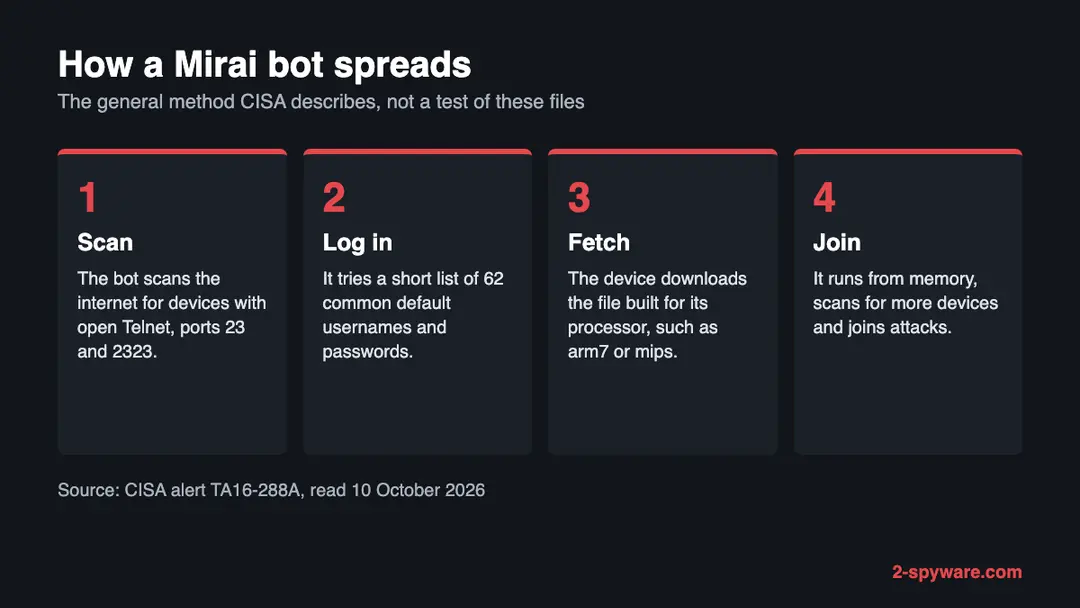
We neither ran nor opened the power.belyxhost.in files. What follows is the general pattern of Mirai from published sources, so you know what the threat looks like from the owner's side.
| Stage | What the sources say |
|---|---|
| Finding victims | CISA says Mirai constantly scans the internet for IoT devices it can take over. A device is found simply because it is reachable and its login is open. |
| Getting in | The bot works through a built-in list of 62 common default usernames and passwords. Owners who never changed the factory login were the easy prey. |
| Who was hit | In the incidents CISA covers, mostly home routers, network cameras and digital video recorders. A variant also scanned TCP port 7547 for broadband routers with a known flaw. |
| How big it got | A USENIX Security study followed the botnet for seven months and saw a peak near 600,000 infections, nearly all embedded and IoT devices. The authors blame the simplicity of the method. |
A taken-over device usually carries on with its normal job, so the owner sees little. Behind the scenes it looks for more victims and waits for orders to attack someone else. This is why a Mirai host matters to people who never went near it.
What power.belyxhost.in (Mirai botnet files) can steal or download
Signs on your side, and how little they prove
Many owners see nothing at all. The signs below are inferred from how Mirai works, and no single one proves an infection.
What to look for on a router or camera
- The factory login still opens the admin pageThis is the weakness Mirai relies on. Treat a device in this state as exposed even if it behaves normally.
- Telnet or remote administration reachable from the internetCISA asks defenders to watch ports 23 and 2323, the Telnet ports where Mirai tries its logins.
- Unfamiliar outgoing traffic on port 48101CISA says infected devices use that port to send results to the attacker. You only see it in a router log or a network monitor, and it is a hint, not proof.
- Slow line, a hot device or a stuttering cameraScanning and attacking use bandwidth and processor time, but many harmless things do the same. Weak evidence.
- A message from your internet providerProviders sometimes write when a line sends attack or scan traffic. Check the date and the device the message names.
- Nothing unusual at allQuite possible. The malware sits in memory and the device keeps doing its job.
Look at the login and open services first Those two checks cost nothing and say more than any symptom. Sources: CISA alert TA16-288A and the USENIX Security paper on Mirai, read 10 October 2026.
What an infection could cost
A log entry with this name costs you nothing. The items below apply only to a device that really connected to the address or ran one of its files.
- High
Your connection is used to attack others
A compromised router or camera can be told to flood a target with traffic. The victims are strangers, but the traffic leaves from your line.
- High
A foothold inside the home network
A router sees the traffic of everything behind it. We found no source saying this happened here, so read it as a possibility, not an observation.
- Medium
Infected again within minutes
CISA warns that reconnecting before the password is changed can get the device reinfected fast, since the scanners never stop.
- Medium
Trouble with your provider
A provider may warn or restrict a customer whose device attacks others. This is common practice in general and not something we saw for this host.
- Low
None, if you only noticed the name
A name in a firewall log, a security report or a blocked link is not an infection by itself.
How to check the PC for power.belyxhost.in (Mirai botnet files)
Why a device of yours might have asked for this name
No source says how any device came to contact power.belyxhost.in. The routes below are the ones CISA and researchers describe for Mirai in general.
- 1
A scanner found a weak login
A bot swept the internet, met a device with an open admin or Telnet login and tried the default passwords. Nobody had to click anything. CISA names this as the main route.
- 2
The software had a known hole
One Mirai-derived variant went after routers with a flaw reachable on port 7547. A router that the maker no longer patches stays open to bugs of this sort.
- 3
An intruder ran a download command
After getting in, the attacker tells the device to fetch the file built for its chip. A script such as payload.sh could carry out that fetch, but we never saw its content.
- 4
You only read the name somewhere
If the name appeared in a router or DNS log, some device on your network asked for it. Find that device, because it is the one under suspicion.
Looking at your router before you change anything
The deciding question is whether a device of yours contacted power.belyxhost.in, or still has a factory login with remote access open. If so, go to the plan. If you cannot tell, run the checks below first. None of them alters a setting.
These files are not aimed at phones or ordinary computers, so this page gives no steps for them.
- 1
Search the router log for the name
Sign in to the router's admin page (the address and login are usually on its label or in its manual) and open the log or the list of connected devices. Look for the word belyxhost. A router with no log may still be covered by a DNS filtering service you use, which can show which device asked.
- 2
Try the factory login
If the label's login, or the default for your model, still opens the admin page, a bot could have used it as well.
- 3
Find the remote access setting
Look for remote management or remote administration and see whether it is on for the internet. The FTC advises switching it off, together with WPS and UPnP.
- 4
Compare the firmware
Read the version on the status or system page and compare it with the maker's site. A very old version, or a model the maker has dropped, is a reason to plan a replacement.
- 5
Match any provider notice
A message about attack traffic from your line normally gives a date and an address. Compare them with the list of devices.
- 6
Do not trust a clean result too far
These checks cannot see into the device, and the malware lives in memory. A device that looks normal may stay infected until it is restarted offline.
How to remove power.belyxhost.in (Mirai botnet files)
How to remove power.belyxhost.in
A loader's job is to install other malware, so treat the PC as infected with more than one program until the scans are clean.
Step 1: Delete scheduled tasks that bring it back
Open Task Scheduler from the Start menu and click Task Scheduler Library. Select each task you do not recognise and read the Actions tab:
- a task that starts a file in
%AppData%or%Temp% - runs
powershellwith a long encoded line - opens a web address belongs to power.belyxhost.in or a similar program
Right-click such a task and choose Delete, and check the subfolders too. Leave tasks from Microsoft, your PC's maker and programs you use. Task Scheduler is the same in Windows 11 and Windows 10.

Windows 11: Task Scheduler Library, the task selected, the Actions tab shows the file it runs. Full procedure with screenshots: Remove what malware leaves behind in Windows
- a task that starts a file in
Step 2: Remove it from startup
Whatever power.belyxhost.in installed usually starts with Windows. Open Task Manager with Ctrl + Shift + Esc, go to Startup apps in Windows 11 or the Startup tab in Windows 10, and disable what you do not know, starting with entries that have an empty Publisher column.
Open file location on the right-click menu shows the file, which helps you decide and tells you what to delete later. Disabling is safe: if something you need stops working, switch it back on.
Full procedure with screenshots: Stop apps from opening at startup On uGetFix
Step 3: Delete the folders left behind
What the uninstaller leaves behind is usually in the user folders. Open File Explorer, switch on View > Show > Hidden items (in Windows 10 View > Hidden items), and go through
%LocalAppData%,%AppData%, %ProgramData% and the two Program Files folders.Sort by Date modified and delete folders that appeared together with the problem and belong to no program you use. Folders with random names that hold
.exe,.dll, .js or .ps1 files are the strongest sign.Full procedure with screenshots: Remove what malware leaves behind in Windows
Step 4: Scan the PC, then run the offline scan
Open Windows Security > Virus & threat protection > Scan options, run a Full scan and remove everything it finds. Then select Microsoft Defender Antivirus (offline scan) and click Scan now: the PC restarts and scans before Windows loads, which finds files that hide while Windows runs.
Save your work first, because the offline scan takes about 15 minutes. Both scans are built into Windows 11 and Windows 10, and a second scanner from another vendor is a useful extra opinion.

Windows 11: Windows Security > Virus & threat protection > Scan options. Full procedure with screenshots: Run a Microsoft Defender Offline scan
Step 5: Change passwords from another device and sign out other sessions
Assume that the passwords saved in this PC's browsers, and the accounts that were open in them, are known to the attacker. From a phone or a clean computer, change the e-mail password first, then banking, shopping, social and gaming accounts.
Use each service's option to sign out of all other sessions, because stolen cookies keep a session open even after a password change. Turn on two-step verification on each account. Wait with the infected Windows 11 or Windows 10 PC until the scans are clean.
Full procedure with screenshots: Turn on two-step verification / secure a hacked account
Cleaning a router, camera or recorder, in CISA's order
CISA's removal advice is brief because Mirai sits in the device's memory. We follow it and add the settings that the FTC and CISA recommend afterwards. We did not try these steps on a live infection.
- 1
Take it off the network
Pull the network cable and switch off its Wi-Fi if it has any. If the device is your only way online, do the later steps from a phone on mobile data and accept that the home line will be down for a while.
- 2
Power-cycle it with nothing attached
Switch it off and on with no network connected. According to CISA, rebooting clears the malware because it resides in dynamic memory. A reboot alone does not prevent a second infection.
- 3
Set a new password before it goes back online
Sign in on the local address and choose a strong admin password that you use nowhere else. CISA warns that reconnecting first risks a quick reinfection.
- 4
Install the latest firmware
Get it from the maker's own site. The FTC suggests checking the site before setup and again from time to time, registering the router for update notices and, when your provider supplied it, asking about automatic updates.
- 5
Close what a bot would use
Turn off remote management, WPS and UPnP. CISA says to disable UPnP on routers unless it is truly needed and to keep an eye on Telnet. If the device offers Telnet, switch it off.
- 6
Factory reset when in doubt
The CISA and FTC pages we read give no reset procedure, so use the manual for your model. Most devices have a small button to hold for several seconds. After the reset, set the password first, then update the firmware, and only then reconnect.
- 7
Retire a model that gets no updates
When the maker has stopped issuing fixes, a new password cannot close the flaws. Replace the device with one from a maker that keeps patching.
Windows, Mac, phones and servers: do they need cleaning?
The files are built for the small chips in network gear, plus some x86 builds. We found nothing that says they run on a normal computer or a phone.
| Your device | What we know | What to do |
|---|---|---|
| Windows PC or Mac | The file names point to router and camera chips, and the files are Linux programs. Nothing says a PC was a target | No cleaning is needed because of this address. Do check the router your PC connects through |
| iPhone, iPad or Android phone | No source mentions phones | Nothing to remove. A phone that failed to load a page from this host did so because the host no longer answers |
| Linux server, NAS or virtual machine | The x86, x86_64 and i686 builds are the kind such a system could run. We found no source about them for this host | If one of yours contacted the address, treat it as compromised and ask whoever runs it, or its maker, how to rebuild it |
After removal: passwords, accounts and prevention
Mirai lives on devices that were set up once and forgotten. The list below follows the advice of CISA and the FTC.
Do
- Replace every factory password on a new router, camera or recorder on day one.
- Apply security updates promptly and sign up for update notices.
- Switch off remote management, WPS and UPnP unless you have a reason to keep them.
- Set Wi-Fi to WPA3 Personal, or WPA2 Personal where WPA3 is not offered.
- Buy from makers with a record of security fixes and retire models that no longer get them.
Don't
- Do not expose a camera or recorder to the internet with its factory login.
- Do not leave Telnet enabled, since Mirai tries its logins on ports 23 and 2323.
- Do not plug a cleaned device back in before the new password is set.
- Do not count a restart as a permanent fix when the old password is still in place.
- Do not wave away a provider's notice about attack traffic from your line.
Questions about power.belyxhost.in (Mirai botnet files)
What is power.belyxhost.in?
power.belyxhost.in is a web address that the abuse.ch tracker URLhaus lists for malware downloads. Fifteen file addresses were added on 26 September 2026, and 14 of them carry the tag mirai. Many of the names match processor types such as arm7 and mips.
When we looked the name up on 10 October 2026 it did not resolve, and URLhaus showed every file offline. We found no public write-up of this address. The parent name belyxhost.in was registered on 3 February 2026.
Is power.belyxhost.in a virus?
An address is not a virus, but this one is listed as a source of Mirai malware. The files are meant for routers, cameras and similar devices rather than an ordinary computer.
We did not download them, so we cannot say precisely what they do. Treat the address as dangerous and do not try to open its files. Reading this page is harmless, and visiting it from a phone or computer does not infect the device.
What is Mirai?
Mirai is malware that turns network devices into a botnet. CISA says it keeps scanning the internet for vulnerable devices and logs in with a short built-in list of 62 common default usernames and passwords.
The devices CISA names are mainly home routers, network cameras and digital video recorders. Once infected, they join attacks on other targets. A USENIX Security study saw the botnet reach about 600,000 infections at its peak.
Why is one file tagged gafgyt?
One reporter tagged /bins/mpsl with both mirai and gafgyt. Gafgyt, also called Bashlite, is a separate Linux botnet family, and the Uptycs analysis found that its variants copied much of Mirai's code, including the flood attacks.
That overlap makes samples hard to sort into one family. We did not open the file, so we cannot say which label is correct. The cleaning is the same for both:
- go offline
- restart
- set a strong password
- close open services
How do I know if my router is infected?
From the outside you often cannot. The device goes on working, and Mirai sits in its memory.
Warning signs include a factory login that still works, remote administration open to the internet, a slow or hot device, or a notice from your internet provider about attack traffic. If you suspect an infection, follow CISA's order:
- disconnect
- restart while offline
- set a new password
- only then reconnect the device
How do I remove Mirai from a router or camera?
Disconnect the device from the network and restart it while it is offline, because CISA says rebooting clears the malware, which resides in dynamic memory. Set a strong password before you reconnect, since a device plugged back in first could be quickly reinfected.
Then update the firmware, switch off remote management, WPS and UPnP, and reset the device to factory settings from the manual if you are unsure. Replace a model that no longer gets updates.
Will restarting my router remove it?
A restart removes Mirai itself, since CISA says it resides in dynamic memory. It does not close the door it came through. If the factory password and open remote access are still in place, a scanner can log in again, often within minutes.
Restart while the device is offline, set a new password before it goes back online, and update the firmware so that any known flaw is not left open.
Why does the site not load any more?
On 10 October 2026 our browser reported ERR_NAME_NOT_RESOLVED for power.belyxhost.in, meaning the name gave no address, and URLhaus showed all 15 files offline. The operator may have deleted the name, a provider may have stepped in, or the files may have moved.
None of that cleans a device that already ran a file from here, and an infected device may keep asking for the old name.
Does this affect my Windows PC, Mac or phone?
Almost certainly not directly. The file names match the processors in routers, cameras and similar devices, and Mirai is described as a threat to such IoT devices.
We found nothing saying these files run on a PC or a phone. The risk to you lies in the router and other network devices at home. Check those; your computers need no cleaning because of this address.
Will Fortect remove power.belyxhost.in?
Fortect scans Windows for malware and unwanted programs and repairs the system files and settings they change, and its free scan shows what it finds on your PC before you decide anything.
For power.belyxhost.in, follow the plan above as well: the browser steps take back permissions and settings that no scanner treats as a threat, and uninstalling the program that brought it removes the source.
Run Microsoft Defender's full scan and, if anything was found, its offline scan as a second opinion. If the symptoms are gone after the plan and both scans are clean, there is nothing more to do.
Sources
- URLhaus (abuse.ch): host page for power.belyxhost.in (entries read from our copy of the feed) (read October 10, 2026)
- CISA: Heightened DDoS Threat Posed by Mirai and Other Botnets (TA16-288A) (read October 10, 2026)
- USENIX Security 2017: Understanding the Mirai Botnet (read October 10, 2026)
- FTC Consumer Advice: How to Secure Your Home Wi-Fi Network (read October 10, 2026)
- Uptycs: Mirai code re-use in Gafgyt (read October 10, 2026)