
swatting.wiki: a Mirai botnet download address for routers and cameras, and what to do if a device of yours may be infected
swatting.wiki is a web address that URLhaus lists for 14 malware downloads, every one tagged mirai, a botnet that takes over routers, cameras and other small network devices. The name no longer resolves when we look it up. If a router, camera or recorder of yours contacted it, unplug the device, restart it while it is offline, set a new password and only then reconnect it.
Facts checked October 10, 2026. Removal steps tested on Windows 11 (26H2) and checked against Microsoft's and the browser makers' current documentation.
Automatic
Get a free scan and check if your PC is infected.
Fortect finds malware, unwanted programs and the Windows damage they leave behind, and repairs it in one pass.
Programs like a file or script that a device or a shell command fetched from swatting.wiki usually arrive in groups; a free scan lists the companions that are easy to miss.
Do it yourself · free Remove swatting.wiki (Mirai botnet files) yourself 5 steps, about 15 minutes, no software needed.
Start the steps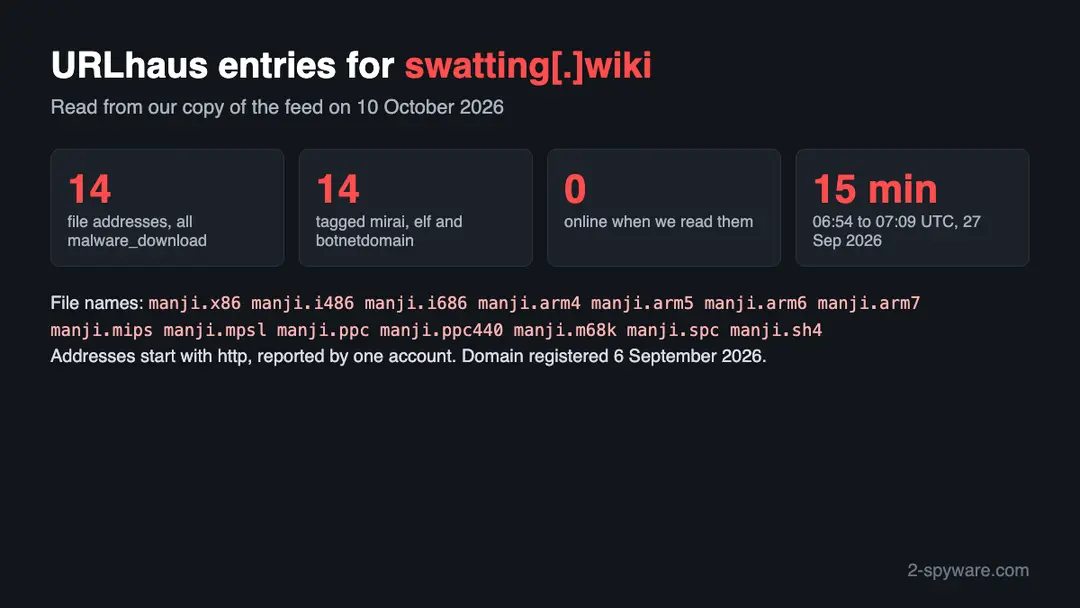
Swatting.wiki (Mirai botnet files): summary
| Type | A malware download host for network devices: URLhaus lists 14 files, all tagged mirai |
|---|---|
| Risk | High for a router, camera or recorder that contacted it: the device may be part of a botnet |
| Symptoms | Often none. A factory login, remote admin switched on, a slow or hot device, or an abuse notice are the signs |
| How to get rid of it | Unplug the device, restart it offline, set a new password, update the firmware, turn off remote admin and UPnP, reset or replace it if in doubt |
| Our check (10 October 2026) | One lookup: the name did not resolve, no page. A dead site clears nothing; the danger rating comes from URLhaus |
| Running since / first seen | Domain registered 6 September 2026; first malware URLs reported 27 September 2026 |
| Removal | Scan the PC with security software to find and remove the malware and anything installed with it. Fortect scans Windows for malware and repairs the system files and settings it damaged. Remove it nowTo use the full-featured product, you have to purchase a license for Fortect. The scan is free. |
Show 9 more facts
| Platform | Routers, cameras and other Linux-based devices, by the processor names and the mirai tag |
|---|---|
| Detection names | No Microsoft detection name is known for the files on this server, because we did not open them and they are built for network devices, not Windows. The URLhaus tag is mirai. On a router the only check is the firmware and the steps on this page |
| Name | Swatting.wiki |
| Domain registered | 6 September 2026 |
| Evidence | 14 write-ups by security sites; details still limited |
| First seen | 27 September 2026 |
| Distribution | Typically fake installers, cracked programs, e-mail attachments, fake "verify you are human" pages and ads for popular apps |
| Damage | Installs other malware, often several programs at once |
| Facts checked | 10 October 2026 |
Facts checked on 10 October 2026 against our copy of the URLhaus data for swatting.wiki, the registry record, one browser test of our own, the CISA Mirai alert TA16-288A, a USENIX Security paper on Mirai, the FTC page on home Wi-Fi and the CISA page on network infrastructure devices.
We did not download the files and we infected no device; the removal steps follow CISA and were not tried on a live infection.
What swatting.wiki is, and what we know about it
swatting.wiki is a web address, not a program. The malware tracker URLhaus lists it as a host that served Mirai files. Mirai goes after devices that run a small Linux system, such as home routers, cameras and video recorders, not ordinary Windows or Mac computers. We found no public write-up of this address or of the file name it uses, so this page rests on the URLhaus entries, the registration record, our own lookup and what CISA and researchers have published about Mirai in general.
- 1
What URLhaus lists
14 file addresses on swatting.wiki, all with the threat type malware_download, all added on 27 September 2026 by one reporter account named BlinkzSec. The first batch arrived at 06:54 UTC and the last file, manji.arm7, at 07:09 UTC. All 14 were offline when we read them.
- 2
What the tags say
Every entry carries the tags mirai, elf, botnetdomain, swatting-wiki and ua-wget. The elf tag means a Linux executable. The tag ua-wget tells you the reporter's tool saw the download requested with the wget program, a common way for a script on a small Linux device to fetch a file. The botnetdomain tag is the reporter's label for a domain used by a botnet.
- 3
What we could not confirm
We did not download any file and found no analysis of these exact files. So we do not know which Mirai variant they are, which logins they try or where they report to. The tags are the reporter's labels, not our finding.
- 4
What this means for you
If you only saw the name in a log or a block list, nothing is wrong with your device because of that. If a device of yours connected to this address or ran a file from it, treat the device as infected and follow the plan below.
- Kind of threat
- A malware download host: 14 files, all tagged mirai
- Malware family
- Mirai, an IoT botnet (the reporter's tag; not confirmed by us)
- Registration
- Registered 6 September 2026 through Porkbun, expires 6 September 2027, record last changed 28 September 2026
- URLhaus entries
- 14 file addresses, all added on 27 September 2026; all 14 offline when we read them
- Platform
- Routers, cameras and other Linux-based network devices. Not an ordinary PC threat
What swatting.wiki (Mirai botnet files) does on an infected PC
What we checked on 10 October 2026, and what we could not
We tried to open https://swatting.wiki/ once, from Lithuania, in an automated Chromium browser set to English. The browser reported that the name could not be found, so no page loaded. That tells you nothing good about the host and it clears nothing.
Our site test, 10 October 2026
- The name did not resolveOur browser reported ERR_NAME_NOT_RESOLVED. The name gave no address to connect to. URLhaus lists all 14 files as offline, which fits a server that was taken down or switched off.
- Why that is not a clean resultA name can stop resolving because the operator removed it, because a provider acted, or because the attacker moved to a new name. Infected devices that already hold the old address may keep trying it, and the same files may be served from somewhere else.
- Notification request, pop-ups, redirects, ad networksNone seen. There was nothing to see: no page loaded on this one visit. A host like this serves files to devices, not pages to people.
- URLhaus listing14 malware addresses, all tagged mirai, added within 16 minutes on 27 September 2026.
- Registration dataThe registry record shows the name was created on 6 September 2026, 21 days before the first report. A young name is only a weak sign, but it fits a name set up for one purpose.
Dangerous: treat it as a botnet download host The site test was one lookup that failed, so it proves nothing either way. The danger rating comes from the URLhaus reports, not from our visit. A dead address does not heal a device that already ran what it served.
What happened to swatting.wiki, from registration to our test
The visible history is a registration, one burst of 15 minutes on one morning and then silence. We have no earlier or later reports for this host.
6 September 2026
The name is registered
The registry record gives the creation date as 6 September 2026 and the registrar as Porkbun. We have no page, archive copy or report from the following three weeks.
27 September 2026, 06:54 UTC
Thirteen files are reported at once
URLhaus receives manji.arm4 and manji.sh4 at 06:54:15 and eleven more within eight seconds: x86, i486, i686, arm5, arm6, mips, mpsl, ppc, ppc440, m68k and spc. All carry the tag mirai.
The URLhaus entries for swatting.wiki, summarised from our copy of the feed on 10 October 2026. 27 September 2026, 07:09 UTC
One more file
The last entry, manji.arm7, is added at 07:09:40, fifteen minutes after the first. After this URLhaus records nothing new for the host.
28 September 2026
The registration record changes
The registry shows its last change on 28 September 2026, the day after the reports. We do not know what changed, so we do not read anything into it.
10 October 2026
Our test finds no address
Our browser visit to https://swatting.wiki/ ends in ERR_NAME_NOT_RESOLVED, and URLhaus shows all 14 files offline, thirteen days after the reports.
We could not read the URLhaus pages themselves, because they ask for a browser check. The entries above come from the same data in our own database, which holds the URLhaus feed.
The file names: what they suggest, and what we do not know
File names are weak evidence. We list what each group could be and mark which statements are only our reading.
| Group of files on swatting.wiki | What URLhaus says | What it may be (our reading) |
|---|---|---|
| manji.arm4, arm5, arm6, arm7 | Offline, tagged mirai, added 27 September 2026 | One build for each generation of ARM processor, the kind inside many routers, cameras and recorders. Not confirmed |
| manji.mips, manji.mpsl | Offline, tagged mirai, added 27 September 2026 | Builds for MIPS processors in two byte orders. We take mpsl to be the little-endian one. Not confirmed |
| manji.x86, manji.i486, manji.i686 | Offline, tagged mirai, added 27 September 2026 | Builds for 32 bit x86 chips, found in older appliances, mini computers and some network boxes. Not confirmed |
| manji.ppc, manji.ppc440 | Offline, tagged mirai, added 27 September 2026 | Builds for PowerPC, used in some older network and industrial gear. Not confirmed |
| manji.m68k, manji.spc, manji.sh4 | Offline, tagged mirai, added 27 September 2026 | Builds for Motorola 68000, SPARC and SuperH chips, which are rare today. Their presence suggests a build list that covers as many processor types as possible. Not confirmed |
The number of builds is the most telling fact. One file per processor type means the operator did not know which kind of device a victim would be, so the same address was prepared for many kinds of device. That fits what CISA says about Mirai's targets, but it does not prove how these files were used. We found no source that explains the prefix manji, and we do not know whether it names a person, a tool or a variant.
How Mirai gets onto a device, according to CISA and researchers
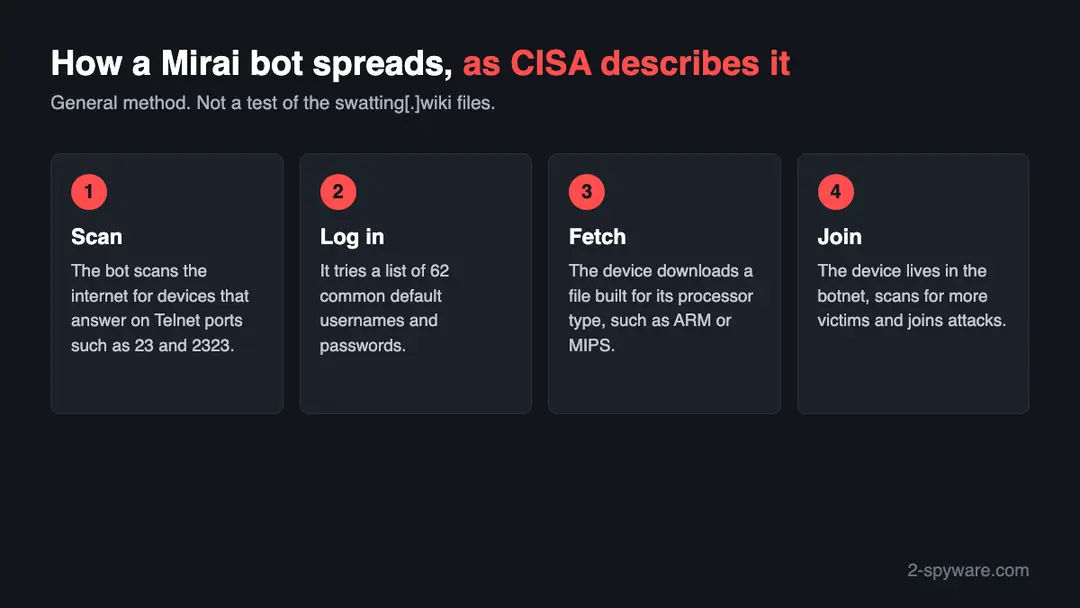
We did not run or open the swatting.wiki files. This is the method CISA and academic researchers describe for Mirai in general, so you know what to look for.
- 1
Step one: the knock
According to CISA, the malware never stops probing the internet for IoT devices it can break into. Nobody has to open an e-mail or click a link. Having a public address is enough to be tried.
- 2
Step two: the guessing
The probing bot has a built-in list of 62 usernames and passwords that manufacturers use as defaults. CISA stresses that such defaults for most devices can be looked up online, and that this short list was nonetheless enough to reach hundreds of thousands of devices.
- 3
Step three: the right file
After a login succeeds, the bot needs a program that runs on the victim's chip. That is why a host such as swatting.wiki keeps a separate file for each processor family, and why the same address can serve a camera and a router.
- 4
Step four: the army
The researchers who traced the botnet for seven months counted a peak of about 600,000 infected devices, mostly embedded and IoT ones. They conclude that fairly simple methods were enough to take over many low-end devices.
CISA names home routers, network cameras and digital video recorders as the main victims in the incidents it described. It also records a late 2016 offshoot that went for port 7547 on broadband routers with a known flaw. The owner of a taken-over device usually sees no change, which is the reason this kind of host matters to people who never visited it.
What swatting.wiki (Mirai botnet files) can steal or download
What you may notice, and what you may not
Most owners notice nothing. The signs below follow from what Mirai does; none of them proves infection alone.
| Sign | What it means |
|---|---|
| The login printed on the label still opens the admin page | That is the exact gap this botnet exploits, so count the device as exposed even if it behaves normally |
| Telnet answers from outside your home | CISA asks defenders to watch TCP ports 23 and 2323, where the bot tries its guesses |
| Traffic leaving on port 48101 | CISA says infected devices often report back to the attacker on this port. Only a router with a readable traffic log would show it |
| A sluggish line, a warm box, a camera that stutters | Scanning and attacking consume bandwidth and processor time, but plenty of harmless causes look the same, so treat this as a hint only |
| A letter or e-mail from your internet provider | Providers sometimes warn a customer whose line sends attack or scan traffic. Check which date and which device it names |
| No sign whatsoever | The code sits in memory and the gadget keeps doing its job, so silence is the most common case |
What this can cost you
Seeing this address in a log costs nothing. The risks below apply to a device that actually connected to it or ran one of its files.
- High
You become the attacker's tool
A taken-over router or camera can be ordered to flood someone else's server. The victim is a stranger, but the traffic comes from your address and your bandwidth.
- High
A foothold inside the house
Every device in your home talks to the internet through the router. Whoever controls it is in a position to watch or redirect that traffic. No source we read describes this for swatting.wiki, so it is a possible risk, not something observed.
- Medium
A second infection soon after the first is cleaned
CISA warns that plugging a device back in before changing its password can lead to quick reinfection, because the scanning never stops.
- Medium
Friction with your internet provider
An internet provider may warn or restrict a line that sends attack traffic. That is common practice in general, and we saw no case of it for this host.
- Low
No harm, if all you have is the name
Finding the name in a firewall log or on a block list does not mean any device was infected.
How to check the PC for swatting.wiki (Mirai botnet files)
How a device ends up contacting an address like this
We do not know how any device reached swatting.wiki, and no source says. These are the routes CISA and the research describe for Mirai.
- 1
The device was found by a scanner
A bot scanned the internet, found a device with an open login and tried the default passwords. No one clicked anything. This is the main route CISA describes.
- 2
A flaw in the device software
CISA notes a variant that scanned port 7547 on broadband routers with a known flaw. An old router that no longer gets updates stays open to flaws like this.
- 3
A command run by someone who got in
Once inside, the attacker has the device fetch a file that matches its processor. The ua-wget tag suggests the files were requested with wget, but we did not see the commands or scripts that made the request.
- 4
A log line you found
If you only found swatting.wiki in a router or DNS log, the entry means a device on your network asked for the name. Find out which device did, because that one is the suspect.
Check your router and other devices before you reset anything
Start with the question that matters: did a device of yours connect to swatting.wiki, or does one still use its factory login with remote access on? If yes, follow the plan on this page. If you are unsure, do these checks first. None of them changes anything.
Phones and ordinary computers are not the target of these files, so this page does not give steps for them.
- 1
Trace the lookup to a device
Sign in to the router (address and login are on its label or in the manual) and open its event log or the list of connected clients. Search for the word swatting. A router without logs may leave you with a DNS filtering service, if you use one, which can show which client asked.
- 2
Try the label login yourself
If the admin page accepts the username and password printed on the router, or the published default for your model, assume a scanner could get in the same way.
- 3
Find the remote management switch
It sits in the router's administration or security settings under a name like remote management or remote access. The FTC says to turn it off, together with WPS and UPnP.
- 4
Compare firmware versions
The status or system page shows the installed version. Compare it with the newest one on the maker's website. A big gap, or a model that has no newer file at all, means you should plan a replacement.
- 5
Match a provider letter to a device
A warning from your internet provider normally gives a date and an address. Compare them with the client list of your router.
- 6
Do not trust a calm result
None of this looks inside the device. The malware lives in memory, so a gadget that seems fine may still be infected until you restart it while it is offline.
How to remove swatting.wiki (Mirai botnet files)
How to remove swatting.wiki
A loader's job is to install other malware, so treat the PC as infected with more than one program until the scans are clean.
Step 1: Delete scheduled tasks that bring it back
Open Task Scheduler from the Start menu and click Task Scheduler Library. Select each task you do not recognise and read the Actions tab:
- a task that starts a file in
%AppData%or%Temp% - runs
powershellwith a long encoded line - opens a web address belongs to swatting.wiki or a similar program
Right-click such a task and choose Delete, and check the subfolders too. Leave tasks from Microsoft, your PC's maker and programs you use. Task Scheduler is the same in Windows 11 and Windows 10.

Windows 11: Task Scheduler Library, the task selected, the Actions tab shows the file it runs. Full procedure with screenshots: Remove what malware leaves behind in Windows
- a task that starts a file in
Step 2: Remove it from startup
Whatever swatting.wiki installed usually starts with Windows. Open Task Manager with Ctrl + Shift + Esc, go to Startup apps in Windows 11 or the Startup tab in Windows 10, and disable what you do not know, starting with entries that have an empty Publisher column.
Open file location on the right-click menu shows the file, which helps you decide and tells you what to delete later. Disabling is safe: if something you need stops working, switch it back on.
Full procedure with screenshots: Stop apps from opening at startup On uGetFix
Step 3: Delete the folders left behind
What the uninstaller leaves behind is usually in the user folders. Open File Explorer, switch on View > Show > Hidden items (in Windows 10 View > Hidden items), and go through
%LocalAppData%,%AppData%, %ProgramData% and the two Program Files folders.Sort by Date modified and delete folders that appeared together with the problem and belong to no program you use. Folders with random names that hold
.exe,.dll, .js or .ps1 files are the strongest sign.Full procedure with screenshots: Remove what malware leaves behind in Windows
Step 4: Scan the PC, then run the offline scan
Open Windows Security > Virus & threat protection > Scan options, run a Full scan and remove everything it finds. Then select Microsoft Defender Antivirus (offline scan) and click Scan now: the PC restarts and scans before Windows loads, which finds files that hide while Windows runs.
Save your work first, because the offline scan takes about 15 minutes. Both scans are built into Windows 11 and Windows 10, and a second scanner from another vendor is a useful extra opinion.

Windows 11: Windows Security > Virus & threat protection > Scan options. Full procedure with screenshots: Run a Microsoft Defender Offline scan
Step 5: Change passwords from another device and sign out other sessions
Assume that the passwords saved in this PC's browsers, and the accounts that were open in them, are known to the attacker. From a phone or a clean computer, change the e-mail password first, then banking, shopping, social and gaming accounts.
Use each service's option to sign out of all other sessions, because stolen cookies keep a session open even after a password change. Turn on two-step verification on each account. Wait with the infected Windows 11 or Windows 10 PC until the scans are clean.
Full procedure with screenshots: Turn on two-step verification / secure a hacked account
Clean a router, camera or recorder: the order CISA gives
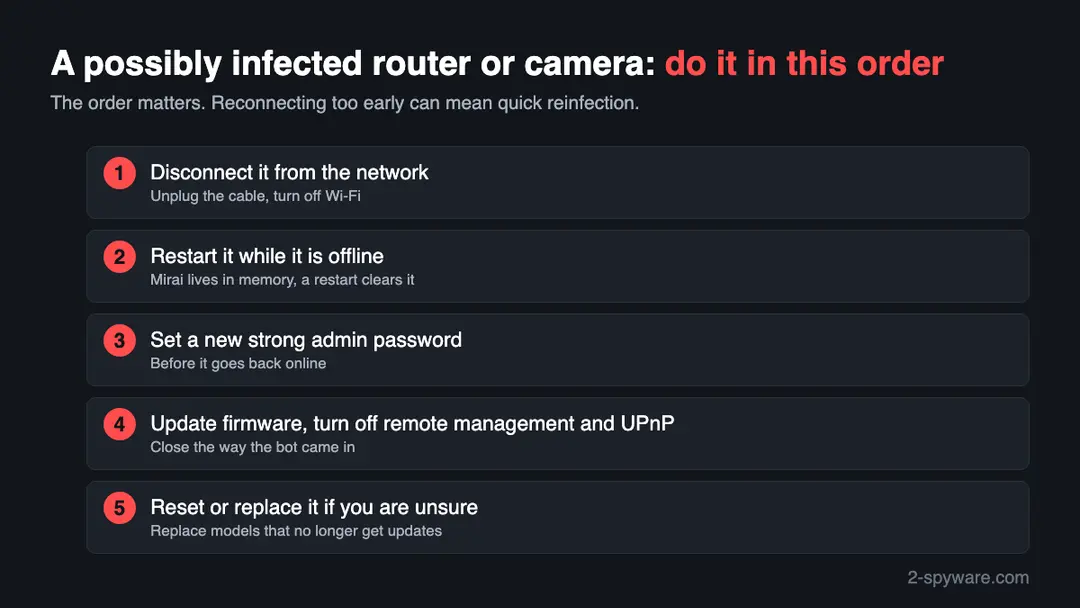
CISA's removal advice is short because Mirai lives in the device's memory. We follow it here and add the settings the FTC and CISA recommend afterwards. We did not test these steps on an infected device.
- 1
1. Cut the connection
Pull the network cable out and switch off the device's Wi-Fi. If this is your only router, use your phone on mobile data for the rest of the steps and accept that the home network is down meanwhile.
- 2
2. Power cycle it offline
Switch it off, wait, and switch it on again with nothing connected. CISA states that Mirai resides in dynamic memory, so a reboot clears it. Do not stop here, because a reboot does not close the door the malware used.
- 3
3. Set a new password first
Open the admin page over the local network and replace the default with a long password that you use nowhere else. CISA's warning is explicit: reconnecting before the reboot and the password change could lead to quick reinfection.
- 4
4. Install the latest firmware
Get the file from the maker's own website. The FTC adds three habits: look for new firmware before setup and when you change settings, register the router for update notices, and ask your provider whether it pushes updates automatically.
- 5
5. Close the doors a bot knocks on
Switch off remote management, WPS and UPnP. CISA advises disabling UPnP on routers unless it is absolutely necessary, and turning off unencrypted remote administration such as Telnet and FTP on network devices.
- 6
6. Factory reset when in doubt
The pages we read give no reset procedure, so follow the manual for your model, usually a small button held down for several seconds. Afterwards set the password, then update the firmware, and only then reconnect.
- 7
7. Retire what is no longer supported
When the maker has stopped publishing fixes, a strong password cannot repair the flaws left in the firmware. CISA recommends buying from companies known for secure products.
If you use a Windows PC, a Mac or a phone
These files are built for the small processors in network devices. We found nothing that says they run on an ordinary computer or a phone.
| Your device | What we know | What to do |
|---|---|---|
| Windows PC or Mac | Every file is an ELF program for a small Linux chip, and ELF is not a Windows or Mac format. Nothing we read says a computer was a target | Nothing to clean because of this address. Do check the router your computer connects through |
| iPhone, iPad or Android phone | No source we read mentions phones | Nothing to remove. A phone that failed to load this address behaved as expected, since the name no longer resolves |
| A Linux server or a NAS box | These run Linux and may use some of the chip types in the list. We found no report about them for this host | If yours contacted this address, treat it as compromised and ask its maker or administrator how to rebuild it |
After removal: passwords, accounts and prevention
Mirai relies on devices that people set up once and forgot. The measures below are those CISA and the FTC recommend.
Do
- Replace the factory password of each new router, camera or recorder before you plug it in for good.
- Apply security updates when they appear, and register the device with its maker to get notices.
- Keep remote management, WPS and UPnP off on the router unless you have a reason.
- Pick WPA3 Personal for Wi-Fi, or WPA2 Personal when WPA3 is not offered.
- Buy from makers with a record of security fixes and replace models that stop getting them.
Don't
- Do not expose a camera or video recorder to the internet with its factory login.
- Do not keep Telnet switched on. CISA names it among the unencrypted remote admin protocols to disable.
- Do not plug a cleaned device back in until its password has changed.
- Do not count a restart as a cure. Without a new password a scanner can get back in.
- Do not set aside a provider's warning about attack traffic from your line.
Questions about swatting.wiki (Mirai botnet files)
What is swatting.wiki?
It is an internet name that appears in URLhaus, the malware database run by abuse.ch, as a place that handed out files. A single reporter filed 14 addresses on 27 September 2026, within about a quarter of an hour, and every one is tagged mirai.
The file names all begin with manji and end in a chip type such as arm7, mips or x86. The domain had been registered three weeks earlier, on 6 September. By 10 October it no longer resolved, and we found no outside analysis of it.
Is swatting.wiki a virus?
Strictly, no: a name on the internet is a location, and the malware is the files that were stored there. The reports describe those files as Mirai, programs built for the small processors in network equipment.
We never opened them, so we cannot describe their exact behaviour. Our advice is to treat the address as hostile and never fetch anything from it. Reading this page is safe, and so is a phone or computer that merely failed to load the name.
What is Mirai?
Mirai is a family of malware that recruits everyday network gadgets into a remote-controlled network of machines, a botnet. In CISA's words it keeps scanning for vulnerable IoT devices and tries 62 well-known default logins.
Home routers, network cameras and video recorders were the main victims in the incidents CISA described. Once taken over, a device joins attacks on third parties. Academic researchers who followed the original botnet counted about 600,000 infections at its peak.
What does manji mean in the file names?
We do not know. All 14 files on swatting.wiki start with manji, followed by a processor type such as x86, arm7, mips or sh4. We searched for the name and found no report, analysis or variant called manji, so we cannot say whether it names a malware build, a tool or a person.
What the suffixes show is that the operator prepared one file for each kind of chip. That is typical of Mirai-style builds, but it is our reading.
How do I know if my router is infected?
Usually you cannot, because the router carries on working and the malware stays in memory. Look for risk factors instead:
- a login that is still the factory one
- remote management left on
- a warning letter from your provider about traffic that came from your line
Slow speeds and a hot casing are possible but weak hints. When in doubt, assume the worst and run CISA's sequence of disconnecting, restarting offline, changing the password and then reconnecting.
How do I remove Mirai from a router or camera?
There is no cleaner to install; the fix is a short routine. First take the device off the network. Next power it down and up again while it is isolated, since CISA says the malware lives only in dynamic memory.
Then set a strong new password before it sees the internet again, and afterwards install current firmware and switch off remote management and UPnP. If you doubt any of this worked, use the maker's factory reset, or buy a new unit when the model is out of support.
Will restarting my router remove it?
It clears the malware, yes, because by CISA's account Mirai exists only in the device's volatile memory. It does not clear the reason the malware got in.
With the old password and an open remote login, the scanners that never stop can walk in again, sometimes within minutes. So the restart has to happen with the cable unplugged, and the new password has to be in place before the device returns to the network.
Why does the site not load any more?
When we tried on 10 October 2026, DNS gave our browser no address for the name (the error was ERR_NAME_NOT_RESOLVED), and URLhaus marked all 14 files as offline. We cannot tell why.
The owner may have deleted the record, a registrar or host may have stepped in, or the operation may have moved to a different name. A dead address does not repair a device that already ran one of the files, and such a device may go on asking for it.
Does this affect my Windows PC, Mac or phone?
Not in any way we could find. The files are tagged elf, a Linux program format, and their names point at chips common in routers and cameras rather than in laptops and phones.
No source we read links them to Windows, macOS, iOS or Android. Your exposure is the equipment around those machines, above all the router. Check that, and leave your computers alone unless something else is wrong with them.
Will Fortect remove swatting.wiki?
Fortect scans Windows for malware and unwanted programs and repairs the system files and settings they change, and its free scan shows what it finds on your PC before you decide anything.
For swatting.wiki, follow the plan above as well: the browser steps take back permissions and settings that no scanner treats as a threat, and uninstalling the program that brought it removes the source.
Run Microsoft Defender's full scan and, if anything was found, its offline scan as a second opinion. If the symptoms are gone after the plan and both scans are clean, there is nothing more to do.
Sources
- URLhaus (abuse.ch): host page for swatting.wiki (entries read from our copy of the feed) (read October 10, 2026)
- CISA: Heightened DDoS Threat Posed by Mirai and Other Botnets (TA16-288A) (read October 10, 2026)
- USENIX Security 2017: Understanding the Mirai Botnet (read October 10, 2026)
- FTC Consumer Advice: How to Secure Your Home Wi-Fi Network (read October 10, 2026)
- CISA: Securing Network Infrastructure Devices (read October 10, 2026)