
Robinhood scam text on iPhone and Android: is it real and what to do
A text message that says your Robinhood account shows anomalies, theft or a suspension, and asks you to tap a link or call a number, is a known phishing scam on iPhone and Android. Do not tap or call: open the Robinhood app yourself, and if you already typed your login, change the password and freeze the account from the app.
Facts checked October 17, 2026. Steps checked against Apple's and Google's current documentation and the reports we cite. We have not run the app or the link on a phone ourselves.
Do it yourself · free Remove Robinhood scam text yourself 6 steps, about 18 minutes, no software needed.
Start the steps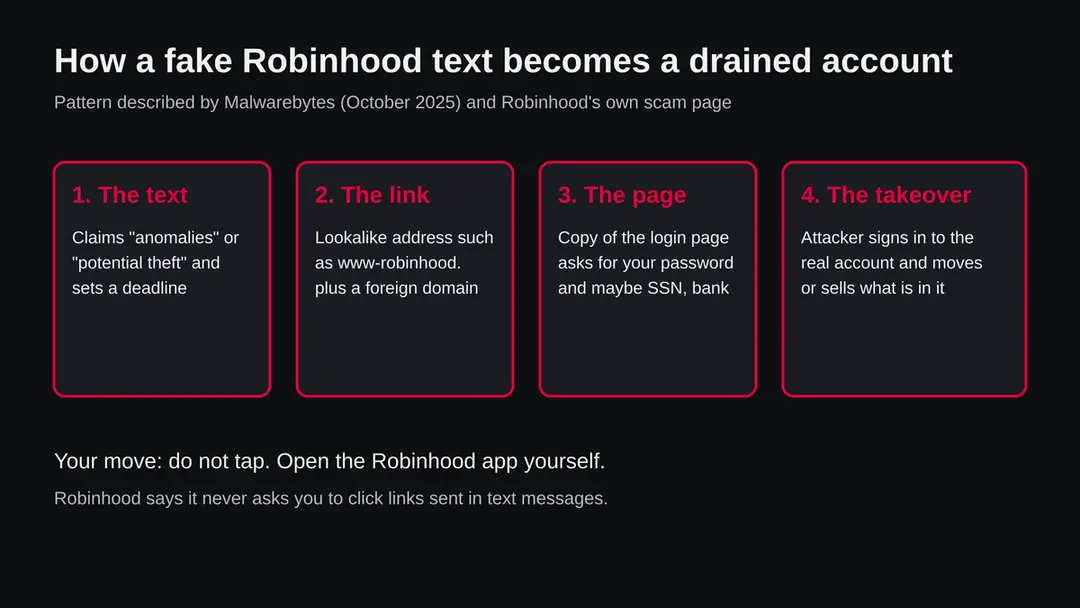
Robinhood scam text: summary
| Name | Robinhood scam text (fake security alert, fake login link, fake support number) |
|---|---|
| Type | Phishing by text message (smishing) that pretends to be Robinhood |
| Risk | High if you sign in on the fake page: the attacker can take over the real account. None if you ignore the text |
| Symptoms | A text about anomalies, potential theft, a suspended account or a verification link, from a number you do not know |
| How to get rid of it | Nothing is installed by the text itself. Delete it, report it, and if you typed a password, change it in the app and freeze the account |
| Our check (17 October 2026) | No address to test: the job was a name, not a site. We read Robinhood's and Malwarebytes' pages; no URLhaus data and no site test |
Show 11 more facts
| Devices | iPhone and Android (the text arrives as SMS or iMessage) |
|---|---|
| Microsoft detection | No Microsoft detection name is known: this is a text message that sends you to a fake login page, not a program on the phone or a Windows threat |
| Official report address | reportphishing@robinhood.com (Robinhood does not reply to it) |
| Evidence | 0 write-ups by security sites; details still limited |
| Domains | robinhood-securelogin.com |
| Ads shown as | Redirects through ad pages |
| Browsers | Chrome, Edge and Firefox |
| First seen | 17 October 2026 |
| Distribution | Typically ad scripts on free streaming, file-hosting and adult sites, typo domains and hacked websites |
| Damage | Redirects to scam pages, fake updates and tech support scams |
| Facts checked | 17 October 2026 |
Facts checked on 17 October 2026 against Robinhood's support page on identifying and reporting scams, Malwarebytes' report of 15 October 2025, and press coverage of the callback variant. We tested no link and no phone number, and we do not publish the numbers or addresses from other people's messages except the defanged examples Malwarebytes listed.
Is a Robinhood scam text real? The short answer
If a text says your Robinhood account has anomalies, a potential theft, a problem to verify or a deadline, and it gives you a link or a phone number, treat it as a scam. Robinhood's own support page says the company will never ask you to click links sent in text messages, and that you should go to the app or robinhood.com instead of using a link or number in an unexpected message.
Not every text that mentions Robinhood is fake. Robinhood does send real messages, for example a verification code that you asked for when you sign in. The difference is who started the contact.
A code that arrives right after you tapped Sign in is yours. A warning that arrives out of the blue and pushes you to act within minutes is the pattern scammers use.
The safe test takes ten seconds and needs no judgment about the wording:
- close the text
- open the Robinhood app from your home screen (or type robinhood.com yourself)
- look at your account and its notifications
If something real needs your attention, it is there. If the app shows nothing, the text was not from Robinhood.
- What it claims
- Account anomalies, potential theft, suspension, an API key linked to a wallet, or a login that must be verified
- What it wants
- A tap on a link to a fake login page, or a call to a fake support number
- What it does not do
- Install anything on the phone by being read. The harm comes from what you type or say afterwards
- Who is behind it
- Not known. We found no source that names the senders
- Where to check
- Only the Robinhood app, robinhood.com and robinhood.com/contact
What we know about these texts, and what we do not
Several security sources have documented the same scam since 2023 in changing wording. We could not confirm who sends it, how many people receive it, or how much has been lost, and we do not guess at those numbers.
Malwarebytes wrote on 15 October 2025 that an employee of the company received a text claiming that Robinhood's automated security check system had found anomalies in the account and that a dedicated security check link had to be used.
The message was signed as the Robinhood Securities Official Security Team and came from a number with the +243 country code, which belongs to the Democratic Republic of the Congo. Malwarebytes described its report as a follow up to a scam that MalwareTips had reported earlier.
The link in that message went to a lookalike address that began with www-robinhood. followed by an unrelated domain. Malwarebytes listed fourteen defanged indicators, among them robinhood-securelogin[.]com and robinhood-verification[.]net. We did not visit any of them. The page behind such a link is described as a convincing copy of the Robinhood login page.
Press coverage also describes a second version without a link. A Fox News report found by our search says a text claimed an API key had been linked to an external wallet and told the reader to call a number labelled as a safety reminder.
The report's point is that no legitimate financial company handles account security through an unsolicited phone call. We read only the search summary of that article, not the full page, so we use it only for the existence of the callback version.
What is unknown: whether one group or many send these texts, whether the senders reuse the same numbers, and whether any specific message you received is part of a campaign we have seen. Wording and numbers change from week to week. That is why this page teaches the pattern and the safe steps rather than a list of numbers.
Is Robinhood scam text dangerous?
What we checked for this guide, and what we could not
This guide covers a scam text, not a website, so there was no address for our server to request. We read Robinhood's own page and one researcher write up, and we did not open any scam link.
Robinhood scam text · desk check · 17 October 2026
- Robinhood's own guidanceRead on 17 October 2026: no links from texts, no codes or passwords to anyone, reports to reportphishing@robinhood.com, and a freeze option in the app for a compromised account.
- Researcher write upMalwarebytes, 15 October 2025: a fake security alert text, a lookalike login page and fourteen defanged indicators.
- Site testNot done. The subject is a message, not a site, and our server made no request. A quiet result would not have cleared anything anyway.
- URLhausNo reported URLs were attached to this job, so we have no malware list data for any link from these texts.
- Your messageWe cannot see it. If yours differs from the examples here, the same rule applies: it is the unrequested link or number that gives it away.
Treat an unrequested Robinhood alert text as a scam The pattern is documented by Robinhood and by a security vendor. We did not test a live link, so the page makes no claim about any single address.
How to tell a fake Robinhood message from a real one
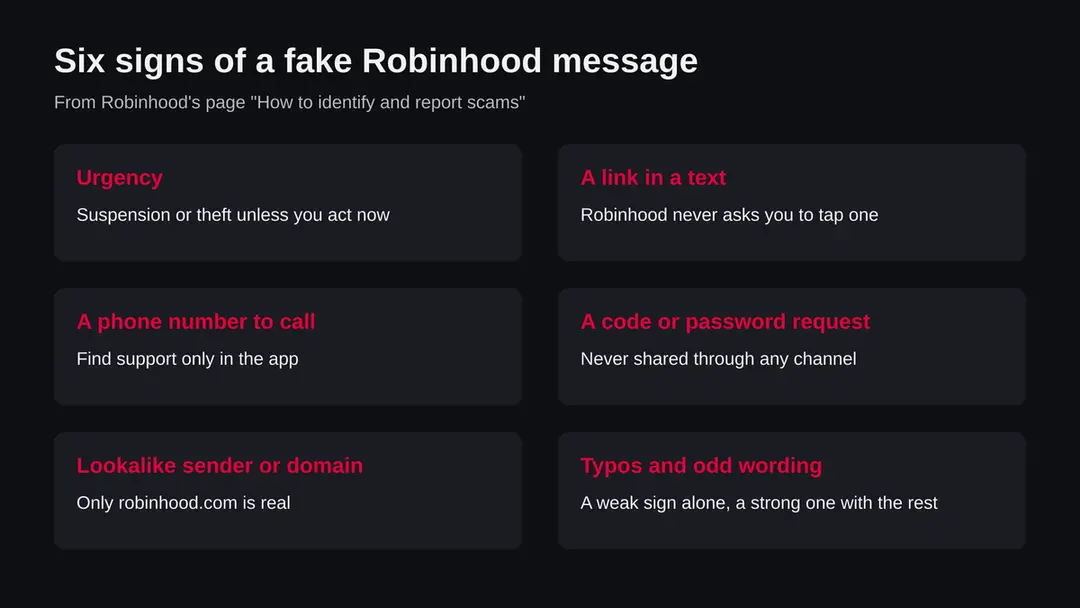
No single sign proves a text is fake, but a link or phone number in an unexpected message is reason enough to stop. Robinhood lists the signs below on its own support page.
| What you see | What it means | What to do |
|---|---|---|
| Threat of suspension or a deadline | Pressure is the scammer's main tool; Robinhood names it as a red flag | Do nothing in the text. Open the app yourself |
| A link to sign in or verify | Robinhood says it never asks you to click links in texts | Do not tap. Do not copy it into a browser either |
| A number to call about a wallet or security | Callback scams use a person on the phone to get codes and passwords | Do not call. Robinhood says not to search for or call numbers sent to you |
| A request for a password, 2FA code or recovery phrase | Robinhood says it never asks for these through any channel | Never give them, even to someone who sounds like support |
| An address like www-robinhood.something or robinhood-secure... | Only robinhood.com belongs to Robinhood; lookalikes are fraudulent | Close it. Type robinhood.com yourself |
| A foreign or unknown sending number | Real alerts come inside the app as notifications | Check the app, then report the text |
Robinhood scam text compared with other versions
The scam comes as three recurring versions: a link version, a callback version and a social media or email version. The safe response to all of them is the same.
| Version | How it works | Source |
|---|---|---|
| Fake security alert with a link | Claims anomalies or potential theft, sends you to a lookalike login page | Malwarebytes, 15 October 2025 |
| Callback text | Claims an API key or wallet problem and tells you to call a number | Fox News coverage (read as a search summary only) |
| Fake support on social media or search | A page or account offers help or payouts and a number to call | Robinhood's scam page |
| Email with an attachment | Fake tax form such as a 1099 or a zip, exe or doc file | Robinhood's scam page |
| Free stock or prize offer | Too good to be true offers used to start a conversation | Robinhood's scam page |
On a phone the attachment version matters less, because a phone does not run an exe file, but the link, callback and fake support versions work equally well on iPhone and Android.
How Robinhood scam text got onto your phone
A Robinhood account holds money and investments that can be sold and moved, so a stolen login has direct value. The text exists only to get that login.
Malwarebytes writes that logging in on the fake page gives the scammers your credentials, which they can use to drain the account. The reports we read add that attackers may try to switch off two factor protection, change the password and sell assets. The fake page may also ask for more than a password:
- Malwarebytes mentions tax documents
- full name
- Social Security number if one is on file
- bank account information
MalwareTips, in the coverage our search returned, reports that some fake sites showed a verification complete message and then sent the visitor on to the real Robinhood site. That matters because a victim who lands on the real site afterwards may think nothing went wrong.
If you typed a login on any page you reached from a text, assume the login is known to someone else, even if the end of the process looked normal.
The reason the scam is sent as a text is simple. Texts feel urgent, they arrive on the device where the Robinhood app lives, and people read them within minutes. Email filters catch many phishing mails, while a text from an unknown number reaches the phone directly.
The same pattern is used for parcel, toll and bank texts: the FTC reported that consumers lost 470 million dollars to text message scams in 2024, a figure we know from press coverage of the report, not from the FTC page itself.
How to remove Robinhood scam text
There is nothing to uninstall: the text itself installs nothing.
The plan is to ignore the link, check your account the safe way, and secure it if you typed anything.
Step 1: Do not tap, call or reply
Leave the link and the number alone, and do not reply, including with STOP. Robinhood says it never asks you to click links sent in text messages, and the FTC advises not to answer unsolicited texts.
If you already have the message open, simply close it. Nothing runs on the phone because you read it.
The warning signs Robinhood lists for a fake message. Step 2: Check your account the safe way
Open the Robinhood app from your home screen, or type robinhood.com yourself in the browser. Look at your account, recent activity and notifications.
If a real problem exists it shows there. If the app shows nothing, the text was not from Robinhood.
Do not use the app store page or a search ad to find the app if you do not already have it, and download only the official app from the Apple App Store or Google Play.
Step 3: If you typed a login, secure the account
In the Robinhood app, change the password to a new one you use nowhere else and remove devices you do not know under the device monitoring settings.
To freeze the account, open the in-app chat, say that the account is hacked and choose Freeze account. Robinhood says a freeze blocks deposits, withdrawals and new positions during a review of 1 to 2 weeks. If you cannot sign in, email support@robinhood.com.
Step 4: Report and block the sender
Forward the text to 7726 (SPAM) as the FTC advises, and send a screenshot with the sending number to reportphishing@robinhood.com. On iPhone use Report Junk under the message in Messages if it is shown (iOS 26).
On Android use Report spam in Google Messages (Android 14). The menu names can differ by version, and we did not test them on a device.
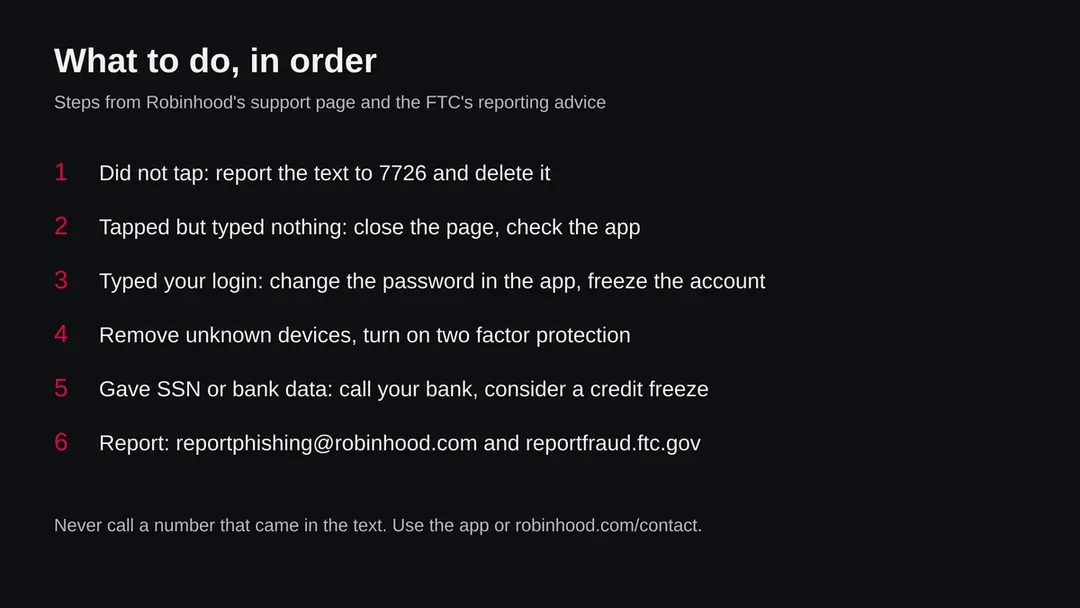
The order of actions after a fake Robinhood text. Step 5: Tighten the phone's message filters
On iPhone open Settings > Messages and turn on Filter Unknown Senders (iOS 26), which moves texts from people not in your contacts into a separate list.
On Android open Messages > profile picture > Messages settings > Spam protection and turn on Enable spam protection (Google Messages, Android 14). We read no Apple or Google page for this guide, so check the menu names against your version.
Step 6: Watch the money and the credit
If you typed a login, check your Robinhood activity and linked bank for the next few weeks.
If you gave your Social Security number or bank details, call your bank on the number on your card, tell it what you gave, and think about a credit freeze.
Report to the FTC at reportfraud.ftc.gov if any money or personal data went to a scammer.
After removal: keep the ads from coming back
What to do depending on what you did
What you did after the text arrived decides what you need to do. Reading it costs nothing. Tapping the link usually costs nothing unless you then typed something. Typing a login is the step that needs action today.
- 1
You only read it, or did not open it
Do not reply, not even with STOP, because the FTC advises not to respond to an unsolicited text. Report it and delete it. Nothing is installed on your phone by reading a text.
- 2
You tapped the link but typed nothing
Close the page. Open the Robinhood app and check your account and recent activity. Nothing you did not do should be there. A page that opened is not an infection of the phone, but do not return to it.
- 3
You typed your email and password
Treat the account as exposed. Open the Robinhood app (or sign in at robinhood.com yourself), change the password to a new one you use nowhere else, and remove devices you do not know in the device monitoring settings. Robinhood's page also says you can freeze the account: use the in-app chat, say that the account is hacked and choose Freeze account.
- 4
You gave a 2FA code, or spoke to someone on the phone
Do all of the above at once, and contact Robinhood Support through the app. Robinhood says a freeze blocks deposits, withdrawals and new positions until a review finishes, which can take 1 to 2 weeks, and that you can still sell assets you hold. If you cannot sign in, Robinhood says to email support@robinhood.com.
- 5
You gave your Social Security number or bank details
Call your bank on the number printed on your card or on its app, tell it what you gave, and ask what it can watch. Think about a credit freeze with the credit bureaus; the FTC's identity theft site IdentityTheft.gov explains the steps. We did not verify those pages for this guide, so read them there.
- 6
You sent money or crypto
Contact Robinhood Support as soon as possible and report to the FTC at reportfraud.ftc.gov. Robinhood warns that crypto transfers cannot be reversed and that it cannot reimburse crypto transfers you authorize, so speed matters and expectations should stay low.
How to report a Robinhood scam text
Report the text three ways: to Robinhood, to your phone provider through 7726, and to the FTC. It takes about two minutes and helps block the sender.
- 1
Report to Robinhood
Send a screenshot of the text and the sending number to reportphishing@robinhood.com. Robinhood says to use that address only for phishing and that it will not reply. Do not attach links or open them to take the screenshot.
- 2
Forward the text to 7726
The FTC advises forwarding suspicious texts to 7726 (SPAM) so that providers can help block them. Press and hold the message, choose forward, and type 7726. Our source for this is press coverage of the FTC's advice, and an older FTC page said it is free with the main US carriers, so check your own carrier's page if you are outside the United States.
- 3
Report in your messaging app
On iPhone, open the message in Messages and tap Report Junk if it appears under the text. On Android, open the message in Google Messages, tap the menu and choose Report spam. The exact wording depends on your system version, and we did not test it on a device for this guide.
- 4
Report to the FTC
File at reportfraud.ftc.gov. Robinhood's page names it as the place to report if money went to a scammer. Include the number, the time and what the text said.
How to stay ahead of the next one
Do
- Contact Robinhood only through the app or robinhood.com/contact, which Robinhood lists as its official paths.
- Turn on two factor protection for your Robinhood account and keep your recovery details current.
- Use a password for Robinhood that you use nowhere else.
- Report the text, then delete it, so you do not tap it by mistake later.
- Tell family members, especially older ones, that Robinhood never asks for codes or links by text.
Don't
- Tap a link or call a number in an unexpected message about your account.
- Search the web for a Robinhood phone number; Robinhood warns that fake support numbers appear in search and social ads.
- Share a password, 2FA code or secret recovery phrase with anyone, in any channel.
- Install remote desktop software or share your screen with a person who says they are from Robinhood.
- Send money or crypto to anyone claiming to be from Robinhood.
Questions about Robinhood scam text
Is the Robinhood text I got a scam?
Almost certainly, if it came without you asking and it contains a link or a phone number. Robinhood's own support page says it will never ask you to click links sent in text messages, and tells you to go to the app or robinhood.com instead.
A code that arrives right after you tried to sign in is different, because you started it. If you are unsure, do not tap anything.
Open the Robinhood app from your home screen and look for notifications there. If the app shows no problem, the text was not from Robinhood. Then report it and delete it.
What does the Robinhood account anomalies or potential theft text say?
Malwarebytes described one version on 15 October 2025: it said Robinhood's automated security check system had detected anomalies in the account and asked for a dedicated security check link to be used.
It was signed as the Robinhood Securities Official Security Team and came from a number with the +243 country code. Other reports use the words potential theft. The wording changes between campaigns, so rely on the pattern:
- an alarm
- a deadline and a link
- never on one exact sentence
I clicked the link in the Robinhood text. What now?
If you only tapped and typed nothing, close the page, open the Robinhood app and check your account. Nothing is installed on the phone by opening a page, but do not go back to it.
If you typed your email, password or a code, change the password in the app at once, remove devices you do not know, and consider freezing the account through the in-app chat, as Robinhood's page describes. Then report the text. If you also gave your Social Security number or bank details, call your bank on the number on your card.
Should I call the number in the Robinhood text?
No. Some versions of the scam have no link and tell you to call a number about a wallet or API key problem. A report found by our search says no legitimate financial company handles account security through an unsolicited phone call.
Robinhood tells customers not to call numbers sent by text or email and not to search the web for Robinhood phone numbers, because scammers buy ads and post fake numbers. Use the in-app chat or callback request, or go to robinhood.com/contact.
How do I report a Robinhood scam text?
Send a screenshot and the sending number to reportphishing@robinhood.com, which Robinhood says is for phishing only and will not answer. Forward the text to 7726 (SPAM) so your provider can help block the number, as the FTC advises.
Report it inside your messaging app, and file a report at reportfraud.ftc.gov, especially if you lost money or gave away personal data. Do not open the link to take the screenshot. Reporting does not get your money back by itself, but it helps stop the sender.
Does Robinhood ever send text messages?
Yes. Robinhood can send a verification code to your phone when you sign in or change something, and that code is for you alone. The difference is that you started the action and the text asks for nothing:
- no link to tap
- no number to call
- no deadline
Robinhood says it never asks for your password, 2FA code or recovery phrase in any channel. If a text asks you to hand over a code you received, to anyone, it is a scam, even if the first message was real.
Can scammers get into my Robinhood account with just my phone number?
We found no source that says a phone number alone is enough. The reports we read describe scammers needing your login, a code, or both, which is why the texts push you to a fake login page or a phone call.
A phone number can still be used to find you and to send more texts. Use a strong, unique password, keep two factor protection on, and treat any request for a code as a scam. If you are worried, check the devices listed in your Robinhood security settings.
Is the Robinhood scam text a virus on my iPhone or Android?
No. Reading a text does not install malware on an iPhone or an Android phone, and the message itself is not a program. The danger is the fake login page and the person on the phone, which take your credentials and codes.
You do not need a virus scanner or a remover for this, and an app that promises to remove the Robinhood scam text is selling you something. The free steps on this page are the whole fix. If you installed an app because a text or caller told you to, uninstall it and turn off its permissions.
Why do I keep getting Robinhood texts when I have no account?
Scammers send these texts to large lists of numbers and do not know who has an account. A message about Robinhood to someone with no account is a sign of mass sending, not of a leak from Robinhood. We found no source that explains how any specific number got on a list.
Do not reply, because a reply shows the number is active. Report the text, delete it, and block the sender. Do not follow the link even to see what happens.
Sources
- Robinhood Support: How to identify and report scams (read October 17, 2026)
- Malwarebytes: Scammers are still sending us their fake Robinhood security alerts (15 October 2025) (read October 17, 2026)
- Fox News: Robinhood text scam warning, do not call this number (read October 17, 2026)
- MalwareTips: Fake Robinhood account warning texts, how the scam works (read October 17, 2026)
- Yahoo News: Text scams cost consumers $470M in 2024, FTC (reporting the FTC's advice on 7726 and reportfraud.ftc.gov) (read October 17, 2026)