
PS5 hacked: how to tell if your PlayStation account or console was hacked, and what to do
When people say their PS5 was hacked, the thing taken is almost always the PlayStation Network account, not the console itself, and the fix is to secure the email, change the password, sign out everywhere and turn on 2-step verification. A second, different case is a console that was modified on purpose, which can end in a ban and is not a break-in.
Facts checked October 17, 2026. Steps checked against Apple's and Google's current documentation and the reports we cite. We have not run the app or the link on a phone ourselves.
Do it yourself · free Remove PS5 hacked (PlayStation account takeover) yourself 7 steps, about 21 minutes, no software needed.
Start the steps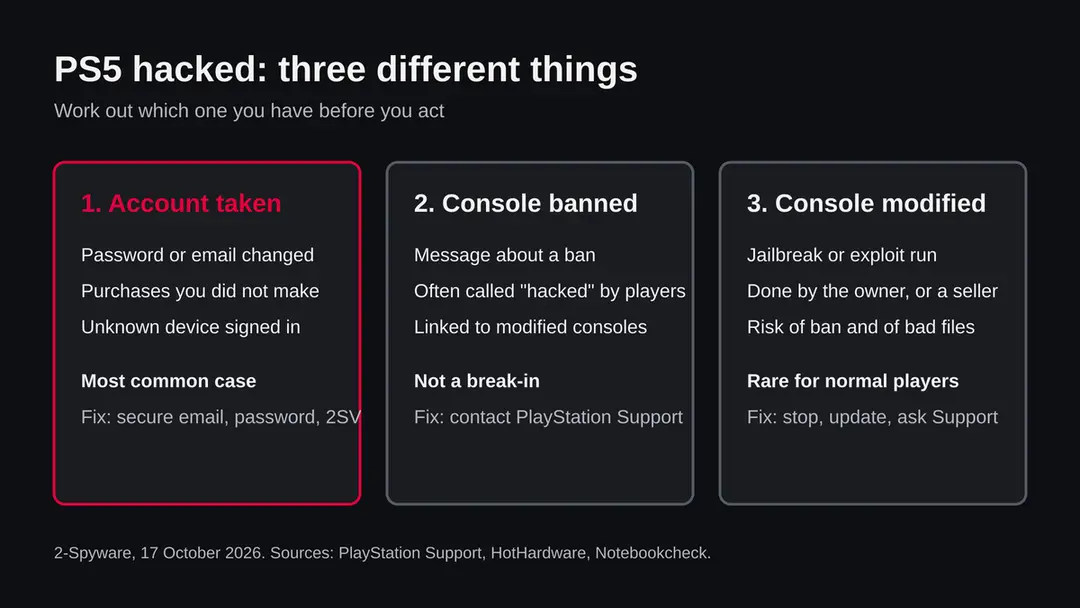
PS5 hacked (PlayStation account takeover): summary
| Name | PS5 hacked (PlayStation 5 and PlayStation Network account takeover) |
|---|---|
| Type | Account takeover in most cases; a modified or banned console in a smaller number |
| Risk | Medium to high for the account: purchases, wallet funds, saved cards, the email behind it. Low for the console hardware itself |
| Symptoms | Sign-in alerts you did not cause, changed email or password, purchases you did not make, unknown consoles on the account, friends receiving odd messages, a ban message |
| How to get rid of it | Secure the email, change the PSN password, sign out of every device, deactivate unknown consoles, remove saved payment methods, turn on 2-step verification, contact PlayStation Support |
| Our check (17 October 2026) | Desk research only: no address to test, no URLhaus entry, no console tested |
Show 8 more facts
| Devices | PlayStation 5 and the PlayStation Network account that it uses, which also covers other PlayStation consoles |
|---|---|
| Microsoft detection | No Microsoft detection name belongs to a PS5 or a PlayStation account takeover. A Windows PC that opened a fake PlayStation page or file could be flagged by Defender, which uses generic names such as Trojan:Win32/Wacatac.B!ml, so run a scan on it too. That name is an example of Microsoft's style and was not checked against any file tied to this topic |
| Evidence | 0 write-ups by security sites; details still limited |
| Program | A file or program installed on a PS5 or on a device used to sign in to PlayStation Network |
| First seen | 17 October 2026 |
| Distribution | Typically ad scripts on free streaming, file-hosting and adult sites, typo domains and hacked websites |
| Damage | Redirects to scam pages, fake updates and tech support scams |
| Facts checked | 17 October 2026 |
Facts checked on 17 October 2026 against PlayStation Support pages on compromised accounts and 2-step verification, two news reports on PS5 exploits and bans, and a cyber help guide for hacked gaming accounts. There is no website to test and we did not examine any console, so we describe patterns and official steps, not one named case.
Is your PS5 hacked? The short answer
Most of the time a hacked PS5 means a hacked PlayStation Network account. Someone has your sign-in details, signs in from another device and changes things. The console on your shelf is usually fine. The steps are about the account: secure the email first, change the password, sign out everywhere and turn on 2-step verification.
The phrase covers three different situations, and the right action depends on which one you have. In the first, a stranger has your PSN login. In the second, the console shows a ban message, which players often call hacked even though nobody broke in.
In the third, the console itself was modified with an exploit, either by you, by a seller or by someone you lent it to. Most readers are in the first group.
We cannot look at your account or your console, so this page does not tell you which case you have. It gives you the signs of each, the order of actions that Sony's own support pages describe, and the questions to ask yourself. Where a fact is unknown we say so.
- Most likely case
- The PSN account was taken over, through a fake page, a reused password or an insecure email
- First action
- Secure the email account behind the PSN account
- Second action
- Change the PSN password and sign out of PlayStation on every device
- Also do
- Deactivate consoles you do not recognise, remove saved payment methods, turn on 2-step verification
- Not the same as
- A virus on the console. We found no source that describes ordinary PS5 owners catching malware from normal use
Signs that your PlayStation account was hacked
The clearest signs are things that changed without you: a password or sign-in email that no longer works, purchases you did not make, and consoles or devices on the account that you do not recognise. One odd sign alone can have an innocent cause, so look for two or more.
A second group of signs shows up in your social circle. Friends tell you that you sent them a link, a free currency offer or a request for a code. Account thieves often use a stolen account to message its friends, because a message from a known name is believed. If this happens, treat the account as taken even if you can still sign in.
Signs to look for, and what each one can mean
- You are locked out and the password failsA thief changed the password or the sign-in email. Use the Trouble Signing In route on Sony's sign-in page and contact PlayStation Support.
- Purchases or wallet spending you did not makeOpen your transaction history. Sony's support page on compromised accounts tells you to contact PlayStation Support as soon as possible when someone used your payment details.
- Unknown consoles on the accountA console you never owned that is set as active for your account means someone else is signed in.
- Sign-in or security emails you did not expectThese can be real alerts of a sign-in attempt, or a fake email that wants you to click. Do not use the link in the email. Go to the account page by typing the address yourself.
- Friends receive strange messages from youEither your account is used or someone copied your name. Warn them, and check the account.
- The console is slow or a game crashesOn its own this is not a sign of a hack. Games crash and consoles slow down for ordinary reasons, and no source we read ties these to account theft.
Treat two or more real signs as an account takeover We cannot see your account. If the password changed, money was spent or an unknown console is listed, act on the steps below today.
Is PS5 hacked (PlayStation account takeover) dangerous?
PS5 jailbreaks, exploits and bans: when hacked means modified
A modified PS5 is a console that was made to run code Sony did not approve, using an exploit. That is something done to the console, usually on purpose, and the risk is a ban and untrusted files, not a stranger stealing your account.
HotHardware reported on a PS5 jailbreak that needs outdated system firmware and said that using it or similar exploits can lead to permanent bans of both the user account and the hardware ID from PlayStation services, and may put access to digital only games at risk.
Notebookcheck reported that Sony blocked modified consoles from connecting to PSN unless they run firmware 14.10, and that after the update jailbreaks and the hypervisor bypass cannot be installed. We could not confirm the date of that report in the material we read, so check the current firmware news before you rely on the timing.
Two cases matter here. If you modified the console yourself, a ban is a known risk of what you did, and Support is the only door for a ban question. If you bought the console used and it behaves oddly, or a seller offered to install games for you, then you may hold a console with modifications you did not choose.
In both cases, do not install files from forums or file sites onto the console, because a file that runs with extra rights can do more than the game it claims to be.
A ban message is not the same as a break-in. If you see one and you did nothing to the console, someone may have used your account on a modified console, or the console may have been modified before you owned it. We do not know which, and only PlayStation Support can see the reason. Ask them, and secure the account in the meantime.
| Situation | What it usually is | What to do |
|---|---|---|
| Password changed, purchases you did not make | Account takeover | Follow the order of actions below |
| Ban message, you never modified anything | Unknown; possibly a used console or a shared account | Contact PlayStation Support, secure the account |
| Ban message, you ran an exploit | A known risk of modifying a console | Support decides; do not expect a reversal |
| Seller offered to install games | A modified console | Stop, update through official routes, ask Support what it can see |
| Console slow or crashing | Ordinary fault | Restart, update, free space; not a hack by itself |
What we checked for this guide, and what we could not
This guide rests on desk research. There is no website to test, no file to scan and no console in our hands, so nothing here is a test result about your account or your PS5.
PS5 hacked · desk check · 17 October 2026
- PlayStation Support on compromised accountsRead. It says to sign out of PlayStation on every device, deactivate consoles, remove saved payment methods, change the email password first and contact PlayStation Support if your payment details were used.
- PlayStation Support on 2-step verificationRead. Path: Account Management, Security, Edit next to 2-step Verification Status, then choose an authenticator app or text message and record the backup codes.
- Malware listsThere is no address for this topic. We found no URLhaus entry because there was nothing to look up.
- Press reports on exploits and bansTwo reports read. One was not dated in the material we saw, and we did not verify the firmware claims on a console.
- How many accounts are takenUnknown. We found no reliable figure and give none.
- Your account and your consoleNot tested. We cannot see them. The steps are the official ones, and a quiet result on your side does not clear the account.
Account takeover is the likely reading, not proven for you The official steps are free and safe to run whichever case you have. Run them even if you are not sure.
How PS5 hacked (PlayStation account takeover) got onto your phone
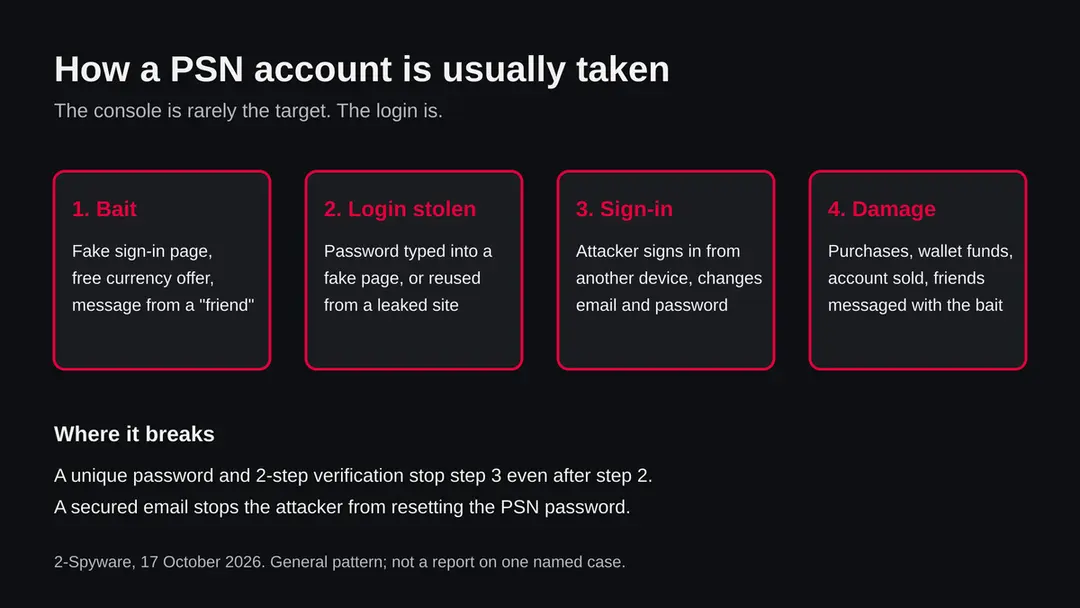
The console is rarely the target. The login is. Accounts are taken through a fake sign-in page, a password reused from another site that leaked, or an email account that the thief already controls, since a password reset goes through the email.
The pattern is the same for most gaming accounts. A message or a page promises something:
- free in-game currency
- a prize
- a beta key
- a trade
- a warning that your account will be closed
It sends you to a page that looks like the PlayStation sign-in. You type your details, and the page passes them on. The thief signs in at once, often from a different country, and changes the email and password before you notice.
A second route needs no trick at all. If you used the same password for PlayStation and for a small forum or shop that was later breached, the thief only has to try the leaked pair on PlayStation.
This is why a unique password matters more than a clever one. We do not have a count of how many PSN accounts are taken each way; no source we read gives a reliable figure, and we will not invent one.
How to remove PS5 hacked (PlayStation account takeover)
How to secure a hacked PS5 and PlayStation account
These steps secure the PlayStation Network account behind the console, which is where most PS5 hacks happen.
They follow PlayStation Support pages read on 17 October 2026. Menu names can change, so match them to what you see. If you also signed in to PlayStation on an iPhone or an Android phone, for example in a browser or the PlayStation App, sign out there too and change the password on that phone as well.
Step 1: Secure your email account first
Open your email provider and change its password from a device you trust. Turn on 2-step verification there, check for forwarding rules you did not set, and sign out other sessions if the provider offers it.
PlayStation Support says to change the email password first, because the PSN password reset goes to that address.
Step 2: Change the PSN password
Go to the PlayStation sign-in page by typing the address yourself, and use the Trouble Signing In option if the old password fails. Choose a password that you use nowhere else.
If you cannot get in at all, or the sign-in email was changed, contact PlayStation Support and be ready to prove that the account is yours.
The order of actions for a hacked PlayStation account. Step 3: Sign out of every device and deactivate consoles
PlayStation Support says to sign out of PlayStation on every device and then deactivate the consoles. Do this for every console that is not yours, then sign in again only on your own PS5.
On an iPhone or an Android phone, also sign out of any browser or PlayStation App session you do not trust. This removes a thief who is still signed in with the old session.
Step 4: Remove saved payment methods
Open your PlayStation account settings and take off saved cards and other payment methods. This stops further buying. Add one back later only if you want it, and consider asking for a password at checkout if the settings offer that.
Step 5: Turn on 2-step verification
In Account Management open Security and choose Edit next to 2-step Verification Status. Pick an authenticator app or text message, scan the QR code or enter your mobile number, and record the backup codes.
Store the codes away from your phone. If your device supports passkeys, Sony describes those as a quick and secure option.
Step 6: Check the history and contact Support
Open your transaction history and write down every purchase you did not make. Contact PlayStation Support with that list before you dispute anything with the bank, because a chargeback can lead to a suspension according to a third party guide.
If the console shows a ban message, ask Support for the reason; only they can see it.
Step 7: Stop modifying the console and update it
If your console was modified, stop running exploits and do not install files from file sites. A console that runs unapproved code can hold files you cannot judge. Update through the console's own system software settings and keep the account away from any modified console.
What to do first, in order
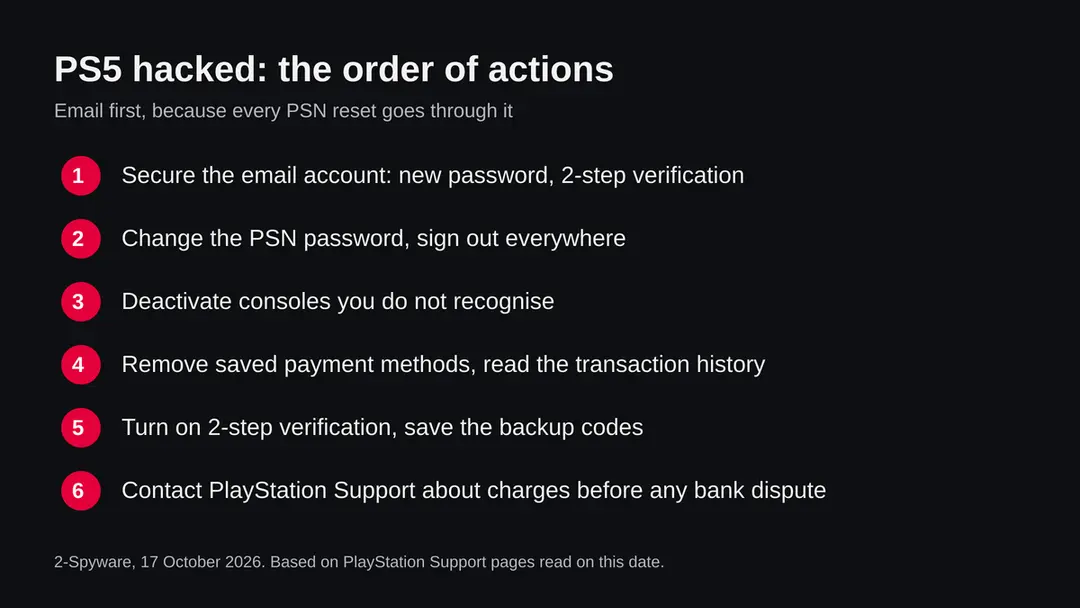
Do the email first. Every password reset for a PSN account is sent to the email address on the account, so a thief who controls the email can undo your fixes.
- 1
Secure the email account
Change the email password from a device you trust, sign out of other sessions if your email provider offers it, and turn on 2-step verification there. Check the forwarding rules and recovery options, because a thief may have added their own.
- 2
Change the PSN password and sign out everywhere
Choose a password you use nowhere else. PlayStation Support says to sign out of PlayStation on every device, so a stolen session does not outlive the new password.
- 3
Deactivate consoles
PlayStation Support tells you to deactivate the consoles on the account. Do this for any console you do not recognise, and then sign in again on your own.
- 4
Remove saved payment methods
Take saved cards and other payment methods off the account, as PlayStation Support suggests, so that nothing more can be bought while you sort this out.
- 5
Read the transaction history
Write down every purchase you did not make, with date and amount. You will need the list for Support.
- 6
Contact PlayStation Support before your bank
A third party guide warns that a bank chargeback can lead to an account suspension. Read Sony's guidance on unauthorised payments first, and ask Support what they advise.
After removal: keep the ads from coming back
Turn on 2-step verification and consider a passkey
2-step verification makes a stolen password useless on its own, because the thief also needs the code from your phone. PlayStation Support's path is Account Management, then Security, then Edit next to 2-step Verification Status.
On that page you choose an authenticator app or a text message. With an app you scan a QR code. With a text message you enter your mobile number.
Then you record your backup codes and keep them somewhere that is not the phone itself, such as a printout in a drawer. If you lose both the phone and the codes you may lock yourself out.
PlayStation Support also describes passkeys as a quick and secure way to sign in, and says that if your device does not support passkeys you should use 2-step verification.
We did not read the passkey setup steps themselves, so follow Sony's own passkey guide for those. An authenticator app is generally safer than text messages, which can be intercepted by a SIM swap, but any second step is far better than none.
Scams that follow a hacked account
After an account theft, a second scam often follows: a stranger says they found or can get your account back, for a small fee or in exchange for a code. The only safe recovery route is Sony's own support.
The Cyber Helpline's guide for hacked gaming accounts recommends reporting the compromise through the platform's official support, turning on multi-factor authentication and changing passwords on any other site that used the same credentials.
A security blog we read describes the recovery scam, with red flags such as a request to pay a small fee, a promise to return it, or a request for screenshots, receipts, an ID or a code to prove ownership. That blog is not an official source, so we give it as a warning pattern, not as a fact about any single case.
Never give a verification code to another person, never pay a stranger to recover an account and never install a program or enter details on a page that someone sends you after a hack. Sony Support will not ask for your password.
Do
- Secure the email before the PSN account.
- Use a password you use nowhere else, ideally from a password manager.
- Turn on 2-step verification and store the backup codes away from the phone.
- Type playstation.com yourself instead of following links in messages.
- Ask PlayStation Support about charges before a bank dispute.
Don't
- Pay a stranger or a recovery service to get the account back.
- Share a verification code with anyone.
- Run an exploit or install files from file sites on the console.
- Reuse the old password anywhere.
- Click the link in a sign-in alert email; open the account page yourself.
What stays unknown
We do not know how your account was reached, and nobody can tell from outside.
We do not know whether a given ban came from your account, your console or an earlier owner. We could not verify how current the exploit and firmware reports are, and we found no reliable figures for how many accounts are taken or how often modified consoles are banned. If a page tells you otherwise with exact numbers and no source, be careful with it.
Questions about PS5 hacked (PlayStation account takeover)
Can a PS5 be hacked?
Yes, but the word is used for different things. Your PlayStation Network account can be taken over, which is the common case and the one most readers have. The console itself can also be modified with an exploit, which HotHardware reports needs outdated system firmware and carries a risk of permanent account and hardware bans.
We found no source that describes ordinary owners catching a virus from normal play. Treat strange account activity as a takeover and act on the account first, as the steps on this page describe.
How do I know if my PS5 or PSN account was hacked?
Look for things that changed without you:
- a password or sign-in email that no longer works
- purchases or wallet spending you did not make
- consoles on the account that you do not recognise
- friends who say you sent them odd messages
One sign alone can have an innocent cause, so look for two or more. A slow console or a crashing game is not a sign of a hack on its own. We cannot see your account, so check the transaction history and the list of consoles yourself.
What should I do first if my PlayStation account was hacked?
Secure the email account first, because PSN password resets are sent there. Then change the PSN password to one you use nowhere else, sign out of PlayStation on every device, deactivate consoles you do not recognise, remove saved payment methods and turn on 2-step verification.
PlayStation Support's page on compromised accounts describes the sign-out, deactivation and payment steps and tells you to contact Support as soon as possible if your payment details were used.
How do I turn on 2-step verification on PlayStation?
Go to Account Management, open Security, and choose Edit next to 2-step Verification Status. You then pick an authenticator app or a text message. For an app you scan a QR code, and for a text message you enter your mobile number.
Last, record your backup codes and keep them away from the phone. You can switch methods later by deactivating the current method and turning 2-step verification on again. Sony also describes passkeys as a quick option if your device supports them.
Can I get my money back for purchases a hacker made?
Possibly, but we cannot promise it, and the decision is Sony's. PlayStation Support says to contact them as soon as possible if someone used your payment details, and its contact page has a section for payments you do not recognise.
Write down each purchase with its date and amount first. A third party guide warns that a bank chargeback can lead to an account suspension, so ask Support before you dispute a charge with your bank, and read Sony's own guidance.
Will I be banned if my PS5 is jailbroken?
It is a real risk. HotHardware reported that using a PS5 jailbreak or similar exploits can lead to permanent bans of both the user account and the hardware ID, and Notebookcheck reported that Sony blocked modified consoles from PSN unless they run firmware 14.10.
We could not confirm the date of the second report. We do not recommend modifying a console, and a ban question can only be answered by PlayStation Support, who can see the reason.
I got a ban message but never modified my PS5. Was I hacked?
Not necessarily. A ban is not the same as a break-in. Possible causes include someone using your account on a modified console, a console that was modified before you bought it, or a shared account.
We do not know which applies to you, and nobody outside Sony can tell. Contact PlayStation Support and ask for the reason, and secure the email and the account in the meantime using the steps on this page.
Someone offers to recover my hacked account for a fee. Is that safe?
No. The Cyber Helpline recommends recovering a hacked gaming account only through the platform's official support. A security blog describes recovery scams that ask for a small fee, promise a refund, or ask for screenshots, receipts, an ID or a code to prove ownership.
Never pay a stranger, never share a verification code, and never install a program that someone sends you. Sony Support will not ask for your password.
Can a hacker use my PS5 to attack my home network or phone?
We found no source that shows this for ordinary PS5 owners, so we cannot say it happens and we will not claim it does. The proven risk is to the account:
- purchases
- wallet funds
- the email behind it
- anyone who trusts your name
As a precaution, change any password you reused, keep your router and devices updated, and treat a console you bought used or modified as untrusted until Support has told you what it sees.
Sources
- PlayStation Support: Phished (compromised) accounts and unauthorised charges (read October 17, 2026)
- PlayStation Support: How to set up 2-step verification on PlayStation (read October 17, 2026)
- HotHardware: A New PS5 Jailbreak Is Here, But Think Twice If You Want To Play GTA 6 (read October 17, 2026)
- Notebookcheck: Sony blocks PS5 console jailbreak from PSN, requiring firmware update 14.10 (read October 17, 2026)
- The Cyber Helpline: Recover from hacked online gaming account (read October 17, 2026)