
Unifin scam: what is real, what is fake, and what to do on iPhone and Android
Unifin scam is a search about two different things: impostors who used the name of the Mexican lender Unifin Financiera to sell fake loans, and the lender's own bankruptcy.
We found no official source that calls Unifin itself a scam, but a stranger who offers you a Unifin loan and asks for a fee first is running a scam, whether you meet them on iPhone, Android, by phone or in person.
Facts checked October 17, 2026. Steps checked against Apple's and Google's current documentation and the reports we cite. We have not run the app or the link on a phone ourselves.
Do it yourself · free Remove Unifin scam yourself 6 steps, about 18 minutes, no software needed.
Start the steps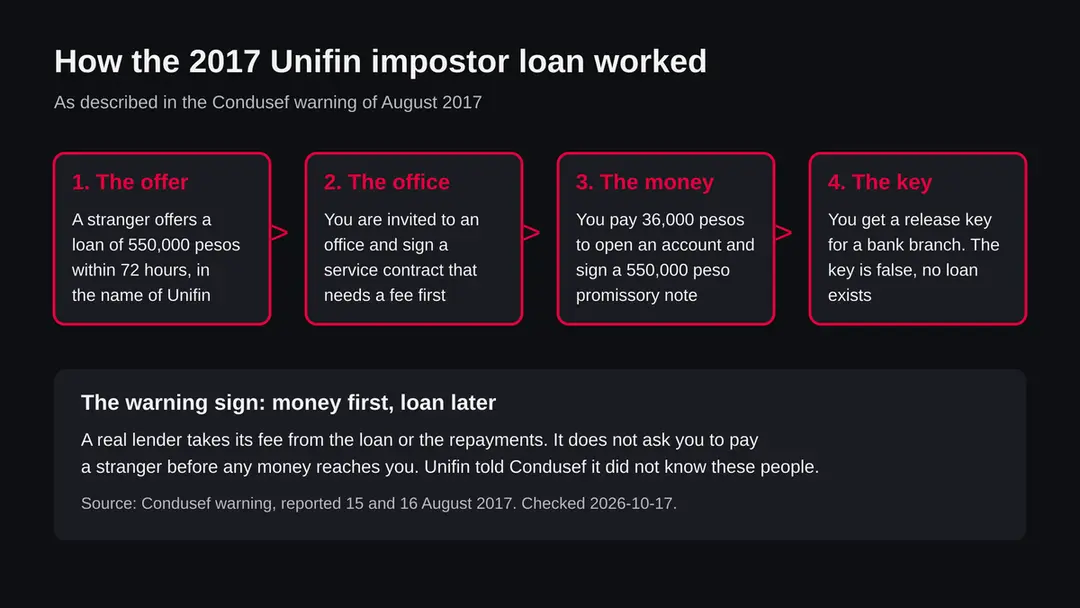
Unifin scam: summary
| Name | Unifin scam (searches for Unifin, Unifin Financiera, Unifin loan) |
|---|---|
| Type | Advance fee loan fraud that used the Unifin name (Condusef warning, August 2017); company bankruptcy is a separate matter |
| Risk | Medium for anyone paying a fee or signing a note to get a loan; none from the name alone |
| Symptoms | A loan offered within hours, a fee demanded before any money, a promissory note for the full amount, a release key that does not work |
| How to get rid of it | Nothing to uninstall. Stop contact, pay nothing, check the lender with the regulator, tell your bank if you paid |
| Our check (17 October 2026) | Desk research only: Condusef reports, regulator warnings and Expansion. No website or program was tested |
Show 9 more facts
| First seen | Impostor warning reported 15 August 2017 |
|---|---|
| Devices | Not device specific: the 2017 cases happened by phone and in person; messages can reach iPhone and Android |
| Microsoft detection | No Microsoft detection name is known for this fraud, because it is not a file. If a message leads to a loan app, Microsoft lists the Android name Trojan:AndroidOS/SpyLoan!MTB (Microsoft Security Intelligence, read 17 October 2026); we did not link it to any Unifin case |
| Evidence | 0 write-ups by security sites; details still limited |
| Program | A link, app or file sent with an offer of a Unifin loan |
| Microsoft Defender name | Trojan:AndroidOS/SpyLoan!MTB |
| Distribution | Typically ad scripts on free streaming, file-hosting and adult sites, typo domains and hacked websites |
| Damage | Redirects to scam pages, fake updates and tech support scams |
| Facts checked | 17 October 2026 |
Desk research on 17 October 2026 from Mexican news reports of a Condusef warning, Expansion, and warnings by the CSSF and FMA. No website or program was tested, and no court files were read.
Is Unifin a scam? The short answer
We found no official source that calls Unifin Financiera a scam. We found an official warning that impostors used its name to sell fake loans, and we found that the company itself went through a bankruptcy procedure. Those are three different things, and people who search for "Unifin scam" may mean any of them.
This page is built from sources we read on 17 October 2026: a Mexican news report of a warning from Condusef, the country's financial consumer protection agency, dated August 2017; a second report of the same warning; Expansion's report on the end of Unifin's bankruptcy procedure in January 2024; and two foreign regulator warnings about sites with similar names.
We did not visit any website, we did not talk to the company, and we did not read court files.
What we cannot tell you is whether a particular message, call or person who contacted you is real. The name Unifin has been copied before, so the safe rule is simple: pay nothing to get a loan, and check the lender yourself.
- The company
- Unifin Financiera, a Mexican lender for leasing, car loans and fleets, listed on the Mexican stock exchange since 2015
- The impostor warning
- Condusef, reported 15 and 16 August 2017: people posing as Unifin staff sold fake loans
- The company's own trouble
- Stopped paying its debt on 8 August 2022; announced the end of its concurso mercantil on 29 January 2024
- Look alike names
- ulfininvestment[.]com (CSSF, April 2022) and unifinanz[.]it (FMA, October 2023), neither tied to Unifin by any source we read
- What is not confirmed
- Any current scam under the Unifin name in 2026; we found no official warning dated after 2017
Is Unifin scam dangerous?
What we checked for this guide, and what we could not
This was a desk check on 17 October 2026. We read two reports of the Condusef warning, Expansion's report on Unifin's bankruptcy, and two foreign regulator warnings. We tested no website and no program, because the subject is a name, not an address.
Unifin scam · desk research · 17 October 2026
- Impostor warningFound: Condusef, reported 15 and 16 August 2017. The Unifin name was used by others to sell fake loans.
- Newer official warning naming UnifinNone found in our searches. That does not prove none exists; we could not search Condusef's own database.
- Company financesExpansion reports a default on 8 August 2022 and the end of the concurso mercantil announced on 29 January 2024.
- Look alike sitesCSSF (11 April 2022) and FMA (25 October 2023) warned about ulfininvestment[.]com and unifinanz[.]it. No source ties them to Unifin.
- Why the topic is searched nowUnknown. Search data shows interest in the phrase, but we found no source for a current 2026 scam, and we will not invent one.
Name misused by others; company not named a scam The Unifin name was abused by impostors in 2017 and the company had a bankruptcy procedure. We found no official finding that the company itself is a scam.
Look alike names: Ulfin Investment and Unifinanz
Two foreign regulators warned about sites whose names look like Unifin. Neither source links them to Unifin Financiera, and we do not either.
The Luxembourg regulator CSSF published a warning on 11 April 2022 about the website ulfininvestment[.]com. The site offers investment services and says it is based in Hesperange and supervised by the CSSF. The CSSF states that the entity is not supervised by it and has no authorisation to provide investment or other financial services in or from Luxembourg.
The Liechtenstein regulator FMA published a warning on 25 October 2023, filed as a clone firm case. It says the website unifinanz[.]it and its email address have no connection to the real Liechtenstein company Unifinanz Trust, that the operators hold no FMA licence or registration, and it strongly advises against investing through the site or answering its offers. We read both pages; we did not open either site.
The lesson for a reader is about spelling. Scam sites pick names one letter away from real ones. If you meet a lender or investment site, copy the exact name into the regulator's own warning list and look for the letter swaps.
| Name | Who warned | What they said |
|---|---|---|
| ulfininvestment[.]com | CSSF, Luxembourg, 11 April 2022 | Not supervised or authorised; the claimed supervision cannot be relied on |
| unifinanz[.]it | FMA, Liechtenstein, 25 October 2023 | No link to Unifinanz Trust, no licence; do not invest or respond |
| Unifin Financiera | Condusef, Mexico, August 2017 | Its name was used by impostors; the company said it did not know them |
How to tell a real loan from an advance fee scam
A real lender pays you the loan and collects its costs from the loan or the repayments. If anyone asks you to pay first, in cash, by transfer, by gift card or by cryptocurrency, treat it as a scam, whatever name they use.
The 2017 case had the usual features. The loan was big and approved within hours. Payment came before money. A promissory note tied the victim to the full amount.
A release key stood in for a real transfer. Pressure to act quickly and to meet in person, without time to ask questions, completes the pattern. None of these is proof alone, but together they are enough to stop.
- High
Fee before the loan
The 2017 victims paid 36,000 pesos to open an account. Paying to receive money is the core of the fraud.
- High
Promissory note for the full amount
Signing a note in favor of a third party can leave you owing money you never received. Ask a lawyer or a consumer office before signing.
- Medium
Speed
Approval in 72 hours or less, with no checks, is meant to stop you thinking.
- Medium
A code instead of a transfer
The release key at a bank branch turned out to be false. A genuine lender sends money to your account.
- Medium
Approach on the street or by message
Condusef reported victims being approached near the World Trade Center in Mexico City. Real lenders do not recruit borrowers on the pavement.
How to remove Unifin scam
What to do after a Unifin loan offer on iPhone and Android
There is no program to remove, because the case we found was run with contracts and fees.
What you remove is the contact, and you protect your money.
Step 1: Stop and pay nothing
Do not transfer a fee, do not give a deposit and do not sign a contract or promissory note while you are being pushed. The 2017 case promised a loan within 72 hours, and the speed was part of the trick.
A real lender can wait one day while you check it. Write down who spoke to you, which number or address they used and what they asked for.
Step 2: Do not use the links or numbers in the message
Warning: On iPhone and on Android, do not tap a link in a text, chat or email that offers a Unifin loan, and do not call the number it gives.
Delete the message after you have saved a screenshot for a report. If you already tapped, do not type a password, a card number or an identity document number on the page that opened. Close it.
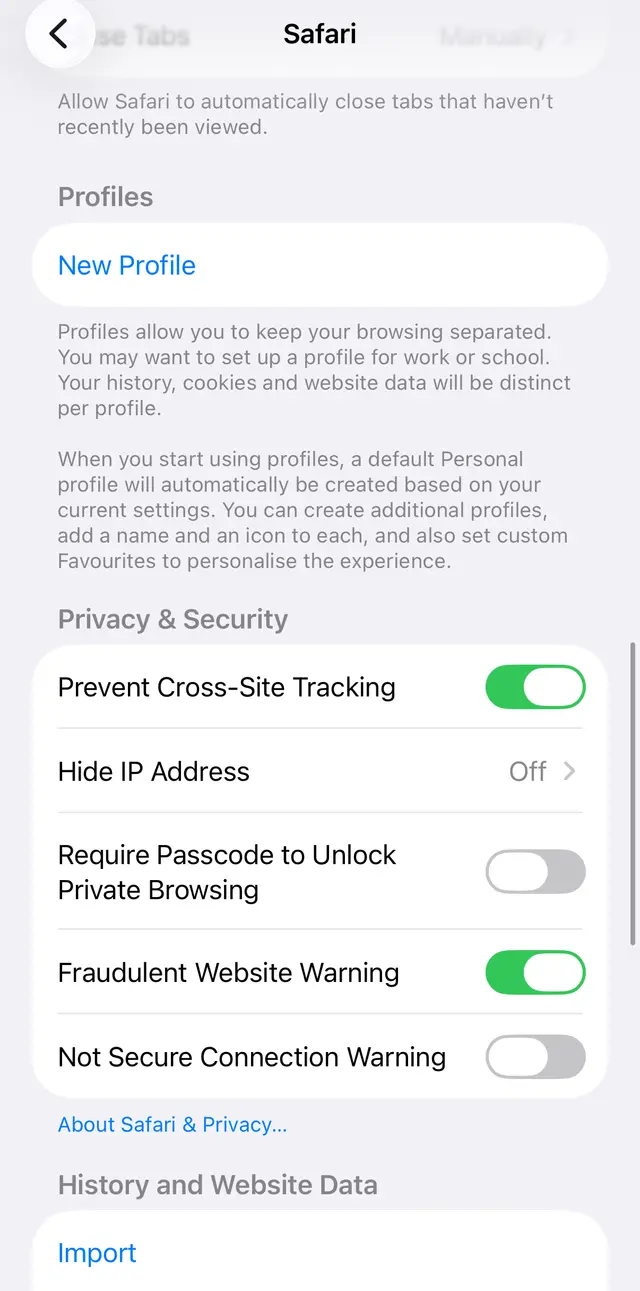
iPhone Safari settings: the Fraudulent Website Warning switch, which helps against fake pages opened from a link. Step 3: Check the lender with the regulator
Take the full legal name the person gave you and check it with Condusef, the Mexican consumer finance regulator that issued the 2017 warning. Ask whether the adviser really works for that institution.
If you cannot confirm both, treat the offer as a scam. Then contact Unifin using details you found yourself, and ask whether it made the offer.
Step 4: If you already paid, call your bank
Call the bank that sent the money, using the number on your card or on its official site, and say you paid a fee for a loan that did not arrive.
Ask for the payment to be stopped or disputed. Do this the same day, because transfers are hard to reverse later. Keep every receipt, contract and message.
Step 5: Report it and block the contact
Report the case to Condusef, the body that published the original warning, and to the police. Block the sender's number on your phone so the same people cannot reach you again.
Expect a second approach: scammers sometimes call victims again and offer to recover the money for another fee. Do not pay it. On Android, also make sure no app was installed from the message.
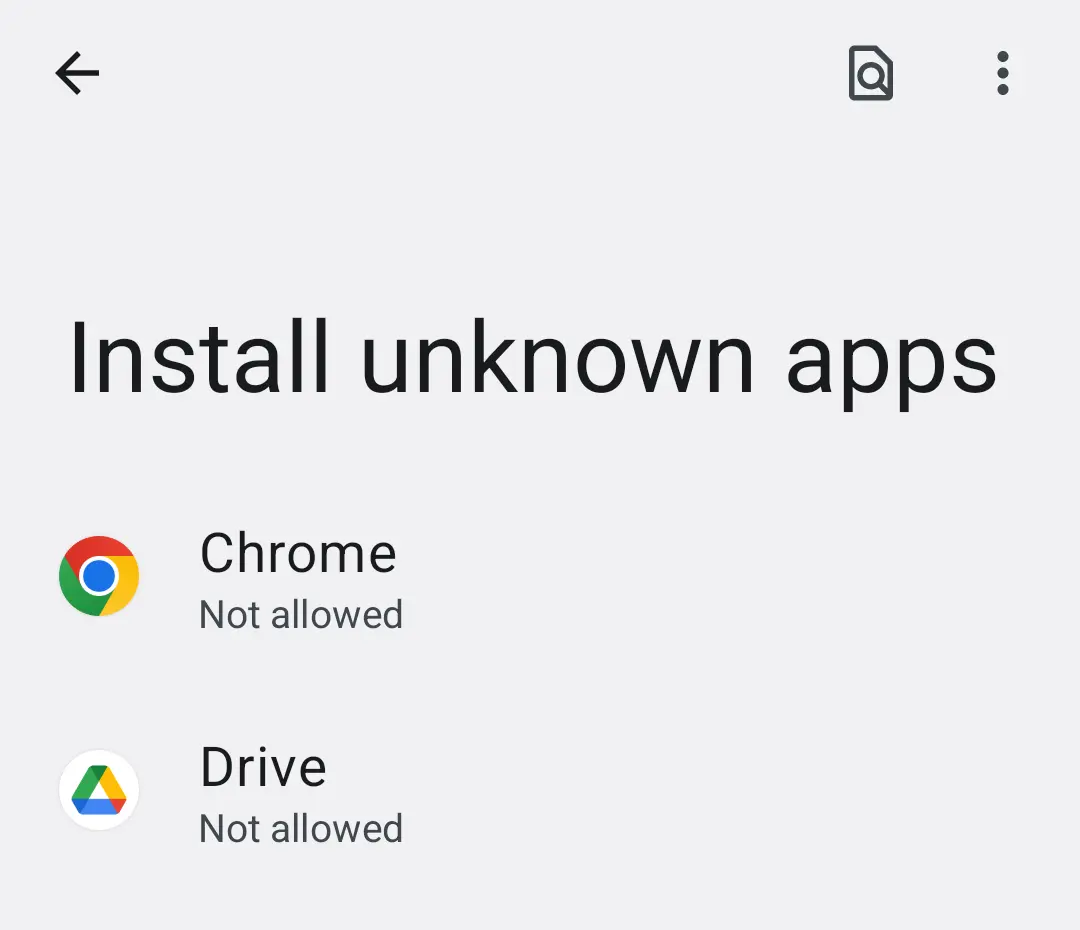
Android 14: Settings, Install unknown apps. Keep it off for the browser and messengers. Step 6: Protect your accounts
If you gave a password, a code from a text message or card details, change the password from another device, switch on two step sign in where it exists, and ask your bank to replace the card.
If you gave copies of your documents, watch for loans or accounts opened in your name and tell your bank. Check your bank statements for the next few weeks, because small unknown charges can be a test before a larger one.
How to check a lender before you pay anything
Check the lender yourself, with the regulator, before any money or signature. The 2017 advice from Condusef was to verify the institution and check that the adviser really works for it.
- 1
Get the full legal name
Ask for the exact company name, address and the adviser's full name. A trade name such as Unifin is not enough, because impostors use real names. If they refuse, stop.
- 2
Check it with the regulator
Check the name with Condusef, the Mexican consumer finance regulator, or the financial regulator of your own country. If the lender does not appear, or appears under a different name, treat the offer as unsafe.
- 3
Confirm the person works there
Contact the company through details you found yourself, such as its official site or its stock exchange listing, and ask whether this adviser exists and made this offer. Never use the number in the message.
- 4
Read the contract at home
Take a copy of the contract and any promissory note home and read them without the person present. Look for any fee before payout, any note in favor of a third company, and amounts that do not match what was promised.
- 5
Compare names letter by letter
Compare the spelling of the website, email address and company name with the real one. The cases in this guide include look alike names that differ by one or two letters.
After removal: keep the ads from coming back
If you already paid or signed
Act the same day. The sooner your bank hears about a payment, the better the chance it can be stopped or disputed. We cannot promise any outcome, and the reports we read do not say whether the 2017 victims got money back.
- 1
Call your bank
Use the number on your card. Say you paid a fee for a loan that was not paid out. Ask if the transfer can be stopped or disputed, and ask for a written reference.
- 2
Collect the evidence
Keep the contract, the note, receipts, bank statements, messages, phone numbers and the names used. Take photos of the office address and any papers.
- 3
Report it
File a complaint with Condusef, whose warning started this, and with the police. Reports help other people, and Condusef says in its warning that it follows such cases.
- 4
Be careful with the note
A promissory note you signed may be used to demand money from you. Get advice from a lawyer or a consumer office about it before you pay anyone who contacts you about it.
- 5
Do not pay a recovery service
Someone who offers to get your money back for another fee is repeating the scam. Only your bank, the regulator and the police are the right places to go.
What not to do
Do
- Check the lender's legal name with the regulator before you sign.
- Contact the company using details you found yourself.
- Keep every paper and message if something goes wrong.
- Call your bank the same day if you paid.
- Ask a lawyer or consumer office about any promissory note.
Don't
- Pay a fee, deposit or insurance to receive a loan.
- Sign a note in favor of a company you do not know.
- Trust a release key, code or voucher in place of a transfer.
- Tap links or call numbers from an unexpected loan message.
- Pay a stranger who offers to recover your money.
Questions about Unifin scam
Is Unifin a scam?
We found no official source that calls Unifin Financiera itself a scam. What we found is two separate things. First, Mexico's consumer finance regulator Condusef warned in August 2017 that impostors were using the Unifin name to sell fake loans, and Unifin told Condusef it did not know these people.
Second, Unifin as a company stopped paying its debt in August 2022 and went through a bankruptcy procedure that it said ended in January 2024. A company in financial trouble is not the same as a scam, but a stranger who offers you a Unifin loan and asks for money first is a scam pattern.
What is Unifin?
Unifin Financiera is a Mexican lender that Expansion describes as an unregulated Sofom, a type of multi purpose financial company. It focuses on leasing, car loans and fleet management, also lends to small and medium businesses, and has been listed on the Mexican stock exchange since 2015.
It is a business lender, so an offer of a personal loan of a few hundred thousand pesos from a person on the street does not match what the company is known for. Check any offer against the company itself, using a contact you found on your own.
What was the Unifin loan scam of 2017?
Condusef warned that people posing as Unifin staff offered loans to people who needed money.
In the case it described, a victim was promised a loan of 550,000 pesos within 72 hours, asked to pay 36,000 pesos as an account opening fee and to sign a promissory note of the same size as the loan in favor of a company called Confincor.
The victim then got a release key for a bank branch, and the bank said the key was false. The news reports are dated 15 and 16 August 2017.
Did Unifin go bankrupt, and does that make it a scam?
Unifin said on 8 August 2022 that it had stopped paying interest and principal on its debt, and on 29 January 2024 it announced that its concurso mercantil, the Mexican court procedure for a company that cannot pay, had ended and that it was a fully reorganized company. Expansion reported both dates.
A bankruptcy is a legal procedure, not a finding of fraud. We did not read court files and make no claim about any person. Creditors and investors should read the company's own filings and get advice from a licensed adviser.
Is a text, call or email from Unifin real?
We cannot tell from here, and neither can you from the message alone. The name is easy to copy, and the 2017 case shows impostors did copy it. Do not tap links or call numbers inside the message.
Find the company's contact details yourself, for example from its listing on the Mexican stock exchange or from the regulator, and ask whether the message is genuine. Never pay a fee to receive a loan, and treat a demand to act within hours as a warning sign, not a reason to hurry.
Are unifinanz.it or Ulfin Investment the same as Unifin?
No source we read links them to Unifin Financiera. The Liechtenstein regulator FMA warned on 25 October 2023 that the website unifinanz[.]it and its email address have no connection to the real company Unifinanz Trust and hold no licence.
The Luxembourg regulator CSSF warned on 11 April 2022 that the site ulfininvestment[.]com, which claimed to be supervised by it, is not supervised or authorised. Both names look like Unifin, which may be why they show up in searches, but they are different names.
What should I do if I paid a fee or signed a note?
Contact your bank at once, using the number on your card, and tell them you paid for a loan that does not exist. Ask whether the transfer can be stopped or disputed. Keep the contract, receipts, messages and the name and phone number of the people involved, then report the case to Condusef and to the police.
Do not pay any second fee to get the first one back, because recovery offers are a known follow up trick. Be careful with a signed promissory note and ask a lawyer or a consumer office what it means for you.
How can I check whether a lender is real?
Ask the lender for its full legal name, then check that name with the financial regulator of your country. In Mexico, the 2017 warning advised checking the institution with Condusef and checking that the adviser really works for it.
Look for a registered office you can verify and contracts that do not demand money before the loan. Compare the website address, spelling and phone number with the ones on the lender's official pages. If anything is missing or the person pushes you to hurry, walk away.
Is there anything to remove from my computer or phone?
Not because of the name alone. The 2017 scam we found was run through contracts, offices and a bank release key, not through a program. A message that comes with a link can still lead to a fake page or ask you to install an app, so do not install anything from such a message.
On iPhone or Android, delete the message, do not tap the link, and block the sender. If you did install something or typed a password, change that password from another device and call your bank.
Sources
- IDC Online: Detectan prestamos falsos a nombre de Unifin Financiera (16 August 2017) (read October 17, 2026)
- El Financiero: Eres cliente de Unifin, ten cuidado (15 August 2017) (read October 17, 2026)
- Expansion: Unifin concluye proceso de concurso mercantil (29 January 2024) (read October 17, 2026)
- CSSF: Warning concerning the website www.ulfininvestment.com (11 April 2022) (read October 17, 2026)
- FMA Liechtenstein: Warning, clone firm and website unifinanz[dot]it (25 October 2023) (read October 17, 2026)