
Google phishing quiz: what it is, is it safe and how to spot fake copies
The Google phishing quiz is a free training test from Google's Jigsaw unit at phishingquiz.withgoogle.com that teaches you to tell phishing e-mails from real ones. It is not a virus, but fake copies and messages that promise a prize for taking it can steal passwords, so only use the exact address and never type a password or card number into a quiz.
Facts checked October 17, 2026. Removal steps tested on Windows 11 (26H2) and checked against Microsoft's and the browser makers' current documentation.
Automatic
Get a free scan and check if your PC is infected.
Fortect finds malware, unwanted programs and the Windows damage they leave behind, and repairs it in one pass.
If redirects to phishingquiz.withgoogle.com keep coming back, a free scan can check extensions, programs and browser settings in one pass.
Do it yourself · free Remove fake Google phishing quiz yourself 3 steps, about 9 minutes, no software needed.
Start the steps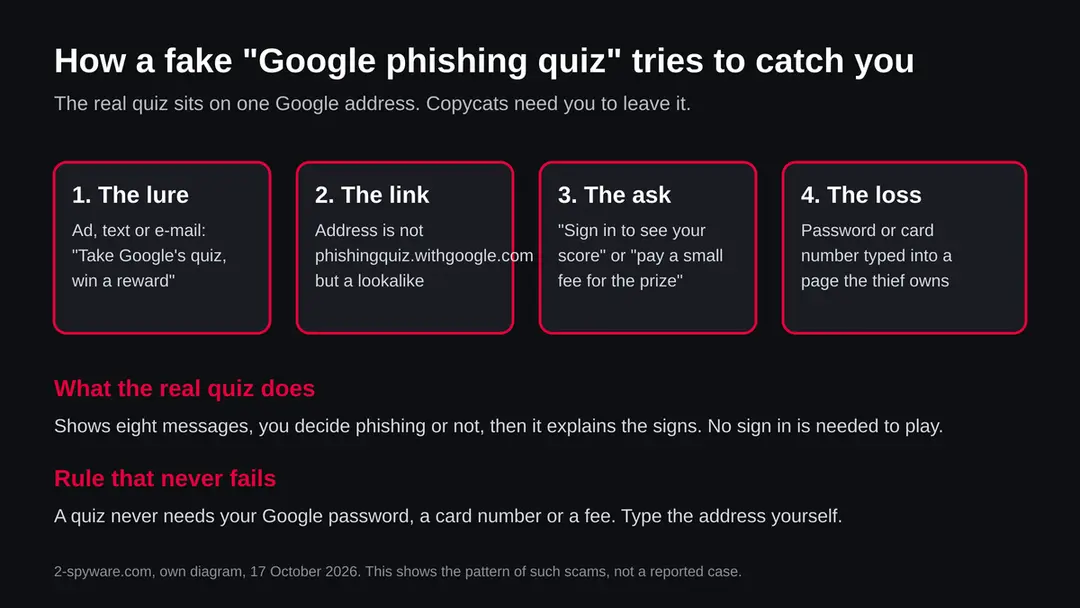
Fake Google phishing quiz: summary
| Name | Google phishing quiz (Jigsaw phishing quiz) |
|---|---|
| Type | Free phishing awareness quiz from Google's Jigsaw unit; not malware. Copies and prize messages that use its name can be scams |
| Risk | None from the real quiz at phishingquiz.withgoogle.com. High if a page with this name asks for a password, a code or money |
| Symptoms | A message, ad or page that says you must take or finish the Google phishing quiz and sign in or pay to get a score or a reward |
| How to get rid of it | Nothing to remove. Close the fake page, change the Google password if you typed it, turn on 2-Step Verification, report the message |
| Our check (17 October 2026) | No address to test: the subject is a name. Our read of the quiz page returned only a title and a loading message. No URLhaus entry in our data |
| Removal | Scan the PC with security software to find and remove the malware and anything installed with it. Fortect scans Windows for malware and repairs the system files and settings it damaged. Remove it nowTo use the full-featured product, you have to purchase a license for Fortect. The scan is free. |
Show 11 more facts
| Owner | Jigsaw, a unit of Google (according to press coverage of the quiz) |
|---|---|
| Devices | Any device with a browser |
| Microsoft detection | No Microsoft detection name is known: a quiz web page is not a program |
| Evidence | 0 write-ups by security sites; details still limited |
| Domains | phishingquiz.withgoogle.com |
| Ads shown as | Redirects through ad pages |
| Browsers | Chrome, Edge and Firefox |
| First seen | 17 October 2026 |
| Distribution | Typically ad scripts on free streaming, file-hosting and adult sites, typo domains and hacked websites |
| Damage | Redirects to scam pages, fake updates and tech support scams |
| Facts checked | 17 October 2026 |
Facts checked on 17 October 2026 against Google's Gmail help page on phishing and press coverage of the quiz. Our tool read only the title and a loading message on the quiz page, so we did not play it. This guide is about a name, and the check was a desk check, not a plain request from our server.
What is the Google phishing quiz
The Google phishing quiz is a free online test made by Jigsaw, a unit of Google, and it lives at phishingquiz.withgoogle.com. It shows you example e-mails and notifications, you decide whether each is phishing, and it then explains the signs.
Press coverage of the quiz, from sites such as Tom's Guide and 9to5Google, describes eight messages. Some are phishing attacks and some are normal mail. After every answer the quiz points out what gave the message away, or what showed that it was genuine.
The same coverage says the examples were inspired by real phishing mail and that Jigsaw built the quiz from security training it ran with a large group of journalists, activists and political leaders. We repeat these points as reported and did not verify them ourselves.
We also have to be plain about our own check. When our tool read the quiz page on 17 October 2026, it returned a title, Jigsaw Phishing Quiz, and the word Loading, because the questions are drawn by the page after it opens.
We could not play it, so we cannot confirm the current number of questions, the wording or the privacy text. Open the page in your own browser to see them.
People search for this name with a security question:
- is it safe
- is it a scam
- is it a virus
The short answers are yes it is safe at the right address, no it is not a scam by itself, and no it is not a virus. The long answers, and the cases where a page with this name is dangerous, are below.
- Address of the real quiz
- phishingquiz.withgoogle.com
- Made by
- Jigsaw, a unit of Google, according to press coverage
- Format
- Eight example messages; you judge each as phishing or not, then read the reasons
- Cost
- Free, runs in the browser
- Not the same as
- A virus, a Google security alert, a prize draw or a program you install
Is the Google phishing quiz safe, a scam or a virus?
The real quiz is safe, it is not a scam and it is not a virus. It is a web page for learning. The danger sits in imitations and in messages that use the quiz as bait.
A virus is a program, and the quiz is a page you read and click through. We found no URLhaus entry about it in the data our server reads, and the facts we hold name no malicious address connected to it. That is a statement about our data on 17 October 2026 and not a promise for every day and every visitor.
Here is where the risk is. Scammers copy anything popular. A text that says Google is giving a reward to people who finish its phishing quiz, an ad for a certificate of completion, or an e-mail that says your quiz score is waiting behind a sign in page would all be fakes.
We found no report of such a campaign, so we do not say one is running. We say the trick is easy to build and that the test below tells you whether you are on the real page.
The test is the address. The real quiz sits on a withgoogle.com name, so the part before the first single slash must end in withgoogle.com, and the page must be reached by an address you typed or a link from Google's own pages. An address like withgoogle.com.something-else.example is not Google, because the end of the name is what counts.
Is fake Google phishing quiz dangerous?
What we checked for this guide, and what we could not
The subject of this guide is a name and not a web address, so there was no plain request to a suspect site. We read the quiz page, Google's help page on phishing, and press coverage. We did not play the quiz and we did not test any imitation.
Google phishing quiz · desk check · 17 October 2026
- Malware listsNo URLhaus entry for this subject in the data our server reads on 17 October 2026.
- Google's own adviceGoogle's Gmail help page on phishing says to check that sender name and address match, to hover over links, and that Gmail will not ask for your password over e-mail.
- The quiz pageOur tool read only the title Jigsaw Phishing Quiz and a Loading message. We could not read the questions, so the details come from press coverage.
- Registration dataNo registration record was looked up: the subject is a name and not a plain domain, so we give no registration date.
- Fake copiesWe did not search for imitations and found none in our data. A quiet result does not clear every copy that may exist.
A training tool; the risk is in imitations The quiz is a training page from Google's Jigsaw unit. What needs care is any page or message that uses its name to ask for a password, a code or money.
What the quiz teaches: five checks for every message
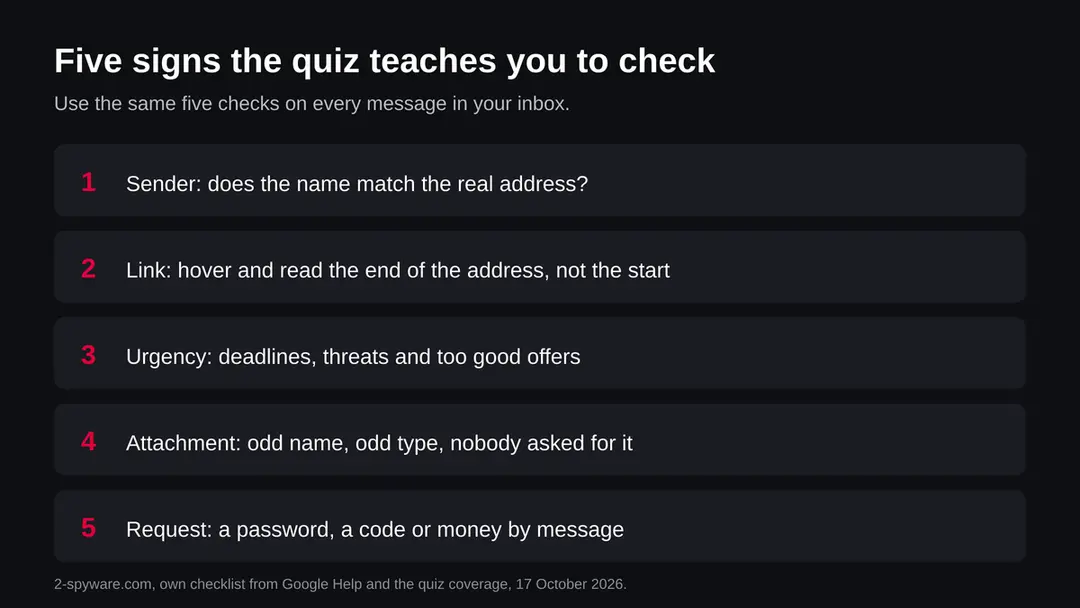
The quiz trains five habits: read the sender, read the link, notice the pressure, distrust the attachment and refuse the request for secrets. They work on any message, including the ones that point you to a quiz.
Start with the sender. Google's help page tells you to check that the sender name and the e-mail address match. A message that shows a familiar name but comes from an unrelated address fails this check at once. Next, the link.
On a computer, hover over a link before you click and read the address that appears. Coverage of the quiz gives an example of a name that begins with mail-google but ends in a domain nobody has heard of: only the end of the name counts.
Pressure is the third sign. Messages that scream urgency, threaten to close an account, or promise something too good to be true are built to stop you thinking. Google's page says the same: be wary of urgent or too good to be true messages.
The fourth sign is an attachment you did not expect, especially with an odd name or type. The fifth is any request for a password, a one time code or money by message. Google states that Gmail will not ask for your password over e-mail.
The quiz adds one lesson that people often miss. Some of its messages are real. If you treat everything as fake you will mark genuine mail wrongly and still miss the clever fakes. The aim is to check, not to panic.
| Sign | What to look at | Fake looks like |
|---|---|---|
| Sender | Name and address together | A known name with an address you do not know |
| Link | The end of the web address, shown when you hover | A Google name at the start, another owner at the end |
| Pressure | Deadlines, threats, prizes | Your account closes today unless you act |
| Attachment | Name, type, did you expect it | An invoice or document nobody sent you |
| Request | Does it ask for a password or code | Sign in to see your score, or pay a fee |
How to tell the real quiz from a copy
Type phishingquiz.withgoogle.com yourself, or search for Jigsaw phishing quiz and check the address before you click. Do not use a link from a message that you did not ask for.
Look at the address bar after the page opens. The name must end in withgoogle.com. Remember that anything can be written before that end, so read from the right. A page that sits on a long name with several hyphens, or one that puts google at the start and another name at the end, is not Google.
Next, watch what the page asks. The quiz as described is a game of judging example messages. It does not need a password to start, and it does not sell anything.
A page that wants a sign in, a code from your phone, a phone number, a card or a payment is not following the pattern of the real one, and you should close it. Our own read of the page found no sign in step, but because the questions did not load for our tool, we base this on press coverage.
Finally, ask who sent you there. If a stranger, a text or an unexpected e-mail did, treat the link as a lure, whatever it is called. Open a new window and go to the address yourself, or call the organisation the message claims to come from, as the FTC advises.
| Check | Real quiz | Warning sign |
|---|---|---|
| Address ends in | withgoogle.com | Any other ending, even with Google in the name |
| How you got there | You typed it or searched for it | A text, ad or e-mail you did not ask for |
| Sign in | Not part of the quiz as described | Asks for your Google password or a code |
| Money | Free | A fee, a deposit or a card number |
| Permissions | None needed to read and answer | Allow notifications, install an extension or a file |
Why people search for this name, and what else it can mean
Most people who search for the Google phishing quiz want to take it, to pass it for work or school, or to check it is safe. A smaller group have received a message that mentions it.
Some employers and schools tell staff and students to practise spotting phishing, and a free Google test is an easy pick. If your employer sent you the link, ask the security or IT team to confirm it. If you only received a link by text or e-mail from someone you do not know, treat it as a lure.
The name can also be confused with other things. A phishing simulation run by your own company is a different thing: it sends test e-mails to staff to measure who clicks, and the training page you land on afterwards belongs to that company.
A real Google security alert is another thing again. If an e-mail claims to be one, Google's page says to check your activity at myaccount.google.com/notifications instead of using the link inside.
Last, there is no program called Google phishing quiz on your device. If a site or an app tells you it found one and sells a remover, it is selling fear. There is nothing to remove, and you should not pay.
| What you met | What it is | What to do |
|---|---|---|
| phishingquiz.withgoogle.com | Google's Jigsaw training quiz | Use it freely; type the address yourself |
| A link to a quiz in a text or ad | Possibly a lure | Do not click; go to the address by hand |
| A test e-mail from your employer | A phishing simulation | Ask IT; report it as your policy says |
| A page that says a quiz virus was found | A scare tactic | Close it; pay for nothing |
How fake Google phishing quiz got into your browser
A scam that borrows the quiz would follow the usual phishing path: a lure, a lookalike link, a request for something that you should not give, and then the theft. This is the pattern of the trick and not a report of a case we have seen.
The lure can arrive as a text, a social media post, a pop up ad or an e-mail. It says that Google is rewarding people who finish its phishing quiz, or that your company or school requires you to finish it by a deadline.
The link then goes to a page that looks like Google's but sits on another address. At the point where a real quiz would simply start, the fake asks you to sign in with your Google account to save your result, or to enter a card number to pay a small processing fee for the reward.
Whatever you type goes to the owner of the fake page. A password is enough for them to try your mail, your drive and, because many people reuse passwords, other accounts. A card number is used or sold. The FTC's consumer advice describes the same shape for phishing in general: scammers pretend to be a company you know, and they push you to act at once.
One more version is worth knowing. A page might ask you to allow notifications in the browser, or to install an extension or a file, to continue. A real quiz that runs in the browser needs none of those. If you gave the permission, see the clean up steps below.
- High
Google password typed into a fake page
The thief can try your mail and other accounts. Change the password at once.
- High
Card number typed for a fee or reward
The card can be charged or sold. Call the bank.
- Medium
Notifications allowed or a file installed
Spam can keep arriving. Remove the file or extension and block the site.
- Low
You only opened the page
Usually nothing is lost, but close it and do not return.
How to remove fake Google phishing quiz
How to stop the Google phishing quiz redirects
Work in this order and test a few links after each step, so you know which one was the cause.
Step 1: Check the browser's extensions
A browser that keeps landing on
phishingquiz.withgoogle.comby itself usually has an add-on doing it. Open the extension list (chrome://extensions, edge://extensions, or Extensions and themes in the Firefox menu) and remove anything you do not remember installing.Coupon, PDF, new tab, search and video downloader add-ons are the usual suspects. Do this in every browser on the Windows 11 or Windows 10 PC.
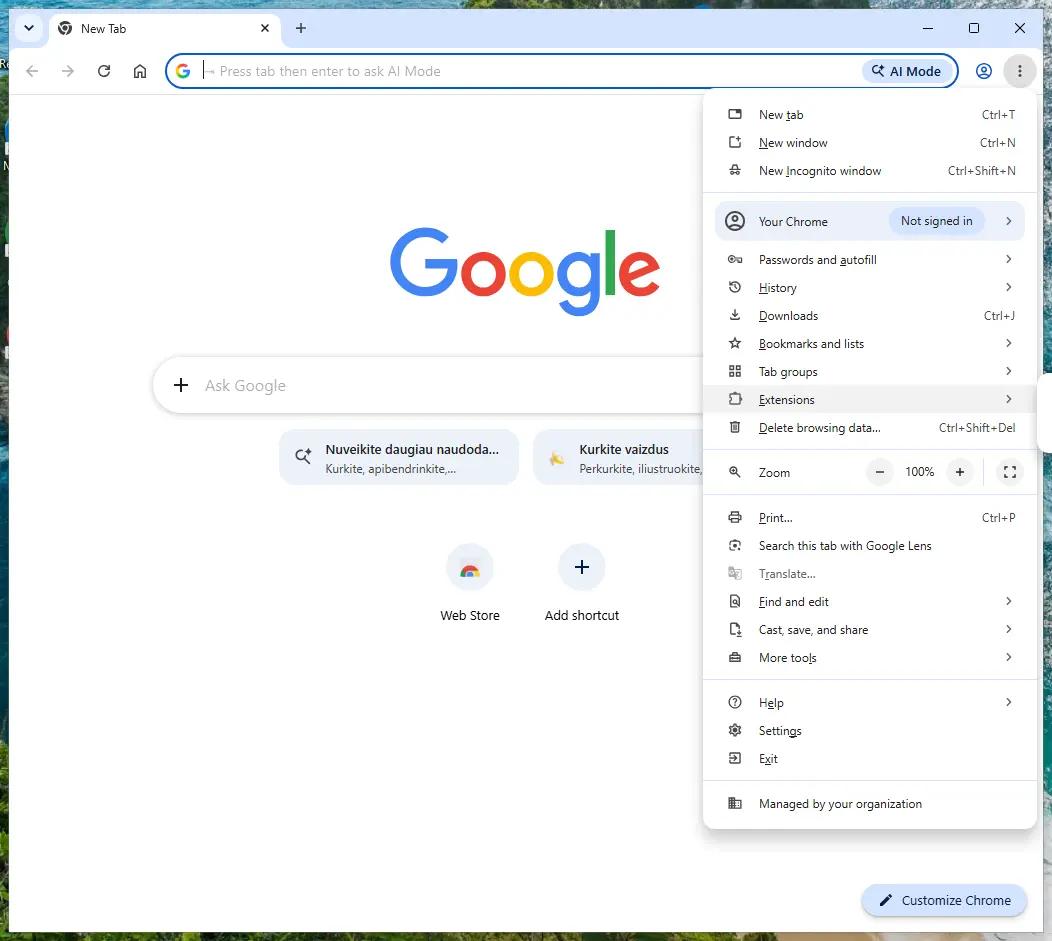
Chrome on Windows 11: More > Extensions > Manage extensions. Full procedure with screenshots: Remove a browser extension
Step 2: Reset the browser if the redirects continue
When
phishingquiz.withgoogle.comkeeps opening after the extensions are cleaned, reset the browser to its defaults. Chrome: Settings > Reset settings > Restore settings to their original defaults; Edge: Settings > Reset settings; Firefox: Help > More troubleshooting information > Refresh Firefox.A reset keeps bookmarks and saved passwords but clears site permissions, the start page and the search engine.
If every browser still redirects afterwards, the cause is a program in Windows 11 or Windows 10: check Settings > Apps > Installed apps for anything you did not install.
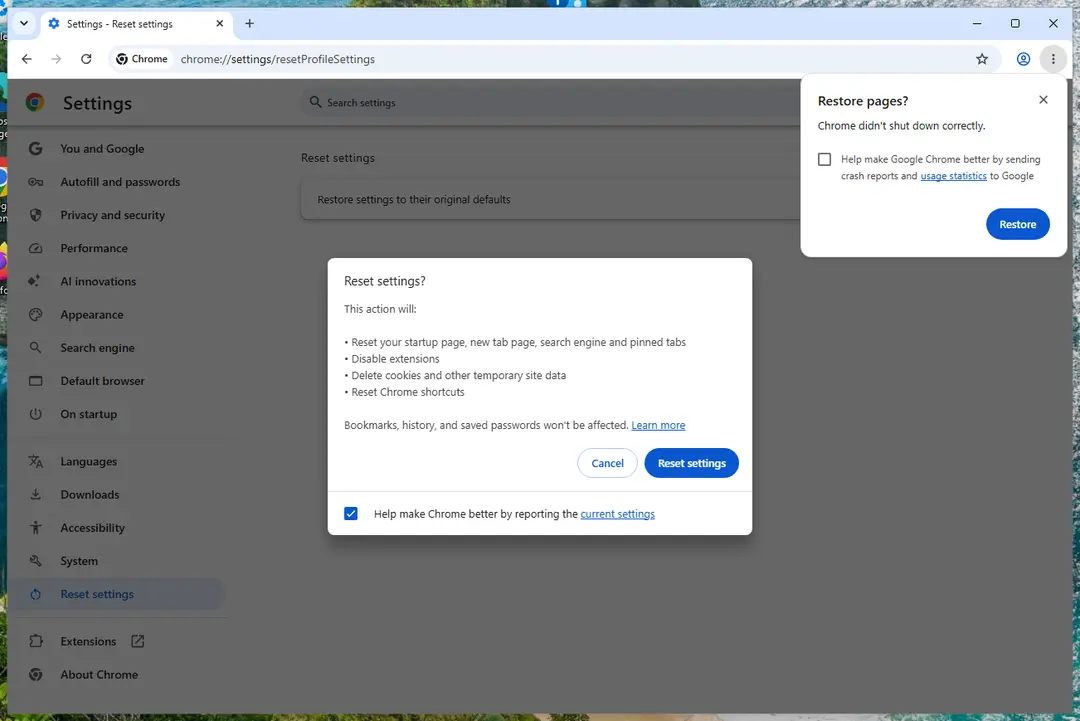
Chrome on Windows 11: Settings > Reset settings. Full procedure with screenshots: Reset a browser and fix a hijacked search engine
Step 3: Scan the PC if you downloaded anything from the ads
Most people who only saw the notifications can skip this step. If a notification or the page it opened made you download or run a file, delete the file and run a full scan, then a Microsoft Defender Offline scan.
In Windows 11 and Windows 10 open Windows Security > Virus & threat protection > Scan options, select Microsoft Defender Antivirus (offline scan) and click Scan now. The PC restarts and the scan takes about 15 minutes, so save your work first.

Windows 11: Windows Security > Virus & threat protection > Scan options. Full procedure with screenshots: Run a Microsoft Defender Offline scan
What to do if you typed a password into a fake quiz
Act within minutes: close the page, change the password from a device you trust, check your account activity and turn on 2-Step Verification. These steps follow Google's own help pages.
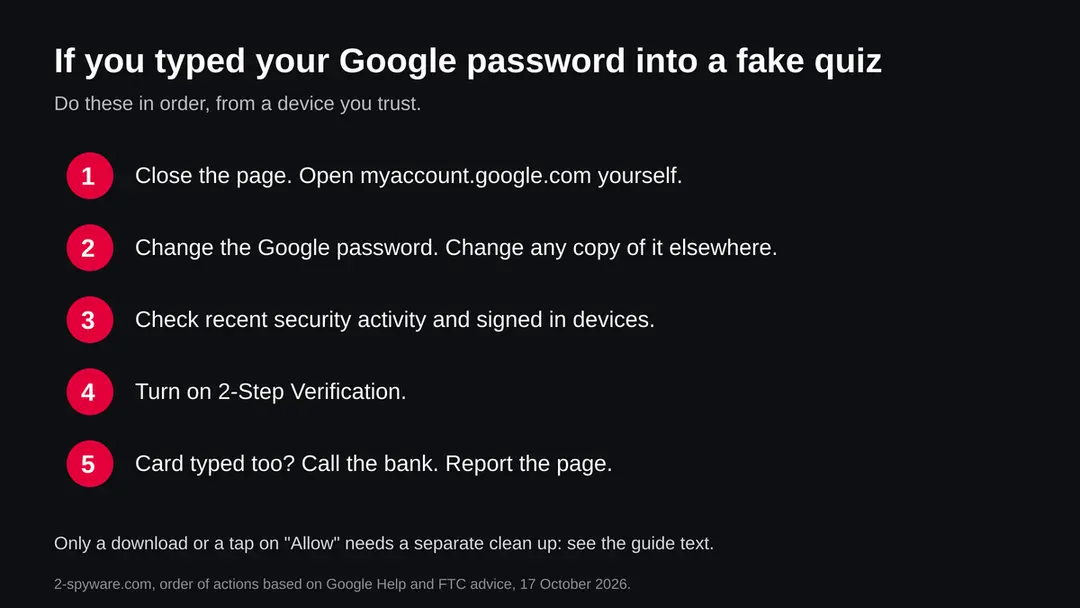
- 1
Close the page and go to Google yourself
Close the tab. Type myaccount.google.com in a new window. Do not use any link from the message. Google's help page says that if a link asks for your password you should go directly to the website you want to use.
- 2
Change the password
In your Google Account, change the password to a long one you have not used before. Google's page says to find and change unsafe saved passwords in your account. Change the same password on every other site where you used it, starting with your e-mail.
- 3
Check recent security activity
Google says that for a security e-mail that seems fake you can go to myaccount.google.com/notifications to see your recent security activity. Look for sign ins from places or devices you do not know and sign them out.
- 4
Turn on 2-Step Verification
Google recommends 2-Step Verification as an extra layer if a password is stolen. With it, a thief who has only the password cannot get in.
- 5
If a card was typed
Call the bank on the number on the card, say the number went to a fake page, and ask for the card to be blocked and for the charges to be watched.
- 6
If you allowed notifications or installed something
Open the browser's site settings and set notifications for the page to Block. Remove any extension or file you added after the page asked. Then run a scan with the security program you already trust. The page cannot be removed from your device because it was never installed: only what you allowed needs undoing.
- 7
Report it
In Gmail on a computer, open the message, click More next to Reply, then click Report phishing, as Google's help page describes. In the United States you can also report phishing to the FTC at FTC.gov/complaint.
After removal: keep the ads from coming back
Do
- Type the address of any site you need, or use a bookmark, and do not follow links in unexpected messages.
- Hover over links on a computer and read the end of the address before you click.
- Turn on 2-Step Verification for your Google Account and for your e-mail.
- Use a different long password for every important account, kept in a password manager.
- Report phishing in Gmail with More, then Report phishing, so Google can protect others.
Don't
- Enter a Google password or a one time code on a page that you reached from a message.
- Pay a fee to claim a reward for finishing a quiz.
- Allow notifications or install an extension to read a quiz result.
- Pay for a Google phishing quiz remover, since there is nothing to remove.
- Assume that every message in a test is fake: some are real.
Questions about fake Google phishing quiz
What is the Google phishing quiz?
The Google phishing quiz is a free online test from Jigsaw, a unit of Google, at phishingquiz.withgoogle.com. According to coverage of its launch, it shows you eight e-mails and notifications, some real and some phishing, and asks you to decide which are which.
After each answer it explains the signs you should have noticed. Our own look at the page on 17 October 2026 loaded only a title and a loading message, so the description of the questions comes from press coverage and not from us playing it. It is a training tool and not a virus.
Is the Google phishing quiz safe?
The quiz at phishingquiz.withgoogle.com is a Google owned training page, and we found nothing in our facts that says otherwise. The word safe needs one condition: you must be on that exact address.
Copies of popular quizzes, and links in messages that say you won a reward for finishing one, are the risk. A real quiz never needs your Google password, a card number or a fee. We could not test every copy that exists, so type the address yourself instead of following a link.
Is the Google phishing quiz a scam?
The quiz itself is not a scam. It is a tool Google's Jigsaw team built to teach people to spot phishing. What can be a scam is a message that uses the quiz as bait:
- a text
- an ad or an e-mail that says Google is rewarding quiz takers
- that you must sign in to see your score
We have no report of such a campaign in our data, so we do not claim one exists. The shape of the trick is common, which is why this page tells you how to check any quiz link.
How many questions are in the Google phishing quiz and how do I pass?
Coverage of the quiz says it has eight questions, each one an e-mail or notification you judge as phishing or not. There is no password to pass: you answer, then read why.
To score well, check the sender address, hover over every link and read the end of the web address, look for urgency or odd attachments, and remember that some messages in the quiz are genuine. Do not assume every message is fake. Because the page may change, play it yourself to see the current count.
Do I need to sign in or enter my e-mail to take the quiz?
From what we could confirm, no. The quiz is described as a free test that runs in the browser. We could not play it ourselves, because our reading of the page returned only a loading screen, so treat this as press coverage and not as our test.
The safe rule holds either way: if a page that calls itself the Google phishing quiz asks for your Google password, a one time code, a card number or a phone number before it shows you the questions or your score, close it. That request is the opposite of what the quiz teaches.
I entered my Google password on a fake phishing quiz. What now?
Close the page, then open myaccount.google.com by typing it yourself and change your password. Google's help page says to find and change unsafe saved passwords in your Google Account, to check your recent security activity, and to turn on 2-Step Verification so a stolen password alone is not enough.
Change the same password anywhere else you used it. If the page also took a card number, call your bank and ask for the card to be blocked. Report the page to Google and to the FTC if you are in the United States.
How do I report a phishing e-mail in Gmail?
Google's help page gives these steps for a computer:
- open Gmail
- open the message
- click More next to Reply
- then click Report phishing
If a message was wrongly marked as phishing, the same menu offers Report not phishing. The page describes only the computer steps, so we do not give mobile menu names we could not confirm.
Reporting helps Google protect other people. It does not undo anything you clicked, so if you entered a password, change it as well.
Do I need an antivirus or a quiz remover after a phishing quiz scam?
Not for the quiz itself, since it installs nothing. A fake quiz page that only collected a password needs no removal tool, it needs a password change.
Only if the page made you download a file, install an extension or allow browser notifications do you need to clean up the device: remove that file or extension and block the notifications in the browser settings, then run a scan with the security program you already trust.
Be careful with any ad that sells a Google phishing quiz remover, because there is nothing to remove.
Are there other phishing quizzes I can use to practise?
Yes, security companies and universities publish similar tests, but we did not review any of them for this page and we name none. Treat each one by the same rules as the Google quiz:
- check the web address
- expect no sign in
- never pay
Practise is worth it because phishing works on speed and habit. The FTC's advice is also useful: do not reply to or click links in unexpected requests for information, and instead go to a website you know is real or call the company.
Will Fortect remove Google phishing quiz?
Fortect scans Windows for malware and unwanted programs and repairs the system files and settings they change, and its free scan shows what it finds on your PC before you decide anything.
For Google phishing quiz, follow the plan above as well: the browser steps take back permissions and settings that no scanner treats as a threat, and uninstalling the program that brought it removes the source.
Run Microsoft Defender's full scan and, if anything was found, its offline scan as a second opinion. If the symptoms are gone after the plan and both scans are clean, there is nothing more to do.
Sources
- Jigsaw: Phishing Quiz (page title and loading screen only) (read October 17, 2026)
- Gmail Help: Avoid and report phishing emails (read October 17, 2026)
- Tom's Guide: How Well Can You Do on Google's Phishing Quiz? (read October 17, 2026)
- 9to5Google: Jigsaw phishing quiz coverage (January 2019) (read October 17, 2026)
- FTC Consumer Advice: Phishing, don't take the bait (read October 17, 2026)