
Scam Likely on iPhone and Android: what the call label means and how to stop the calls
Scam Likely is a warning label that your phone carrier puts on an incoming call when it suspects the call is a scam. It is not a virus and not an app on your iPhone or Android phone, so there is nothing to remove:
- do not answer
- give nothing away
- then block
- report the number
Facts checked October 18, 2026. Steps checked against Apple's and Google's current documentation and the reports we cite. We have not run the app or the link on a phone ourselves.
Do it yourself · free Remove Scam Likely calls yourself 8 steps, about 24 minutes, no software needed.
Start the steps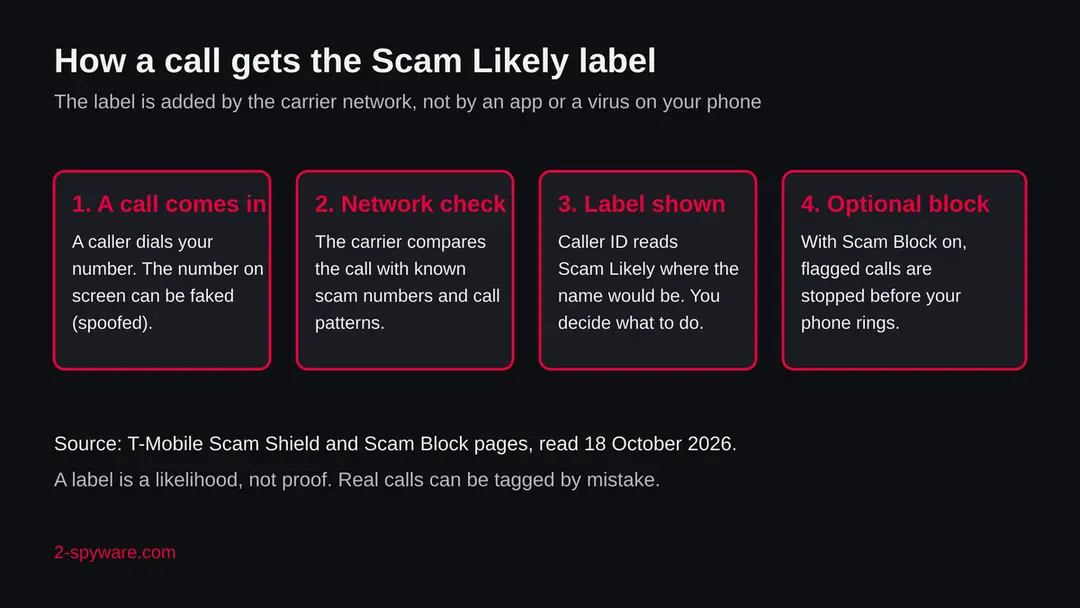
Scam Likely calls: summary
| Name | Scam Likely (also written Scam Likely?, Scam Number, Spam Likely) |
|---|---|
| Type | A caller ID warning label added by the carrier to a suspected scam or robocall; not malware |
| Risk | Low for the label itself. The call behind it can be a real scam attempt, and a real call is sometimes labelled by mistake |
| Symptoms | Incoming calls show Scam Likely where the caller's name would be, or the call never rings if blocking is on |
| How to get rid of it | Nothing to uninstall. Do not answer, block the number, switch on carrier call blocking, and report the call |
| Our check (18 October 2026) | Desk check of T-Mobile, FTC, FCC and Google pages. This is a name, not an address, so there was no URLhaus entry and no site test |
Show 11 more facts
| Who adds it | T-Mobile and Metro by T-Mobile use this exact wording; other carriers use their own labels |
|---|---|
| Devices | iPhone and Android phones, and any phone that shows caller ID |
| Microsoft detection | None exists. Scam Likely is a phone network label, so no Microsoft name of the form Trojan:Win32/..., Trojan:MSIL/... or TrojanDownloader:JS/... applies, and we do not invent one |
| Evidence | 0 write-ups by security sites; details still limited |
| Domains | Scam Likely |
| Ads shown as | Redirects through ad pages |
| Browsers | Chrome, Edge and Firefox |
| First seen | 18 October 2026 |
| Distribution | Typically ad scripts on free streaming, file-hosting and adult sites, typo domains and hacked websites |
| Damage | Redirects to scam pages, fake updates and tech support scams |
| Facts checked | 18 October 2026 |
Facts checked on 18 October 2026 against T-Mobile's Scam Shield pages, the FTC's advice on unwanted calls, the FCC's page on caller ID authentication and Google's Phone app help. Scam Likely is a phrase, not an address, so there was no URLhaus entry, no registration data and no site test. We did not test any phone.
What does Scam Likely mean on a phone call
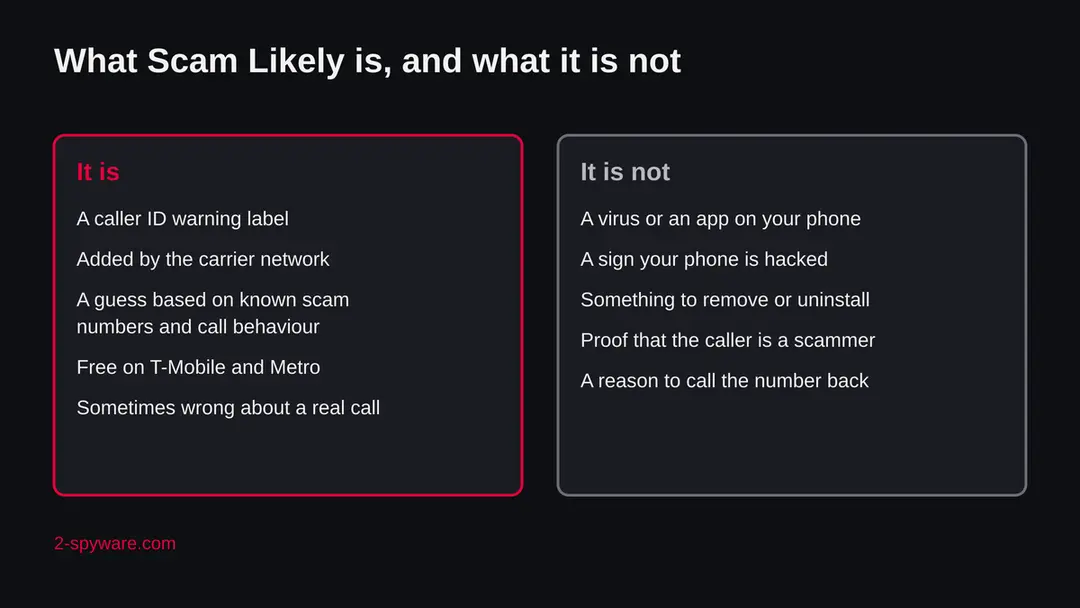
Scam Likely is a label that appears on your screen where a caller's name would normally be. Your mobile carrier puts it there when its systems think the incoming call is probably a scam or an unwanted robocall. It is a warning about the call, not a program installed on your phone.
The wording comes from T-Mobile. Its feature called Scam ID shows Scam Likely in place of the caller ID when a call is flagged, so you can decide before you pick up. T-Mobile's Scam Shield page and its launch announcement describe it this way, and the same wording is used for Metro by T-Mobile customers.
Other carriers and phone apps use their own labels, such as Spam Likely or Potential Spam. We did not read those carriers' pages for this guide, so we do not describe how they work.
People often search for Scam Likely with the words virus or scam, because the label looks alarming. The label itself is harmless. You cannot catch anything from seeing it, and you do not have to remove it. What matters is the call behind it, and what you do when the phone rings.
- What it is
- A caller ID label that says the call is likely a scam
- Who adds it
- The carrier network, before the call reaches your phone (T-Mobile's wording)
- Where you see it
- On the incoming call screen and in the recent calls list, in place of a name
- Cost
- Free for postpaid T-Mobile and Metro by T-Mobile customers, no app needed, according to T-Mobile
- Not the same as
- A virus, spyware, a hacked phone or an app you installed
Is Scam Likely a virus or a scam itself
No. The Scam Likely label is not a virus and not a scam. It is a protection feature of the phone network. A virus has to run on your phone, and a label that is added to a call before it arrives is not code on your phone at all.
There is one honest caveat. Scammers know that people trust caller ID, so a few of them copy the look of such labels in text messages or fake alerts, for example a message that says your number was flagged as Scam Likely and that you must call a support line or install a fix.
We have no report of this to quote, so treat it as a general warning, not a finding. Your carrier does not need you to install anything to show the label. If a text, a pop-up or a website tells you to download a tool to remove Scam Likely, close it.
The second caveat is the opposite one. A label is a guess about a number, made in milliseconds from patterns. T-Mobile says in its own material that a legitimate call can occasionally get tagged Scam Likely, which is why it keeps the option to still receive calls with this tag.
A pharmacy, a school, a doctor's office or a delivery driver calling from a new number can be tagged by mistake. So the label means be careful, not this person is a criminal.
Is Scam Likely calls dangerous?
What we checked for this guide, and what we could not
This subject is a phrase, not a website, so there was no address to test and no entry in the URLhaus malware list. We made a desk check: we read T-Mobile's Scam Shield page and launch announcement, the FTC's consumer advice on unwanted calls, the FCC's page on caller ID authentication and Google's help page for the Phone app.
Scam Likely · desk check of official pages · 18 October 2026
- What the label isT-Mobile describes Scam ID as an alert: a flagged call is shown as Scam Likely in place of the caller ID, and it needs a phone that shows caller ID.
- How calls are judgedT-Mobile says every incoming call is checked on its network against a database of known scam numbers and call patterns. We cannot verify its inner workings or its accuracy.
- BlockingT-Mobile describes Scam Block as off by default, switched on by dialling #662#, and says prepaid customers can also use a store or call 611.
- Other carriersWe did not read the pages of Verizon, AT&T or other carriers, so we say nothing about how their labels are chosen.
- Your own callWe cannot see which number called you. We do not name any number or company as a scammer.
- Phone menu pathsWe give only the paths we read in an official page. For the iPhone's own call filtering we did not read Apple's page, so the iPhone steps point to carrier tools and say so.
A carrier warning label, not malware Scam Likely is a feature of the phone network. The risk is in the call behind it, so the fix is how you handle calls, not a removal tool.
How a call gets the Scam Likely label
The carrier decides, not you and not your phone. The label is added on the network, usually while the call is still being set up, from what the carrier knows about the number and how it behaves.
T-Mobile says it analyses each incoming call as it reaches its network, against a large database of known scammer numbers, kept up to date by looking at the calls on the network for patterns that look like scams.
Typical signs are the same number calling a very large number of people in a short time, a number that is new and calls in bulk, and numbers that other customers have reported. The company does not publish the exact rules, and we cannot confirm them, so treat this list as an example of the idea, not as T-Mobile's rule book.
Behind this sits a wider effort to make caller ID more honest. The FCC explains that under a framework called STIR/SHAKEN the carrier where a call starts digitally signs the call, and other carriers on the route check that signature, so that the receiving phone company can confirm the displayed number is real.
The FCC says its goal is to reduce the effect of illegal spoofed caller ID, help law enforcement find bad actors and let carriers block illegal calls before they reach you. The framework works on IP networks, and the FCC requires providers with older network technology to upgrade or build another solution.
This is why the label can be wrong in both directions. A scammer who finds a fresh number may call for hours before the number is labelled. A real business with a new number may be labelled at once. Neither the label nor its absence is proof.
| What you see | What it most likely means | What to do |
|---|---|---|
| Scam Likely on the screen | The carrier thinks the call is a scam or robocall | Do not answer; let it go to voicemail or block it |
| Scam Likely, but you expect a call from that company | Possible false label | Let it ring out, then call the company back on a number from its official website or your card |
| No label, but the call feels wrong | A new number the carrier has not flagged yet, or a spoofed number | Hang up, give nothing, do not trust the caller ID |
| Your own number or a neighbour's number calls you | Spoofing: the displayed number is fake | Do not answer or call back; the FTC warns that scammers fake caller ID |
| A text that says to call or install something to remove Scam Likely | Not your carrier's way of working | Delete it and install nothing |
Should you answer a Scam Likely call
No, the safest choice is not to answer. If you do not know the number and the phone says Scam Likely, let it go to voicemail. A real caller with a real reason will leave a message or try another way.
If you already picked up, the FTC's advice is simple. Hang up, and do not respond in any way. Do not press buttons to speak to a person or to be taken off the call list, because pressing a button can mark your number as live and lead to more calls. Do not argue and do not give any detail about yourself, not even a yes.
Warning: Never call a number back just because it appeared on your screen, especially if the call dropped after one ring.
Scammers use missed calls to make you ring a number that costs money or reaches them. We have no source to quote for the cost part, so read it as general caution; the FTC's own point stands on its own: caller ID can be faked, so the name or number shown does not prove who is calling.
A call that says it is from a bank, the tax office, a delivery company, a tech support firm or the police and that creates urgency is the usual scam pattern. Ask yourself whether you expected it. If you did not, hang up, then reach the real organisation through the phone number on its website, on your card or on your bill, never one the caller gave you.
Do
- Let unknown Scam Likely calls go to voicemail.
- Hang up at once if you picked up by mistake.
- Call a company back only on a number you found yourself.
- Tell older relatives that caller ID can be faked.
- Report the call and block the number.
Don't
- Press 1, press 9 or any button to stop the calls.
- Say yes, even to a harmless question.
- Give a code, a card number, a password or a bank detail.
- Install an app or allow remote access because a caller asks.
- Call back a number shown on a missed call you do not know.
How Scam Likely calls got onto your phone
Your number is on call lists or is simply being dialled in bulk. Phone scams are cheap: automated systems dial huge ranges of numbers, and a person only joins when someone answers. Getting calls does not mean your phone is hacked.
Numbers reach those lists in many ways:
- data from earlier leaks
- forms you filled in
- websites that sell contact data
- plain guessing
Some scammers call numbers in sequence near yours, so even a number you never shared can be reached. The FTC notes that scammers use spoofing to hide where the call comes from, and that the calls often come from numbers that look local.
Because the number on screen changes, blocking one number helps little when the calls keep coming from new ones. That is why carrier level blocking, which works on patterns, helps more than blocking numbers by hand.
One more point. If your own number is shown as the caller, the call did not come from your phone and your phone is not hacked. Someone has put your number in the caller ID field.
If friends tell you that they got calls from you which you never made, scammers probably spoofed your number. You cannot stop that from your phone, but you can tell people not to trust it and, if you think your accounts are at risk, change the passwords of your important accounts from another device.
How to remove Scam Likely calls
How to deal with Scam Likely calls on iPhone and Android
There is nothing to uninstall, because Scam Likely is a label added by the carrier.
What you do is handle the call safely and turn on the blocking your carrier and phone offer.
Step 1: Do not answer, or hang up at once
If the screen says Scam Likely and you do not know the number, let the call go to voicemail. If you picked up, hang up.
The FTC advises not to respond in any way and not to press any button, not even to be taken off the list. Pressing buttons can lead to more calls.
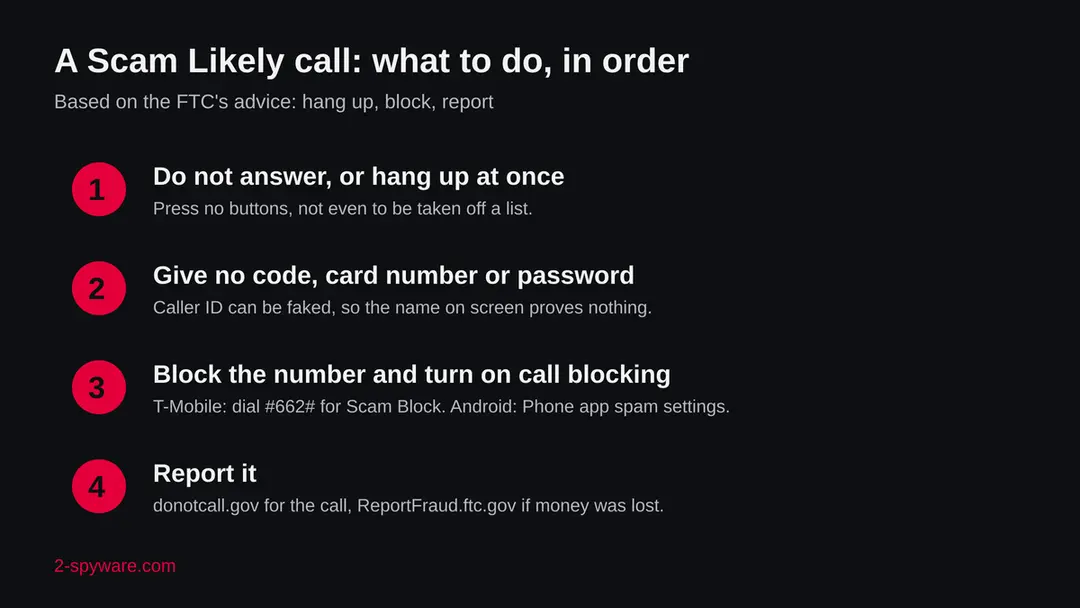
The order of actions after a Scam Likely call, based on the FTC's advice to hang up, block and report. Step 2: Give nothing away
Caller ID can be faked, so the name or number on screen proves nothing. Never give a code sent to your phone, a card number, a password or a bank detail to someone who called you.
If the caller says it is your bank or another company, hang up and call back on the number from the card, the bill or the company's own website.
Step 3: Switch on carrier blocking
On T-Mobile or Metro by T-Mobile, dial #662# to switch on Scam Block, which stops calls marked Scam Likely on the network. Prepaid customers can also use a store or call 611.
Dial #632# to switch it off if it blocks a call you want. Other carriers have their own tools; check your carrier's website.
Step 4: Android: use the Phone app's spam settings
Open the Phone app, tap More > Settings > Spam and Call Screen (some phones show only Call Screen).
Google's help page says the phone can hang up on calls it judges to be spam, and that you can tap Screen call and then choose Report as spam. Menu names vary by phone and Android version.
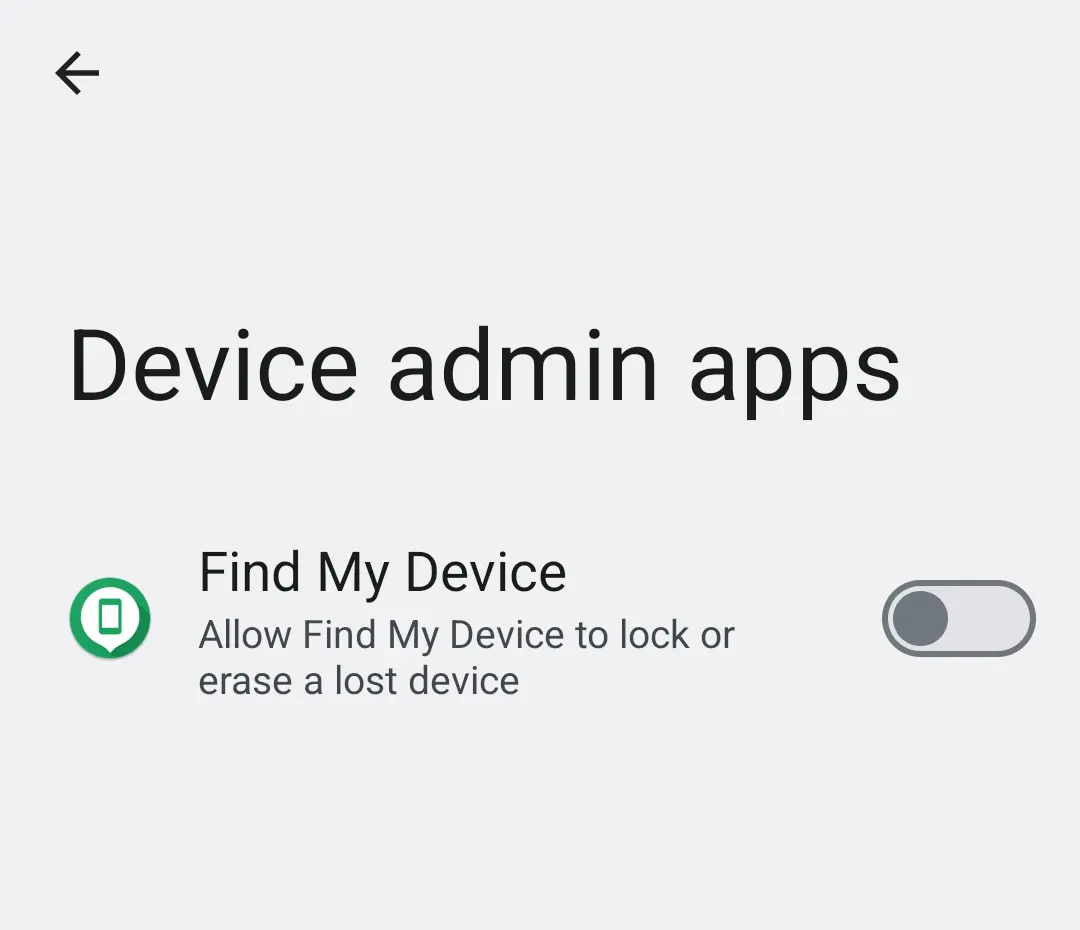
Android 14: Settings, Device admin apps. Use it to check that no unknown app holds admin rights after a scam call that asked you to install something. Step 5: iPhone: block the number and check Apple's current menu
From the Phone app, open the recent calls list and block the number you know.
We did not read Apple's page on filtering unknown callers, so look on Apple Support for the current path for your iOS version. Carrier tools, such as the T-Mobile codes above, work on any phone.
Step 6: Report the call
Report the call at donotcall.gov. If you lost money, also report it at ReportFraud.ftc.gov and tell your bank at once. The FTC publishes reported numbers each business day to help carriers build call blocking and labelling.
Step 7: Remove what a caller had you install
If a caller made you install an app or give remote access, uninstall it. On iPhone touch and hold the icon and choose Remove App.
On Android go to Settings > Apps, or search Settings for Install unknown apps and switch it off for the browser and messengers.
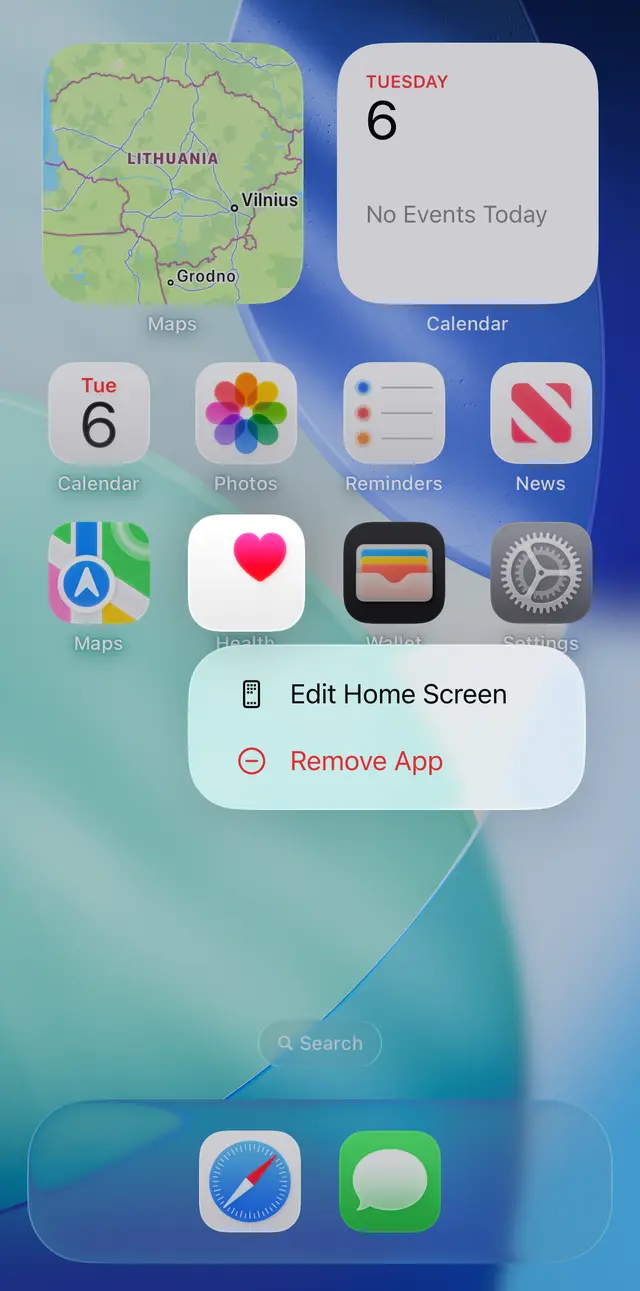
iOS 26: touch and hold an app icon on the Home Screen, then choose Remove App. Step 8: Ignore removal tools
Nobody needs a Scam Likely remover. An app, a text or a page that sells one is using the name to sell you something. The steps above are free.
How to block Scam Likely calls on T-Mobile, Android and iPhone
The most effective block is at the carrier. On T-Mobile, Scam Block stops calls marked Scam Likely before they ring. Beyond that, Android's Phone app has its own spam options. For the iPhone we only give carrier tools, because we did not read Apple's page for its call filtering.
- 1
T-Mobile and Metro by T-Mobile: switch on Scam Block
T-Mobile's pages say Scam Block is off by default and is switched on by dialling #662# from the phone. Prepaid customers can also turn it on in a store or by calling 611. T-Mobile says that with Scam Block on, calls marked Scam Likely are stopped on the network, and that it works even if the phone has no caller ID display. It may block calls you want, so you can switch it off again with #632#.
- 2
T-Mobile: make sure the label itself is on
T-Mobile describes Scam ID as normally on automatically. Its earlier launch material says dialling #664# enables it if it is not. The label needs a phone that shows caller ID.
- 3
Android: use the Phone app's spam settings
In Google's Phone app, open More > Settings > Spam and Call Screen (on some phones the entry is just Call Screen). Google's help page says that if the phone decides a call is spam it can hang up, and for manual screening you tap Screen call and later choose Report as spam. Menu names differ by phone make and Android version, and we read this page without a specific version number.
- 4
iPhone: use your carrier's tools and block by number
We did not read Apple's page on call filtering, so we give no iPhone menu path here. Use your carrier's blocking service (for T-Mobile, the codes above), and block a number you already know from the recent calls list in the Phone app. Check Apple Support for the current wording of the unknown callers option for your iOS version.
- 5
Know the limits
Blocking a number does not stop a scammer who calls from another one. The FTC says carriers may offer blocking tools and points to ftc.gov/calls for how to block calls on a cell phone and a home phone. Carrier blocking and call reporting work best together.
After removal: keep the ads from coming back
How to report a Scam Likely call
Report the call at donotcall.gov, and if you lost money also at ReportFraud.ftc.gov. The FTC says it publishes the numbers people report on each business day, which helps carriers and other partners that build call blocking and call labelling.
Reporting takes a minute and has a real use: the numbers feed the tools that label later calls. Note the number, the time, what the caller said and what they wanted. Do not include card numbers or passwords in anything you write down and share. If the call was an attempt and you gave nothing, a short report is enough.
You can also report the call to your carrier. On Android, the Phone app's Report as spam answer does this for calls you screened. We did not verify other in-phone report buttons, so we do not describe them.
If you answered, gave details or lost money
Answering a call changes nothing on the phone. What matters is what you told the caller or did afterwards.
- 1
You only answered or said hello
Nothing to repair. Expect more calls for a while and use the blocking steps above.
- 2
You gave a card number or bank detail
Call your bank or card issuer on the number printed on the card, tell them what you gave, and ask them to block the card or account and watch for charges.
- 3
You gave a password or a code
Change that password from another device you trust and turn on two step sign in. A code sent by text or an app is a key to your account, so never read it to a caller.
- 4
You let someone take control of your phone or computer
Disconnect the device from the internet, remove any remote access app the caller had you install (on a phone, check the installed apps list), and see our other guides for the program involved. Treat any account you used on that device as exposed.
- 5
You sent money
Contact the bank or service you used at once and report the loss at ReportFraud.ftc.gov. The sooner the bank knows, the more options it has.
How to cut down scam calls in the future
Do
- Keep the carrier's call labelling and blocking switched on.
- Let unknown numbers go to voicemail and listen to the message later.
- Use the official number from a bill or website for any call back.
- Share your phone number only where it is needed.
- Report unwanted calls so the numbers can be flagged.
Don't
- Trust the name or number shown on the screen.
- Press a button to be removed from a list.
- Give remote access to anyone who calls you.
- Pay anyone who calls and asks for gift cards or a transfer.
- Pay for a Scam Likely remover, there is nothing to remove.
Questions about Scam Likely calls
What does Scam Likely mean?
Scam Likely means your carrier thinks the incoming call is probably a scam or an unwanted robocall. T-Mobile's Scam ID feature shows the words in place of the caller ID, so you can decide before you answer. It is a guess based on known scam numbers and call patterns, not proof, and a real call is sometimes labelled by mistake.
The label is not a virus and not an app on your phone. The safe response is not to answer if you do not know the number, to give nothing away if you did, and to block and report the number afterwards.
Is Scam Likely a virus?
No. Scam Likely is a label added by the phone network before the call arrives, so it is not code that runs on your iPhone or Android phone, and seeing it cannot infect you.
Be careful only with what comes around it: a text or pop-up that tells you to install a tool to remove Scam Likely is not from your carrier, which needs nothing installed to show the label.
Close it, delete the message and install nothing. If a caller made you install an app or give access to your phone, remove that app and change your passwords.
Should I answer a Scam Likely call?
No, if you do not know the number, let it go to voicemail. A real caller will leave a message or use another way. If you answer by mistake, hang up and do not press any button, because the FTC says that responding in any way, including pressing a button to be taken off the list, is a mistake.
Give no codes, card numbers or passwords. If you expect a call from a business that might be labelled wrongly, let it ring out and call back on a number from its official website.
Can a real call be marked Scam Likely?
Yes. The label is a guess made by the carrier's systems, and T-Mobile itself says a legitimate call can occasionally get tagged Scam Likely. That is why it lets customers still receive calls with this tag and why Scam Block can be switched off.
A pharmacy, a school or a delivery driver using a new number may be tagged. If you expect such a call, let the phone ring, listen to the voicemail, and call the organisation back through a number you found yourself.
How do I stop Scam Likely calls on T-Mobile?
Switch on Scam Block by dialling #662# from the phone. T-Mobile's pages say it is off by default, that calls marked Scam Likely are then stopped on the network, and that prepaid customers can also switch it on in a store or by calling 611.
If it blocks a call you want, dial #632# to switch it off. Scam Block does not stop every scam call, because a scammer on a fresh number may not be flagged yet, so keep handling unknown calls with care and report them.
How do I stop Scam Likely calls on Android and iPhone?
On Android open the Phone app, then More, Settings, Spam and Call Screen (some phones show only Call Screen). Google's help page says the phone can hang up on calls it judges to be spam and lets you report a call as spam after screening it.
The wording differs by phone and Android version. For iPhone we did not read Apple's page on call filtering, so use your carrier's blocking, block known numbers from the Phone app's recent calls and check Apple Support for the current menu path for your iOS version.
How do I report a Scam Likely call?
Report the call at donotcall.gov. If you lost money, also report it at ReportFraud.ftc.gov and tell your bank immediately. The FTC says it publishes the phone numbers people report on each business day, which helps phone carriers and others who build call blocking and labelling tools.
Note the number, the time and what the caller wanted, and leave out card numbers and passwords. On Android you can also choose Report as spam when you screen a call in the Phone app.
Why am I getting calls from my own number?
Someone has put your number into the caller ID field, which is called spoofing. The call did not come from your phone and your phone is not hacked. The FTC warns that scammers fake caller ID to look like a local number, a bank, a government office or even your own number, partly to avoid call blocking.
Do not answer or call back. Block what you can, report the call, and tell friends not to trust the caller ID if they got calls that seem to come from you.
Do I need a Scam Likely remover app?
No. There is nothing on your phone called Scam Likely to remove, because it is a label added by the carrier network. Any app, text message or website that sells a Scam Likely remover or cleaner is using the name to sell you something, and some of them are scams. The real fixes are free:
- do not answer
- give nothing away
- switch on your carrier's call blocking
- use the spam options of your phone's Phone app
- report the number
Sources
- T-Mobile: Scam Shield (Scam Block, Caller ID, reporting) (read October 18, 2026)
- T-Mobile: Introduces Scam ID and Scam Block to protect customers from scam calls (read October 18, 2026)
- FTC Consumer Advice: Unwanted calls? Just block 'em, report 'em (read October 18, 2026)
- FCC: How Will Caller ID Authentication Help Consumers? (read October 18, 2026)
- Google Phone app Help: Call Screen and spam calls (read October 18, 2026)