
Vfiqi.info ads: what it is and how to remove it
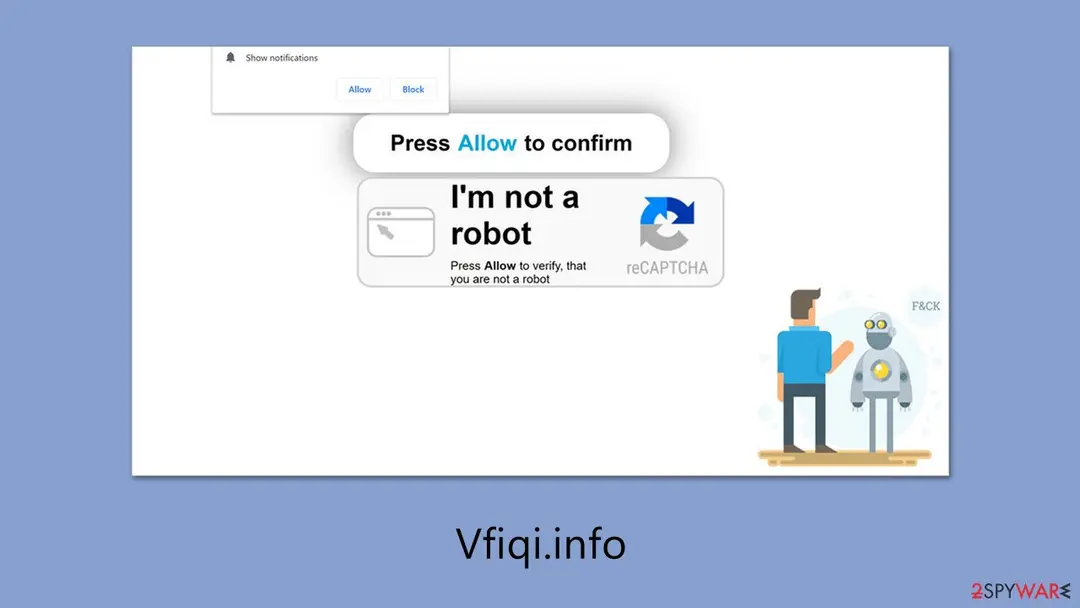
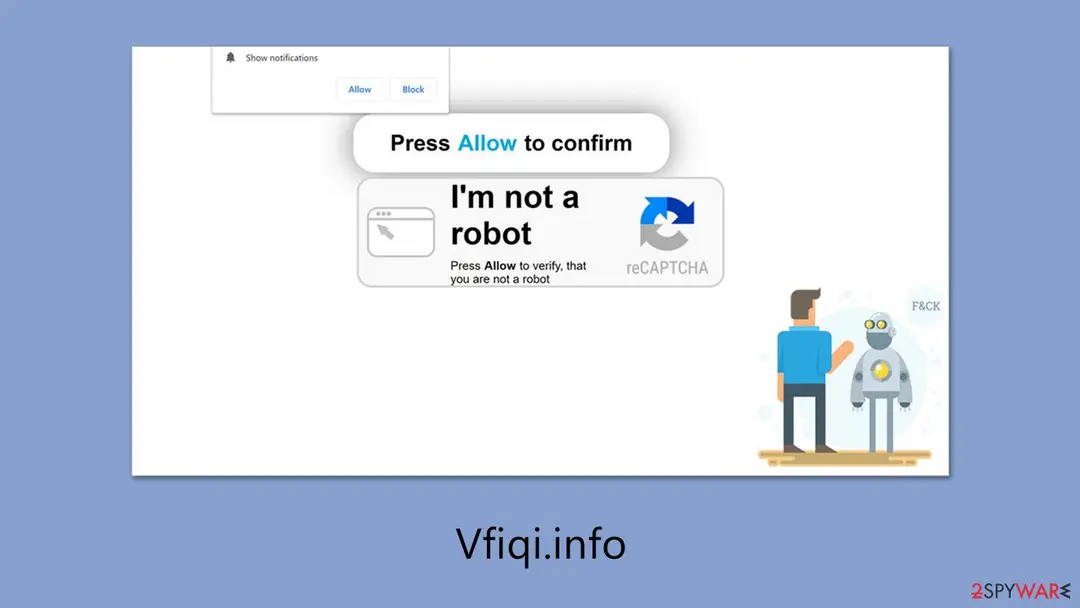
While browsing questionable sites like illegal streaming platforms or torrent pages, you might stumble upon Vfiqi.info. If you end up there, you'll quickly see a misleading message pushing you to click "Allow" in a notification pop-up.
Facts checked October 7, 2026. Removal steps tested on Windows 11 (26H2) and checked against Microsoft's and the browser makers' current documentation. Sections marked as our earlier report are the original text: they describe the threat as it was then and have not been reviewed since. The 2026 status, the removal steps and the questions are current.
Automatic
Get a free scan and check if your PC is infected.
Fortect finds malware, unwanted programs and the Windows damage they leave behind, and repairs it in one pass.
If notifications from vfiqi.info led you to download something, a free scan can check the PC for anything that came with it.
Do it yourself · free Remove Vfiqi.info ads yourself 2 steps, about 6 minutes, no software needed.
Vfiqi.info ads: summary
| Distribution | The website gains access to deliver information as soon as the "Allow" button is pressed within the push notification prompt |
|---|---|
| Damage | Links from the site could redirect you to dangerous webpages, potentially leading to malware infections, financial losses, or the exposure of personal information |
| Name | Vfiqi.info |
| Type | Push notifications, ads, scam, pop-ups |
| Symptoms | Notifications show up at the bottom-right corner of the screen – these include fraudulent content and links to potentially dangerous websites |
| Detection names | No Microsoft detection name is known |
| Removal | Scan the PC with security software to find and remove the malware and anything installed with it. Fortect scans Windows for malware and repairs the system files and settings it damaged. Remove it nowTo use the full-featured product, you have to purchase a license for Fortect. The scan is free. |
Show 7 more facts
| Evidence | One write-up by a security site; details still limited |
|---|---|
| Domains | vfiqi.info |
| Ads shown as | Desktop notifications |
| Browsers | Chrome, Edge and Firefox |
| Installed on the PC | Nothing; a browser notification permission only |
| First seen | 4 March 2025 |
| Facts checked | 7 October 2026 |
Is Vfiqi.info ads dangerous?
From our report of Mar 2025 · not reviewed since
Vfiqi.info is a fake website that misleadingly asks you to enable notifications to show intrusive ads
While browsing questionable sites like illegal streaming platforms or torrent pages, you might stumble upon Vfiqi.info.
If you end up there, you'll quickly see a misleading message pushing you to click "Allow" in a notification pop-up.
If you agree, Vfiqi.info gets permission to send you notifications, which soon turn into annoying ads. These pop-ups can interrupt whatever you're doing, showing up over other apps or even pulling you out of full-screen mode while gaming or watching something.
The real problem with Vfiqi.info is the risk it brings. Those ads often lead to phishing traps that can harm your privacy or security. We suggest you avoid clicking on any links or ads from Vfiqi.info and follow our guide to get rid of them from your browser.
From our report of Mar 2025 · not reviewed since
Unexpected redirects are precisely what catches users off guard
People often first notice Vfiqi.info through ads that carry its name.
However, the first time they land on the site, it usually happens unexpectedly and can be easy to miss. There are two main ways users end up on these shady sites:
One way is through adware, which can cause sudden redirects or show strange ads in places they don't belong. For instance, you might be on a site that's normally free of ads, but a pop-up or hidden script sends you straight to a suspicious page like Vfiqi.info.
The other way is visiting risky websites that often hide harmful content. A user might click a tricky link or a fake "Download" button, thinking it's safe, only to end up with ransomware or other dangerous stuff.
To keep your online space secure, it's smart to check for adware regularly and stay away from risky sites. Ignoring alerts from your security tools can put your system at risk, so always pay attention to those warnings.
From our report of Mar 2025 · not reviewed since
How scammers misuse this trick
Most people don't go to Vfiqi.info on purpose because of its shady nature.
Still, they might get sent there by accident through a redirect from another sketchy site (along with other places you'd rather avoid).
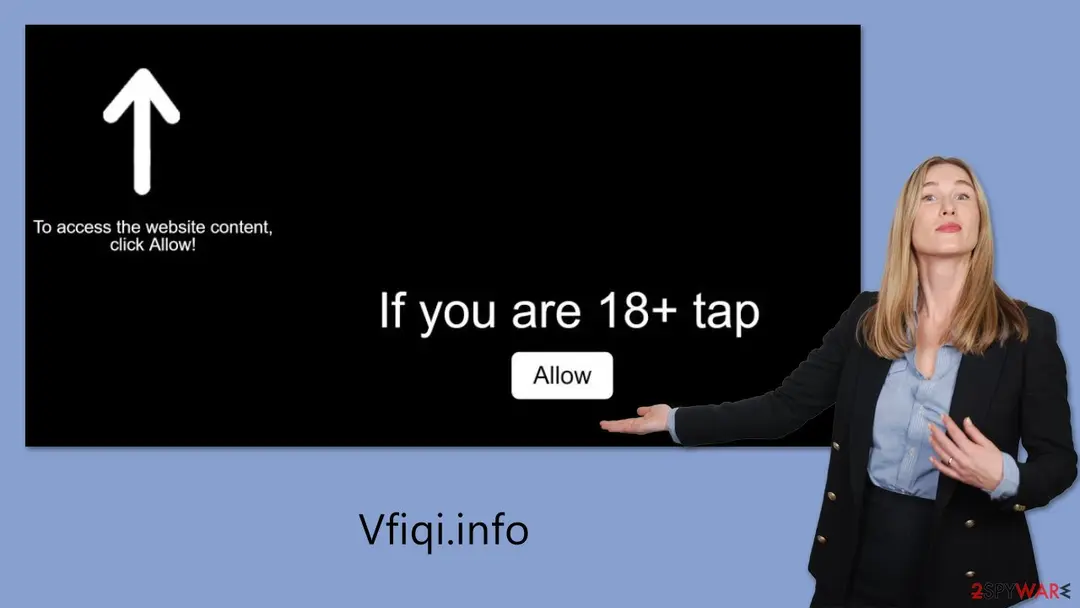
This sudden switch to Vfiqi.info is a sneaky move scammers love to use. It catches people off guard, so they don't suspect the next thing they see. The aim is to trick users into thinking the push notification pop-up is something harmless. Here are some examples of what you might see on the site:
These tricks aren't new - they pop up on other sites like them too. If you turn on notifications from Vfiqi.info, you'll start seeing unwanted ads on your desktop out of nowhere, which can get really annoying.
These pop-ups don't just show fake links or lead to harmful sites - they're also tough to stop if you don't know how. The good part? Once you figure out where to look, turning them off is pretty easy.
- Click Allow to start downloading
- If you are 18+, click Allow
- Click "Allow" to win a prize and get it in our shop!
- Press "Allow" to watch the video
- Can't play this video! Browser may block video autoplay. Click "Allow" to play the video.
From our report of Mar 2025 · not reviewed since
More from our earlier report on Vfiqi.info
- Third parties may use cookies to track your online activities, so it's advisable to clear your browser cache and other residual files with to protect your privacy
Check your browser and PC
- Address:
vfiqi.info
How to remove Vfiqi.info ads
How to stop Vfiqi.info notifications
Do this in every browser you use, and in every profile inside it: each keeps its own list of sites allowed to send notifications.
Nothing has to be uninstalled for the notifications themselves.
Which browser shows the ads?
Step 1: Remove vfiqi.info from Chrome's notification list
Chrome keeps a list of every site you once allowed to send notifications, and
vfiqi.infois on it. Pastechrome://settings/content/notificationsinto the address bar, find vfiqi.info under Allowed to send notifications, open the three-dot menu next to it and pick Remove.Then click Add next to Not allowed to send notifications and type vfiqi.info, so the site cannot ask a second time. Repeat it in every Chrome profile you use on Windows 11 or Windows 10, since each profile has its own list.
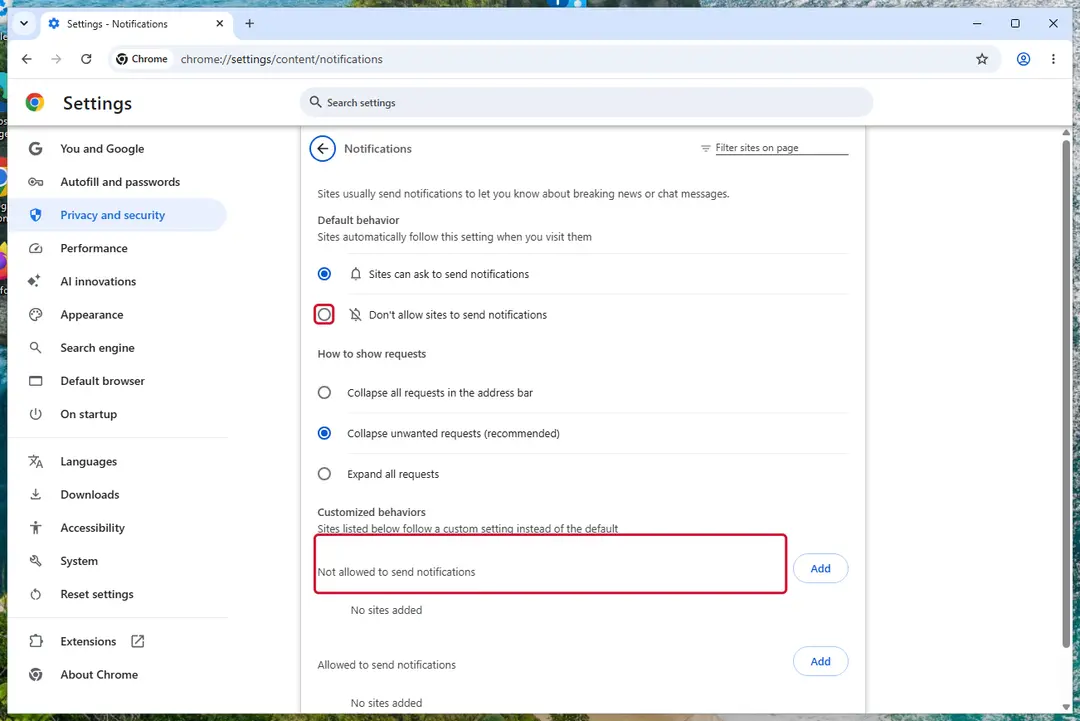
Chrome on Windows 11: Settings > Privacy and security > Site settings > Notifications. Full procedure with screenshots: Stop website notifications and pop-ups
Step 1: Remove vfiqi.info from Edge's notification list
Open Settings and more (the three dots) > Settings > Privacy, search, and services > Site permissions > All permissions > Notifications. Remove
vfiqi.infofrom the Allowed list, then click Add site next to Not allowed to send notifications and enter it there.Edge is built into both Windows 11 and Windows 10, so check it even if you normally use another browser. If the notifications came with the Edge logo, this is the browser that holds the permission.
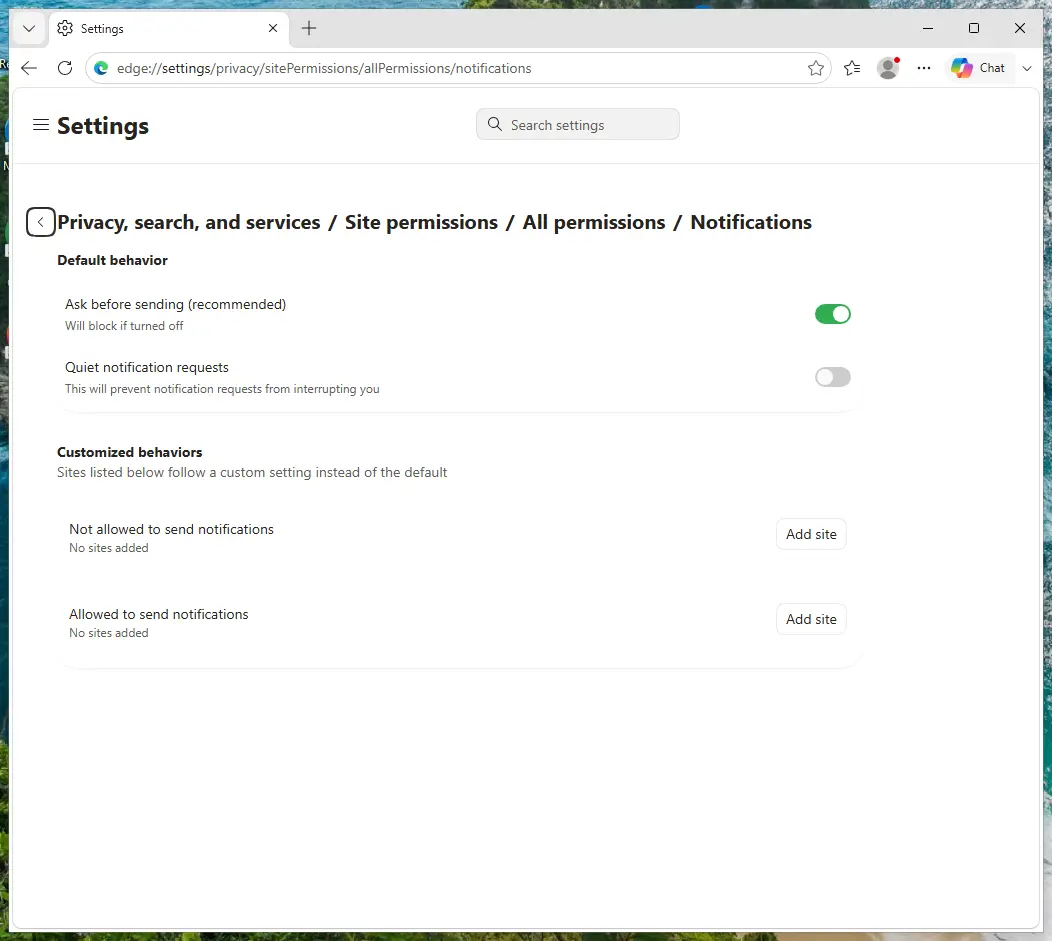
Edge on Windows 11: Site permissions > All permissions > Notifications. Full procedure with screenshots: Stop website notifications and pop-ups
Step 1: Remove vfiqi.info from Firefox's notification permissions
Open the menu (three lines) > Settings and click Permissions and data in the left list, then Notifications. Select
vfiqi.info, click Remove Website and confirm with Save Changes.In versions older than Firefox 152 the same list sits under Privacy & Security, behind a Settings button next to Notifications. Firefox shows these notifications only while it is running, on Windows 11 and Windows 10 alike.
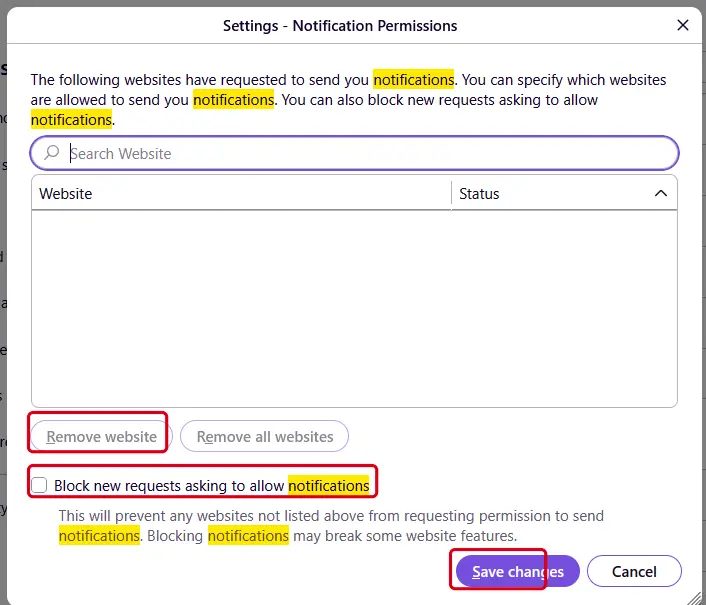
Firefox on Windows 11: the Notification Permissions window. Full procedure with screenshots: Stop website notifications and pop-ups
Then, whichever browser you use
Step 2: Scan the PC if you downloaded anything from the ads
If you only saw the notifications and clicked nothing, you can stop before this step. If a notification led you to download or run something, delete that file, then scan Windows.
In Windows Security > Virus & threat protection > Scan options, run a Full scan, then choose Microsoft Defender Antivirus (offline scan) and Scan now. The offline scan restarts the PC and takes about 15 minutes on Windows 11 and Windows 10.

Windows 11: Windows Security > Virus & threat protection > Scan options. Full procedure with screenshots: Run a Microsoft Defender Offline scan
More removal instructions
For programs installed on the PC and older browsers. Open the one you need.
Remove Vfiqi.info ads
Push notifications have been around on phones for a while, but they're newer to desktop browsers.
Many people don't know much about them and often miss the moment when they're asked to turn them on. Later, they're surprised when messages from Vfiqi.info pop up out of nowhere, and they can't figure out where these annoying alerts are coming from.
Some think their computer has a virus and run antivirus programs or other tools to fix it. But that doesn't help, since it's not a malware issue - it's just the notification settings from Vfiqi.info causing trouble. To stop these alerts, you need to go into your browser and turn off the notifications yourself. If you're not sure how, just check the steps we've listed below.
Google Chrome (Android)
- Open the Google Chrome browser and go to Menu > Settings.
- Locate the Privacy and security section and pick Site Settings > Notifications.
- Look at the Allow section and look for a suspicious URL.
- Click the three vertical dots next to it and pick Block. This should remove unwanted notifications from Google Chrome.
- Open Google Chrome and tap on Settings (three vertical dots).
- Select Notifications.
- Locate the unwanted URL and toggle the button to the left (Off position).
- Open Mozilla Firefox and go to Menu > Options.
- Click on Privacy & Security section.
- Under Permissions, you should be able to see Notifications. Click the Settings button next to it.
- In the Settings – Notification Permissions window, click on the drop-down menu by the URL in question.
- Select Block and then click on Save Changes. This should remove unwanted notifications from Mozilla Firefox.
- Click on Safari > Preferences...
- Go to the Websites tab and, under General, select Notifications.
- Select the web address in question, click the drop-down menu and select Deny.
- Open Microsoft Edge, and go to Settings.
- Select Site permissions.
- Go to Notifications on the right.
- Under Allow, you will find the unwanted entry.
- Click on More actions and select Block.
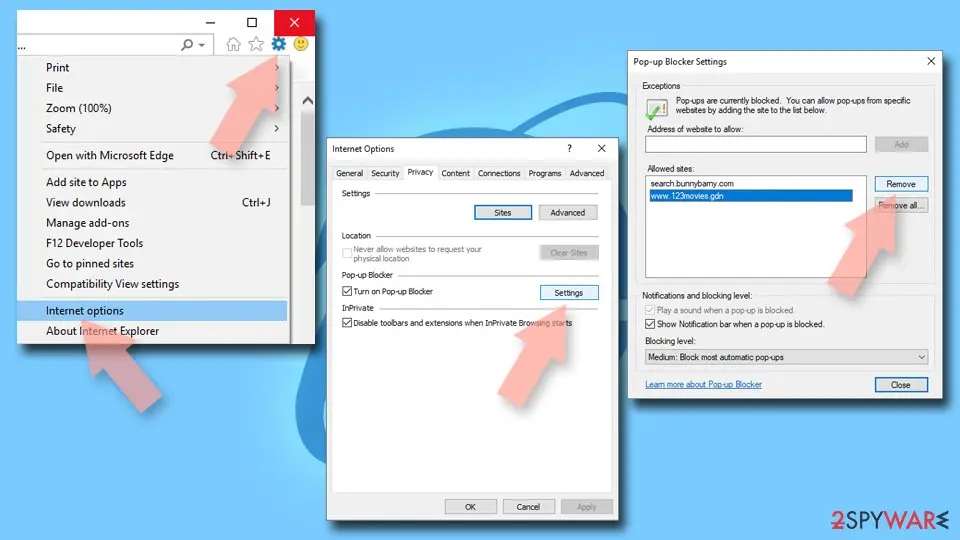
- Open Internet Explorer, and click on the Gear icon at the top-right of the window.
- Select Internet options and go to the Privacy tab.
- In the Pop-up Blocker section, click on Settings.
- Locate the web address in question under Allowed sites and pick Remove.
Checking the system for infections
Once you've cleared out those pesky pop-ups from Vfiqi.info, it's a good idea to carefully check your computer for any hints of trouble.
A system affected by adware or other types of malware often shows signs like constant redirects to shady sites or a sudden flood of ads while you're browsing online.
To tackle and get rid of these annoyances, it's recommended to employ reliable security software solutions, specifically or . Utilizing such tools brings several advantages. Firstly, it guarantees the optimal functioning of your system by rooting out anything harmful.
Plus, they clean up hidden trackers that could mess with your privacy. On top of that, this method fixes damage caused by viruses and stops potential problems before they slow down or mess up your computer, keeping everything safe and smooth.
Protect your privacy - employ a VPN
There are several ways how to make your online time more private - you can access an incognito tab.
However, there is no secret that even in this mode, you are tracked for advertising purposes. There is a way to add an extra layer of protection and create a completely anonymous web browsing practice with the help of VPN. This software reroutes traffic through different servers, thus leaving your IP address and geolocation in disguise.
Besides, it is based on a strict no-log policy, meaning that no data will be recorded, leaked, and available for both first and third parties. The combination of a secure web browser and VPN will let you browse the Internet without a feeling of being spied or targeted by criminals.
No backups? No problem. Use a data recovery tool
If you wonder how data loss can occur, you should not look any further for answers - human errors, malware attacks, hardware failures, power cuts, natural disasters, or even simple negligence.
In some cases, lost files are extremely important, and many straight out panic when such an unfortunate course of events happen. Due to this, you should always ensure that you prepare proper data backups on a regular basis.
If you were caught by surprise and did not have any backups to restore your files from, not everything is lost. is one of the leading file recovery solutions you can find on the market - it is likely to restore even lost emails or data located on an external device.
Questions about Vfiqi.info ads
vfiqi.info keeps sending notifications. Is it a virus?
No. Notifications from vfiqi.info come from a permission stored in the browser, not from a program installed in Windows. Someone clicked Allow on a prompt from that site, usually without realising what it meant, and the site now sends ads through the browser's notification system.
Antivirus scans often find nothing because there is nothing to find on the disk. Removing vfiqi.info from the browser's list of allowed sites stops the messages for good. A scan is still useful if you clicked a notification and downloaded or ran something from the page it opened, because those downloads can be unwanted programs.
Did a notification from vfiqi.info infect my computer?
A notification cannot infect a PC. It is a short text with a link that the browser displays. Clicking it opens a page, and a page cannot install anything unless you agree to a download and run the file.
So the answer depends on what you did after clicking. Looked and closed: you are fine. Downloaded but did not open: delete the file.
Opened a downloaded file: uninstall what it added and scan the PC. Typed card or login details: contact the bank and change the password. In every case, remove vfiqi.info from the browser's allowed notifications so the messages stop.
Why does Vfiqi.info show me ads?
Because that is its whole purpose. Vfiqi.info is a push-notification spam site, and its operators are paid for every ad it displays and every click it gets. In this case the ads take the form of desktop notifications.
They are chosen by ad networks that accept almost any advertiser, which is why so many look like warnings or prizes. The ads are not a sign that your PC is broken or infected with something worse; they are a sign that something on it, or in the browser, has permission to advertise. Removing that permission or program stops them.
Is vfiqi.info safe to visit?
No. The site vfiqi.info exists to push visitors towards ads, and the pages it leads to include fake virus warnings, fake updates, prize scams and notification prompts. Visiting it once does not infect an up-to-date PC, but anything you click or download there is a gamble.
Do not enter personal details, do not allow notifications and do not call phone numbers it shows. If it opens by itself, close the tab and check the browser's extensions and notification permissions. Blocking the single domain helps little, because the operators register new names regularly.
Which browser is sending the vfiqi.info notifications?
Each notification shows the name of the browser and the site in its small print. In the cases we saw, the messages from vfiqi.info came through Chrome, Edge and Firefox. Permissions are stored per browser and per profile, so removing the site in one browser does not affect another.
If you use several Chrome or Edge profiles, check each one. If you sync the browser with an account, remove the permission while signed in, otherwise another computer may still hold it and keep receiving the same messages.
How do I know the ads come from Vfiqi.info?
Look for notifications from vfiqi.info. That is the trace Vfiqi.info leaves, and it shows up as desktop notifications. Ads that appear on every site, including ones that never carried ads before, point to something on your PC or in the browser rather than to the sites themselves.
A quick test is a private window, where extensions are off by default: if the ads disappear there, an extension is responsible. If they appear even with the browser closed, the source is a notification permission or a program in Windows.
Did clicking Allow install anything on my PC?
No. Allowing notifications stores a permission in the browser and nothing else. No file is downloaded and no program is added to Windows, which is also why antivirus scans find nothing. The risk comes later, from the notifications themselves: they lead to scam pages, fake updates and phishing forms.
Remove the permission in each browser where you allowed it. If you clicked a notification and downloaded something afterwards, delete that file and run a Microsoft Defender full scan and offline scan.
Will Focus or Do not disturb stop the notifications?
Only for as long as it is on. Do not disturb in Windows 11 holds back notifications from all apps, including browsers, and releases them to the notification centre later. The site still has permission and the messages still arrive.
Use the browser's notification settings to remove the site instead: once its permission is gone, it cannot send anything, whatever Windows is set to. Keep Do not disturb for what it is meant for, such as meetings, presentations and quiet hours.
An ad showed a phone number and I called it. What now?
The number belongs to scammers, not to Microsoft or an antivirus company. If you only talked, hang up and do not call back. If you let them connect to the PC, disconnect it from the internet, uninstall the remote access program they used, such as AnyDesk, TeamViewer, ScreenConnect or UltraViewer, and run a full and offline scan.
If you paid or gave bank details, call your bank at once on the number printed on your card. Change any passwords you typed while they were connected, and report the call.
Will Fortect remove Vfiqi.info?
No program removes Vfiqi.info itself, because there is nothing on the PC to remove: the notifications come through a permission saved in the browser, and only the browser's settings take it away, as the steps above show.
What Fortect can do is check the rest of Windows. Its free scan looks for malware, unwanted programs and damaged system files, which is useful if you clicked the ads, downloaded something from the pages they opened, or are not sure what else changed on the PC.
If the scan finds nothing and the notifications stopped after you removed the permission, this problem is solved. Use Microsoft Defender as a second opinion whenever you have downloaded files from pages like these.
Sources
- Google Chrome Help: Use notifications to get alerts (no longer online) (read October 7, 2026)
- FTC: How to recognize, remove and avoid malware (read October 7, 2026)
- Microsoft Learn: Microsoft Defender Offline (read October 7, 2026)
- Microsoft Learn: How Microsoft names malware (read October 7, 2026)