
Coruna on iPhone: what the exploit kit is and how to check and protect your phone
Coruna is an exploit kit that attacks iPhones running iOS 13 to 17.2.1 when they open a booby-trapped web page in Safari; it is not an app you installed. Update to the newest iOS now, turn on Lockdown Mode if you cannot, and move any crypto out of a phone you think was hit.
Facts checked October 17, 2026. Steps checked against Apple's and Google's current documentation and the reports we cite. We have not run the app or the link on a phone ourselves.
Do it yourself · free Remove Coruna yourself 7 steps, about 21 minutes, no software needed.
Start the steps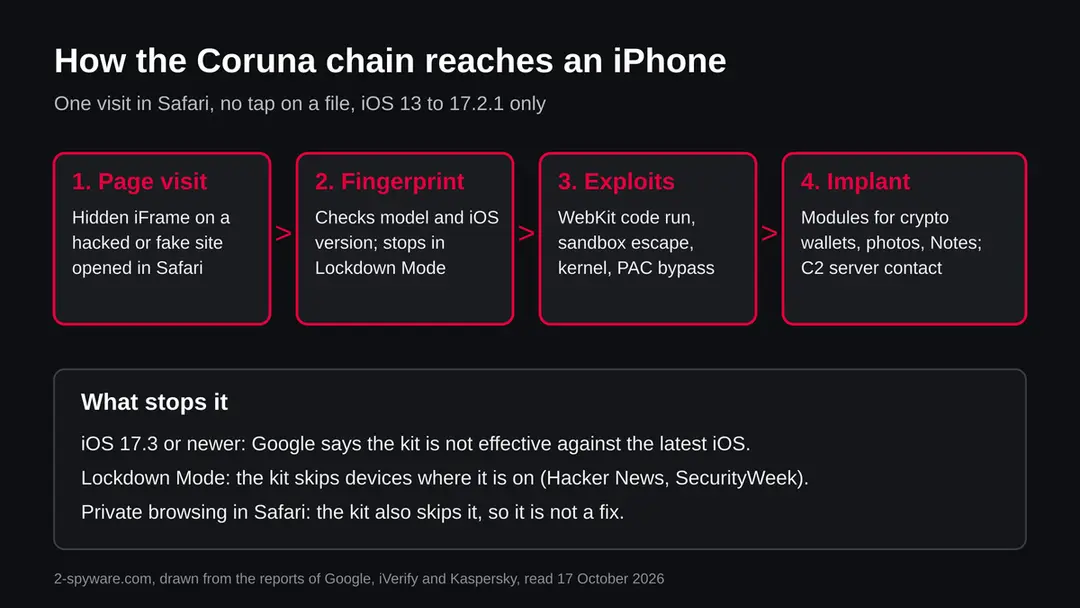
Coruna: summary
| Name | Coruna (iVerify first called it CryptoWaters) |
|---|---|
| Type | iOS exploit kit: 23 exploits in five full chains that infect an iPhone through Safari |
| Risk | High on an unpatched iPhone: data and crypto wallet theft; none on a phone with iOS 17.3 or newer, according to Google |
| Symptoms | Usually none you can see. The kit hides, deletes its own crash logs and runs inside system processes |
| How to get rid of it | Update to the newest iOS, restart, check with MVT or iVerify Basic, move crypto, change passwords; erase and restore if you find traces |
| Our check (17 October 2026) | No address to test: the subject is a name. ThreatFox lists three Coruna entries seen 14 to 16 October 2026; we read the research reports, not the entries |
Show 7 more facts
| First seen | February 2025 (Google); public reports 4 March 2026 |
|---|---|
| Devices | iPhones and iPads on iOS 13.0 to 17.2.1; not effective against the latest iOS |
| Microsoft detection | No Microsoft detection name is known: this is an iPhone threat, not a Windows one |
| Evidence | 0 write-ups by security sites; details still limited |
| Distribution | Typically fake installers, cracked programs, e-mail attachments, fake "verify you are human" pages and ads for popular apps |
| Damage | Installs other malware, often several programs at once |
| Facts checked | 17 October 2026 |
Facts checked on 17 October 2026 against reports from SecurityWeek, iVerify, The Hacker News, Kaspersky's Securelist and Centripetal. Coruna is a name, not a web address, so there was no plain request to make and no site test.
We did not run, test or obtain the kit and we have not seen an infected phone. Menu names follow current iOS; Apple's own support pages were not part of this research round.
What Coruna is, and what it is not
Coruna is an exploit kit for iPhones: a set of 23 exploits in five full chains that takes over a phone through Safari when the phone runs iOS 13.0 to 17.2.1. It is not an app, not a file you downloaded and not something you can find in a list of installed apps.
Google's Threat Intelligence Group and the mobile security firm iVerify published separate reports on it on 4 March 2026. Google learned the name from a debug build in which the developers had left their own labels. iVerify had called the same kit CryptoWaters, because it holds modules aimed at cryptocurrency wallets. Google first saw part of it in February 2025.
The reason people search for it is the size of the story. Exploit kits of this quality used to be sold to governments. Coruna was then seen in the hands of a suspected Russian espionage group and of a financially motivated group in China, which iVerify describes as one of the most significant examples of spyware grade tools spreading to criminals.
The same iVerify report says anyone visiting with a vulnerable iOS version could be infected, and that is why a normal user can ask the question.
- Name
- Coruna (CryptoWaters in iVerify's first report)
- What it is
- A framework of 23 exploits in five full chains for iPhones
- Targets
- iOS 13.0 to 17.2.1, said not to work on the latest iOS
- Delivery
- A hidden iFrame on a compromised or fake website, opened in Safari
- Payloads seen
- PlasmaLoader (PLASMAGRID) for crypto wallet theft; modules for photos, Apple Notes and WhatsApp
- Not the same as
- An app, a profile, a Windows virus or a scam text
Is Coruna a virus, and is my iPhone in danger?
Coruna is not a virus in the old sense, but a successful attack leaves malware on the phone, so it is dangerous for an unpatched iPhone and not for one on iOS 17.3 or newer. Your own danger depends on your iOS version and on which sites your phone opened.
The reports give a clear line. Google says the kit is not effective against the latest version of iOS, and several reports name iOS 17.3 or newer as the simplest defence.
CISA added three of the vulnerabilities, CVE-2021-30952, CVE-2023-41974 and CVE-2023-43000, to its Known Exploited Vulnerabilities list on 5 March 2026, with 26 March as the date for US federal agencies to apply the fixes. Centripetal wrote that CVE-2023-41974 was added on 7 March, so the two sources differ by two days on the listing date.
What we cannot tell you is whether a given phone was hit. There is no public count of victims. The delivery was not tied to one person: iVerify says the exploits were not limited to specific targets or one time links.
That fits a wide net, and it also means that a phone left on an old iOS and used to browse the open web is in the group of phones the kit was built for.
What Coruna does on an infected phone
What we checked for this guide, and what we could not
Coruna is a name, not an address, so we made no site test. We read five published reports and looked at what abuse.ch lists. We did not obtain, run or test the kit, and we have seen no infected phone.
Coruna, desk research, 17 October 2026
- Reports agree on the core factsSecurityWeek, The Hacker News and iVerify agree on 23 exploits, five chains and iOS 13.0 to 17.2.1; Google and iVerify published on 4 March 2026.
- Code link to Operation TriangulationKaspersky says the kernel exploit for CVE-2023-32434 and CVE-2023-38606 is an updated version of the one used in Operation Triangulation, and calls the link an assumption based on code.
- ThreatFoxOur radar shows three Coruna entries on abuse.ch ThreatFox, last seen 16 October 2026. We did not read the entries, so we name no indicator from them.
- Victims and the vendorNo public count of infected phones, and the commercial surveillance vendor is not named in the reports we read.
- Patch status after iOS 17.3The reports say the latest iOS is not affected. Whether a specific newer version is affected is not shown, and iVerify says its work is ongoing.
A real, documented iPhone threat that updated phones resist Coruna is described by several independent firms. The fix is a current iOS, not a removal tool, and we state only what the reports say.
How the Coruna attack works, step by step
The chain starts with a web page and ends with an implant, and it needs no tap on a file or link in a message. It fingerprints the phone first, so it only fires the exploits that fit your model and iOS version.
According to The Hacker News summary of Google's report, the stages are: fingerprint the phone to decide whether it is worth attacking and to choose a chain, run a WebKit remote code execution flaw (CVE-2024-23222 in the newest chain), bypass address layout randomisation, escape the Safari sandbox, bypass pointer authentication on Apple Silicon, and run shellcode that drops the final implant.
Kernel exploits for older versions include CVE-2023-41974 for iOS 16.4 to 16.7 and CVE-2023-32434 and CVE-2023-38606 for older releases.
iVerify adds what happens afterwards. The implant works in system processes such as powerd, locationd, imagent and SpringBoard, downloads modules depending on the apps it finds, deletes the crash logs from failed attempts and checks whether it runs in a Corellium virtual phone, the tool researchers use.
It contacts command servers and can fall back to SMS or iMessage. The kit uses four layers of obfuscation and, per Google, refuses to run in Lockdown Mode and in private browsing.
| Exploit (name in report) | CVE | iOS versions |
|---|---|---|
| buffout | CVE-2021-30952 | 13 to 15.1.1 |
| jacurutu | CVE-2022-48503 | 15.2 to 15.5 |
| Photon | CVE-2023-32434 | 14.5 to 15.7.6 |
| Gallium | CVE-2023-38606 | 14.x |
| Parallax | CVE-2023-41974 | 16.4 to 16.7 |
| cassowary | CVE-2024-23222 | 16.6 to 17.2.1 |
| Sparrow | CVE-2024-23225 | 17.0 to 17.3 |
| Rocket | CVE-2024-23296 | 17.1 to 17.4 |
Timeline: who used Coruna and when
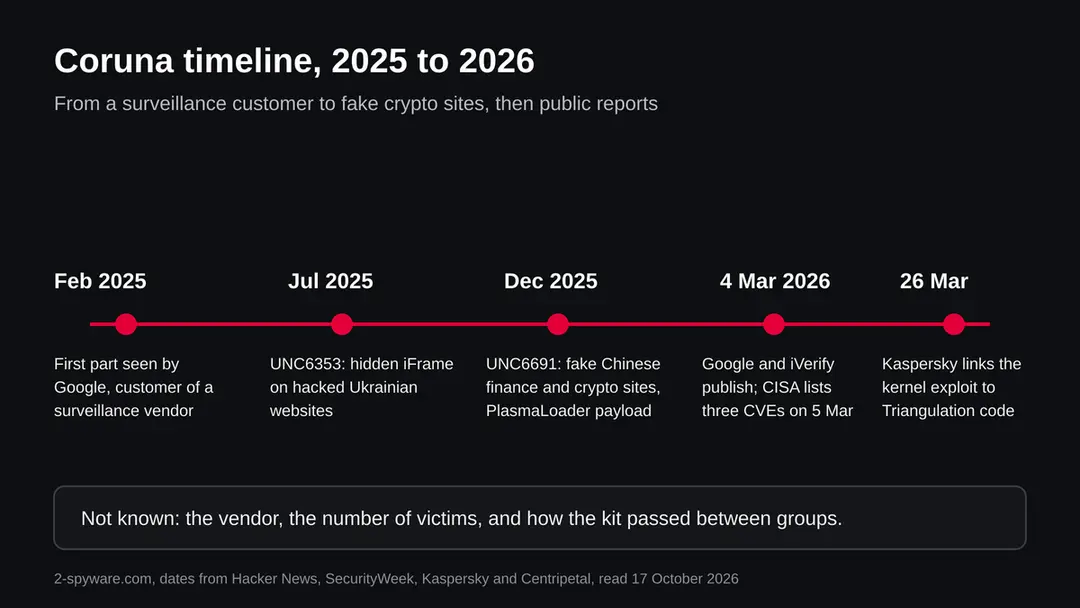
The kit moved from a surveillance customer to a suspected state group to criminals within about ten months. How it passed from hand to hand is not known.
February 2025
Google sees the first part
Google sees the first part of the kit in an attack by a customer of an unnamed commercial surveillance vendor.
July 2025
Ukrainian websites carry the kit
UNC6353, a suspected Russian espionage group, loads the framework through a hidden iFrame on compromised Ukrainian websites, from an address Google lists as cdn.uacounter[.]com, for certain iPhone users in one region.
11 November 2025
Apple updates its release notes
Apple adds CVE-2023-43000 to its security release notes; the flaw was fixed in iOS 16.6 in July 2023.
December 2025
Fake finance sites in China
UNC6691, a financially motivated cluster in China, uses fake finance and crypto sites that tell visitors to open them on an iPhone or iPad, with no region limit, and delivers PlasmaLoader.
4 March 2026
Google and iVerify publish
Google and iVerify publish. CISA lists three of the flaws in its exploited vulnerabilities catalogue the next day.
26 March 2026
Kaspersky finds the Triangulation link
Kaspersky reports that Coruna's kernel exploit is an updated version of one used in Operation Triangulation.
Coruna, CryptoWaters, PlasmaLoader and other names you may see
Several names point to one story. Coruna is the kit, CryptoWaters is iVerify's first name for it, and PlasmaLoader or PLASMAGRID is the payload used by the China based group.
| Name | What it is | Source |
|---|---|---|
| Coruna | The exploit kit; name found in a debug build | Google, via SecurityWeek |
| CryptoWaters | iVerify's first name for the same kit | iVerify |
| PlasmaLoader, PLASMAGRID | Payload that steals crypto wallet data | The Hacker News, Centripetal |
| UNC6353 | Suspected Russian espionage group that used it in Ukraine | Google, via SecurityWeek |
| UNC6691 | Financially motivated cluster in China | Google, via SecurityWeek |
| Operation Triangulation | Earlier iPhone attack whose kernel exploit Coruna updates | Kaspersky |
How Coruna got on your phone
Through a normal looking site, not through a download. The kit was found on compromised Ukrainian news and business pages, on fake Chinese finance and crypto exchange sites, and on more than 50 delivery domains reported by c/side, including fake crypto platforms and gambling lures, as relayed by The Hacker News.
The page carries a hidden frame, so you see nothing unusual. The fake sites asked visitors on a computer to come back on an iPhone or iPad, which is a sign that the aim was your phone. iVerify found one delivery site loading from an analytics page, which shows that the kit hides inside pages that look like routine site code.
Practical meaning: the lure may be an advert, a social message, a search result for a crypto exchange or a link from a chat. The gate that matters is your iOS version, because after 17.3 the same page does nothing. Do not rely on spotting the site. The addresses in the reports are listed for network defenders, and we print only a defanged example here, cdn.uacounter[.]com.
How to remove Coruna
What to do about Coruna on iPhone
You cannot uninstall Coruna like an app, because it is not an app.
The steps close the hole it uses, end an infection that only lives in memory, and limit the damage if data was taken.
Step 1: Read your iOS version
Open Settings > General > About and read iOS Version. Google's research says the kit targets iOS 13.0 to 17.2.1 and is not effective against the latest iOS, and reports say iOS 17.3 or newer is enough to stop it.
If your number is 17.3 or higher, the kit as described in March 2026 does not work on your phone. Write the number down; you will want it if you contact support.
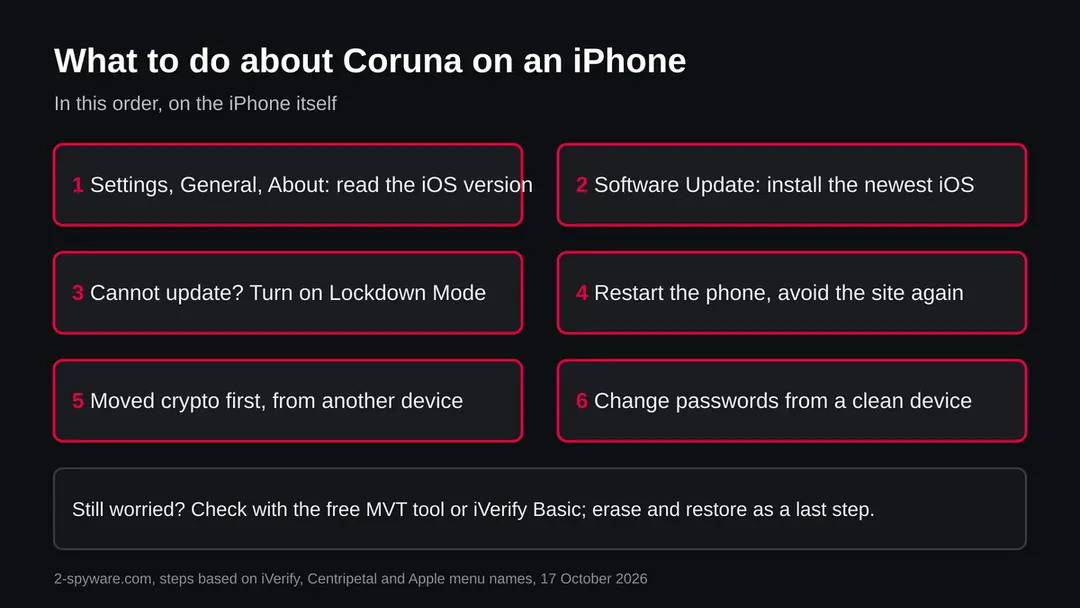
The order of actions on an iPhone you suspect Coruna hit. Step 2: Install the newest iOS
Open Settings > General > Software Update and install what is offered. Keep Automatic Updates switched on in the same screen so security fixes arrive without you.
If your iPhone is too old to take a recent iOS, it may still reach a later patched version of its own line, so check what Software Update lists.
An iPhone that cannot update at all is a reason to move to a newer phone for banking and crypto.
Step 3: If you cannot update, use Lockdown Mode
Open Settings > Privacy & Security > Lockdown Mode and turn it on.
Reports from Google, repeated by SecurityWeek and The Hacker News, say the kit does not run when Lockdown Mode is on. iVerify notes that the kit checks for Lockdown Mode and does not say the mode blocks every chain, so treat it as a stopgap and not as a cure.
Lockdown Mode limits some web features and message attachments, which is the price of the protection.
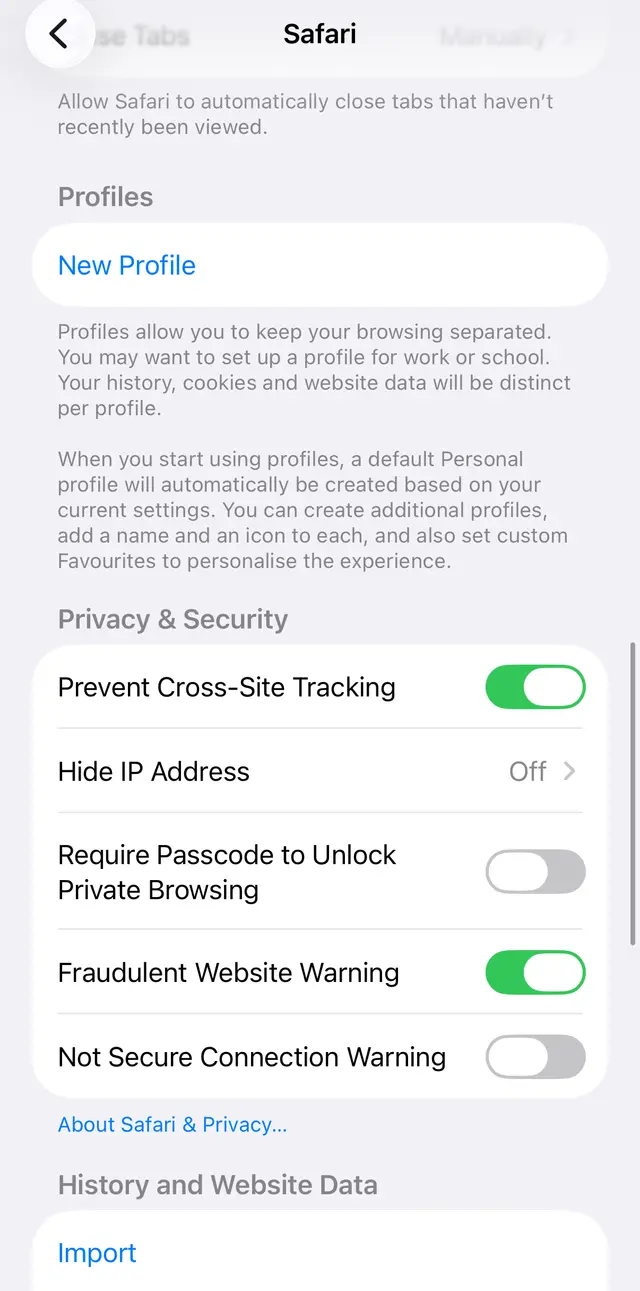
iOS 26: Settings, Apps, Safari. Keep Fraudulent Website Warning on; it will not stop an exploit chain, but it helps against fake sites. Step 4: Restart the phone
Hold the side button and a volume button, slide to power off, and start the phone again. Centripetal advises a restart as an interim step because it clears an infection that lives only in memory.
A restart does not prove the phone is clean, and the phone can be infected again by visiting the same kind of site, which iVerify saw happen to its own test phones several times. Update first, restart second.
Step 5: Check the phone with free tools
iVerify, which found one Coruna delivery site, offers a free app called iVerify Basic that looks for the kit's traces, and it publishes an indicator file for the open source Mobile Verification Toolkit (MVT).
MVT runs on a computer against an iPhone backup. Traces named by iVerify include a file called com.apple.photolibraryd.plist in the preferences, the infection address in Safari history, and unusual network use by the powerd and imagent processes.
These checks are for people who visited a suspect site or handle valuable data; we have not run them ourselves.
Step 6: Move crypto and change passwords from another device
Later versions of Coruna went after crypto wallet apps, so if you keep a wallet on an iPhone that was on an old iOS, move the funds to a new wallet created on a clean device and keep the new recovery phrase offline.
Then change the passwords of your Apple Account, e-mail and exchanges from a different device and switch on two factor authentication. Do not type any recovery phrase into a website or an app that a message asked you to open.
Step 7: Erase and restore only if you find traces
If MVT or iVerify finds traces, back up photos and contacts, then use Settings > General > Transfer or Reset iPhone > Erase All Content and Settings and set the phone up as new. Install the newest iOS before you restore anything.
Do not restore from a backup made after the infection without scanning it. Ignore any app or site that sells a Coruna remover; the kit is no app and a remover cannot fix an unpatched hole.
What nobody has said publicly
The public record is silent on who wrote Coruna, how many phones it infected, and whether any iOS after 17.3 is vulnerable. We list the gaps so that nobody mistakes a guess for a fact.
No source names the surveillance vendor. Claims that US government contractors built the kit rest on code clues, and Centripetal states that the origin has not been established. The statement that this was the first mass attack on iOS is iVerify's own description.
The domain lists in the Google and iVerify reports differ and are long, and a DGA fallback with 15 character .xyz names is reported, so blocking known addresses alone is weak. Both firms said more analysis would follow, so this page may change.
After removal: passwords, accounts and prevention
If you think you opened a Coruna page
One visit to such a page on an updated iPhone does nothing, and on an old iOS it may have been enough. What to do depends on your iOS version.
- 1
iOS 17.3 or newer
Nothing was installed by Coruna as described. Update to the newest iOS anyway and treat the page like any scam page: do not enter wallet phrases or card numbers.
- 2
iOS 17.2.1 or older
Update first, restart, then check with iVerify Basic or MVT. Assume that wallet apps and photos could have been read until the check says otherwise, and move funds to a new wallet from a clean device.
- 3
You typed a recovery phrase or password
Anyone who has the phrase has the funds: move them at once. Change the password from another device, and tell the exchange or your bank.
- 4
You work with sensitive data
Report the visit to your security team or, if you are a journalist or activist, to a digital security helpline, and keep the phone as it is for analysis.
How to keep exploit kits away from your iPhone
Do
- Keep iOS on automatic updates, and install a new major version when your model supports it.
- Use Lockdown Mode if you are likely to be targeted or your phone cannot update.
- Keep crypto on a hardware wallet or a device you keep updated, away from a spare old phone.
- Type exchange addresses yourself or use a bookmark instead of following links from ads and chats.
Don't
- Keep using an iPhone that no longer gets security updates for money matters.
- Open a finance or crypto site that asks you to switch to your iPhone.
- Buy a Coruna remover or a phone cleaner from an ad.
- Enter a wallet recovery phrase anywhere except your own wallet app.
Questions about Coruna
What is Coruna?
Coruna is an exploit kit for iPhones: a toolbox of 23 exploits grouped into five full chains that break into a phone through the Safari browser. Google's Threat Intelligence Group named it after the name its developers left in a debug build, and iVerify, which analysed it separately, first called it CryptoWaters.
Both published on 4 March 2026. It is not a program you install and not an app in the App Store. It runs when a vulnerable iPhone opens a web page that carries it, and it then drops an implant that steals data.
Is Coruna a virus?
It is closer to a break in tool than a virus. A virus spreads by itself, while Coruna waits on web pages and attacks the iPhone of whoever visits, as long as that phone runs iOS 13.0 to 17.2.1.
After the break in, it installs an implant that steals data, so the result does behave like malware. It does not spread from phone to phone through messages in anything we read. Most iPhones on current iOS are not affected, according to Google, and the Windows virus advice you may find online does not apply.
Is my iPhone infected with Coruna?
Probably not, if it runs iOS 17.3 or newer, because Google says the kit is not effective against the latest iOS. Risk is real for an older iOS that you used to visit fake finance or crypto sites, or compromised websites.
There is usually no visible sign, so you cannot tell by looking. Check your iOS version under Settings > General > About, update, and if you are worried run iVerify Basic or MVT. We have no way to say from here whether a particular phone was hit, and we will not guess.
Which iPhones and iOS versions are affected by Coruna?
Google reports that the five chains target iOS 13.0 to 17.2.1. iVerify tested infected devices on iOS 15 to 17, on both older and newer processor types. Each exploit covers a narrower range, for example one for iOS 16.6 to 17.2.1 and another for 17.0 to 17.3, so the chain picks one that fits the model and version it fingerprints.
Later versions are said to resist it, and some components were patched in iOS 17.3. Whether any newer iOS is affected is not shown in the public reports we read.
What does Coruna steal?
The reports describe a modular implant. One payload, PlasmaLoader (also called PLASMAGRID), reads QR codes from images and steals data from crypto wallet apps such as MetaMask, Exodus, Bitget Wallet and Base. iVerify lists modules for wallet apps and WhatsApp, and says the implant can inspect photos and Apple Notes and upload them.
It talks to command servers and can use SMS or iMessage as a fallback. We cannot say that every infection took every item, because the modules depend on which apps are installed.
Who is behind Coruna?
Nobody is established as the author. Google saw three users of the kit: a customer of an unnamed commercial surveillance vendor in early 2025, a suspected Russian espionage group it calls UNC6353 that used it on Ukrainian websites in July 2025, and a financially motivated cluster in China, UNC6691, that used it on fake finance sites in December 2025.
Kaspersky found code shared with the exploit used in Operation Triangulation. Claims that a government built it rest on code clues, and no reporting party has proven that.
Does Lockdown Mode stop Coruna?
According to Google's findings as reported by SecurityWeek and The Hacker News, the kit does not run when Lockdown Mode is detected, and it also skips private browsing. iVerify adds that the kit checks for Lockdown Mode and does not claim the mode blocks the attack.
So Lockdown Mode is a sensible stopgap for a phone that cannot update, but updating iOS is the real fix. Private browsing is not protection: the skip is the kit's own choice and could change.
Do I need a Coruna removal tool or an antivirus for iPhone?
No. Coruna is not an app on your phone and a cleaner app cannot reach the system parts it uses, so a Coruna remover from an ad or a pop up is a trick to sell you something.
The free fixes are to update iOS, restart, use Lockdown Mode if needed, and check with iVerify Basic or MVT. If real traces are found, erase the iPhone and set it up again on the newest iOS. Do not pay for a scanner that claims to clean the phone in a minute.
Is Coruna the same as Operation Triangulation or Pegasus?
No, they are different things that share some history. Kaspersky found that Coruna's kernel exploit for CVE-2023-32434 and CVE-2023-38606 is an updated version of an exploit used in Operation Triangulation, and Coruna also holds four other kernel exploits Kaspersky had not seen there.
That is a code link, not proof of one author. Pegasus is a different commercial spyware product. Coruna is a framework of exploits that other groups ran, and its payloads differ by user, from spying to crypto theft.
Sources
- SecurityWeek: Nation-state iOS exploit kit Coruna found powering global attacks (read October 17, 2026)
- iVerify: Coruna, inside the nation state grade iOS exploit kit (read October 17, 2026)
- The Hacker News: Coruna iOS exploit kit uses 23 exploits (read October 17, 2026)
- Kaspersky Securelist: Coruna framework updated Operation Triangulation exploit (26 March 2026) (read October 17, 2026)
- Centripetal: Coruna iOS exploit kit, observed traffic across education and government sectors (read October 17, 2026)