
massgravel.net: a look-alike of the Windows activation tool site, reported for PowerShell malware, and what to do if you ran its command
massgravel.net is a web address that URLhaus lists four times in September 2026 with the tag fakemas, three of them also tagged powershell, for a home page, a /get script and two zip files. It is spelled almost like massgrave, the name of the team behind the Microsoft Activation Scripts (MAS) tool, but it is not their site.
If you only saw the name, nothing is proven; if you pasted a PowerShell command containing it, treat the Windows PC as compromised: change your passwords from another device, then scan and clean or reset Windows.
Facts checked October 18, 2026. Removal steps tested on Windows 11 (26H2) and checked against Microsoft's and the browser makers' current documentation.
Automatic
Get a free scan and check if your PC is infected.
Fortect finds malware, unwanted programs and the Windows damage they leave behind, and repairs it in one pass.
Programs like a PowerShell command or script that fetches files from massgravel.net usually arrive in groups; a free scan lists the companions that are easy to miss.
Do it yourself · free Remove massgravel.net (fake MAS site, PowerShell and zip files) yourself 5 steps, about 15 minutes, no software needed.
Start the steps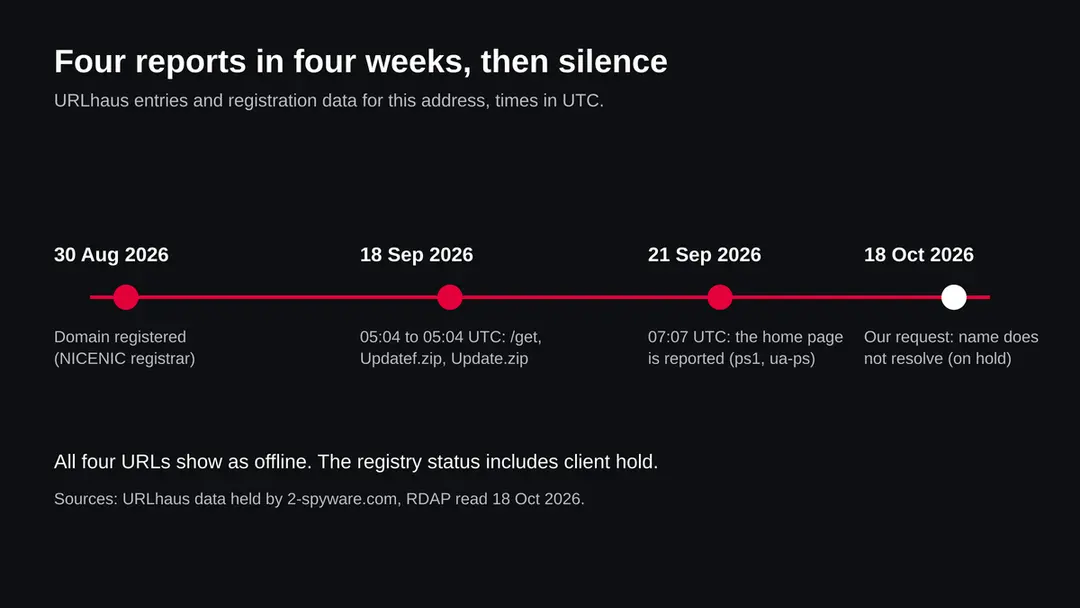
Massgravel.net (fake MAS site, PowerShell and zip files): summary
| Type | A malware server: URLhaus tags its four addresses fakemas, and three of them powershell and ps1 (a fake copy of the MAS activation tool site) |
|---|---|
| Risk | High if you ran a PowerShell command containing this address: passwords, files and control of the PC may be at risk. Low if you only saw the name |
| Symptoms | Unknown for this address. Often none; unknown scheduled tasks, startup entries, a hot slow PC or changed Defender settings would be worth checking |
| How to get rid of it | Change passwords from another device, run Microsoft Defender Offline, remove startup entries you can tie to the command, and reset Windows if you are not sure |
| Our check (18 October 2026) | One plain request from our server: the name did not resolve (ENOTFOUND). That clears nothing; the danger rating comes from URLhaus |
| Running since / first seen | Domain registered 30 August 2026; first addresses reported 18 September 2026 |
| Removal | Scan the PC with security software to find and remove the malware and anything installed with it. Fortect scans Windows for malware and repairs the system files and settings it damaged. Remove it nowTo use the full-featured product, you have to purchase a license for Fortect. The scan is free. |
Show 9 more facts
| Platform | Windows. Nothing we read says Mac or phones are affected |
|---|---|
| Detection names | No Microsoft detection name is known for the files on this address, because we did not open them |
| Name | Massgravel.net |
| Domain registered | 30 August 2026 |
| Evidence | 4 write-ups by security sites; details still limited |
| First seen | 18 September 2026 |
| Distribution | Typically fake installers, cracked programs, e-mail attachments, fake "verify you are human" pages and ads for popular apps |
| Damage | Installs other malware, often several programs at once |
| Facts checked | 18 October 2026 |
Facts checked on 18 October 2026 against the URLhaus data for massgravel.net held in our database (the abuse.ch site itself was not opened), RDAP, one plain request from our server, the page of the real MAS project and the FTC page on hacked accounts.
Two news items on a different fake MAS domain were seen only as search summaries. We did not download the files and we infected no PC; the removal steps follow Microsoft's menu names and were not tried on a live infection.
What massgravel.net is, and what we know about it
massgravel.net is not a program on your PC. It is a web address that the abuse.ch project URLhaus lists as a place where malware was served, under the tag fakemas. That tag points at a fake copy of the MAS activation tool site. We found no public write-up of this one address, so what follows is what URLhaus shows, what our own request returned, and what the real MAS project and other sources say about fake MAS sites in general.
- 1
What URLhaus lists
Four addresses on massgravel.net: the home page, a path called /get, and two zip files called Update.zip and Updatef.zip. Three were added on 18 September 2026 between 05:04:30 and 05:04:35 UTC and the home page on 21 September 2026 at 07:07 UTC. All four carry the threat label malware_download, all four are marked offline, and the reporter is a user named ave9858.
- 2
What the tags mean
fakemas is a name chosen by the reporter for a fake MAS site. powershell and ps1 say the file served is a PowerShell script. ua-ps most likely means the server answered with the script only when the request looked like it came from PowerShell, and with something else to a normal browser; that is our reading, not a statement from the reporter. The two zip files carry only the tag fakemas.
- 3
What we could not confirm
We did not download anything, so we cannot tell you what the script or the zip files did, which malware family they belong to or where it reported to. URLhaus shows tags, not a proof. We also cannot say whether this address belongs to the same campaign that other researchers described for a different look-alike domain.
- 4
What this means for you
If you only saw the name in a log, a blocked request or a warning, you are not infected by that alone. The risk is for a Windows PC where a person pasted a command into PowerShell that contained this address instead of the real one.
- Kind of threat
- A look-alike of the MAS activation tool site; URLhaus tags it fakemas, powershell, ps1 and ua-ps
- Where the files were
- hxxps://massgravel[.]net/ (home page), /get, /Update.zip and /Updatef.zip
- Domain registered
- 30 August 2026, registrar NICENIC International Group Co., Limited; status includes client hold, client delete prohibited and client transfer prohibited (RDAP, read 18 October 2026)
- URLhaus entries
- 4 addresses, added 18 September (3) and 21 September 2026 (1); all offline when we read our copy of the data
- Delivery trick
- Copying the real MAS command and changing one part of the address, so the command runs the attacker's script
- Platform
- Windows. MAS is a Windows and Office tool and the files are PowerShell. Nothing we read says Mac, iPhone or Android are affected
What massgravel.net (fake MAS site, PowerShell and zip files) does on an infected PC
What we checked on 18 October 2026, and what we could not
Our server asked for the address once and the name did not resolve: the error was getaddrinfo ENOTFOUND. That means no server could be reached by that name at that moment. It clears nothing, because a domain can be switched off and switched on again, and because the files may already have been copied to other addresses.
Our check, 18 October 2026
- The name did not resolveOur plain request from our server failed with ENOTFOUND. The registry record lists the status client hold, which is set by the registrar and normally takes a domain out of the internet's name system. We do not know who set it or why.
- Why that is not a clean resultA domain on hold today could have served files in September, and it can be moved or released later. A dead address also does nothing for a PC that already ran the script: what was started on the PC keeps running.
- Notification request, pop-ups, redirects, ad networksNone seen. There was nothing to see: no page loaded, and we made no browser visit.
- URLhaus listingFour addresses tagged fakemas, three also powershell and ps1; all four offline in our copy of the data.
- Downloads and the files themselvesWe did not download the script or the zip files. We cannot tell you what they contain.
Dangerous: treat it as a malware server that is now switched off Our check was one plain request that failed, so it proves nothing either way. The danger rating comes from the four URLhaus reports and their tags, not from our request. Do not run any command that contains this address.
What happened to massgravel.net, from registration to our check
The domain is under two months old at the first report. The dates come from RDAP and from the URLhaus data we hold; the times are UTC.
30 August 2026
The domain is registered
RDAP shows massgravel.net registered on 30 August 2026 through NICENIC International Group Co., Limited. Nothing in the record says who registered it.
18 September 2026
Three addresses are reported within five seconds
At 05:04:30 UTC the path /get is added with the tags fakemas, powershell, ps1 and ua-ps. At 05:04:32 UTC Updatef.zip follows and at 05:04:35 UTC Update.zip, both tagged fakemas. Three entries in five seconds suggests the reporter submitted them together after finding the set.
21 September 2026
The home page is reported
At 07:07 UTC the address https://massgravel.net/ itself is added with the same four tags as /get. That means the front page returned a PowerShell script, not a web page, to a request that looked like PowerShell.
18 October 2026
Our check: the name does not resolve
All four URLhaus entries show as offline, and our own request fails at the name lookup. The registry status client hold is consistent with this. We cannot say what happened between 21 September and today.
Registration and report dates for massgravel.net. The picture is our own drawing from RDAP and the URLhaus rows.
What the pattern suggests, and what it does not: a new domain, reports within three weeks and then silence looks like a short-lived address that was used and dropped. That is our reading of the dates, not something any report says, and it does not mean the people behind it stopped.
What MAS is, and why a fake site copies it
The real project is called Microsoft Activation Scripts, MAS for short, and publishes under the name massgrave. massgravel.net, with an extra letter l, is not it. The real project says so itself: its page warns that third parties may spread malware under the MAS name by changing the web address in the PowerShell command.
| Question | What the sources say | Source |
|---|---|---|
| What is MAS? | An open source Windows and Office activator based on batch scripts, with several activation methods and troubleshooting tools | massgrave.dev, read 18 October 2026 |
| Which addresses are the project's? | The page names get.activated.win in its run command, git.activated.win for its own Git copy, and GitHub and Azure DevOps pages under the name massgrave | massgrave.dev |
| What is the official command? | A one line PowerShell command that downloads from get.activated.win and runs it at once. We do not repeat it here as something to copy | massgrave.dev |
| Does the project warn about fakes? | Yes. It says third parties may spread malware by changing the URL in the command, and tells readers to check the address carefully and to confirm the source if they download a script by hand | massgrave.dev |
| Has a fake MAS domain been used before? | BleepingComputer and ThaiCERT headlines describe a look-alike domain (get.activate[.]win, one letter from the real one) that served PowerShell malware, said to install a loader called Cosmali that drops miners and the XWorm remote access trojan. We saw this only as a search summary, not as an opened page | BleepingComputer; ThaiCERT (summaries seen) |
| Is this address the same campaign? | Not known. The domain is different and we did not open the files | Not available |
| Is MAS itself accepted by Microsoft? | It is a tool to get around paid licensing. We did not read a Microsoft statement about it, and we do not recommend it. Our guide is about the fake address, not about the tool | Not available |
How a command with a changed address becomes malware on your PC
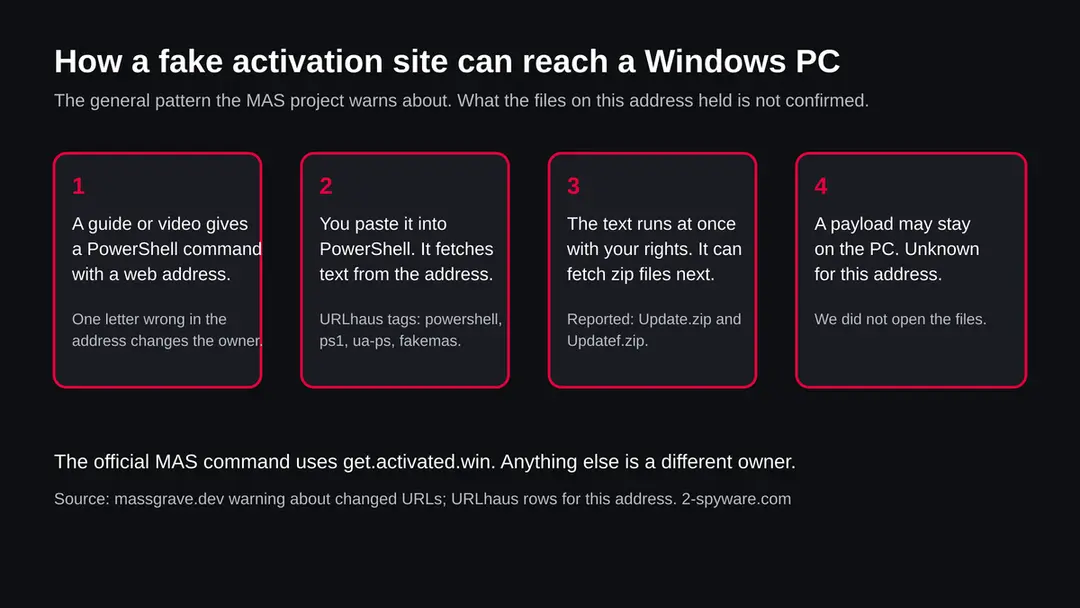
A command of the form download this address and run it is trust in one name. If the name is one letter wrong, the PC trusts the wrong owner and runs whatever that owner sends. We did not see the script on this address; the chain below is the general pattern the MAS project describes, with the facts we do have about this address marked.
- 1
A person gets a command with an address in it
The place is usually a forum post, a video description, a chat message or a search result that promises a free Windows or Office activation. The command looks like the real one. Only the address differs, and a missing or extra letter is easy to miss in a long line.
- 2
The PC downloads text and runs it
Such a command does not install a program you can see. It fetches text from the address and hands it straight to PowerShell, which runs it with the rights of the signed in user. If that user is an administrator, the script can change almost anything. Nothing is shown for you to approve.
- 3
The server may answer differently to PowerShell
The tag ua-ps suggests this server's reply depended on who asked. A browser visit could then show a harmless page while PowerShell receives the script. This is one reason a quiet browser test never clears an address.
- 4
The script can fetch more
The two zip files on the list, Update.zip and Updatef.zip, fit a second stage: the script downloads an archive, unpacks it and starts something inside. That is our reading from the names and the order of the reports. We did not see their contents.
- 5
What stays behind
Unknown for this address. In the other fake MAS case that sources describe, the result was a loader that installed miners and a remote access trojan. Do not assume the same here, and do not assume it is milder either.
What massgravel.net (fake MAS site, PowerShell and zip files) can steal or download
What this can cost you
Seeing the name costs nothing. The list below applies to a Windows PC that really ran a script from this address. We do not know what that script did, so the levels describe what is possible after any unknown PowerShell script has run with your rights, not what we proved.
- High
Passwords and accounts
A script run as you can read what your browser saves and what you type. If the unknown payload includes a stealer or a keylogger, every login on the PC is at risk. Changing passwords from the same PC does not help.
- High
Someone else using your PC
A second stage fetched as a zip may include a remote access program. That gives a stranger a seat at the PC. We do not know whether that happened here.
- High
Crypto and banking
If a wallet file or a seed phrase was on the PC, assume it can be copied. Crypto sent from a stolen wallet cannot be reversed.
- Medium
A slow PC and a hot fan
In the other fake MAS case that sources describe, the loader installed cryptominers. Miners use the processor and the graphics card, so a PC that suddenly runs hot and slow is a sign to check.
- Medium
Security tools turned down
Scripts that run as administrator can try to change Defender settings. We found no source saying this one did; we list it because it is a common first move, and because it is quick to check.
- Low
Nothing, if you only saw the name
A name in a block list, a log or a warning is not an infection.
Who can meet massgravel.net, and who cannot
Most people never meet this address. It matters to a narrow group, and it is better to say which than to frighten everyone.
| You are | What it means |
|---|---|
| Someone who pasted a MAS style command from a post, video or chat | Check the address in the command. If it contains massgravel, you ran the reported script. Treat the PC as compromised and use the plan below |
| Someone who typed the name into a browser, thinking it was the MAS site | A page that loaded in a browser is not the same as a script run in PowerShell. Nothing proves infection from a visit alone, but if you also copied a command from it, you are in the first group |
| An administrator who saw it in a DNS or firewall log | A device on your network asked for the name. People rarely do that by hand. Find the device, isolate it and run the checks below |
| The owner of the real MAS project or a person who tried to warn others | This page is not about your site. The address is spelled differently from yours |
| Someone with a Mac, iPhone or Android phone | The files are PowerShell and the tool is for Windows and Office. We found no source saying you are affected |
What you may notice, and what you may not
We do not know what the files did, so there is no list of signs that belongs to this address. The signs below are the ones that fit any hidden payload started by a PowerShell script; none is certain, and many victims notice nothing.
| Sign | What it may mean |
|---|---|
| A Defender message after you ran a command | Defender may have blocked part of the script or the second stage. Microsoft lists detections in the HackTool:PowerShell/AutoKMS family for activation tool scripts. That is a different thing from the fake one, but a detection near the time you ran the command is worth reading in Protection history |
| A scheduled task or startup entry you did not make | A common way for a payload to start again after a restart. We found no source for this address, so a clean list does not clear the PC |
| High processor or graphics use with nothing open | Possible miner. Task Manager shows which process uses it |
| Defender turned off or a new exclusion folder | Look in Windows Security, Virus and threat protection, Manage settings, Exclusions |
| Logins from new places or password reset emails | Follows from stolen logins; it is our reading, not a quote |
| Nothing at all | Quiet is the aim of most loaders |
How to check the PC for massgravel.net (fake MAS site, PowerShell and zip files)
Start with the question that matters: did you run a PowerShell command that contained massgravel.net, or one whose address you did not check letter by letter? Look in your PowerShell history or the page you copied it from. If you only saw the name in a log, find the device that asked. If the answer is yes or you are not sure, do the checks below. None of them deletes anything.
While you check, stop using the PC for banking, email, work or crypto, and disconnect it from the network if you can.
- 1
Disconnect first
Turn off Wi-Fi or unplug the network cable. Many payloads need the connection to send data out or receive orders.
- 2
Find the command you ran
Look at the post or message you copied it from, and compare the address with the real one on massgrave.dev, which names get.activated.win. If the address in your command is anything else, you ran something from a stranger.
- 3
Open Task Scheduler
Press Start, type Task Scheduler and open it. Look in Task Scheduler Library for tasks you do not know, with random names, or that run PowerShell or a program from a user folder. Do not delete yet; write down the name and what it runs.
- 4
Look at Startup apps
Open Settings > Apps > Startup and look for names you did not install. Entries here start with your Windows sign in.
- 5
Look at running processes
Open Task Manager (Ctrl+Shift+Esc) and sort the Processes tab by CPU, then by Memory. Look for powershell.exe you did not start, unknown names, or a process that uses a lot of processor while you do nothing. Right-click a name and choose Open file location to see where it lives.
- 6
Open Protection history
In Windows Security > Virus & threat protection > Protection history, look for anything blocked or quarantined around the time you ran the command.
- 7
Check Defender exclusions
In Windows Security > Virus & threat protection > Manage settings > Exclusions, look for folders or processes you did not add. We found no source that says this address added exclusions, so an empty list does not clear the PC.
- 8
Check your accounts from another device
Look at the sign in activity of your email, bank and exchange accounts, and at crypto balances. This is quicker than any file check.
- 9
A scan helps, but it does not clear the PC
A scan with Microsoft Defender or another product can find known files. Treat a clean result like a clean site test: one data point. We did not infect a PC with files from this address, so the order of the plan is our judgement, not a tested result.
How to remove massgravel.net (fake MAS site, PowerShell and zip files)
How to remove massgravel.net
A loader's job is to install other malware, so treat the PC as infected with more than one program until the scans are clean.
Step 1: Delete scheduled tasks that bring it back
Programs like massgravel.net add a scheduled task so they return after an uninstall or reopen a page at every sign-in. Start Task Scheduler, open Task Scheduler Library and sort by Last Run Time to see what ran recently.
On the Actions tab, a program in a user folder, a script or a web address is a warning sign; right-click such a task and choose Delete.
Tasks with names copying Google, Edge or Windows updaters but pointing to an odd folder are typical. The tool looks the same in Windows 11 and Windows 10.

Windows 11: Task Scheduler Library, the task selected, the Actions tab shows the file it runs. Full procedure with screenshots: Remove what malware leaves behind in Windows
Step 2: Remove it from startup
Press Ctrl + Shift + Esc to open Task Manager and select Startup apps (Windows 11) or the Startup tab (Windows 10). Disable entries you do not recognise, especially ones with no publisher or with a name that copies a Windows component.
Right-click an entry and choose Open file location to see where it runs from: programs in
%AppData%or%Temp%deserve a closer look. Some entries are not listed there but in the registry Run keys, which the procedure below shows how to check.Full procedure with screenshots: Stop apps from opening at startup On uGetFix
Step 3: Delete the folders left behind
Uninstalling often leaves the program's folders, and some threats reinstall themselves from them.
Press Windows + R, type
%LocalAppData%and press Enter, then do the same for%AppData%and %ProgramData%, and look for folders named after massgravel.net, its publisher or created on the day the problem started. Delete those folders, and check C:\Program Files and C:\Program Files (x86) too.If Windows says a file is in use, end it in Task Manager or delete the folder after a restart in Safe Mode. The folders are the same in Windows 11 and Windows 10.
Full procedure with screenshots: Remove what malware leaves behind in Windows
Step 4: Scan the PC, then run the offline scan
A scan finds the parts of massgravel.net that the manual steps cannot see. In Windows Security > Virus & threat protection > Scan options, start a Full scan and quarantine what it reports.
Follow it with Microsoft Defender Antivirus (offline scan) > Scan now, which restarts the PC and checks the disk while Windows and the malware are not running.
It takes about 15 minutes and works the same in Windows 11 and Windows 10. If either scan finds something, run the full scan again after removal until it comes back clean.

Windows 11: Windows Security > Virus & threat protection > Scan options. Full procedure with screenshots: Run a Microsoft Defender Offline scan
Step 5: Change passwords from another device and sign out other sessions
Massgravel.net can copy saved passwords, cookies and session tokens and send them out in seconds, so cleaning the PC does not undo the theft.
Change your passwords on a device that was never infected, starting with the e-mail account, since every other reset goes through it. On each account, end all other sessions and check the recovery e-mail, phone number and forwarding rules.
Then turn on two-step verification. Sign in on the Windows 11 or Windows 10 PC again only after the offline scan is clean.
Full procedure with screenshots: Turn on two-step verification / secure a hacked account
If you use a Mac, an iPhone or an Android phone
The tool being copied is a Windows and Office activator and the reported files are PowerShell. We found nothing that says massgravel.net affects anything else.
| Your device | What we know | What to do |
|---|---|---|
| Mac | The tags say PowerShell and ps1, which are Windows scripts. We did not open the files | Nothing to remove for this threat. Do not follow the Windows steps on a Mac |
| iPhone or iPad | No source describes this address on iOS | Nothing to remove. If you typed passwords on a page you reached from it, change them |
| Android | No source mentions it | Nothing to remove for this threat; change passwords if you entered any |
After removal: passwords, accounts and prevention
After you ran it: clean the PC and protect what was exposed
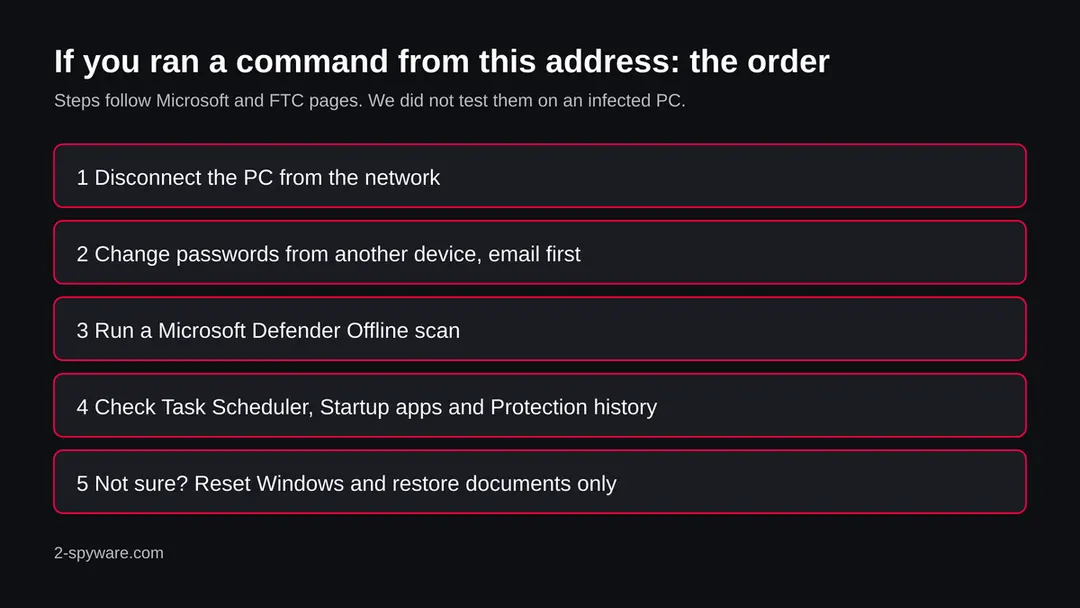
The PC is one half. The other half is everything you typed or stored on it. The order matters: another device first, then the PC.
- 1
Change passwords from a clean device
Use a phone or another computer you trust. Start with email, because it resets everything else, then bank, work, cloud storage and crypto. Anything typed on the PC after the command ran may already be known.
- 2
Sign out other sessions and turn on two step sign in
The FTC says that after changing a password you should sign out of all devices, and turn on two factor authentication if the account offers it. Check that the recovery email and phone number are yours, and look for forwarding rules you did not create.
- 3
Move crypto first if a wallet was on the PC
If a seed phrase or wallet file was ever on the PC, assume it is known. Create a new wallet and recovery phrase on a clean device and move the funds there.
- 4
Run Microsoft Defender Offline
Open Windows Security > Virus & threat protection > Scan options, choose Microsoft Defender Offline scan and select Scan now. Save your work first: Windows restarts and the scan runs outside the normal system, so malware has a harder time hiding. Results appear under Protection history. We could not open Microsoft's page for this on the day we wrote the guide, so check the menu names against your version of Windows.
- 5
Remove what the check found, with care
If Task Scheduler or Startup apps showed an entry that you can tie to the time you ran the command, switch it off or delete it. If you cannot tell, do not guess: the safe answer is the reset below.
- 6
If you are not sure, reset Windows
Go to Settings > System > Recovery > Reset this PC. Keep my files removes apps and settings but keeps personal files; Remove everything wipes the PC. For a PC that ran an unknown script as administrator, the full wipe is the answer that does not depend on finding every piece. Back up your documents first.
- 7
Restore only documents by hand
Copy back documents and photos, not programs, and not a full system image made after you ran the command. Install apps from their makers' own sites.
- 8
Rebuild logins in a password manager
Do not let the browser save passwords again on a PC that may have been watched. Use a password manager and an authenticator app or a security key for two step sign in.
- 9
Watch your money and your accounts
Check card statements and exchange logs for a few weeks and turn on alerts. The FTC says to report stolen personal information at IdentityTheft.gov, which gives a recovery plan.
- 10
Fix the Windows licence the proper way
If you ran the command to activate Windows or Office, the fake did not do that for you. Get a licence from Microsoft or a reseller you trust, or use the unactivated Windows, which still works with some limits.
Keep a PC out of this kind of trap
The weak point is the habit of pasting one line into PowerShell. The real MAS project itself tells readers to check the address, which is the whole defence against this address.
Do
- Read the address in any run-from-the-web command letter by letter before you press Enter, and compare it with the project's own page.
- Reach a project's page by your own bookmark, not by a search result or a link in a video description.
- Keep Windows and Microsoft Defender updated.
- Use a standard account for daily work, so a script has fewer rights.
- Use a password manager and two step sign in, so one stolen password is not enough.
- Keep a backup of documents on a disk that you unplug.
Don't
- Do not paste commands from chat messages, comments or posts you cannot trace.
- Do not run cracks or activators from sites that look like the real one.
- Do not assume that a page that looks harmless in a browser is harmless to PowerShell.
- Do not change your passwords on the PC you suspect.
- Do not rely on a quiet scan to say that you are safe.
Questions about massgravel.net (fake MAS site, PowerShell and zip files)
What is massgravel.net?
It is a web address that URLhaus, the malware tracking project run by abuse.ch, lists four times in September 2026 with the tag fakemas. Three entries are also tagged powershell and ps1, and two are zip files called Update.zip and Updatef.zip.
The name is spelled almost like massgrave, the team behind the Microsoft Activation Scripts tool, but it is not their site. We did not download the files, so what they contain is not confirmed by us.
Is massgravel.net safe to open?
No. Do not open it and do not run any command that contains it. All four reported addresses are offline in our copy of the data, and our own request on 18 October 2026 failed at the name lookup, but that proves nothing about the past or the future.
A domain can be switched back on, and a server can show a harmless page to a browser and a script to PowerShell. The rating comes from the URLhaus reports and their tags.
Is massgravel.net the real Microsoft Activation Scripts site?
No. The real project's page names get.activated.win in its run command, git.activated.win for its own Git copy, and GitHub and Azure DevOps pages under the name massgrave. massgravel.net is none of these.
The project's page itself warns that third parties may spread malware under the MAS name by changing the web address in the PowerShell command, and tells readers to check the address carefully before running anything.
What does the tag fakemas mean?
It is the label the URLhaus reporter chose for a fake copy of the MAS site. It is not an official malware family name, so it tells you what the address pretends to be, not what the file does.
The other tags, powershell, ps1 and ua-ps, say the file is a PowerShell script and, in our reading, that the server answered differently depending on who asked. The malware family is not stated, and we cannot name one.
I ran a command with massgravel.net in it. What now?
Disconnect the PC from the network, then change your passwords from another device, starting with email. Run a Microsoft Defender Offline scan, look in Task Scheduler, Startup apps and Protection history, and check your accounts for sign ins you do not know.
If you are not sure the PC is clean, reset Windows with Remove everything and restore documents by hand. We followed Microsoft's menu names and did not test the steps on an infected PC.
I only saw massgravel.net in a log or a warning. Am I infected?
Not necessarily, and the name alone proves nothing. It does mean that some device or person asked for it, and a person rarely does so by hand.
Find which device it was, check its PowerShell history and the page it copied a command from, and run the checks on this page if the command contained the name. If you cannot find a command, treat a quiet result as one data point, not proof.
Why is the site not loading?
In our check on 18 October 2026 the name did not resolve at all. The registry record for the domain lists the status client hold, set by the registrar, which normally takes a domain out of the name system.
We do not know who set it or why. It may have been switched off after complaints, but that is our guess. It does not help a PC that already ran the script, because what was started keeps running.
Does massgravel.net affect Mac, iPhone or Android?
We found nothing that says so. The reported files are PowerShell scripts and zip files, and the tool being copied is for Windows and Office. On a Mac, iPhone or Android phone there is nothing to remove for this threat.
If you typed a password on a page you reached from this address, change it from a clean device and turn on two step sign in.
Will resetting Windows remove it, and are my accounts safe afterwards?
A reset with Remove everything wipes the programs, scheduled tasks and startup entries, which is the answer that does not depend on finding every piece. It does not undo what was already taken.
Passwords, saved sessions and crypto seed phrases that were on the PC stay exposed until you change them from another device and turn on two step sign in. Restore documents by hand, not a full system image.
Will Fortect remove massgravel.net?
Fortect scans Windows for malware and unwanted programs and repairs the system files and settings they change, and its free scan shows what it finds on your PC before you decide anything.
For massgravel.net, follow the plan above as well: the browser steps take back permissions and settings that no scanner treats as a threat, and uninstalling the program that brought it removes the source.
Run Microsoft Defender's full scan and, if anything was found, its offline scan as a second opinion. If the symptoms are gone after the plan and both scans are clean, there is nothing more to do.
Sources
- Microsoft Activation Scripts project page: official addresses and warning about changed URLs (massgrave.dev) (read October 18, 2026)
- FTC: Email or social media hacked? Here's what to do (read October 18, 2026)
- Microsoft Security Intelligence: HackTool:PowerShell/AutoKMS detection list (only the list of names was readable) (read October 18, 2026)
- BleepingComputer: Fake MAS Windows activation domain used to spread PowerShell malware (seen as a search summary; a different domain) (read October 18, 2026)
- ThaiCERT: Warning, fake domains impersonating MAS used to install Cosmali Loader (seen as a search summary; a different domain) (read October 18, 2026)