
What is the deadliest computer virus? Five outbreaks compared, and what to do on Windows
There is no official ranking, so no single computer virus is the deadliest: the answer depends on whether you count money, infected machines or physical harm. ILOVEYOU, Mydoom, Stuxnet, WannaCry and NotPetya are the usual candidates, and this page compares them from the sources we read and then shows what to do on Windows 11 and 10 if you fear an infection.
Facts checked October 17, 2026. Removal steps tested on Windows 11 (26H2) and checked against Microsoft's and the browser makers' current documentation.
Automatic
Get a free scan and check if your PC is infected.
Fortect finds malware, unwanted programs and the Windows damage they leave behind, and repairs it in one pass.
An automatic scan checks installed programs, startup items and browser extensions for anything that came with a worry that a computer virus is deadly.
Do it yourself · free Remove deadliest computer virus yourself 5 steps, about 15 minutes, no software needed.
Start the steps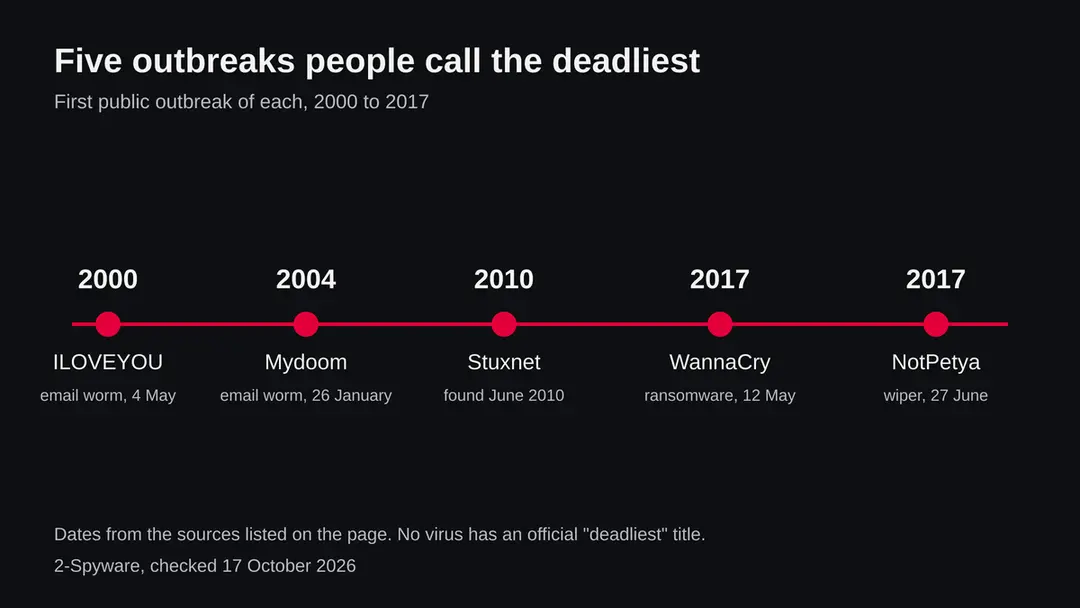
Deadliest computer virus: summary
| Type | A general question about computer viruses, not one file; five outbreaks (ILOVEYOU, Mydoom, Stuxnet, WannaCry, NotPetya) are the usual candidates |
|---|---|
| Risk | For a home PC: low for these exact five, medium to high for copies and imitations that use the same routes |
| Symptoms | None are specific. Signs of a worm or trojan include a Defender alert, unknown startup entries, locked files or a PC that is slow or busy on the network |
| How to get rid of it | Disconnect, back up documents, update Defender, full scan, Defender Offline scan, uninstall unknown programs, install Windows updates, change passwords from another device |
| Our check (17 October 2026) | No PC test and no sample: we read five encyclopedia articles and compared their numbers; the CISA pages refused our request |
| First seen | ILOVEYOU 4 May 2000; Mydoom 26 January 2004; Stuxnet found June 2010; WannaCry 12 May 2017; NotPetya 27 June 2017 |
| Removal | Scan the PC with security software to find and remove the malware and anything installed with it. Fortect scans Windows for malware and repairs the system files and settings it damaged. Remove it nowTo use the full-featured product, you have to purchase a license for Fortect. The scan is free. |
Show 8 more facts
| Detection | Microsoft Defender names such threats by type, for example Trojan:Win32/Wacatac.B!ml for a generic trojan and Ransom:Win32/WannaCrypt for WannaCry; we did not re-check these names on Microsoft's page in this run, and other vendors use their own names |
|---|---|
| Deaths | No source we read gives a death toll for any of the five |
| Platform | Windows |
| Name | Deadliest computer virus |
| Evidence | 0 write-ups by security sites; details still limited |
| Distribution | Typically fake installers, cracked programs, e-mail attachments, fake "verify you are human" pages and ads for popular apps |
| Damage | Installs other malware, often several programs at once |
| Facts checked | 17 October 2026 |
Facts checked on 17 October 2026 against five Wikipedia articles (ILOVEYOU, Mydoom, Stuxnet, the WannaCry attack, the Petya family). We ran no sample and tested no PC. Damage figures are estimates by the parties named, and the removal steps use the Windows Security menus and were not tried on a live infection.
Which computer virus is the deadliest? The short answer
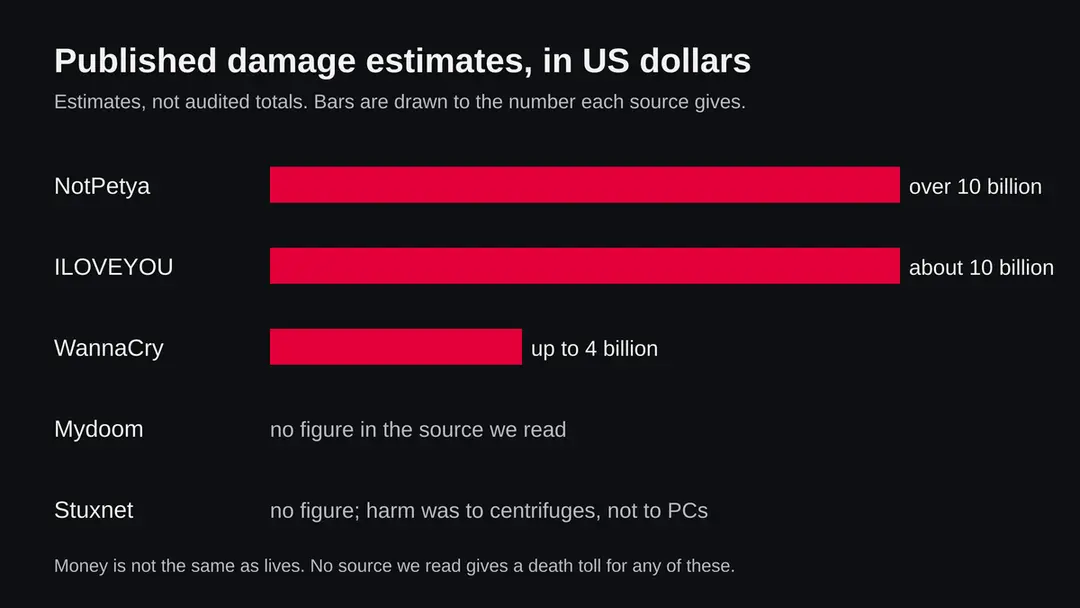
No organisation keeps an official list of the deadliest computer viruses, so any ranking is a choice of yardstick. By money, the published estimates put NotPetya (2017) and ILOVEYOU (2000) at about 10 billion US dollars each. By machines, Stuxnet reportedly infected over 200,000 computers and WannaCry more than 300,000. By physical effect, Stuxnet is the one that destroyed equipment. By lives, we found no source that gives a death toll for any of them.
- Question
- Which computer virus is the deadliest? It is a general question, not a file or a detection name on your PC
- Honest answer
- There is no official winner. It depends on the yardstick: money, machines, physical damage or lives
- Most expensive (published estimates)
- NotPetya, above 10 billion US dollars in one White House assessment; ILOVEYOU, about 10 billion in estimates from the 2020s
- Most physical
- Stuxnet, which made centrifuges at an Iranian site destroy themselves
- Most disruptive to health care
- WannaCry, which hit NHS hospitals in England and Scotland and caused ambulances to be diverted
- Platform
- All five are Windows threats. This page gives steps for Windows 11 and 10
A word about the word deadly. A computer virus is code. It becomes dangerous to life only when it stops something that people depend on, such as a hospital system. In the sources we read, WannaCry is the case where health services were turned away from non critical emergencies and ambulances were diverted, but none of them states how many people died because of it. We therefore do not rank by deaths, and you should be wary of any page that does.
What deadliest computer virus does on an infected PC
Virus, worm, trojan, ransomware: why the word matters
People say virus for every kind of malware, but the five outbreaks here are mostly worms, and one is ransomware in disguise. The type decides how it reaches you and what you do about it.
| Word | What it means | Example on this page |
|---|---|---|
| Virus | Code that attaches itself to other files and runs when the file runs | The word is used loosely for all of them; today it rarely describes how they spread |
| Worm | Code that copies itself from machine to machine, often with no help from the user | ILOVEYOU, Mydoom, Stuxnet, WannaCry |
| Trojan | Code that pretends to be something harmless so you run it | The ILOVEYOU attachment pretended to be a text file |
| Ransomware | Code that locks files and demands payment | WannaCry; NotPetya looked like it but could not be reversed |
| Wiper | Code whose goal is to destroy data, not to earn money | NotPetya, which the source we read treats as equivalent to a wiper |
The five candidates, one by one
Each of these outbreaks is deadly in a different sense. Read them as five different kinds of harm rather than five scores in one contest.
4 May 2000
ILOVEYOU, the love letter
A worm that spread by email to everyone in an infected user's address book. The subject read ILOVEYOU and the attachment was named LOVE-LETTER-FOR-YOU.TXT.vbs, which hid a script behind what looked like a text file. Tens of millions of Windows computers were reportedly infected, about 10 percent of the machines on the internet at the time. It overwrote files, forced mail systems to shut down under the volume of messages, and tried to download a trojan meant to steal passwords. Estimates from the 2020s put the damage at about 10 billion US dollars.
26 January 2004
Mydoom, the fastest email worm
First seen on 26 January 2004, it posed as a mail transmission error with subject lines such as Error or Mail Transaction Failed. At first it was roughly one in ten email messages and at its peak about one in five. At least 500,000 computers were infected, and for a few hours it slowed overall internet performance by about 10 percent. It opened a backdoor on TCP port 3127 and launched a denial of service attack on the SCO Group. The article we read gives no dollar figure.
June 2010
Stuxnet, the one that broke machines
Researchers identified it in mid June 2010, though the first variant appeared in June 2009. It targeted Siemens industrial control systems and was aimed at Iran's uranium enrichment at Natanz. It raised and lowered the speed of centrifuge rotors until they damaged themselves, while hiding the changes from monitoring. It spread through infected USB drives and used four zero day Windows vulnerabilities, and it stayed dormant on machines without the targeted Siemens software. Over 200,000 computers were reportedly infected, about 60 percent of them in Iran. Neither the US nor Israel has officially acknowledged responsibility.
12 May 2017
WannaCry, the hospital stopper
It used EternalBlue, a Windows file sharing (SMB) exploit that the Shadow Brokers had leaked about a month earlier. Microsoft had shipped the fix, bulletin MS17-010, on 14 March 2017, but many machines were unpatched or unsupported. More than 300,000 computers in about 150 countries were infected. NHS hospitals in England and Scotland were hit, with up to 70,000 devices possibly affected, some services turning away non critical emergencies and ambulances diverted. A researcher registered a hard coded domain that acted as a kill switch and slowed the spread. The US and UK formally blamed North Korea in December 2017, and North Korea denied involvement.
27 June 2017
NotPetya, the costly wiper
It looked like ransomware but its encryption was changed so that it could not be reversed, and the single fixed Bitcoin wallet and low 300 dollar fee suggest that damage, not profit, was the goal. It spread through a compromised update of the Ukrainian tax software M.E.Doc, and also used EternalBlue, a modified Mimikatz for passwords and PsExec to move across networks. About 80 percent of the infections were estimated to be in Ukraine, but victims included Maersk, Merck, FedEx and Saint-Gobain. A White House assessment put total damages above 10 billion US dollars. Several governments blamed the Russian GRU's Sandworm group.
Side by side: how they compare on each yardstick
The table below uses only figures from the pages we read. Where a source gave no number, we say so rather than fill the gap.
| Outbreak | How it spread | Scale | Published damage | Could the data be saved? |
|---|---|---|---|---|
| ILOVEYOU (2000) | Email attachment to the address book, and IRC | Tens of millions of Windows PCs, about 10 percent of the internet | About 10 billion US dollars (2020s estimate) | It overwrote files, so affected files were lost without a backup |
| Mydoom (2004) | Email, and the Kazaa shared folder | At least 500,000 PCs; up to one in five emails | No figure in the source we read | A backdoor stayed open after the spread stopped |
| Stuxnet (2010) | USB drives, local networks, four zero days | Over 200,000 PCs, but a payload for one kind of site | No figure; roughly 1,000 centrifuges is one estimate | Not aimed at your files |
| WannaCry (2017) | EternalBlue worm over SMB | More than 300,000 PCs in about 150 countries | Up to 4 billion US dollars (Cyence) | Paying was no guarantee; 327 payments totalling about 130,634 dollars by 14 June 2017 |
| NotPetya (2017) | Poisoned M.E.Doc update, EternalBlue, stolen passwords | About 80 percent of infections in Ukraine; global companies hit | Above 10 billion US dollars (White House assessment) | No: the encryption could not be reverted |
What we checked on 17 October 2026, and what we could not
There is no website to test and we ran no sample. Our own check was none on a PC: we read five encyclopedia articles and stated their numbers with their limits.
Our reading of the sources, 17 October 2026
- The five outbreaks are real and well documentedDates, methods and fixes are consistent in the articles we read, and the WannaCry patch, MS17-010, is a real Microsoft bulletin dated 14 March 2017 according to our source.
- Damage figuresThey are estimates by different parties using different methods. A White House assessment, a risk modelling firm and press estimates are not comparable audits.
- AttributionGovernments blamed North Korea for WannaCry and Russia's GRU for NotPetya. Stuxnet has never been officially claimed. North Korea denied WannaCry.
- DeathsWe found no figure for deaths caused by any of the five. We cannot confirm any claim of that kind.
- Our source typeWe cite encyclopedia articles, which summarise primary reports. We could not open the CISA pages, which refused our request, so we did not use them.
- Your own PCThis page cannot tell you whether your PC is infected. Only a scan on that PC can, and a quiet scan does not clear it.
No live threat tested This is a reference page. The risk to you is not these five old outbreaks but copies and imitations, and the habits in the later chapters cover those.
What the deadliest ones did, and what that tells you
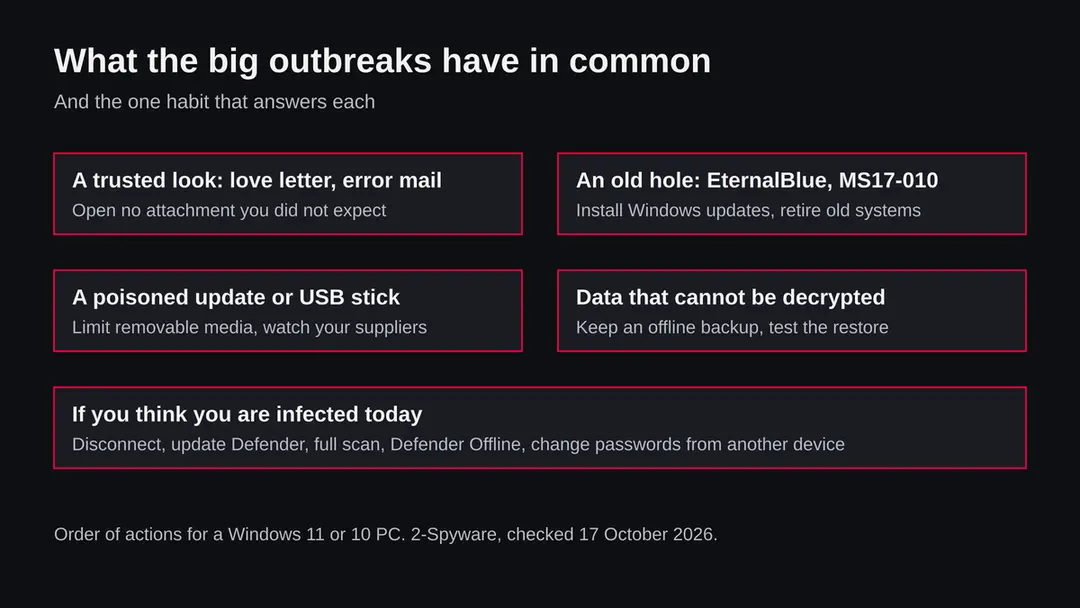
Look past the headline numbers and the same few tricks repeat. Each one is something an ordinary user or administrator can answer.
| Trick | Seen in | Why it worked |
|---|---|---|
| A message that looks personal or routine | ILOVEYOU, Mydoom | The email seemed to come from a contact or from the mail system itself, so people opened the attachment |
| A known hole nobody had closed | WannaCry, NotPetya | The fix existed two months before WannaCry; many machines were not updated or were no longer supported |
| A trusted channel turned against the user | NotPetya, Stuxnet | NotPetya rode on a software update; Stuxnet crossed air gaps on USB drives |
| Running as an administrator across a network | NotPetya | Stolen passwords and PsExec let it run code on other machines on the same network |
| Looking like ransomware when the aim was damage | NotPetya | The encryption could not be reverted, so even paying was no way back |
| A very narrow target | Stuxnet | It stayed dormant on machines without the targeted Siemens software |
What deadliest computer virus can steal or download
You are very unlikely to meet these exact five, but their descendants and imitations use the same routes. These are the risks, shown by how well they are backed.
- High
Lost files
ILOVEYOU overwrote files and NotPetya's damage could not be reversed. Without an offline backup, a file lost this way is gone.
- High
Stolen passwords
ILOVEYOU tried to download a password stealing trojan and NotPetya harvested passwords with a modified Mimikatz. One infected PC can expose accounts well beyond that PC.
- High
A whole network down
WannaCry and NotPetya spread from machine to machine. In an office or a home with shared drives, one unpatched PC can become many.
- Medium
A backdoor left behind
Mydoom opened a backdoor on TCP port 3127, and the source says the backdoors stayed open after the spread stopped. A PC can be reachable by others long after the headline ends.
- Medium
Paying does not fix it
WannaCry demanded about 300 dollars in Bitcoin; only 327 payments totalling about 130,634 dollars were made by 14 June 2017. Nothing in our sources shows payment reliably restored files.
- Low
Fear without infection
Reading about a deadly virus does not mean you have one. Most people with this worry have nothing; the next chapters help you tell.
How to check the PC for deadliest computer virus
How these threats reached people, and how copies reach you today
The routes below come from the five outbreaks. Present day malware uses the same doors, so each one has a plain answer.
- 1
An email attachment that looks harmless
ILOVEYOU used a script file named like a text file, and Mydoom posed as an error message. Today the file is often an Office document, an archive or a link. Open only what you expected, and check that the sender's address matches.
- 2
An unpatched Windows PC on a network
WannaCry spread through the SMB service using a flaw Microsoft fixed in March 2017. A PC that installs Windows updates is not open to that flaw. A PC that no longer gets updates should not be on a network with anything you care about.
- 3
A software update from a supplier you trust
NotPetya spread through a compromised update of Ukrainian tax software. You cannot check every update, but you can keep the number of programs small, remove the ones you do not use, and keep backups.
- 4
A USB drive
Stuxnet crossed networks that were not connected to the internet on infected USB flash drives. Do not plug in a drive you found or were handed by someone you do not know, and turn off autorun habits where you can.
- 5
File sharing and pirated software
Mydoom copied itself into the Kazaa shared folder. Cracks, keygens and shared files remain a common way for malware to spread.
Check your PC if you fear you have one of these
Start by looking, not by deleting. The tools below are built into Windows 11 and 10, and none of them needs a download.
- 1
Look at Protection history
Open Windows Security > Virus & threat protection > Protection history. If Defender found or blocked something, you see the name, the date and the path. Write them down before you click anything.
- 2
Check that protection is on
In Windows Security > Virus & threat protection > Manage settings, confirm that Real-time protection is on. Under Exclusions, look for entries you did not add.
- 3
Look at what starts with Windows
Press Ctrl + Shift + Esc, open Startup apps and look for names you do not know. Switch off what you cannot explain.
- 4
Look at running processes
In Task Manager, open the Processes tab and sort by CPU and memory. Right-click an entry you do not know and choose Open file location. A file in a temporary folder with a random name is worth a closer look.
- 5
Check Windows Update
Open Settings > Windows Update and install everything offered. A PC that is behind on updates is the situation the worms of 2017 relied on.
How to remove deadliest computer virus
A loader's job is to install other malware, so treat the PC as infected with more than one program until the scans are clean.
Step 1: Delete scheduled tasks that bring it back
Programs like deadliest computer virus add a scheduled task so they return after an uninstall or reopen a page at every sign-in. Start Task Scheduler, open Task Scheduler Library and sort by Last Run Time to see what ran recently.
On the Actions tab, a program in a user folder, a script or a web address is a warning sign; right-click such a task and choose Delete.
Tasks with names copying Google, Edge or Windows updaters but pointing to an odd folder are typical. The tool looks the same in Windows 11 and Windows 10.

Windows 11: Task Scheduler Library, the task selected, the Actions tab shows the file it runs. Full procedure with screenshots: Remove what malware leaves behind in Windows
Step 2: Remove it from startup
Press Ctrl + Shift + Esc to open Task Manager and select Startup apps (Windows 11) or the Startup tab (Windows 10). Disable entries you do not recognise, especially ones with no publisher or with a name that copies a Windows component.
Right-click an entry and choose Open file location to see where it runs from: programs in
%AppData%or%Temp%deserve a closer look. Some entries are not listed there but in the registry Run keys, which the procedure below shows how to check.Full procedure with screenshots: Stop apps from opening at startup On uGetFix
Step 3: Delete the folders left behind
Uninstalling often leaves the program's folders, and some threats reinstall themselves from them.
Press Windows + R, type
%LocalAppData%and press Enter, then do the same for%AppData%and %ProgramData%, and look for folders named after deadliest computer virus, its publisher or created on the day the problem started.Delete those folders, and check
C:\Program FilesandC:\Program Files (x86)too.If Windows says a file is in use, end it in Task Manager or delete the folder after a restart in Safe Mode. The folders are the same in Windows 11 and Windows 10.
Full procedure with screenshots: Remove what malware leaves behind in Windows
Step 4: Scan the PC, then run the offline scan
A scan finds the parts of deadliest computer virus that the manual steps cannot see. In Windows Security > Virus & threat protection > Scan options, start a Full scan and quarantine what it reports.
Follow it with Microsoft Defender Antivirus (offline scan) > Scan now, which restarts the PC and checks the disk while Windows and the malware are not running.
It takes about 15 minutes and works the same in Windows 11 and Windows 10. If either scan finds something, run the full scan again after removal until it comes back clean.

Windows 11: Windows Security > Virus & threat protection > Scan options. Full procedure with screenshots: Run a Microsoft Defender Offline scan
Step 5: Change passwords from another device and sign out other sessions
Deadliest computer virus can copy saved passwords, cookies and session tokens and send them out in seconds, so cleaning the PC does not undo the theft.
Change your passwords on a device that was never infected, starting with the e-mail account, since every other reset goes through it. On each account, end all other sessions and check the recovery e-mail, phone number and forwarding rules.
Then turn on two-step verification. Sign in on the Windows 11 or Windows 10 PC again only after the offline scan is clean.
Full procedure with screenshots: Turn on two-step verification / secure a hacked account
Clean a Windows 11 or 10 PC you think is infected
Do the steps in order and stop when a scan from outside Windows is clean and nothing returns. We did not run these steps on a live infection; they use the Windows Security menus.
- 1
Disconnect first
Turn off Wi-Fi or unplug the network cable if you think a worm is active. Worms such as WannaCry and NotPetya spread over the network, so a disconnected PC cannot pass it on.
- 2
Back up documents
Copy documents and photos, not programs, to an external drive and unplug it afterwards. Do this before cleaning, in case a step removes something you wanted.
- 3
Update Defender and run a full scan
Open Windows Security > Virus & threat protection > Protection updates > Check for updates. Then go to Scan options, choose Full scan and Scan now. A quick scan can miss files in folders it does not check.
- 4
Run a Microsoft Defender Offline scan
In Scan options choose Microsoft Defender Offline scan and Scan now. The PC restarts and scans from outside the normal Windows session, so save your work first and, if BitLocker is on, make sure you have your recovery key.
- 5
Remove programs you do not recognise
Open Settings > Apps > Installed apps and uninstall software you did not install, starting with the newest.
- 6
Install all Windows updates
Open Settings > Windows Update and install everything offered, then restart. This closes the kind of hole that WannaCry used.
- 7
Change passwords from another device
Email first, then banking, then everything else. Turn on two step sign in and sign out of all sessions in your main accounts.
- 8
If nothing works, rebuild Windows
As a last resort use Settings > System > Recovery > Reset this PC. Resetting wipes your programs, so do it only with a backup of your documents.
If you run a small business or look after other people's PCs
The costly outbreaks hit organisations, not single home PCs. The measures that matter are the ones that stop a worm from crossing a network.
- 1
Patch and retire
WannaCry hit machines that missed a fix published two months earlier or that no longer got fixes. Keep a list of every Windows machine and its update state, and replace the ones that can no longer be updated.
- 2
Do not let one account open every door
NotPetya used stolen passwords and PsExec to move from machine to machine. Give staff ordinary accounts, keep administrator accounts for administrators, and do not reuse one local password on every PC.
- 3
Keep backups that a worm cannot reach
A copy on a drive that stays plugged in can be encrypted or wiped with the rest. Keep one copy offline and test a restore.
- 4
Know your suppliers
The M.E.Doc backdoor sat in a trusted update for at least six weeks before NotPetya. Limit the software your business depends on to what it needs, and ask suppliers how they protect their updates.
- 5
Plan for the day it fails
Hospitals in England and Scotland had to turn away non critical cases during WannaCry. Write down how you would work for a day with no computers, and who you would call.
After removal: passwords, accounts and prevention
Accounts come next
Because the PC showed A worry that a computer virus is deadly in the list of installed apps, a sign of a program that could read browser data, the clean-up is only half of the work. The other half happens in your online accounts.
Change passwords from a clean device, beginning with e-mail; sign out of all sessions; check forwarding rules and recovery phone numbers; and turn on two-step verification with an authenticator app or a passkey. Ask your bank to replace cards saved in the browser.
Why the order matters and what to check in each account: secure your accounts after malware.
If it ran: what to do about your accounts
The scans deal with the PC. These steps deal with what the code may have seen.
- 1
Change passwords from another device
Email first, then banking, then everything else. Do this before you use banking on the infected PC.
- 2
Sign out everywhere
Use the sign out of all sessions option in your Google, Microsoft and social accounts so stolen session cookies stop working.
- 3
Clear passwords saved in the browser
After the PC is clean, remove passwords and cards saved in the browser and use a password manager instead, because several of these threats went after passwords.
- 4
Check your money
Look at card statements and any wallets for payments you did not make.
- 5
Scan again in a week
A clean scan today does not clear a file that was not yet running. Run a full scan and a Defender Offline scan a week later.
Keep worms and trojans off your PC
The lesson of all five is that the doors are old and well known. Closing them is cheap compared with the damage.
Do
- Keep Real-time protection on. Microsoft Defender is built into Windows 11 and 10.
- Install Windows Update as soon as it is offered, and update your browser and Office.
- Keep one backup copy offline, such as a drive you unplug, and test that you can restore from it.
- Open attachments only when you expected them and the sender's address matches.
- Use an ordinary account for daily work and an administrator account only to install things.
- Replace a PC that no longer receives security updates.
Don't
- Do not open a file that a message says is a love letter, an invoice or a delivery error that you did not expect.
- Do not plug in a USB drive you found or do not know.
- Do not run cracks, keygens or shared software from file sharing sites.
- Do not pay a ransom as a first step; the sources we read show payment was no guarantee.
- Do not call a number shown in a pop-up alert.
Questions about deadliest computer virus
What is the deadliest computer virus ever?
There is no official answer, because nobody keeps a ranking and the word deadliest has no fixed meaning. By published money estimates, NotPetya in 2017 (above 10 billion US dollars in a White House assessment) and ILOVEYOU in 2000 (about 10 billion in estimates from the 2020s) lead.
By physical harm, Stuxnet is the one that destroyed centrifuges. By disruption to health care, WannaCry in 2017 is the case in our sources. We found no source that gives a death toll for any of them, so we do not rank by lives.
Has a computer virus ever killed anyone?
We found no source that says so for the five outbreaks on this page. The articles we read describe lost files, shut down mail systems, damaged centrifuges and, for WannaCry, NHS hospitals turning away non critical emergencies and diverting ambulances.
That is serious harm to services people depend on, but none of the pages we read states how many people died because of it. Be cautious with a page that gives an exact number of deaths without naming a primary source, and say plainly what is unknown instead of guessing.
What is the most dangerous computer virus right now?
No page can name one honestly, because the threats change every week and the answer depends on who you are. For a home user the current dangers are usually ransomware, password stealing trojans and fake downloads, and for a business they include worms that cross a network.
This page covers five historic outbreaks. For today, check that Windows is fully updated, that Real-time protection is on and that you have an offline backup. Those three habits answer most of what made the old outbreaks costly.
Which virus caused the most damage?
By the estimates we read, NotPetya (27 June 2017) caused the most, with a White House assessment putting total damages above 10 billion US dollars, and ILOVEYOU (4 May 2000) is given at about 10 billion in estimates from the 2020s.
WannaCry is put at up to 4 billion by the risk modelling firm Cyence. Mydoom and Stuxnet have no dollar figure in the pages we read. These are estimates by different parties using different methods, so treat the order as indicative, not exact.
What was the fastest spreading computer virus?
The pages we read do not rank speed, but two outbreaks stand out. Mydoom, first seen on 26 January 2004, was at first roughly one in ten email messages and at its peak about one in five, and it slowed overall internet performance by about 10 percent for a few hours.
WannaCry, on 12 May 2017, infected more than 300,000 computers in about 150 countries, and a kill switch domain registered the same day, at 15:03 UTC, slowed it. ILOVEYOU reportedly reached about 10 percent of internet connected computers in 2000.
Is ransomware like WannaCry still a threat to my PC?
Ransomware is still a threat, but WannaCry itself is mainly a danger to unpatched machines. It used the EternalBlue exploit, and Microsoft released the fix, MS17-010, on 14 March 2017, two months before the outbreak.
A Windows 11 or 10 PC with updates installed is not open to that flaw. Other ransomware uses other doors, mostly email attachments, fake downloads and weak remote access. Keep Windows updated, keep Real-time protection on, and keep one backup copy offline so you never face the choice of paying.
Was NotPetya ransomware?
It looked like ransomware but the source we read treats it as equivalent to a wiper. Its encryption was altered so that changes could not be reverted, so victims could not recover data even if they paid.
The single fixed Bitcoin wallet and the low fee of 300 dollars suggest that damage, not profit, was the aim. It spread through a compromised update of the Ukrainian tax software M.E.Doc and also used EternalBlue, a modified Mimikatz and PsExec. Several governments blamed the Russian GRU's Sandworm group.
How do I know if my PC has one of these viruses?
You cannot tell from one sign. Open Windows Security, then Virus and threat protection, then Protection history, and read any detection with its name, date and path. Check Startup apps and Task Manager for programs you do not know, and make sure Real-time protection is on.
Then run a full scan and a Microsoft Defender Offline scan. A quiet scan does not clear a PC, because a file that has not yet run, or that hides itself, may not show. If locked files with a ransom message appear, disconnect the PC first.
How do I protect my computer from the next big outbreak?
Close the doors the old ones used. Install Windows updates as soon as they are offered, since WannaCry relied on a fix that was two months old. Open attachments only when you expected them, which would have stopped ILOVEYOU and Mydoom.
Do not plug in unknown USB drives, which is how Stuxnet crossed closed networks. Keep one offline backup and test a restore, so that even NotPetya style damage is an inconvenience. Use an ordinary account for daily work and replace a PC that no longer gets security updates.
Will Fortect remove deadliest computer virus?
Fortect scans Windows for malware and unwanted programs and repairs the system files and settings they change, and its free scan shows what it finds on your PC before you decide anything.
For deadliest computer virus, follow the plan above as well: the browser steps take back permissions and settings that no scanner treats as a threat, and uninstalling the program that brought it removes the source.
Run Microsoft Defender's full scan and, if anything was found, its offline scan as a second opinion. If the symptoms are gone after the plan and both scans are clean, there is nothing more to do.
Sources
- Wikipedia: ILOVEYOU (worm of 4 May 2000) (read October 17, 2026)
- Wikipedia: Mydoom (email worm of January 2004) (read October 17, 2026)
- Wikipedia: Stuxnet (worm identified in June 2010) (read October 17, 2026)
- Wikipedia: WannaCry ransomware attack (12 May 2017) (read October 17, 2026)
- Wikipedia: Petya (malware family), including NotPetya (27 June 2017) (read October 17, 2026)