
wemqmewkqewq.work.gd: a free subdomain that handed out Mirai botnet files for Linux and router chips
wemqmewkqewq.work.gd is a web address that URLhaus lists 32 times in two waves (27 September and 3 October 2026) for program files tagged mirai and elf, the kind that infect routers, cameras and Linux servers, not Windows PCs.
Seeing the name in a log does not prove an infection; it means that some device or script asked that server for a file. If one of your devices did, take it off the network, reset it to factory settings, update its firmware and set a new password before you reconnect it.
Facts checked October 12, 2026. Removal steps tested on Windows 11 (26H2) and checked against Microsoft's and the browser makers' current documentation.
Automatic
Get a free scan and check if your PC is infected.
Fortect finds malware, unwanted programs and the Windows damage they leave behind, and repairs it in one pass.
Programs like a script, device or program that downloads files such as x86_64, mips or armv7l from wemqmewkqewq.work.gd usually arrive in groups; a free scan lists the companions that are easy to miss.
Do it yourself · free Remove wemqmewkqewq.work.gd (Mirai botnet files, ELF) yourself 5 steps, about 15 minutes, no software needed.
Start the steps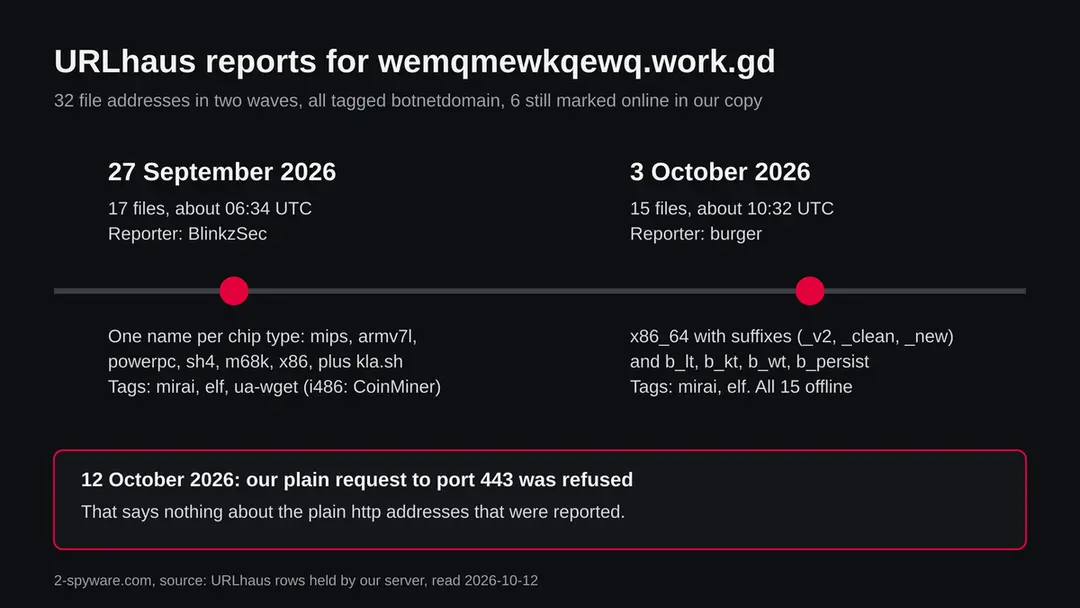
Wemqmewkqewq.work.gd (Mirai botnet files, ELF): summary
| Type | A malware server: URLhaus lists 32 file addresses tagged mirai and elf (programs for Linux and embedded devices), one also tagged CoinMiner |
|---|---|
| Risk | High for a router, camera or Linux server that fetched its files: it may join a botnet. Low if you only saw the name in a log |
| Symptoms | Often none. A slow or hot device, unexplained upload traffic, a changed admin password or unknown files in /tmp are the signs we can name |
| How to get rid of it | Take the device off the network, restore factory settings, update the firmware, set a new password and switch off remote login |
| Our check (12 October 2026) | One plain request from our server to port 443: connection refused. That clears nothing; the rating comes from URLhaus |
| Running since / first seen | First files reported 27 September 2026; parent domain work.gd registered 18 June 2022 |
| Removal | Scan the PC with security software to find and remove the malware and anything installed with it. Fortect scans Windows for malware and repairs the system files and settings it damaged. Remove it nowTo use the full-featured product, you have to purchase a license for Fortect. The scan is free. |
Show 9 more facts
| Platform | Linux and embedded devices. Nothing we read says Windows, Mac or phones are affected |
|---|---|
| Detection names | Microsoft's Security Intelligence search for Mirai (read 12 October 2026) lists Linux detections such as Trojan:Linux/Mirai.AA, Trojan:Linux/Mirai.A!xp and Trojan:Linux/Mirai.A!AMTB. We did not open the files, so we do not know which of these, if any, matches them. URLhaus uses the tags mirai, elf, ua-wget, CoinMiner and botnetdomain |
| Name | Wemqmewkqewq.work.gd |
| Domain registered | 18 June 2022 |
| Evidence | 32 write-ups by security sites; details still limited |
| First seen | 27 September 2026 |
| Distribution | Typically fake installers, cracked programs, e-mail attachments, fake "verify you are human" pages and ads for popular apps |
| Damage | Installs other malware, often several programs at once |
| Facts checked | 12 October 2026 |
Facts checked on 12 October 2026 against the URLhaus rows for wemqmewkqewq.work.gd held by our server (the abuse.ch host page itself was not fetched), RDAP for work.gd, one plain request of our own, the work.gd page, and search result summaries of research by IBM X-Force, Symantec, Ling and others, and MalwareBazaar, plus Microsoft's Security Intelligence list of Mirai detection names.
Two vendor pages returned an access error and the research articles were not opened in full, so claims about Mirai are limited to what those summaries state. We did not download the files and we infected no device; the clean up steps are our judgement, not a tested procedure.
What wemqmewkqewq.work.gd is, and what we know about it
wemqmewkqewq.work.gd is not a program on your computer. It is a web address under the shared domain work.gd that the abuse.ch project URLhaus lists as a place where malware files were served. We found no public write up of this one address, so what follows is what URLhaus shows, what we saw ourselves, and what researchers have published about Mirai, the malware family the files are tagged with.
- 1
What URLhaus lists
32 file addresses on wemqmewkqewq.work.gd, all on plain http, all with the threat label malware_download and the tag botnetdomain. 17 were added on 27 September 2026 at about 06:34 UTC by the reporter BlinkzSec. 15 more were added on 3 October 2026 at about 10:32 UTC by the reporter burger. In the rows we hold, 6 are marked online and 26 offline.
- 2
What the file names look like
The first wave is named after processor types: x86, x86_64, i486, i586, i686, mips, mipsel, armv4l, armv5l, armv6l, armv7l, powerpc, powerpc-440fp, sh4, m68k and arc. One more file, kla.sh, is a shell script. The second wave uses names such as x86_64_v2, x86_64_clean, x86_64_new, b_lt, b_kt, b_wt and b_persist.
- 3
What the tags mean
elf is the program format used by Linux and many embedded devices; Windows does not run it. mirai names the botnet family. ua-wget says the reporter's sample fetched the file with the wget tool. CoinMiner is attached to one file only, i486. sh marks the shell script. botnetdomain means abuse.ch treats the domain as part of a botnet's infrastructure.
- 4
What we could not confirm
We did not download any file, so we cannot say what is inside them, which Mirai build they are, or where they report to. URLhaus shows tags, not a proof. We also do not know which device or message makes a victim ask for these files. That first step is not visible from the server side.
- 5
What this means for you
If you only saw the name in a firewall, DNS or router log, you are not infected by that alone. The risk is for a device where something already ran and went to fetch one of these files. A normal visitor with a browser has no reason to ask for them.
- Kind of threat
- A server that hands out ELF files tagged mirai: a botnet family that infects internet connected Linux devices
- Where the files are
- hxxp://wemqmewkqewq[.]work[.]gd/NAME, for example /x86_64, /mips and /armv7l: plain http, not a web page
- Parent domain registered
- work.gd was registered on 18 June 2022 through Key-Systems GmbH with the status client transfer prohibited (RDAP, read 7 October 2026). This is the record of the shared parent domain, not of this subdomain
- URLhaus entries
- 32 file addresses, added 27 September and 3 October 2026; 6 marked online in our copy of the data
- Delivery
- Files for many processor types, apparently fetched by a script or a shell command. How a device first gets the command is not known for this server
- Platform
- Linux and embedded devices (routers, cameras, recorders, small servers). Nothing we read says Windows, Mac, iPhone or Android is a target of these files
What wemqmewkqewq.work.gd (Mirai botnet files, ELF) does on an infected PC
What we checked on 12 October 2026, and what we could not
Our check was one plain request from our server in the morning of 12 October 2026. It was not a browser visit and it was not a download. The connection to 31[.]56[.]209[.]86 on port 443 was refused. That clears nothing, and it does not even test the addresses URLhaus lists, because those use plain http.
Our check, 12 October 2026
- The secure port refused the connectionOur server received the error ECONNREFUSED for port 443 at 31[.]56[.]209[.]86. This means nothing was listening for secure web connections there when we asked. It tells you nothing about plain http on port 80 or any other port.
- Why that is not a clean resultA server that serves malware files often has no proper web page. It can also be switched off for a while, moved, or answer only to some visitors, some countries or some user agents. One refused connection is one data point.
- Notification request, pop-ups, redirects, ad networksNot tested. This address is a file server, not a page for people, and our plain request received no page.
- URLhaus listing32 file addresses tagged mirai and elf, one also tagged CoinMiner, one a shell script. 6 were still marked online in our copy of the data.
- Downloads and the files themselvesWe did not download any file. We cannot tell you what they contain.
Dangerous: treat it as a malware server Our check was one plain request that ended in a refused connection, so it proves nothing either way. The danger rating comes from the 32 URLhaus reports and their tags, not from our request. Do not request files from this address and do not run anything that does.
What happened to wemqmewkqewq.work.gd, report by report
The reports come in two waves, six days apart, from two different reporters. The dates come from the URLhaus rows we hold; the times are UTC. The registration date belongs to the shared parent domain, not to this subdomain.
18 June 2022
The parent domain work.gd is registered
RDAP shows work.gd registered on 18 June 2022 through Key-Systems GmbH, with the status client transfer prohibited. A subdomain such as wemqmewkqewq can be created at any time later, so this date says nothing about when this name appeared. We do not know that date.
27 September 2026
17 files are reported, many chip types
Between 06:34:10 and 06:34:24 UTC the reporter BlinkzSec adds 17 addresses: m68k, x86, i686, armv6l, sh4, armv4l, kla.sh, i486, powerpc, armv7l, mipsel, mips, armv5l, x86_64, arc, i586 and powerpc-440fp. All are tagged botnetdomain and wemqmewkqewq-work-gd; 16 carry elf and mirai plus ua-wget. i486 is also tagged CoinMiner. kla.sh is tagged sh. Six of these are marked online in our copy: x86, powerpc, armv7l, mipsel, mips and x86_64.
The two waves of reports. The first wave is one file per processor type; the second wave is variants of the x86_64 build. 3 October 2026
15 more files, a second reporter
Between 10:32:29 and 10:33:26 UTC the reporter burger adds 15 addresses: b_persist, x86_64_nowd, b_wt, x86_64_nsr, x86_64_clean, x86_64_fin, x86_64_v2, x86_64_new, x86_64_ns, x86_64_dbg, b_kt, x86_64_sr, x86_64_nl, x86_64_t8 and b_lt. All are tagged botnetdomain, elf and mirai, and all are marked offline in our copy.
12 October 2026
Our plain request is refused
Our server asks for the address on the secure port 443 and the connection is refused. The reports are nine days old at that point or more. We do not know whether the files are still served.
What the pattern suggests, and what it does not: the first wave looks like a full kit with one build for each common processor type, which is how Mirai style loaders are usually set up. The second wave looks like new versions of the x86_64 build, with suffixes such as v2, new, clean and persist. That is our reading of the file names. No report says what those suffixes mean.
What Mirai is, and why one file per chip type
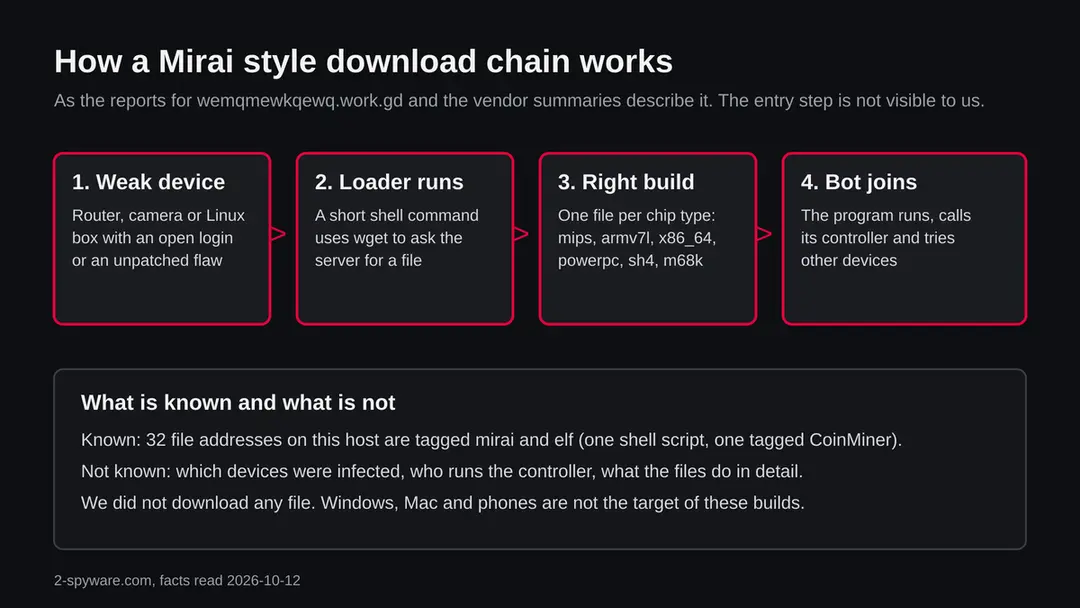
Mirai is a family of malware that turns internet connected Linux devices into a botnet. Its source code became public years ago, so the tag mirai today covers many copies and changed versions, not one gang. We did not open the files on this server; this is what researchers describe.
| Question | What the sources say | Source |
|---|---|---|
| How does it find victims? | The bot picks pairs of user names and passwords from a built in list and tries them against telnet servers on other devices | Ling and others, Mirai (Springer, 2020) |
| Why so many file names? | Samples exist for ARM, MIPS, PowerPC and x86. Symantec reported a variant built with the open source Aboriginal Linux project that supports several of these architectures | SecurityWeek, cross platform Mirai variant |
| Is it only for attacks? | IBM X-Force tracked a Linux Mirai variant that installed Bitcoin mining code on botnet hosts, active from 20 March, at its peak on 25 March and gone by 28 March (the year is not given in the summary we read) | eWeek, IBM report |
| How does the file reach the device? | MalwareBazaar lists shell scripts that fetch one ELF file per processor type; the entries are tagged ua-wget, the same tag our reports carry | MalwareBazaar sample page |
| Which build is this server's? | Not known. URLhaus gives the tag mirai only; we did not open the files | Not available |
| Who runs this server? | Not known. The reporters' names are handles on URLhaus and say nothing about the operator | Not available |
One detail is worth a plain explanation. A router and a cloud server do not use the same chip, so a loader cannot know which program to fetch. It either asks the device what it is, or it tries each file in turn. A list of names such as mips, mipsel, armv7l, powerpc, sh4 and m68k on one server therefore tells us the operator wanted to infect many kinds of device, from home routers to old network gear. It does not tell us how many succeeded.
What work.gd is, and why a free subdomain matters here
work.gd is a shared domain. Under it anyone can get a name of their own, so the first part (wemqmewkqewq) was chosen by whoever set it up, and the owner of work.gd is not the owner of the malware. Blocking the whole of work.gd would hit innocent users; blocking this one name is what makes sense.
- 1
Who runs the parent domain
The page at work.gd calls the domain a public suffix operated for DNSExit customers and describes it as a shared free domain service, branded FreeDomain.one. Each customer controls the content and the DNS records under their own subdomain.
- 2
What the page says about abuse
The page describes an abuse process: you send the full host name or the URL, and the DNSExit abuse team can find the responsible account and suspend the malicious DNS. It names two contact routes, a DNSExit abuse page and a FreeDomain.one abuse form. We did not file a report ourselves.
- 3
What the registration record tells you
The RDAP record we read is for work.gd as a whole: registered 18 June 2022, registrar Key-Systems GmbH, status client transfer prohibited. It names no owner of the subdomain. So we cannot tell you who set up wemqmewkqewq, when, or from which country.
- 4
Why attackers like such names
A free subdomain costs nothing, needs no card and can be thrown away when it is reported. That fits the two waves we see, but it is our reading. Nothing we read says this operator moved from another name.
What wemqmewkqewq.work.gd (Mirai botnet files, ELF) can steal or download
What this can cost you
Reading about the site or seeing its name costs nothing. The risks below apply to a device where one of these files ran. Most of the list is what researchers say Mirai style botnets do in general; we cannot say what these particular files do.
- High
The device is no longer only yours
A bot takes orders from its controller. A router, camera or server in a botnet can be used to send traffic at other targets without you noticing.
- High
Your connection can be slowed or blocked
Attack traffic uses your upload speed. Providers and hosting companies may cut off a device that is seen attacking others, and a cloud server may be suspended.
- Medium
Mining on your hardware
One file here carries the tag CoinMiner. IBM reported Mirai variants that installed mining code. Mining makes a small device hot, slow and unreliable.
- Medium
Other devices on the same network
The research says the bot tries logins on other devices. A router in a botnet sits at the door of every other device at home or in the office.
- Medium
A way in that stays open
The weak password or flaw that let the first file in is still there until you fix it. Another group can use the same hole next week.
- Low
Nothing, if you only saw the name
A name in a block list, a log or a warning is not an infection. A Windows PC, a Mac, an iPhone or an Android phone cannot run these files.
What you may notice, and what you may not
Botnet programs on small devices are built to be quiet. The signs below follow from what such programs do; none is certain, and many owners notice nothing at all.
| Sign | What it may mean |
|---|---|
| A router or camera that is slow, hot or restarts by itself | Heavy work in the background, such as sending attack traffic or mining. It also happens with plain old hardware, so it is a reason to look, not proof |
| Your internet is slow when nobody is using it | Upload traffic that you did not start. Check the traffic page of your router if it has one |
| Your admin password no longer works, or settings changed | Someone logged in and changed them. Some malware also closes the door behind it so that nobody else can take the device |
| Unknown programs or files in a temporary folder on a Linux server | The reports show files with names such as x86_64 or mips being fetched. Our reading: a file with such a name in a folder like /tmp that you did not put there deserves a look |
| Your provider or hosting company sends an abuse notice | Your address was seen attacking or scanning others |
| Nothing at all | Quiet is the aim of a bot. A clean look proves nothing |
How to check the PC for wemqmewkqewq.work.gd (Mirai botnet files, ELF)
How a device ends up asking for these files
Nobody visits wemqmewkqewq.work.gd on purpose. The request comes from a script or a program, so the real question is how that command got onto the device. We cannot say for this server. The routes below follow from how Mirai spreads, as the research describes it.
- 1
A guessable login
The research says the bot tries pairs of user names and passwords from a built in list against telnet. A device that still has its factory password, or any simple one, and has telnet reachable from the internet, is the classic victim.
- 2
An unpatched flaw in the device
Variants of Mirai add exploits for known holes in routers and other devices. We have no list for this server and will not guess which ones. The advice is the same: keep firmware current.
- 3
A command pasted or run on a server
The tag ua-wget means a sample asked for the file using wget. On a Linux server that happens when someone, or a script that an attacker planted, runs a line such as wget followed by an address. If you manage a server, look at your shell history and your scheduled jobs.
- 4
A bigger infected device on the same network
A bot on one device scans others on the internet and sometimes on the local network. One weak camera can be the way in.
Check the device before you delete anything
Start with the question that matters: did a device of yours contact wemqmewkqewq.work.gd? If you saw the name in a firewall or DNS log, the device that asked is the one to check, not the whole network. The steps below are our judgement; no vendor publishes a procedure for these files and we did not infect a device.
- 1
Find the device that asked
Look at your router's log, the DNS log of your network, or the alert that brought you here. Note the device name, its address and the time. If the log shows only your router, the router itself may be the one that asked.
- 2
Take it off the network
Unplug its network cable or switch off its Wi-Fi. A bot needs the connection to be of use to anyone. Do not switch off a server that others depend on without a plan, but do block its outgoing traffic to this name.
- 3
Write down the make, model and firmware version
You need them to find the current firmware and to see whether your model has known flaws. The label on the device and its admin page usually show them.
- 4
On a Linux server: look for the files and the command
Check scheduled jobs (crontab) for lines you did not write, look in /tmp, /var/tmp and /dev/shm for files with names such as x86_64, mips or armv7l, and list running processes for ones you do not know. Also check your shell history for a wget line that points at this name. These are our suggestions, not steps from a vendor.
- 5
Do not run or open the files to see what they do
If you find one, keep a copy only if you know how to handle malware safely. Otherwise note its path and size and move on to the clean up. Never run it.
- 6
A scan helps, but it does not clear the device
A router has no scanner. A server may have one, and a clean result is one data point. Treat it the way you treat a clean site test. The safe answer, when you are unsure, is the factory reset below.
How to remove wemqmewkqewq.work.gd (Mirai botnet files, ELF)
How to remove wemqmewkqewq.work.gd
A loader's job is to install other malware, so treat the PC as infected with more than one program until the scans are clean.
Step 1: Delete scheduled tasks that bring it back
Open Task Scheduler from the Start menu and click Task Scheduler Library. Select each task you do not recognise and read the Actions tab:
- a task that starts a file in
%AppData%or%Temp% - runs
powershellwith a long encoded line - opens a web address belongs to wemqmewkqewq.work.gd or a similar program
Right-click such a task and choose Delete, and check the subfolders too. Leave tasks from Microsoft, your PC's maker and programs you use. Task Scheduler is the same in Windows 11 and Windows 10.

Windows 11: Task Scheduler Library, the task selected, the Actions tab shows the file it runs. Full procedure with screenshots: Remove what malware leaves behind in Windows
- a task that starts a file in
Step 2: Remove it from startup
Whatever wemqmewkqewq.work.gd installed usually starts with Windows. Open Task Manager with Ctrl + Shift + Esc, go to Startup apps in Windows 11 or the Startup tab in Windows 10, and disable what you do not know, starting with entries that have an empty Publisher column.
Open file location on the right-click menu shows the file, which helps you decide and tells you what to delete later. Disabling is safe: if something you need stops working, switch it back on.
Full procedure with screenshots: Stop apps from opening at startup On uGetFix
Step 3: Delete the folders left behind
What the uninstaller leaves behind is usually in the user folders. Open File Explorer, switch on View > Show > Hidden items (in Windows 10 View > Hidden items), and go through
%LocalAppData%,%AppData%, %ProgramData% and the two Program Files folders.Sort by Date modified and delete folders that appeared together with the problem and belong to no program you use. Folders with random names that hold
.exe,.dll, .js or .ps1 files are the strongest sign.Full procedure with screenshots: Remove what malware leaves behind in Windows
Step 4: Scan the PC, then run the offline scan
Open Windows Security > Virus & threat protection > Scan options, run a Full scan and remove everything it finds. Then select Microsoft Defender Antivirus (offline scan) and click Scan now: the PC restarts and scans before Windows loads, which finds files that hide while Windows runs.
Save your work first, because the offline scan takes about 15 minutes. Both scans are built into Windows 11 and Windows 10, and a second scanner from another vendor is a useful extra opinion.

Windows 11: Windows Security > Virus & threat protection > Scan options. Full procedure with screenshots: Run a Microsoft Defender Offline scan
Step 5: Change passwords from another device and sign out other sessions
Assume that the passwords saved in this PC's browsers, and the accounts that were open in them, are known to the attacker. From a phone or a clean computer, change the e-mail password first, then banking, shopping, social and gaming accounts.
Use each service's option to sign out of all other sessions, because stolen cookies keep a session open even after a password change. Turn on two-step verification on each account. Wait with the infected Windows 11 or Windows 10 PC until the scans are clean.
Full procedure with screenshots: Turn on two-step verification / secure a hacked account
If you use Windows, a Mac, an iPhone or an Android phone
The tags and every source we read describe malware for Linux and embedded devices. We found nothing that says the files on this server run on anything else.
| Your device | What we know | What to do |
|---|---|---|
| Windows PC | The files are ELF programs. Windows does not run that format. Android and some Windows setups can run Linux programs only in special cases | Nothing to remove for this threat. Do not follow Linux steps on a PC |
| Mac | macOS uses a different program format | Nothing to remove for this threat |
| iPhone or iPad | No source describes Mirai on iOS | Nothing to remove |
| Android phone | Android is built on Linux, but we found no source that links these files to phones | Nothing to remove for this threat on our evidence |
| Router, camera, recorder, NAS, small server | These are the devices the processor names point to | Check them first, as in the section above |
After removal: passwords, accounts and prevention
Clean up a device that may have been infected
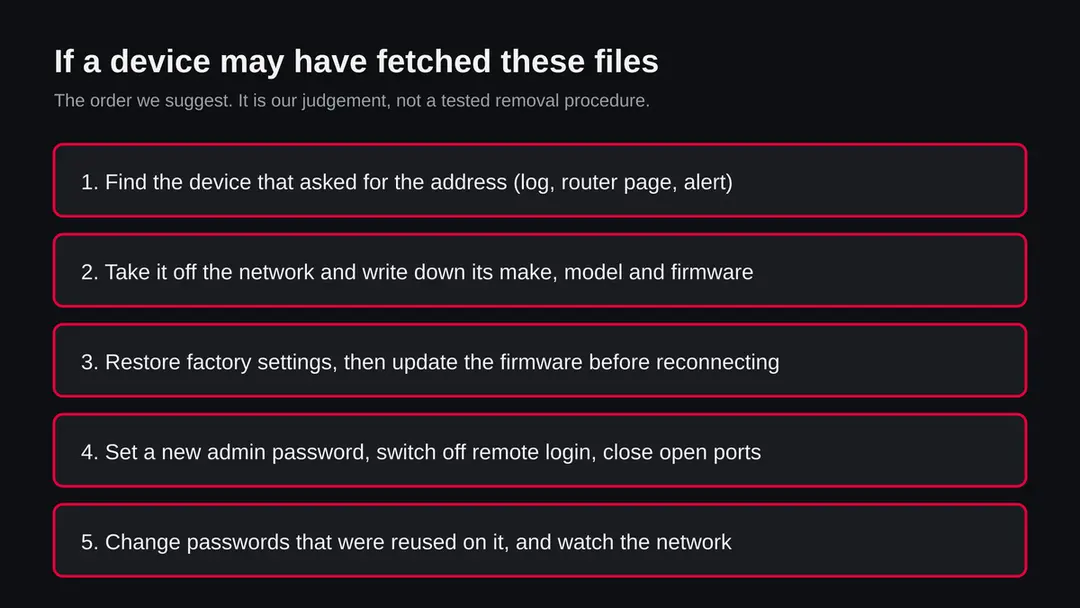
The order matters: first cut the device off, then wipe it, then close the hole that let the file in. If you reconnect a device with the old password and old firmware, it is the same weak target again.
- 1
Restore factory settings
Most routers and cameras have a small reset button or a reset option in the admin page. A factory reset wipes the settings and, on most devices, anything written to the writable part of the system. We have no source that says it removes every Mirai variant from every device, so check your maker's page for your model.
- 2
Update the firmware before you reconnect
Download the newest firmware for your exact model from the maker's own site and install it from a computer connected by cable. If the maker no longer issues updates for the model, plan to replace it; an old device with a public hole will be hit again.
- 3
Set a new, long admin password
Use a password that is unique, long and not a word, and write it in a password manager. Change the default user name if the device allows it.
- 4
Switch off what you do not use
Turn off remote administration, telnet and any port forwarding you did not set up on purpose. Use a VPN or the maker's cloud service for remote access instead of opening a port to the internet.
- 5
Rebuild a Linux server if you cannot explain what ran
If you found files or jobs you did not make, the safe answer is a fresh install from a trusted image, restoring only data, not programs. Then change all keys and passwords that were on the server, and review how the attacker got in, such as an old password or an unpatched service.
- 6
Change passwords that were used on the device
If you used the same password for the router and for anything else, change those from another device. A bot does not need to steal your accounts, but the password has been tried on others.
- 7
Watch the network for a few weeks
Look at the router's traffic and device list. A device you do not know, or constant upload at night, is a reason to look again.
- 8
If you own a site that hosts these files
Then someone put them there. Take the site offline, find how they got in (an old plugin, a weak password, an open upload form), restore from a clean backup, and change all passwords. If your own free subdomain was used without your knowledge, delete its DNS records and tell the provider.
Keep a device out of this kind of botnet
Every researcher source we read says the same: Mirai wins against devices that have a default or weak password and are open to the internet. Fix those two things and most of the risk goes.
Do
- Change the factory password of every router, camera, recorder and NAS on the day you plug it in.
- Keep firmware current, and replace devices that no longer get updates.
- Turn off telnet and remote administration unless you need them, and then limit them to known addresses.
- Put cameras and smart devices on a guest network, away from your computers.
- Block outgoing connections from servers to anything they do not need.
- Keep a note of the make, model and firmware of every device on your network.
Don't
- Do not leave a device on a password such as admin or 1234.
- Do not forward ports on your router to a camera or recorder you cannot update.
- Do not paste a wget or curl line you do not understand into a server.
- Do not run files from addresses you found in a forum post or a chat.
- Do not rely on a quiet look at the device to say it is clean.
Questions about wemqmewkqewq.work.gd (Mirai botnet files, ELF)
What is wemqmewkqewq.work.gd?
It is a web address under the shared domain work.gd that URLhaus, the malware tracking project run by abuse.ch, lists 32 times for program files tagged mirai and elf. They were reported on 27 September and 3 October 2026.
It is not a program on your computer and not a site anyone is meant to visit. We did not download the files, so what they contain is not confirmed by us. The tags point to Mirai, a botnet family for Linux devices.
Is wemqmewkqewq.work.gd safe to open?
No. Do not request files from it, and do not run anything that does. Our own check, a plain request to the secure port 443, was refused, which proves nothing: the reported files are on plain http, and a server that hands out malware often has no proper front page or answers only some visitors.
The rating comes from the 32 URLhaus reports and their tags, not from our request. A browser visit alone is not the main danger; a device running a downloaded file is.
Is wemqmewkqewq.work.gd a virus on my computer?
No, it is a server address, not a program. The files it served are ELF programs for Linux and embedded devices, which Windows and macOS do not run.
If you saw the name in a log, a device on your network asked for it, and that device may be a router, a camera or a Linux box rather than your PC. Find which device it was before you do anything else. Seeing the name alone is not an infection.
What does the tag mirai mean?
Mirai is a family of malware that takes over internet connected Linux devices and makes them a botnet, a group of machines that obey one controller. Researchers describe how it tries lists of user names and passwords on telnet servers.
Its source code became public, so many groups run changed copies. The tag tells you the family the reporter thinks the files belong to. It does not tell you which version, who runs it or what it does on a given device.
Why are there files named x86_64, mips and armv7l?
Devices use different processors, and a program built for one does not run on another. A loader therefore needs one file per chip type, and a server with names such as mips, mipsel, armv7l, powerpc, sh4 and m68k is set up to infect many kinds of device, from home routers to old network gear.
This is how researchers describe Mirai style kits. It shows the intent of the operator, not how many devices were infected.
I saw wemqmewkqewq.work.gd in my router or DNS log. Am I infected?
Not necessarily. It means a device on your network asked for the name, and a person rarely does that by hand. Find out which device it was from the log, take it off the network, note its make, model and firmware, then restore factory settings, install the newest firmware and set a new password.
If the log shows only your router, treat the router as the device in question. Check other devices only if the router itself looks clean.
How do I remove Mirai from a router or camera?
We found no vendor procedure for these files, so this is our judgement. Disconnect the device, restore factory settings with the reset button or the admin page, install the newest firmware from the maker's site, set a long unique admin password, and turn off remote administration and telnet.
If the maker no longer issues updates for the model, replace it. We did not test these steps on an infected device, so check the maker's page for your model.
Does this affect Windows, Mac, iPhone or Android?
We found nothing that says so. The files are ELF programs for Linux and embedded devices, and every source we read describes Mirai as a threat to such devices. On a Windows PC, a Mac or an iPhone there is nothing to remove for this threat.
Android is built on Linux, but we found no report linking these files to phones. The devices to check are your router, cameras, recorders, network storage and any Linux server.
Who runs wemqmewkqewq.work.gd, and can it be reported?
We do not know who runs it. The parent domain work.gd is a shared free domain service operated for DNSExit customers, and anyone can create a name under it, so the registration record says nothing about this subdomain's owner.
The work.gd page describes an abuse process: send the full host name or URL to the DNSExit abuse page or the FreeDomain.one abuse form, and the team can suspend the malicious DNS. We have not filed a report ourselves.
Will Fortect remove wemqmewkqewq.work.gd?
Fortect scans Windows for malware and unwanted programs and repairs the system files and settings they change, and its free scan shows what it finds on your PC before you decide anything.
For wemqmewkqewq.work.gd, follow the plan above as well: the browser steps take back permissions and settings that no scanner treats as a threat, and uninstalling the program that brought it removes the source.
Run Microsoft Defender's full scan and, if anything was found, its offline scan as a second opinion. If the symptoms are gone after the plan and both scans are clean, there is nothing more to do.
Sources
- work.gd: shared free domain service page (DNSExit, FreeDomain.one), abuse process (read October 12, 2026)
- Ling and others: Mirai and its variants, Springer chapter 2020 (login list and telnet spread, as shown in search results) (read October 12, 2026)
- SecurityWeek: Cross platform Mirai variant leverages open source project (Symantec, Aboriginal Linux; as shown in search results) (read October 12, 2026)
- eWeek: Mirai IoT botnet used for Bitcoin mining, IBM reports (as shown in search results) (read October 12, 2026)
- MalwareBazaar (abuse.ch): sample page for a shell script that fetches one ELF file per processor type, tagged ua-wget (read October 12, 2026)