
delphiaonline.top: a Windows malware download site with PowerShell and JavaScript stubs, and what to do if one ran
delphiaonline.top is a website that URLhaus lists for malware downloads: a JavaScript file and two PowerShell scripts both named secured_stub.ps1, all kept in open folders on the server. The site no longer answers when we look it up. If you ran a script or a pasted command from it on Windows, treat the PC as compromised: change your passwords from another device, then scan it offline.
Facts checked October 10, 2026. Removal steps tested on Windows 11 (26H2) and checked against Microsoft's and the browser makers' current documentation.
Automatic
Get a free scan and check if your PC is infected.
Fortect finds malware, unwanted programs and the Windows damage they leave behind, and repairs it in one pass.
An automatic scan checks installed programs, startup items and browser extensions for anything that came with a script or file from delphiaonline.top, or a command that fetched a script from it.
Do it yourself · free Remove delphiaonline.top (PowerShell and JavaScript stubs) yourself 5 steps, about 15 minutes, no software needed.
Start the steps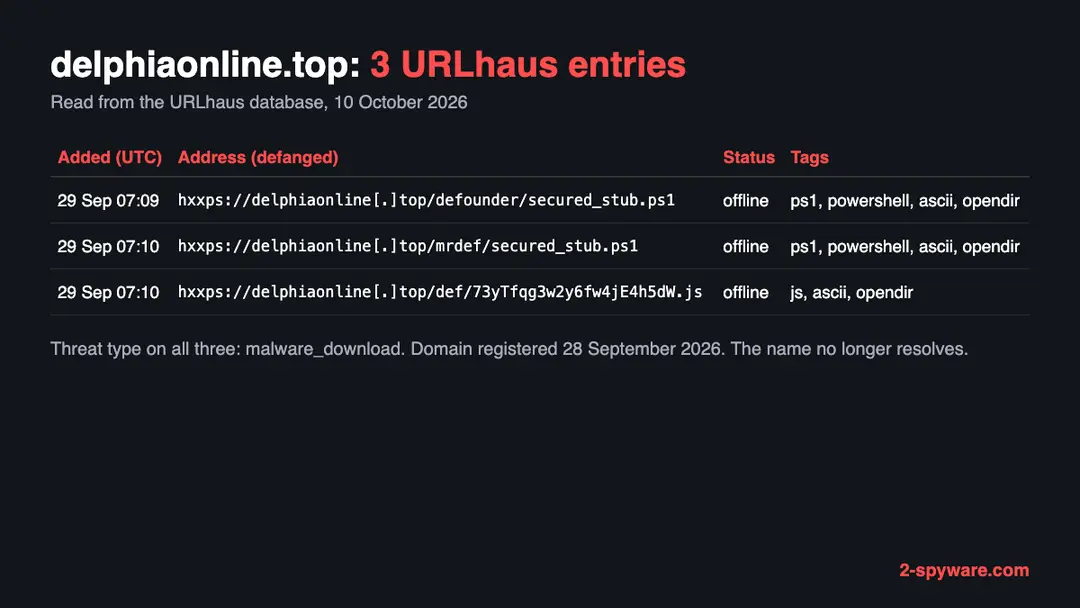
Delphiaonline.top (PowerShell and JavaScript stubs): summary
| Type | A malware download address for Windows: URLhaus lists two PowerShell stubs and one JavaScript file |
|---|---|
| Risk | High if a script from it ran: passwords, sessions, crypto and a second hidden program are possible |
| Symptoms | Often none. A file named secured_stub.ps1, a scheduled task you did not make, unknown Windows Security exclusions or a script you ran are the signs |
| How to get rid of it | Disconnect, change passwords from another device, move crypto, check exclusions, run a Microsoft Defender Offline scan, then back up documents and reinstall Windows if in doubt |
| Our check (10 October 2026) | One lookup: the name did not resolve, no page. A quiet or dead site clears nothing; the danger rating comes from URLhaus |
| Running since / first seen | Domain registered 28 September 2026; malware URLs reported 29 September 2026 |
| Removal | Scan the PC with security software to find and remove the malware and anything installed with it. Fortect scans Windows for malware and repairs the system files and settings it damaged. Remove it nowTo use the full-featured product, you have to purchase a license for Fortect. The scan is free. |
Show 9 more facts
| Platform | Windows, by the ps1 tag; no source says other systems are affected |
|---|---|
| Detection names | No Microsoft detection name is known for the files on this server, because we did not open them and found no Microsoft page that names this campaign. The URLhaus tags are ps1, powershell, js, ascii and opendir. Run a Microsoft Defender Offline scan and read the name in Protection history |
| Name | Delphiaonline.top |
| Domain registered | 28 September 2026 |
| Evidence | 3 write-ups by security sites; details still limited |
| First seen | 29 September 2026 |
| Distribution | Typically fake installers, cracked programs, e-mail attachments, fake "verify you are human" pages and ads for popular apps |
| Damage | Installs other malware, often several programs at once |
| Facts checked | 10 October 2026 |
Facts checked on 10 October 2026 against our copy of the URLhaus data for delphiaonline.top, RDAP, one browser test of our own, and Microsoft Learn pages on the offline scan, Defender exclusions and PowerShell execution policy. We did not download the files and we infected no PC; the removal steps follow Microsoft's pages and were not tried on a live infection.
What delphiaonline.top is, and what we know about it
delphiaonline.top is a web address, not a program on your PC. It is a domain that the abuse.ch project URLhaus lists as a place where malware was served. No public write-up of this domain exists that we could find, and no report names a malware family for it, so this page rests on what URLhaus shows, what we saw ourselves and what Microsoft documents about the tools involved.
- 1
What URLhaus lists
Three file addresses on delphiaonline.top, all added on 29 September 2026 by the abuse.ch reporter account. At 07:09 UTC came https://delphiaonline[.]top/defounder/secured_stub.ps1. At 07:10 UTC came https://delphiaonline[.]top/mrdef/secured_stub.ps1 and https://delphiaonline[.]top/def/73yTfqg3w2y6fw4jE4h5dW.js. All three carry the threat type malware_download and were offline when we read them.
- 2
What the tags mean
ps1 and powershell say that two files are PowerShell scripts. js says that the third is a JavaScript file. ascii says all three are plain text, not compiled programs. opendir says the files sat in a server folder that anyone could list. No tag names a malware family, which is why this page does not claim one.
- 3
What we could not confirm
We did not download any of the files and we never saw a page that tells visitors what to do. So we do not know how a victim reached a script, what the stubs load, or whether the JavaScript file starts them. The tags are the reporter's labels, not our finding.
- 4
What this means for you
If you only saw the name in a log, a link or a warning, you are not infected by that alone. The risk is for people who opened a script file that reached out to this address, pasted a command that did, or ran a file that came from it.
- Kind of threat
- A malware download address: two PowerShell scripts and one JavaScript file, all plain text
- Malware family
- Not named by any source we found. The tags do not give one
- Domain registered
- 28 September 2026, expires 28 September 2027, registrar Spaceship, Inc.; record last changed 28 September 2026 (RDAP, read 10 October 2026)
- URLhaus entries
- 3 file addresses, all added on 29 September 2026; all 3 offline when we read them
- Platform
- Windows, by the ps1 tag. No source says which other systems are hit
What delphiaonline.top (PowerShell and JavaScript stubs) does on an infected PC
What we checked on 10 October 2026, and what we could not
We tried to open https://delphiaonline.top/ once, from Lithuania, in an automated Chromium browser set to English. The browser reported that the name could not be found, so no page loaded. That tells you nothing good about the site and it clears nothing.
Our site test, 10 October 2026
- The name did not resolveOur browser reported ERR_NAME_NOT_RESOLVED. That means the domain name gave no address to connect to. URLhaus also lists all three files as offline, which fits a server that has been taken down or switched off.
- Why that is not a clean resultA name that does not resolve can mean the operators removed the records, the hosting provider or registrar acted, or the attackers moved to another domain. It does not mean the files you may already have run are gone. Operators of this kind of site often rotate domains, so the same script may now point somewhere else.
- Notification request, pop-ups, redirects, ad networksNone seen. There was nothing to see: no page loaded on this one visit.
- URLhaus listingThree malware addresses on this domain, two PowerShell scripts and one JavaScript file. All three were offline when we read the database.
- Downloads and the page itselfWe did not download the files and we did not reach any page. We cannot tell you what the scripts contain.
Dangerous: treat it as a malware site The site test was one lookup that failed, so it proves nothing either way. The danger rating comes from the URLhaus reports, not from our visit. A dead address does not heal a PC that already ran what it served.
What happened to delphiaonline.top, from registration to our test
The history is very short. The domain was registered on 28 September 2026 and the three malware addresses were reported the next morning, so the name looks bought for this purpose. The dates come from RDAP and from the URLhaus database.
28 September 2026
The domain is registered
RDAP shows delphiaonline.top registered on 28 September 2026 through the registrar Spaceship, Inc., valid until 28 September 2027. The name sounds like an online service; nothing we found shows a real business behind it.
29 September 2026
Two PowerShell stubs and a JavaScript file are reported
At 07:09 UTC URLhaus receives secured_stub.ps1 from the folder /defounder/. One minute later it receives secured_stub.ps1 from /mrdef/ and a JavaScript file with a random 22 character name from /def/. All three carry the tag opendir. This is the first and only time URLhaus sees the host.
The three URLhaus entries for delphiaonline.top as we read them on 10 October 2026. Addresses are defanged. 10 October 2026
Our test finds no address
Our browser visit to https://delphiaonline.top/ ends in ERR_NAME_NOT_RESOLVED, and URLhaus shows all three files offline. Eleven days after the reports, nothing answers.
We could not read the URLhaus pages themselves, because they ask for a browser check. The entries above come from the same data in our own database, which holds the URLhaus feed.
The three files: what each name suggests, and what we do not know
File names are weak evidence. We list what each one could be and mark which statements are only a reading of the name and tags.
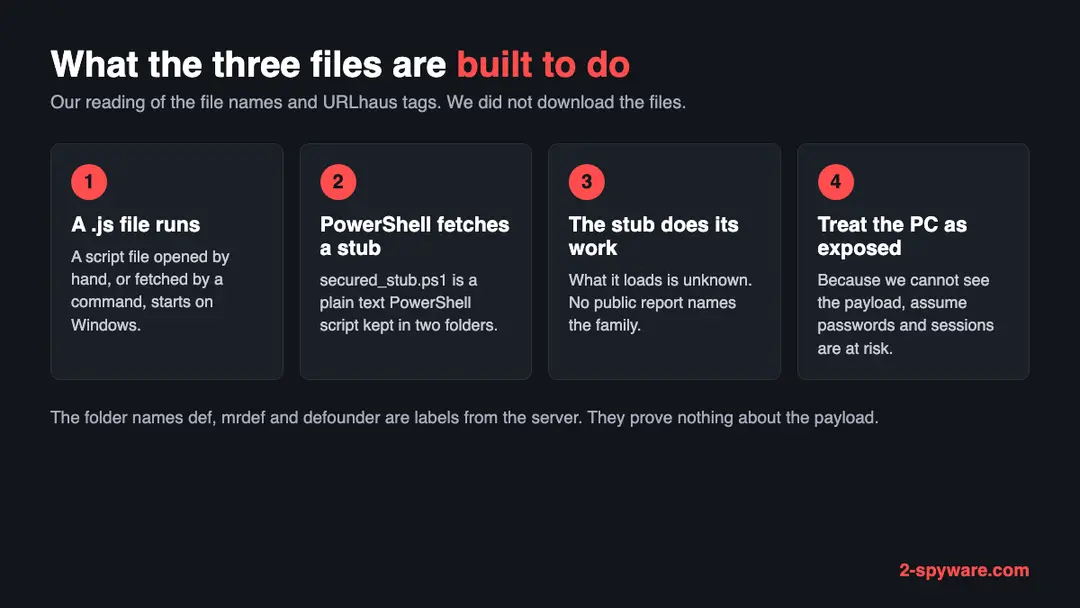
| File on delphiaonline.top | What URLhaus says | What it may be (our reading) |
|---|---|---|
| /defounder/secured_stub.ps1 | Offline, tagged ascii, opendir, powershell and ps1, added 29 September 2026 at 07:09 UTC | A plain text PowerShell script. The word stub usually means a small first part that fetches or starts something larger. Not confirmed |
| /mrdef/secured_stub.ps1 | Offline, same tags, added 29 September 2026 at 07:10 UTC | A second script with the same file name in another folder. It may be a variant for a different target or a different build. Not confirmed |
| /def/73yTfqg3w2y6fw4jE4h5dW.js | Offline, tagged ascii, js and opendir, added 29 September 2026 at 07:10 UTC | A JavaScript file with a random name. On Windows a .js file opens with Windows Script Host when you double click it, so it could be the part that starts a stub. Not confirmed |
The folder names def, mrdef and defounder look like labels the operator chose for different batches. They might be short for defender, but we found no source that says so, and we do not claim the scripts touch Microsoft Defender. Treat the names as a reason to check your Defender settings, which the plan below does, and nothing more.
What the opendir tag tells you about the server
opendir means the folder listing of the server was open, so a researcher or any visitor could see the file names. It is a sign of a quickly set up server, and it is how the reporter found three files in three folders.
| What an open folder shows | What it suggests | What it does not prove |
|---|---|---|
| Several files in one place | The operator uploaded files by hand or with a simple tool and did not turn the listing off | That the same files were served to every visitor. Some servers send a different file by country or device |
| Folders with batch-like names | The operator may keep separate copies for separate runs, mailings or targets | Which batch reached which victim, or how many victims there were |
| A very new domain | The name was bought shortly before use. The registration here is one day older than the first report | Who bought it. RDAP in this case shows a registrar, not a person we could name |
Because the folder was open when the reporter looked, the files were probably found by browsing the server, not by clicking a link in a message. That does not tell us how real victims were sent there, which stays unknown.
What delphiaonline.top (PowerShell and JavaScript stubs) can steal or download
Why a PowerShell stub can run even with Windows protections on
Many people believe that Windows will refuse to run a downloaded script. Microsoft's own documentation says the PowerShell execution policy is a safety feature, not a security boundary, and gives the reason.
- 1
What the execution policy is
Microsoft says the execution policy controls the conditions under which PowerShell loads configuration files and runs scripts. On Windows clients with no policy set, the effective policy is Restricted, which blocks script files but allows single commands.
- 2
Why it does not stop a pasted command
Microsoft's page states that the execution policy is not a security boundary: users can easily bypass it by typing the script contents at the command line. A command you paste into PowerShell is therefore not blocked by it.
- 3
Why downloads by command are different
Browsers mark downloaded files as coming from the internet, and the RemoteSigned policy then refuses unsigned ones. Microsoft notes that other download methods such as curl.exe, Invoke-RestMethod and Invoke-WebRequest may not add that mark. A script fetched by a command can lack the mark.
- 4
What this means here
A short command that downloads secured_stub.ps1 and runs it, or a JavaScript file that starts PowerShell, does not need you to change any setting. We do not know which route victims met, but the point is that the built-in rule is not the thing that protects you.
What a script stub could mean for you
We did not open the files and found no analysis of them, so we cannot list what this copy does. The table below is the general meaning of each kind of part, not a claim about this site's files.
Names and tags from the reports
- ps1 and powershell (URLhaus tags on two files)
- js (URLhaus tag on one file)
- ascii (plain text files)
- opendir (open folder listing)
- secured_stub.ps1 (file name, two folders)
- def, mrdef, defounder (folder names)
| Kind of part | What it can do to you | Source |
|---|---|---|
| Stub or downloader | Fetches and starts a larger program, so the first script may not be the last thing on the PC | Our reading of the file name; not confirmed for this site |
| Script that changes security settings | Some scripts add exclusions or switch off protection before the real payload runs. We do not know if these do. Microsoft documents how exclusions work and how to list them | Microsoft Learn on Defender exclusions |
| Information stealer or remote tool | Copies saved passwords, cookies and wallet files, or lets another person use the PC. Not named by any source for this domain | General risk of a malware download; not confirmed |
| Persistence | A scheduled task, Startup entry or Run key that starts the script again after a restart | General practice; not seen by us on this site |
What this can cost you
Reading the site name or seeing a warning costs nothing. The risks below apply to a PC where a script from the site ran or a file from it was opened.
- High
Logins your browser remembers
A script that runs under your Windows account can reach whatever your browser stores. Reset passwords on another device and end all sessions, since the old session may outlive the old password.
- High
Lost cryptocurrency
Treat wallet files and recovery phrases on the PC as seen by someone else. A transfer cannot be undone, so shift the balance to a fresh wallet created on a clean device first.
- High
A second program you cannot see
A stub is made to bring something else. Until you have scanned from outside Windows, assume the PC may be running a program that the first script installed.
- Medium
Weakened protection
If a script added exclusions to Windows Security, a later file in those folders would not be scanned. Check the exclusions list in the plan below.
- Medium
Work accounts and company data
On a work PC the saved logins reach company systems. Tell your IT or security team at once; they can block the accounts.
- Low
Nothing, if you only saw the name
A name in a warning, a firewall log or a blocked link is not an infection.
What you may notice, and what you may not
Many victims notice nothing. The signs below follow from how script chains are built; the first one is the best evidence you have.
| Sign | What it means |
|---|---|
| A script file or a pasted command you ran that mentions delphiaonline.top, secured_stub or a .top address | This is the start of the chain. Note the file name or the line before you do anything else |
| A file named secured_stub.ps1 or a .js file with a long random name in Downloads, Temp or Public | These are the names URLhaus lists. A match is a strong reason to follow the plan. Do not run it again |
| A scheduled task or a Startup entry you did not make | A common way for a script to start again at each logon. Note the name before you change anything |
| Exclusions in Windows Security that you did not add | Windows Security lists folders and files it skips. An entry you do not recognise is a warning sign |
| A window that flashed and closed | A PowerShell or Command Prompt window that runs a one-line download and exits |
| Accounts you did not touch | Logins from new places, password-reset emails and messages sent from your accounts. This follows from stolen sessions; it is our reading, not a quote |
| Nothing at all | Stubs and the programs they bring are built to stay quiet |
How to check the PC for delphiaonline.top (PowerShell and JavaScript stubs)
How people end up running a script like this
We do not know how visitors reached delphiaonline.top, and no source says. These are the usual ways a .js or .ps1 file ends up running, listed so you can ask yourself which one fits.
- 1
A script attachment or archive
An email or a message carries a .js file, or a zip with one inside, named like an order, an invoice or a document. On Windows, double clicking a .js file runs it with Windows Script Host; it is not shown as a document.
- 2
A command you are told to paste
Some pages ask you to copy a command into the Windows Run box or PowerShell to pass a check or fix an error. The ps1 tag fits that way of starting a script, but no source tells us this site did so. We did not see its page.
- 3
A file that claims to be an update or a free program
Cracked software and fake updates are common carriers for downloader scripts. This is general knowledge, not something we saw on this domain.
- 4
A link from a search result or an advert
A new domain bought a day before use may be promoted by advertising or by links in messages. We have no evidence of which was used here.
Check your Windows PC before you delete anything
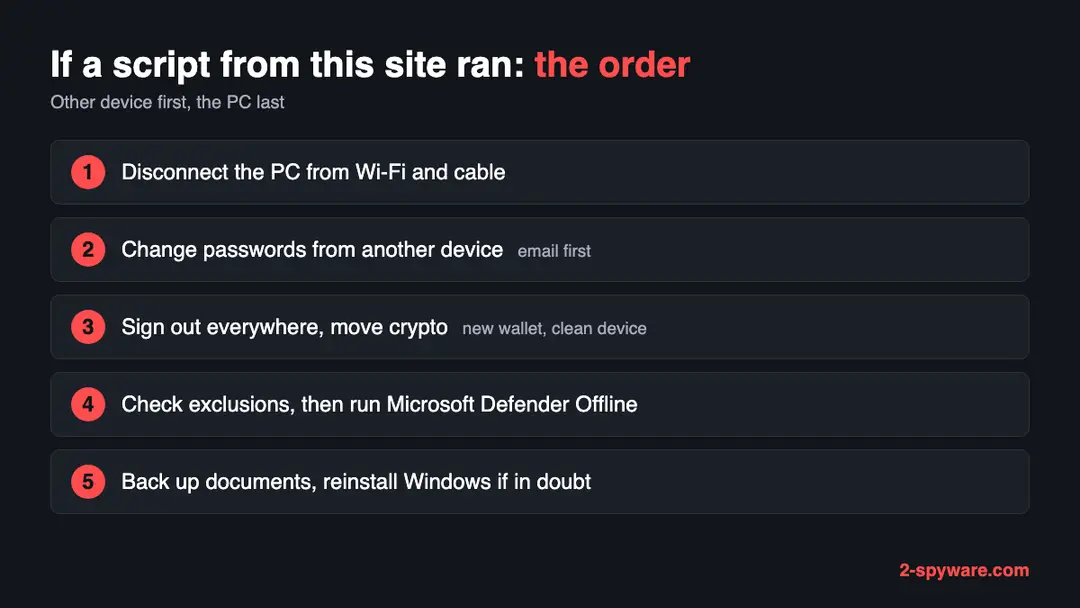
Start with the question that matters: did you open a script file or paste a command that fetched something from delphiaonline.top, or run a file that came from it? If yes, follow the numbered plan on this page, because a clean-looking check does not clear a PC. If you are not sure, do these checks first. None of them deletes anything.
While you check, stop using the PC for banking, email, work or crypto, and disconnect it from Wi-Fi and network cables if you can.
- 1
Search for the file names
Open File Explorer, click the search box and type
secured_stub. Look in Downloads,C:\Users\Publicand the Temp folder (type%TEMP%in the address bar). Do not double click anything you find. Note the folder and date. - 2
Open Task Scheduler
Type Task Scheduler in the Start menu and open it. Click Task Scheduler Library and go through the list. For a task with a random or odd name, open its Actions tab and read the command. Leave it in place for now and write the name down.
- 3
Open the Startup folder
Hit Windows key + R, enter
shell:startupand confirm. Anything in there that you did not put in yourself deserves a note. - 4
Read the Run history after a pasted command
Start Registry Editor with regedit and browse to
HKEY_CURRENT_USER\Software\Microsoft\Windows\CurrentVersion\Explorer\RunMRU. Each value is something typed into the Run box. Only read them. Mark any that mention powershell, a web address or delphiaonline. - 5
Check the Windows Security exclusions
Open Windows Security > Virus & threat protection > Manage settings > Add or remove exclusions. Every entry is a place that Windows Security does not scan. Any folder you did not add yourself is a warning sign. Microsoft's page says you usually do not need exclusions at all. An administrator can list them in PowerShell, as Microsoft documents, with
Get-MpPreferenceand its ExclusionPath value. Note anything unknown and do not remove it until after the offline scan. - 6
Check Windows Security detections
Open Windows Security > Virus & threat protection > Protection history. On Windows 10 the same page is under Settings > Update & Security > Windows Security. Look for detections dated around the time the script ran.
- 7
Remember what a clean check means
A downloader script may leave little on the disk once it has done its work. A clean check lowers the doubt; it does not remove it.
How to remove delphiaonline.top (PowerShell and JavaScript stubs)
How to remove delphiaonline.top
A loader's job is to install other malware, so treat the PC as infected with more than one program until the scans are clean.
Step 1: Delete scheduled tasks that bring it back
Open Task Scheduler from the Start menu and click Task Scheduler Library. Select each task you do not recognise and read the Actions tab:
- a task that starts a file in
%AppData%or%Temp% - runs
powershellwith a long encoded line - opens a web address belongs to delphiaonline.top or a similar program
Right-click such a task and choose Delete, and check the subfolders too. Leave tasks from Microsoft, your PC's maker and programs you use. Task Scheduler is the same in Windows 11 and Windows 10.

Windows 11: Task Scheduler Library, the task selected, the Actions tab shows the file it runs. Full procedure with screenshots: Remove what malware leaves behind in Windows
- a task that starts a file in
Step 2: Remove it from startup
Whatever delphiaonline.top installed usually starts with Windows. Open Task Manager with Ctrl + Shift + Esc, go to Startup apps in Windows 11 or the Startup tab in Windows 10, and disable what you do not know, starting with entries that have an empty Publisher column.
Open file location on the right-click menu shows the file, which helps you decide and tells you what to delete later. Disabling is safe: if something you need stops working, switch it back on.
Full procedure with screenshots: Stop apps from opening at startup On uGetFix
Step 3: Delete the folders left behind
What the uninstaller leaves behind is usually in the user folders. Open File Explorer, switch on View > Show > Hidden items (in Windows 10 View > Hidden items), and go through
%LocalAppData%,%AppData%, %ProgramData% and the two Program Files folders.Sort by Date modified and delete folders that appeared together with the problem and belong to no program you use. Folders with random names that hold
.exe,.dll, .js or .ps1 files are the strongest sign.Full procedure with screenshots: Remove what malware leaves behind in Windows
Step 4: Scan the PC, then run the offline scan
Open Windows Security > Virus & threat protection > Scan options, run a Full scan and remove everything it finds. Then select Microsoft Defender Antivirus (offline scan) and click Scan now: the PC restarts and scans before Windows loads, which finds files that hide while Windows runs.
Save your work first, because the offline scan takes about 15 minutes. Both scans are built into Windows 11 and Windows 10, and a second scanner from another vendor is a useful extra opinion.

Windows 11: Windows Security > Virus & threat protection > Scan options. Full procedure with screenshots: Run a Microsoft Defender Offline scan
Step 5: Change passwords from another device and sign out other sessions
Assume that the passwords saved in this PC's browsers, and the accounts that were open in them, are known to the attacker. From a phone or a clean computer, change the e-mail password first, then banking, shopping, social and gaming accounts.
Use each service's option to sign out of all other sessions, because stolen cookies keep a session open even after a password change. Turn on two-step verification on each account. Wait with the infected Windows 11 or Windows 10 PC until the scans are clean.
Full procedure with screenshots: Turn on two-step verification / secure a hacked account
Scan from outside Windows: Microsoft Defender Offline
An offline scan runs before the normal Windows starts, so a hidden program cannot hide from it as easily. Microsoft's page says it targets malware that tries to bypass the Windows shell, such as rootkits.
- 1
Get the PC ready
Save open files and quit your programs, because the PC will restart by itself. The offline scan needs an administrator account and a working Windows Recovery Environment. Open Command Prompt with Run as administrator and type
reagentc /info. If the status reads Disabled, typereagentc /enable. Microsoft warns that with recovery switched off the scan never starts and no error appears. - 2
Pause BitLocker first
A PC with BitLocker on the system drive may demand the recovery key at the restart. Suspend BitLocker before you begin, using Microsoft's linked instructions, so the scan can start without a prompt.
- 3
Launch it from Windows Security
Go to Windows Security > Virus & threat protection > Scan options, tick Microsoft Defender Offline scan and press Scan now. Accept the two prompts. Windows signs you out and boots into a blue scanning screen. Microsoft says it takes about 15 minutes. As an administrator you can also type
Start-MpWDOScanin PowerShell. - 4
Find what it caught
When Windows returns, open Windows Security > Virus & threat protection > Protection history. Windows 10 reaches the same screen through Settings > Update & Security > Windows Security. Microsoft lists Windows on ARM as unsupported, and says Defender Antivirus must be your main antivirus.
- 5
Tidy the exclusions
Return to Add or remove exclusions and delete every entry you did not create. If you removed one, run the offline scan a second time, since the files in that folder were skipped on the first pass.
- 6
Treat a clean report with care
No detection is not proof of a clean PC when a script may have brought a second program. If one of these scripts really ran on your machine, copy your documents off and reinstall Windows.
If you use a Mac, an iPhone or an Android phone
The ps1 tag points at Windows. We found nothing that says the three files run on anything else.
| Your device | What we know | What to do |
|---|---|---|
| Mac | PowerShell exists for macOS, yet these files are tagged and named for Windows. What a Mac visitor would have seen is unknown | Handle a Mac that ran something from this site as its own case, using our Mac guides. The Windows steps on this page do not apply |
| iPhone or iPad | iOS does not run Windows scripts | Nothing to delete. Change any password you typed into a page from this site |
| Android | No source we read mentions it | Nothing to delete for these files. Change any password you entered |
After removal: passwords, accounts and prevention
After a clean PC: protect what was taken
The PC is one half. The other half is everything that was on it, which the attackers may already have. The order matters: other device first, then crypto, then the PC.
- 1
New passwords, from a different device
Pick up your phone or a family member's laptop. Begin with the email account, since it resets everything else, then bank, work and social logins. Anything typed on the affected PC should be assumed seen. Your Microsoft account has its own page at account.microsoft.com.
- 2
End every open session
Stolen browser cookies can keep a thief signed in after a password change. Use the sign out everywhere option in each account that matters, and cancel any API tokens, SSH keys or cloud keys that lived on the PC.
- 3
Crypto before anything else
If a wallet or its recovery phrase sat on the PC, create a new wallet on a clean device and send the funds there at once. A moved balance cannot be taken back, and neither can a stolen one.
- 4
Add a second sign-in step
Prefer an authenticator app or a hardware key over text messages. Then a stolen password alone, or one stolen session, does not let someone in at a fresh login.
- 5
Save documents, then reset Windows
Copy documents and photos only, never programs or scripts, to an external drive. On Windows 11 open Settings > System > Recovery; on Windows 10 open Settings > Update & Security > Recovery. Choose to reset the PC and remove everything.
- 6
Keep an eye on the money
For the next few weeks read your bank, email and crypto history for anything you did not do, and call your bank the same day if you find it.
Keep a Windows PC out of this kind of trap
The rule that stops this chain is short: a script file from an email or a web page is not a document, and a command from a web page is not a fix.
Do
- Delete any .js, .vbs, .ps1 or .cmd file that reaches you by mail or download. It is a program, not a paper.
- Close the tab when a page tells you to paste a command into Run or PowerShell.
- Install Windows and browser updates, and leave Windows Security switched on.
- Open the exclusions list in Windows Security once in a while and remove entries you never added.
- Keep one backup on a drive that stays unplugged, and protect key accounts with an authenticator app.
Don't
- Never open a purchase order or receipt that turns out to be a script, whatever it is called.
- Never count on the PowerShell execution policy alone: Microsoft says it is not a security boundary.
- Never run downloads from sites that offer paid software for free.
- Never start a file that came by link or message and calls itself an update.
- Never read a quiet scan as proof that you are safe.
Questions about delphiaonline.top (PowerShell and JavaScript stubs)
What is delphiaonline.top?
delphiaonline.top is a web address that URLhaus, the malware database run by abuse.ch, lists for malware downloads. Three file addresses were added on 29 September 2026: two PowerShell scripts named secured_stub.ps1 in different folders and one JavaScript file.
The domain was registered on 28 September 2026, one day earlier. When we looked it up on 10 October 2026 the name did not resolve, and URLhaus showed all three files offline. We found no public write-up of this domain and no malware family name for it.
Is delphiaonline.top a virus?
A website is not a virus, but this one is listed as a source of malware. URLhaus gives all three of its file addresses the threat type malware_download. We did not download the files, so we cannot say exactly what they do.
Treat the domain as dangerous, do not open it, and do not run anything it offers. Reading about it on this page cannot infect you. The danger is a script that you ran or a command that you pasted.
What is secured_stub.ps1?
secured_stub.ps1 is the file name of two PowerShell scripts that URLhaus lists on this domain, one in the folder defounder and one in mrdef. The ending .ps1 means a PowerShell script, and the tag ascii means it is plain text.
A stub usually means a small first part that fetches or starts something else. We did not open either file, so what they contain is not confirmed, and the name is only our clue.
I ran a script from delphiaonline.top. What do I do now?
Cut the PC off from the network by switching off Wi-Fi and pulling the cable. Next, working on a different device, reset your email, bank and work passwords, end your sessions and send any crypto to a new wallet.
Only then look at the exclusions list in Windows Security and start a Microsoft Defender Offline scan. When a script really ran, the surest finish is copying documents out and reinstalling Windows. On a work PC, call your IT team right away.
What if I only visited the site and ran nothing?
Probably nothing happened. Here the harm comes from running a script or file, not from loading a page. Leave anything it offered unopened, and delete a downloaded file you never ran.
If you typed a password into a page from this site, change it from a safe device. We never saw the page, so what it showed visitors is unknown, and today the site does not answer at all.
Why does the site not load any more?
Our browser got ERR_NAME_NOT_RESOLVED for delphiaonline.top on 10 October 2026, so the name pointed nowhere, and URLhaus marked every file offline. Possible reasons:
- the operators deleted the records
- the registrar or host stepped in
- the campaign moved to a new domain
None of that repairs a PC that already ran a script from here, and a copy of the same script may call a different address today.
Does Windows block PowerShell scripts by default?
Only in part. On a Windows PC with no policy set, the effective PowerShell execution policy is Restricted, which blocks script files. But Microsoft's documentation says the execution policy is not a security boundary, because a user can type or paste the script contents at the command line instead.
Scripts fetched by curl.exe or Invoke-WebRequest may also lack the internet mark that some policies check. Do not count on it to protect you.
How do I check the Windows Security exclusions?
Open Windows Security, choose Virus and threat protection, then Manage settings, and scroll to Exclusions and select Add or remove exclusions. Each entry is a file, folder, type or process that Windows Security does not scan.
Microsoft says you usually do not need exclusions. Remove any entry you did not add yourself, after you have run the offline scan. An administrator can also list them in PowerShell with Get-MpPreference.
Will a scan with Windows Security remove it?
It may find parts of it, but a quiet scan does not prove the PC is clean. A downloader script may leave little on the disk after it has fetched its payload.
Run Microsoft Defender Offline from Windows Security under Virus and threat protection, Scan options, and read Protection history afterwards. If a script from this site ran, back up documents and reinstall Windows to be sure, and change your passwords from another device first.
Will Fortect remove delphiaonline.top?
Fortect scans Windows for malware and unwanted programs and repairs the system files and settings they change, and its free scan shows what it finds on your PC before you decide anything.
For delphiaonline.top, follow the plan above as well: the browser steps take back permissions and settings that no scanner treats as a threat, and uninstalling the program that brought it removes the source.
Run Microsoft Defender's full scan and, if anything was found, its offline scan as a second opinion. If the symptoms are gone after the plan and both scans are clean, there is nothing more to do.
Sources
- URLhaus (abuse.ch): host page for delphiaonline.top (entries read from our copy of the feed) (read October 10, 2026)
- RDAP registration record for delphiaonline.top (read October 10, 2026)
- Microsoft Learn: Microsoft Defender Offline scan in Windows (read October 10, 2026)
- Microsoft Learn: Configure custom exclusions for Microsoft Defender Antivirus (read October 10, 2026)
- Microsoft Learn: about_Execution_Policies (PowerShell) (read October 10, 2026)