
evacompltd.site: a Windows VIP Keylogger malware site (script files and PowerShell) and what to do if one ran
evacompltd.site is a website that URLhaus lists for malware downloads:
- three JavaScript files and three PowerShell files
- most tagged VIPKeylogger
- all on one day
The site no longer answers when we look it up. If you opened a script file that came from it on Windows, treat the PC as compromised: change your passwords from another device, then scan it offline.
Facts checked October 10, 2026. Removal steps tested on Windows 11 (26H2) and checked against Microsoft's and the browser makers' current documentation.
Automatic
Get a free scan and check if your PC is infected.
Fortect finds malware, unwanted programs and the Windows damage they leave behind, and repairs it in one pass.
Programs like a script file or a PowerShell command from evacompltd.site usually arrive in groups; a free scan lists the companions that are easy to miss.
Do it yourself · free Remove evacompltd.site (VIPKeylogger, JS and ps1) yourself 5 steps, about 15 minutes, no software needed.
Start the steps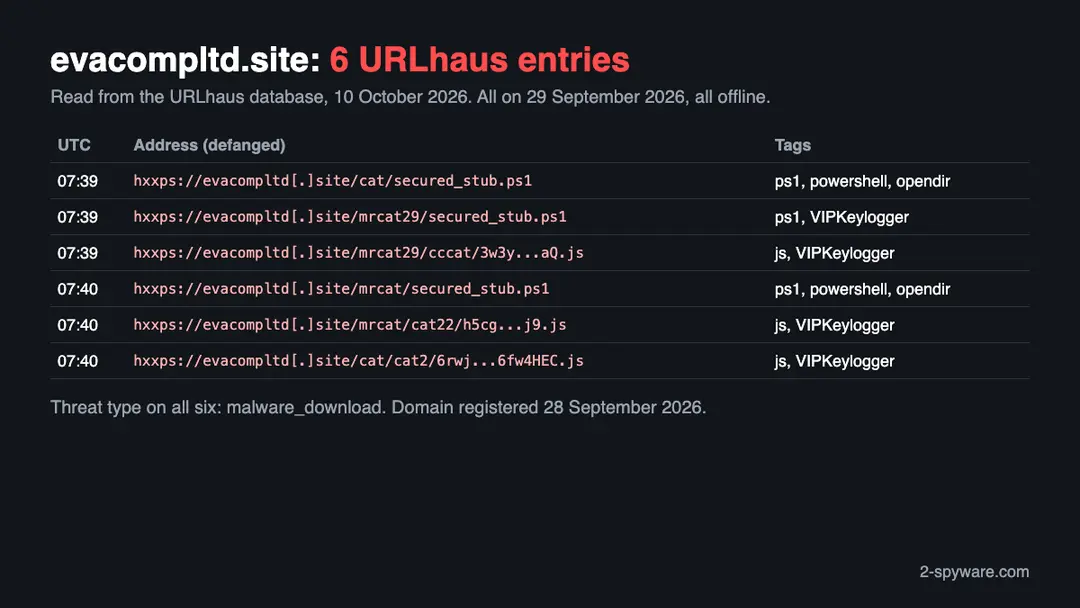
Evacompltd.site (VIPKeylogger, JS and ps1): summary
| Type | A malware download address for Windows: URLhaus lists three JS and three PowerShell files, four tagged VIPKeylogger |
|---|---|
| Risk | High if a script from it ran: passwords, sessions, keystrokes, crypto and screenshots may have been exposed |
| Symptoms | Often none. A UserInitMprLogonScript value under HKCU\Environment, a Documents\VIPREcovery folder or a script you ran are the signs |
| How to get rid of it | Disconnect, change passwords from another device, move crypto, run a Microsoft Defender Offline scan, then back up documents and reinstall Windows if in doubt |
| Our check (10 October 2026) | One lookup: the name did not resolve, no page. A quiet or dead site clears nothing; the danger rating comes from URLhaus |
| Running since / first seen | Domain registered 28 September 2026; first malware URLs reported 29 September 2026 |
| Removal | Scan the PC with security software to find and remove the malware and anything installed with it. Fortect scans Windows for malware and repairs the system files and settings it damaged. Remove it nowTo use the full-featured product, you have to purchase a license for Fortect. The scan is free. |
Show 9 more facts
| Platform | Windows, by the ps1 tag and the family; no source says other systems are affected |
|---|---|
| Detection names | No Microsoft detection name is known for the files on this server, because we did not open them and found no Microsoft page that names this campaign. The URLhaus tags are VIPKeylogger, ps1, powershell, js, ascii and opendir. Run a Microsoft Defender Offline scan and read the name in Protection history |
| Name | Evacompltd.site |
| Domain registered | 28 September 2026 |
| Evidence | 6 write-ups by security sites; details still limited |
| First seen | 29 September 2026 |
| Distribution | Typically fake installers, cracked programs, e-mail attachments, fake "verify you are human" pages and ads for popular apps |
| Damage | Installs other malware, often several programs at once |
| Facts checked | 10 October 2026 |
Facts checked on 10 October 2026 against our copy of the URLhaus data for evacompltd.site, RDAP, one browser test of our own, the Splunk Threat Research Team and SOC Prime on VIP Keylogger, and Microsoft Learn. We did not download the files and we infected no PC; the removal steps follow Microsoft's page and were not tried on a live infection.
What evacompltd.site is, and what we know about it
evacompltd.site is a web address, not a program on your PC. It is a domain that the abuse.ch project URLhaus lists as a place where malware was served, and four of its six entries carry the tag VIPKeylogger. No public write-up of this one domain exists that we could find, so this page rests on what URLhaus shows, what we saw ourselves and what the Splunk Threat Research Team has published about VIP Keylogger loaders.
- 1
What URLhaus lists
Six file addresses on evacompltd.site, all added on 29 September 2026 between 07:39 and 07:40 UTC by the abuse.ch reporter account. Three are JavaScript files (ending in .js, with long random names) and three are PowerShell scripts, each named secured_stub.ps1, in the folders /cat/, /mrcat/ and /mrcat29/. All six carry the threat type malware_download and were offline when we read them.
- 2
What the tags mean
ps1 and powershell say a file is a PowerShell script. js says it is a JavaScript file. ascii says it is plain text. opendir says the server showed its folder contents openly, so anyone could list the files. VIPKeylogger names the malware family: VIP Keylogger is a stealer that records keystrokes and takes saved logins. Together they describe script files meant to start a loader chain.
- 3
What we could not confirm
We did not download any of the files and we never saw a page that tells visitors what to do. So we do not know how a victim reached the scripts or what each file does. The tags are the reporter's labels, not our finding.
- 4
What this means for you
If you only saw the name in a log, a link or a warning, you are not infected by that alone. The risk is for people who opened a script file from this address, pasted a command that fetched one, or ran a file that came from it.
- Kind of threat
- A malware download address; four of six entries are tagged VIPKeylogger
- Malware family
- VIP Keylogger, a stealer for Windows (reporter's tag, not confirmed by us)
- Domain registered
- 28 September 2026, expires 28 September 2027, registrar Spaceship, Inc.; record last changed 3 October 2026 (RDAP, read 10 October 2026)
- URLhaus entries
- 6 file addresses, all added on 29 September 2026; all 6 offline when we read them
- Platform
- Windows, by the ps1 tag and the family. No source says which other systems are hit
What evacompltd.site (VIPKeylogger, JS and ps1) does on an infected PC
What we checked on 10 October 2026, and what we could not
We tried to open https://evacompltd.site/ once, from Lithuania, in an automated Chromium browser set to English. The browser reported that the name could not be found, so no page loaded. That tells you nothing good about the site and it clears nothing.
Our site test, 10 October 2026
- The name did not resolveOur browser reported ERR_NAME_NOT_RESOLVED. That means the domain name gave no address to connect to. URLhaus also lists all six files as offline, which fits a server that has been taken down or switched off.
- Why that is not a clean resultA name that does not resolve can mean the operators removed the records, a provider acted, or the attackers moved to another domain. It does not undo anything a script already did on a PC. The domain was only a day old when it was first reported, which fits a throwaway address.
- Notification request, pop-ups, redirects, ad networksNone seen. There was nothing to see: no page loaded on this one visit.
- URLhaus listingSix malware addresses on this domain. Four were tagged VIPKeylogger. All six were offline when we read the database.
- Downloads and the page itselfWe did not download the files and we did not reach any page. We cannot tell you what the scripts contain.
Dangerous: treat it as a malware site The site test was one lookup that failed, so it proves nothing either way. The danger rating comes from the URLhaus reports, not from our visit. A dead address does not heal a PC that already ran what it served.
What happened to evacompltd.site, from registration to our test
The history is very short: the domain was reported as a malware source the day after it was registered. The dates come from RDAP and from the URLhaus database.
28 September 2026
The domain is registered
RDAP shows evacompltd.site registered on 28 September 2026 through the registrar Spaceship, Inc., valid until 28 September 2027. The name sounds like a company; nothing we found shows a real business behind it.
29 September 2026
Six script files are reported within two minutes
Between 07:39 and 07:40 UTC URLhaus receives six entries from abuse.ch: three secured_stub.ps1 scripts and three .js files with long random names, most tagged VIPKeylogger. This is the first time URLhaus sees the host, one day after registration.
The six URLhaus entries for evacompltd.site as we read them on 10 October 2026. Addresses are defanged. 3 October 2026
The registration record changes
RDAP shows the record changed on this date. We do not know what was changed or why.
10 October 2026
Our test finds no address
Our browser visit to https://evacompltd.site/ ends in ERR_NAME_NOT_RESOLVED, and URLhaus shows all six files offline.
We could not read the URLhaus pages themselves, because they ask for a browser check. The entries above come from the same data in our own database, which holds the URLhaus feed.
What VIP Keylogger is and how its script loaders work
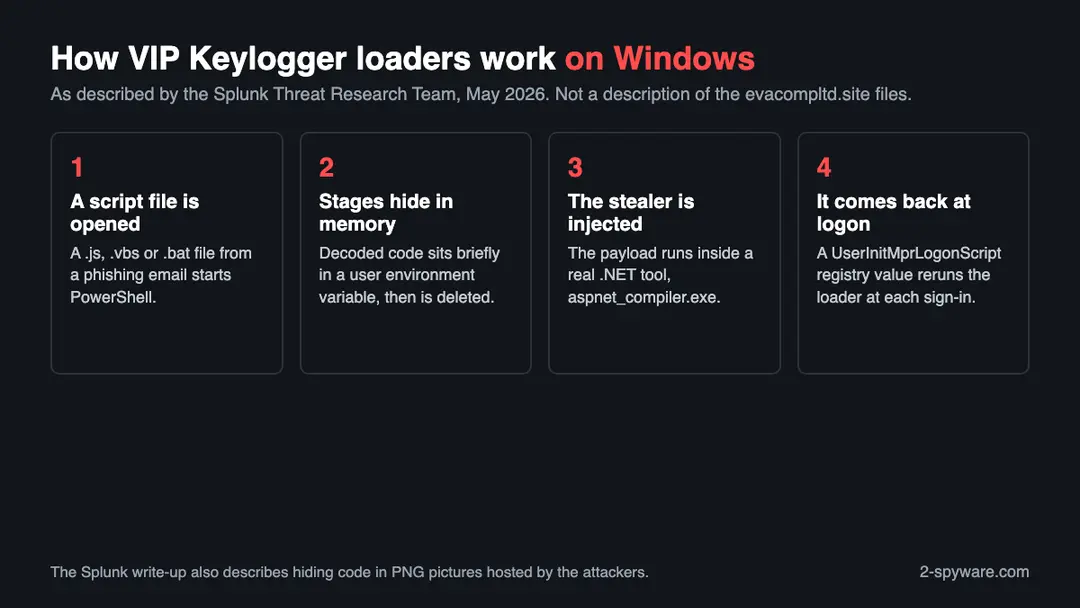
We did not open evacompltd.site's files. This is how the Splunk Threat Research Team describes more than 200 VIP Keylogger script loaders from March and April 2026, so you can recognise the pattern.
- 1
A phishing email delivers a script
Splunk says the loaders spread through phishing that imitates bank payment notices, purchase orders and shipping updates. The loader may be a .vbs, .js or .bat file. The .js loader is heavily obfuscated and fetches a PowerShell stager, which decodes and decrypts a third one.
- 2
The stages hide in a user variable
The decoded PowerShell is held for a moment in a user environment variable named INTERNAL_DB_CACHE and then deleted. The next stage decodes Base64 data with an XOR key that is itself protected with AES, and compiles inline .NET code to run shellcode.
- 3
Pictures can carry the code
Splunk found PNG files hosted by the attackers that hide the encoded downloader and the stealer. The script cuts the data out between two text markers and decodes it. A .bat loader instead drops its payload as a hidden file in %appdata%\Microsoft\Windows\Libraries.
- 4
The stealer runs inside a real program
The payload is injected into aspnet_compiler.exe, a legitimate Microsoft .NET tool. SOC Prime also names only that process. The loader also checks for sandboxes and deletes itself after running.
- 5
A logon value brings it back
Splunk says the loader sets the UserInitMprLogonScript registry value so that it runs each time the user signs in. This is the part you can look for on a PC.
The six files: what each name suggests, and what we do not know
File names are weak evidence. We list what each one could be and mark which statements are only a reading of the name and tags.
| File on evacompltd.site | What URLhaus says | What it may be (our reading) |
|---|---|---|
| /cat/secured_stub.ps1 | Offline, tagged ascii, opendir, powershell and ps1, added 29 September 2026 | A plain text PowerShell script, probably a stage that a .js file fetches. Not confirmed |
| /mrcat/secured_stub.ps1 | Offline, same tags, added 29 September 2026 | The same kind of stage in another folder. Whether the content is identical is unknown |
| /mrcat29/secured_stub.ps1 | Offline, tagged ascii, opendir, powershell, ps1 and VIPKeylogger, added 29 September 2026 | A PowerShell stage that the reporter linked to VIP Keylogger. The only ps1 with the family tag |
| /cat/cat2/6rwj...HEC.js | Offline, tagged ascii, js, opendir and VIPKeylogger | A JavaScript loader. Splunk says VIP's .js loaders are heavily obfuscated and fetch a PowerShell stager |
| /mrcat/cat22/h5cg...j9.js | Offline, same tags | Another JavaScript loader with a random name, in a second folder |
| /mrcat29/cccat/3w3y...aQ.js | Offline, same tags | A third JavaScript loader, in a third folder |
Three folders, each with a ps1 and some with a js, and an open directory listing, suggest a server set up to serve several campaigns or versions at once. That is as much as the names allow. We did not fetch the files, so we cannot say how they belong together.
What evacompltd.site (VIPKeylogger, JS and ps1) can steal or download
What VIP Keylogger can take from a Windows PC
We do not know what evacompltd.site's own copy took, because we did not open it. The table below is what Splunk found in VIP Keylogger in general, so it describes the family the reporter named.
Where Splunk found VIP Keylogger working on a PC
- INTERNAL_DB_CACHE (user environment variable that holds a stage for a moment)
- UserInitMprLogonScript (registry value that reruns the loader at logon)
- aspnet_compiler.exe (the real program the stealer is injected into)
- %appdata%\Microsoft\Windows\Libraries (hidden dropped payload of a .bat loader)
- C:\Users\<name>\Documents\VIPREcovery\Screenshot.png (saved screenshots)
| What it takes | How, according to Splunk | What it costs you |
|---|---|---|
| Browser data | Saved passwords, cookies, history, cards and autofill from many Chromium and Firefox based browsers | Your logged in sessions and saved logins can be used by someone else |
| Discord tokens and Outlook logins | Reads Discord local storage and Outlook credentials and the Windows product ID from the registry | Access to your chat and mail accounts |
| Keystrokes | Records what you type through keyboard hooks | Passwords you type are seen even if they were never saved |
| Clipboard and crypto addresses | Reads the clipboard and swaps wallet addresses for the attacker's | A payment can go to the attacker and cannot be reversed |
| Wi-Fi passwords | Runs netsh wlan show profile with key=clear | Your home or office Wi-Fi keys |
| Screenshots | Takes periodic pictures of the desktop | Whatever was on your screen, including documents and codes |
| System details | Sends host name, IP and country, looked up through public services | A profile of the PC the thief can sell or reuse |
What this can cost you
Seeing the address in a log or a block message costs you nothing. The risks below are for a PC where one of its script files was opened.
- High
Account takeover
A stealer takes cookies, saved logins and what you type. Changing the password alone may not end a stolen session, so sign out everywhere as well.
- High
Crypto theft
Splunk says the clipboard is watched and wallet addresses are replaced. Stolen crypto cannot be reversed, so check every address before you send, and move funds from any wallet that was on the PC.
- High
Exposed secrets on the screen and in keystrokes
Screenshots and a keylogger catch things that are never saved: one time codes, bank pages, private messages. Treat anything you typed on the PC as seen.
- Medium
A loader that starts again
The UserInitMprLogonScript value reruns the loader at each logon. Until it is found and removed, the PC may keep contacting the attackers.
- Medium
Work accounts and company data
Logins saved on a company laptop open company systems. Report it to IT or security quickly so the accounts can be locked.
- Low
Nothing, if you only saw the address
An address in a firewall log, a blocked link or a warning is not an infection.
What you may notice, and what you may not
Many victims notice nothing. The signs below follow from how Splunk describes the family; the first ones are the best evidence you have.
| Sign | What it means |
|---|---|
| A script file you opened that came by email or from a link | This is the start of the chain. Note the file name before you do anything else |
| A UserInitMprLogonScript value under HKCU\Environment | Splunk says VIP loaders use it to run at every logon. A normal PC rarely has one |
| A very long text value in HKCU\Environment, or one named INTERNAL_DB_CACHE | Splunk and SOC Prime both point at this variable and at oversized values there |
| A VIPREcovery folder in Documents | Splunk says screenshots are saved to Documents\VIPREcovery\Screenshot.png |
| Accounts you did not touch | Logins from new places, password-reset emails and messages sent from your accounts. This follows from stolen sessions; it is our reading, not a quote |
| Nothing at all | Stealers are built to stay quiet |
How to check the PC for evacompltd.site (VIPKeylogger, JS and ps1)
How people end up running a script like this
We do not know how visitors reached evacompltd.site, and no source says. Splunk names the route for VIP loaders in general: phishing email.
- 1
An email about a payment, an order or a delivery
Splunk lists bank payment notices, procurement orders and logistics updates as the lures. The attachment or link leads to a script file.
- 2
A script that is passed off as a document
A .js, .vbs or .bat file is a program. Windows runs it when you double click it; it is not shown as a document.
- 3
A command you are told to paste
The ps1 files could be started by a pasted PowerShell line. No source tells us this site did so, and we did not see its page.
- 4
A file that claims to be an update or free software
This is a common way to hand out stealers. It is general knowledge, not something we saw on this domain.
Check your Windows PC before you delete anything
Start with the question that matters: did you open a script file or paste a command that fetched something from evacompltd.site, or run a file that came from it? If yes, follow the numbered plan on this page, because a clean-looking check does not clear a PC. If you are not sure, do these checks first. None of them deletes anything.
While you check, stop using the PC for banking, email, work or crypto, and disconnect it from Wi-Fi and network cables if you can.
- 1
Look at HKCU\Environment
Open Registry Editor (press the Windows key, type regedit, press Enter) and go to
HKEY_CURRENT_USER\Environment. Look for a value named UserInitMprLogonScript, a value named INTERNAL_DB_CACHE or any very long text value. Splunk says these are the traces of VIP loaders. Write down or photograph what you see; do not delete it yet. - 2
Look for the screenshot folder
Open File Explorer and go to Documents. A folder named VIPREcovery with a Screenshot.png in it is the sign Splunk describes. Do not open or delete it yet; note it.
- 3
Look in the hidden Libraries folder
Press Windows key + R, type
%appdata%\Microsoft\Windows\Librariesand press Enter. In View > Show > Hidden items, look for a file you did not put there. Splunk says a .bat loader drops its payload here. - 4
Look for a scheduled task or a Startup file you did not make
Press the Windows key, type Task Scheduler and open it. Select Task Scheduler Library and read any task that is new or has a random name. Then press Windows key + R, type
shell:startupand press Enter. Note anything unknown. - 5
Check Windows Security
Open Windows Security > Virus & threat protection > Protection history. On Windows 10 the same page is under Settings > Update & Security > Windows Security. Look for detections dated around the time the script ran.
- 6
Remember what a clean check means
The stages are built to run from memory and the loader deletes itself, so little may be left on the disk. A clean check lowers the doubt; it does not remove it.
How to remove evacompltd.site (VIPKeylogger, JS and ps1)
How to remove evacompltd.site
A loader's job is to install other malware, so treat the PC as infected with more than one program until the scans are clean.
Step 1: Delete scheduled tasks that bring it back
Programs like evacompltd.site add a scheduled task so they return after an uninstall or reopen a page at every sign-in. Start Task Scheduler, open Task Scheduler Library and sort by Last Run Time to see what ran recently.
On the Actions tab, a program in a user folder, a script or a web address is a warning sign; right-click such a task and choose Delete.
Tasks with names copying Google, Edge or Windows updaters but pointing to an odd folder are typical. The tool looks the same in Windows 11 and Windows 10.

Windows 11: Task Scheduler Library, the task selected, the Actions tab shows the file it runs. Full procedure with screenshots: Remove what malware leaves behind in Windows
Step 2: Remove it from startup
Press Ctrl + Shift + Esc to open Task Manager and select Startup apps (Windows 11) or the Startup tab (Windows 10). Disable entries you do not recognise, especially ones with no publisher or with a name that copies a Windows component.
Right-click an entry and choose Open file location to see where it runs from: programs in
%AppData%or%Temp%deserve a closer look. Some entries are not listed there but in the registry Run keys, which the procedure below shows how to check.Full procedure with screenshots: Stop apps from opening at startup On uGetFix
Step 3: Delete the folders left behind
Uninstalling often leaves the program's folders, and some threats reinstall themselves from them.
Press Windows + R, type
%LocalAppData%and press Enter, then do the same for%AppData%and %ProgramData%, and look for folders named after evacompltd.site, its publisher or created on the day the problem started. Delete those folders, and check C:\Program Files and C:\Program Files (x86) too.If Windows says a file is in use, end it in Task Manager or delete the folder after a restart in Safe Mode. The folders are the same in Windows 11 and Windows 10.
Full procedure with screenshots: Remove what malware leaves behind in Windows
Step 4: Scan the PC, then run the offline scan
A scan finds the parts of evacompltd.site that the manual steps cannot see. In Windows Security > Virus & threat protection > Scan options, start a Full scan and quarantine what it reports.
Follow it with Microsoft Defender Antivirus (offline scan) > Scan now, which restarts the PC and checks the disk while Windows and the malware are not running.
It takes about 15 minutes and works the same in Windows 11 and Windows 10. If either scan finds something, run the full scan again after removal until it comes back clean.

Windows 11: Windows Security > Virus & threat protection > Scan options. Full procedure with screenshots: Run a Microsoft Defender Offline scan
Step 5: Change passwords from another device and sign out other sessions
Evacompltd.site can copy saved passwords, cookies and session tokens and send them out in seconds, so cleaning the PC does not undo the theft.
Change your passwords on a device that was never infected, starting with the e-mail account, since every other reset goes through it. On each account, end all other sessions and check the recovery e-mail, phone number and forwarding rules.
Then turn on two-step verification. Sign in on the Windows 11 or Windows 10 PC again only after the offline scan is clean.
Full procedure with screenshots: Turn on two-step verification / secure a hacked account
Scan from outside Windows: Microsoft Defender Offline
An offline scan runs before the normal Windows starts, so a hidden program cannot hide from it as easily. Microsoft's page says it targets malware that tries to bypass the Windows shell, such as rootkits.
- 1
Get the PC ready
Microsoft's page warns that the PC will restart and that the scan runs for roughly a quarter of an hour, so finish and save what you are doing first. The account you use must be a local administrator. The scan also needs the recovery environment (WinRE) switched on: in an administrator Command Prompt run
reagentc /info, and if the answer is Disabled, runreagentc /enable. With WinRE off, Microsoft says, nothing happens and no error appears. - 2
Pause BitLocker
A PC with BitLocker on the system drive may ask for the recovery key when it boots into the scan. Suspend BitLocker protection beforehand to avoid being locked out.
- 3
Launch the offline scan
Go to Windows Security > Virus & threat protection > Scan options, pick Microsoft Defender Offline scan and press Scan now. Confirm the prompts. Windows signs you out and restarts into a blue scanning screen, then boots normally. An administrator PowerShell window can start the same scan with
Start-MpWDOScan. - 4
Find out what it found
Open Windows Security > Virus & threat protection > Protection history after the restart. The detection name is shown there. Per Microsoft, the offline scan is not available on Windows for ARM, and it receives updates only when Microsoft Defender Antivirus is your main antivirus.
- 5
A quiet result is not an all clear
Here the stealer may have run once, sent its data and left. An empty scan result cannot undo that. If a script from this address ran, plan to back up your documents and reinstall Windows.
If you use a Mac, an iPhone or an Android phone
The ps1 tag and the family point at Windows. We found nothing that says the six files run on anything else.
| Your device | What we know | What to do |
|---|---|---|
| Mac | A loader that writes Windows registry values has nothing to write to on macOS. We do not know what a Mac visitor would have been served | Use our Mac guides if you ran anything from an unknown site on a Mac. The registry and folder checks above are for Windows only |
| iPhone or iPad | Script files and PowerShell do not run on iOS | No clean up needed. Change a password only if you typed it into a page from this address |
| Android | No source ties these files to Android | No clean up needed for these files. Change any password you entered on a related page |
After removal: passwords, accounts and prevention
After a clean PC: protect what was taken
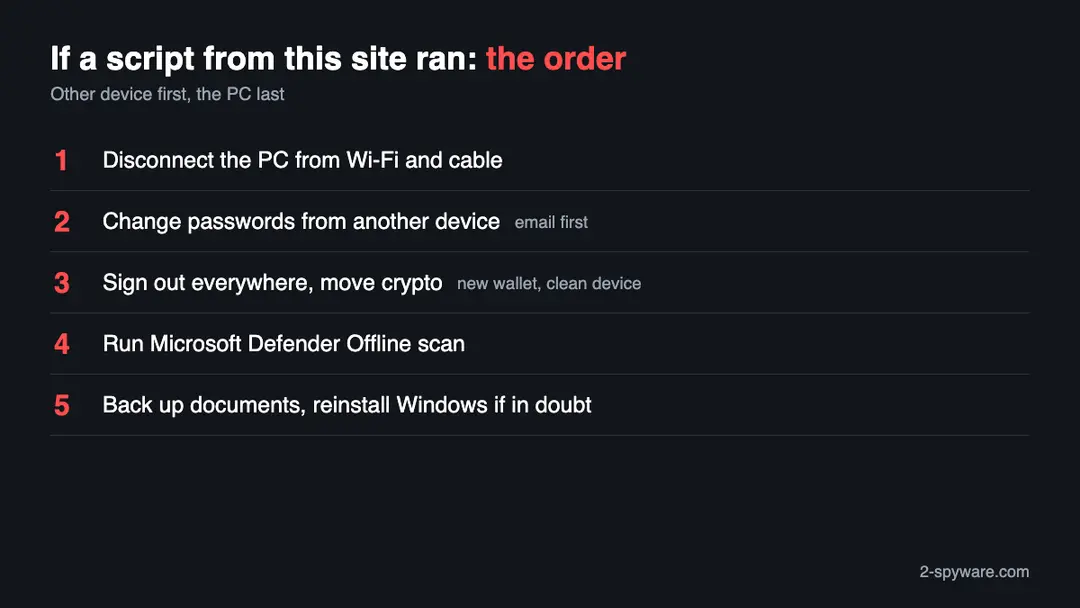
The PC is one half. The other half is everything that was on it, which the attackers may already have. The order matters: other device first, then crypto, then the PC.
- 1
New passwords, typed on another device
Take a phone or a different computer. Email goes first because it resets everything else, then banking, work, social media and Discord. Anything you typed on the PC while the keylogger ran should be treated as read. Microsoft account holders can change theirs at account.microsoft.com.
- 2
Router and Wi-Fi
Splunk reports that VIP Keylogger reads saved Wi-Fi passwords with netsh. Set a new Wi-Fi key in your router's settings, again from a clean device, and reconnect your other devices.
- 3
End the open sessions
A stolen cookie can keep working after a password change. Use each account's sign out of all devices option, and cancel API tokens, SSH keys and cloud keys that lived on the PC.
- 4
Wallets and clipboard
Splunk says the clipboard is watched for wallet addresses. If a wallet or recovery phrase was on this PC, create a new wallet on a clean device and move the funds. From now on compare the first and last characters of every address after you paste it.
- 5
Two-step sign in
An authenticator app or a hardware key makes a stolen password or cookie less useful, because the account asks again at a new sign in.
- 6
Rebuild the PC
Copy only documents and photos to an external drive, never programs or scripts. On Windows 11 choose Settings > System > Recovery > Reset this PC; on Windows 10 use Settings > Update & Security > Recovery. Pick the option that removes everything.
- 7
Keep watching
For several weeks read your bank and email activity for anything you did not do. A bank can act faster the sooner you report it.
Keep a Windows PC out of this kind of trap
The rule that stops this chain is short: a script file from an email or a web page is not a document, and you should not run it.
Do
- Call a .js, .vbs, .ps1 or .bat attachment what it is, a program, and delete it unread.
- Confirm a surprise payment notice or purchase order with the sender by phone or a known address.
- Install Windows and browser updates, and leave Windows Security switched on.
- Show file extensions in File Explorer (View > Show > File name extensions) so a script cannot pass as a PDF.
- Protect important accounts with an authenticator app.
Don't
- Do not open a bank notice, invoice or order whose file ends in .js, .vbs or .bat.
- Do not paste a line from a web page into Run or PowerShell.
- Do not download cracked programs or keygens.
- Do not trust a file that says it is an update because a link told you so.
- Do not read a quiet scan as proof that nothing was stolen.
Questions about evacompltd.site (VIPKeylogger, JS and ps1)
What is evacompltd.site?
evacompltd.site is a web address that URLhaus, the malware database run by abuse.ch, lists for malware downloads. Six file addresses were added on 29 September 2026: three PowerShell scripts called secured_stub.ps1 and three JavaScript files, four of them tagged VIPKeylogger.
The domain was registered on 28 September 2026. When we looked it up on 10 October 2026 the name did not resolve, and URLhaus showed all six files offline. We found no public write-up of this domain itself.
Is evacompltd.site a virus?
Strictly, no: a domain is a place, not a program. But URLhaus files all six of its addresses under malware_download, and four carry the VIPKeylogger tag, so the place hands out a stealer's loader scripts.
Without downloading them we cannot describe each file. Stay away from the address and from anything it supplied. Reading this page is safe.
What is VIP Keylogger?
VIP Keylogger is a stealer for Windows. The Splunk Threat Research Team, in a May 2026 analysis of more than 200 loaders, says it records keystrokes, takes saved browser logins and cookies, reads Discord and Outlook data, copies the clipboard, swaps crypto wallet addresses, reads Wi-Fi passwords and takes screenshots.
It reaches PCs through script loaders sent by phishing email. We did not analyse a sample from this site.
What does opendir mean in the URLhaus tags?
Opendir means the server showed an open directory: a plain list of the files in a folder that anyone could browse. Attackers sometimes leave this on by mistake, and researchers use it to find more files.
It tells you the server was not set up to look like a normal site. It does not tell you what the files do, and we did not download any of them.
I ran a script from evacompltd.site. What do I do now?
Cut the PC off the network (Wi-Fi off, cable out). On a different device change your email, bank and work passwords, end all open sessions, move any crypto and set a new Wi-Fi key.
Then run a Microsoft Defender Offline scan. Because a stealer can finish in minutes and delete itself, the safest finish is a backup of documents and a clean Windows reinstall. For a work PC, tell IT first.
What if I only visited the site and ran nothing?
Then the likely harm is small, because these chains need you to run a script. Delete any file you saved from it without opening it.
If you typed a password into a page from this address, change that password from a device you trust. We never saw the page and the address no longer works, so we cannot tell what it showed.
How can I check for VIP Keylogger on my PC?
Splunk names several traces. In Registry Editor open HKEY_CURRENT_USER and then Environment, and look for a value called UserInitMprLogonScript, one called INTERNAL_DB_CACHE or a very long text value.
In Documents look for a folder named VIPREcovery. In the folder %appdata%\Microsoft\Windows\Libraries look for hidden files you did not make. Finding none does not clear the PC, because the loader deletes itself after running.
Why does the site not load any more?
Our browser got ERR_NAME_NOT_RESOLVED on 10 October 2026: the domain name pointed nowhere. URLhaus also lists all six files as offline.
Someone may have deleted the records, a provider may have stepped in, or the attackers may be using a fresh domain. Either way, a PC that already ran one of the scripts is not fixed by the address going dark.
Will a scan with Windows Security remove it?
Possibly part of it. Splunk says the loader keeps its stages in memory and removes itself, so an empty result may only mean there was nothing left to find. The data may already be gone.
Use the offline scan (Windows Security, Virus and threat protection, Scan options) and read Protection history, but still change passwords from another device and plan a reinstall if a script ran.
Will Fortect remove evacompltd.site?
Fortect scans Windows for malware and unwanted programs and repairs the system files and settings they change, and its free scan shows what it finds on your PC before you decide anything.
For evacompltd.site, follow the plan above as well: the browser steps take back permissions and settings that no scanner treats as a threat, and uninstalling the program that brought it removes the source.
Run Microsoft Defender's full scan and, if anything was found, its offline scan as a second opinion. If the symptoms are gone after the plan and both scans are clean, there is nothing more to do.
Sources
- URLhaus (abuse.ch): host page for evacompltd.site (entries read from our copy of the feed) (read October 10, 2026)
- RDAP registration record for evacompltd.site (read October 10, 2026)
- Splunk Threat Research Team: Behind the Code, the Layered Defense-Evasion of VIP Keylogger (read October 10, 2026)
- SOC Prime: VIP Keylogger and Its Multi-Layered Evasion Tactics (read October 10, 2026)
- Microsoft Learn: Microsoft Defender Offline scan in Windows (read October 10, 2026)