
Driver_irql_not_les_or_equal virus Tech support scam virus: what it is and how to remove it
Driver_irql_not_les_or_equal Tech support scam virus is quite lengthy, though the most precise way to define this fraudulent program. Some users mistakenly call it a "Driver_irol_not_less_or_equal virus," but we should point out the mistake in the spelling of a word "less" in the original title.
Facts checked October 6, 2026. Removal steps tested on Windows 11 (26H2) and checked against Microsoft's and the browser makers' current documentation. Sections marked as our earlier report are the original text: they describe the threat as it was then and have not been reviewed since. The 2026 status, the removal steps and the questions are current.
Automatic
Get a free scan and check if your PC is infected.
Fortect finds malware, unwanted programs and the Windows damage they leave behind, and repairs it in one pass.
A scan of the PC is a quick way to confirm nothing was installed alongside the "A problem has been detected and windows has been shutdown to prevent…" pop-up.
Do it yourself · free Remove Driver_irql_not_les_or_equal virus Tech support scam virus yourself 2 steps, about 6 minutes, no software needed.
Start the steps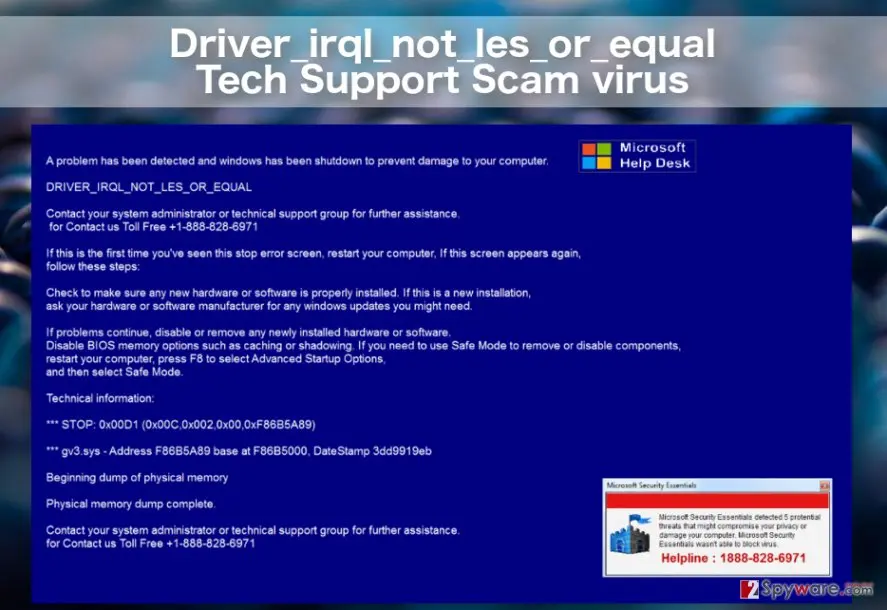
Driver_irql_not_les_or_equal virus Tech support scam virus: summary
| Detection names | No Microsoft detection name is known |
|---|---|
| Distribution | Not recorded in the old report |
| Damage | Not recorded in the old report |
| Name | Driver_irql_not_les_or_equal virus Tech support scam virus |
| Type | Tech support scam page |
| Symptoms | A fake virus warning in a browser tab and a support phone number shown on screen |
| Removal | Scan the PC with security software to find and remove the malware and anything installed with it. Fortect scans Windows for malware and repairs the system files and settings it damaged. Remove it nowTo use the full-featured product, you have to purchase a license for Fortect. The scan is free. |
Show 5 more facts
| Evidence | 6 write-ups by security sites; no sample analysed yet |
|---|---|
| Imitates | Microsoft support |
| Phone number | +1-888-496-5150 |
| First seen | 16 December 2016 |
| Facts checked | 6 October 2026 |
What the Driver_irql_not_les_or_equal virus Tech support scam virus pop-up looks like
A problem has been detected and windows has been shutdown to prevent damage to your computer. DRIVER_IRQL_NOT_LES_OR_EQUAL
Contact your system administrator or technical support group for further assistance.
for Contact us Toll Free +1-888-496-5150 If this is the first time you've seen this stop error screen, restart your computer, If this screen appears again,
follow these steps: Check to make sure any new hardware or software is properly installed.
If this is a new installation, ask your hardware or software manufacturer for any windows updates you might need.
If problems continue, disable or remove any newly installed hardware or software.
Disable BIOS memory options such as caching or shadowing. If you need to use Safe Mode to remove or disable components,
restart your computer, press F8 to select Advanced Startup Options,
and then select Safe Mode.
Technical information:
*** STOP: 0x00D1 (0x00C,0x002,0x00,0xF86B5A89)
*** gv3.sys – Address F86B5A89 base at F86B5000, DateStamp 3dd9919eb
Beginning dump of physical memory Physical memory dump complete.
Contact your system administrator or technical support group for further assistance.
for Contact us Toll Free +1-888-828-6971
Is the Driver_irql_not_les_or_equal virus Tech support scam virus warning real?
- Phone number:
+1-888-496-5150
What the Driver_irql_not_les_or_equal virus Tech support scam virus scammers want
From our report of Dec 2016 · not reviewed since
Things you should know about the Driver_irql_not_les_or_equal Tech support scam
Driver_irql_not_les_or_equal Tech support scam virus is quite lengthy, though the most precise way to define this fraudulent program.
Some users mistakenly call it a "Driver_irol_not_less_or_equal virus," but we should point out the mistake in the spelling of a word "less" in the original title. The properly-spelled variant is actually a real Windows error which shows up when computer drivers get outdated or corrupted . Otherwise, this error is known as Error code 0x000000D1.
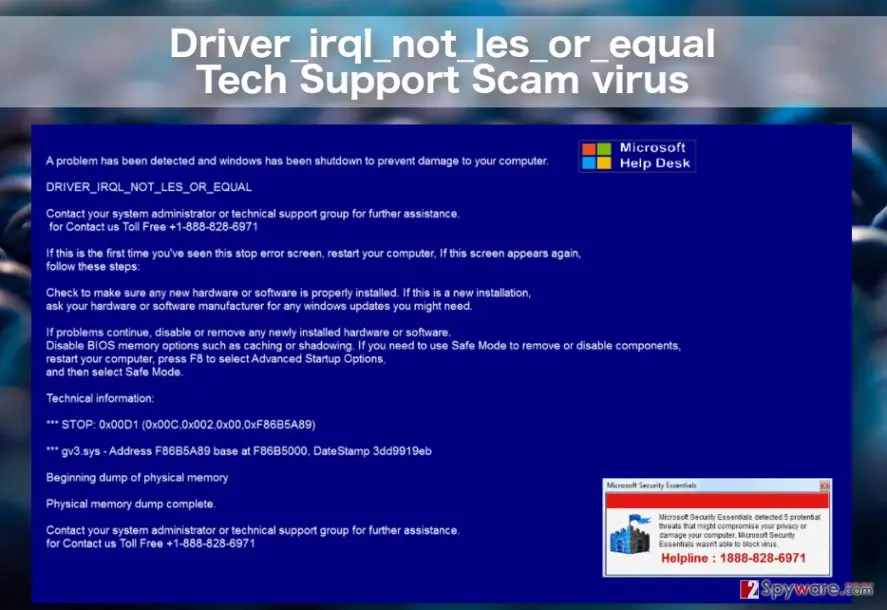
Nevertheless, Blue Screen of Death screen with misspelled Driver_irql_not_les_or_equal error signals something quite different. It indicates that your computer is probably infected with malware which tries to trick you into thinking your computer is in a critical state and you must call a support technician in order to fix it.
In reality, there is no actual emergency, and you are simply being targeted by the so-called Tech Support scammers. If this is actually the case, you are probably stuck at system boot-up with the following message:
The error might seem completely legitimate, since it convincingly includes error solution steps, such as launching the PC in Safe Mode and checking your hardware and software. In actuality, none of these actions will help you to remove the fake lock screen because the scammers have cleverly altered your Windows Registry to boot this window at startup.
The lockscreen can only be eliminated by terminating the malicious process in your Task Manager or Command Prompt, and when you do, you should proceed to the Driver_irql_not_les_or_equal removal immediately. Automatic malware-detections tools such as can be especially helpful in this process.
While a lot of the time we talk about the peculiarities of social engineering tricks used in these Tech Support Scams, rarely do we talk about the potential consequences of such attacks. Unfortunately, these can be very unpleasant.
If the victims get convinced into calling the indicated number, the scammers at the end of the line will do their best to make as much use of it as possible. They may attempt to sell you technical support contracts, shady security software or try to gain remote access to the device and install backdoors to deploy various phishing and keylogging malware on the computer without user's authorization .
Eventually, when the criminals obtain the necessary information, they may break into your bank account steal your money and completely mess up your computer to cover up their tracks. Thus, the sooner you remove Driver_irql_not_les_or_equal the better.
From our report of Dec 2016 · not reviewed since
Where do Tech Support Scams come from?
If you are an active Internet surfer, you must have visited some questionable file-sharing websites at some point of your browsing career.
It is not what security experts advise doing, but sometimes, such sites are cleverly obfuscated, so, many users end up on them completely unintendedly. On such domains, scammers usually promote their fraudulent applications, and adware creators collect advertising revenue. Here is where Tech Support Scams like Driver_irql_not_les_or_equal usually reside as well. You might unknowingly install it to your PC with fake software updates or after clicking an infected ad.
It is typical to find such malware as spam email attachments, so you should be especially careful around your email as well. Remember, that neither the infected emails, nor the corrupted download links you find online will clearly state that you are downloading Driver_irql_not_les_or_equal virus on your computer, thus, you should stay vigilant.
How to get rid of the Driver_irql_not_les_or_equal virus Tech support scam virus pop-up
The warning is a web page and your PC is not infected by it.
Close it, then remove what keeps bringing it back.
Step 1: Close the page without touching its buttons
Press Ctrl + Shift + Esc to open Task Manager, select the browser on Processes and click End task: buttons on the page, including Close and Cancel, can trigger downloads or more pop-ups. When you reopen the browser, do not restore the previous tabs.
Warning: Never call
+1-888-496-5150; Microsoft and antivirus companies do not put phone numbers in warnings.If the page opens again by itself, notifications or an extension are bringing it back, which the next steps fix. Task Manager works the same in Windows 11 and Windows 10.
Full procedure with screenshots: Close a frozen app (Task Manager, Force Quit) On uGetFix
Step 2: Scan the PC, then run the offline scan
A scan finds the parts of Driver_irql_not_les_or_equal virus Tech support scam virus that the manual steps cannot see. In Windows Security > Virus & threat protection > Scan options, start a Full scan and quarantine what it reports.
Follow it with Microsoft Defender Antivirus (offline scan) > Scan now, which restarts the PC and checks the disk while Windows and the malware are not running.
It takes about 15 minutes and works the same in Windows 11 and Windows 10. If either scan finds something, run the full scan again after removal until it comes back clean.

Windows 11: Windows Security > Virus & threat protection > Scan options. Full procedure with screenshots: Run a Microsoft Defender Offline scan
Instructions for each browser and system
The detailed steps for every browser and system this guide covers. Open the one you use.
Manual removal using Safe Mode
Important! →
Manual removal guide might be too complicated for regular computer users. It requires advanced IT knowledge to be performed correctly (if vital system files are removed or damaged, it might result in full Windows compromise), and it also might take hours to complete. Therefore, we highly advise using the automatic method provided above instead.
Step 1. Access Safe Mode with Networking
Manual malware removal should be best performed in the Safe Mode environment.
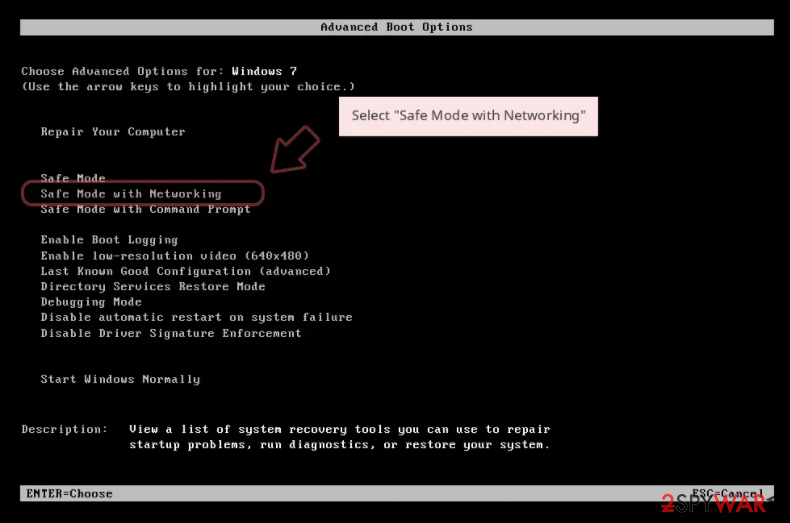
Windows 7 / Vista / XP
- Click Start > Shutdown > Restart > OK.
- When your computer becomes active, start pressing F8 button (if that does not work, try F2, F12, Del, etc. - it all depends on your motherboard model) multiple times until you see the Advanced Boot Options window.
- Select Safe Mode with Networking from the list.
Windows 10 / Windows 8
- Right-click on Start button and select Settings.
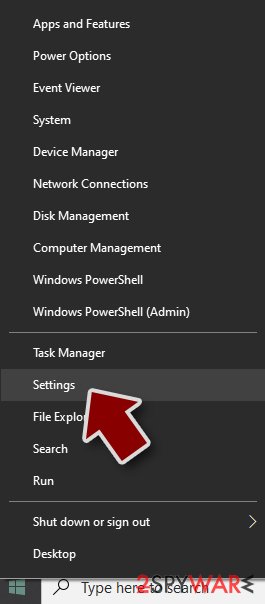
- Scroll down to pick Update & Security.
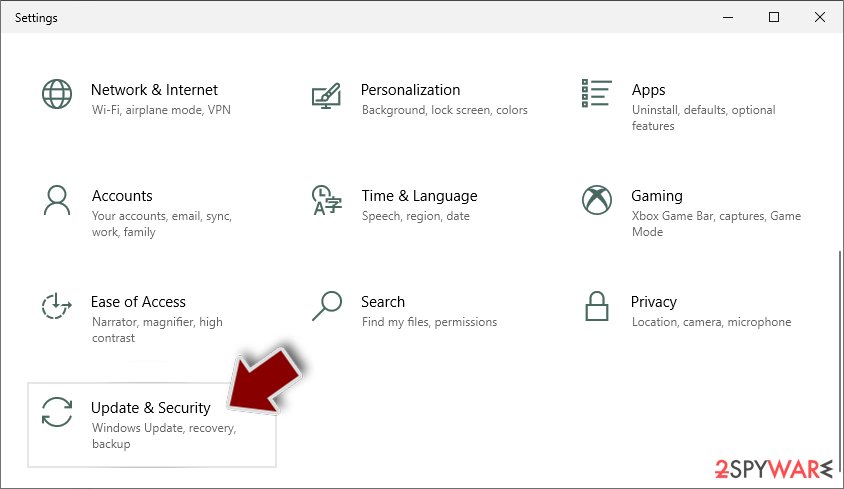
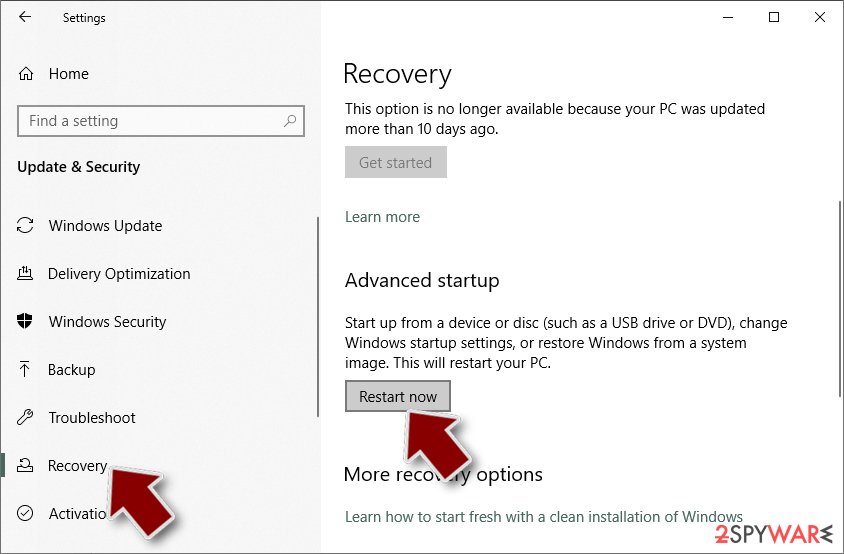
- On the left side of the window, pick Recovery.
- Now scroll down to find Advanced Startup section.
- Click Restart now.
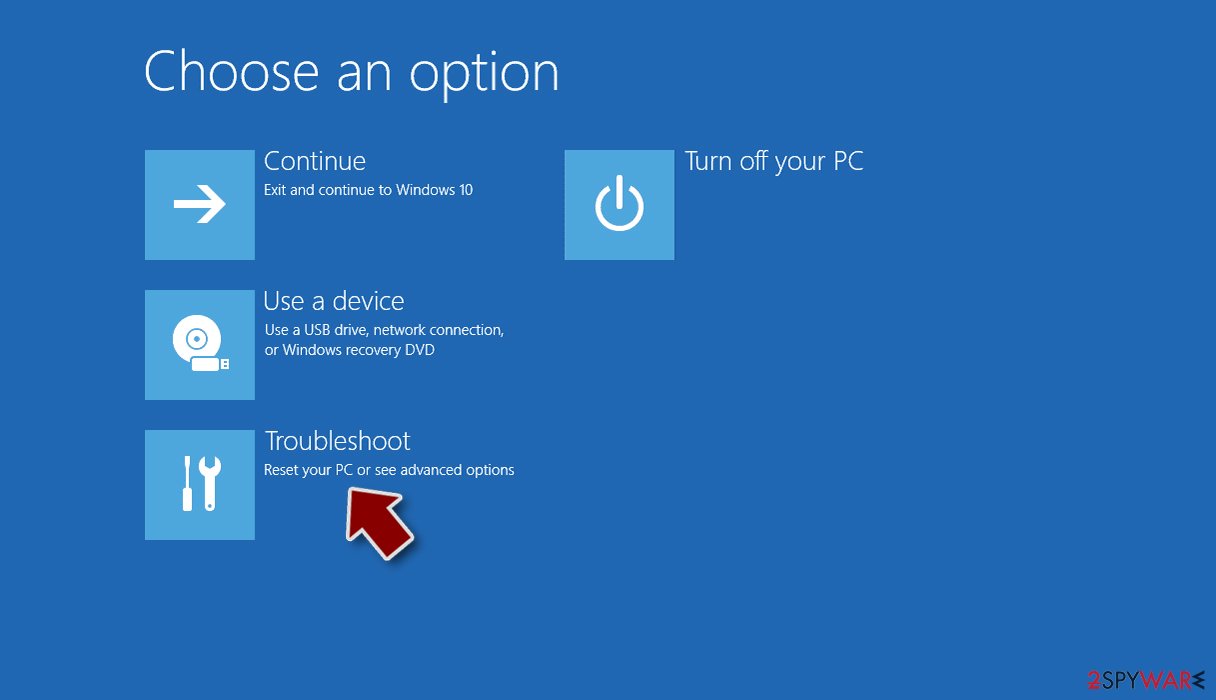
- Select Troubleshoot.
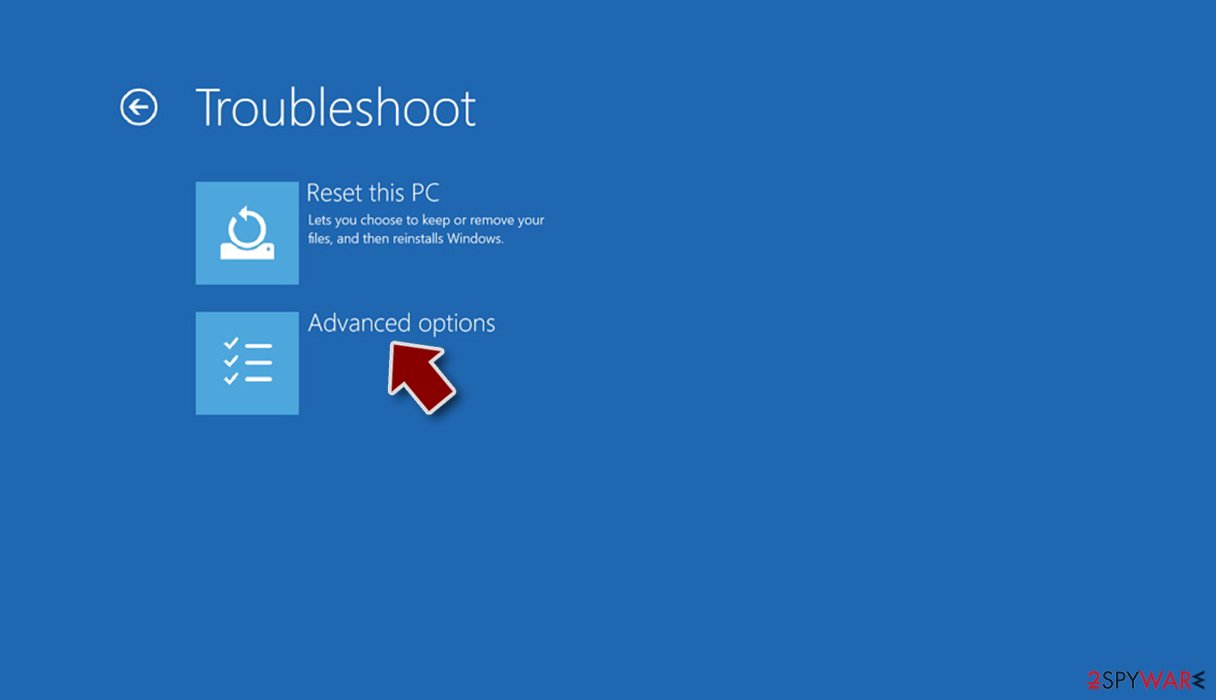
- Go to Advanced options.
- Select Startup Settings.
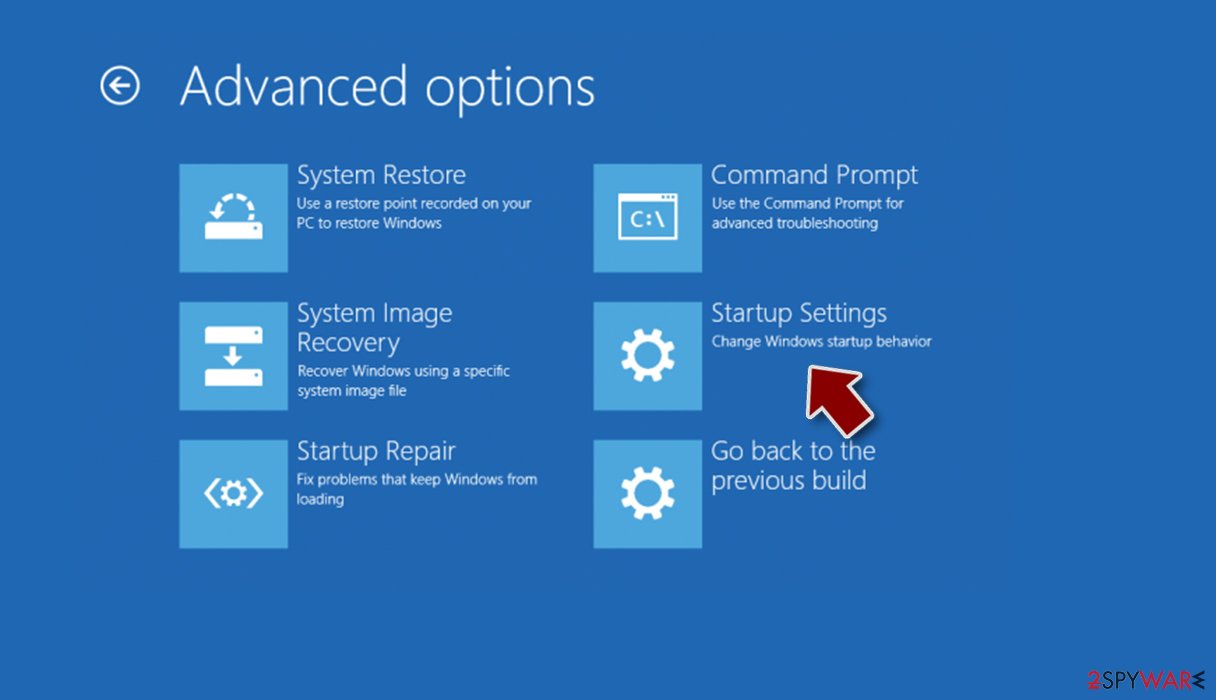
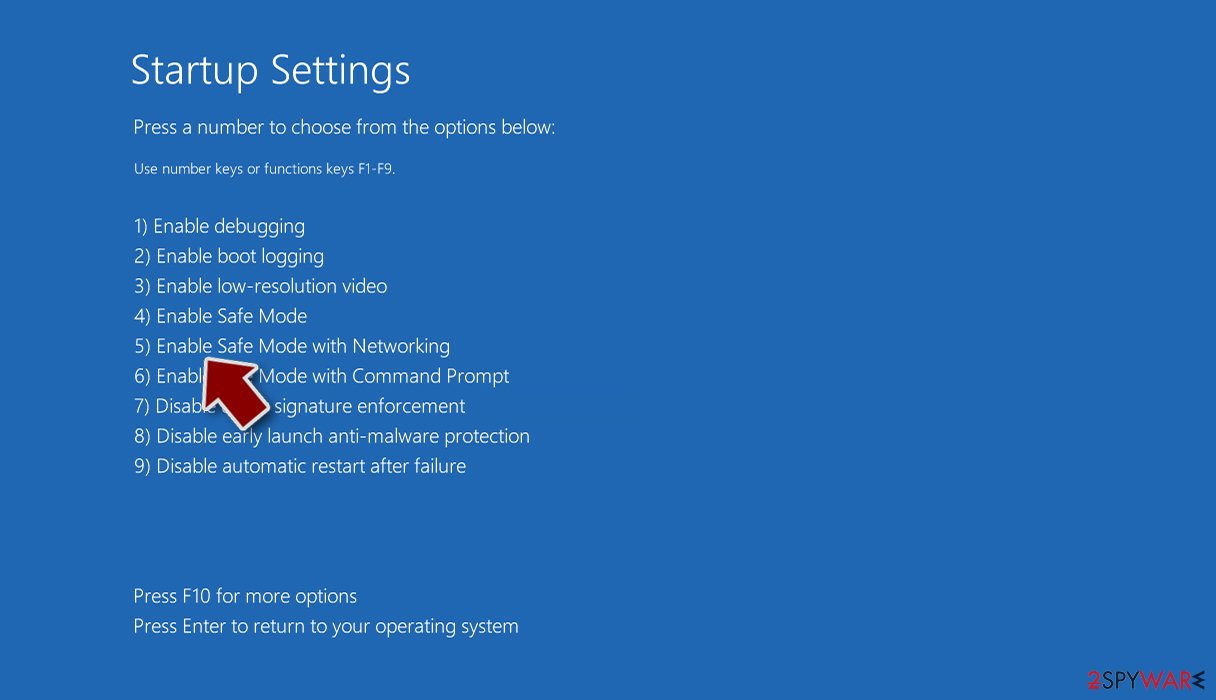
- Press Restart.
- Now press 5 or click 5) Enable Safe Mode with Networking.
Step 2. Shut down suspicious processes
Windows Task Manager is a useful tool that shows all the processes running in the background. If malware is running a process, you need to shut it down:
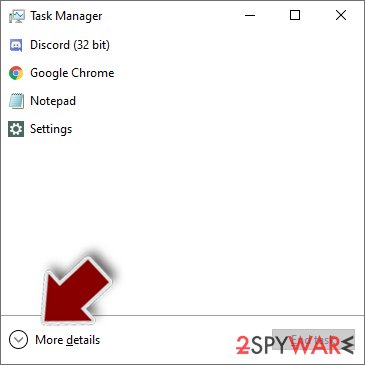
- Press Ctrl + Shift + Esc on your keyboard to open Windows Task Manager.
- Click on More details.
- Scroll down to Background processes section, and look for anything suspicious.
- Right-click and select Open file location.
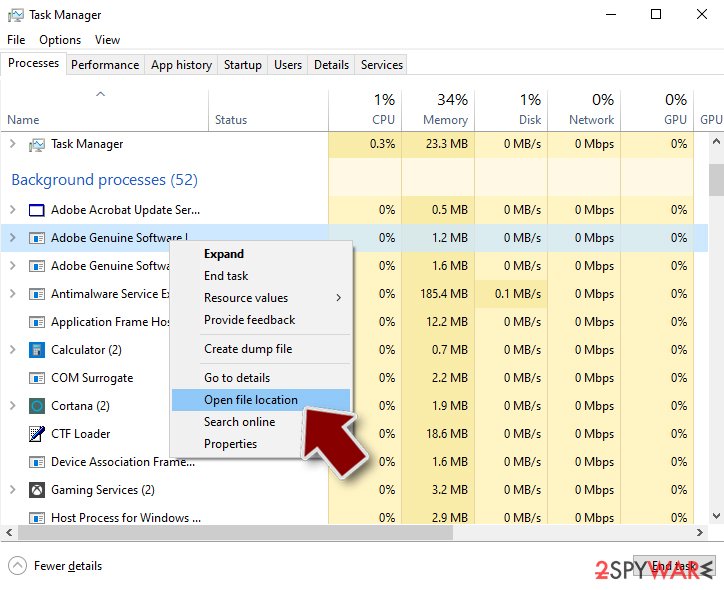
- Go back to the process, right-click and pick End Task.
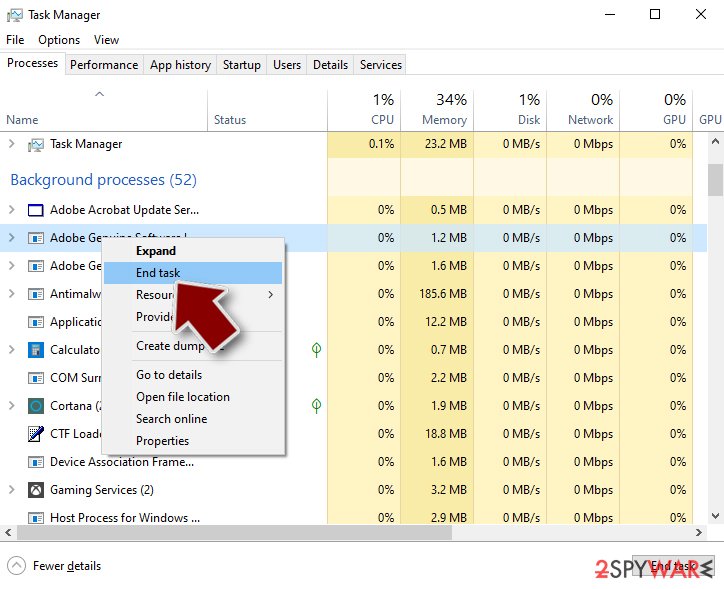
- Delete the contents of the malicious folder.
Step 3. Check program Startup
- Press Ctrl + Shift + Esc on your keyboard to open Windows Task Manager.
- Go to Startup tab.
- Right-click on the suspicious program and pick Disable.
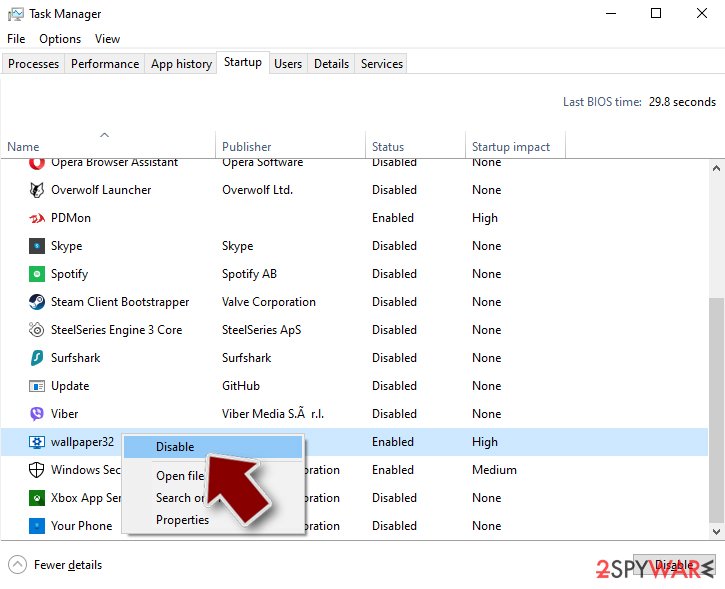
Step 4. Delete virus files
Malware-related files can be found in various places within your computer. Here are instructions that could help you find them:
- Type in Disk Cleanup in Windows search and press Enter.
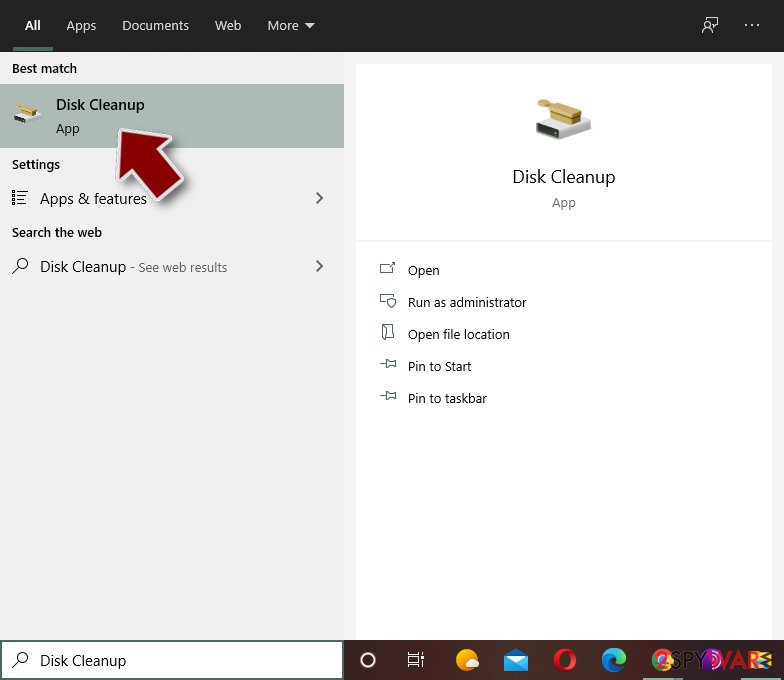
- Select the drive you want to clean (C: is your main drive by default and is likely to be the one that has malicious files in).
- Scroll through the Files to delete list and select the following:
Temporary Internet Files
Downloads
Recycle Bin
Temporary files - Pick Clean up system files.
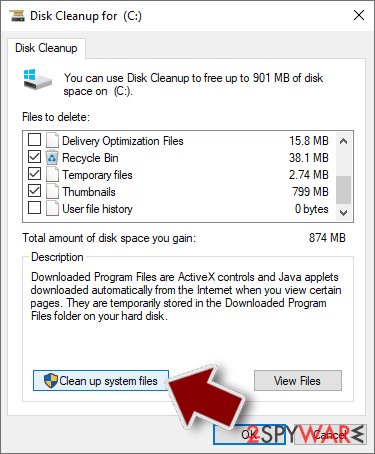
- You can also look for other malicious files hidden in the following folders (type these entries in Windows Search and press Enter):
%AppData%
%LocalAppData%
%ProgramData%
%WinDir%
After you are finished, reboot the PC in normal mode.
Choose a proper web browser and improve your safety with a VPN tool
Online spying has got momentum in recent years and people are getting more and more interested in how to protect their privacy online.
One of the basic means to add a layer of security - choose the most private and secure web browser. Although web browsers can't grant full privacy protection and security, some of them are much better at sandboxing, HTTPS upgrading, active content blocking, tracking blocking, phishing protection, and similar privacy-oriented features.
However, if you want true anonymity, we suggest you employ a powerful VPN - it can encrypt all the traffic that comes and goes out of your computer, preventing tracking completely.
Lost your files? Use data recovery software
While some files located on any computer are replaceable or useless, others can be extremely valuable.
Family photos, work documents, school projects - these are types of files that we don't want to lose. Unfortunately, there are many ways how unexpected data loss can occur:
- power cuts
- Blue Screen of Death errors
- hardware failures
- crypto-malware attack
- even accidental deletion
To ensure that all the files remain intact, you should prepare regular data backups. You can choose cloud-based or physical copies you could restore from later in case of a disaster. If your backups were lost as well or you never bothered to prepare any, can be your only hope to retrieve your invaluable files.
From our report of Dec 2016 · not reviewed since
How quick is Driver_irql_not_les_or_equal virus removal?
If you are a regular home user, do not bother eliminating Driver_irql_not_les_or_equal virus manually.
Though our experts have provided a comprehensive guide how to do it below this article, you should better leave it for the more advanced users and choose automatic Driver_irql_not_les_or_equal removal option instead.
Anti-malware utilities will come in handy if your computer is contaminated with more potentially unwanted programs since they are capable of scanning the system thoroughly. The virus detection tools will remove Driver_irql_not_les_or_equal, other malware and protect your device from malware attacks in the future.
[GI=method-1]To escape the Driver_irql_not_les_or_equal lock screen try accessing your Windows Task Manager by pressing ALT+CRTL+DEL combination on your keyboard. The, locate the suspicious process and click "End Task"
Questions about Driver_irql_not_les_or_equal virus Tech support scam virus
Is the "A problem has been detected and windows has been shutdown to prevent…" warning from Microsoft?
No. Microsoft and Windows Security never show warnings inside a browser tab, never ask you to call a phone number and never charge for a scan through a web page. The message "A problem has been detected and windows has been shutdown to prevent…" comes from a website that copies the look of a system alert.
It runs a script that shows the same alarm to every visitor, whatever computer they use. Close the tab, and if it refuses to close, end the browser in Task Manager.
Then check the browser's notification permissions and extensions, because those are the usual reason such a page reopens. If you want to know whether the PC is really clean, open the Windows Security app from the Start menu and run a scan there.
Can I trust the people at +1-888-496-5150?
No. They may sound professional, know your Windows version and show you real system screens, but all of that is part of a sales script. The aim of the people behind +1-888-496-5150 is to get remote access to your PC and money from you, sometimes repeatedly through "refund" tricks.
Anything they found was invented or normal, such as warnings in Event Viewer that every Windows PC has. Hang up, do not let them connect and do not pay. If you have already done so, disconnect the PC from the internet and work through the steps for callers in this guide.
The "A problem has been detected and windows has been shutdown to prevent…" page made me install something. What now?
Uninstall it first. Open Settings > Apps > Installed apps, sort the list by install date and remove whatever appeared when the page showing "A problem has been detected and windows has been shutdown to prevent…" told you to install it. Check the browser's extensions as well, since some pages push an extension instead of a program.
Then run a full scan with Microsoft Defender, and an offline scan if anything is found. If the program was a remote-access tool, or if you typed passwords while it was installed, change those passwords from another device and turn on two-step verification. Keep the file name and the page address; they are useful if you report the scam.
I called +1-888-496-5150 and let them connect. What now?
Act in this order. Disconnect the PC from the internet so the session ends. Uninstall the remote-access program they asked for, and check Installed apps for anything else added during the call.
From another device, change your e-mail and banking passwords and turn on two-step verification. If you paid or gave card details, call your bank today and ask to block the card and dispute the payment.
Watch for follow-up calls offering a refund; they are part of the same scam. Finally, report +1-888-496-5150 to the authorities in your country with the date and amount.
Does Microsoft support know about Driver_irql_not_les_or_equal virus Tech support scam virus?
Large brands such as Microsoft support are aware that scammers copy their names and logos, and most have pages where you can report such abuse. They do not run these pages and do not profit from the warnings themselves.
Sometimes an affiliate of an antivirus vendor sends traffic through fake alerts, which breaks the vendor's rules and gets the affiliate banned when reported. If you want to help, report the page address to the brand's security team and to your browser through its report option.
Is +1-888-496-5150 a real support number?
No. +1-888-496-5150 appears on Driver_irql_not_les_or_equal virus Tech support scam virus and is answered by a scam call centre. Microsoft and antivirus companies do not put phone numbers in security warnings, and they never ask you to call because of a web page.
If you need real support from Microsoft support, find the contact page on its official site by typing the address yourself. Scammers sometimes buy search ads for support numbers too, so check that the site you find is the real one. If the number reached you by phone instead, hang up.
The page will not close. What can I do?
Press Esc to leave full-screen mode, then close the tab. If the browser is frozen, open Task Manager with Ctrl + Shift + Esc, select the browser and click End task. When you restart the browser, do not restore tabs.
If the page loads again on start, open a new window and close the old one, then remove the page from the browser's startup settings. Restarting the PC also works. Nothing was installed by the page, so closing it by force is safe and loses nothing.
The agent knew details about my PC. Were they real?
They looked real but proved nothing. Callers from pages like Driver_irql_not_les_or_equal virus Tech support scam virus open the Windows Event Viewer, which shows harmless warnings on every PC, or run a command that lists normal system details, and present them as signs of infection. Some type alarming text into a command window themselves.
Nothing they showed you came from a real scan. If they had remote access, follow the clean-up steps anyway, because they may have installed tools while you watched. Change any password they could have seen.
Which browser settings protect against fake alerts?
Three matter most. First, notifications: set your browser to ask before allowing them, and block sites you do not trust. Second, reputation checks: SmartScreen in Edge and Safe Browsing in Chrome warn you before known scam pages load, and Firefox has its own deceptive-content protection under Privacy & Security.
Third, pop-ups and redirects: keep the default blocking on. Add a reputable ad blocker if fake alerts keep reaching you through ads on sites you use. Review the notification list every few months.
Will Fortect remove Driver_irql_not_les_or_equal virus Tech support scam virus?
Fortect scans Windows for malware and unwanted programs and repairs the system files and settings they change, and its free scan shows what it finds on your PC before you decide anything.
For Driver_irql_not_les_or_equal virus Tech support scam virus, follow the plan above as well: the browser steps take back permissions and settings that no scanner treats as a threat, and uninstalling the program that brought it removes the source.
Run Microsoft Defender's full scan and, if anything was found, its offline scan as a second opinion. If the symptoms are gone after the plan and both scans are clean, there is nothing more to do.
Sources
- Ugetfix: How to fix DRIVER_IRQL_NOT_LES_OR_EQUAL? (SCAM) (read October 6, 2026)
- FTC: How to spot, avoid and report tech support scams (read October 6, 2026)
- FTC: How to recognize, remove and avoid malware (read October 6, 2026)
- Microsoft Learn: Microsoft Defender Offline (read October 6, 2026)
- Microsoft Learn: How Microsoft names malware (read October 6, 2026)