
First computer virus in the Philippines: the ILOVEYOU worm of 2000, and what is not known
The first computer virus in the Philippines that people mean is almost always the ILOVEYOU worm, released from Manila on 4 May 2000; no source we read names an earlier Philippine virus, and none proves that it was the very first.
It is a Windows script worm from the dial-up era, so the practical answer is: never open a file called LOVE-LETTER-FOR-YOU, and scan it with Windows Security if you find one.
Facts checked October 18, 2026. Removal steps tested on Windows 11 (26H2) and checked against Microsoft's and the browser makers' current documentation.
Automatic
Get a free scan and check if your PC is infected.
Fortect finds malware, unwanted programs and the Windows damage they leave behind, and repairs it in one pass.
Programs like a file named LOVE-LETTER-FOR-YOU.TXT.vbs usually arrive in groups; a free scan lists the companions that are easy to miss.
Do it yourself · free Remove ILOVEYOU (Love Bug, Loveletter) yourself 5 steps, about 15 minutes, no software needed.
Start the steps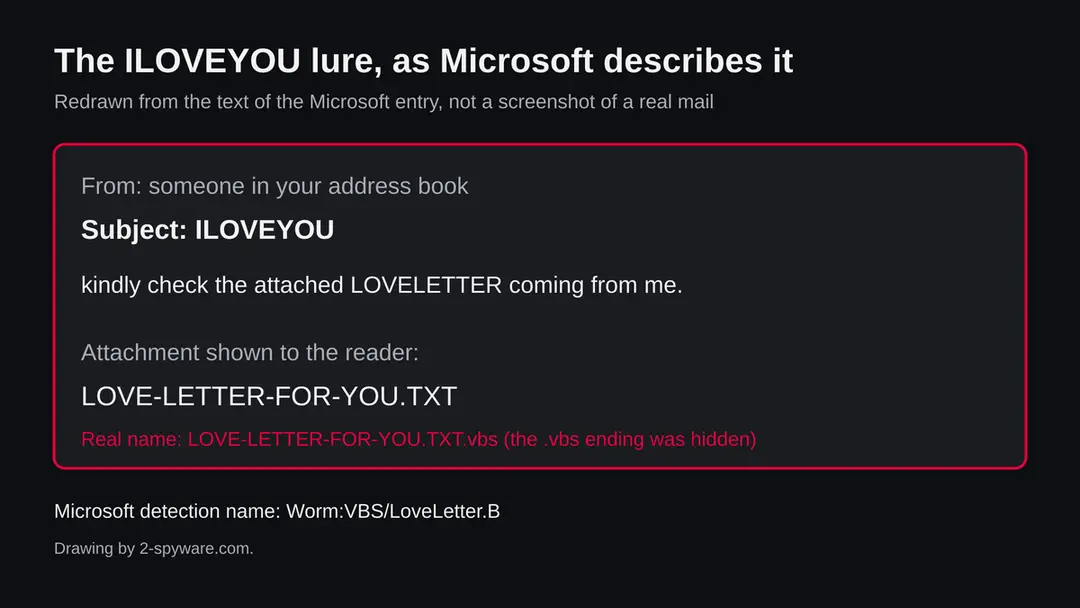
ILOVEYOU (Love Bug, Loveletter): summary
| Type | A Windows script worm (Visual Basic Script) spread by e-mail and IRC, with a password stealing trojan fetched later |
|---|---|
| Risk | Low as a history question; medium to high if a file with this name or disguise is on your PC and has run |
| Symptoms | In 2000: a mail with the subject ILOVEYOU, files overwritten with .vbs copies, music files hidden |
| How to get rid of it | Do not open it, show file endings, update Defender, run a full scan and Defender Offline, delete the file, change passwords |
| Our check (18 October 2026) | Reading only: two Wikipedia entries and one search; no sample run and no PC tested |
| First seen | 4 May 2000, released from Manila; the very first Philippine virus is not documented in the sources we read |
| Removal | Scan the PC with security software to find and remove the malware and anything installed with it. Fortect scans Windows for malware and repairs the system files and settings it damaged. Remove it nowTo use the full-featured product, you have to purchase a license for Fortect. The scan is free. |
Show 8 more facts
| Detection | Worm:VBS/LoveLetter.B (Microsoft); Microsoft also lists Virus:VBS/LoveLetter and Worm:VBS/LoveLetter!MSR as family names |
|---|---|
| File name | LOVE-LETTER-FOR-YOU.TXT.vbs and WIN-BUGSFIX.exe (the fetched trojan) |
| Not to be confused with | Brain (1986, Lahore, first PC virus) and the Melissa virus, which is not documented as a Philippine virus |
| Name | ILOVEYOU (Love Bug) |
| Evidence | 0 write-ups by security sites; details still limited |
| Distribution | Typically fake installers, cracked programs, e-mail attachments, fake "verify you are human" pages and ads for popular apps |
| Damage | Installs other malware, often several programs at once |
| Facts checked | 18 October 2026 |
Facts checked on 18 October 2026 against Wikipedia's entries for ILOVEYOU and for the Brain virus and one web search. Two further pages did not load and are not used. We ran no sample and tested no PC; the removal steps are the standard Windows Security menus and were not tried on a live infection.
Which virus was the first in the Philippines?
The answer most people want is ILOVEYOU, also called the Love Bug or Loveletter: a worm written in Manila and released on 4 May 2000. It is the first Philippine malware that the whole world heard about. Whether it was the first one ever written or met in the Philippines is a different question, and the sources we read do not answer it.
- 1
What the record confirms
Wikipedia's entry for ILOVEYOU says the worm was released on 4 May 2000, that it came from Manila, and that its author was Onel de Guzman, a former AMA Computer College student who later admitted to creating and releasing it. It spread by e-mail with the subject line ILOVEYOU and reached tens of millions of computers within ten days.
- 2
What the record does not confirm
The ILOVEYOU article does not say that this was the first virus in the Philippines. A web search for older Philippine viruses returned no reliable page that names one. One low quality page claimed the Melissa virus was the first in the country; we found no source that backs it and it does not fit the facts, because Melissa was not written in the Philippines. So the honest wording is: the best known, and the first we can document, not proven to be the very first.
- 3
Why the word first is hard to prove
Early infections were often never reported. A virus that spread on floppy disks inside a school or an office in the 1980s or early 1990s left no public record, and a record is what a claim of first needs. One of the search results made the same point: pinpointing the first virus anywhere is difficult because early cases went unreported.
- 4
What this means for you
If you are here for a school answer or a quiz, ILOVEYOU of May 2000 is the answer people give, and you can say that it is the first widely known Philippine virus. If you found a file with this name on a PC, an old disk or in an e-mail archive, read the check chapter before you open anything.
- Name
- ILOVEYOU, also called the Love Bug and Loveletter
- Type
- A worm written as a Visual Basic Script, spread by e-mail and IRC; it also fetched a password stealing trojan
- Released
- 4 May 2000, from Manila, Philippines
- Author
- Onel de Guzman, who admitted creating and releasing it
- File name
- LOVE-LETTER-FOR-YOU.TXT.vbs; Windows hid the .vbs ending so it looked like a text file
- Platform
- Windows. It does not run on a Mac or a phone, and this guide covers Windows 11 and 10 only
What ILOVEYOU (Love Bug, Loveletter) does on an infected PC
What we checked on 18 October 2026, and what we could not
There is no website to test and we ran no sample of the worm. Our check was reading: two Wikipedia entries and one web search. Two other pages we tried to open, a CERT advisory on the worm and a Wikipedia entry on the Philippine e-commerce law, did not load, so nothing in this guide rests on them.
Our reading of the sources, 18 October 2026
- ILOVEYOU came from Manila on 4 May 2000The Wikipedia entry gives the date, the origin and the author's own admission. These are the same facts the news reported in May 2000.
- It spread by e-mail to the whole address bookThe entry describes a message with the subject ILOVEYOU that was sent to every contact in the victim's address book, and a second route through IRC channels.
- It was the first virus in the PhilippinesNot stated in the entry we read, and no search result named an earlier Philippine virus. We call it the first we can document, not proven first.
- The damage figuresThe entry gives about 10 billion US dollars and about 10 percent of internet connected computers. Those are estimates made after the event, not counts, and we cannot check them.
- Current detection namesMicrosoft's entry for Worm:VBS/LoveLetter.B (published 19 January 2011, updated 15 September 2017) names the file LOVE-LETTER-FOR-YOU.TXT.vbs and the subject ILOVEYOU, and says Defender Antivirus detects it. Its search results list other family names, such as Virus:VBS/LoveLetter and Worm:VBS/LoveLetter!MSR, which we saw only as titles.
- A quiet scan or an old fileDoes not clear a PC. A copy of the worm may be harmless on a modern, updated Windows, but we did not test that, and a file with a changed name can still hold script code.
Old and well documented, but check any file you actually have The worm is a 2000 event and not a live campaign we saw. That is a reading of the record, not a test of your PC. If a file with this name is in front of you, treat it as unsafe until a scan says otherwise, and a scan that finds nothing still proves little.
From Brain in 1986 to the Love Bug in 2000
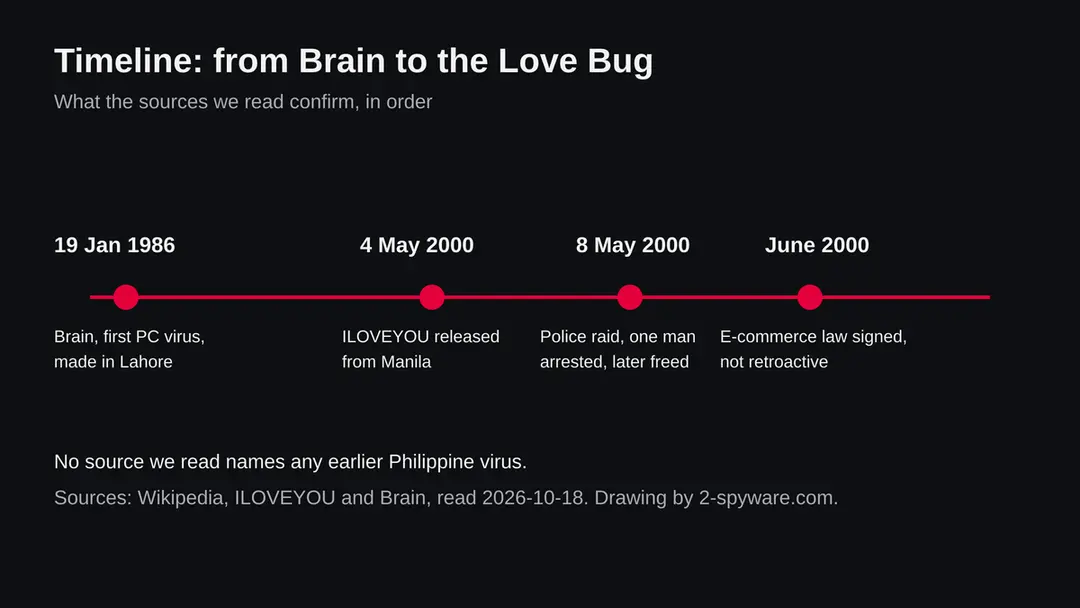
The timeline shows only dates that the sources we read give. The gap between 1986 and 2000 is not empty in real life, but the record we found is silent about the Philippines in those years.
19 January 1986
Brain, the first PC virus, appears in Lahore
Wikipedia describes Brain as considered the first computer virus for the IBM Personal Computer and compatibles. The brothers Amjad Farooq Alvi and Basit Farooq Alvi wrote it in Lahore, Pakistan. It spread on floppy disks by replacing their boot sectors and avoided hard disks. The article does not mention the Philippines, so Brain is the first PC virus in the world, not in the Philippines.
1986 to 1999
The record is silent
We found no reliable page on a Philippine virus in these years. That does not mean there was none. It means that a claim of first here would need a source we could not find, such as a news report or a study from that time.
4 May 2000
ILOVEYOU is released
The worm leaves Manila. It goes from Hong Kong to Europe and then to the United States, according to the entry, and the first infected mailboxes send it on to every contact they hold.
May 2000
Offices and governments are hit
The entry names Belgium's banking system, the UK House of Commons, where e-mail servers were shut down for two hours, and most US federal agencies. It gives 2,258 infected workstations at the US Army, and 7,000,000 e-mails received by the Veterans Health Administration.
8 May 2000
A raid and an arrest
Police raided a location and arrested the boyfriend of the author's sister. He was later released for lack of evidence. The author was charged under the Access Device Regulation Act and with malicious mischief, and prosecutors later dropped all charges.
June 2000
An e-commerce law is signed
President Joseph Estrada signed an e-commerce law in June 2000. The entry says it could not be applied to the author retroactively, which is why a law written after the event could not be used against him.
Do not mix it up: first virus, first Philippine virus, first famous one
Search results blend three different questions. They have three different answers, and only the first has a clear source.
| Question | Answer from the sources we read | How sure we are |
|---|---|---|
| First PC virus in the world | Brain, released 19 January 1986 in Lahore, Pakistan, spread on floppy disks | Well sourced in Wikipedia's entry, which says it is considered the first for the IBM PC |
| First virus from the Philippines that became known worldwide | ILOVEYOU, released 4 May 2000 from Manila | Well sourced |
| First virus ever seen in the Philippines | Unknown. No source we read names one | Not answered; do not trust a page that states it flatly |
| First Philippine law used after a virus | An e-commerce law signed in June 2000, which could not be applied to the author retroactively | One line in the ILOVEYOU entry; we could not read the law itself |
| Melissa as the first Philippine virus | One low quality web page said so; we found no source | Not supported. Melissa is a different worm |
What the worm did on a PC
ILOVEYOU was a script, not a compiled program. A reader who opened the attachment ran a few hundred lines of Visual Basic Script that copied itself, damaged files and went looking for the address book.
| Behaviour | What the source says | What it meant for the victim |
|---|---|---|
| Looked like a text file | The file was LOVE-LETTER-FOR-YOU.TXT.vbs and Windows hid the .vbs ending | People thought they were opening plain text and ran a script instead |
| Mailed itself | A message with the subject ILOVEYOU went to every contact in the address book, with the line kindly check the attached LOVELETTER coming from me | The mail came from a friend or a colleague, which is why people trusted it |
| Spread over IRC | The worm also moved through IRC channels | A second route for people who chatted on IRC |
| Overwrote files | It overwrote .vbs and .vbe files with its own code, and replaced files such as .jpg, .js, .css and .hta with worm copies ending in .vbs | Pictures and web files were lost, not only copied |
| Hid music files | Original .mp2 and .mp3 files were hidden rather than removed | The music was still on the disk but not visible |
| Fetched a password stealer | It downloaded a trojan, WIN-BUGSFIX.exe, which stole passwords. The entry says the author's main goal was to steal dial-up internet logins | The reported goal was access to internet accounts, not ransom |
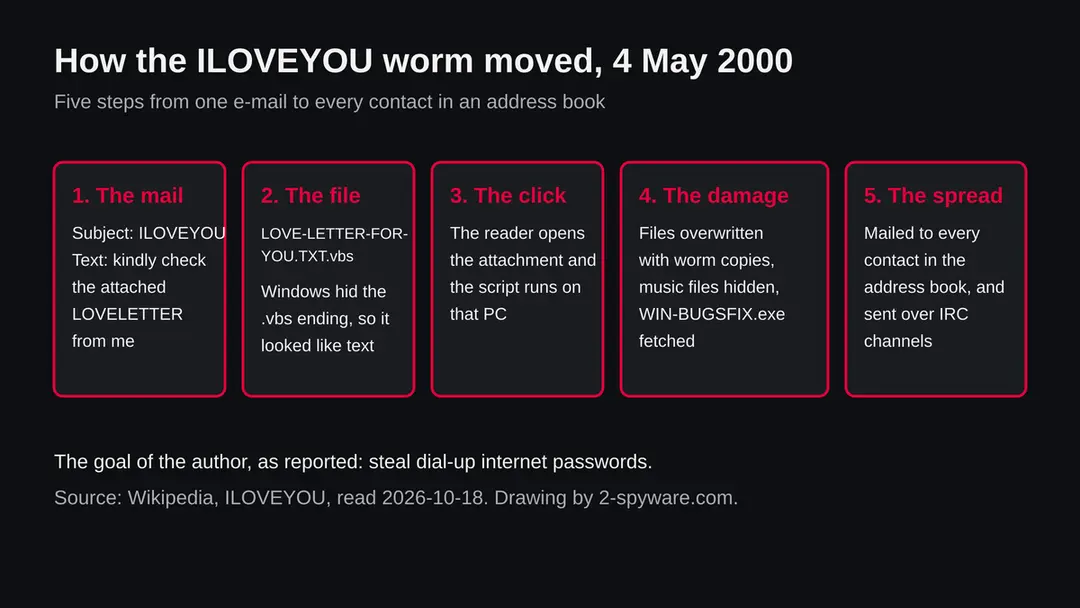
The mechanism is why the worm moved so fast. Every infected person became a sender, and every receiver had the sender's name in the From line. Ten days were enough for tens of millions of reported infections, according to the entry.
What ILOVEYOU (Love Bug, Loveletter) can steal or download
The worm itself is a 26 year old script, and a file with this name is more likely a curiosity, a school sample or a joke than a live attack. A file you did not expect that carries the same disguise is still a real danger, because the trick of a hidden ending has not gone away.
- Medium
A copy of the original script
If you run the original code on an old, unpatched PC, it can overwrite files as described above. We did not test it on a current Windows and give no claim about what happens there.
- Medium
A new file using the same trick
A file named like a text file or a picture but ending in a script or program extension is still a normal way to attack. The lesson of the Love Bug is to read the true ending.
- High
Stolen passwords
The reported aim of the original was password theft. If a script like this ran on your PC, treat the passwords you typed on it as exposed.
- Low
A file on a school or museum page
Historical sample sites exist. We did not test any of them and do not link to one. A sample you download on purpose is still a live file.
- Low
Nothing at all
If the page you read was only history, there is nothing on your PC. The care is for the case where a file is actually in front of you.
How to check the PC for ILOVEYOU (Love Bug, Loveletter)
How people got it in 2000, and how the same trick arrives now
The sources confirm two routes for the original: e-mail and IRC. The modern routes below are our description of the same trick, not a finding about ILOVEYOU.
- 1
An e-mail from someone you know
The original arrived with the subject ILOVEYOU from a contact whose own PC was infected. A message from a friend that you did not expect, with an attachment, is the oldest warning sign.
- 2
An IRC channel
The worm sent copies in IRC chat. Today the same idea shows up in chat apps and file sharing, where a friend's hacked account sends a file.
- 3
A hidden file ending
Windows can hide known file endings, so name.txt.vbs shows as name.txt. In File Explorer, open the View menu, choose Show and tick File name extensions to see the real ending.
- 4
A download from a sample site
People who study the worm sometimes download it on purpose. Do that only in a virtual machine with no network and no personal files, and not at all if you are not sure how.
Check a file or a PC for an ILOVEYOU copy
Look before you open. Everything in this chapter is a read only step until the last item. The menu names are those of Windows 11; Windows 10 is nearly the same.
- 1
Show the real file endings
Open File Explorer, choose View > Show > File name extensions. A file called LOVE-LETTER-FOR-YOU.TXT.vbs will now show .vbs at the end. A real text file ends in .txt only.
- 2
Search for the name
In File Explorer, type LOVE-LETTER in the search box at the top right and search This PC, including mail attachments you saved and downloads. A match is a reason to scan, not proof of an infection.
- 3
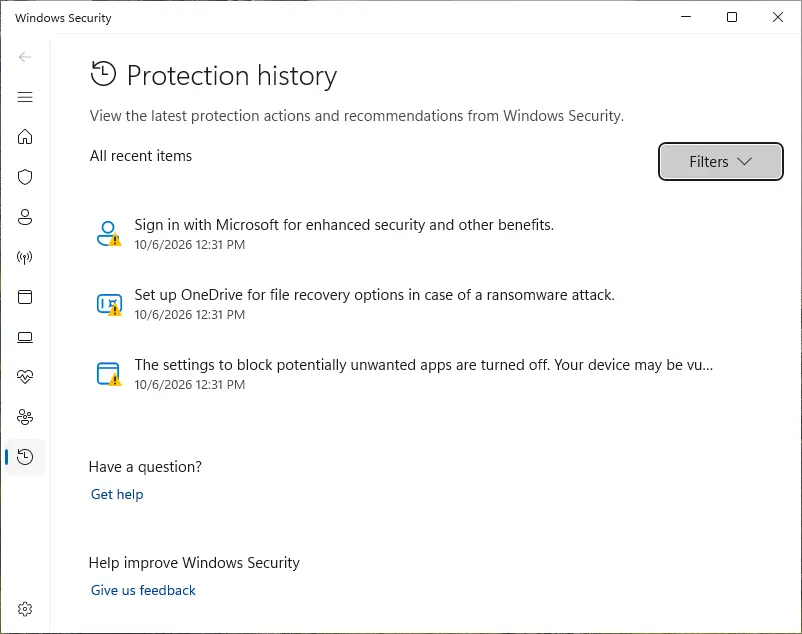
Look at Protection history
Open Windows Security > Virus & threat protection > Protection history. Note any entry with a script name, its date, its status and its path under Affected items.
- 4
Check what starts with Windows
Press Ctrl + Shift + Esc, open Startup apps and look for names you do not know. We know of no startup entry for the original worm from the sources we read, so this is a general check, not a match.
- 5
Scan the single file
Right-click the file and choose Scan with Microsoft Defender. If the option is missing, open Windows Security > Virus & threat protection > Scan options > Custom scan and pick its folder.
How to remove ILOVEYOU (Love Bug, Loveletter)
How to remove ILOVEYOU (Love Bug)
A loader's job is to install other malware, so treat the PC as infected with more than one program until the scans are clean.
Step 1: Delete scheduled tasks that bring it back
Open Task Scheduler from the Start menu and click Task Scheduler Library. Select each task you do not recognise and read the Actions tab:
- a task that starts a file in
%AppData%or%Temp% - runs
powershellwith a long encoded line - opens a web address belongs to ILOVEYOU (Love Bug) or a similar program
Right-click such a task and choose Delete, and check the subfolders too. Leave tasks from Microsoft, your PC's maker and programs you use. Task Scheduler is the same in Windows 11 and Windows 10.

Windows 11: Task Scheduler Library, the task selected, the Actions tab shows the file it runs. Full procedure with screenshots: Remove what malware leaves behind in Windows
- a task that starts a file in
Step 2: Remove it from startup
Whatever ILOVEYOU (Love Bug) installed usually starts with Windows.
Open Task Manager with Ctrl + Shift + Esc, go to Startup apps in Windows 11 or the Startup tab in Windows 10, and disable what you do not know, starting with entries that have an empty Publisher column.
Open file location on the right-click menu shows the file, which helps you decide and tells you what to delete later. Disabling is safe: if something you need stops working, switch it back on.
Full procedure with screenshots: Stop apps from opening at startup On uGetFix
Step 3: Delete the folders left behind
What the uninstaller leaves behind is usually in the user folders. Open File Explorer, switch on View > Show > Hidden items (in Windows 10 View > Hidden items), and go through
%LocalAppData%,%AppData%, %ProgramData% and the two Program Files folders.Sort by Date modified and delete folders that appeared together with the problem and belong to no program you use. Folders with random names that hold
.exe,.dll, .js or .ps1 files are the strongest sign.Full procedure with screenshots: Remove what malware leaves behind in Windows
Step 4: Scan the PC, then run the offline scan
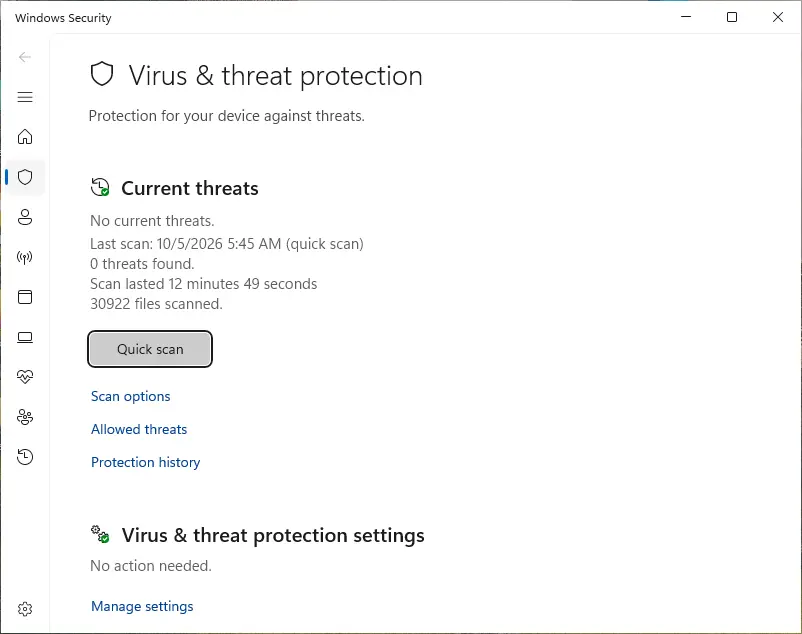
Open Windows Security > Virus & threat protection > Scan options, run a Full scan and remove everything it finds. Then select Microsoft Defender Antivirus (offline scan) and click Scan now: the PC restarts and scans before Windows loads, which finds files that hide while Windows runs.
Save your work first, because the offline scan takes about 15 minutes. Both scans are built into Windows 11 and Windows 10, and a second scanner from another vendor is a useful extra opinion.

Windows 11: Windows Security > Virus & threat protection > Scan options. Full procedure with screenshots: Run a Microsoft Defender Offline scan
Step 5: Change passwords from another device and sign out other sessions
Assume that the passwords saved in this PC's browsers, and the accounts that were open in them, are known to the attacker. From a phone or a clean computer, change the e-mail password first, then banking, shopping, social and gaming accounts.
Use each service's option to sign out of all other sessions, because stolen cookies keep a session open even after a password change. Turn on two-step verification on each account. Wait with the infected Windows 11 or Windows 10 PC until the scans are clean.
Full procedure with screenshots: Turn on two-step verification / secure a hacked account
Remove a copy from Windows 11 and Windows 10
Stop as soon as a scan from outside Windows is clean and the file is gone. We did not run these steps against a live infection. They follow the standard Windows Security menus and the general advice of the sources we used in similar guides.
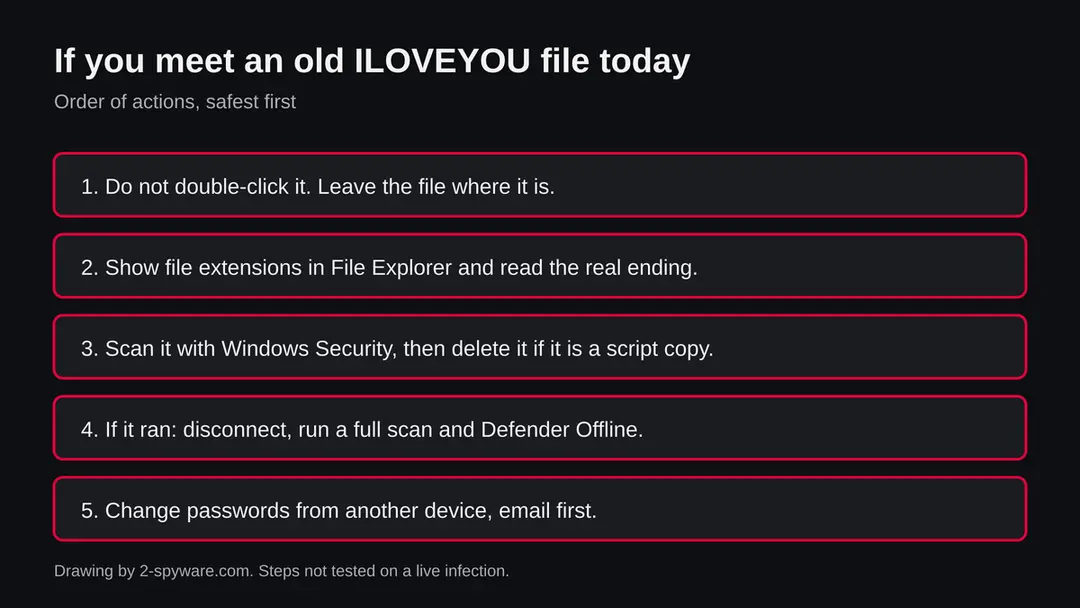
- 1
Do not open it
Do not double-click the file, and do not open it with a script host. If it came by e-mail, do not reply and do not forward it, because forwarding is how the worm spread.
- 2
Disconnect if it already ran
If you opened it, turn off Wi-Fi or unplug the cable. Copy your documents and pictures, not programs, to an external drive that you unplug afterwards.
- 3
Update the definitions
Open Windows Security > Virus & threat protection > Protection updates > Check for updates, so the scan uses today's rules.
- 4
Run a full scan
In Windows Security > Virus & threat protection > Scan options, choose Full scan and Scan now. A quick scan can miss a script saved in an unusual folder.
- 5
Run Microsoft Defender Offline
In the same Scan options page choose Microsoft Defender Offline scan and Scan now. The PC restarts, so save your work first and suspend BitLocker if it is on.
- 6
Delete the leftovers
Delete the file that started it and any .vbs copy of your pictures or web files that sits where an original used to be. Do this only after the scan, and keep a backup of the folder before you delete.
- 7
Update Windows and change passwords
Open Settings > Windows Update and install everything. Then change passwords from another device, email first, and turn on two-step sign-in.
After removal: passwords, accounts and prevention
Accounts come next
Because the PC showed A file named LOVE-LETTER-FOR-YOU.TXT.vbs in the list of installed apps, a sign of a program that could read browser data, the clean-up is only half of the work. The other half happens in your online accounts.
Change passwords from a clean device, beginning with e-mail; sign out of all sessions; check forwarding rules and recovery phone numbers; and turn on two-step verification with an authenticator app or a passkey. Ask your bank to replace cards saved in the browser.
Why the order matters and what to check in each account: secure your accounts after malware.
If it ran: what to do about your accounts
The original aimed at logins, so the accounts matter more than the files.
- 1
Change passwords from another device
Start with email, then banking, then everything else. Use a phone or a different PC, not the one that ran the file.
- 2
Warn your contacts
A worm that mails itself sends from your address. Tell the people in your address book that a message from you may have been sent without your knowledge, and ask them not to open it.
- 3
Sign out everywhere
Use the sign out of all sessions option in your Google, Microsoft and social accounts.
- 4
Check your money
Look at card statements and any online wallets for payments you did not make.
- 5
Scan again in a week
A clean scan today does not clear a file that was not yet running. Run a full scan and a Defender Offline scan a week later.
What the Love Bug taught, and still holds
The attack worked because people trusted a sender and could not see a file ending. Both problems are fixable in a minute.
Do
- Show file name extensions in File Explorer and read the last ending of every attachment.
- Keep Real-time protection on. Microsoft Defender is built into Windows 11 and 10.
- Install Windows Update monthly, and update your mail app and browser.
- Ask a sender by phone or chat before opening an attachment you did not expect, even from a friend.
- Keep a backup of documents on a disk you unplug, such as File History or OneDrive.
- Study old samples only in a virtual machine with no network and no personal files.
Don't
- Do not open attachments ending in .vbs, .js, .exe or .scr unless you know exactly what they are.
- Do not forward a suspect message to warn friends; report it instead.
- Do not choose Allow on a Defender alert to make it go away.
- Do not download virus samples to your everyday PC.
- Do not trust a message only because it is signed with love.
Questions about ILOVEYOU (Love Bug, Loveletter)
What was the first computer virus in the Philippines?
The one people mean is ILOVEYOU, a worm released from Manila on 4 May 2000 by Onel de Guzman, a former AMA Computer College student who later admitted it.
It is the first Philippine virus that became known worldwide. No source we read says it was the very first virus ever seen in the country, and we found none that names an earlier one.
Early infections were often never reported, so a flat claim of first would need a source we do not have. The safe wording is that it is the best known and the first we can document.
What was the ILOVEYOU virus?
ILOVEYOU, also called the Love Bug or Loveletter, was a Windows worm written as a Visual Basic Script. It arrived by e-mail with the subject ILOVEYOU and an attachment named LOVE-LETTER-FOR-YOU.TXT.vbs, and it sent itself to every contact in the victim's address book.
It also moved through IRC channels, overwrote files and fetched a password stealing trojan called WIN-BUGSFIX.exe. Strictly it is a worm, not a classic virus that infects other programs, but most people call it a virus.
Who created the first computer virus in the Philippines?
The author of ILOVEYOU is on record as Onel de Guzman, a former AMA Computer College student, who later admitted creating and releasing the worm. Four days after the release, on 8 May 2000, police arrested the boyfriend of his sister, who was freed for lack of evidence.
De Guzman was charged under the Access Device Regulation Act and with malicious mischief, and prosecutors later dropped all charges. We name no one else, because the other names we saw came from pages we did not read.
Was ILOVEYOU the first computer virus in the world?
No. The first virus for the IBM PC is considered to be Brain, released on 19 January 1986 in Lahore, Pakistan, by the brothers Amjad Farooq Alvi and Basit Farooq Alvi, according to Wikipedia.
It spread on floppy disks by replacing their boot sectors. ILOVEYOU came fourteen years later and spread by e-mail. The Love Bug is famous for how fast it moved, tens of millions of reported infections in ten days, and not for being first.
Why was nobody convicted for ILOVEYOU?
According to Wikipedia, the author was charged under the Access Device Regulation Act and with malicious mischief, and prosecutors later dropped all charges. An e-commerce law was signed by President Joseph Estrada in June 2000, but it could not be applied to the author retroactively.
We did not read the prosecutors' reasons or the text of the law, so we cannot say more than that. The case is often cited as a reason countries wrote computer crime laws.
How much damage did the ILOVEYOU virus cause?
Wikipedia gives an estimate of about 10 billion US dollars and says that about 10 percent of internet connected computers were hit. The same entry gives examples:
- 2,258 infected workstations at the US Army
- 7,000,000 e-mails received by the Veterans Health Administration
- House of Commons e-mail servers shut down for two hours
- trouble in Belgium's banking system
These are estimates made afterwards, not exact counts, and we cannot check them ourselves.
Can ILOVEYOU infect Windows 11 or Windows 10 today?
We do not know, because we did not test it and found no source that did. It is a Visual Basic Script from 2000, and Windows can still run such scripts. Treat any copy as unsafe.
Do not open it, scan it with Windows Security, and run it only in a virtual machine with no network if you study it. The disguise it used, a hidden file ending, still works on any PC that hides known file endings, so showing them in File Explorer is worth doing today.
How do I know if a file is a disguised script?
Look at the last ending after turning file endings on. In File Explorer on Windows 11, choose View, then Show, then File name extensions. A file that looks like name.txt may really be name.txt.vbs, and the last ending is the true one.
Endings such as .vbs, .js, .exe and .scr run code. A picture or a text file never has one of those at the end. If you are unsure, right-click the file, choose Scan with Microsoft Defender, and do not open it until the result is back.
Is it safe to download the ILOVEYOU virus to study it?
Not on your everyday PC. A sample is a live file and we did not test any sample site, so we link to none. Researchers study malware in a virtual machine with no network, no shared folders and no personal files, and delete the machine afterwards.
If you only want to learn how it worked, the facts in this guide, the Wikipedia entry and the timeline are enough, and you need no file for a school report.
Will Fortect remove ILOVEYOU (Love Bug)?
Fortect scans Windows for malware and unwanted programs and repairs the system files and settings they change, and its free scan shows what it finds on your PC before you decide anything.
For ILOVEYOU (Love Bug), follow the plan above as well: the browser steps take back permissions and settings that no scanner treats as a threat, and uninstalling the program that brought it removes the source.
Run Microsoft Defender's full scan and, if anything was found, its offline scan as a second opinion. If the symptoms are gone after the plan and both scans are clean, there is nothing more to do.
Sources
- Wikipedia: ILOVEYOU (read October 18, 2026)
- Wikipedia: Brain (computer virus) (read October 18, 2026)
- Microsoft Security Intelligence: Worm:VBS/LoveLetter.B threat description (read October 18, 2026)