
com.google.android.googlequicksearchbox referral in Google Analytics: not spam
com.google.android.googlequicksearchbox is the package name of the Google app for Android, and in Google Analytics it marks real visitors who tapped your page in Discover or in a search made in that app. It is not referral spam: keep the visits, and move them out of Referral with a GA4 custom channel group.
Facts checked October 9, 2026. Steps checked against Apple's and Google's current documentation and the reports we cite. We have not run the app or the link on a phone ourselves.
Do it yourself · free Remove googlequicksearchbox yourself 6 steps, about 18 minutes, no software needed.
Start the steps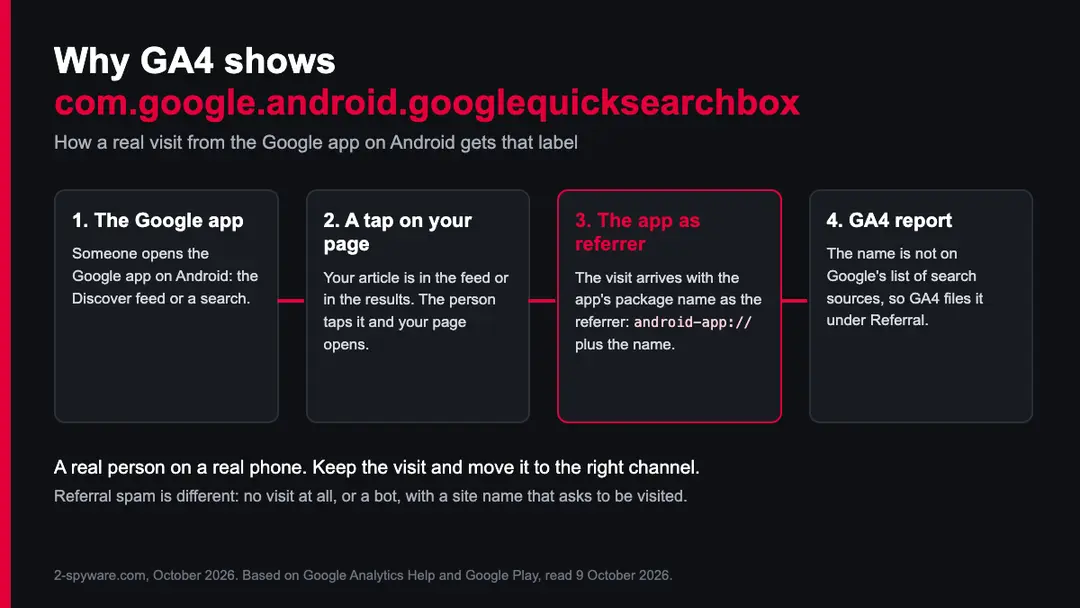
Googlequicksearchbox: summary
| Type | Genuine Google app for Android (package name), shown as a traffic source in GA4; not referral spam |
|---|---|
| Risk | None for your site: the visits are real readers. The only cost is that GA4 counts them as Referral instead of search |
| Symptoms | com.google.android.googlequicksearchbox / referral in Traffic acquisition, android-app:// referrers in logs, spikes on Discover days |
| How to get rid of it | Nothing to remove. Create a GA4 custom channel group that moves the rows into Organic Search or their own channel |
| Our check (9 October 2026) | Google's GA4 source list and channel rules, Google Play listing; no site to test |
| First asked about on our site | 2016 |
Show 7 more facts
| Publisher | Google LLC |
|---|---|
| Detection names | None: it is Google's genuine app, so Microsoft Defender, Google Play Protect and other scanners have nothing to flag |
| Where it comes from | Taps on links in the Google app: the Discover feed and searches made in the app |
| File name | com.google.android.googlequicksearchbox (an Android package name, not a Windows file) |
| Distribution | Preinstalled on most Android phones and updated through Google Play; not part of Windows |
| Damage | None from the genuine app; a copy from a download site or a lookalike app is a separate risk |
| Facts checked | 9 October 2026 |
Facts checked on 9 October 2026 against Google Analytics Help, Google's GA4 source list, Google Search Central and the Google Play listing. No site was tested, because the name belongs to an app, not a website.
What the googlequicksearchbox file is
What com.google.android.googlequicksearchbox is
It is the package name of the Google app for Android, published by Google LLC. Every Android app has such a name, and this one is the ID in the app's own Google Play address. When someone taps a link to your site inside the Google app, Android can pass that name along as the referrer, and your analytics shows it as a traffic source.
- 1
Someone opens the Google app
On most Android phones the Google app runs the search bar on the home screen and the Discover feed. People use it to search, to scroll Discover, or to open a result they asked for by voice.
- 2
They tap a link to your site
Your article is in the Discover feed or in the results. A tap opens your page, often inside the app's own browser view rather than in Chrome.
- 3
The app names itself as the referrer
The page loads with a referrer in the form
android-app://com.google.android.googlequicksearchbox/, which is how Android describes a visit that an app started. - 4
GA4 sorts the visit
GA4 reads the source as the package name and the medium as referral. Google's list of search sources does not contain this name, so the default channel group files the visit under Referral.
- Package name
com.google.android.googlequicksearchbox, the Google app for Android- Publisher
- Google LLC, listed on Google Play under that ID
- What it sends you
- People from Discover and from searches made in the app
- In GA4
- Source com.google.android.googlequicksearchbox, medium referral, channel Referral
- Is it spam
- No. Each row is a real visit from a phone that runs Google's own app
What we checked for this guide
We did not need to visit a suspicious site here, because there is no site: the name belongs to an app. We checked how GA4 sorts the traffic against Google's own documents and its published list of sources.
Our check, 9 October 2026
- Owner of the nameGoogle Play lists the Google app by Google LLC under the ID com.google.android.googlequicksearchbox.
- GA4 source listGoogle's spreadsheet of default channel sources has google and google-play as search sources. The Google app's package name is not on it.
- Channel ruleGA4 puts traffic in Organic Search only when the source is on that list or the medium is organic. A referral medium lands in Referral.
- Your own propertyWe cannot see your GA4 data. The five checks below tell you whether your rows match the genuine pattern.
- Lookalike namesSpammers have used Google names before. A source that only resembles the package name, or ends in a web domain, is not this app.
Genuine traffic, wrong channel The name belongs to Google's own app and brings real visitors. The only problem is that GA4 counts them as Referral instead of search.
How to check the googlequicksearchbox file
How it differs from referral spam
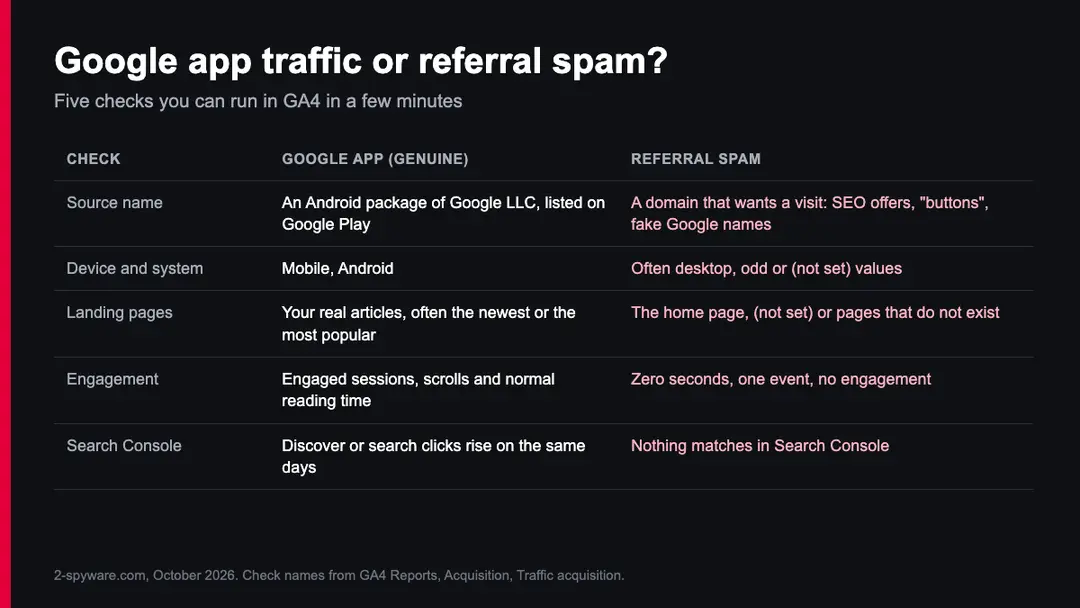
Referral spam is fake traffic made to get your attention: the spammer wants you to look up the strange domain in your reports and visit it. The Google app sends people, not hits. The table and the picture below show what to look at.
| Google app traffic | Referral spam | |
|---|---|---|
| Source | An Android package of Google LLC | A web domain such as an SEO offer, a share button or a fake Google name |
| Device | Mobile, Android | Often desktop, or values that make no sense |
| Landing page | Your real articles | The home page, (not set) or a page your site does not have |
| Engagement | Engaged sessions and normal reading time | Zero seconds and a single event |
| Search Console | Discover or search clicks on the same days | Nothing in Search Console matches |
Real spam cases on our site show the other side. RankSonic.net, Rankings-Analytics.com, Get-Your-Social-Buttons.info and Sharebutton.to are domains that pushed their own name into reports. Secret.google.com borrowed a Google name, which is why a name alone is not proof.
GA4 also drops traffic from known bots and spiders on its own, using Google's research and the IAB's International Spiders and Bots List, and you cannot turn that off. Ghost hits that never touched your site were common in Universal Analytics; with GA4 they are much rarer, and the Google app was never one of them.
Old advice: Universal Analytics filters no longer exist
Many pages still tell you to build an advanced view filter that rewrites the referral to organic. Those filters lived in Universal Analytics, and Universal Analytics is gone.
2016
Readers first asked us
Readers asked us whether com.google.android.googlequicksearchbox was referral spam. The answer then was the same as now: it is the Google app.
1 July 2023
Universal Analytics stopped processing
Standard Universal Analytics properties stopped processing new data. Analytics 360 properties got an extension.
July 2024
Universal Analytics shut down
Google shut Universal Analytics down. The interface, the API and all old data became unavailable, and view filters went with them.
Now
GA4 uses channel groups
GA4 has no view filters that rewrite a source. The tool for this job is a custom channel group, described in the plan below.
Do
- Leave the data as it is and change how it is grouped, with a custom channel group.
- Write down the date you made the change, so later reports are read correctly.
Don't
- Add the name to List unwanted referrals: that setting is for your own payment and login domains, and it hides the source, so these visits stop being counted as search or referral at all.
- Block the visits on your server: you would turn away real readers from Google.
- Report it as spam to Google: there is nothing to report.
Seeing the same name on your phone
The name also appears on phones, in error messages, battery lists and the microphone indicator. On a phone it means the same thing: the Google app, which is part of most Android phones and is not a virus.
| What you see | What it means | What to do |
|---|---|---|
| "Google keeps stopping" or "com.google.android.googlequicksearchbox has stopped" | The Google app crashed, often after an update | Open Settings > Apps > Google > Storage and tap Clear cache, then update the app in Google Play |
| The microphone or camera dot names the Google app | You or a hotword such as Hey Google started the app, or Lens is open | Open Settings > Apps > Google > Permissions and set the microphone or camera to Ask every time or Don't allow |
| High battery use by Google | Discover, voice and searches in the background | Check Settings > Battery > Battery usage, and turn off the features you do not use |
| A copy from outside Google Play | An APK from a download site, which may be changed | Remove it and reinstall the Google app from Google Play |
You can turn the app off in Settings > Apps > Google > Disable on many phones, but the home screen search bar and Discover stop working with it. A real problem is a copy that came from a download site, or an app with a lookalike name that asks for accessibility access. Our guide to Android malware covers that case.
Find it in your GA4 reports
Look at the rows before you change anything. Five minutes in the Traffic acquisition report shows whether the visits look like real people on Android phones.
- 1
Open Traffic acquisition
In GA4 open Reports > Acquisition > Traffic acquisition. Change the first column from Session default channel group to Session source / medium.
- 2
Find the row
Type
googlequicksearchboxin the search box above the table. You should see com.google.android.googlequicksearchbox / referral. - 3
Add device and system
Click the plus sign next to the dimension and add Device category, then try Operating system. Genuine rows are mobile and Android.
- 4
Look at engagement
Check Engaged sessions and Average engagement time per session. Real readers stay and scroll; spam rows show zero.
- 5
Compare with Search Console
In Search Console open Performance > Discover for the same dates. When Discover clicks and this row rise together, the visits come from the feed.
Some visits from the app reach GA4 as google / organic instead, when the app passes Google's web address rather than its own package name. That is why the row can be small on one site and large on another: it depends on how many of your readers find you in Discover and in the app.
Where googlequicksearchbox comes from
Google says Discover is part of Google Search: a feed that shows people content linked to their interests, based on their Web and App Activity. On Android the feed lives in the Google app, so a Discover click is the most common way this name reaches your reports.
| Where the reader was | What GA4 often shows | Where to confirm it |
|---|---|---|
| Discover feed in the Google app | com.google.android.googlequicksearchbox / referral | Search Console, Performance, Discover |
| A search typed or spoken in the Google app | The same row, or google / organic | Search Console, Performance, Search results |
| Discover in Chrome on Android | Often google / organic or (direct) | Search Console, Performance, Discover (it includes Chrome) |
| Google search in a normal browser | google / organic | Search Console, Performance, Search results |
- Low
Sudden spikes
Discover traffic jumps when one article is picked up and drops a few days later. Google calls Discover traffic less predictable than search and advises treating it as an addition to search.
- Low
Short visits
Feed readers often read one article and leave. That lowers pages per session, but it is normal reading, not bot behaviour.
- Medium
Wrong decisions
If the row stays under Referral, your search numbers look smaller than they are. A content team may then credit the wrong channel.
What to do with googlequicksearchbox
Nothing needs removing.
These visits come from people using the Google app on Android phones. The steps below keep them and move them out of Referral, so your search and Discover numbers are complete.
Step 1: Check the rows first
Open Reports > Acquisition > Traffic acquisition and switch the dimension to Session source / medium. Search for googlequicksearchbox and add Device category as a second dimension. Genuine rows are mobile Android visits with engaged sessions on your real pages.
If you see desktop visits, zero engagement or pages you do not have, you are looking at a different source, and the spam guides above apply instead.
Five checks that separate real Google app visits from referral spam in a GA4 report. Step 2: Create a custom channel group
Go to Admin > Data display > Channel groups and click Create new channel group. GA4 starts the new group as a copy of the default one, so all your other channels stay as they were.
Give it a clear name, for example Channels with Google app. You need the Editor role or higher on the property, and a standard property can hold two custom groups.
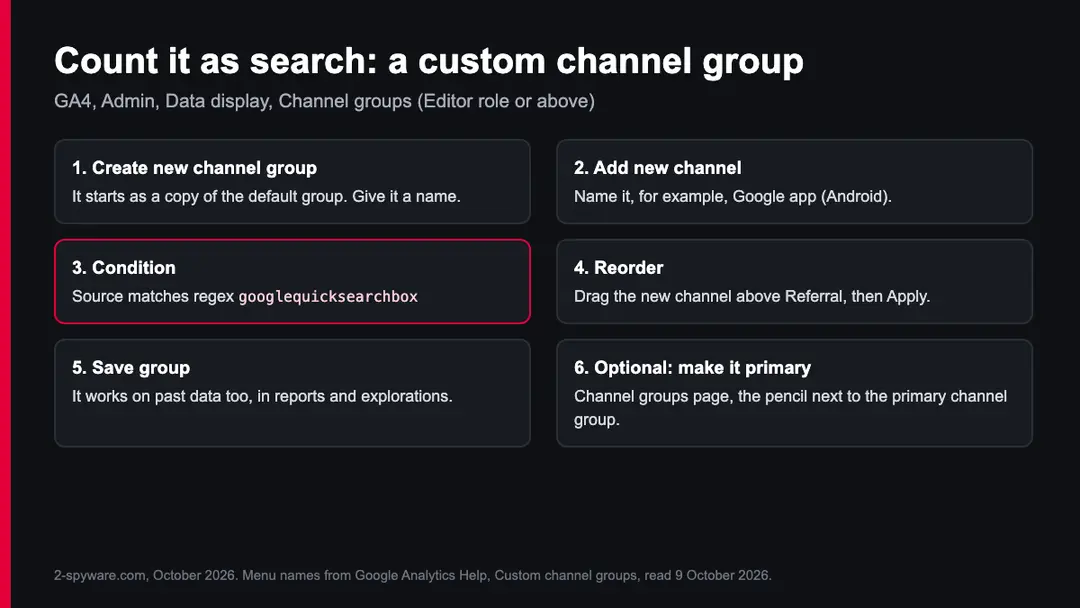
The custom channel group in GA4, from Admin to Save group, with the regex condition for the Google app. Step 3: Add a channel for the Google app
Click Add new channel and name it Google app (Android), or Organic Search if you would rather merge it. Click Add condition group and choose Source with matches regex, then enter googlequicksearchbox.
Save the channel. Matching on this part of the name also catches the rows that carry the full android-app address.
Step 4: Move it above Referral
Click Reorder and drag the new channel above Referral, then click Apply. GA4 puts each visit in the first channel whose rule it matches, so a channel placed below Referral would never receive these visits. Click Save group when the order is right.
Step 5: Use it in your reports
In Traffic acquisition open the dimension menu and pick your new channel group. Custom groups apply to past data as well, so earlier months are sorted the same way.
If you want the new group to be the property's default, click the pencil next to the primary channel group on the Channel groups page and select it.
Step 6: Leave the referral settings alone
Do not add the name to List unwanted referrals in the data stream's tag settings.
That list exists for your own checkout and login domains, and it removes the source from the visit, so the visits would look like direct traffic or be credited to an earlier source.
A channel group changes only the label, so nothing is lost if you change your mind. Android readers keep arriving as before.
Questions about googlequicksearchbox
Is com.google.android.googlequicksearchbox referral spam?
No. It is the package name of the Google app for Android, published by Google LLC, and the visits are real people who tapped a link to your site inside that app. Most come from the Discover feed, the rest from searches made in the app.
GA4 lists them under Referral only because the package name is not on Google's list of search sources. Spam looks different: a web domain you do not know, desktop or nonsense device values, zero engagement and landing pages your site does not have.
Check your rows in Traffic acquisition with Device category added. If they are mobile Android visits with engaged sessions, keep them and move them to a search channel with a custom channel group.
What does android-app://com.google.android.googlequicksearchbox mean?
It means the visit was started by the Google app on an Android phone. Android describes a visit that an app opened with the prefix android-app:// and the app's package name, and com.google.android.googlequicksearchbox is the ID of the Google app on Google Play.
You may see the longer form, with a slash and Google's web address after the name, in raw referrer logs, server logs or older reports. GA4 shortens it to the package name as the source, with referral as the medium.
It does not mean that someone is scanning your site or that the app installed anything. It is a label for one person tapping one link.
How do I filter com.google.android.googlequicksearchbox in GA4?
Do not filter it out, because these are real visitors. GA4 data filters are made for internal and developer traffic, and they would remove the visits for good. What you want is a different label:
- create a custom channel group in Admin > Data display > Channel groups
- add a channel with the condition Source matches regex googlequicksearchbox
- drag it above Referral before you save
Then pick that group in the Traffic acquisition report. The change applies to past data too, so you do not lose history. If you only want to see these visits, without changing anything, search for the name in the report table.
Should it count as organic search or as Discover?
That is your choice, and both are defensible. Google calls Discover part of Google Search, and Search Console reports Discover next to search results, so merging the rows into Organic Search gives you one search total.
A separate channel, for example Google app (Android), keeps Discover's spikes from hiding trends in normal search, because Google itself says Discover traffic is less predictable.
Many publishers who get a lot of Discover traffic choose a separate channel and compare it with the Discover report in Search Console. Sites that get only a few visits from the app usually merge it. Either way the visits stay counted.
Why does the Google app traffic show in GA4 as referral?
Because GA4 sorts visits by fixed rules and this name does not match the search rule. Google's default channel group puts a visit in Organic Search when the source is on its list of search sites or the medium is organic. The list, which Google publishes as a spreadsheet, includes google and google-play but not the Google app's package name.
The app reports itself as the referrer, so the medium is referral and the Referral rule wins. You cannot edit the default group. You can make your own group, or make your own group the primary one, which changes the label from then on.
Can I remove it with List unwanted referrals?
You can, but you should not. Google describes that setting for domains that are part of your own site's flow, such as a payment processor or a password reset e-mail that sends people back. It adds a flag that tells GA4 to ignore the referrer, so the visit loses its source.
These readers would then show up as direct traffic, or be credited to an earlier source, and your search and Discover numbers would shrink instead of grow. A custom channel group moves the visits without hiding where they came from. The list also holds only 50 conditions per data stream, so keep it for its real job.
Is the old Universal Analytics filter still valid?
No. Older guides, from 2016 to 2022, describe an advanced view filter that rewrote the referral into organic in Universal Analytics. Standard Universal Analytics properties stopped processing data on 1 July 2023, and Google shut the product down for everyone in July 2024, with all data and the API gone.
GA4 has no views and no filters that rewrite a source or medium. The GA4 way to get the same result is a custom channel group, which also works on past data. If you still have an old setup document that mentions the filter, update it so nobody spends time looking for a menu that no longer exists.
Is com.google.android.googlequicksearchbox a virus on my phone?
No, the genuine app is the Google app that comes with most Android phones. You see the name in crash messages, battery lists and the microphone or camera indicator because the app runs the home screen search bar, Discover, voice search and Lens.
Check that it came from Google Play: open its page in the Play Store and confirm that the developer is Google LLC.
A copy installed from a download site, or an unknown app with a similar name that asks for accessibility access, deserves a closer look. In that case remove it and run Google Play Protect, which is built into the Play Store.
How do I fix "Google keeps stopping" on Android?
Clear the Google app's cache and update it. Open Settings > Apps > Google > Storage and tap Clear cache, then open the Google app's page in Google Play and install any update.
Restart the phone. If the message comes back, install pending system updates in Settings > System > Software updates, or on a Samsung phone in Settings > Software update.
Clearing storage, not only the cache, resets the app's settings and signs you out of some features, so try it last. The message is a crash report, not a sign of infection, and it does not affect the visitors you see in GA4.
Sources
- Analytics Help: Default channel group (read October 9, 2026)
- Google: GA4 default channel group sources and categories (spreadsheet) (read October 9, 2026)
- Analytics Help: Custom channel groups (read October 9, 2026)
- Analytics Help: Identify unwanted referrals (read October 9, 2026)
- Analytics Help: Known bot-traffic exclusion (read October 9, 2026)
- Analytics Help: Google Analytics 4 has replaced Universal Analytics (read October 9, 2026)
- Google Search Central: Discover and your website (read October 9, 2026)
- Google Play: Google app (com.google.android.googlequicksearchbox), search listing (read October 9, 2026)