
Hhyu ransomware: what it is and how to get your .hhyu files back
Hhyu ransomware is a version of the STOP/Djvu family that encrypts your files, adds .hhyu to their names and asks $980 in a note called _readme.txt. Whether you can decrypt them depends on the key type: files locked with an offline key can be opened by the free Emsisoft decryptor, the rest need backups.
Facts checked October 6, 2026. Removal steps tested on Windows 11 (26H2) and checked against Microsoft's and the browser makers' current documentation.
Automatic
Get a free scan and check if your PC is infected.
Fortect finds malware, unwanted programs and the Windows damage they leave behind, and repairs it in one pass.
A free scan checks for the encryptor still on the PC; it does not decrypt .hhyu files.
Do it yourself · free Remove Hhyu ransomware yourself 6 steps, about 18 minutes, no software needed.
Start the steps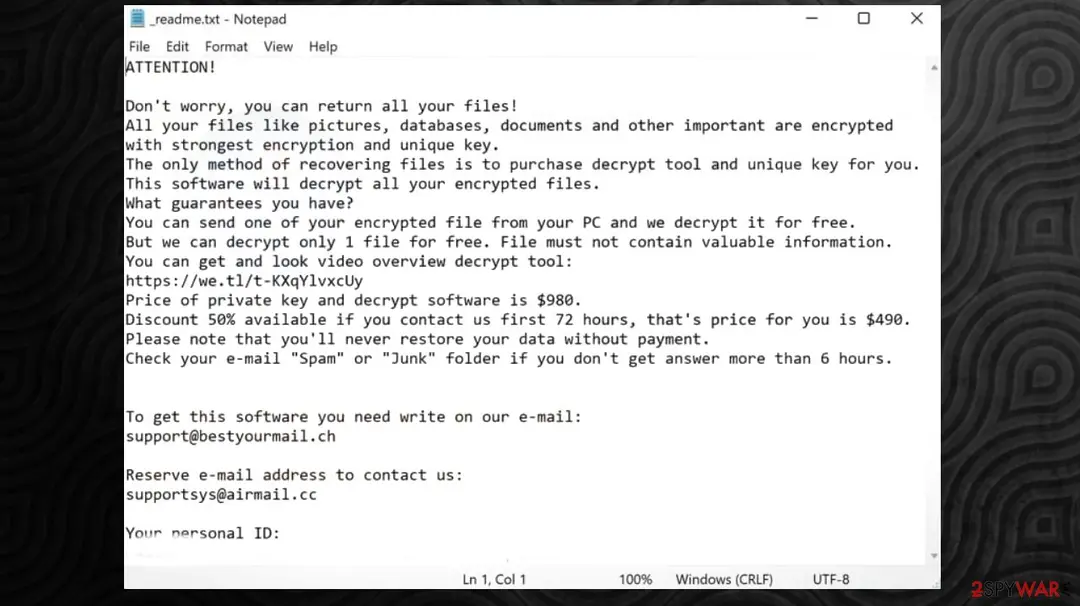
Hhyu ransomware: summary
| Type | File-encrypting ransomware, STOP/Djvu family |
|---|---|
| Risk | High: files are lost unless the key was offline; the crack may also carry a password stealer |
| Symptoms | .hhyu added to file names, _readme.txt in folders, files that will not open |
| How to get rid of it | Safe Mode scan with Microsoft Defender, delete the crack, then try the Emsisoft decryptor and backups; see the plan |
| Our check | Source check on 6 October 2026 (Emsisoft, BleepingComputer, PCrisk, CISA, Microsoft); malware not run |
| First seen | July 2022; our report 18 July 2022 |
| Removal | Scan the PC with security software to find and remove the malware and anything installed with it. Fortect scans Windows for malware and repairs the system files and settings it damaged. Remove it nowTo use the full-featured product, you have to purchase a license for Fortect. The scan is free. |
Show 14 more facts
| Name | Hhyu ransomware (also Hhyu virus, Hhyu file virus) |
|---|---|
| Encrypted file extension | .hhyu, appended: 1.jpg.hhyu |
| Ransom note | _readme.txt, quoted below |
| Decryptor | Emsisoft STOP Djvu decryptor, offline-key files only |
| Price in the note | $980, or $490 within 72 hours |
| Contact | Two e-mail addresses in the note; no wallet printed here |
| Evidence | 0 write-ups by security sites; no sample analysed yet |
| Encrypted files | .hhyu |
| Free decryptor | No free decryptor is known (checked 6 October 2026) |
| Microsoft Defender name | Trojan:Win32/RedLine.MB!MTB (the name PCrisk lists for Microsoft on the Hhyu sample) |
| Distribution | Typically cracked programs, keygens and game cheats, fake installers, e-mail attachments, and Remote Desktop with weak passwords in small offices |
| Damage | Files on the PC and connected drives encrypted, restore points often deleted, sometimes a password stealer installed as well |
| Detection names | Microsoft: Trojan:Win32/RedLine.MB!MTB (the name PCrisk lists for Microsoft on the Hhyu sample) |
| Facts checked | 6 October 2026 |
Facts checked on 6 October 2026 against Emsisoft's STOP Djvu decryptor page and blog post, BleepingComputer's STOP support topic, PCrisk's Hhyu and Djvu pages, Microsoft Support and CISA, plus our own July 2022 screenshots. We did not run the malware.
What Hhyu ransomware is
Hhyu is a STOP/Djvu strain. Every file it locks gets .hhyu tacked onto its name, and a note named _readme.txt is dropped in each folder it worked in.
In July 2022 we wrote that this was "one of 500 versions" and that the note wants Bitcoin. Emsisoft's own count was 160 variants (2019), we found nothing for 500, and the note never names a currency. Those two points are corrected below.
- Family
- STOP/Djvu; PCrisk calls Hhyu "a new Djvu ransomware"
- Renamed files
1.jpgbecomes1.jpg.hhyu,2.pngbecomes2.png.hhyu(PCrisk's example)- Note
_readme.txt- Asking price
- $980, halved to $490 for anyone who writes within 72 hours; no coin or wallet named
- Contacts
support@bestyourmail.chandsupportsys@airmail.cc; no website- First seen
- July 2022 (PCrisk spotted the sample on VirusTotal); our report followed on 18 July 2022
- Chance of getting files back
- Real only when an offline key was used; see the key chapter
Leave both addresses alone, they are here to identify the note. The video link inside our screenshot is not the one PCrisk quotes, so every build seems to carry its own; we opened neither.
Timeline
August 2019
New-style STOP/Djvu
Emsisoft dates the strains with a victim-specific online key to this month.
18 October 2019
Emsisoft decryptor
Its post counted 160 variants and over 116,000 confirmed victims; the tool handled 148 variants.
15 July 2022
Sample on VirusTotal
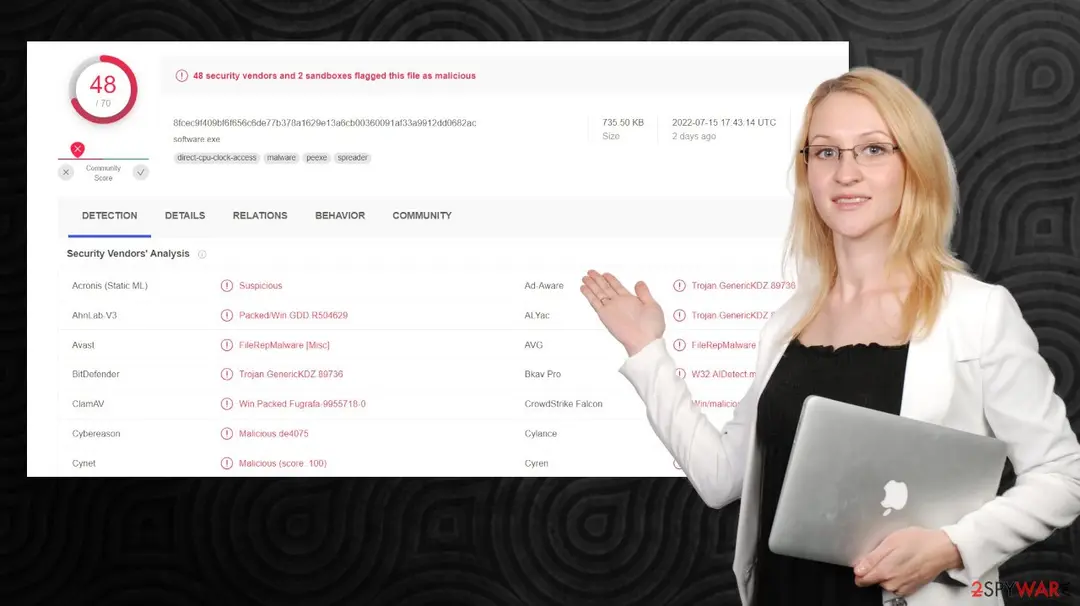
The VirusTotal page in our screenshot, for a file named
software.exe, carries this date; 48 of 70 vendors flagged it.18 July 2022
Our first report
We wrote that $490 in Bitcoin was demanded. The note we photographed says $980, or $490 within 72 hours.
25 May 2023
PCrisk update
PCrisk last revised its
.hhyupage and still lists the decryptor as only partly available.December 2024
Last known strain
A BleepingComputer moderator wrote that nothing new has appeared since
.held.6 October 2026
This recheck
The Emsisoft tool is still version 1.0.0.5 from October 2019, and we found nothing newer about
.hhyu.
What we verified, and what we could not
There is no website here to test and we never ran the malware. This is a source check plus our own 2022 screenshots; it tells you nothing about what the file does on your PC.
Hhyu ransomware · source check · 6 October 2026
- Family and extensionPCrisk lists Hhyu as Djvu with
.hhyu; our screenshot shows the Djvu note. - Note, price, contactsTaken from our screenshot and compared with PCrisk's copy; only the video link differs.
- Sample detections48 of 70 vendors and 2 sandboxes flag
software.exe(735.50 KB), SHA-2568fcec9f409bf6f656c6de77b378a1629e13a6cb00360091af33a9912dd0682ac. - DecryptorEmsisoft's page, opened today, still promises decryption for offline-key files of every STOP Djvu version and counts 4,766,552 downloads.
- Does Emsisoft hold the `.hhyu` offline key?Unknown. Running the tool on your own copies is the only test.
- Registry, hosts file, shadow copiesOld claims of ours and PCrisk's general Djvu remarks; unconfirmed for
.hhyu.
Likely lost, unless the key is an offline one With an ID that does not end in t1, only the attackers probably hold the key. The crack may also have brought other malware.
Which name will your scanner show?
Microsoft's name for Hhyu ransomware is Trojan:Win32/RedLine.MB!MTB (the name PCrisk lists for Microsoft on the Hhyu sample).
Defender sorts threats by category first, so the word before the colon tells you what kind of program was found, even if the family name means nothing to you.
Do not search for a removal tool by the detection name alone; fake "removal tools" use the same keywords. How the naming works is explained in our guide to antivirus detection names.
- File extension:
.hhyu - Note file:
_readme.txt
Detection names
These labels describe the dropper, not the encrypted files, and change often.
Use them only to confirm that a scan hit the right family.
| Scanner | Label | Source |
|---|---|---|
| Microsoft | Trojan:Win32/RedLine.MB!MTB | PCrisk |
| Kaspersky | UDS:Trojan-Ransom.Win32.Stop.gen | PCrisk |
| ESET-NOD32 | A Variant Of Win32/Kryptik.HQDA | PCrisk |
| Avast | FileRepMalware [Misc] | PCrisk, our screenshot |
| Combo Cleaner / BitDefender | Trojan.GenericKDZ.89736 | PCrisk, our screenshot |
RedLine is a separate malware family, so Microsoft's label hints that the dropper carried more than ransomware. We did not analyse the file; treat it as a reason to change passwords.
How Hhyu ransomware behaves
How an infection unfolds
Before a single file is touched, the malware has already settled the outcome: it either obtains a personal key or falls back on a shared one.
- 1
You run something pirated
Emsisoft says STOP travels almost only inside key generators and cracks. PCrisk adds fake installers and "YouTube downloader" websites. Nothing happens until the file is started.
- 2
The PC is registered with the attackers
An ID is generated and sent to their server, which returns a key that exists for this one victim only (the online key, per BleepingComputer).
- 3
No reply, fixed key
When the server cannot be reached the program uses a key baked into it. That offline key belongs to the extension, so thousands of victims can share it.
- 4
Encryption
Salsa20, says Emsisoft; output is exactly 334 bytes longer than the input for strains after August 2019. PCrisk adds that only the beginning of each file is scrambled, enough to break it.
- 5
The note
_readme.txtlands next to the damaged files, listing the price, the two addresses and your personal ID.
Most people find out only when a document refuses to open. We also wrote in 2022 that Hhyu corrupts the registry, boot sections and DLLs; nobody we read confirms that for .hhyu.
Offline or online key: read the end of your ID
Open _readme.txt and look at the last characters of the personal ID. A trailing t1 normally marks an offline ID, the only case the free Emsisoft tool can help with.
| Offline key | Online key | |
|---|---|---|
| Chosen when | The server stayed silent | The server answered |
| Who else has it | Every victim of the same extension | Nobody |
| Tail of the ID | Normally t1 | Anything else |
| Emsisoft tool | Opens files if Emsisoft owns the key | Cannot help |
| Wording on screen | "offline ID, decryption MAY be possible in the future" | "online ID. decryption is impossible" |
Our 2022 text described this split correctly. A t1 ending is a hint, not a guarantee, and one PC can hold files locked with both kinds.
What is and is not proven about its behaviour
For .hhyu itself the public record is short; most of the old list was general ransomware behaviour.
Hhyu ransomware · behaviour claims · 6 October 2026
- Locks files and adds `.hhyu`PCrisk's screenshot of renamed files and its description.
- Writes `_readme.txt`Our July 2022 Notepad screenshot; PCrisk shows the same note.
- Only the start of each file is lockedPCrisk's statement about Djvu in general; untested by us on
.hhyu. - Registry, boot and DLL damageOur 2022 claim; no source names it for this strain. Windows trouble after cleaning is a separate repair job.
- Hosts file editedPCrisk's general Djvu page says Djvu edits it to block security sites. No test on this sample; BleepingComputer suggests resetting the file if the decryptor cannot connect.
- Shadow copies wipedTypical of ransomware, unconfirmed here. Look at Previous Versions.
Anything beyond the encryption is unproven Assume the PC is untrustworthy until a Safe Mode scan finishes: whatever arrived with the crack may still run.
How it reaches PCs
Documented routes all involve software you were not supposed to get for free.
- High
Cracks and key generators
Almost the only carrier, according to Emsisoft; our 2022 guide named pirating platforms and torrent pages.
- High
Fake installers, YouTube downloader sites
PCrisk's description of the typical Djvu infection.
- Medium
Torrents and malicious ads
Both are in PCrisk's distribution row for
.hhyu. - Low
E-mail attachments with macros
Named by our 2022 guide and PCrisk, but not by Emsisoft or BleepingComputer: possible, unproven.
Related extensions
Instructions for any other STOP/Djvu extension usually apply here as well.
| Extension | Note | Same steps? |
|---|---|---|
.gero, .meds, .boot | New-style variants (Emsisoft) | Yes |
.djvu, .roland, .verasto | Old variants, before August 2019 | Mostly; file-pair option is theirs only |
.miia | Another four-letter strain | Yes |
.held | Latest known, December 2024 | Yes |
Was anything stolen?
Possibly. Password-stealing malware sometimes rides along, so change passwords from a clean device.
- Medium
Bundled stealer
Emsisoft: some STOP versions carry password-stealing Trojans. PCrisk's
.hhyupage: other malware may be installed alongside. Microsoft's RedLine label fits, but we cannot say what your copy did. - Low
No leak site
We said "double extortion" in 2022. No source ties that to STOP/Djvu; the note only sells a decryptor.
The first hour
Every minute it keeps running means fewer files left to save.
- 1
Stop the crack
Close the installer or the crack folder and do not open them again.
- 2
Cut the network
Unplug the cable or switch off Wi-Fi so shared drives are safe.
- 3
Eject drives
Remove USB disks and pause cloud sync to protect clean backups.
- 4
Keep evidence and copies
Photograph the note, keep
_readme.txt, copy a few.hhyufiles to a USB drive and unplug it. - 5
Do not reply to the attackers
The free test file is bait to open a conversation.
- 6
Report
In the US see CISA's guide: cisa.gov/report, FBI field offices, ic3.gov. Elsewhere, national police or cybercrime unit.
The Hhyu ransomware note
ATTENTION!
Don't worry, you can return all your files!
All your files like pictures, databases, documents and other important are encrypted with strongest encryption and unique key.
The only method of recovering files is to purchase decrypt tool and unique key for you.
This software will decrypt all your encrypted files.
What guarantees you have?
You can send one of your encrypted file from your PC and we decrypt it for free.
But we can decrypt only 1 file for free. File must not contain valuable information.
You can get and look video overview decrypt tool: hxxps://we.tl/t-KXqYlvxcUy
Price of private key and decrypt software is $980.
Discount 50% available if you contact us first 72 hours, that's price for you is $490.
Please note that you'll never restore your data without payment.
Check your e-mail "Spam" or "Junk" folder if you don't get answer more than 6 hours.
To get this software you need write on our e-mail: support@bestyourmail.ch
Reserve e-mail address to contact us: supportsys@airmail.cc
Your personal ID:
Can Hhyu ransomware files be decrypted?
Can .hhyu files be decrypted?
Occasionally. Only Emsisoft's STOP Djvu decryptor can do it, and only for files locked with an offline key that Emsisoft already has.
Our 2022 guide warned that the tool is not for everyone and that waiting may be needed; that stands. One step was wrong for this strain: sending an encrypted file together with its original is for old Djvu only.
| Tool output | Meaning | Next |
|---|---|---|
Files open again, ID ended t1 | Emsisoft had the offline key | Test them, copy them out |
| "No key for New Variant offline ID" | Offline ID, key not yet known | Keep copies, retry every week or two |
| "this ID appears to be an online ID" | Personal key, attackers only | Backups and the recovery chapter |
Why waiting is a gamble: per BleepingComputer, Emsisoft learns an offline key only after some victim has paid, got the key and passed it on, and nobody announces it.
- 1
Clean the PC
Finish the scan from the plan, or restored files can be locked again.
- 2
Work on copies
Put some
.hhyufiles and one_readme.txton a USB stick and note how the ID ends. Do not send the ID to anyone. - 3
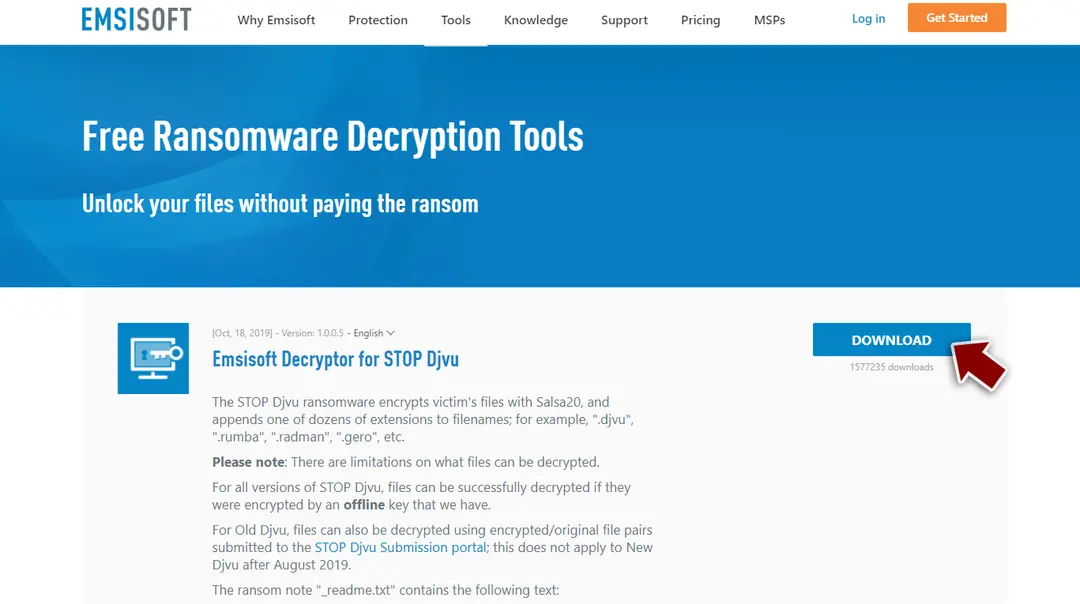
Get the tool from Emsisoft
Use only the emsisoft.com page in our sources, press Download, then open
decrypt_STOPDjvu.exefrom the browser's download pop-up. - 4
Answer the prompts
Yes to User Account Control and to the License Terms, OK to the Disclaimer.
- 5
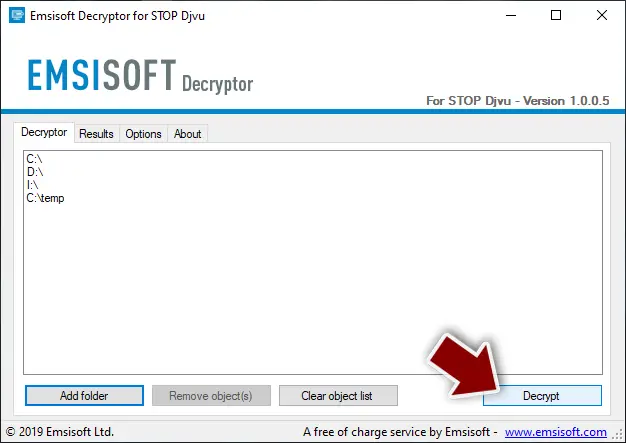
Pick folders, press Decrypt
Drives are listed automatically, Add folder adds more. An internet connection is required. Successful files show "Decrypted!".
Do
- Hold on to the locked files even if the tool fails now; keys are added later
- Open a few decrypted files before deleting the locked ones
Don't
- Do not buy a "decryptor", least of all from the note's authors
- Do not run decryptors found on forums or in e-mails
Pay or not?
Do not pay. The note asks $980 or $490 within 72 hours, and no source we read says payment works reliably.
- High
Money gone, files too
PCrisk: the attackers may send no tool even after payment. We said the same about them in 2022.
- Medium
The 72-hour clock
A pressure tactic. It is a discount deadline, not the moment files vanish.
- Medium
One free file
Proves nothing about the rest. The note itself says it must not hold valuable data.
Corrections to 2022: the full price is $980, not $490, and no currency is named. BleepingComputer says online-key files stay shut without the criminals' key.
How to remove Hhyu ransomware
Tools you'll need
All of these are free except where noted. Download them on a clean device if the infected PC is offline.
- A USB stick: to keep the ransom note, two or three encrypted files and screenshots off the infected PC.
- Microsoft Defender Offline: built into Windows 11 and Windows 10; scans before Windows starts, so running malware cannot hide.
- Microsoft Safety Scanner: a second, portable scanner with current signatures; each download works for 10 days.
- ID Ransomware: identifies the family from the note and one encrypted file and says whether a decryptor exists.
- No More Ransom: the free decryptors from police and security companies; check it again every few months.
- Fortect (optional): scans Windows for malware and repairs the system files and settings it damaged. The free scan is in the box above.
How to remove Hhyu ransomware and get your files back
Work in this order.
Disconnecting comes first, removal comes before any restore, and nothing here asks you to contact the attackers.
Step 1: Disconnect the PC and unplug backup drives
Hhyu ransomware encrypts everything it can reach, including drives and shares you connect later. Cut the network first: cable out, or Wi-Fi off from the taskbar.
Then unplug every USB stick and backup disk and pause cloud sync, so the encrypted versions do not replace your online copies. Do not reconnect any of them until the ransomware is removed from the Windows 11 or Windows 10 PC.
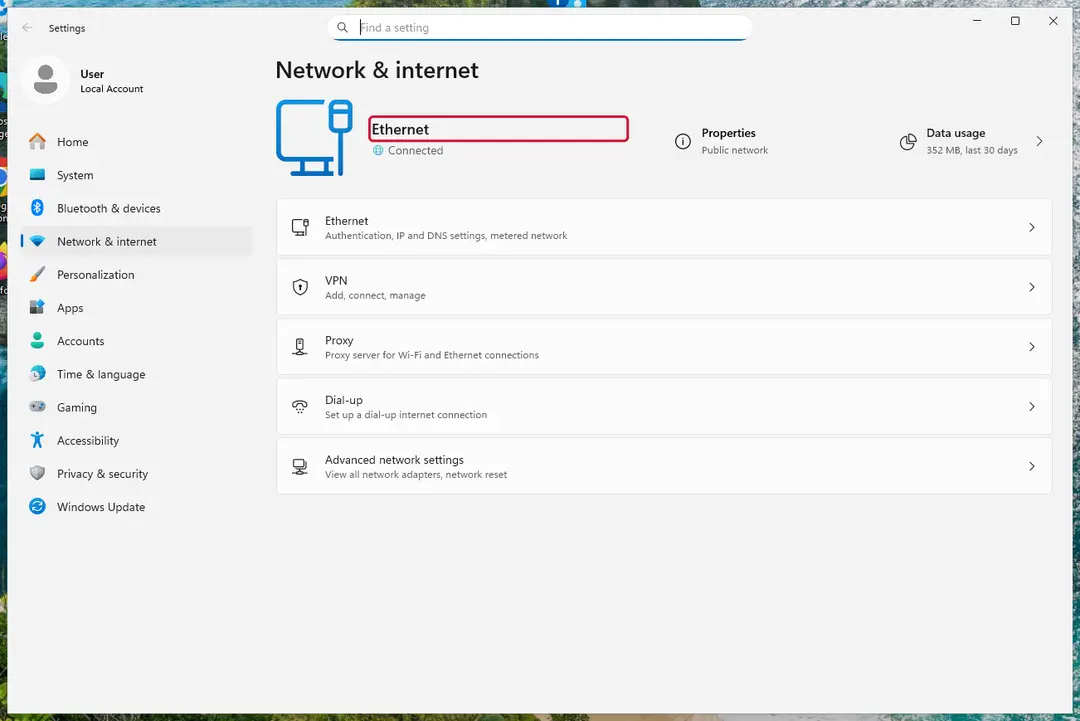
Windows 11: turn off Wi-Fi to take the PC offline. Full procedure with screenshots: Ransomware: first steps, finding a decryptor and recovering files
Step 2: Save the ransom note and confirm the family
Copy
_readme.txtand one or two files ending in.hhyuto a USB stick, and leave the originals where they are.From another device, upload the note and a sample file to ID Ransomware or No More Ransom's Crypto Sheriff, which name the family from the note, the extension and the file structure.
Write down the contact address and your personal ID from the note, because a decryptor or the police may ask for them.
Warning: Never contact the attackers from the infected Windows 11 or Windows 10 PC.
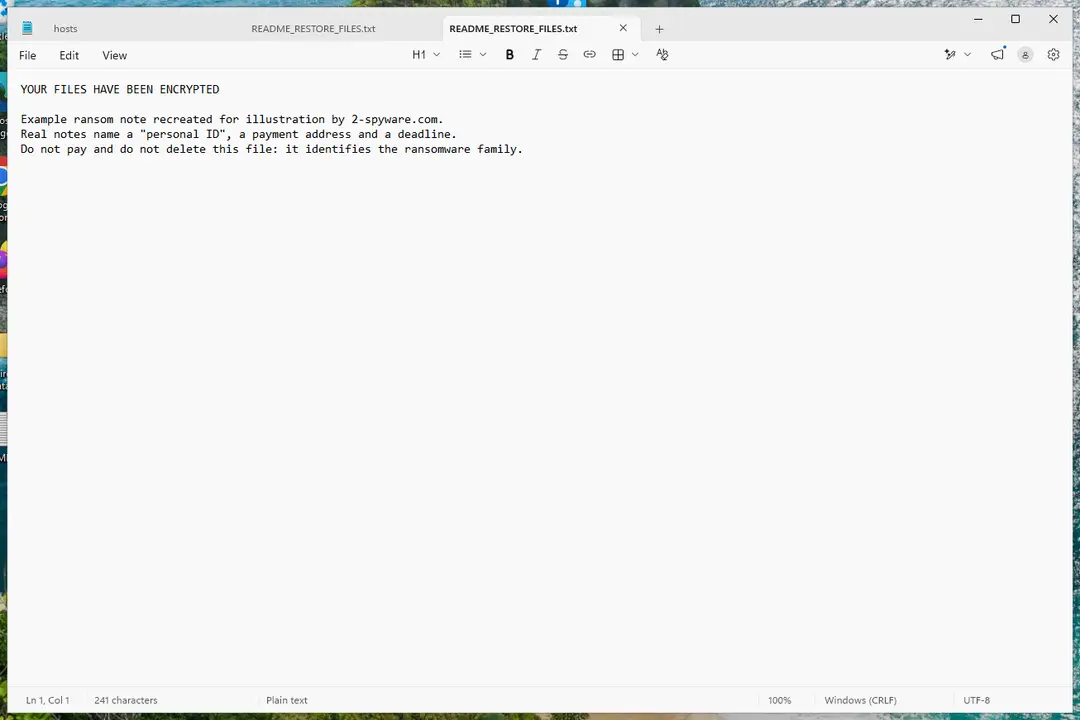
Windows 11: the ransom note and encrypted files to copy for identification. Full procedure with screenshots: Ransomware: first steps, finding a decryptor and recovering files
Step 3: Check for a free decryptor
For Hhyu ransomware, no free decryptor is known (checked 6 October 2026). Search the family name in the No More Ransom decryption tools list and in the free decryptors of Emsisoft, Avast and Kaspersky, because new tools appear years after an attack.
Important: Keep the encrypted files even if nothing works today, and do not pay before every free option is ruled out: payment does not guarantee a working key.
Decryptors run on Windows 11 and Windows 10, but only after the ransomware itself is removed.
Full procedure with screenshots: Ransomware: first steps, finding a decryptor and recovering files
Step 4: Remove the ransomware before you restore or decrypt
Restoring or decrypting files while Hhyu ransomware still runs lets it encrypt them again. Run a Full scan in Windows Security > Virus & threat protection > Scan options, then the Microsoft Defender Antivirus (offline scan).
If the ransomware blocks Windows Security, start Safe Mode with Networking and scan from there. Some families install a password stealer as well, so let both scans finish on Windows 11 or Windows 10.

Windows 11: Windows Security > Virus & threat protection > Scan options. Full procedure with screenshots: Run a Microsoft Defender Offline scan
Step 5: Look for shadow copies of the files
Open Command Prompt as administrator and run
vssadmin list shadows. If it lists copies dated before the attack, right-click a folder with encrypted files in File Explorer, choose Properties > Previous Versions, and open or restore a version from before that date.ShadowExplorer, a free tool, shows the same copies when the tab is empty or hidden. Most current families delete shadow copies, so an empty list is normal, but the check takes two minutes on Windows 11 or Windows 10.
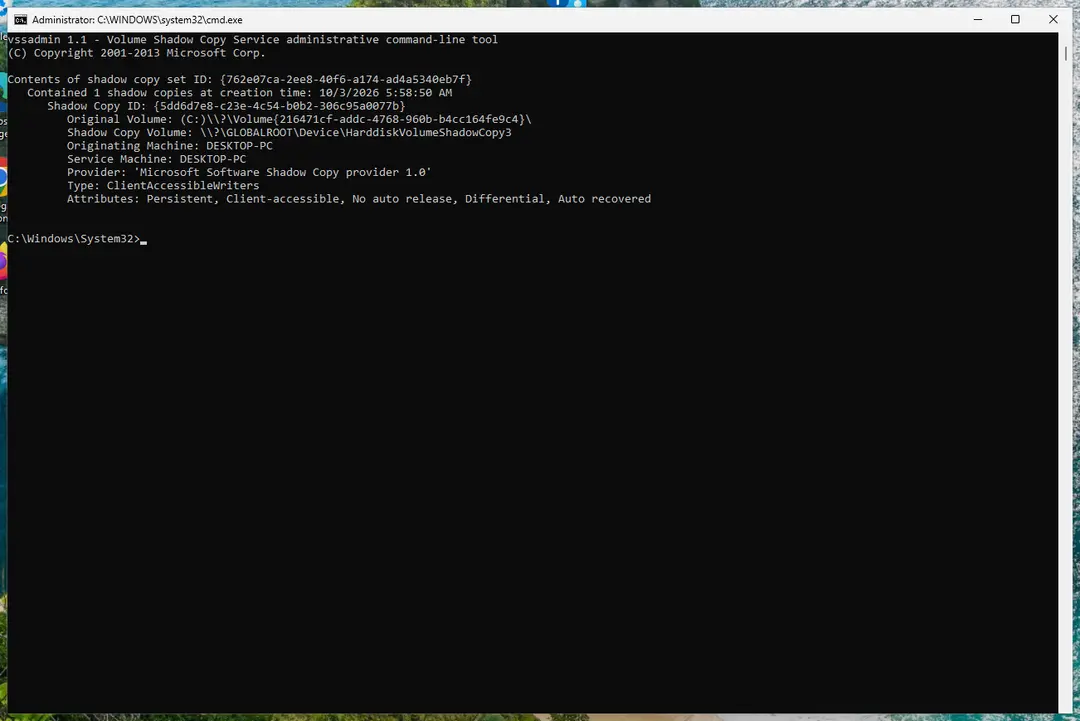
Windows 11: vssadmin list shadows shows whether shadow copies exist. Full procedure with screenshots: Ransomware: first steps, finding a decryptor and recovering files
Step 6: Restore the files from a backup or recover deleted originals
Restore from an external backup, File History or OneDrive's version history, choosing a date before the attack. Connect the backup drive only after the scans are clean, or the ransomware encrypts it too.
If there is no backup, file recovery software can sometimes find the deleted originals, because some ransomware writes an encrypted copy and deletes the original file.
Stop writing to the drive and try recovery on Windows 11 or Windows 10 before new files overwrite the space.
Full procedure with screenshots: Recover deleted files (Recycle Bin, backups, OneDrive) On uGetFix
Report it and recover your files
Report it
Report the attack even if you do not expect the files back: insurers and banks ask for the report number, and police use the contacts in the note to link cases.
- United States
- FBI IC3 · FTC ReportFraud
- United Kingdom
- Report Fraud (formerly Action Fraud) · NCSC
- Australia
- ReportCyber (ASD)
- EU countries
- Europol: national reporting sites
Give the victim ID, the note and the date the files were encrypted. A business that holds personal data may also have to notify its data protection authority, in the EU within 72 hours.
Other ways to get files back
Cleaning the PC does not unlock anything.
Once it is clean, work down this list before writing new data to the disk.
- 1
Backups
External disk, NAS or cloud (OneDrive, iCloud, Dropbox). Plug it in only after the PC is clean; a drive left connected can be locked again.
- 2
Previous Versions
Right-click the folder, Restore previous versions (Windows 11: Show more options first), choose a date before the attack. Needs System Restore protection to have been on; System Restore itself does not return personal files.
- 3
Windows File Recovery
winfr C: E: /regular /n \Users\<name>\Documents\searches for deleted, not yet overwritten files (E: must be a different drive). It does not decrypt, and an SSD may have reused the space. - 4
Partly readable media
PCrisk says only the start of a Djvu file is locked and points to DiskTuna's Media_Repair for audio and video. Untested on
.hhyu; use a copy. - 5
Keep the locked copies
With an offline ID, run the decryptor again every week or two.
The 3-2-1 backup rule
CISA advises offline backups because ransomware hunts for any backup it can reach.
| Number | Rule | Example |
|---|---|---|
| 3 | Three copies | The file plus two backups |
| 2 | Two media | PC disk and a USB drive |
| 1 | One kept apart | A drawer drive, or cloud storage with history |
Do
- Unplug the backup drive after copying
- Open a file from the backup now and then
Don't
- Never leave the only backup connected
How to prevent Hhyu ransomware and the next attack
Each habit below blocks a route this family uses.
Do
- Buy the program or use a free alternative: cracks are the documented way in
- Keep Microsoft Defender and Windows Update on
- Show file extensions (View > Show > File name extensions)
- Keep one offline backup
Don't
- Do not run keygens, cracks, game cheats or pirated installers
- Do not install from sites offering YouTube downloads
- Do not disable antivirus because a crack says so
- Do not open attachments from unknown senders
Questions about Hhyu ransomware
What is Hhyu ransomware?
Hhyu ransomware is a STOP/Djvu strain for Windows that encrypts files, appends .hhyu to their names and leaves _readme.txt asking $980, or $490 within 72 hours. PCrisk found the sample on VirusTotal in July 2022 and we wrote about it on 18 July 2022.
Emsisoft, which maintains the free decryptor, names Salsa20 as the cipher and cracks and keygens as the usual carrier. We did not run the malware, so everything here comes from our own screenshots, PCrisk, Emsisoft and BleepingComputer, all linked in the sources list.
How do I open .hhyu files?
You cannot open them normally, because the content is encrypted. They open again only when Emsisoft's STOP Djvu decryptor holds the key for your files. Read your personal ID at the end of _readme.txt: an ID ending in t1 usually means an offline key, shared by many victims, which Emsisoft may have now or get later.
Any other ending means an online key that only the attackers know. Copy the files in either case, since keys are added over time without announcement, and run the tool again every week or two.
Is there a free Hhyu decryptor?
Yes, but only for some victims. Emsisoft's free tool opens files locked with an offline key that Emsisoft has, and PCrisk rates the decryptor for .hhyu as only partly available.
When an online key was used, only the attackers can decrypt. Get the tool solely from the emsisoft.com page listed in our sources, because lookalike decryptor sites are a known trap, and never pay anyone who promises to decrypt everything.
Before you try, finish the removal scan, copy the locked files to a separate drive and read how your ID ends, because that ending tells you in advance whether the tool has any chance of working.
Should I pay the Hhyu ransom?
No. The note wants $980, or $490 if you write within 72 hours, and offers one free test decryption. Nobody can enforce the attackers' promise, and PCrisk warns that paying can cost both files and money.
The countdown exists to rush you; it is a discount deadline, not the point where files are destroyed. Keep the note, copy the files, run the scan in our plan, then try the offline-key decryptor and your backups. The first-hour chapter lists where to report.
How did Hhyu get on my PC?
Most likely through a crack, keygen or fake installer for paid software. Emsisoft says STOP spreads almost only that way, and our 2022 guide named pirating platforms and torrent pages.
PCrisk also lists YouTube downloader sites, malicious ads and e-mail attachments, but Emsisoft and BleepingComputer never mention e-mail for this family, so treat it as possible and unproven. Check what you downloaded just before the files stopped opening, starting with that folder, and delete whatever crack or installer is still there.
Will my passwords be stolen?
They might be. Emsisoft says some STOP versions bundle password-stealing Trojans, and PCrisk says other malware can be installed together with the ransomware. Microsoft's label for the Hhyu sample contains RedLine, a different malware family, but we did not analyse the file and have no evidence about your copy.
After the scan, change important passwords from a clean device, starting with e-mail and banking, and switch on two-step sign-in so a stolen password alone is not enough. Do not reuse an old password anywhere else.
Do paid decryption services work for .hhyu files?
Not for online-key files. Only the attackers hold that key, so a recovery firm cannot decrypt on its own, and BleepingComputer says such files are not recoverable without it. A service promising to decrypt everything for a fee is either paying the attackers on your behalf or just taking your money.
Free routes cost nothing: the Emsisoft tool for offline keys, your backups, Previous Versions and Windows File Recovery, with the steps in the recovery chapter above. If a company asks for money before it has even looked at your files, walk away.
How is Hhyu different from .djvu and other STOP extensions?
Only in the extension and the ID, not in how it works. Hhyu, .miia, .gero, .meds and .held are all STOP/Djvu, so the note and the decryptor are the same. The key matters: old variants such as .djvu have extra file-pair options, those after August 2019 do not, and .hhyu is one of the later ones.
BleepingComputer's moderator knows no variant newer than .held (December 2024), so our old claim of weekly new versions no longer holds. Instructions for another extension of the family therefore apply here too.
Will Fortect remove Hhyu ransomware?
Fortect scans Windows for malware and unwanted programs and repairs the system files and settings they change, and its free scan shows what it finds on your PC before you decide anything.
For Hhyu ransomware, follow the plan above as well: the browser steps take back permissions and settings that no scanner treats as a threat, and uninstalling the program that brought it removes the source.
Run Microsoft Defender's full scan and, if anything was found, its offline scan as a second opinion. If the symptoms are gone after the plan and both scans are clean, there is nothing more to do.
Sources
- Emsisoft: STOP Djvu decryptor (read October 6, 2026)
- Emsisoft: Emsisoft releases new decryptor for STOP Djvu ransomware (read October 6, 2026)
- BleepingComputer: STOP Ransomware (.STOP .Djvu, .Puma, .Promo) support topic (read October 6, 2026)
- PCrisk: Hhyu ransomware (read October 6, 2026)
- PCrisk: Djvu ransomware (read October 6, 2026)
- Microsoft Support: Windows File Recovery (read October 6, 2026)
- Microsoft Support: Start your PC in safe mode in Windows (read October 6, 2026)
- Microsoft Support: Virus and threat protection in the Windows Security app (read October 6, 2026)
- CISA: #StopRansomware Guide (read October 6, 2026)