
likedrink.beer: a domain that served 27 Mirai botnet files for routers and other Linux devices, and what to do about it
likedrink.beer is a web address that URLhaus lists 27 times on 4 October 2026 for files named mirai followed by a chip type, such as mirai.arm7 and mirai.mips32. These are builds of the Mirai botnet program for routers, cameras and other Linux devices, not for Windows PCs or Macs, and the domain no longer answers.
If you only saw the name in a log, nothing is proven; if a router, camera or server of yours behaves oddly, reset it, update it and replace its default password.
Facts checked October 11, 2026. Removal steps tested on Windows 11 (26H2) and checked against Microsoft's and the browser makers' current documentation.
Automatic
Get a free scan and check if your PC is infected.
Fortect finds malware, unwanted programs and the Windows damage they leave behind, and repairs it in one pass.
If a router, camera or Linux server that downloads mirai files from likedrink.beer keeps coming back after uninstalling, a scan can find what reinstalls it.
Do it yourself · free Remove likedrink.beer (Mirai botnet files) yourself 5 steps, about 15 minutes, no software needed.
Start the steps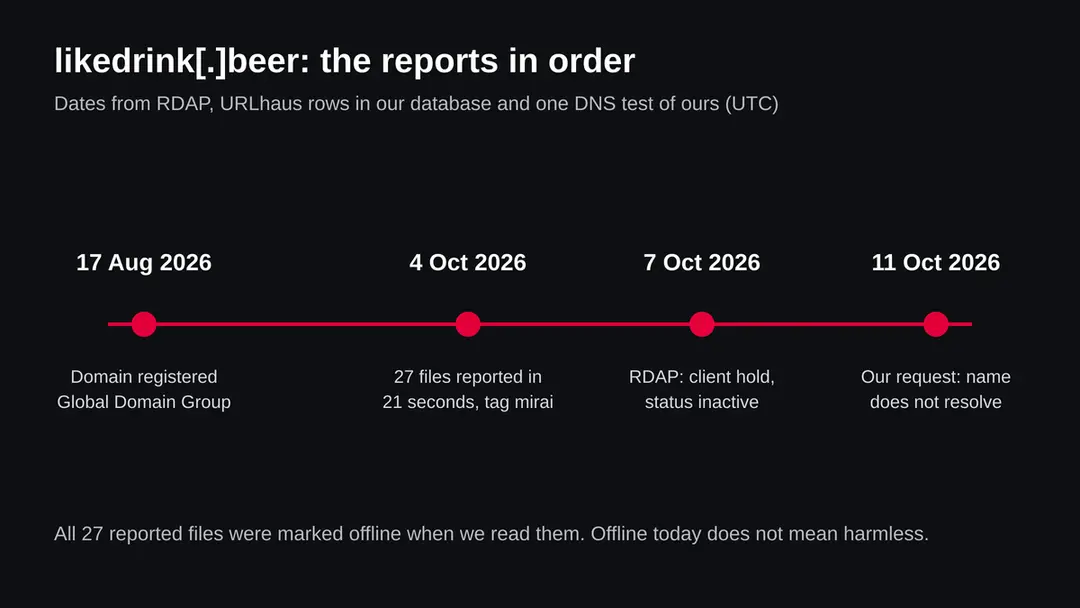
Likedrink.beer (Mirai botnet files): summary
| Type | A malware server address: URLhaus lists 27 files tagged mirai, builds of an IoT botnet program for Linux devices |
|---|---|
| Risk | High for an exposed router, camera or Linux server that fetched the files. Low if you only saw the name |
| Symptoms | Often none. A slow line, a changed router login, or log entries for likedrink.beer are the signs |
| How to get rid of it | Factory reset the device, update its firmware, set a new unique password, turn off remote management, UPnP and WPS |
| Our check (11 October 2026) | A plain request from our server: the name does not resolve. That clears nothing; the rating comes from URLhaus |
| Running since / first seen | Domain registered 17 August 2026; 27 files reported 4 October 2026 |
| Removal | Scan the PC with security software to find and remove the malware and anything installed with it. Fortect scans Windows for malware and repairs the system files and settings it damaged. Remove it nowTo use the full-featured product, you have to purchase a license for Fortect. The scan is free. |
Show 9 more facts
| Platform | Linux based devices on small chips. Not Windows, Mac, iPhone or normal Android apps |
|---|---|
| Detection names | No Microsoft detection name is known for these files, because we did not open them |
| Name | Likedrink.beer |
| Domain registered | 17 August 2026 |
| Evidence | 27 write-ups by security sites; details still limited |
| First seen | 4 October 2026 |
| Distribution | Typically fake installers, cracked programs, e-mail attachments, fake "verify you are human" pages and ads for popular apps |
| Damage | Installs other malware, often several programs at once |
| Facts checked | 11 October 2026 |
Facts checked on 11 October 2026 against the URLhaus rows for likedrink.beer held in our database (we did not open urlhaus.abuse.ch itself), RDAP, one plain request of our own, and the pages listed under sources.
Several vendor and agency pages (CISA, Cloudflare) would not open for our tool, so the Mirai facts are limited to what the listed pages and their summaries state. We did not download the files and infected no device; the removal steps follow FTC advice and were not tried on a live infection.
What likedrink.beer is, and what we know about it
likedrink.beer is not a program on your computer. It is a web address that the abuse.ch project URLhaus lists as a place where malware files were served. We found no public write-up of this one address, so what follows is what URLhaus shows, what our own checks found, and what the sources we read say about Mirai in general.
- 1
What URLhaus lists
Twenty seven file addresses, all in a folder called bins, all named mirai followed by a dot and an ending such as arm5, mips32, x86_64 or rv64. All carry the threat label malware_download and the tag mirai, and all were added on 4 October 2026 between 06:59:22 and 06:59:43 UTC, so within 21 seconds. The reporter name in the data is von. All 27 were marked offline when we read our copy.
- 2
What the file names suggest
The endings look like names of processor types. A botnet author who wants to infect many kinds of devices builds one copy per chip type and puts them all in one folder; a script on a victim device then picks the copy that fits. That is our reading of the names, not something the report says. We did not download any of the files.
- 3
What we could not confirm
We do not know what is inside these files, which Mirai variant they are, where they would report to, or how a device was meant to be tricked into fetching them. URLhaus shows tags, not proof. We also do not know who runs the domain.
- 4
What this means for you
If you saw the name in a firewall log, a router log, a DNS filter or a warning, the name alone does not show an infection. It does show that a device on that network asked for it, or that someone scanned a list. A person normally never types an address like this by hand.
- Kind of threat
- A server address that handed out 27 files tagged mirai, builds of an IoT botnet program
- Where the files were
- hxxp://likedrink[.]beer/bins/mirai.NAME: plain http, folder bins, 27 different endings
- Domain registered
- 17 August 2026 through Global Domain Group LLC (RDAP, read 7 October 2026)
- Domain status
- RDAP lists client hold, client transfer prohibited, server transfer prohibited and inactive. A client hold normally stops the name from resolving
- URLhaus entries
- 27 file addresses, all added 4 October 2026 within 21 seconds, all offline in our copy
- Platform
- Linux based devices: routers, cameras, recorders, small servers. Not Windows, Mac, iPhone or normal Android apps
What likedrink.beer (Mirai botnet files) does on an infected PC
What we checked on 11 October 2026, and what we could not
Our check was a plain request from our own server. It did not reach a website: the name could not be found at all (error: getaddrinfo ENOTFOUND). That is consistent with the registry hold, but it clears nothing.
Our check, 11 October 2026
- The name did not resolveOur server could not turn likedrink.beer into an address. That fits the client hold and inactive status RDAP showed on 7 October 2026. It means the name is switched off for now. It does not say the operator is gone.
- Why that is not a clean resultA registrar or registry can hold a name today and the operator can register a new name tomorrow. Botnet operators move files between domains and bare IP addresses. A dead name is a good sign for this one name only.
- Notification request, pop-ups, redirects, ad networksNone seen. There was nothing to see: no page loaded and we did not use a browser.
- URLhaus listing27 files tagged mirai, reported on 4 October 2026, all offline when we read them.
- Downloads and the files themselvesWe did not download any file and cannot tell you what they contain.
Dangerous: treat it as a malware server, currently switched off Our request proves nothing either way. The rating comes from the 27 URLhaus reports and their tags. Do not request files from this address and do not run anything that does.
What happened to likedrink.beer, from registration to our check
The domain is under two months old and the reports come in one burst. Dates come from RDAP and from the URLhaus rows in our data; times are UTC.
17 August 2026
The domain is registered
RDAP shows likedrink.beer registered on 17 August 2026 at 22:34 UTC through Global Domain Group LLC. The .beer ending is an ordinary public ending, so the name tells us nothing about the operator.
4 October 2026
27 files are reported in 21 seconds
Between 06:59:22 and 06:59:43 UTC, 27 file addresses under /bins/ are added, one per chip type, all tagged mirai. Seven were added in the first second. Such speed fits a script that walks through a list of file names, which is our reading and not a statement in the report.
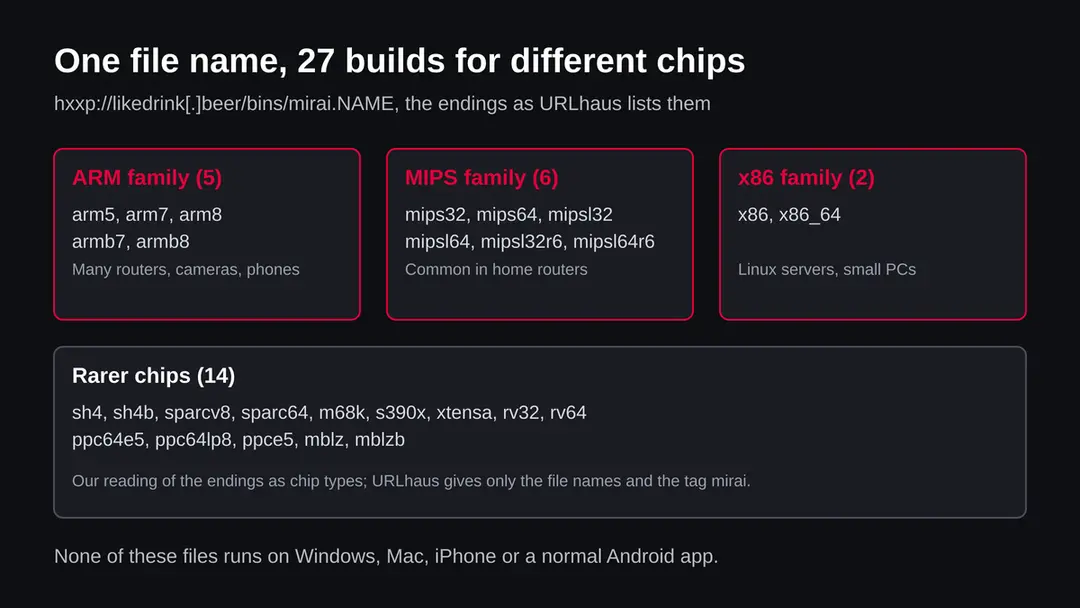
The 27 reported endings grouped by our reading of the chip type. The grouping is ours; URLhaus gives only the file names. 7 October 2026
The registry record shows a hold
When our database fetched the RDAP record, the status list held client hold, client transfer prohibited, server transfer prohibited and inactive. We do not know who asked for the hold or why.
11 October 2026
Our request finds no address
A plain request from our server fails at the name lookup. All 27 files had been marked offline before this. Nothing we hold shows the files online at any time.
What the pattern suggests, and what it does not: a new name, one burst of reports and a hold within three weeks looks like a short lived staging point rather than a long running site. That is our reading of the dates. It does not tell us whether devices were infected from this name during the time it worked.
What Mirai is, in plain words
Mirai is a family of malware for Linux based devices that connect to the internet. The sources we read describe it as one of the first significant botnets aimed at exposed Linux networking devices, and as a program whose published source code led to many variants.
| Question | What the sources say | Source |
|---|---|---|
| What is it? | Malware for Linux based internet of things devices that looks for insecure devices, enslaves them in a botnet and uses them for DDoS attacks | arXiv 1901.04805 (research paper, as summarised in search results) |
| How does it spread? | By scanning for devices that are reachable over Telnet and still use factory default login details | arXiv 1901.04805 (as summarised); FTC advice about default passwords points the same way |
| Why are there so many variants? | The source code was published on a forum called Hack Forums, after which many variants appeared, mostly infecting home networks | Joe Sandbox analysis report |
| Is there a Windows side? | Dr.Web reported in 2017 a Windows trojan called Trojan.Mirai.1 that scans the local network for Linux devices and downloads a Linux binary to them | The Hacker News, February 2017 |
| How long do bots stay quiet? | The research paper says the scanning phase of such botnets can last for months before the bots take part in an attack | arXiv 1901.04805 (as summarised) |
| Which variant is on this domain? | Not known. URLhaus gives only the tag mirai, and we did not open the files | Not available |
A DDoS attack means that thousands of devices send traffic to one target until it can no longer answer. The owner of an infected camera is therefore usually not the target. Their device is the tool, and its owner pays with a slow connection, a raised bill or a reputation problem if the provider notices the traffic.
How a router or camera ends up asking for these files
The request does not come from a person. A script on a device fetches the file that fits its chip. We cannot say how the first script reached a device for this server; the routes below are the ones the sources and the FTC name.
- 1
A device is reachable from the internet
Home routers, cameras and recorders often have remote management, Telnet or a web login open to the outside. The FTC advises turning off remote management, WPS and UPnP on the router, which are the doors such scans look for.
- 2
The login still has the factory password
The research paper we read describes Mirai trying factory default logins. A device whose admin name and password were never changed lets it in. The FTC says to replace the default admin username and password with unique ones.
- 3
A small program is loaded
Once inside, a script has to fetch a program that fits the device's chip. This is where a folder of 27 builds fits: the script asks for the one that matches. That step is our reading of why the folder exists.
- 4
The device joins the botnet
It then scans for more devices and waits for orders. The owner often notices nothing, or only a slow connection.
What likedrink.beer (Mirai botnet files) can steal or download
Who can meet this, and who cannot
The files are built for Linux on small chips. A normal PC, Mac or phone does not run them. The people at risk are those who own devices that sit on the internet and were never hardened.
| Your device | What we know | What to do |
|---|---|---|
| Home router or modem | The most common home device with a Linux system, remote management and a default login | Check the settings page; turn off remote management, UPnP and WPS; set a unique admin password; update the firmware |
| IP camera, recorder, smart plug, printer | Often Linux based and rarely updated. They are the group the sources describe for Mirai | Change the default login, update from the maker's own site, keep it off the open internet |
| Linux server or NAS | The x86 and x86_64 builds suggest small servers are in scope. That is our reading | Look for unknown processes and logins, use key based login, patch |
| Windows PC | The files do not run there. The 2017 Dr.Web report describes a separate Windows trojan that scans for Linux devices | No removal for these files. Scan the PC normally if it behaves oddly |
| Mac, iPhone, normal Android | No source we read describes these files on them | Nothing to remove for this threat |
What this can cost you
Seeing the name costs nothing. The risks below apply to a device that was actually infected.
- High
A router under foreign control
If your router is infected, a stranger runs a program on the box that carries all your traffic. We did not find a source that says a Mirai variant reads that traffic, so we do not claim it, but an unknown program on a router is a reason to reset it.
- Medium
Your connection used in attacks
The sources describe infected devices being used for DDoS attacks. Your line carries the attack traffic and can slow down. Your provider may notice.
- Medium
More scanning from your network
An infected device scans for other devices, so a second weak device on your network can be found from the first.
- Low
Nothing, if you only saw the name
A name in a block list, a log or a warning is not an infection.
What you may notice, and what you may not
Bots are built to be quiet. The signs below are what the facts imply, not a list from one report, and most owners notice nothing.
| Sign | What it may mean |
|---|---|
| A slow connection with no heavy use | A device may be sending traffic. This is a weak sign; many things slow a line |
| A router or camera that restarts or runs hot | Also weak. It can be an ordinary fault |
| A login page that stopped accepting your password | Someone may have changed it. This is a sign for a reset |
| Your router log shows requests for likedrink.beer or other odd names | That is the strongest sign. Note the time and which device asked |
| Your provider warns you about traffic from your line | Take it seriously and follow the order below |
| Nothing at all | Possible. We cannot tell you that a quiet device is clean |
How to check the PC for likedrink.beer (Mirai botnet files)
Start with the question that matters: did a device of yours contact likedrink.beer, or is any device of yours open to the internet with a factory password? None of the checks below deletes anything.
We did not infect a device for this page, and no vendor publishes a removal procedure for these 27 files. The order below follows the FTC's home network advice and is our judgement, not a tested result.
- 1
Find which device asked
If you came here from a log, a router page or an alert, note the device and the time. Only that device is in question, not everything on the network.
- 2
Open the router's settings page
Use the address printed on the router's label or in its manual and sign in. If your password no longer works, treat that as a warning. Look at the list of connected devices and write down any you do not know.
- 3
Look for open doors
Find remote management (also called remote administration), UPnP and WPS. The FTC advises turning off all three on the router unless you need them. The menu names differ from maker to maker, so use the manual of your model.
- 4
Check the firmware
The FTC advises checking the maker's website for firmware updates. If the maker no longer ships updates for your model, the device cannot be made safe by settings alone.
- 5
Do the same for cameras and other devices
Open each camera, recorder or smart device in its app or web page, and see whether the admin login is still the factory one. The FTC says to change any default username and password on each connected device.
- 6
A scan helps only a little
A scanner on a PC cannot look inside a router. A clean result means as little as a clean site test: one data point.
How to remove likedrink.beer (Mirai botnet files)
A loader's job is to install other malware, so treat the PC as infected with more than one program until the scans are clean.
Step 1: Delete scheduled tasks that bring it back
Open Task Scheduler from the Start menu and click Task Scheduler Library. Select each task you do not recognise and read the Actions tab:
- a task that starts a file in
%AppData%or%Temp% - runs
powershellwith a long encoded line - opens a web address belongs to likedrink.beer or a similar program
Right-click such a task and choose Delete, and check the subfolders too. Leave tasks from Microsoft, your PC's maker and programs you use. Task Scheduler is the same in Windows 11 and Windows 10.

Windows 11: Task Scheduler Library, the task selected, the Actions tab shows the file it runs. Full procedure with screenshots: Remove what malware leaves behind in Windows
- a task that starts a file in
Step 2: Remove it from startup
Whatever likedrink.beer installed usually starts with Windows. Open Task Manager with Ctrl + Shift + Esc, go to Startup apps in Windows 11 or the Startup tab in Windows 10, and disable what you do not know, starting with entries that have an empty Publisher column.
Open file location on the right-click menu shows the file, which helps you decide and tells you what to delete later. Disabling is safe: if something you need stops working, switch it back on.
Full procedure with screenshots: Stop apps from opening at startup On uGetFix
Step 3: Delete the folders left behind
What the uninstaller leaves behind is usually in the user folders. Open File Explorer, switch on View > Show > Hidden items (in Windows 10 View > Hidden items), and go through
%LocalAppData%,%AppData%, %ProgramData% and the two Program Files folders.Sort by Date modified and delete folders that appeared together with the problem and belong to no program you use. Folders with random names that hold
.exe,.dll, .js or .ps1 files are the strongest sign.Full procedure with screenshots: Remove what malware leaves behind in Windows
Step 4: Scan the PC, then run the offline scan
Open Windows Security > Virus & threat protection > Scan options, run a Full scan and remove everything it finds. Then select Microsoft Defender Antivirus (offline scan) and click Scan now: the PC restarts and scans before Windows loads, which finds files that hide while Windows runs.
Save your work first, because the offline scan takes about 15 minutes. Both scans are built into Windows 11 and Windows 10, and a second scanner from another vendor is a useful extra opinion.

Windows 11: Windows Security > Virus & threat protection > Scan options. Full procedure with screenshots: Run a Microsoft Defender Offline scan
Step 5: Change passwords from another device and sign out other sessions
Assume that the passwords saved in this PC's browsers, and the accounts that were open in them, are known to the attacker. From a phone or a clean computer, change the e-mail password first, then banking, shopping, social and gaming accounts.
Use each service's option to sign out of all other sessions, because stolen cookies keep a session open even after a password change. Turn on two-step verification on each account. Wait with the infected Windows 11 or Windows 10 PC until the scans are clean.
Full procedure with screenshots: Turn on two-step verification / secure a hacked account
After removal: passwords, accounts and prevention
If you think a router, camera or server was infected
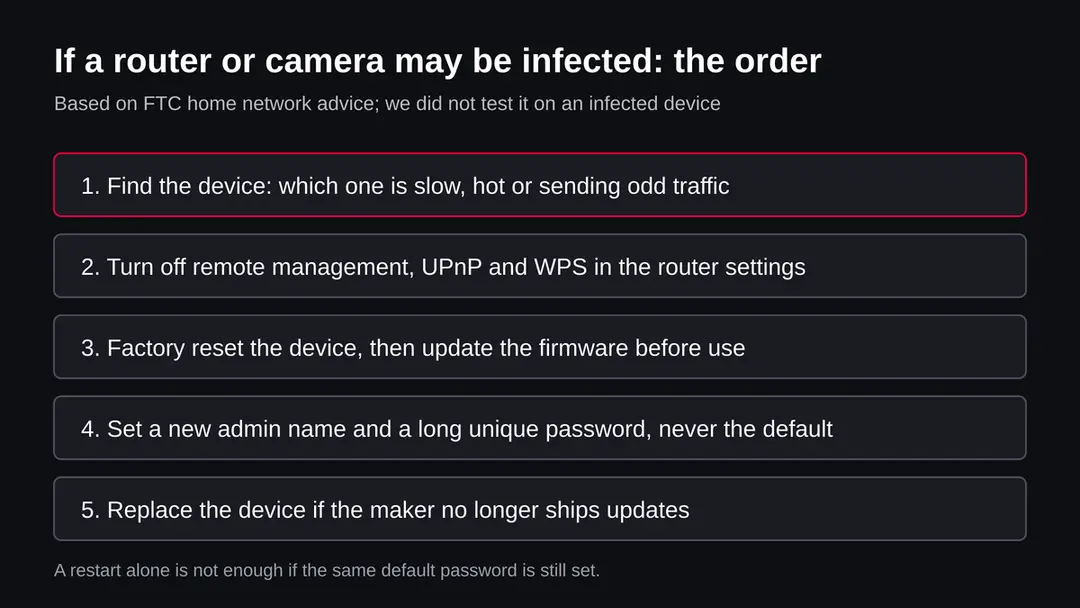
The safe answer for a small device is to wipe it and set it up again, because you cannot look inside it. The order matters: do the reset before you trust the device again.
- 1
Disconnect the device from the internet
Unplug the cable that goes to the modem, or switch off the device. This ends any traffic it sends while you work.
- 2
Factory reset it
Most devices have a small reset button or a reset option in the settings. A plain restart is not the same thing: the sources describe a program that is held in the device's memory, and a reset also removes settings that an intruder may have changed. We did not find a source that proves a restart alone removes every variant, so we advise the full reset.
- 3
Update before you connect
Get the newest firmware from the maker's own site and install it from a computer connected by cable, then connect the device. Updating first closes the hole that let the bot in.
- 4
Set new login details
Choose a new admin name and a long unique password. The FTC advises not using anything tied to your name, address or router brand, and not reusing a password from another account. Then set a separate Wi-Fi password.
- 5
Turn off the doors
Keep remote management, UPnP and WPS off unless you need them. The FTC also suggests a guest network for visitors' devices so they do not share the network with your cameras.
- 6
Replace what cannot be updated
If the maker no longer ships updates, buy a supported model. This is our judgement, not a vendor statement.
- 7
Change your passwords as a precaution
We did not find a source that says Mirai steals account passwords. Still, if your router's admin page was open to the internet, change the Wi-Fi password and the passwords of any service whose login you saved on a camera or similar device.
If you run a website or server and found this name in your files
Some of these listings are about a legitimate server that was broken into. We do not know that for likedrink.beer: it is a young domain, and nothing says it ever had a normal site. If you found a bins folder or the name inside your own files, treat the server as compromised.
- 1
Take the server out of service
Put it behind a firewall or switch it off. Save the logs first, because they show how the intruder came in.
- 2
Find how the intruder came in
Look for logins from unknown addresses, new users, new scheduled jobs and files in writable folders. Weak or default SSH, Telnet or panel passwords are the first thing to check.
- 3
Rebuild instead of cleaning
The safest path is a fresh install from a known good image, then a restore of data only, with all passwords and keys replaced.
- 4
Tell your hosting provider
They can help with logs and take down content from their side.
Keep your devices out of this kind of botnet
Every step is cheap and done once per device. They follow FTC advice for home networks.
Do
- Change the admin name and password of every router, camera and smart device the day you set it up.
- Use WPA3 or WPA2 Personal for Wi-Fi, as the FTC advises.
- Check the maker's site for firmware updates now and then, and keep the companion app current.
- Turn off remote management, UPnP and WPS unless you need them.
- Put cameras and smart plugs on a guest network.
- Buy devices from makers that publish updates.
Don't
- Do not leave a device on the factory password, even for a week.
- Do not expose a camera or recorder to the internet by port forwarding.
- Do not rely on a restart to clean a device you suspect.
- Do not request or run files from likedrink[.]beer or any address that serves files named after a botnet.
- Do not assume that a dead domain means the threat has gone.
Questions about likedrink.beer (Mirai botnet files)
What is likedrink.beer?
It is a web address that URLhaus, the malware tracking project run by abuse.ch, lists for 27 files tagged mirai. They sat in a folder called bins and were named mirai plus a chip type, for example mirai.arm7 or mirai.x86_64.
All 27 were added on 4 October 2026 within 21 seconds and were marked offline when we read them. It is not a program on your computer and not a site anyone is meant to visit. We did not download the files, so what they contain is not confirmed by us.
Is likedrink.beer safe to open?
No. Do not request files from it and do not run anything that does. Our own request on 11 October 2026 could not find the name at all, which fits the registry hold RDAP showed on 7 October.
That proves nothing about the future: botnet operators can register another name and put the same files there. The rating comes from the 27 URLhaus reports and their tags, not from a visit, and we made no browser visit.
What is Mirai?
Mirai is malware for Linux based internet of things devices. The sources we read describe it as software that looks for insecure devices, adds them to a botnet and uses them for DDoS attacks, and as one of the first significant botnets aimed at exposed Linux networking devices.
Its source code was published on a forum, after which many variants appeared. The tag on these files says Mirai, but not which variant it is.
I saw likedrink.beer in my router or DNS log. Am I infected?
Not necessarily. The name in a log shows that a device on your network asked for it, or that a filter blocked a lookup. It does not show that anything ran.
Find which device asked and when, then look at that device: is its login still the factory one, is remote management on, is the firmware old? If you cannot tell, follow the reset order on this page. A scan on a PC cannot look inside a router.
Does likedrink.beer affect Windows, Mac or my phone?
We found nothing that says so. The file endings are chip types for routers, cameras and small servers, and the sources describe Mirai as a Linux threat.
A Dr.Web report from 2017 describes a separate Windows trojan that scans the local network for Linux devices, but nothing links it to this domain. On a normal PC, Mac, iPhone or Android phone there is nothing to remove for these files.
How do I remove Mirai from a router or camera?
Disconnect the device, then do a full factory reset with its reset button or settings option. Install the newest firmware from the maker's own site before you reconnect it, set a new unique admin name and password, and turn off remote management, UPnP and WPS.
A plain restart may not be enough. The steps follow FTC advice for home networks and we did not test them on an infected device. If the maker no longer ships updates, replace the device.
Does a factory reset remove the infection?
In most cases a reset returns a device to its maker's software and settings, which removes a program an intruder added and the settings it changed. We did not find a source that proves this for every variant, so we call it the safest step rather than a guarantee.
It does not help if you then use the same default password again: the next scan can get in the same way. Update first, then change the login.
Why were 27 files reported in 21 seconds?
URLhaus data shows all 27 addresses added on 4 October 2026 between 06:59:22 and 06:59:43 UTC. Our reading is that a script went through the folder and reported every file it found, because the names are one build per chip type.
The report does not say so. It also does not say how the reporter found the folder. What it does show is that the whole set was online at some point before the reports and offline when we read them.
The domain does not answer. Is the danger over?
For this one name, probably for now. RDAP shows a client hold and an inactive status, and our request on 11 October 2026 failed at the name lookup.
For you, the danger depends on your own devices: a router with a default password can be attacked from any address. Botnet operators also move files to new names or bare IP addresses. Harden the devices rather than waiting for a name to disappear.
Will Fortect remove likedrink.beer?
Fortect scans Windows for malware and unwanted programs and repairs the system files and settings they change, and its free scan shows what it finds on your PC before you decide anything.
For likedrink.beer, follow the plan above as well: the browser steps take back permissions and settings that no scanner treats as a threat, and uninstalling the program that brought it removes the source.
Run Microsoft Defender's full scan and, if anything was found, its offline scan as a second opinion. If the symptoms are gone after the plan and both scans are clean, there is nothing more to do.
Sources
- FTC Consumer Advice: Securing Your Internet-Connected Devices at Home (read October 11, 2026)
- FTC Consumer Advice: How To Secure Your Home Wi-Fi Network (read October 11, 2026)
- The Hacker News: Mirai IoT botnet gets a Windows trojan (Dr.Web report, February 2017) (read October 11, 2026)
- Joe Sandbox: analysis report 1838700 (Mirai variants after the source code was published) (read October 11, 2026)
- arXiv 1901.04805: network based detection of Mirai like bots (research paper) (read October 11, 2026)