
0807.st: archives tagged SmartLoader and Stealc, and what to do if you ran one on Windows
0807.st is a web address that URLhaus lists for three files reported on 10 October 2026: two RAR archives and one DAT file, all tagged SmartLoader and Stealc. SmartLoader is a Windows loader and Stealc is a stealer that takes saved passwords, cookies and crypto wallets.
If you only saw the name, nothing is proven. If you unpacked and ran one of these files, change your passwords from another device first, then clean or reset Windows.
Facts checked October 10, 2026. Removal steps tested on Windows 11 (26H2) and checked against Microsoft's and the browser makers' current documentation.
Automatic
Get a free scan and check if your PC is infected.
Fortect finds malware, unwanted programs and the Windows damage they leave behind, and repairs it in one pass.
If a RAR archive or DAT file from 0807.st, or a program unpacked from it keeps coming back after uninstalling, a scan can find what reinstalls it.
Do it yourself · free Remove 0807.st (SmartLoader, Stealc) yourself 5 steps, about 15 minutes, no software needed.
Start the steps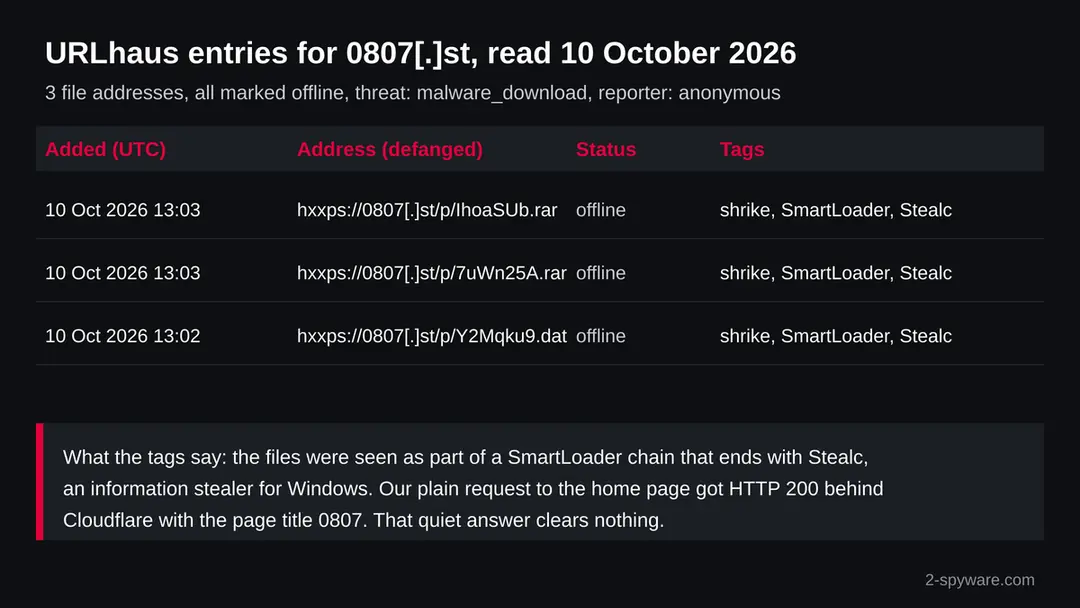
0807.st (SmartLoader, Stealc): summary
| Type | A malware download address for Windows PCs: URLhaus lists two RAR archives and one DAT file tagged SmartLoader and Stealc |
|---|---|
| Risk | High if you ran a file from it: saved passwords, cookies and crypto wallets can be taken in minutes. Low if you only saw the name |
| Symptoms | Often none. An unknown scheduled task, a tool that did nothing when run, or logins you did not make are the signs |
| How to get rid of it | Change passwords and sign out all sessions from another device, move crypto, run Microsoft Defender Offline, reset Windows if in doubt |
| Our check (10 October 2026) | One plain request: HTTP 200, title 0807, behind Cloudflare. A quiet answer clears nothing; the rating comes from URLhaus |
| Running since / first seen | Files first reported 10 October 2026; registration date not known to us |
| Removal | Scan the PC with security software to find and remove the malware and anything installed with it. Fortect scans Windows for malware and repairs the system files and settings it damaged. Remove it nowTo use the full-featured product, you have to purchase a license for Fortect. The scan is free. |
Show 8 more facts
| Platform | Windows, by every source on SmartLoader and Stealc |
|---|---|
| Detection names | No Microsoft detection name is known for these files, because we did not open them. The URLhaus tags are shrike, SmartLoader and Stealc |
| Name | 0807.st |
| Evidence | 3 write-ups by security sites; details still limited |
| First seen | 10 October 2026 |
| Distribution | Typically fake installers, cracked programs, e-mail attachments, fake "verify you are human" pages and ads for popular apps |
| Damage | Installs other malware, often several programs at once |
| Facts checked | 10 October 2026 |
Facts checked on 10 October 2026 against our copy of the URLhaus data for 0807.st, an RDAP request that found no record, one plain request from our server (no browser, no clicks), BleepingComputer, Security Affairs, Microsoft Learn and Microsoft Support. We did not download the files and we infected no PC; the removal steps follow Microsoft's pages and were not tried on a live infection.
What 0807.st is, and what we know about it
0807.st is not a program on your PC. It is a web address that the abuse.ch project URLhaus lists for three file downloads, two RAR archives and one DAT file, all tagged SmartLoader and Stealc. We found no public write-up of this address, so this page sets out what the reports show, what our own request saw and what researchers have published about SmartLoader and Stealc.
- 1
What URLhaus lists
Three file addresses under a folder called p: IhoaSUb.rar, 7uWn25A.rar and Y2Mqku9.dat. All three were added on 10 October 2026, one at about 13:02 UTC and two at about 13:03 UTC. The threat label is malware_download and the reporter is shown as anonymous. All three were marked offline in our copy of the data.
- 2
What the tags mean
SmartLoader is a loader, a small program whose job is to set itself up on a Windows PC and fetch the next piece. Stealc is an information stealer that takes saved passwords, cookies and crypto wallet data. shrike is a third tag; we found no reliable source that explains it, so we do not guess what it stands for.
- 3
What the file names suggest
Short random names after /p/ look like the links a file sharing or paste service hands out. That is our reading of the address pattern, not a fact any report states. It means the owner of 0807.st may be the attacker, or may run a service that an attacker used to store files. We could not tell which.
- 4
What this means for you
If you only saw the name in a browser warning, a DNS log or a block list, nothing is proven. The risk is for a Windows PC where someone downloaded one of these archives, unpacked it and ran what was inside, or where a program fetched the DAT file on its own.
- Kind of threat
- A download address for archives tagged SmartLoader, a Windows loader, and Stealc, a password and wallet stealer
- Where the files were
- hxxps://0807[.]st/p/ followed by a seven character name and the ending .rar or .dat
- URLhaus entries
- 3 file addresses, all added on 10 October 2026, all marked offline when we read our copy of the data
- Domain record
- Our RDAP request found no record for 0807.st, so the registration date and registrar are not known to us
- Our request
- 10 October 2026: HTTP 200 from a Cloudflare server, page title 0807, no redirect
- Platform
- Windows. SmartLoader and Stealc are Windows malware in every source we read
What 0807.st (SmartLoader, Stealc) does on an infected PC
What we checked on 10 October 2026, and what we could not
We sent one plain request to https://0807.st/ from our server on 10 October 2026, with no browser and no clicks. The server answered with HTTP 200, the page title 0807 and a Cloudflare server header. That answer clears nothing.
Our check, 10 October 2026
- The home page answeredHTTP 200, title 0807, served through Cloudflare, no redirect to another address. Cloudflare sits in front of many legitimate and many malicious sites, so its presence tells you nothing about the owner.
- Why that is not a clean resultA plain request does not run scripts, does not click and does not open the reported folder. A site can show a harmless front page while files under /p/ are malicious, and the reported files can be removed and replaced by new ones.
- Notification requestThe page text our server received did not mention the browser notification feature. That covers only the one page we asked for.
- URLhaus listingThree files under /p/ tagged shrike, SmartLoader and Stealc, threat malware_download, all reported on 10 October 2026.
- The files themselvesWe did not download the archives or the DAT file. We cannot tell you what they contain, which Stealc build they carry or where it sends data. By the time we read the data, all three were marked offline.
Dangerous: treat it as a malware download address The rating comes from the three URLhaus reports and their tags, not from our request. Do not download files from this address and do not run anything that came from it.
What happened to 0807.st, as far as the records show
The record is short. Everything we know falls on one day, 10 October 2026, and the times are UTC.
Not known
Registration
Our RDAP request for 0807.st returned no record. The .st ending is the country code of Sao Tome and Principe, and not every country registry answers RDAP. We therefore do not know when the name was registered or by whom.
10 October 2026, 13:02 UTC
The DAT file is reported
URLhaus adds hxxps://0807[.]st/p/Y2Mqku9.dat with the tags 0807.st, shrike, SmartLoader and Stealc. A DAT ending says nothing about the content; loaders often fetch encrypted parts with neutral endings like this.
10 October 2026, 13:03 UTC
Two RAR archives are reported
A minute later, IhoaSUb.rar and 7uWn25A.rar are added with the same four tags. RAR is an archive format, so a person would have to unpack it and run what is inside.
The three URLhaus entries for 0807.st that we read on 10 October 2026. The table of reports, not a picture of the site, is the main evidence. 10 October 2026, 15:08 UTC
Our check
All three file addresses are marked offline. Our plain request to the home page gets HTTP 200 and the title 0807. Offline means the reported links stopped serving files; it does not mean the server or the operator is gone.
What the pattern suggests, and what it does not: three files reported within one minute by the same anonymous reporter look like one batch found together. That is our reading of the dates. No report tells us how many people downloaded them.
How SmartLoader brings Stealc onto a Windows PC
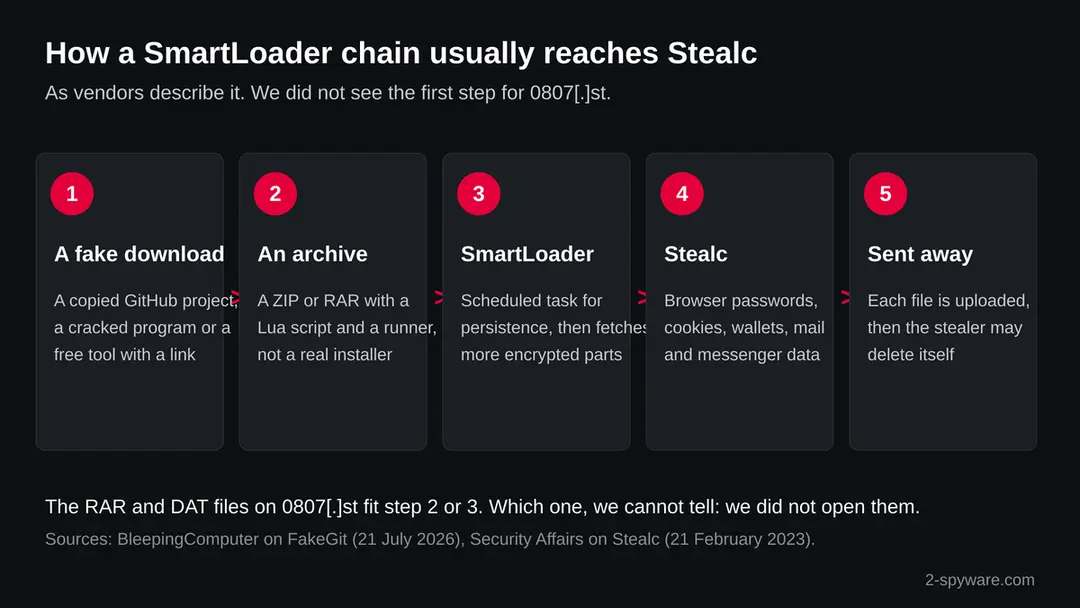
SmartLoader does not arrive by itself. A person downloads what looks like a free tool, unpacks it and runs it. We did not see how victims reached 0807.st; this is the chain researchers describe for SmartLoader in 2026.
- 1
A download that looks useful
BleepingComputer (21 July 2026) reports research by Island that found about 7,600 fake GitHub repositories in a campaign called FakeGit. They copied real projects and tools such as Gmail, WhatsApp, Jenkins and Docker helpers, and more than 800 posed as AI agent skills or MCP servers.
- 2
An archive, not an installer
The README of such a page points to an archive presented as a release or an installer. Inside are disguised Lua scripts that start SmartLoader. The files on 0807.st are RAR archives, which fits this step, but we cannot confirm their content.
- 3
SmartLoader settles in
According to the same report, SmartLoader creates scheduled tasks so it starts again, reads the address of its control server from a Polygon smart contract and downloads further encrypted parts. Reading the address from a blockchain makes the server harder to take down.
- 4
Stealc is the last stage
The final part installed is Stealc. Its job is quick: collect saved logins, cookies and wallet data and send them to the operator.
- 5
The trail can disappear
Security Affairs, reporting on SEKOIA's research, says Stealc removes itself and the libraries it downloaded once the data is sent. A PC can look normal afterwards while the stolen data is already in use.
The same report says Trend Micro links this operation to an older one that used Lumma Stealer and tracks the group as Water Kurita. Island told the press that the 14 million download count includes repeated and automated requests, so it is not a count of infected PCs.
What Stealc is
Stealc is an information stealer sold to criminals as a service. The buyer chooses what it collects, so one build may take more than another.
| Question | What the sources say | Source |
|---|---|---|
| Who found it? | SEKOIA researchers, in January 2023 | Security Affairs, 21 February 2023 |
| Who sells it? | A seller using the name Plymouth, on dark web forums and a Telegram channel, with regular new versions | Security Affairs |
| What is it built on? | Code ideas from the Vidar, Raccoon, Mars and RedLine stealers | Security Affairs |
| What does it target? | 22 browsers, 75 crypto browser extensions, 25 desktop wallets, email clients such as Outlook, messenger apps, and files picked by rules the buyer sets | Security Affairs (from SEKOIA's configuration) |
| How does it send data? | File by file, not as one archive, and it starts before it has its full configuration; it also records the IP address, country and browser names in a file called system_info.txt | Security Affairs |
| What does it download? | Genuine helper libraries such as sqlite3.dll and nss3.dll, which it uses to read browser data | Security Affairs |
| How is it spread? | Videos that promote cracked software with links to infected installers, and in 2026 SmartLoader chains from fake GitHub projects | Security Affairs; BleepingComputer |
| Which build is on 0807.st? | Not known. URLhaus gives only the tags; we did not open the files | Not available |
What 0807.st (SmartLoader, Stealc) can steal or download
What Stealc can take from a Windows PC
A stealer does its work in seconds and then has no reason to stay. Treat everything stored in the browsers and wallet apps of the PC as known to the attacker.
Reported targets
- Saved browser passwords
- Browser cookies and sessions
- Autofill data
- Crypto browser extensions
- Desktop crypto wallets
- Outlook and other email accounts
- Messenger accounts
- Files chosen by the buyer
- Your IP address and country
| Data | Why it matters | Source |
|---|---|---|
| Saved passwords | Every account whose password the browser remembered can be opened | Security Affairs |
| Cookies | A session cookie can log the attacker in without your password or a second factor, until you sign out everywhere | Our reading of how cookies work |
| Wallet extensions and apps | 75 extensions and 25 desktop wallets in one configuration; crypto that is sent cannot be pulled back | Security Affairs |
| Email and messengers | Outlook account files and messenger data; a hijacked email resets other accounts | Security Affairs |
| Chosen files | The file grabber takes what the buyer asks for, such as documents with words like wallet or password in the name | Security Affairs; the example is our reading |
What this can cost you
Seeing the name costs nothing. The risks below apply to a Windows PC where a file from 0807.st was unpacked and run.
- High
Email and main accounts
Saved passwords and live cookies let someone into your email, and email resets everything else. Changing a password is not enough while an old session cookie still works.
- High
Crypto
Stealc targets wallet extensions and desktop wallets. Funds moved from a stolen wallet cannot be recovered.
- High
Developer and work secrets
The 2026 SmartLoader chains aim at developers through fake code projects. Island advises rotating all secrets on an affected machine, which means API keys, access tokens and SSH keys as well as passwords.
- Medium
A loader that stays
SmartLoader sets up scheduled tasks and can fetch new parts later, so the PC may receive another payload after the first theft.
- Medium
Contacts targeted next
A stolen messenger or email account can be used to send the same lure to people who trust you.
- Low
Nothing, if you only saw the name
A name in a warning, a log or a block list is not an infection.
What you may notice, and what you may not
Stealers are built to be quiet. Most victims notice nothing on the PC and learn about the theft from their accounts.
| Sign | What it can mean |
|---|---|
| A tool from a download page that did nothing when you ran it | The archive may have run a script in the background instead of installing what it promised |
| A scheduled task you did not make | BleepingComputer reports that SmartLoader uses scheduled tasks to start again |
| Lua files or an unknown runner program in a user folder | The FakeGit archives contain disguised Lua scripts; where they land on disk varies |
| Logins from new places, or new sessions you do not know | Stolen passwords or cookies being used |
| Wallet balances lower, or transfers you did not make | Wallet data taken |
| A Defender alert naming Stealc or SmartLoader | A detection at the time you ran the file; open the details to see what was found |
| Nothing at all | Stealc can delete itself after sending the data |
How to check the PC for 0807.st (SmartLoader, Stealc)
How a person ends up with a file from 0807.st
We do not know which page sent people to these files. The routes below are the ones the sources describe for SmartLoader and Stealc.
- 1
A copied project on GitHub
A repository that looks like a real tool, with fake stars and a download button in its README. The button leads to an archive hosted elsewhere or attached as a release.
- 2
An AI tool or MCP server listing
Island found hundreds of fake AI skills and MCP servers listed in public catalogs. Some AI assistants even repeated their install steps, according to Island's tests.
- 3
Cracked software and video tutorials
SEKOIA describes videos that explain how to install a cracked program and link to a download site that serves the stealer.
- 4
A link in a chat or a forum
A short file link like the ones on 0807.st is easy to paste into a Discord server, a comment or a message. This route is our reading of the address pattern, not something a report names.
Check your PC before you delete anything
Start with one question: did you download a RAR or DAT file from 0807.st, unpack it and run something from it? If you saw the name only in a log from your network, find the device that asked for it. If the answer is yes or you are not sure, do the checks below. None of them deletes anything.
While you check, stop using the PC for email, banking, work and crypto. The account steps further down are done from another device.
- 1
Disconnect first
Turn off Wi-Fi or unplug the cable. SmartLoader needs the connection to fetch new parts, and a stealer needs it to send data.
- 2
Find the file and the time
Open your Downloads folder and sort by date. Note the name of the archive, when you got it and what you ran from it. The time helps you match alerts and logins later.
- 3
Open Protection history
In Windows Security > Virus & threat protection > Protection history, look for anything found, blocked or quarantined around that time, and open each entry to read the name and the file path.
- 4
Look for new scheduled tasks
Press Start, type Task Scheduler and open it. In Task Scheduler Library, look for tasks you do not know, with random or borrowed names, that run a program or script from a folder under your user profile such as AppData. Write down the name and the action; do not delete yet.
- 5
Look at Startup apps
Open Settings > Apps > Startup. Note anything you did not install. On Windows 10 the same list is in Task Manager under the Startup tab.
- 6
Look for unknown processes
Open Task Manager and the Processes tab. Look for a program you do not know, especially one started from a user folder. Right click it and choose Open file location to see where it lives.
- 7
Check your accounts from another device
On your phone or another computer, look at the sign in activity of your email, bank, exchange, Discord, Telegram and GitHub accounts. This is the fastest way to learn whether the theft already happened.
- 8
A clean scan does not clear the PC
Stealc may delete itself after it sends the data. A scan that finds nothing can mean the file was harmless, or that the stealer already left. Treat it as one data point.
How to remove 0807.st (SmartLoader, Stealc)
How to remove 0807.st
A loader's job is to install other malware, so treat the PC as infected with more than one program until the scans are clean.
Step 1: Delete scheduled tasks that bring it back
Programs like 0807.st add a scheduled task so they return after an uninstall or reopen a page at every sign-in. Start Task Scheduler, open Task Scheduler Library and sort by Last Run Time to see what ran recently.
On the Actions tab, a program in a user folder, a script or a web address is a warning sign; right-click such a task and choose Delete.
Tasks with names copying Google, Edge or Windows updaters but pointing to an odd folder are typical. The tool looks the same in Windows 11 and Windows 10.

Windows 11: Task Scheduler Library, the task selected, the Actions tab shows the file it runs. Full procedure with screenshots: Remove what malware leaves behind in Windows
Step 2: Remove it from startup
Press Ctrl + Shift + Esc to open Task Manager and select Startup apps (Windows 11) or the Startup tab (Windows 10). Disable entries you do not recognise, especially ones with no publisher or with a name that copies a Windows component.
Right-click an entry and choose Open file location to see where it runs from: programs in
%AppData%or%Temp%deserve a closer look. Some entries are not listed there but in the registry Run keys, which the procedure below shows how to check.Full procedure with screenshots: Stop apps from opening at startup On uGetFix
Step 3: Delete the folders left behind
Uninstalling often leaves the program's folders, and some threats reinstall themselves from them.
Press Windows + R, type
%LocalAppData%and press Enter, then do the same for%AppData%and %ProgramData%, and look for folders named after 0807.st, its publisher or created on the day the problem started. Delete those folders, and check C:\Program Files and C:\Program Files (x86) too.If Windows says a file is in use, end it in Task Manager or delete the folder after a restart in Safe Mode. The folders are the same in Windows 11 and Windows 10.
Full procedure with screenshots: Remove what malware leaves behind in Windows
Step 4: Scan the PC, then run the offline scan
A scan finds the parts of 0807.st that the manual steps cannot see. In Windows Security > Virus & threat protection > Scan options, start a Full scan and quarantine what it reports.
Follow it with Microsoft Defender Antivirus (offline scan) > Scan now, which restarts the PC and checks the disk while Windows and the malware are not running.
It takes about 15 minutes and works the same in Windows 11 and Windows 10. If either scan finds something, run the full scan again after removal until it comes back clean.

Windows 11: Windows Security > Virus & threat protection > Scan options. Full procedure with screenshots: Run a Microsoft Defender Offline scan
Step 5: Change passwords from another device and sign out other sessions
0807.st can copy saved passwords, cookies and session tokens and send them out in seconds, so cleaning the PC does not undo the theft.
Change your passwords on a device that was never infected, starting with the e-mail account, since every other reset goes through it. On each account, end all other sessions and check the recovery e-mail, phone number and forwarding rules.
Then turn on two-step verification. Sign in on the Windows 11 or Windows 10 PC again only after the offline scan is clean.
Full procedure with screenshots: Turn on two-step verification / secure a hacked account
Clean the PC: an offline scan, then a reset if in doubt
Do the account steps from another device first if you ran the file, then clean the PC. A cleaned PC does not undo what was already sent.
- 1
Run Microsoft Defender Offline
Microsoft Learn says to open Windows Security > Virus & threat protection > Scan options, select Microsoft Defender Offline scan and choose Scan now. Save your work first: Windows signs you out and restarts, and the scan takes about 15 minutes outside the normal Windows. It works on x64 Windows 11 and on Windows 10 version 1607 or newer, not on ARM PCs.
- 2
Suspend BitLocker first if it is on
Microsoft Learn says that with BitLocker on the system drive you should suspend it first, or the restart may ask for the recovery key. Have the key ready either way.
- 3
Read the results
After the restart, the results are in Protection history. Microsoft Learn also says the offline scan does not run, and shows no error, if the Windows Recovery Environment is switched off.
- 4
Remove what you can tie to the file
Delete the archive and the folder you unpacked it to. Remove a scheduled task or a startup entry only if it clearly points to that folder or to the files from the archive. If you cannot tell, do not guess.
- 5
If you are not sure, reset Windows
Microsoft Support describes Reset this PC, which reinstalls Windows from scratch and lets you keep your personal files or remove everything. On Windows 11 it is under Settings > System > Recovery. Apps and settings are removed either way, and Microsoft calls it the most disruptive option, so back up documents first.
- 6
Restore documents by hand
Copy back documents and photos, not programs, scripts or archives from the time of the infection. Install apps again from their makers' own sites.
If you use a Mac, an iPhone or an Android phone
Every source we read describes SmartLoader and Stealc as Windows malware. We found nothing that says the files on 0807.st run on other systems.
| Your device | What we know | What to do |
|---|---|---|
| Mac | The reports describe Windows loaders, Windows scheduled tasks and Windows wallets | Nothing to remove for this threat; do not follow the Windows steps on a Mac. Delete the archive if you downloaded it |
| iPhone or iPad | No source mentions these files on iOS | Nothing to remove; if you typed a password on a page linked to it, change it |
| Android | No source mentions these files on Android | Nothing to remove; change passwords you entered on a suspicious page |
| A shared account | If the infected PC used the same browser account, synced passwords are exposed on every device | Change those passwords and sign out all sessions |
After removal: passwords, accounts and prevention
After running a file: protect what was taken
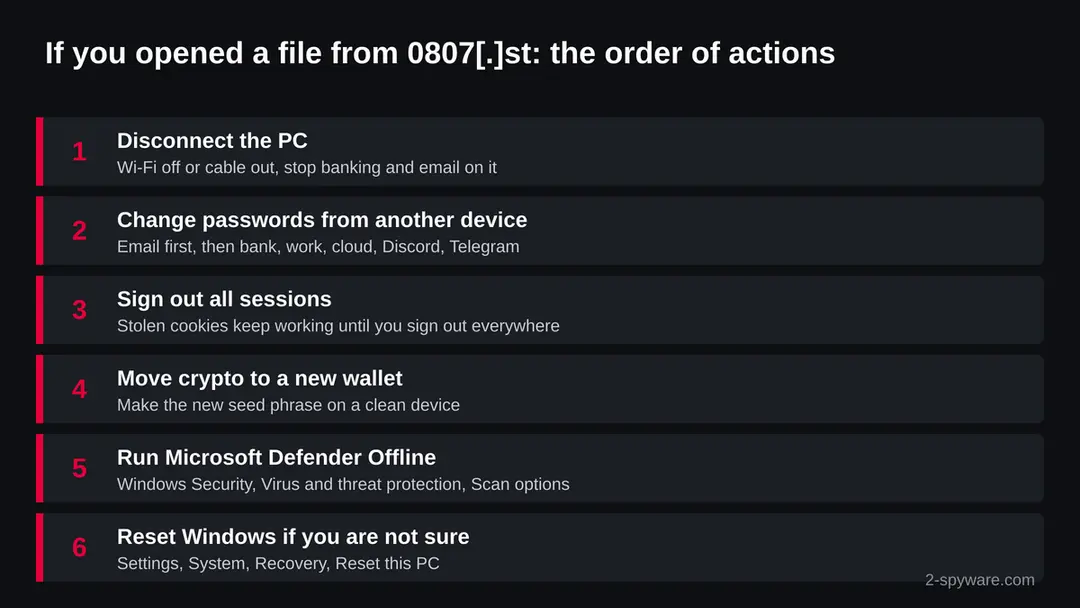
The data most likely left the PC within minutes. Speed matters more than a perfect clean, and the account steps come first, from another device.
- 1
Change passwords from a clean device
Start with your email, because it resets everything else. Then your bank, work accounts, cloud storage, Discord, Telegram, Steam and any exchange. Every password saved in the browser of that PC counts as known.
- 2
Sign out of every session
Most services have an option to sign out on all devices in their security settings. Use it, because a stolen cookie keeps a session open even after the password changes. Then turn on two step sign in with an authenticator app or a security key.
- 3
Move crypto to a new wallet
If a wallet extension or wallet app was on the PC, assume its data is known. Create a new wallet with a new recovery phrase on a clean device and move the funds there. Do not reuse the old phrase.
- 4
Rotate developer secrets
If you are a developer and the file came from a code project, replace GitHub tokens, SSH keys, cloud keys and API keys used on the PC. Island advises rotating all secrets on an affected machine at once.
- 5
Watch your money and accounts
Check card statements and exchange history for several weeks and turn on alerts. Tell your bank if a card was saved in the browser.
- 6
Warn people you chat with
If your messenger or email account was used, tell your contacts not to open files or links sent in your name.
Keep a PC out of this kind of chain
Each step of the chain needs you to run something. Stopping at the first step is the strongest defence.
Do
- Get programs from their makers' own sites or the Microsoft Store, and check that a GitHub project is the original before you download a release.
- Look at the account behind a repository: its age, its other projects and whether the code is really there or only a download button.
- Use a password manager instead of saving passwords in the browser, and two step sign in on every important account.
- Keep a hardware wallet or a separate device for crypto you cannot afford to lose.
- Keep Windows and Microsoft Defender updated, and show file endings in File Explorer.
- Test unknown developer tools and AI agent add-ons in a separate virtual machine first.
Don't
- Do not run tools from archives linked in a README when the project has no real source code.
- Do not install cracked software or follow video tutorials that link to free versions of paid programs.
- Do not let an AI assistant run install commands from a repository you have not checked.
- Do not change your passwords on the PC you suspect.
- Do not treat a clean scan as proof that nothing was taken.
Questions about 0807.st (SmartLoader, Stealc)
What is 0807.st?
It is a web address that URLhaus, the malware tracking project of abuse.ch, lists for three file downloads: two RAR archives and one DAT file under the folder /p/.
All three were reported on 10 October 2026 and tagged shrike, SmartLoader and Stealc. It is not a program on your PC. We did not download the files, so their content is not confirmed by us.
Is 0807.st safe?
No. Do not download files from it and do not run anything that came from it. Our plain request on 10 October 2026 got an ordinary answer with the title 0807, but a quiet front page clears nothing. The danger rating comes from the three URLhaus reports and their tags.
What is SmartLoader?
SmartLoader is a Windows loader. According to BleepingComputer's report on Island's FakeGit research, it arrives in archives with disguised Lua scripts, sets up scheduled tasks, reads its server address from a Polygon smart contract and downloads more encrypted parts. Its final stage in that campaign is the Stealc information stealer.
What does Stealc steal?
SEKOIA, as reported by Security Affairs, found Stealc targeting 22 browsers, 75 crypto browser extensions, 25 desktop wallets, email clients such as Outlook and messenger apps.
It also grabs files the buyer chooses and records your IP address and country. Saved passwords and cookies are the most urgent loss. Change those first, from another device.
I downloaded a RAR file from 0807.st but did not open it. Am I infected?
An archive that was never unpacked and run does nothing by itself. Delete it and empty the Recycle Bin.
If you unpacked it and ran anything from it, follow the full steps on this page, starting with changing your passwords from another device. A quick scan of the Downloads folder with Microsoft Defender is a sensible extra check.
I ran the file. What should I do first?
Disconnect the PC from the internet. Then, from a phone or another computer, change your email password, sign out of all sessions and turn on two step sign in.
Do the same for your bank, work and crypto accounts, and move crypto to a new wallet. Only then clean the PC with a Microsoft Defender Offline scan or a reset.
How do I remove SmartLoader and Stealc from Windows?
Run a Microsoft Defender Offline scan from Windows Security, Virus and threat protection, Scan options. Delete the archive and the unpacked folder, and remove scheduled tasks or startup entries that clearly point to them.
If you are not sure what ran, use Reset this PC and remove everything, then restore only documents. We did not test these steps on an infected PC.
My scan found nothing. Am I safe?
Not necessarily. Security Affairs reports that Stealc deletes itself and its helper files after sending the data. A clean scan may mean the file was harmless or that the stealer already left.
If you ran the file, change your passwords and sign out of all sessions anyway. The account steps protect you whatever the scan says.
Does 0807.st affect Mac, iPhone or Android?
We found nothing that says so. SmartLoader and Stealc are described as Windows malware in every source we read.
On a Mac or a phone, delete any file you downloaded from the address and change any password you typed on a page linked to it. Synced browser passwords from an infected PC are exposed on every device.
Will Fortect remove 0807.st?
Fortect scans Windows for malware and unwanted programs and repairs the system files and settings they change, and its free scan shows what it finds on your PC before you decide anything.
For 0807.st, follow the plan above as well: the browser steps take back permissions and settings that no scanner treats as a threat, and uninstalling the program that brought it removes the source.
Run Microsoft Defender's full scan and, if anything was found, its offline scan as a second opinion. If the symptoms are gone after the plan and both scans are clean, there is nothing more to do.
Sources
- URLhaus (abuse.ch): host page for 0807.st (entries read from our copy of the feed) (read October 10, 2026)
- BleepingComputer: FakeGit campaign uses 7,600 GitHub repos to push SmartLoader malware (21 July 2026) (read October 10, 2026)
- Security Affairs: Stealc, a new advanced infostealer appears in the threat landscape (21 February 2023, on SEKOIA research) (read October 10, 2026)
- Microsoft Learn: Microsoft Defender Offline scan in Windows (updated 25 August 2026) (read October 10, 2026)
- Microsoft Support: Recovery options in Windows (Reset this PC) (read October 10, 2026)