
AIGPUSniffer: what it is, is it a virus, and how to remove it
AIGPUSniffer.exe is a small Adobe helper that Illustrator and InDesign start for a second or two to test your graphics card before they turn on GPU acceleration. It is not a virus and not part of ASUS software: you can stop it by turning off GPU Performance in the Adobe app, and it goes away for good only when you uninstall that app.
Facts checked October 9, 2026. Removal steps tested on Windows 11 (26H2) and checked against Microsoft's and the browser makers' current documentation.
Automatic
Get a free scan and check if your PC is infected.
Fortect finds malware, unwanted programs and the Windows damage they leave behind, and repairs it in one pass.
Do it yourself · free Remove AIGPUSniffer yourself 3 steps, about 9 minutes, no software needed.
Start the steps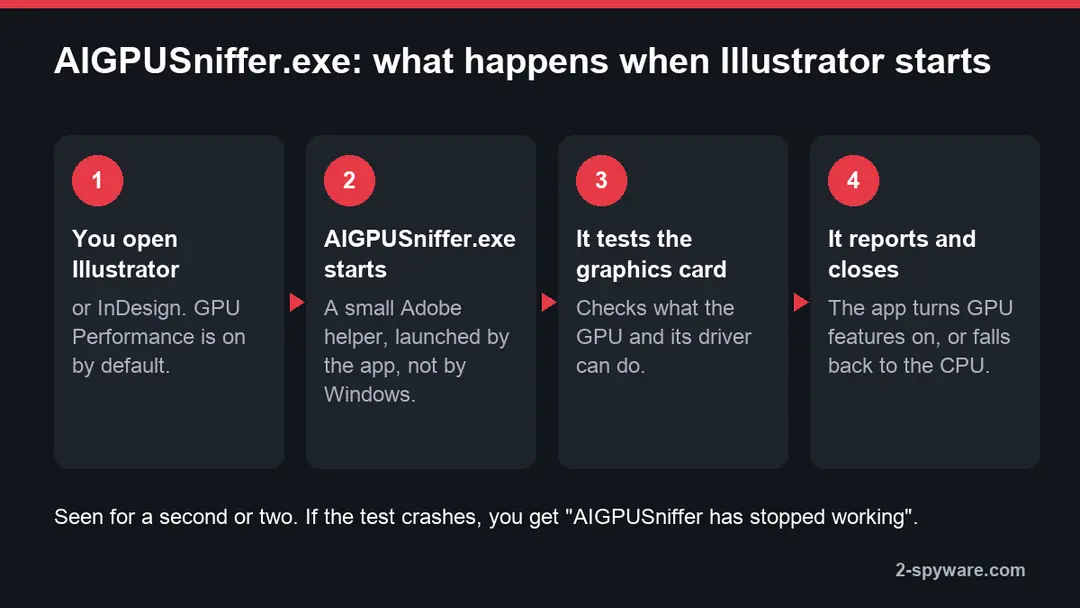
AIGPUSniffer: summary
| Type | Adobe program file (AIGPUSniffer.exe), not a virus and not an ASUS tool |
|---|---|
| Comes with | Adobe Illustrator; also started by InDesign |
| What it does | Tests the graphics card and driver for a second or two, so the app knows whether it can use GPU Performance |
| Symptoms | AIGPUSniffer flashing up in Task Manager or the Mac Dock when Illustrator or InDesign opens; "AIGPUSniffer has stopped working" |
| How to get rid of it | Turn off GPU Performance in the Adobe app to stop it; uninstall the app in Creative Cloud to remove it |
| Our check (9 October 2026) | Genuine Adobe component; no malware using the name found in security vendor research |
| Check the PC | The genuine file needs no removal. Fortect's free scan checks Windows for malware hiding under system file names and for damaged system files. Remove it nowTo use the full-featured product, you have to purchase a license for Fortect. The scan is free. |
Show 10 more facts
| Signs of a fake | Outside the Adobe program folder, no Adobe signature, running with no Adobe app open or none installed |
|---|---|
| Detection names | None: the genuine file is not detected by Microsoft Defender or other antivirus |
| Damage | None from the genuine file; a copy outside the Adobe folder would be as harmful as whatever malware it is |
| First asked about on our site | 2019 |
| File name | AIGPUSniffer.exe |
| Description | AIGPUSniffer Interface Binder |
| Publisher | Adobe |
| Genuine location | The Adobe app's own folder under C:\Program Files\Adobe, for example C:\Program Files\Adobe\Adobe Illustrator 2026\Support Files\Contents\Windows |
| Distribution | Installed with the program it belongs to |
| Facts checked | 9 October 2026 |
Facts checked on 9 October 2026 against Adobe's help pages for Illustrator, InDesign and Creative Cloud, Adobe Community reports and the file's version information.
What the AIGPUSniffer file is
What AIGPUSniffer does
AIGPUSniffer is a helper program that ships inside Adobe Illustrator. When Illustrator (and InDesign, which uses the same graphics code) starts with GPU Performance turned on, it launches AIGPUSniffer.exe to probe your graphics card and driver, then uses the answer to decide whether to draw on the GPU or the CPU.
- File
AIGPUSniffer.exe, about 130 KB in the Illustrator builds listed by file databases- Description in Properties
- AIGPUSniffer Interface Binder, product name AIGPUSniffer
- Made by
- Adobe (older builds say Adobe Systems Incorporated)
- Genuine location
- Inside the Adobe app's folder, for Illustrator
C:\Program Files\Adobe\Adobe Illustrator <year>\Support Files\Contents\Windows - Started by
- The Adobe app itself, each time it starts with GPU Performance on
- How long it runs
- A second or two, then it closes; it is not a service and has no startup entry of its own
- Can you remove it
- Only together with the Adobe app. Turning off GPU Performance stops the test in most cases
Adobe has never published a page about the file itself, so the name is the best clue. AI is Illustrator's short name and the extension of its files (.ai), GPU is the graphics processor, and a sniffer is a program that probes something. Adobe's help pages describe the feature it serves: GPU Performance, which Illustrator turns on by default and which moves drawing, zooming and panning to the graphics card. Testing the card in a separate, throwaway process means a buggy driver crashes the helper, not your open document.
Which programs start it, and what it is not
If you see AIGPUSniffer, an Adobe Creative Cloud app is installed. It is not part of Windows, not part of your graphics driver and not part of ASUS software.
| Program | When AIGPUSniffer runs | GPU setting that controls it |
|---|---|---|
| Adobe Illustrator | Every start with GPU Performance on (the default) | Edit > Preferences > Performance > GPU Performance |
| Adobe InDesign | At start or when opening a document, as users have reported since InDesign CC 2015 | Edit > Preferences > GPU Performance |
| Premiere Pro, Bridge | Mentioned in user reports, for example "AIGPUSniffer interrupted restart" with Premiere running; not confirmed by Adobe | None of their own for this helper |
- Low
Not an ASUS file
People with ASUS PCs often guess it belongs to Armoury Crate or GPU Tweak, because both deal with the graphics card. It does not: neither ships a file by this name, and AIGPUSniffer appears on Dell, HP, Lenovo and self-built PCs too, and on Macs.
- Low
Not your graphics driver
NVIDIA, AMD and Intel drivers install their own control panels and services. AIGPUSniffer only talks to the driver; updating or reinstalling the driver does not remove it.
- Low
Not a network sniffer
"Sniffer" here means a hardware probe. The genuine file does not capture network traffic, log keys or send your files anywhere.
Is AIGPUSniffer safe or a virus?
No. The genuine AIGPUSniffer.exe is an Adobe component, and we found no security vendor report of malware that uses this name. A fake would have to sit in the wrong folder or lack Adobe's signature, which you can check in two minutes.
What we checked · 9 October 2026
- MakerThe file's version information names Adobe as the company and "AIGPUSniffer Interface Binder" as the description.
- Where it livesInside the Illustrator program folder, next to
Illustrator.exe, in every listing and forum report we read. - Adobe's own wordAdobe's help pages describe the GPU Performance feature it serves in Illustrator and InDesign, with the switches that turn it off.
- Malware using the nameNone found in security vendor research or Microsoft's threat encyclopedia on this date.
- What this does not proveWe did not test your PC. Any file name can be copied, so check the copy you have, as the next chapter shows.
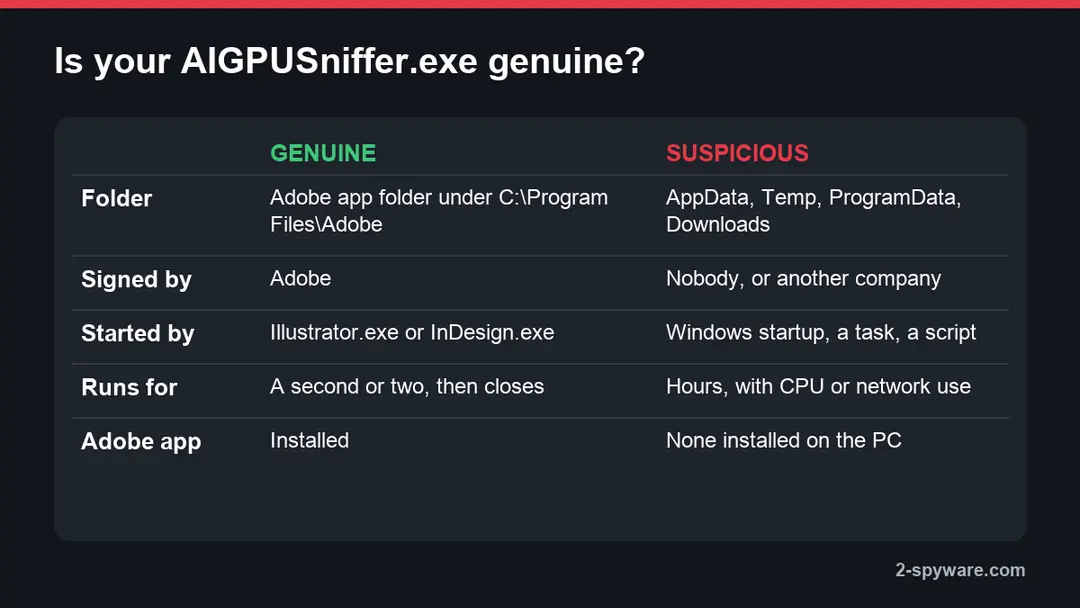
Genuine An AIGPUSniffer.exe in an Adobe program folder that appears for a moment when Illustrator or InDesign opens is part of that app and needs nothing done.
| Genuine AIGPUSniffer | Suspicious | |
|---|---|---|
| Folder | The Adobe app's folder under C:\Program Files\Adobe | %AppData%, %Temp%, %ProgramData%, Downloads, or a folder with a random name |
| Signature | Valid, signed by Adobe | Missing, invalid, or another company |
| When it runs | For a second or two when an Adobe app starts | All the time, or from the moment Windows starts |
| Started by | Illustrator.exe or InDesign.exe | A Run key, a scheduled task, PowerShell or a script |
| Resources | A short burst of GPU and CPU | Steady CPU or GPU load while you do nothing, constant network traffic |
| Adobe app on the PC | Yes | No Adobe app installed at all |
How to check the AIGPUSniffer file
Do this if AIGPUSniffer runs when no Adobe app is open, keeps running for minutes, or you have no Adobe software. The steps are the same in Windows 11 and Windows 10.
- 1
Catch it in Task Manager
Press Ctrl + Shift + Esc and open Details. Right-click a column header > Select columns, tick Command line, and sort by name. A genuine copy shows a path inside
C:\Program Files\Adobe. If it closes before you find it, the short life is itself a good sign. - 2
Open its folder
Right-click
AIGPUSniffer.exe> Open file location, or search the drive for the file in File Explorer. The folder must belong to an Adobe app, withIllustrator.exeorInDesign.exenearby. - 3
Check the signature
Right-click the file > Properties > Digital Signatures. The signer must be Adobe; select it > Details and look for "This digital signature is OK". The Details tab should show the description AIGPUSniffer Interface Binder.
- 4
Scan that one file
In Windows 11, right-click the file > Show more options > Scan with Microsoft Defender; in Windows 10 the command is in the first menu. A clean result together with the right folder and signature settles it.
What to do with AIGPUSniffer
How to check AIGPUSniffer
The genuine file belongs to an installed program.
Check that it is the real one before you remove anything.
Step 1: Check the location and signature of AIGPUSniffer.exe
Open Task Manager (Ctrl + Shift + Esc), right-click
AIGPUSniffer.exeon Processes and choose Open file location.The genuine file is in the Adobe app's own folder under
C:\Program Files\Adobe, for exampleC:\Program Files\Adobe\Adobe Illustrator 2026\Support Files\Contents\Windows; the same name anywhere else, especially in %AppData% or %Temp%, is an impostor to remove.Right-click the file > Properties > Digital Signatures to see who signed it. A genuine file needs nothing done; ending a genuine Windows file can make Windows 11 or Windows 10 unstable.
Full procedure with screenshots: Run a Microsoft Defender Offline scan
Step 2: Uninstall Adobe Illustrator (or InDesign)
Adobe Illustrator (or InDesign) is removed like any other program, from the list of installed apps. In Windows 11 that is Settings > Apps > Installed apps, in Windows 10 Settings > Apps > Apps & features, and in both you can also use Control Panel > Programs and Features.
Select Adobe Illustrator (or InDesign), click Uninstall and follow the uninstaller to the end. Then look at the entries just above and below it when the list is sorted by date: bundled programs install at the same minute.
Full procedure with screenshots: Uninstall a program or app in Windows On uGetFix
Step 3: Scan the PC, then run the offline scan
A scan finds the parts of AIGPUSniffer that the manual steps cannot see. In Windows Security > Virus & threat protection > Scan options, start a Full scan and quarantine what it reports.
Follow it with Microsoft Defender Antivirus (offline scan) > Scan now, which restarts the PC and checks the disk while Windows and the malware are not running.
It takes about 15 minutes and works the same in Windows 11 and Windows 10. If either scan finds something, run the full scan again after removal until it comes back clean.

Windows 11: Windows Security > Virus & threat protection > Scan options. Full procedure with screenshots: Run a Microsoft Defender Offline scan
Stop AIGPUSniffer from starting
You cannot switch the helper off in Windows, because Windows does not start it. You switch off the feature that needs it, inside the Adobe app. Your work and files are not affected; only drawing moves from the graphics card to the processor.
- 1
Illustrator
Press Ctrl + K (or choose Edit > Preferences), open Performance and clear GPU Performance. Click OK and restart Illustrator. To switch only the current view, use View > Preview on CPU and back with View > GPU Preview.
- 2
InDesign
Choose Edit > Preferences > GPU Performance and clear the GPU Performance option, then restart InDesign. Shift + E swaps between GPU Preview and Preview on CPU without changing the setting.
- 3
Check the result
Start the app again and watch Task Manager's Details tab. In most reports the helper no longer appears; if a copy still flashes up at start, it is harmless and closes on its own.
Think twice before you leave GPU Performance off. Adobe turns it on by default because zooming, panning and large artboards are smoother with it, and InDesign uses it for High Quality Display on high-resolution screens. If the helper is not causing a crash or an error, the sensible choice is to leave it alone.
"AIGPUSniffer has stopped working" and other errors
When the test itself crashes, Windows shows an error naming AIGPUSniffer, and the Adobe app may warn that your graphics card or driver is not supported. The cause is almost always the graphics driver or the app picking the wrong GPU, not malware.
- 1
Update the graphics driver
Get the current driver from NVIDIA, AMD or Intel, or from your laptop maker's support page. Adobe's first advice for any GPU problem in Illustrator is a driver update. Windows Update drivers are often months old.
- 2
Make the Adobe app use the right GPU
Laptops with two graphics chips sometimes run the test on the weaker one. In Windows 11 open Settings > System > Display > Graphics, add
Illustrator.exeandAIGPUSniffer.exefrom the Illustrator folder as desktop apps and set each one to High performance. In Windows 10 the same page is Settings > System > Display > Graphics settings. - 3
Update the Adobe app
In the Creative Cloud desktop app, open Apps > Updates. GPU fixes ship in regular Illustrator and InDesign updates.
- 4
Fall back to the CPU
If the crashes continue, turn off GPU Performance as shown above. The app then skips the GPU features and the errors stop.
One old tip is worth skipping: renaming or deleting AIGPUSniffer.exe to stop the error. It was a workaround for running Illustrator under Wine on Linux, and on Windows it can leave Illustrator without a working GPU check or break the next update. Turning off GPU Performance does the same job safely.
Remove AIGPUSniffer with the Adobe app
AIGPUSniffer.exe has no uninstaller of its own. It leaves the PC when you uninstall the Adobe app it came with, and Adobe's way to do that is the Creative Cloud desktop app.
- 1
Open Creative Cloud
Open the Creative Cloud desktop app from Start or the notification area, and go to Apps > All apps.
- 2
Uninstall the app
Select More actions (the three dots) next to Illustrator or InDesign and choose Uninstall. Then choose Remove to delete its preferences and plug-ins too, or Keep to keep them for a later reinstall.
- 3
Check the folder
Open
C:\Program Files\Adobeand make sure the app's folder, withAIGPUSniffer.exein it, is gone. Restart the PC if Windows still holds a file in use. - 4
No Creative Cloud app?
Use Settings > Apps > Installed apps in Windows 11 or Settings > Apps > Apps & features in Windows 10, find the Adobe app and choose Uninstall.
If AIGPUSniffer.exe is in a folder that belongs to no installed program, or you never installed any Adobe software, treat the file as suspicious: note its folder, end the process, run a Microsoft Defender full scan and the offline scan, and remove what they find. Our guide to COM Surrogate shows the same checks for a Windows file whose name malware borrows.
After the check: keep Windows clean
Do
- Install Adobe apps only through the Creative Cloud desktop app or adobe.com, so every file in the program folder is signed by Adobe.
- Keep the graphics driver current from NVIDIA, AMD, Intel or your PC maker, and update it before you blame the Adobe app.
- Leave GPU Performance on unless it crashes: Adobe made it the default for speed.
- Keep Windows Security and SmartScreen on, and Windows Update automatic.
Don't
- Delete, rename or block
AIGPUSniffer.exewhile the Adobe app is installed. - Install "free" or cracked Illustrator or Photoshop builds: they come from the same sites that hand out password stealers.
- Download a single
AIGPUSniffer.exefrom a file-download site to fix an error; reinstall or repair the Adobe app instead. - Trust a cleaner or driver updater that calls the file a threat without naming a detection.
Questions about AIGPUSniffer
What is AIGPUSniffer and why does it appear?
AIGPUSniffer is a helper program from Adobe that tests your graphics card. Adobe Illustrator starts it, and InDesign does too, each time the app opens with GPU Performance turned on, which is the default. It checks what the graphics processor and its driver can do, reports back and closes within a second or two.
That is why you see it flash up in Task Manager, or in the Dock on a Mac, and then vanish. The app uses the answer to decide whether to draw on the graphics card or fall back to the processor. If you do not use Illustrator or InDesign, the helper never runs.
Is AIGPUSniffer.exe a virus?
No. The genuine file is part of Adobe Illustrator, signed by Adobe, and we found no security vendor report of malware using this name.
It becomes worth a closer look only in unusual cases: the file sits outside the Adobe program folder, it has no valid Adobe signature, it runs while no Adobe app is open, or there is no Adobe software on the PC at all.
To check yours, right-click it in Task Manager's Details tab, choose Open file location, then look at Properties > Digital Signatures. An Adobe folder plus an Adobe signature means it is the real helper, and nothing needs to be done.
Is AIGPUSniffer part of ASUS software?
No. AIGPUSniffer is an Adobe file, and ASUS software such as Armoury Crate or GPU Tweak does not install anything by this name. The mix-up is understandable, because both deal with the graphics card, and many people first notice the helper on a gaming laptop.
You can confirm it on your own PC: the file sits in an Adobe folder under C:\Program Files\Adobe, and its Properties name Adobe as the maker. Uninstalling or updating Armoury Crate will not change anything about it. If you want it gone, the setting or the uninstaller you need is in the Adobe app, not in the ASUS tools.
Can I delete AIGPUSniffer.exe?
You can, but you should not while the Adobe app is installed. Deleting or renaming the file was a workaround for running Illustrator under Wine on Linux; on Windows it can leave Illustrator without its GPU check, bring back error messages, or break the next update, which may also put the file back.
If you want the helper to stop running, clear GPU Performance in Illustrator under Edit > Preferences > Performance, or in InDesign under Edit > Preferences > GPU Performance. If you want it off the PC entirely, uninstall the Adobe app through the Creative Cloud desktop app, and the file goes with it.
How do I stop AIGPUSniffer from opening every time?
Turn off the GPU feature that needs it. In Illustrator, press Ctrl + K, open Performance and clear GPU Performance; in InDesign, choose Edit > Preferences > GPU Performance and clear the option. Restart the app afterwards.
Drawing then runs on the processor, which is slower with large files and on high-resolution screens, so do this only if the helper causes a problem such as a crash or a long freeze at start.
If it merely flashes up for a second, leaving it alone is the better choice. There is no Windows service, startup entry or scheduled task to disable, because the Adobe app starts it directly.
What does "AIGPUSniffer has stopped working" mean?
It means the GPU test crashed, usually inside the graphics driver. Illustrator or InDesign keeps running, but may turn its GPU features off or warn that your graphics card is not supported. Start by installing the current driver from NVIDIA, AMD or Intel, or from your laptop maker.
On a laptop with two graphics chips, open Settings > System > Display > Graphics in Windows 11 (Graphics settings in Windows 10), add AIGPUSniffer.exe and Illustrator.exe from the Illustrator folder, and set both to High performance. Update the Adobe app too. If the crash still returns, turn off GPU Performance and the test stops running.
Why does AIGPUSniffer appear in the Dock on a Mac?
The Mac versions of Illustrator and InDesign carry the same helper, and macOS shows every running app in the Dock, so its icon jumps up for a moment when you open one of them.
Many Mac users first noticed it after the macOS Mojave update in 2018. If it shows "AIGPUSniffer quit unexpectedly", turn off GPU Performance in the app's preferences.
Some users also found that Bridge had linked .ai and .ait files to AIGPUSniffer instead of Illustrator, so double-clicking a drawing opened the helper; resetting those file type associations in Bridge's preferences fixed it. Uninstalling the app through Creative Cloud removes the helper on a Mac too.
Does AIGPUSniffer slow down my PC?
Not on its own. It runs for a second or two while the Adobe app starts and then closes, so it uses no memory or CPU the rest of the time.
Slow starts that people blame on it usually come from the app itself loading fonts, plug-ins and Creative Cloud sync, or from a graphics driver that hangs during the test.
If Illustrator or InDesign freezes at the splash screen and Task Manager shows AIGPUSniffer stuck there, update the graphics driver first, then try with GPU Performance turned off. An AIGPUSniffer that keeps using the CPU while no Adobe app is open is not normal, so check its folder and signature.
Will Fortect remove AIGPUSniffer?
Fortect scans Windows for malware and unwanted programs and repairs the system files and settings they change, and its free scan shows what it finds on your PC before you decide anything.
For AIGPUSniffer, follow the plan above as well: the browser steps take back permissions and settings that no scanner treats as a threat, and uninstalling the program that brought it removes the source.
Run Microsoft Defender's full scan and, if anything was found, its offline scan as a second opinion. If the symptoms are gone after the plan and both scans are clean, there is nothing more to do.
Sources
- Adobe Help Center: GPU performance in Illustrator (read October 9, 2026)
- Adobe Help Center: GPU performance in InDesign (read October 9, 2026)
- Adobe Help Center: Uninstall Creative Cloud apps (read October 9, 2026)
- Adobe Community: What is AIGPUSniffer? (read October 9, 2026)