
api.recapcha.fun: a fake CAPTCHA address tied to the North Korean fake interview campaign, and what to do if you pasted its command
api.recapcha.fun is a web address that URLhaus lists three times on 18 October 2026 for malware downloads tagged ClickFix, ContagiousInterview, DPRK and fake-recruitment. That points to a fake job interview where a page, dressed as a CAPTCHA or an error, tells you to paste a command into your computer; the page itself cannot hurt you, but the pasted command can.
If you only saw the name in a log, nothing is proven; if you pasted a command after a recruiter's message, treat the computer as watched: change passwords from another device, then scan and clean or reset.
Facts checked October 18, 2026. Removal steps tested on Windows 11 (26H2) and checked against Microsoft's and the browser makers' current documentation.
Automatic
Get a free scan and check if your PC is infected.
Fortect finds malware, unwanted programs and the Windows damage they leave behind, and repairs it in one pass.
An automatic scan checks installed programs, startup items and browser extensions for anything that came with a command or script you pasted that contacts api.recapcha.fun.
Do it yourself · free Remove api.recapcha.fun (ClickFix, fake recruitment) yourself 5 steps, about 15 minutes, no software needed.
Start the steps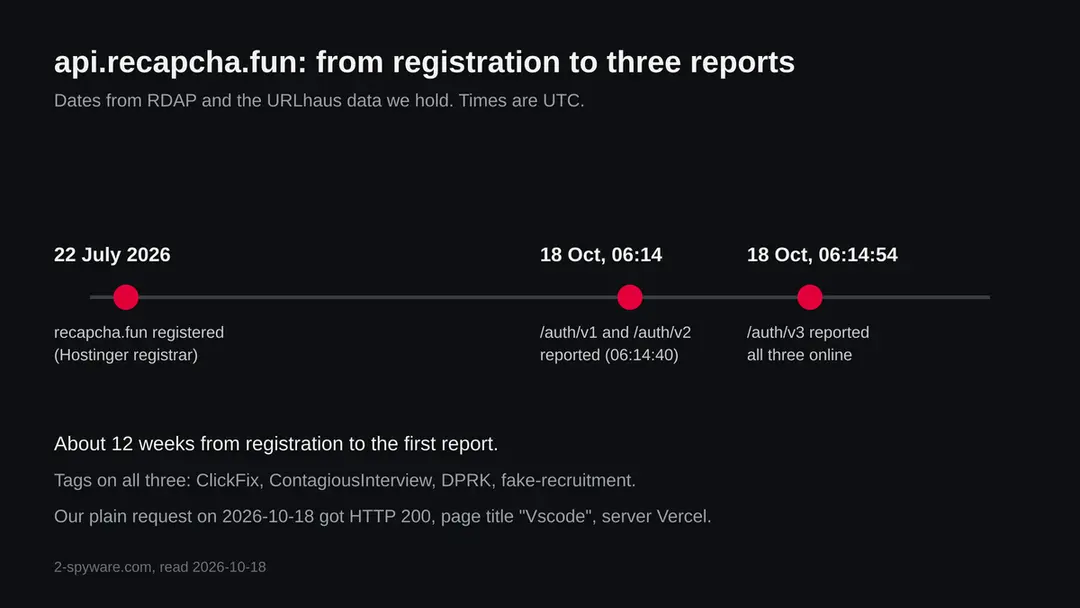
Api.recapcha.fun (ClickFix, fake recruitment): summary
| Type | A malware server: URLhaus lists three addresses tagged ClickFix, ContagiousInterview, DPRK and fake-recruitment |
|---|---|
| Risk | High if you pasted or ran a command from a fake interview or CAPTCHA page: passwords, sessions, crypto wallets and files may be taken. Low if you only saw the name |
| Symptoms | Often none. A pasted command in Run history, a shell window that flashed, unknown startup entries or tasks, or login alerts and missing crypto are the signs |
| How to get rid of it | Change passwords from another device, move crypto, run Microsoft Defender Offline, remove startup entries, and reset Windows if you are not sure |
| Our check (18 October 2026) | One plain request from our server: HTTP 200, title Vscode, hosted on Vercel. A quiet answer clears nothing; the danger rating comes from URLhaus |
| Running since / first seen | Domain registered 22 July 2026; first addresses reported 18 October 2026 |
| Removal | Scan the PC with security software to find and remove the malware and anything installed with it. Fortect scans Windows for malware and repairs the system files and settings it damaged. Remove it nowTo use the full-featured product, you have to purchase a license for Fortect. The scan is free. |
Show 9 more facts
| Platform | Not known for these addresses. The campaign has had Windows and macOS versions; nothing we read puts it on iPhone or Android |
|---|---|
| Detection names | No Microsoft detection name is known for the files on this server, because we did not open them. Vendors name BeaverTail and InvisibleFerret for the campaign in general |
| Name | Api.recapcha.fun |
| Domain registered | 22 July 2026 |
| Evidence | 3 write-ups by security sites; details still limited |
| First seen | 18 October 2026 |
| Distribution | Typically fake installers, cracked programs, e-mail attachments, fake "verify you are human" pages and ads for popular apps |
| Damage | Installs other malware, often several programs at once |
| Facts checked | 18 October 2026 |
Facts checked on 18 October 2026 against the URLhaus data for api.recapcha.fun held in our database, RDAP, one plain request from our server, and published reports by Microsoft, Palo Alto Networks Unit 42, The Hacker News and Reuters. We did not download the files and we infected no computer; the removal steps follow Microsoft's pages and were not tried on a live infection.
What api.recapcha.fun is, and what we know about it
api.recapcha.fun is not a program on your computer. It is a web address that the abuse.ch project URLhaus lists as a place where malware was served. The tags on all three entries name a known style of attack: a fake job interview that ends with you running a command yourself. We found no public write-up of this one address, so below is what URLhaus shows, what our server saw, and what security vendors have published about the campaign the tags name.
- 1
What URLhaus lists
Three addresses on api.recapcha.fun: /auth/v1, /auth/v2 and /auth/v3, each followed by ?token=304. Two were added at about 06:14:40 UTC and one at 06:14:54 UTC on 18 October 2026. All three are marked online, all carry the threat label malware_download, and all were submitted by one URLhaus contributor.
- 2
What the tags mean
ClickFix is a trick where a page makes you run a command yourself. ContagiousInterview is the name researchers use for a campaign of fake job interviews. DPRK says the reporter links it to North Korea. fake-recruitment says the lure is a made up job offer. These tags are the reporter's reading; URLhaus shows them, not a court or a vendor verdict.
- 3
What we could not confirm
We did not download anything from these addresses, so we cannot tell you what a pasted command fetches from them, which malware family it installs, or where that malware reports to. We also cannot tell whether the three addresses return different files for Windows and for Mac.
- 4
What this means for you
If you only saw the name in a firewall log, a blocked request or a warning, that alone does not mean you are infected. The risk is for a computer where someone pasted a command from a fake interview or fake CAPTCHA page and ran it. A normal visitor has no reason to open these addresses.
- Kind of threat
- A server that URLhaus lists for malware downloads in a ClickFix, fake recruitment campaign tagged ContagiousInterview and DPRK
- Where the files are
- hxxps://api[.]recapcha[.]fun/auth/v1?token=304, /auth/v2?token=304 and /auth/v3?token=304
- Domain registered
- 22 July 2026 through HOSTINGER operations, UAB; status client transfer prohibited (RDAP, read 18 October 2026)
- URLhaus entries
- 3 addresses, added 18 October 2026 at 06:14 UTC; all 3 online when we read our copy of the data
- Name trick
- recapcha imitates reCAPTCHA, Google's well known human check, so a fake check page looks normal. We read this as the purpose of the name; no report states it
- Platform
- Not known for these three addresses. The campaign the tags name has used commands for both Windows and macOS
What api.recapcha.fun (ClickFix, fake recruitment) does on an infected PC
What we checked on 18 October 2026, and what we could not
Our check was one plain request from our server to the address, with no browser, no clicks and no recorded session. It got an answer, but a quiet answer clears nothing: a lure page can show a harmless face to a server and the real page only to a person who arrived from a recruiter's link.
Our check, 18 October 2026
- The address answeredHTTP status 200, no redirect. The server header says Vercel, a service that hosts websites for anyone who signs up. That tells us where the page is hosted, not who runs it.
- The page titleThe title was Vscode. That fits a page that pretends to be about Visual Studio Code, a tool developers use, which would suit a fake coding test. This is our reading of one word; the page text could be anything.
- Why that is not a clean resultA plain request has no recruiter link, no browser fingerprint and no click. Lure pages of this kind often show a CAPTCHA or an error only after a button is pressed. A quiet result on one visit is not proof of anything.
- Notification requestNot mentioned in the answer we received. This is a plain request, so it cannot test whether a browser would be asked.
- URLhaus listingThree addresses tagged ClickFix, ContagiousInterview, DPRK and fake-recruitment; all three online in our copy of the data on 18 October 2026.
- Downloads and the files themselvesWe did not download any file and did not run any command. We cannot tell you what the addresses serve.
Dangerous: treat it as a malware server Our request was one plain visit and proves nothing either way. The danger rating comes from the three URLhaus reports and their tags, not from our visit. Do not open these addresses and never run a command that a page gave you.
What happened to api.recapcha.fun, from registration to our check
The domain is under three months old and all reports came within seconds of each other. The dates come from RDAP and from the URLhaus data we hold; times are UTC.
22 July 2026
recapcha.fun is registered
RDAP shows the domain recapcha.fun registered on 22 July 2026 at about 09:52 UTC through HOSTINGER operations, UAB. The status is client transfer prohibited, which is a standard lock against moving the domain; it says nothing about the owner's intent.
18 October 2026, 06:14
Two addresses are reported
At about 06:14:40 UTC URLhaus receives /auth/v1?token=304 and /auth/v2?token=304, both tagged ClickFix, ContagiousInterview, DPRK and fake-recruitment, with the threat label malware_download.
18 October 2026, 06:14:54
A third address follows
Fourteen seconds later /auth/v3?token=304 is added with the same tags. The three paths differ only in the version number, which looks like one operator trying versions of the same endpoint. That is our reading of the names.
18 October 2026, 07:26
Our check
We read the registration record and made our plain request. The server answered with status 200, the title Vscode, and a Vercel server header. All three URLhaus entries were still marked online.
What the pattern suggests, and what it does not: a domain registered in July and reported in October fits a lure that was prepared in advance and is now being used. We do not know how many people received the link, and URLhaus does not count visitors.
How a fake interview ends with you running a command
The tags describe a campaign that several vendors have written about. We did not watch this server do it, so the chain below is how Microsoft, Unit 42 and others describe the campaign, not a recording of this address.
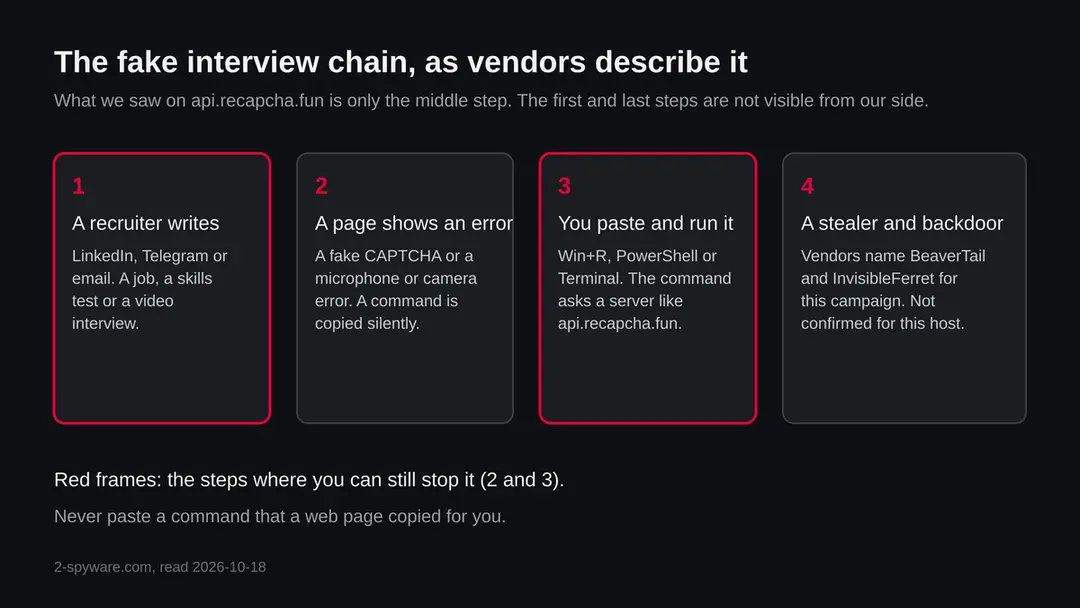
- 1
A recruiter reaches out
Unit 42 describes fake recruiter profiles on social media that approach people looking for tech jobs. The Hacker News, reporting on research from 2024, describes recruiters who share code projects hosted on GitHub, GitLab or Bitbucket as a technical test. The job is invented and the pay is often high.
- 2
A page throws up an error
In the 2025 wave reported by The Hacker News, victims were asked to record a self assessment video and were then shown a fake microphone error. In a related pattern, the link showed an error and told the target to update video call software. The fix offered is a command.
- 3
The page copies a command for you
Microsoft describes how a fake CAPTCHA or human check copies a command to the clipboard without telling you, then asks you to paste it into the Windows Run dialog, Windows Terminal or PowerShell. Because you run it, many automatic controls do not stop it.
- 4
The command downloads the malware
The command contacts a server and runs what comes back. In this campaign researchers name BeaverTail, a JavaScript stealer and downloader, which fetches InvisibleFerret, a Python backdoor. The Hacker News also reports compiled BeaverTail programs for Windows, macOS and Linux, and says some chains deliver OtterCookie. Which of these an address like api.recapcha.fun serves is not known.
Microsoft adds that many ClickFix payloads run in memory through normal Windows programs such as powershell.exe, msbuild.exe or regasm.exe. That makes a file scan alone a weak test and is why this guide asks you to check more than files.
What ContagiousInterview and the DPRK tag mean
ContagiousInterview is a name vendors use for a long running campaign. The sources agree on the lure and the malware names and differ a little on dates and numbers, so we give each claim with its source.
| Question | What the sources say | Source |
|---|---|---|
| What is it? | A campaign built on a fictitious job interview that tricks job seekers into downloading and running a Node.js project containing the BeaverTail downloader, which then delivers the InvisibleFerret Python backdoor | The Hacker News, September 2024 |
| Who is behind it? | The cluster is assessed as part of the Lazarus group, a North Korean actor. CrowdStrike tracks the activity as Famous Chollima; ESET uses the name DeceptiveDevelopment. Attribution is the vendors' assessment, not a verdict we can check | The Hacker News |
| How long has it run? | Active since at least December 2022 according to the 2025 report; Unit 42 first published on the activity in November 2023 | The Hacker News, September 2025 |
| Who is targeted? | Software developers first. GitLab researchers reported a shift in 2025 to marketing and trader roles in crypto and retail | The Hacker News, September 2025 |
| How many people? | SentinelOne and Validin found that at least 230 people were targeted in one period, according to the 2025 report. Reuters, in a report we read in a syndicated copy, gave the same figure for January to March | The Hacker News; Reuters (Yahoo News) |
| Which malware? | BeaverTail, InvisibleFerret, OtterCookie; ClickFix lures were also linked to GolangGhost and FlexibleFerret | The Hacker News, September 2025 |
| Which build is on this server? | Not known. URLhaus gives tags, not a family name, and we did not open the files | Not available |
What api.recapcha.fun (ClickFix, fake recruitment) can steal or download
What this kind of malware can take from your computer
The campaign's stealers are aimed at money and logins. The list below is what the sources say the family does in general, not what a file on this particular server does.
Reported as possible in this campaign
- Saved browser passwords
- Browser cookies and sessions
- Cryptocurrency wallet data
- Files searched for and uploaded
- Clipboard contents
- Reconnaissance of your system
- A Python backdoor for later control
- Extra malware downloaded
| Data | Detail | Source |
|---|---|---|
| Logins and wallets | BeaverTail acts as an information stealer, and the campaign aims at cryptocurrency theft | The Hacker News; ESET as quoted there |
| Control | InvisibleFerret is a Python backdoor delivered by BeaverTail | The Hacker News |
| Reconnaissance, data theft, clipboard poisoning | Reported for OtterCookie, which some chains deliver | The Hacker News |
| Other families through ClickFix | Microsoft lists Lumma Stealer, remote access tools such as AsyncRAT, loaders and others as common ClickFix payloads in general | Microsoft |
What this can cost you
Reading this page or seeing the name costs nothing. The risks below apply to a computer where someone ran a command from a fake interview or CAPTCHA page.
- High
Crypto and wallets
The campaign is described as aimed at cryptocurrency theft. Coins sent from a stolen wallet cannot be pulled back. A seed phrase that was ever stored on the computer should be treated as known.
- High
Passwords and sessions
A stealer can take saved browser passwords and the cookies that keep you signed in. Changing passwords on the same computer does not help while the malware is still there.
- High
Someone using your computer
A backdoor such as InvisibleFerret lets a person return later. It is not a one time theft.
- Medium
Work accounts and code
The lure targets people who apply for jobs, often with a work laptop. Source code, company logins and cloud keys on that laptop become a risk for an employer too. Tell your security team at once.
- Medium
More malware
The chains described deliver several families one after the other, so one detection may not be the whole story.
- Low
Nothing, if you only saw the name
A name in a block list, a log or a warning is not an infection.
What you may notice, and what you may not
Stealers and backdoors are built to be quiet. The signs below follow from the sources; none is certain, and many victims notice nothing for a while.
| Sign | What the reports show |
|---|---|
| A pasted command in your Run history | Microsoft names fake CAPTCHA text in the Run history, stored in the RunMRU registry key, as a detection signal. If you remember pasting something after a CAPTCHA or an interview error, that is the moment to focus on |
| PowerShell or Terminal opened by itself, or a window that flashed and closed | The pasted command usually starts a shell. This follows from how ClickFix works; it is our reading |
| A normal Windows program using the network for no reason | Microsoft says ClickFix payloads often run inside powershell.exe, msbuild.exe or regasm.exe. They are real programs, so one running with no reason is worth a look |
| Logins from new places or password reset emails | This follows from stolen sessions and passwords |
| Missing crypto | The campaign aims at wallets; an empty wallet is often the first sign |
| Nothing at all | Quiet running is the point of a stealer and a backdoor |
How to check the PC for api.recapcha.fun (ClickFix, fake recruitment)
How people end up on a page like this
Nobody finds api.recapcha.fun by chance. It is a link someone sends, so the real question is who sent it and why. The routes below are the ones the sources describe for the same campaign.
- 1
A message about a job
Unit 42 describes fake recruiters on social media. Reports collected in the Reuters piece describe contacts over LinkedIn and Telegram that move to a skills test or a video assessment. The company names used can be real firms, so a known brand proves nothing.
- 2
A skills test or video that fails
The page says the microphone, camera or CAPTCHA failed, and offers a fix that is a command. A real company's interview tool does not ask you to paste commands into a terminal.
- 3
A project to run on your own computer
The older version of the campaign asked candidates to download a code project and run it. The Hacker News describes bogus npm packages and trojanized projects hosted on code sites. Running unknown code on your main computer is the same risk as pasting a command.
- 4
A video call tool to install
The Hacker News describes installers shaped as MSI files and macOS disk images that pretended to be the MiroTalk video conferencing software, and fake updates for apps like VCam or CameraAccess.
Check your computer before you delete anything
Start with the question that matters: did you paste or run a command, or install an app, after a recruiter's message or a CAPTCHA that would not go away? If you saw the name in a log from your own network, find the device that asked. If the answer is yes or you are not sure, do the checks below. None of them deletes anything.
While you check, stop using the computer for banking, email, work or crypto. Disconnecting from the network is the first move.
- 1
Disconnect first
Turn off Wi-Fi or unplug the cable. A backdoor needs the connection to be used, and a stealer needs it to send what it took.
- 2
Remember the moment
Think back to when a page asked you to press Win+R, open Terminal or PowerShell, or paste something. Write down the time and the site. This tells you which device and which day to look at.
- 3
Open Protection history
In Windows Security > Virus & threat protection > Protection history, look for anything blocked or quarantined around that time. A detection with a name containing BeaverTail, InvisibleFerret, Lumma or a generic Trojan or Script name is a sign.
- 4
Look at Startup apps and Task Scheduler
Open Settings > Apps > Startup and look for names you did not install. Then press Start, type Task Scheduler, open it and check the Task Scheduler Library for tasks you do not know. Do not delete yet; write the name and the program it runs.
- 5
Look at running programs
Open Task Manager and look for powershell.exe, msbuild.exe, regasm.exe, node.exe or python.exe running with no reason or with heavy network use. They are real programs, so their presence is not proof, and their absence does not clear the computer.
- 6
Look for a code project you ran
If the recruiter sent you a project, note the folder and whether you ran npm install or a start command. The Hacker News describes malware hidden in such projects. Do not run it again.
- 7
Check your accounts from another device
Look at the sign in activity of your email, bank, work and exchange accounts, and at crypto balances. This is quicker than any file check.
- 8
A scan helps, but it does not clear the computer
A scan with Microsoft Defender or another product can find known files. Treat a clean result the way you treat a clean site test: one data point. We did not infect a computer with this server's files, so the order of the plan is our judgement from Microsoft's pages, not a tested result.
How to remove api.recapcha.fun (ClickFix, fake recruitment)
How to remove api.recapcha.fun
A loader's job is to install other malware, so treat the PC as infected with more than one program until the scans are clean.
Step 1: Delete scheduled tasks that bring it back
Open Task Scheduler from the Start menu and click Task Scheduler Library. Select each task you do not recognise and read the Actions tab:
- a task that starts a file in
%AppData%or%Temp% - runs
powershellwith a long encoded line - opens a web address belongs to api.recapcha.fun or a similar program
Right-click such a task and choose Delete, and check the subfolders too. Leave tasks from Microsoft, your PC's maker and programs you use. Task Scheduler is the same in Windows 11 and Windows 10.

Windows 11: Task Scheduler Library, the task selected, the Actions tab shows the file it runs. Full procedure with screenshots: Remove what malware leaves behind in Windows
- a task that starts a file in
Step 2: Remove it from startup
Whatever api.recapcha.fun installed usually starts with Windows. Open Task Manager with Ctrl + Shift + Esc, go to Startup apps in Windows 11 or the Startup tab in Windows 10, and disable what you do not know, starting with entries that have an empty Publisher column.
Open file location on the right-click menu shows the file, which helps you decide and tells you what to delete later. Disabling is safe: if something you need stops working, switch it back on.
Full procedure with screenshots: Stop apps from opening at startup On uGetFix
Step 3: Delete the folders left behind
What the uninstaller leaves behind is usually in the user folders. Open File Explorer, switch on View > Show > Hidden items (in Windows 10 View > Hidden items), and go through
%LocalAppData%,%AppData%, %ProgramData% and the two Program Files folders.Sort by Date modified and delete folders that appeared together with the problem and belong to no program you use. Folders with random names that hold
.exe,.dll, .js or .ps1 files are the strongest sign.Full procedure with screenshots: Remove what malware leaves behind in Windows
Step 4: Scan the PC, then run the offline scan
Open Windows Security > Virus & threat protection > Scan options, run a Full scan and remove everything it finds. Then select Microsoft Defender Antivirus (offline scan) and click Scan now: the PC restarts and scans before Windows loads, which finds files that hide while Windows runs.
Save your work first, because the offline scan takes about 15 minutes. Both scans are built into Windows 11 and Windows 10, and a second scanner from another vendor is a useful extra opinion.

Windows 11: Windows Security > Virus & threat protection > Scan options. Full procedure with screenshots: Run a Microsoft Defender Offline scan
Step 5: Change passwords from another device and sign out other sessions
Assume that the passwords saved in this PC's browsers, and the accounts that were open in them, are known to the attacker. From a phone or a clean computer, change the e-mail password first, then banking, shopping, social and gaming accounts.
Use each service's option to sign out of all other sessions, because stolen cookies keep a session open even after a password change. Turn on two-step verification on each account. Wait with the infected Windows 11 or Windows 10 PC until the scans are clean.
Full procedure with screenshots: Turn on two-step verification / secure a hacked account
If you use a Mac, an iPhone or an Android phone
The page title and the tags do not say which system the three addresses target. The campaign the tags name has had macOS versions, so a Mac user who pasted a command should not assume safety.
| Your device | What we know | What to do |
|---|---|---|
| Mac | The Hacker News reports BeaverTail as compiled programs for Windows, macOS and Linux, and macOS disk images in the older chain. Microsoft also notes a ClickFix campaign that showed Windows instructions to macOS users and delivered the Atomic macOS Stealer | If you pasted a command into Terminal or installed an app after a recruiter's message, treat it as an infection: change passwords from another device, move crypto, and consider erasing the Mac and reinstalling macOS |
| iPhone or iPad | Nothing we read describes this campaign on iOS. A command cannot be pasted into a phone the same way | Nothing to remove for this threat. If you typed passwords on a page, change them |
| Android | Nothing we read describes it on Android | Nothing to remove for this threat; change passwords if you entered any |
After removal: passwords, accounts and prevention
After you ran the command: protect what was taken
The computer is one half. The other half is everything you typed or stored on it while the malware was there. The order matters: another device first, then the computer.
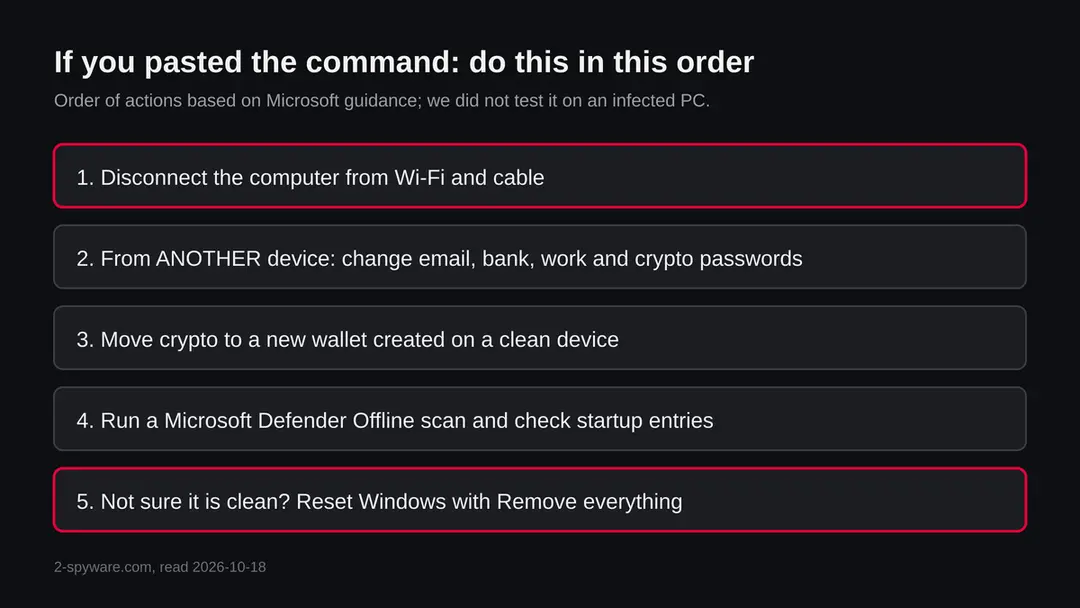
- 1
Change passwords from a clean device
Use your phone or another computer you trust. Start with email, because it resets everything else, then bank, work, cloud storage, code hosting and exchanges. Anything typed on the affected computer while it was watched is already known.
- 2
Sign out other sessions and turn on two step sign in
Stolen cookies can keep a session alive after a password change, so use each service's option to sign out of all devices. Turn on two step sign in with an authenticator app or a security key where offered, and update recovery emails and phone numbers.
- 3
Move crypto first if a wallet was on the computer
If a seed phrase or wallet file was ever on the computer, assume it is known. Create a new wallet and recovery phrase on a clean device and move the funds there before anything else.
- 4
Tell your employer if it was a work laptop
If the computer belongs to a job, tell the security team now. Keys, tokens and source code may need to be replaced, and that is their decision to make, not yours.
- 5
Run Microsoft Defender Offline
Open Windows Security > Virus & threat protection > Scan options, choose Microsoft Defender Offline scan and select Scan now. Save your work first: Windows restarts and the scan takes several minutes. It runs outside the normal Windows, so malware has a harder time hiding. Results are under Protection history. If BitLocker is on, suspend it first or the restart may ask for the recovery key.
- 6
Remove what the check found, with care
If Startup apps or Task Scheduler showed an entry you can tie to the malware, remove it. If you cannot tell, do not guess: the safe answer is the reset below.
- 7
If you are not sure, reset Windows
Go to Settings > System > Recovery > Reset this PC. Keep my files removes apps and settings but keeps personal files; Remove everything wipes the computer. For a computer that may have been under remote control, the full wipe is the answer that does not depend on finding every piece. Back up documents first, on a disk you then unplug.
- 8
Restore only documents by hand
Copy back documents and photos, not programs, and not a full system image from after the first contact. Install apps from their makers' own sites. Do not run the recruiter's project again.
- 9
Rebuild logins in a password manager
Do not let the browser save passwords again on a computer that was watched. Use a password manager and an authenticator app or security key.
- 10
Watch your money and accounts
Check card statements and exchange logs for a few weeks and turn on alerts. If money was taken, report it to your bank and your national fraud or cybercrime service, and keep the recruiter's messages as evidence.
Keep your computer out of this kind of chain
The command is the late part of the chain. Every source we read starts earlier, with a recruiter, a test or a failing page.
Do
- Treat any page that tells you to press Win+R, open Terminal or PowerShell and paste something as an attack, and close it. Microsoft lists exactly this as the ClickFix trick.
- Check the recruiter and the company through the company's own website and phone number, not through the message.
- Do any coding test on a separate computer or a virtual machine with no personal logins and no wallets.
- Read what a pasted command says before you press Enter; if you cannot read it, do not run it.
- Keep Windows and Microsoft Defender updated, and keep cloud protection on.
- Use a password manager and two step sign in, so one stolen password is not enough.
Don't
- Do not run a code project from a stranger on the computer where you keep your wallet or work logins.
- Do not install a video call tool because an interview page asked for it; use the link the company's own calendar invite gives.
- Do not trust a CAPTCHA that asks you to do anything other than click pictures or a box.
- Do not change your passwords on the computer you suspect.
- Do not rely on a quiet scan to say that you are safe.
recapcha, reCAPTCHA and other names that look the same
Google's real service is spelled reCAPTCHA and lives on google.com and gstatic.com addresses. recapcha.fun is a different domain with a different spelling and a .fun ending, registered on 22 July 2026. We found nothing that links it to Google.
Seeing a real CAPTCHA on a site you know does not make that site malicious, and this guide does not say that. The warning is about one specific address and about the behaviour of asking you to paste a command. A real CAPTCHA asks you to tick a box or pick pictures and never to open a terminal.
Questions about api.recapcha.fun (ClickFix, fake recruitment)
What is api.recapcha.fun?
It is a web address that URLhaus, the malware tracking project run by abuse.ch, lists three times on 18 October 2026 for malware downloads. The entries carry the tags ClickFix, ContagiousInterview, DPRK and fake-recruitment.
It sits on the domain recapcha.fun, registered on 22 July 2026. It is not a program on your computer and not a site anyone is meant to visit. We did not download anything from it, so what it serves is not confirmed by us.
Is api.recapcha.fun safe to open?
No. Do not open it, and do not run any command a page tells you to paste.
Our own plain request from a server got HTTP 200 and the page title Vscode, which proves nothing: a lure page can look harmless to a server and show its real face only to a person who arrived from a recruiter's link. The rating comes from the three URLhaus reports and their tags, not from our request.
What is ClickFix?
ClickFix is a trick where a web page, often dressed as a CAPTCHA or an error, copies a command to your clipboard and tells you to paste it into the Windows Run dialog, Windows Terminal or PowerShell.
Microsoft explained the technique on 21 August 2025. Because you run the command yourself, many automatic protections do not step in. The page cannot harm you alone; the pasted command can.
What is the Contagious Interview campaign?
It is the name researchers use for a campaign of fake job interviews that The Hacker News reports as active since at least December 2022. Victims are lured to run code or commands that install BeaverTail, a stealer and downloader, and InvisibleFerret, a Python backdoor.
Vendors assess it as part of the North Korean Lazarus group; that is their assessment, and we cannot verify it ourselves. Whether this address belongs to it rests on the reporter's tags.
I saw api.recapcha.fun in a log or a warning. Am I infected?
Not necessarily, and the name alone proves nothing. It does mean that some device asked for the address, and a person rarely does that by hand. Find the device, disconnect it, and run the checks on this page:
- Protection history
- Startup apps
- Task Scheduler
- a Microsoft Defender Offline scan
Do any password changes from another device. If nobody on that device followed a recruiter's link, the cause may be a browser extension or another program, which a log alone cannot tell.
I pasted a command from an interview page. What do I do now?
Disconnect the computer from the network first. Then, from another device, change your email, bank, work and crypto passwords, sign out of all sessions and move any crypto to a new wallet made on a clean device.
After that run a Microsoft Defender Offline scan, check Startup apps and Task Scheduler, and reset Windows with Remove everything if you are not sure. If it was a work laptop, tell your security team at once.
What can this malware take?
The sources describe BeaverTail as an information stealer aimed at cryptocurrency theft, with InvisibleFerret as a backdoor that lets a person return later, and OtterCookie adding reconnaissance and clipboard poisoning.
In practice that means saved browser passwords, session cookies, wallet data and files. We did not open the files on api.recapcha.fun, so we cannot say which of these this address delivers. Treat every login and wallet on an affected computer as known.
Does it affect Mac, iPhone or Android?
The campaign the tags name has had macOS versions, so a Mac user who pasted a command into Terminal or installed an app after a recruiter's message should not assume safety.
Microsoft also describes a ClickFix campaign that delivered the Atomic macOS Stealer. We found nothing that places it on iPhone or Android. On those phones there is nothing to remove for this threat; change any password you typed on a suspicious page.
Will resetting Windows remove it, and are my accounts safe afterwards?
A reset with Remove everything wipes the programs and startup entries, which is the answer that does not depend on finding every piece. It does not undo what was already taken.
Passwords, session logins and crypto seed phrases that the malware saw stay exposed until you change them from another device and turn on two step sign in. Restore documents by hand, not a full system image, and never run the recruiter's project again.
Will Fortect remove api.recapcha.fun?
Fortect scans Windows for malware and unwanted programs and repairs the system files and settings they change, and its free scan shows what it finds on your PC before you decide anything.
For api.recapcha.fun, follow the plan above as well: the browser steps take back permissions and settings that no scanner treats as a threat, and uninstalling the program that brought it removes the source.
Run Microsoft Defender's full scan and, if anything was found, its offline scan as a second opinion. If the symptoms are gone after the plan and both scans are clean, there is nothing more to do.
Sources
- Microsoft Security Blog: Think before you ClickFix, analyzing the ClickFix social engineering technique (21 August 2025) (read October 18, 2026)
- The Hacker News: DPRK hackers use ClickFix to deliver BeaverTail (September 2025) (read October 18, 2026)
- Palo Alto Networks Unit 42: North Korean threat actors lure tech job seekers as fake recruiters (read October 18, 2026)
- The Hacker News: North Korean hackers target job seekers with fake interviews (September 2024) (read October 18, 2026)
- Reuters via Yahoo News: Crypto workers under siege from North Korean hackers (read October 18, 2026)