
dstats.qzz.io: a Mirai botnet download address for routers and cameras, and what to do if a device of yours may be infected
dstats.qzz.io is a web address that URLhaus lists for 36 malware downloads, 34 of them tagged mirai, a botnet that takes over routers, cameras and other small network devices. The site no longer answers when we look it up. If a router, camera or recorder of yours contacted it, unplug the device, restart it while it is offline, set a new password and only then reconnect it.
Facts checked October 10, 2026. Removal steps tested on Windows 11 (26H2) and checked against Microsoft's and the browser makers' current documentation.
Automatic
Get a free scan and check if your PC is infected.
Fortect finds malware, unwanted programs and the Windows damage they leave behind, and repairs it in one pass.
If a file or script that a device or a shell command fetched from dstats.qzz.io keeps coming back after uninstalling, a scan can find what reinstalls it.
Do it yourself · free Remove dstats.qzz.io (Mirai botnet files) yourself 5 steps, about 15 minutes, no software needed.
Start the steps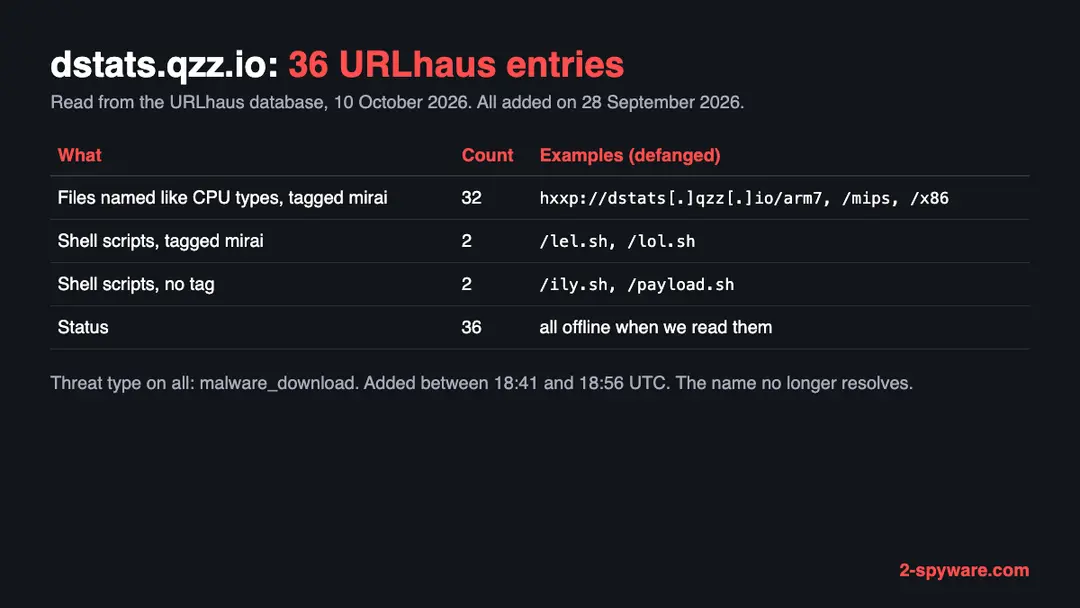
Dstats.qzz.io (Mirai botnet files): summary
| Type | A malware download host for network devices: URLhaus lists 36 files, 34 tagged mirai |
|---|---|
| Risk | High for a router, camera or recorder that contacted it: the device may be part of a botnet |
| Symptoms | Often none. A factory login, remote admin switched on, a slow or hot device, or an abuse notice are the signs |
| How to get rid of it | Unplug the device, restart it offline, set a new password, update the firmware, turn off remote admin and UPnP, reset or replace it if in doubt |
| Our check (10 October 2026) | One lookup: the name did not resolve, no page. A dead site clears nothing; the danger rating comes from URLhaus |
| Running since / first seen | First malware URLs reported 28 September 2026; no registration record is available for qzz.io |
| Removal | Scan the PC with security software to find and remove the malware and anything installed with it. Fortect scans Windows for malware and repairs the system files and settings it damaged. Remove it nowTo use the full-featured product, you have to purchase a license for Fortect. The scan is free. |
Show 8 more facts
| Platform | Routers, cameras and other Linux-based devices, by the processor names and the mirai tag |
|---|---|
| Detection names | No Microsoft detection name is known for the files on this server, because we did not open them and they are built for network devices, not Windows. The URLhaus tag is mirai. On a router the only check is the firmware and the steps on this page |
| Name | Dstats.qzz.io |
| Evidence | 36 write-ups by security sites; details still limited |
| First seen | 28 September 2026 |
| Distribution | Typically fake installers, cracked programs, e-mail attachments, fake "verify you are human" pages and ads for popular apps |
| Damage | Installs other malware, often several programs at once |
| Facts checked | 10 October 2026 |
Facts checked on 10 October 2026 against our copy of the URLhaus data for dstats.qzz.io, one browser test of our own, the CISA Mirai alert TA16-288A, a USENIX Security paper on Mirai, the FTC page on home Wi-Fi and the CISA page on network infrastructure devices. We did not download the files and we infected no device; the removal steps follow CISA and were not tried on a live infection.
What dstats.qzz.io is, and what we know about it
dstats.qzz.io is a web address, not a program. It is a host that the malware tracker URLhaus lists as a place where Mirai files were served. Mirai targets devices that run a small Linux system, such as home routers, cameras and video recorders, not ordinary Windows or Mac computers. No public write-up of this one address exists that we could find, so this page rests on the URLhaus entries, our own lookup and what CISA and researchers have published about Mirai.
- 1
What URLhaus lists
36 file addresses on dstats.qzz.io, all with the threat type malware_download, all added on 28 September 2026 by a reporter account named von. The first, http://dstats[.]qzz[.]io/ily.sh, came at 18:41:20 UTC and the last, /x64s, at 18:56:17 UTC. All 36 were offline when we read them.
- 2
What the tags say
34 entries carry the tag mirai. Two files, ily.sh and payload.sh, carry no tag. Thirty-two of the tagged files have names that match processor types, such as arm, arm5, arm6, arm7, mips, mpsl, ppc, sh4 and x86. The other two tagged files are shell scripts named lel.sh and lol.sh.
- 3
What we could not confirm
We did not download any file and found no analysis of these exact files. So we do not know which Mirai variant they are, which logins they try, or where they report to. The tags are the reporter's labels, not our finding.
- 4
What this means for you
If you only saw the name in a log or a block list, nothing is wrong with your device because of that. If a device of yours connected to this address or ran a file from it, treat the device as infected and follow the plan below.
- Kind of threat
- A malware download host: 36 files, 34 tagged mirai, 2 untagged shell scripts
- Malware family
- Mirai, an IoT botnet (the reporter's tag; not confirmed by us)
- Registration
- No registration record: our lookup found no RDAP server for the qzz.io domain, so we cannot say who set up the name or when
- URLhaus entries
- 36 file addresses, all added on 28 September 2026; all 36 offline when we read them
- Platform
- Routers, cameras and other Linux-based network devices. Not an ordinary PC threat
What dstats.qzz.io (Mirai botnet files) does on an infected PC
What we checked on 10 October 2026, and what we could not
We tried to open https://dstats.qzz.io/ once, from Lithuania, in an automated Chromium browser set to English. The browser reported that the name could not be found, so no page loaded. That tells you nothing good about the host and it clears nothing.
Our site test, 10 October 2026
- The name did not resolveOur browser reported ERR_NAME_NOT_RESOLVED. The name gave no address to connect to. URLhaus lists all 36 files as offline, which fits a server that was taken down or switched off.
- Why that is not a clean resultA name can stop resolving because the operator removed it, because the provider acted, or because the attacker moved to a new name. Infected devices that already hold the old address may keep trying it, and the same files may be served from somewhere else.
- Notification request, pop-ups, redirects, ad networksNone seen. There was nothing to see: no page loaded on this one visit. A host like this serves files to devices, not pages to people.
- URLhaus listing36 malware addresses, 34 tagged mirai, added within 16 minutes on 28 September 2026.
- Registration dataNo RDAP record exists for the qzz.io domain, so we cannot show a registrar or a creation date.
Dangerous: treat it as a botnet download host The site test was one lookup that failed, so it proves nothing either way. The danger rating comes from the URLhaus reports, not from our visit. A dead address does not heal a device that already ran what it served.
What happened to dstats.qzz.io, from the first report to our test
The visible history is a single burst of 15 minutes on one evening. We have no earlier or later reports for this host.
28 September 2026, 18:41 UTC
A script and thirty-odd binaries are reported
URLhaus receives ily.sh at 18:41:20 and then within seconds a long run of files named after processor types, among them arm, arm5, arm6, arm7, armv5, armv7, aarch64, mips, mpsl, ppc, sh4, x86 and nshx86. Two more scripts, lel.sh and lol.sh, and payload.sh follow in the same minute. All carry the tag mirai except ily.sh and payload.sh.
The URLhaus entries for dstats.qzz.io, summarised from our copy of the feed on 10 October 2026. 28 September 2026, 18:56 UTC
One more file
The last entry, /x64s, is added at 18:56:17. After this URLhaus records nothing new for the host.
10 October 2026
Our test finds no address
Our browser visit to https://dstats.qzz.io/ ends in ERR_NAME_NOT_RESOLVED, and URLhaus shows all 36 files offline, twelve days after the reports.
We could not read the URLhaus pages themselves, because they ask for a browser check. The entries above come from the same data in our own database, which holds the URLhaus feed.
The file names: what they suggest, and what we do not know
File names are weak evidence. We list what each group could be and mark which statements are only our reading.
| Group of files on dstats.qzz.io | What URLhaus says | What it may be (our reading) |
|---|---|---|
| arm, arm5, arm6, arm7, armv5, armv7, aarch64 | Offline, tagged mirai, added 28 September 2026 | One build for each generation of ARM processor, the kind inside many routers, cameras and recorders. Not confirmed |
| mips, mpsl, ppc, sh4, x86, x64s | Offline, tagged mirai, added 28 September 2026 | Builds for other chips: MIPS in two byte orders (mpsl is probably the little-endian one), PowerPC, SuperH, and 32 and 64 bit x86. Not confirmed |
| Names that start nsh or nshk, such as nsharm7 and nshkmips | Offline, tagged mirai, added 28 September 2026 | A second set of the same processor types under another prefix. It may be a second build or a variant. We found no source that explains the prefix |
| lel.sh and lol.sh | Offline, tagged mirai | Shell scripts. A script like this usually tries the downloads in turn until one fits the device. Not confirmed |
| ily.sh and payload.sh | Offline, no tag | More shell scripts with no label. They may be the first stage or a helper. Not confirmed |
| ayakashi2 | Offline, tagged mirai | A name that matches no processor type. It may be a nickname for a variant. We could not confirm |
The number of builds is the most telling fact. One file per processor type means the operator did not know which kind of device a victim would be, so the same address was prepared for many kinds of device. That fits what CISA says about Mirai's targets, but it does not prove how these files were used.
How Mirai gets onto a device, according to CISA and researchers
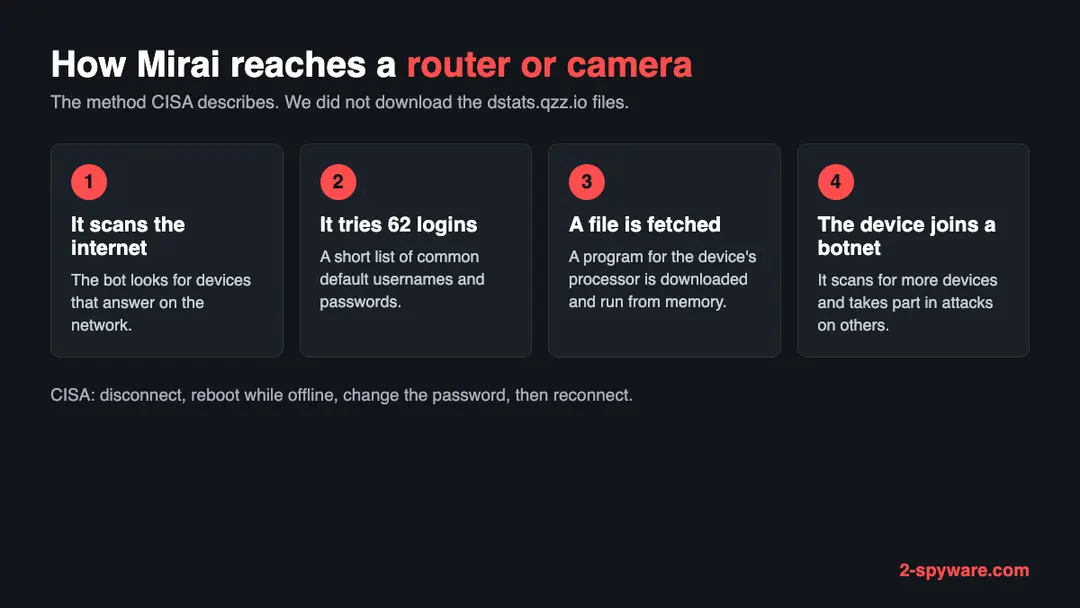
We did not run or open the dstats.qzz.io files. This is the method CISA and academic researchers describe for Mirai in general, so you know what to look for.
- 1
It scans for devices
CISA's alert says Mirai continuously scans the internet for vulnerable IoT devices. A device with a public address and an open login is found whether or not anyone knows it exists.
- 2
It tries a short list of default logins
CISA says Mirai uses a short list of 62 common default usernames and passwords. That small dictionary was enough to reach hundreds of thousands of devices, because many owners never change the factory login.
- 3
Which devices fall
The incidents CISA describes involved primarily home routers, network-enabled cameras and digital video recorders. CISA also notes a later variant that abused a flaw in broadband routers that leave port 7547 open.
- 4
Why the scale mattered
A USENIX Security paper that studied the botnet over seven months found it peaked at about 600,000 infections, made mostly of embedded and IoT devices. The authors point to the simplicity of the infection as a key factor.
An infected device keeps working as before, so its owner often notices nothing. Its job is to scan for more devices and to join attacks on other targets. That is why a Mirai host such as this one matters even to people who never visited it.
What dstats.qzz.io (Mirai botnet files) can steal or download
What you may notice, and what you may not
Most owners notice nothing. The signs below follow from what Mirai does; none of them proves infection alone.
| Sign | What it means |
|---|---|
| Your router or camera still has its factory login | This is the weakness Mirai uses. A device in this state should be treated as exposed even if nothing looks wrong |
| Telnet or remote administration is switched on for the internet | CISA tells people to watch Telnet traffic on ports 23 and 2323, because that is where Mirai tries its logins |
| Slow internet, a hot device or a lagging camera | A device that scans and attacks uses bandwidth and processor time. Many other things cause the same, so this is weak evidence |
| Your device's name in a block list or an abuse notice from your provider | A provider may write when a device on your line attacks others or scans the network. Read the date and the device named |
| Settings that changed back or a login that no longer works | Some bots change the admin password to keep others out. We found no source for this one in the pages we read, so take it as a possibility only |
| Nothing at all | The infection lives in the device's memory and the device keeps doing its normal job |
What this can cost you
Seeing this address in a log costs nothing. The risks below apply to a device that actually connected to it or ran one of its files.
- High
Your device attacks other people
An infected router or camera becomes part of a botnet that can be used to flood other targets with traffic. The harm falls on strangers, and the traffic leaves from your connection.
- High
A way into your home network
A router sits between your devices and the internet. Control of it gives the attacker a place to watch or redirect traffic. We found no source describing that for this host, so it is a risk, not an observation.
- Medium
Reinfection within minutes
CISA warns that a device reconnected before its password is changed could be quickly reinfected. The scanners are always running.
- Medium
A notice or a block from your provider
Providers may limit or warn a customer whose device is part of an attack. This is general practice, not something we saw here.
- Low
Nothing, if you only saw the name
A name in a firewall log or a blocked link is not an infection.
How to check the PC for dstats.qzz.io (Mirai botnet files)
How a device ends up contacting an address like this
We do not know how any device reached dstats.qzz.io, and no source says. These are the routes CISA and the research describe for Mirai.
- 1
The device was found by a scanner
A bot scanned the internet, found a device with an open login and tried the default passwords. No one clicked anything. This is the main route CISA describes.
- 2
A flaw in the device software
CISA notes a variant that abused a flaw in routers that leave port 7547 open. An old router that no longer gets updates stays open to flaws like this.
- 3
A command run by someone who got in
Once inside, the attacker has the device fetch a file that matches its processor. A shell script such as ily.sh or payload.sh could do the fetching, but we did not see the scripts.
- 4
A log line you found
If you only found dstats.qzz.io in a router or DNS log, the entry means a device on your network asked for the name. Find out which device did, because that one is the suspect.
Check your router and other devices before you reset anything
Start with the question that matters: did a device of yours connect to dstats.qzz.io, or does one still use its factory login with remote access on? If yes, follow the plan on this page. If you are unsure, do these checks first. None of them changes anything.
Phones and ordinary computers are not the target of these files, so this page does not give steps for them.
- 1
Find out which device asked for the name
Open your router's admin page (the address and login are on its label or in its manual) and look for a log or a list of connected devices. Search the log for dstats or qzz. If the router keeps no log, a DNS filter service you use may show the device that asked.
- 2
Check whether the factory login still works
If the admin page still accepts the login printed on the router's label, or the default for your model, a bot could have used it too.
- 3
Look at remote access
In the router's settings find remote management or remote administration and see if it is switched on for the internet. The FTC advises turning it off, and also advises turning off WPS and UPnP.
- 4
Look at the firmware
Find the firmware version in the status or system page and compare it with the manufacturer's site. An old version, or a model the maker no longer updates, is a reason to plan a replacement.
- 5
Read a provider notice
If your internet provider wrote about attack traffic from your line, the notice usually names the date and the address. Match them against the device list.
- 6
Remember what a clean check means
These checks cannot see inside the device. Because the malware sits in memory, a device that looks normal may still be infected until it is restarted offline.
How to remove dstats.qzz.io (Mirai botnet files)
How to remove dstats.qzz.io
A loader's job is to install other malware, so treat the PC as infected with more than one program until the scans are clean.
Step 1: Delete scheduled tasks that bring it back
Open Task Scheduler from the Start menu and click Task Scheduler Library. Select each task you do not recognise and read the Actions tab:
- a task that starts a file in
%AppData%or%Temp% - runs
powershellwith a long encoded line - opens a web address belongs to dstats.qzz.io or a similar program
Right-click such a task and choose Delete, and check the subfolders too. Leave tasks from Microsoft, your PC's maker and programs you use. Task Scheduler is the same in Windows 11 and Windows 10.

Windows 11: Task Scheduler Library, the task selected, the Actions tab shows the file it runs. Full procedure with screenshots: Remove what malware leaves behind in Windows
- a task that starts a file in
Step 2: Remove it from startup
Whatever dstats.qzz.io installed usually starts with Windows. Open Task Manager with Ctrl + Shift + Esc, go to Startup apps in Windows 11 or the Startup tab in Windows 10, and disable what you do not know, starting with entries that have an empty Publisher column.
Open file location on the right-click menu shows the file, which helps you decide and tells you what to delete later. Disabling is safe: if something you need stops working, switch it back on.
Full procedure with screenshots: Stop apps from opening at startup On uGetFix
Step 3: Delete the folders left behind
What the uninstaller leaves behind is usually in the user folders. Open File Explorer, switch on View > Show > Hidden items (in Windows 10 View > Hidden items), and go through
%LocalAppData%,%AppData%, %ProgramData% and the two Program Files folders.Sort by Date modified and delete folders that appeared together with the problem and belong to no program you use. Folders with random names that hold
.exe,.dll, .js or .ps1 files are the strongest sign.Full procedure with screenshots: Remove what malware leaves behind in Windows
Step 4: Scan the PC, then run the offline scan
Open Windows Security > Virus & threat protection > Scan options, run a Full scan and remove everything it finds. Then select Microsoft Defender Antivirus (offline scan) and click Scan now: the PC restarts and scans before Windows loads, which finds files that hide while Windows runs.
Save your work first, because the offline scan takes about 15 minutes. Both scans are built into Windows 11 and Windows 10, and a second scanner from another vendor is a useful extra opinion.

Windows 11: Windows Security > Virus & threat protection > Scan options. Full procedure with screenshots: Run a Microsoft Defender Offline scan
Step 5: Change passwords from another device and sign out other sessions
Assume that the passwords saved in this PC's browsers, and the accounts that were open in them, are known to the attacker. From a phone or a clean computer, change the e-mail password first, then banking, shopping, social and gaming accounts.
Use each service's option to sign out of all other sessions, because stolen cookies keep a session open even after a password change. Turn on two-step verification on each account. Wait with the infected Windows 11 or Windows 10 PC until the scans are clean.
Full procedure with screenshots: Turn on two-step verification / secure a hacked account
Clean a router, camera or recorder: the order CISA gives
CISA's removal advice is short because Mirai lives in the device's memory. We follow it here and add the settings the FTC and CISA recommend afterwards. We did not test these steps on an infected device.
- 1
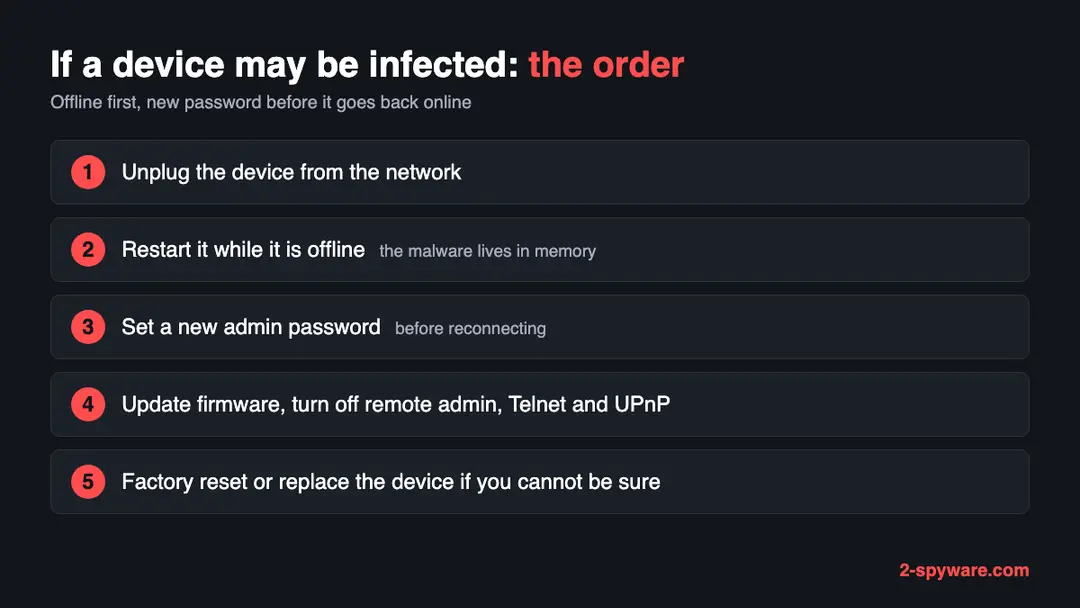
Disconnect it from the network
Unplug the network cable and turn off its Wi-Fi if it has one. For a router that is your only connection, do the next steps from a phone using mobile data, and expect your home internet to be down for a while.
- 2
Restart it while it is offline
Turn it off and on again with no network connected. CISA says the malware resides in dynamic memory, so a restart removes it. A restart alone does not stop reinfection.
- 3
Change the default password before reconnecting
Sign in to the device on its local address and set a new admin password that is strong and used nowhere else. CISA warns that if you reconnect first, the device could be quickly reinfected.
- 4
Update the firmware
Download the newest firmware from the manufacturer's own site. The FTC says to check the site before setup and from time to time, to register the router for update notices, and to ask your provider about automatic updates.
- 5
Turn off what a bot uses
In the settings turn off remote management and UPnP. CISA lists disabling UPnP on routers unless it is necessary, and, for infrastructure devices, turning off unencrypted remote admin such as Telnet. Check that the built-in firewall is on.
- 6
Reset to factory settings if you cannot be sure
Neither CISA nor the FTC pages we read give a reset procedure, so use the manufacturer's manual for your model. Most devices have a small reset button held for some seconds. After a reset, set a new password first, then update the firmware, and only then reconnect.
- 7
Replace a device that no longer gets updates
If the maker has stopped issuing fixes for the model, a new password does not close its flaws. Buy a replacement from a maker with a record of security updates, as CISA advises.
If you use a Windows PC, a Mac or a phone
These files are built for the small processors in network devices. We found nothing that says they run on an ordinary computer or a phone.
| Your device | What we know | What to do |
|---|---|---|
| Windows PC or Mac | The file names match router and camera chips. A PC would have been a different kind of target, and nothing here says one was | No removal is needed because of this address. Still check the router that your PC uses, as above |
| iPhone, iPad or Android phone | No source mentions phones | Nothing to remove. If your phone could not load a page from this host, that is expected, since it no longer answers |
| A Linux server or a NAS | These are Linux-based systems and may share the processor types in the list. We found no source about them for this host | If one of yours contacted this address, treat it as compromised and ask whoever runs it, or its maker, how to rebuild it |
After removal: passwords, accounts and prevention
Mirai relies on devices that people set up once and forgot. The measures below are those CISA and the FTC recommend.
Do
- Change every default password on a router, camera or recorder the day you install it.
- Install security updates as soon as they come out, and register the device for notices.
- Turn off remote management, WPS and UPnP on the router unless you need them.
- Use WPA3 Personal on Wi-Fi, or WPA2 Personal if WPA3 is not offered.
- Choose devices from makers with a record of security fixes, and replace ones that no longer get them.
Don't
- Never leave a camera or recorder reachable from the internet with its factory login.
- Never leave Telnet on for remote login. CISA lists Telnet as an unencrypted protocol to turn off.
- Never reconnect a cleaned device before you have set a new password.
- Never assume a restart fixed things for good. Without a new password the device can be infected again.
- Never ignore a notice from your provider about attack traffic from your line.
Questions about dstats.qzz.io (Mirai botnet files)
What is dstats.qzz.io?
dstats.qzz.io is a web address that URLhaus, the malware tracker run by abuse.ch, lists for malware downloads. Thirty-six file addresses were added on 28 September 2026, and 34 of them carry the tag mirai.
Many have names that match processor types such as arm7 and mips. When we looked it up on 10 October 2026 the name did not resolve, and URLhaus showed every file offline. We found no public write-up of this address and no registration record.
Is dstats.qzz.io a virus?
A web address is not a virus, but this one is listed as a source of Mirai malware. The files are aimed at routers, cameras and similar devices, not at an ordinary computer.
We did not download them, so we cannot say exactly what they do. Treat the address as dangerous and do not try to open its files. Reading this page cannot harm you, and a visit from a phone or computer does not infect it.
What is Mirai?
Mirai is malware that turns network devices into a botnet. CISA says it continuously scans the internet for vulnerable devices and uses a short list of 62 common default usernames and passwords to log in.
The devices CISA names are primarily home routers, network-enabled cameras and digital video recorders. Infected devices then take part in attacks on other targets. A USENIX Security study found the botnet peaked at about 600,000 infections.
How do I know if my router is infected?
You often cannot tell from the outside. The device keeps working, and Mirai lives in its memory.
Warning signs are a factory login that still works, remote administration switched on, a slow or hot device, or a notice from your internet provider about attack traffic. If you suspect it, follow CISA's steps:
- disconnect
- restart offline
- set a new password
- only then reconnect the device
How do I remove Mirai from a router or camera?
Disconnect the device from the network. Restart it while it is offline, because CISA says the malware resides in dynamic memory. Change the default password to a strong one before you reconnect, since a device reconnected first could be quickly reinfected.
Then update the firmware, turn off remote management and UPnP, and reset it to factory settings using the manual if you are unsure. Replace a model that no longer gets updates.
Will restarting my router remove it?
A restart removes Mirai itself, because CISA says it resides in dynamic memory. But a restart does not close the way it came in. If the factory password and open remote access are still there, a scanner can log in again, often within minutes.
Restart the device while it is offline, set a new password before it goes back online, and update the firmware so the same flaw is not left open.
Why does the site not load any more?
On 10 October 2026 our browser reported ERR_NAME_NOT_RESOLVED for dstats.qzz.io, so the name gave no address, and URLhaus showed all 36 files offline. The operator may have deleted the name, a provider may have acted, or the files may have moved to another address.
None of that cleans a device that already ran a file from here, and an infected device may keep asking for the old name.
Does this affect my Windows PC, Mac or phone?
Almost certainly not directly. The file names match the processors in routers, cameras and similar devices, and Mirai is described as a threat to such IoT devices.
We found nothing that says these files run on a PC or a phone. The risk to you is the router and other network devices in your home. Check those, and your own computers need no cleaning because of this address.
I only saw dstats.qzz.io in a log. What now?
Find out which device on your network asked for the name, because that one may be infected. Check its login, its firmware and whether remote access is on.
If a device asked for the name, treat it as infected and follow the steps above. If the entry came from a block list or a security scan that only listed the name, nothing needs removing, but changing default passwords is still wise.
Will Fortect remove dstats.qzz.io?
Fortect scans Windows for malware and unwanted programs and repairs the system files and settings they change, and its free scan shows what it finds on your PC before you decide anything.
For dstats.qzz.io, follow the plan above as well: the browser steps take back permissions and settings that no scanner treats as a threat, and uninstalling the program that brought it removes the source.
Run Microsoft Defender's full scan and, if anything was found, its offline scan as a second opinion. If the symptoms are gone after the plan and both scans are clean, there is nothing more to do.
Sources
- URLhaus (abuse.ch): host page for dstats.qzz.io (entries read from our copy of the feed) (read October 10, 2026)
- CISA: Heightened DDoS Threat Posed by Mirai and Other Botnets (TA16-288A) (read October 10, 2026)
- USENIX Security 2017: Understanding the Mirai Botnet (read October 10, 2026)
- FTC Consumer Advice: How to Secure Your Home Wi-Fi Network (read October 10, 2026)
- CISA: Securing Network Infrastructure Devices (read October 10, 2026)