
Lastacloud virus: what Android.Lastacloud is and how to remove it
Lastacloud (Android.Lastacloud) is a spying trojan for Android that arrives as a fake "WhatsApp Update" or "Browser Update" app and was built by the Inception Framework espionage group. Uninstall the fake update app, from safe mode if needed, then protect your accounts and reset the phone if you cannot be sure it is clean.
Facts checked October 6, 2026. Steps checked against Apple's and Google's current documentation and the reports we cite. We have not run the app or the link on a phone ourselves.
Do it yourself · free Remove Lastacloud virus yourself 5 steps, about 15 minutes, no software needed.
Start the steps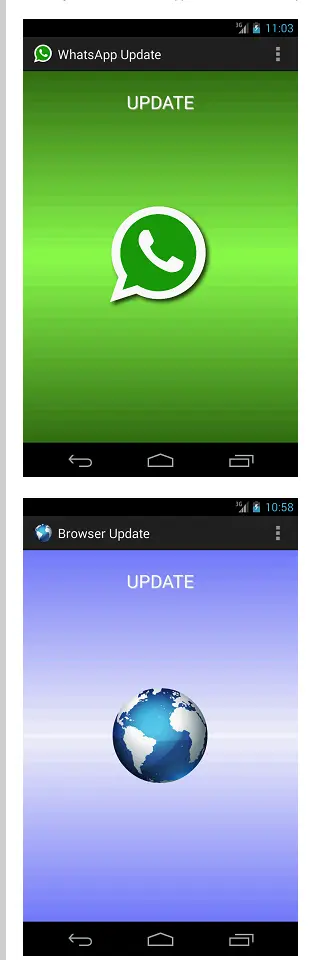
Lastacloud virus: summary
| Type | Android spying Trojan disguised as WhatsApp Update or Browser Update, linked to the Inception Framework espionage group |
|---|---|
| Risk | High for the data on the phone: contacts, SMS, call log, calendar, microphone recordings; Symantec rated it very low in 2014 for spread |
| Symptoms | An app called WhatsApp Update or Browser Update with a green speech-bubble or globe icon; often no visible sign |
| How to get rid of it | Uninstall the fake update, from safe mode if needed, check accounts from a clean device, factory reset if in doubt |
| Our check | Desk check on 6 October 2026 of Symantec's writeups and Google's help pages; no sample run and no phone test |
| First seen | Detected 12 December 2014 (Symantec); our guide 26 April 2021 |
Show 6 more facts
| Detection names | Symantec: Android.Lastacloud (also IOS.Lastacloud, BBOS.Lastacloud). No Microsoft detection name is known: this is Android malware |
|---|---|
| Name | Lastacloud virus |
| Evidence | 0 write-ups by security sites; details still limited |
| Distribution | Typically fake installers, cracked programs, e-mail attachments, fake "verify you are human" pages and ads for popular apps |
| Damage | Installs other malware, often several programs at once |
| Facts checked | 6 October 2026 |
Facts checked on 6 October 2026 against Symantec's Android.Lastacloud writeup (December 2014), its Inception Framework article (March 2018) and Google's current help pages. We ran no sample and tested nothing on a phone; the newest source that names Lastacloud is from 2018.
What Lastacloud is and what it does to a phone
Lastacloud is Symantec's name for an Android spying trojan. It pretends to be an update for WhatsApp or the phone's browser, asks for broad permissions and sends the phone's identity numbers to its operators. It is an app on the phone, not a website, and not a Windows or Mac threat.
- 1
A fake update is installed
Symantec lists two package names: com.whatsapp.update, shown as "WhatsApp Update", and com.androidbrowser.update, shown as "Browser Update". Neither is an update that WhatsApp or Android sends; they are separate apps someone persuaded the owner to install.
- 2
It asks for far more than an update needs
At installation it requests permissions to read contacts, SMS messages, the call log, the calendar and the browsing history, to use the microphone, to read location, and to monitor, change or end outgoing calls.
- 3
It shows a disguise icon
Once installed it shows either a green speech bubble with a white telephone receiver, which looks like WhatsApp, or a globe, which looks like a browser.
- 4
It collects and sends data
Symantec says it gathers the IMSI, IMEI, ICCID, phone number, manufacturer and model, can record audio including phone calls, can download and run further files, and sends what it collects to a remote location.
- 5
It checks in through ordinary web pages
The report lists profile pages on LiveJournal and Tumblr that the Trojan may connect to. The same pattern, forum profile pages used as dead drops, is described again in Symantec's 2018 article.
- What it is
- An Android Trojan horse that steals information (Symantec: Android.Lastacloud, risk level 1, very low, in December 2014)
- What you may notice
- An app called WhatsApp Update or Browser Update, with a speech-bubble or globe icon; often nothing else, because spying software tries to stay quiet
- Who made it
- Symantec ties it to the Inception Framework, an espionage group, and lists versions for iOS and BlackBerry too (IOS.Lastacloud, BBOS.Lastacloud)
- Not the same as
- Ordinary ad apps or adware: this family is built to collect information, not to show ads
What Lastacloud virus does on an infected PC
What we checked and what we did not
Lastacloud is a malware family, not a website, so there was no site test and we ran no sample. We re-read the vendor's report and Symantec's later article, and compared them with our 2021 guide.
Lastacloud · source check · 6 October 2026
- Package names and lookSymantec's writeup (discovered 12 December 2014, updated 13 December 2014): com.whatsapp.update and com.androidbrowser.update, versions 2.11.401 and 19.03.124.5, green speech-bubble or globe icon.
- Permissions and dataThe same writeup lists the permissions requested and the data it gathers (IMSI, IMEI, ICCID, phone number, manufacturer, model).
- OriginSymantec's 2018 article names Android.Lastacloud among the mobile tools of the Inception Framework and says its newer Android malware spreads through SMS messages and emails with malicious links.
- Removal stepsPlay Protect, updates, safe mode, uninstalling and factory reset follow Google's help pages, read on 6 October 2026.
- Is it active nowThe newest source that names it is Symantec's article of March 2018. We cannot say how many phones carry it today, and the 2014 package versions may have changed.
- Phone billsOur old guide said victims may see slightly higher telephone bills. Symantec's writeup does not say this, so we treat it as unconfirmed.
- SamplesNone run and no phone tested. Nothing here proves a phone is clean or infected.
A real, targeted family; old and quiet The vendor reports agree and name the packages exactly, but they date from 2014 to 2018 and describe targeted espionage. This is a reading of sources on one day, not a test of a phone, and it does not clear any phone.
How the Lastacloud story went
May 2014
The group is already active
Symantec says the Inception Framework has been active since at least May 2014. Its early attacks used spear-phishing emails with Office documents, and more than half the earlier targets were in the energy and defense sectors.
12 December 2014
Symantec adds a detection
Symantec records Android.Lastacloud as discovered on 12 December 2014 and updates the writeup the next day. Its iOS and BlackBerry cousins are written up the same week.
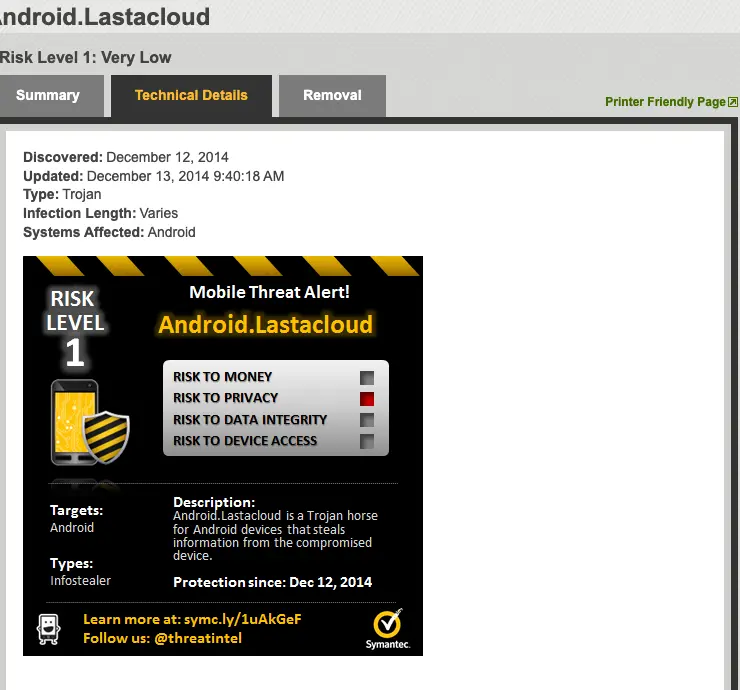
Symantec's threat card in its writeup (Wayback Machine copy): risk level 1, type infostealer, protection since 12 December 2014. Only the privacy risk is marked. December 2014
The group is exposed
Blue Coat, now part of Symantec, publishes the first public report on the Inception Framework in December 2014.
April 2015
Activity returns
After a quiet spell Symantec sees a resurgence of Inception attacks from April 2015, continuing through 2017.
March 2018
Android malware still in use
Symantec writes that the group has an ongoing interest in mobile devices, has modified its Android malware, spreads it by SMS and email links and uses forum profile pages as dead drops.
26 April 2021
Our old guide
We published a short guide describing the fake updates and the permissions. It was not updated afterwards.
6 October 2026
This page re-checked
We re-read the vendor reports and Google's current help pages, and corrected the removal steps of the old guide.
What Lastacloud virus can steal or download
What Lastacloud can reach
The harm is information. Read the list as what the app can reach once the owner has allowed it.
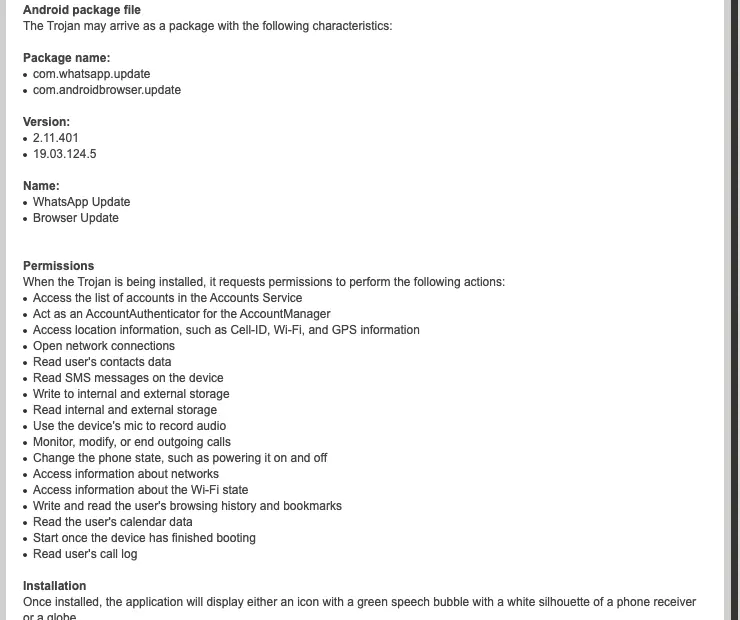
Permissions requested (Symantec)
- Contacts
- SMS messages
- Call log
- Calendar
- Browsing history and bookmarks
- Location (Cell-ID, Wi-Fi, GPS)
- Microphone recording
- Internal and external storage, read and write
- Accounts list (Accounts Service)
- Outgoing calls: monitor, modify, end
- Network connections
- Wi-Fi state
- Phone state, such as powering it on and off
- Start after the phone boots
Symantec lists these as the permissions the Trojan requests when installed.
Data it gathers first (Symantec)
- IMSI
- IMEI
- ICCID
- Phone number
- Manufacturer and model
These identify the SIM card and the handset.
- High
Messages, contacts and calls
With the SMS, contact and call permissions the app can read what you write and who you talk to, and the microphone permission lets it record audio, including phone calls.
- High
More malware
Symantec says it can download and run files. Our old guide warned that it may bring other Android viruses; that follows from the download ability.
- Medium
Accounts on the phone
It asks to see the accounts list. Treat passwords, one-time codes sent by SMS and logged-in apps as exposed until the phone is clean.
- Low
A slow phone
Our old guide lists a slow phone. A spying app tries to stay quiet and the vendor report names no slowdown, so this sign alone proves nothing.
What to do in the first hour
Protect accounts from another device first, then deal with the phone.
- 1
Look for the fake apps
Open Settings > Apps & notifications > See all apps (on some phones the menu is Settings > Apps) and look for WhatsApp Update and Browser Update. A second app called WhatsApp next to the real WhatsApp Messenger is also a reason to look closer.
- 2
Switch on Airplane mode if you find one
This stops the app from sending more while you prepare. Call and SMS will not work until you turn it off again.
- 3
Use a clean device for your accounts
On a computer or another phone open myaccount.google.com/security-checkup, change the password of your Google account and sign out of devices you do not recognise. Do the same for email, banking and messaging accounts.
- 4
Do not trust SMS codes on this phone
The app asks to read SMS messages. Use an authenticator app or a security key on a clean device for sensitive accounts until the phone is clean.
How Lastacloud virus got on your PC
How it reaches a phone
- High
A fake update warning
Our old guide says people are interrupted by a convincing warning that WhatsApp or the browser needs an update and tap to install it. Genuine updates come through the store the app was installed from.
- High
Links in SMS messages and emails
Symantec (2018) says the group's Android malware is spread through SMS messages and emails that carry malicious links.
- Medium
Installing apps from outside the store
Both packages are apps installed by hand. Android asks permission before installing an app from outside the Play Store; allowing it for one app is the step the attackers need.
- Low
A phone left without updates
Not named in the reports, but old Android versions lack later protections and the attacker needs only one tap by the owner.
Who it was built for
Lastacloud belongs to a spying group, not to a mass-market criminal gang, which changes how worried most readers need to be and how worried some should be.
| Fact | What the source says | Our note |
|---|---|---|
| Motive | Symantec: espionage is the primary motive of the Inception Framework | Not a money-making ad or ransomware operation |
| Targets | Defense, aerospace, energy, governments, telecoms, media and finance (Symantec 2018) | Embassies and consultancies were also among the early targets |
| Places | Targets in many countries; Russia, Ukraine, Moldova, Belgium, Iran and France led from 2015 to 2017 | From the fixed period 2015 to 2017 only |
| Ordinary users | Not stated by the sources | If you work in one of these fields or deal with such organizations, take the steps below more seriously |
How to check the PC for Lastacloud virus
Names it goes by
The same code line is listed under several names, so search for all of them when you look for it on a phone or in a scan report.
| Name | Who uses it | Our note |
|---|---|---|
| Android.Lastacloud | Symantec | The detection name for the Android version, and the name our old guide used |
| IOS.Lastacloud and BBOS.Lastacloud | Symantec | Versions for iPhone and BlackBerry from the same group |
| Lastacloud | MISP Galaxy (open threat-intelligence project) | Described as a Trojan horse for Android that steals information from the compromised device |
| WhatsApp Update, Browser Update | Shown on the phone | The display names of the two packages; they are not real update tools |
| Inception Framework | Blue Coat, Symantec | The espionage group behind it, not a name for the app |
The two fake update apps
| Shown as | Package name | Version in the 2014 report | Icon |
|---|---|---|---|
| WhatsApp Update | com.whatsapp.update | 2.11.401 | Green speech bubble with a white telephone receiver |
| Browser Update | com.androidbrowser.update | 19.03.124.5 | A globe |
How to remove Lastacloud virus
A loader's job is to install other malware, so treat the PC as infected with more than one program until the scans are clean.
Step 1: Delete scheduled tasks that bring it back
Open Task Scheduler from the Start menu and click Task Scheduler Library. Select each task you do not recognise and read the Actions tab:
- a task that starts a file in
%AppData%or%Temp% - runs
powershellwith a long encoded line - opens a web address belongs to Lastacloud virus or a similar program
Right-click such a task and choose Delete, and check the subfolders too. Leave tasks from Microsoft, your PC's maker and programs you use. Task Scheduler is the same in Windows 11 and Windows 10.

Windows 11: Task Scheduler Library, the task selected, the Actions tab shows the file it runs. Full procedure with screenshots: Remove what malware leaves behind in Windows
- a task that starts a file in
Step 2: Remove it from startup
Whatever Lastacloud virus installed usually starts with Windows. Open Task Manager with Ctrl + Shift + Esc, go to Startup apps in Windows 11 or the Startup tab in Windows 10, and disable what you do not know, starting with entries that have an empty Publisher column.
Open file location on the right-click menu shows the file, which helps you decide and tells you what to delete later. Disabling is safe: if something you need stops working, switch it back on.
Full procedure with screenshots: Stop apps from opening at startup On uGetFix
Step 3: Delete the folders left behind
What the uninstaller leaves behind is usually in the user folders. Open File Explorer, switch on View > Show > Hidden items (in Windows 10 View > Hidden items), and go through
%LocalAppData%,%AppData%, %ProgramData% and the two Program Files folders.Sort by Date modified and delete folders that appeared together with the problem and belong to no program you use. Folders with random names that hold
.exe,.dll, .js or .ps1 files are the strongest sign.Full procedure with screenshots: Remove what malware leaves behind in Windows
Step 4: Scan the PC, then run the offline scan
Open Windows Security > Virus & threat protection > Scan options, run a Full scan and remove everything it finds. Then select Microsoft Defender Antivirus (offline scan) and click Scan now: the PC restarts and scans before Windows loads, which finds files that hide while Windows runs.
Save your work first, because the offline scan takes about 15 minutes. Both scans are built into Windows 11 and Windows 10, and a second scanner from another vendor is a useful extra opinion.

Windows 11: Windows Security > Virus & threat protection > Scan options. Full procedure with screenshots: Run a Microsoft Defender Offline scan
Step 5: Change passwords from another device and sign out other sessions
Assume that the passwords saved in this PC's browsers, and the accounts that were open in them, are known to the attacker. From a phone or a clean computer, change the e-mail password first, then banking, shopping, social and gaming accounts.
Use each service's option to sign out of all other sessions, because stolen cookies keep a session open even after a password change. Turn on two-step verification on each account. Wait with the infected Windows 11 or Windows 10 PC until the scans are clean.
Full procedure with screenshots: Turn on two-step verification / secure a hacked account
How to remove Lastacloud from an Android phone
The numbered plan above is the Windows plan and does not apply to a phone. Use these steps: the menus follow Google's pages, the behaviour follows the vendor reports. We did not test them on an infected phone.
| Situation | Do this | What you lose |
|---|---|---|
| Play Protect names an app | Tap the notification, then Uninstall | That app |
| You found WhatsApp Update or Browser Update | Uninstall it, from safe mode if it will not go, then change your passwords from a clean device | That app |
| The app returns or you cannot be sure the phone is clean | Back up photos and contacts, then factory reset | Everything not backed up |
| You work in a field the group targets, or the phone holds sensitive data | Factory reset and treat the old phone and its SIM as exposed; ask your IT or security team | Time |
- 1
Turn on Google Play Protect
Open the Play Store, tap your profile icon, then Play Protect and Settings, and turn on Scan apps with Play Protect. If you got apps from places other than the Play Store, also turn on Improve harmful app detection.
- 2
Update the phone
Settings > System > Software updates, then Security & privacy > System & updates > Security update and Google Play system update.
- 3
Restart in safe mode if the fake app resists
On a Pixel 6 or later hold Power and Volume Up for a few seconds, then tap and hold Power off or Restart and tap OK. On a Pixel 5a or earlier hold Power, tap Power off, then press the power button and hold Volume Down while the animation plays. Safe mode shows at the bottom of the screen. Other makers use other keys: search for the maker's name and safe mode.
- 4
Uninstall the fake updates
Settings > Apps & notifications > See all apps, tap WhatsApp Update or Browser Update and Uninstall. If Uninstall is greyed out, the app may hold special rights, such as device administrator; the menu for removing those differs between phones and we did not confirm it here, so try a factory reset or ask the maker.
- 5
Run Play Protect and restart
Scan again with Play Protect and restart normally. Airplane mode is switched on automatically in safe mode; turn it off to use Wi-Fi, GPS and calls.
- 6
Back up what you need, then reset if in doubt
Copy photos and contacts to your Google account or a computer. Do not restore an app backup afterwards. A factory reset erases everything: know your Google account password, charge to at least 70 percent and connect to Wi-Fi; Google says it can take up to an hour. Install apps afterwards only from Google Play.
- 7
Change passwords again
After the phone is clean, change the passwords you entered or received codes for while the app was installed, and remove the old phone from your Google account's device list.
Our old guide advised scanning with an anti-virus program and, if that was blocked, rebooting into safe mode first. The safe-mode part still holds; a scan is worth running once, but we found no source that shows any product removes this family, so do not stop after a scan.
After removal: passwords, accounts and prevention
Accounts come next
Because the PC showed whatsApp Update (com.whatsapp.update) in the list of installed apps, a sign of a program that could read browser data, the clean-up is only half of the work. The other half happens in your online accounts.
Change passwords from a clean device, beginning with e-mail; sign out of all sessions; check forwarding rules and recovery phone numbers; and turn on two-step verification with an authenticator app or a passkey. Ask your bank to replace cards saved in the browser.
Why the order matters and what to check in each account: secure your accounts after malware.
How to keep fake updates off your phone
Almost every route in is an app you chose to install or a link you tapped.
Do
- Update WhatsApp and the browser only through the store you installed them from
- Install apps from Google Play, the Galaxy Store or Amazon, and read the permissions first
- Keep Google Play Protect on and install Android and security updates
- Check what a new app asks for: a messenger update has no use for microphone and call-control permissions
- Keep a backup in more than one place, one of them offline
Don't
- Tap an update warning in a pop-up, an SMS message or an email
- Allow installing from unknown sources for a browser or file manager that you do not need
- Download WhatsApp or browser updates from links people send you
- Rely on a VPN against malware: it hides your address on public Wi-Fi and does not scan apps
- Ignore an app called WhatsApp Update or Browser Update because the phone seems fine
Our old guide said to ignore warning messages and to use only Google Play or similar trusted stores for downloads and updates. That is still the main advice.
Questions about Lastacloud virus
What is the Lastacloud virus?
Lastacloud is an Android spying Trojan that Symantec detects as Android.Lastacloud. It arrives as an app named WhatsApp Update or Browser Update, with the package names com.whatsapp.update and com.androidbrowser.update, and shows a green speech-bubble or globe icon.
Symantec says it steals information from the phone, gathering the IMSI, IMEI, ICCID, phone number, manufacturer and model, and can record audio and download further files. Symantec links it to the Inception Framework, an espionage group, and lists iOS and BlackBerry versions as well. It is not a Windows or Mac virus and it is not a website.
Is Android.Lastacloud dangerous?
Yes, for the data on an infected phone, although Symantec rated it risk level 1, very low, in December 2014. That rating describes how widely it spread, not what it does. The permissions it requests cover contacts, SMS messages, the call log, the calendar, browsing history, location and the microphone, and it can monitor or end outgoing calls.
The group behind it is described as an espionage operation that targets defense, energy, government, telecoms, media and finance. For most people the risk is that one tap on a fake update gives a spy a view of their messages and calls.
How do I know if my phone has Lastacloud?
Look for an app called WhatsApp Update or Browser Update. Open Settings > Apps & notifications > See all apps and check the list, including a second app named WhatsApp next to WhatsApp Messenger. Symantec says the app shows either a green speech bubble with a white telephone receiver or a globe.
Run Play Protect from the Play Store as well. A clean list or scan does not clear the phone: the app is built to be quiet, the 2014 package names may have changed since, and we ran no sample. If you doubt it, reset the phone.
How do I remove Lastacloud from Android?
Uninstall the fake update app, from safe mode if it will not go, then check your accounts. Open Settings > Apps & notifications > See all apps, tap WhatsApp Update or Browser Update and tap Uninstall.
If that fails, restart in safe mode: on a Pixel 6 or later hold Power and Volume Up, then tap and hold Power off or Restart and tap OK.
Turn on Play Protect, install updates and change your passwords from a clean device. If you cannot be sure the phone is clean, back up photos and contacts and factory reset it. We did not test these steps on an infected phone.
Is WhatsApp Update a real app?
No. WhatsApp updates through the store it was installed from, usually Google Play, and an app called WhatsApp Update with the package name com.whatsapp.update is the Lastacloud disguise named in Symantec's writeup.
The real app is WhatsApp Messenger. If someone sends you a link to an update, or a pop-up tells you to install one, do not tap it: open Google Play yourself and check whether an update is waiting.
If you already installed such an app, treat it as malware, uninstall it and follow the account steps above. We did not find a way to confirm every build from outside the phone.
How does Lastacloud get onto a phone?
It gets on when the owner installs it, usually after a fake warning that WhatsApp or the browser needs an update. Our old guide describes such warnings, and Symantec's 2018 article says the group's Android malware spreads through SMS messages and emails that carry malicious links.
Android asks before installing an app from outside the Play Store, and allowing that for one app is what the attackers need. Update only through Google Play, do not follow update links in messages, and read the permissions of any new app: a messenger update has no use for microphone and call-control access.
Can a factory reset remove Lastacloud?
A factory reset is the strongest step Google documents, and the vendor reports do not say that Lastacloud survives it, although we found no test either way. It erases all data, apps and settings, so back up photos and contacts first, but not apps.
Know your Google account password, charge the phone to at least 70 percent and connect to Wi-Fi; Google says the reset can take up to an hour. Afterwards install apps only from Google Play and change your passwords from a clean device. If the fake apps return, ask the maker to reflash the firmware.
Is Lastacloud still active in 2026?
We cannot say. The newest source that names Android.Lastacloud is Symantec's article of March 2018, which says the group kept modifying its Android malware. We found nothing newer that we could verify, and we do not know whether the 2014 package names are still in use.
Updated phones with Play Protect on are better protected, but we do not claim they are immune, since no source we read covers current versions. The fake update trick still works on any phone where an owner allows installation from outside the store.
Did Lastacloud raise my phone bill?
We found no source that says so. Our old guide listed slightly higher telephone bills as a sign, but Symantec's writeup does not mention charges; it describes data theft, audio recording and downloading files. A bill that has grown can have many ordinary causes, including apps using mobile data in the background.
Treat the bill as a reason to check your app list and your data use under Settings, not as proof of infection. The strongest sign remains an app called WhatsApp Update or Browser Update that you did not install on purpose.
Will Fortect remove Lastacloud virus?
Fortect scans Windows for malware and unwanted programs and repairs the system files and settings they change, and its free scan shows what it finds on your PC before you decide anything.
For Lastacloud virus, follow the plan above as well: the browser steps take back permissions and settings that no scanner treats as a threat, and uninstalling the program that brought it removes the source.
Run Microsoft Defender's full scan and, if anything was found, its offline scan as a second opinion. If the symptoms are gone after the plan and both scans are clean, there is nothing more to do.
Sources
- Symantec: Android.Lastacloud (discovered 12 December 2014, updated 13 December 2014; Wayback Machine copy of 13 February 2016) (read October 6, 2026)
- Symantec: Android.Lastacloud, technical details with permissions and functionality (Wayback Machine copy) (read October 6, 2026)
- Symantec: Inception Framework: Alive and Well, and Hiding Behind Proxies (March 2018) (read October 6, 2026)
- MISP Galaxy, Android cluster: Lastacloud (read October 6, 2026)
- Google Account Help: Remove malware or unsafe software (Android) (no longer online) (read October 6, 2026)
- Google Pixel Phone Help: Find problem apps by rebooting to safe mode (no longer online) (read October 6, 2026)
- Google Android Help: Reset your Android device to factory settings (no longer online) (read October 6, 2026)