
locservice.short.gy: short links that URLhaus ties to the Contagious Interview fake job campaign, and what to do if a coding test ran them
locservice.short.gy is a short link address that URLhaus lists four times on 12 October 2026 for files tagged ContagiousInterview, which is the name of a fake job interview campaign aimed at developers; the tags also say VSCode, npm, sh, bat and js.
A short link like this is not something you catch by seeing its name: it is fetched by a script that a coding test, a cloned project or an npm package has already started on a computer.
If you only saw the name in a log, nothing is proven. If you ran a project for a recruiter, treat the computer as watched: move crypto and change passwords from another device, rotate your keys and tokens, then scan and clean or reinstall.
Facts checked October 12, 2026. Removal steps tested on Windows 11 (26H2) and checked against Microsoft's and the browser makers' current documentation.
Automatic
Get a free scan and check if your PC is infected.
Fortect finds malware, unwanted programs and the Windows damage they leave behind, and repairs it in one pass.
If a script, project or npm package that downloads files from locservice.short.gy keeps coming back after uninstalling, a scan can find what reinstalls it.
Do it yourself · free Remove locservice.short.gy (Contagious Interview, VS Code and npm lures) yourself 5 steps, about 15 minutes, no software needed.
Start the steps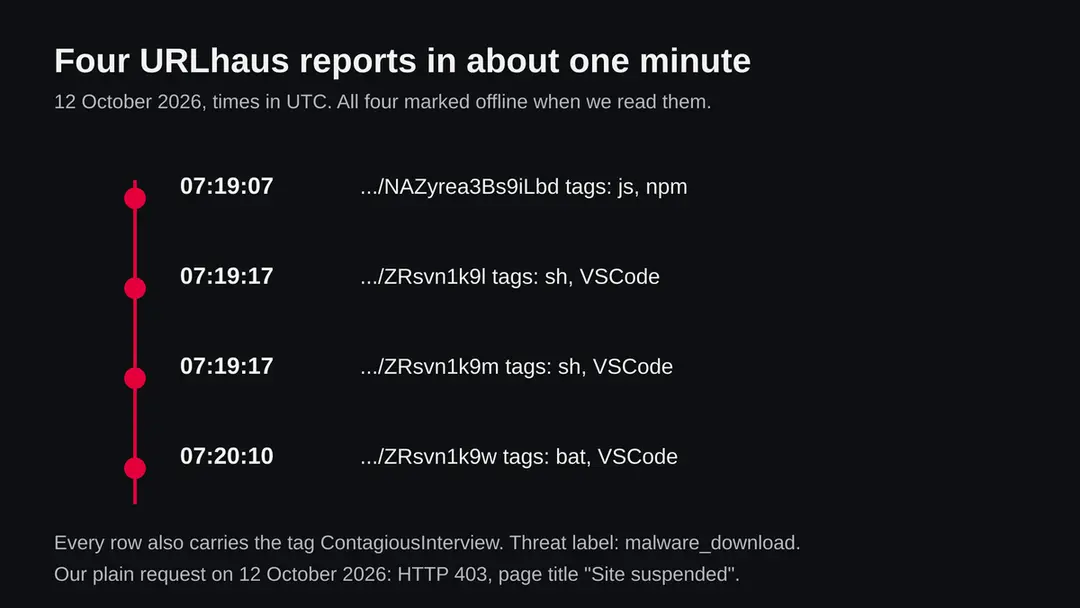
Locservice.short.gy (Contagious Interview, VS Code and npm lures): summary
| Type | Malware download links: four short links that URLhaus tags ContagiousInterview, with VSCode, npm, sh, bat and js |
|---|---|
| Risk | High if a project or package from a recruiter fetched these links: wallets, passwords, keys and the computer itself may be taken. Low if you only saw the name |
| Symptoms | Often none. A project you ran on request of a recruiter is the real sign; unknown startup entries and unexpected logins are the others |
| How to get rid of it | Move crypto and change passwords from another device, rotate keys and tokens, delete the project, scan, and reinstall if you are not sure |
| Our check (12 October 2026) | One plain request from our server: HTTP 403, title Site suspended. A blocked answer clears nothing; the rating comes from URLhaus |
| Running since / first seen | short.gy registered 21 January 2021; the four locservice links were reported on 12 October 2026 |
| Removal | Scan the PC with security software to find and remove the malware and anything installed with it. Fortect scans Windows for malware and repairs the system files and settings it damaged. Remove it nowTo use the full-featured product, you have to purchase a license for Fortect. The scan is free. |
Show 9 more facts
| Platform | Developer computers: Windows (bat), macOS or Linux (sh), anything with Node.js (js). Nothing we read says phones are affected |
|---|---|
| Detection names | No Microsoft detection name is known for the files behind these links, because we did not open them |
| Name | Locservice.short.gy |
| Domain registered | 21 January 2021 |
| Evidence | 4 write-ups by security sites; details still limited |
| First seen | 12 October 2026 |
| Distribution | Typically fake installers, cracked programs, e-mail attachments, fake "verify you are human" pages and ads for popular apps |
| Damage | Installs other malware, often several programs at once |
| Facts checked | 12 October 2026 |
Facts checked on 12 October 2026 against the four URLhaus rows for locservice.short.gy held in our database (we did not fetch the abuse.ch site), RDAP for short.gy, one plain request from our server, and published reports by GitLab, The Hacker News, BleepingComputer, Help Net Security and the Visual Studio Code documentation.
We did not download the files and we infected no computer; the cleaning steps are our judgement and were not tried on a live infection.
What locservice.short.gy is, and what we know about it
locservice.short.gy is not a program on your computer. It is a web address on short.gy, a link shortening service, and the abuse.ch project URLhaus lists four short links on it as places where malware files were served. All four carry the tag ContagiousInterview. We found no public write-up of this one address, so what follows is what URLhaus shows, what our own request returned, and what security vendors have published about the campaign the tag names.
- 1
What URLhaus lists
Four short links, all under https://locservice.short.gy/, with the codes NAZyrea3Bs9iLbd, ZRsvn1k9l, ZRsvn1k9m and ZRsvn1k9w. They were added within about one minute, between 07:19 and 07:20 UTC on 12 October 2026, by one reporter. All four carry the threat label malware_download and were marked offline when we read them.
- 2
What the tags mean
ContagiousInterview is the name researchers use for a long running campaign in which fake recruiters give developers a coding task. VSCode and npm name the two ways the task is wired up: a Visual Studio Code project, or an npm package. The file types sh, bat and js tell you what the short link hands out: a shell script (for macOS and Linux), a batch file (for Windows) and a JavaScript file.
- 3
What we could not confirm
We did not download any of the files, so we cannot tell you what is inside them or which malware family they start. The short links are offline, so nobody can fetch them now, but copies of the project that points at them may still exist on the computers of people who cloned it. We also do not know who owns the locservice name on short.gy.
- 4
What this means for you
If you only saw the name in a firewall log, a mail warning or a blocked request, you are not infected by that alone. The risk is for a computer where a project or package already ran and went to fetch one of these links. A normal visitor has no reason to ask for them.
- Kind of threat
- Short links that URLhaus tags ContagiousInterview: malware download links used in a fake job interview campaign aimed at developers
- Where the files are
- hxxps://locservice[.]short[.]gy/ followed by a short code, for example hxxps://locservice[.]short[.]gy/ZRsvn1k9w: a custom name on the short.gy link service
- Parent domain registered
- short.gy was registered on 21 January 2021 through Gandi SAS; status client transfer prohibited (RDAP, read 12 October 2026). That is the shortener, not the locservice link
- URLhaus entries
- 4 short links, all added on 12 October 2026 between 07:19 and 07:20 UTC; all 4 offline when we read our copy of the data
- File types
- One js file tagged npm, two sh files tagged VSCode, one bat file tagged VSCode
- Platform
- Developer computers. The bat file points to Windows, the sh files to macOS or Linux, the js file to anything that runs Node.js. We did not open them, so this is our reading of the file types
What locservice.short.gy (Contagious Interview, VS Code and npm lures) does on an infected PC
What we checked on 12 October 2026, and what we could not
Our check was a plain request to the address from our server, with no browser and no clicks. It returned HTTP 403 and a page titled Site suspended. That is the shortener blocking the address, and it clears nothing.
Our check, 12 October 2026
- The address answered with a block pageA plain request returned status 403 with the title Site suspended and no redirect. That fits a link that was disabled after the reports. It could also be the answer given to a server that is not a victim, so we do not read more into it.
- Why that is not a clean resultA link that is offline today was online when the campaign used it. Copies of a project that point at it may exist, and the same operators can create new links on this or another shortener.
- Notification request, pop-ups, ad networksNone seen. There was no page to see, only the block answer. We ran no browser.
- URLhaus listingFour malware_download links tagged ContagiousInterview, with js, npm, sh, bat and VSCode; all four offline in our copy of the data on 12 October 2026.
- Downloads and the files themselvesWe did not download any file, so we cannot tell you what they contained.
Dangerous if a project fetched these links; the name alone is not an infection Our check was one plain request that hit a block page, so it proves nothing either way. The danger rating comes from the four URLhaus reports and the campaign they are tagged with, not from our request. Do not request these links and do not run any project that does.
What happened to locservice.short.gy, from the shortener to our check
The shortener is almost six years old, but the reports on this address are only hours old. The dates come from RDAP and from the URLhaus data we hold; the times are UTC.
21 January 2021
short.gy is registered
RDAP shows short.gy registered on 21 January 2021 through Gandi SAS. This is the parent domain of the link service, not the locservice name, so it says nothing about who made these links.
12 October 2026, 07:19 UTC
Three links are reported
At 07:19:07 a link tagged js and npm (code NAZyrea3Bs9iLbd) is added. At 07:19:17 two links tagged sh and VSCode (codes ZRsvn1k9l and ZRsvn1k9m) follow. All carry ContagiousInterview.
12 October 2026, 07:20 UTC
A fourth link, a batch file
At 07:20:10 the link ZRsvn1k9w is added, tagged bat and VSCode. Together the four cover a JavaScript file, two shell scripts and a Windows batch file, which looks like one lure prepared for several operating systems. That is our reading of the file types, not something a report says.
The four URLhaus entries for locservice.short.gy on 12 October 2026. The codes differ; the host, the campaign tag and the offline status are the same. 12 October 2026, about 08:23 UTC
Our check
RDAP is read and a plain request is sent from our server. The request gets HTTP 403 and the title Site suspended. All four links are offline in our data.
What the pattern suggests, and what it does not: four links created and reported within a minute fit a researcher who found a project and listed everything it fetches. That is our reading. It does not tell us how many people received the project, and it does not tell us whether anyone ran it.
What the ContagiousInterview tag means
Contagious Interview is the name Palo Alto Networks Unit 42 gave to a campaign by North Korea linked actors, according to Help Net Security's 2026 report. The attackers pose as recruiters and give developers a coding task that carries the malware. The campaign is well documented, but nothing we read describes the locservice links themselves.
| Question | What the sources say | Source |
|---|---|---|
| How does it start? | A recruiter, often from a plausible AI, blockchain or NFT firm, makes contact on LinkedIn or a job platform and invites the target to a coding interview or test | Help Net Security, September 2026 |
| How old is it? | Unit 42 named it and its research indicates it started as early as December 2022 | Help Net Security, September 2026 |
| How big is it? | Help Net Security reports more than 30,000 devices in over 100 countries infected between December 2025 and July 2026, and more than 7,000 cryptocurrency wallets drained of funds or credentials. We did not verify these figures ourselves | Help Net Security, September 2026 |
| What is the trick with VS Code? | A tasks.json file inside the repository can run code automatically when the folder is opened, and the interview pretext pressures the victim into trusting the workspace | GitLab, 4 May 2026 |
| What is the trick with npm? | Fake or typosquatted npm packages that load the BeaverTail information stealer and the InvisibleFerret backdoor. Socket's first wave was 35 packages with more than 4,000 downloads | BleepingComputer |
| Is it still changing? | The VS Code method was first seen in December 2025 and was still being refined in January 2026 | The Hacker News, January 2026 |
| Which files are these links? | Not known. URLhaus gives the tags, and we did not open the files | Not available |
How a coding test can fetch a short link
Opening a link in a browser is not how this works. A script already running on the developer's computer asks the short link for the next file, and the shortener forwards the request to wherever the operator keeps it. We did not see the project that used locservice.short.gy; this is how the vendors above describe the two methods the tags name.
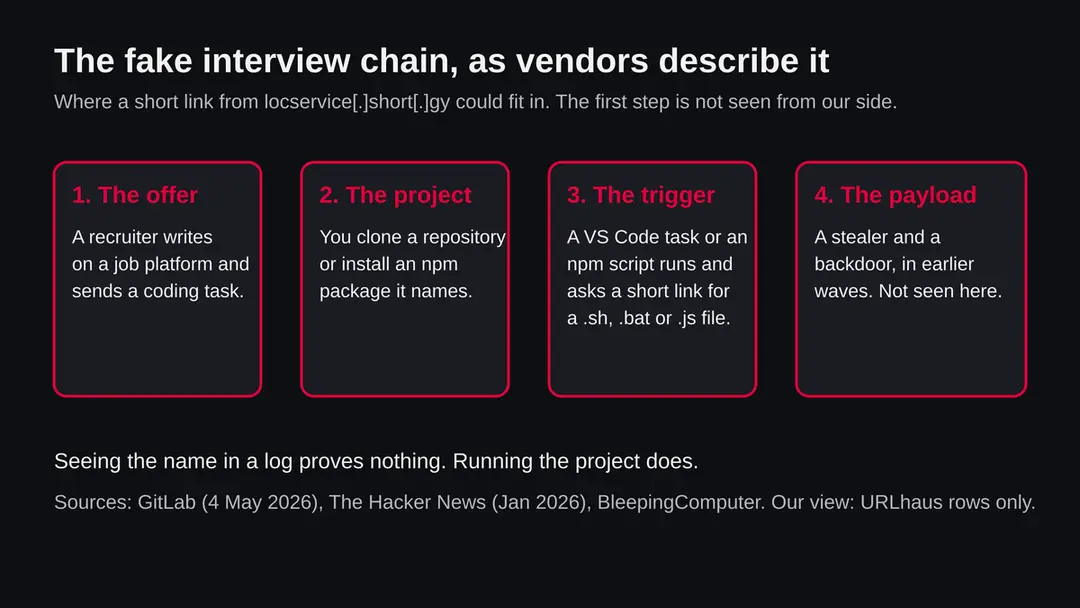
- 1
A recruiter hands you a project
The message looks like a normal hiring process: a job description, a call, then a coding exercise in a repository or a package. Help Net Security says the contact usually comes through LinkedIn or a job platform. The pressure to finish quickly is part of the design.
- 2
VS Code route: a task runs when the folder opens
VS Code tasks are meant to automate chores such as builds. GitLab explains that a tasks.json file in the repository can run code whenever the repository is opened, and that the victim must grant trust to the folder for that to happen. The tags VSCode on the sh and bat links fit this route: the task would download and start a script.
- 3
npm route: an install or run script
The js link is tagged npm. BleepingComputer, reporting Socket's research, describes malicious npm packages that load BeaverTail and InvisibleFerret and that sometimes copy the names of trusted libraries. An npm package can run code when you install it or run the project.
- 4
The short link is the middle man
A short link hides the real file location in the project's code, so a reviewer sees only a harmless looking web address. It also lets the operator change or remove the file without touching the project. When the shortener blocks the link, as the 403 Site suspended answer suggests happened here, new copies stop working but old projects stay on disk.
- 5
A stealer and a backdoor arrive
In the npm waves Socket described, the payloads were the BeaverTail information stealer and the InvisibleFerret backdoor. We do not know what these four files start. Treat the list in the next section as what such a campaign can do, not as proof about these files.
VS Code's own documentation says that Restricted Mode, the state of a folder you have not trusted, blocks tasks, debugging, workspace settings and extensions so that code does not run automatically, and that trying to run a task prompts you to trust the folder. That prompt is the moment that matters.
What locservice.short.gy (Contagious Interview, VS Code and npm lures) can steal or download
What this kind of campaign can take from a developer computer
The list below comes from the campaign write-ups, not from the four files, which we did not open. A developer computer holds more than a normal one, so the same malware reaches further.
Reported or implied for this campaign
- Cryptocurrency wallet data
- Saved browser passwords and sessions
- Account credentials
- A remote backdoor on the computer
- Source code in your repositories
- SSH keys, cloud keys and tokens kept on disk (our reading)
- Extra malware downloaded later
| Data | Detail | Source |
|---|---|---|
| Information stealer | BeaverTail is described as an information stealer that Socket found loaded by malicious npm packages | BleepingComputer |
| Backdoor | InvisibleFerret is described as a backdoor, which lets another person run commands on the computer | BleepingComputer |
| Crypto | Help Net Security reports funds or credentials taken from more than 7,000 cryptocurrency wallets over the campaign | Help Net Security |
| Developer secrets | Not named by the sources we read for these links. Keys and tokens in your home folder, shell history and project files are exposed to anything that runs as you, so we advise treating them as exposed. This is our judgement | Our reading |
What this can cost you
Reading the name costs nothing. The risks below apply to a computer where a project or package fetched one of these links and the file ran.
- High
Crypto wallets
Funds sent out of a stolen wallet cannot be reversed. If a seed phrase or a wallet file was ever on the computer, assume it is known.
- High
Passwords and sessions
A stealer takes saved passwords and logged in sessions. Changing passwords on the infected computer does not help, because the new ones can be seen too.
- High
Your employer's code and systems
A developer computer often holds keys to repositories, servers and cloud accounts. One run of a fake test on a work laptop can become a company incident, so tell your security team early.
- Medium
Someone using the computer live
A backdoor lets a person come back at any time and act while you are signed in.
- Medium
Others who clone your repositories
Trend Micro, as quoted by Help Net Security, describes the campaign becoming worm like, where a compromised developer's repository spreads malware to others. Check your own repositories before you push.
- Low
Nothing, if you only saw the name
A name in a block list, a log or a warning is not an infection.
What you may notice, and what you may not
Stealers and backdoors are built to be quiet. The signs below follow from what the sources describe; none is certain, and many victims notice nothing until money or an account is gone.
| Sign | What it means |
|---|---|
| A project from a recruiter that you ran or opened and trusted | The one real sign. If a task or package from such a project ran, the rest of the list matters |
| A terminal window that flashed and closed when you opened the folder | A task or script may have run. This follows from how the VS Code route works; it is our reading |
| New startup entries, scheduled tasks or launch agents you did not make | Persistence is how a backdoor survives a restart. We have no source for the persistence of these particular files |
| Logins from new places or password reset emails | A sign that credentials were taken |
| A wallet that is empty or a transaction you did not make | The most expensive sign, and often the first |
| Nothing at all | Quiet is the point of this kind of malware |
How to check the PC for locservice.short.gy (Contagious Interview, VS Code and npm lures)
Who can meet this, and who cannot
Nobody visits locservice.short.gy on purpose. The request comes from code. The people who can be affected are the ones who received, cloned or installed something. Everyone else can stop reading at the next section.
- 1
Developers and job seekers contacted by a recruiter
The campaign targets people who write software, especially in blockchain, AI and web work. A message from an unknown recruiter with a coding test that arrives as a repository or a package is the pattern all the vendor reports share.
- 2
Anyone who installed an npm package by a copied name
Socket found packages that mimic well known libraries. A typing mistake in an install command, or a package suggested in a chat, is enough.
- 3
Someone who only saw the name
If the name came from a firewall, a DNS log, a mail filter or a scanner such as ours, only the device that asked for it is in question. If you maintain a site and found a locservice.short.gy link in it, see the section for owners further down.
Check your computer before you delete anything
Start with the question that matters: did you run a project, task or package that a recruiter or an unknown person gave you, or did a log show your computer asking for locservice.short.gy? If the answer is no and nothing else is odd, you have nothing to remove. If yes or not sure, do the checks below. None of them deletes anything.
While you check, stop using the computer for banking, crypto, work and email.
- 1
Disconnect first
Turn off Wi-Fi or unplug the network cable. A backdoor needs the connection to be used.
- 2
Find the project and read tasks.json
Look for the repository or folder you were given. Open it in a plain text editor, not in VS Code, and read the file .vscode/tasks.json. A task with runOn set to folderOpen that runs curl, wget, powershell or a script is the pattern GitLab describes. Also read package.json for install, postinstall or prepare scripts. Do not run anything from the project.
- 3
Search for the address
Search the project folder for the text short.gy. A hit tells you that the project reached out to this service, but a project can use other links, so no hit does not clear it.
- 4
Look at startup entries on Windows
Open Settings > Apps > Startup and look for names you did not install. Also open Task Scheduler and look in Task Scheduler Library for tasks with random names or that run a script from a user folder.
- 5
Look at processes
Open Task Manager and sort the Processes tab by CPU and by network. Node.js, Python or a shell that is running with no reason deserves a look. On a Mac or Linux machine use Activity Monitor or the process list in a terminal. A process that is there is not proof, and a missing one does not clear the computer.
- 6
Open Protection history
In Windows Security > Virus & threat protection > Protection history, look for anything blocked or quarantined around the time you opened the project.
- 7
Check your accounts and wallets from another device
Look at the sign in activity of email, code hosting, cloud and exchange accounts, and at wallet balances. This is quicker than any file check.
- 8
A scan helps, but it does not clear the computer
A scan with Microsoft Defender or another product can find known files. Treat a clean result like a clean site test: one data point. No vendor publishes a removal procedure for these four links and we did not infect a computer, so the order of the plan is our judgement from platform pages, not a tested result.
If you run a website or a project and these links appear in it
The address is a short link, so the bad file does not live on your server. The risk is in whatever points to it. We found no source about how short.gy handles reports, so the steps below are general and not a description of that service.
- 1
Find what points to the link
Search your repository, build scripts, package.json, tasks.json and site files for short.gy. Check recent commits and the people with write access.
- 2
Remove it and look at how it got in
Remove the reference, then change the passwords and tokens of every account that could push to the project, and turn on two step sign in. A stolen token is a common way for such code to arrive.
- 3
Warn people who cloned it
Anyone who ran the project in the meantime should follow the cleaning steps on this page. Say so plainly in the repository.
- 4
Report the link
URLhaus takes reports of malware links. We did not find short.gy's own abuse page in our reading, so we cannot name a contact. Look on the service's own site.
How to remove locservice.short.gy (Contagious Interview, VS Code and npm lures)
How to remove locservice.short.gy
A loader's job is to install other malware, so treat the PC as infected with more than one program until the scans are clean.
Step 1: Delete scheduled tasks that bring it back
Programs like locservice.short.gy add a scheduled task so they return after an uninstall or reopen a page at every sign-in. Start Task Scheduler, open Task Scheduler Library and sort by Last Run Time to see what ran recently.
On the Actions tab, a program in a user folder, a script or a web address is a warning sign; right-click such a task and choose Delete.
Tasks with names copying Google, Edge or Windows updaters but pointing to an odd folder are typical. The tool looks the same in Windows 11 and Windows 10.

Windows 11: Task Scheduler Library, the task selected, the Actions tab shows the file it runs. Full procedure with screenshots: Remove what malware leaves behind in Windows
Step 2: Remove it from startup
Press Ctrl + Shift + Esc to open Task Manager and select Startup apps (Windows 11) or the Startup tab (Windows 10). Disable entries you do not recognise, especially ones with no publisher or with a name that copies a Windows component.
Right-click an entry and choose Open file location to see where it runs from: programs in
%AppData%or%Temp%deserve a closer look. Some entries are not listed there but in the registry Run keys, which the procedure below shows how to check.Full procedure with screenshots: Stop apps from opening at startup On uGetFix
Step 3: Delete the folders left behind
Uninstalling often leaves the program's folders, and some threats reinstall themselves from them.
Press Windows + R, type
%LocalAppData%and press Enter, then do the same for%AppData%and %ProgramData%, and look for folders named after locservice.short.gy, its publisher or created on the day the problem started. Delete those folders, and check C:\Program Files and C:\Program Files (x86) too.If Windows says a file is in use, end it in Task Manager or delete the folder after a restart in Safe Mode. The folders are the same in Windows 11 and Windows 10.
Full procedure with screenshots: Remove what malware leaves behind in Windows
Step 4: Scan the PC, then run the offline scan
A scan finds the parts of locservice.short.gy that the manual steps cannot see. In Windows Security > Virus & threat protection > Scan options, start a Full scan and quarantine what it reports.
Follow it with Microsoft Defender Antivirus (offline scan) > Scan now, which restarts the PC and checks the disk while Windows and the malware are not running.
It takes about 15 minutes and works the same in Windows 11 and Windows 10. If either scan finds something, run the full scan again after removal until it comes back clean.

Windows 11: Windows Security > Virus & threat protection > Scan options. Full procedure with screenshots: Run a Microsoft Defender Offline scan
Step 5: Change passwords from another device and sign out other sessions
Locservice.short.gy can copy saved passwords, cookies and session tokens and send them out in seconds, so cleaning the PC does not undo the theft.
Change your passwords on a device that was never infected, starting with the e-mail account, since every other reset goes through it. On each account, end all other sessions and check the recovery e-mail, phone number and forwarding rules.
Then turn on two-step verification. Sign in on the Windows 11 or Windows 10 PC again only after the offline scan is clean.
Full procedure with screenshots: Turn on two-step verification / secure a hacked account
If you use a Mac, Linux, an iPhone or an Android phone
Two of the four files are shell scripts, so this is not only a Windows matter. A phone is not the target as far as we read.
| Your device | What we know | What to do |
|---|---|---|
| Mac or Linux computer | The two sh files point to a shell script. We did not open them, so we do not know what they install | If you ran such a project, follow the same order: move crypto, change passwords from another device, rotate keys, delete the project, scan or reinstall. Do not follow the Windows menu paths |
| Windows computer | The bat file points to a batch file; the js file runs wherever Node.js is installed | Follow the steps on this page |
| iPhone or iPad | A coding test is run on a computer. No source describes this campaign on iOS | Nothing to remove for this threat. If you typed passwords on a computer that ran the project, change them |
| Android | No source mentions it | Nothing to remove for this threat; change passwords if you entered any on an affected computer |
After removal: passwords, accounts and prevention
After you ran the project: protect what was taken
The computer is one half. The other half is everything that was stored on it or typed into it while the malware was there. The order matters: another device first, then the computer.
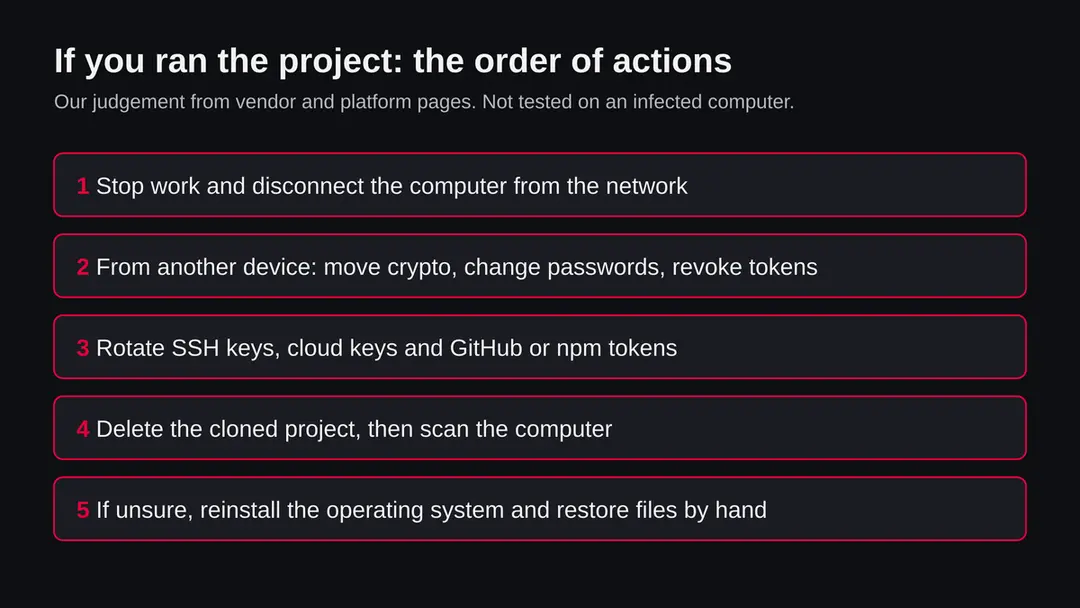
- 1
Move crypto first
If a seed phrase or wallet file was ever on the computer, create a new wallet and recovery phrase on a clean device and move the funds there before anything else.
- 2
Change passwords from a clean device
Start with email, because it resets everything else, then code hosting, cloud, work, bank and exchanges. Sign out of all other sessions and turn on two step sign in with an authenticator app or a security key.
- 3
Rotate every key and token
Create new SSH keys, cloud access keys, GitHub and npm tokens, API keys and anything in .env files, and delete the old ones on the service side. A key on the disk of that computer is assumed known.
- 4
Tell your employer if it was a work computer
Say it early. Your security team can look for use of your keys and can protect shared repositories.
- 5
Delete the project and scan
Delete the cloned folder and any node_modules inside it. On Windows run a Microsoft Defender Offline scan under Windows Security > Virus & threat protection > Scan options; save your work first, because Windows restarts. Results appear under Protection history.
- 6
Remove startup entries you can tie to the malware
In Settings > Apps > Startup, switch off what you do not recognise. If you cannot tell, do not guess: the safe answer is the reinstall below.
- 7
If you are not sure, reinstall
On Windows, Microsoft puts the reset at Settings > System > Recovery > Reset this PC. Choose Remove everything for a computer that may have been under remote control, and back up documents first. On a Mac or Linux computer, reinstall the operating system from the maker's installer. Either way, restore documents by hand, not programs and not a system image from after the first run.
- 8
Rebuild logins in a password manager
Do not let the browser save passwords again on a computer that was watched. Use a password manager.
- 9
Watch your money and accounts
Check statements and exchange logs for several weeks and turn on alerts. In the United States, the FTC runs IdentityTheft.gov for reporting stolen personal information.
Keep a computer out of this kind of chain
The short link is the late part of the chain. Every vendor write-up we read starts earlier, with a project that a person was talked into running.
Do
- Run any coding test from a recruiter in a virtual machine or a disposable cloud workspace, never on the computer that holds your keys and wallets. Socket's reports note that victims are coaxed into running projects outside containers.
- Keep unknown folders in VS Code Restricted Mode and choose not to trust the folder. The VS Code documentation says Restricted Mode blocks tasks.
- Read .vscode/tasks.json and the scripts in package.json before you open or install anything.
- Check the exact package name, its publisher, its age and its download count before npm install.
- Keep crypto wallets and seed phrases off computers that you use for development.
- Use a password manager and two step sign in, so one stolen password is not enough.
Don't
- Do not click Trust on a folder just because a recruiter or an interview timer asks you to.
- Do not run a project that wants you to paste a command, disable a security product or install an unfamiliar tool.
- Do not rely on a link looking harmless: short links hide where a file really comes from.
- Do not change your passwords on the computer you suspect.
- Do not rely on a quiet scan to say you are safe.
Questions about locservice.short.gy (Contagious Interview, VS Code and npm lures)
What is locservice.short.gy?
It is a web address on short.gy, a link shortening service. URLhaus, the malware tracking project run by abuse.ch, lists four short links on it that were added on 12 October 2026, all tagged ContagiousInterview.
The other tags are js, npm, sh, bat and VSCode. It is not a program on your computer and not a site anyone is meant to visit. We did not download the files, so what they contain is not confirmed by us.
Is locservice.short.gy safe to open?
No. Do not request these links and do not run anything that does. Our plain request from our server got an HTTP 403 page titled Site suspended, which proves nothing: a link that is blocked today was live when it was used, and the same operators can make new ones.
The rating comes from the four URLhaus reports and the campaign tag, not from our visit.
What does ContagiousInterview mean?
It is the name researchers use for a long running fake job campaign. Help Net Security says Unit 42 named it and that its research points to a start as early as December 2022.
Attackers pose as recruiters, usually through LinkedIn or a job platform, and give developers a coding test that carries malware. The tag tells you which campaign the reporter linked these files to; it does not tell you what the files do.
I saw locservice.short.gy in a log or a warning. Am I infected?
Not necessarily, and the name alone proves nothing. It does mean that something on your network asked for it, and a person rarely does that by hand.
Find which device asked, and think about whether it ran a project, task or npm package from a recruiter or a stranger. If it did, disconnect it and follow the checks on this page. Make account and wallet changes from another device.
How can a VS Code project run code when I open it?
VS Code tasks can run commands, and GitLab explains that a tasks.json file in a repository can run code whenever the repository is opened, once the folder is trusted.
The VS Code documentation says Restricted Mode, the state of an untrusted folder, blocks tasks, so choosing not to trust an unknown folder stops this route. Reading .vscode/tasks.json in a plain text editor first shows what it would have run.
How do I remove the malware if I ran a fake coding test?
Disconnect the computer. From another device, move crypto, change passwords and revoke keys and tokens. Then delete the project, scan the computer (on Windows, with a Microsoft Defender Offline scan) and look at startup entries.
If you are not sure, reinstall the operating system and restore documents by hand. No vendor publishes a removal procedure for these four links, so the order is our judgement and was not tested on an infected computer.
What can this campaign take from my computer?
The write-ups we read name an information stealer called BeaverTail and a backdoor called InvisibleFerret, and Help Net Security reports funds or credentials taken from more than 7,000 cryptocurrency wallets.
On a developer machine, saved passwords, sessions, wallet files, source code and keys are all within reach of code that runs as you. We did not open the four files, so this describes the campaign, not proven behaviour of these links.
Does this affect Mac, Linux, iPhone or Android?
Two of the four files are tagged sh, which points to shell scripts for macOS or Linux, and one is a js file that runs wherever Node.js is installed, so it is not only a Windows matter.
The bat file points to Windows. We found nothing that says phones are affected; a coding test is run on a computer. We did not open the files, so the platform reading is ours.
Will a reinstall protect my accounts afterwards?
A reinstall wipes programs and startup entries, which is the answer that does not depend on finding every piece. It does not undo what was already taken.
Passwords, session logins, API keys, SSH keys and crypto seed phrases that were on the computer stay exposed until you change or replace them, from another device. Turn on two step sign in and restore documents by hand, not a full system image.
Will Fortect remove locservice.short.gy?
Fortect scans Windows for malware and unwanted programs and repairs the system files and settings they change, and its free scan shows what it finds on your PC before you decide anything.
For locservice.short.gy, follow the plan above as well: the browser steps take back permissions and settings that no scanner treats as a threat, and uninstalling the program that brought it removes the source.
Run Microsoft Defender's full scan and, if anything was found, its offline scan as a second opinion. If the symptoms are gone after the plan and both scans are clean, there is nothing more to do.
Sources
- GitLab: How to detect and prevent Contagious Interview IDE attacks (4 May 2026) (read October 12, 2026)
- The Hacker News: North Korea linked hackers target developers with malicious VS Code projects (January 2026) (read October 12, 2026)
- BleepingComputer: New wave of fake interviews use 35 npm packages to spread malware (read October 12, 2026)
- Help Net Security: North Korea's job interview scam runs both ways (September 2026) (read October 12, 2026)
- Visual Studio Code documentation: Workspace Trust (read October 12, 2026)