
Quasar RAT: what it is and how to remove it from Windows
Quasar RAT is a free, open-source remote control tool for Windows that attackers use to watch the screen, record typing and run programs on a PC. If an alert names it or you find it, change your passwords from another device and follow the removal steps.
Facts checked October 11, 2026. Removal steps tested on Windows 11 (26H2) and checked against Microsoft's and the browser makers' current documentation.
Automatic
Get a free scan and check if your PC is infected.
Fortect finds malware, unwanted programs and the Windows damage they leave behind, and repairs it in one pass.
If a security alert naming Quasar RAT, or an unknown Client.exe-type program in AppData keeps coming back after uninstalling, a scan can find what reinstalls it.
Do it yourself · free Remove Quasar RAT yourself 5 steps, about 15 minutes, no software needed.
Start the steps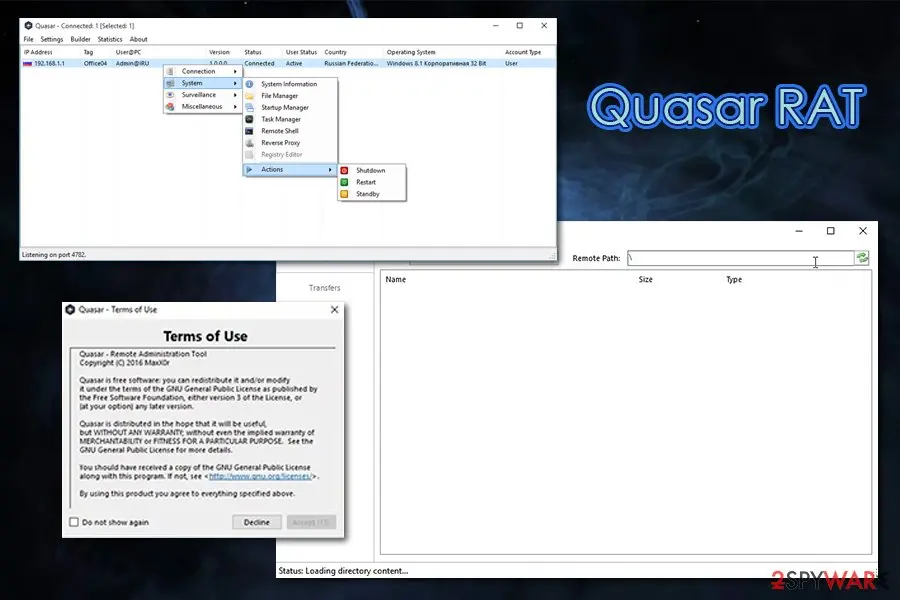
Quasar RAT: summary
| Type | Remote access trojan (open-source remote administration tool for Windows, used by attackers) |
|---|---|
| Risk | High: a person can see your screen, record what you type and run programs; the sources document password theft |
| Symptoms | Often none; the client runs without a window. A security alert, an unknown startup entry or a connection on port 4782 can show it |
| How to get rid of it | Disconnect, change passwords from another device, Safe Mode, Windows Security full scan, Defender Offline, check startup and tasks, reset Windows if unsure |
| Our check (6 October 2026) | No PC test: we read the project page, CISA, MITRE and vendor reports; we ran no sample |
| Running since / first seen | July 2014 as xRAT; named Quasar August 2015; in public attack reports since 2017; our guide 8 May 2020 |
| Removal | Scan the PC with security software to find and remove the malware and anything installed with it. Fortect scans Windows for malware and repairs the system files and settings it damaged. Remove it nowTo use the full-featured product, you have to purchase a license for Fortect. The scan is free. |
Show 10 more facts
| Detection | Microsoft: Backdoor:Win32/QuasarRAT.A, Trojan:Win32/Quasar.A!MTB and Trojan:MSIL/Quasar.MG!MTB; edited builds get other names |
|---|---|
| Default port | TCP 4782; can be changed |
| Not to be confused with | Other remote tools such as NanoCore and njRAT, which are other families |
| Name | Quasar virus |
| Evidence | 0 write-ups by security sites; details still limited |
| First seen | 8 May 2020 |
| Microsoft Defender name | Backdoor:Win32/QuasarRAT.A |
| Distribution | Typically e-mail attachments, fake installers, cracked games, tech support scams and compromised updates |
| Damage | Full remote control of the PC, theft of files and passwords, further infections |
| Facts checked | 6 October 2026 |
Facts checked on 6 October 2026 against the project page, MITRE ATT&CK S0262, CISA's report AR18-352A, reports from Unit 42, Volexity, Cofence (via Security Affairs), Uptycs and Darktrace, Microsoft's entries for Backdoor:Win32/QuasarRAT.A and Trojan:MSIL/Quasar.MG!MTB and Microsoft's pages for Safe Mode, Windows Security and Defender Offline. We ran no sample and tested no PC; the removal steps were not tried on a live infection. Not confirmed:
- the Stone Panda and APT10 alias match
- the Gorgon Group's home country
- the 2018 industry targeting of menuPass
- CVE-2018-8373 with Quasar
What Quasar is, and what it is not
Quasar is a free remote administration program for Windows, written in C#, that has been used by many attackers as a remote access trojan. The program is not malicious by design; what makes it a virus on your PC is that someone put it there without asking you.
- 1
What the author says it is
The project page calls it a fast and light-weight remote administration tool coded in C#, and says its uses range from user support through day-to-day administrative work to employee monitoring. It is free and open source under the MIT License, so anyone can download it, change it and build their own copy.
- 2
What CISA says it is
CISA's analysis report AR18-352A calls Quasar a publicly available, open-source remote access tool for Windows. It says the tool can be used for legitimate purposes, such as a helpdesk technician reaching an employee's laptop, and that CISA is aware of APT actors using it for cybercrime and cyber espionage. Quasar has no exploits of its own: whoever uses it must first get a file onto the PC by other means.
- 3
How it works
Quasar has a server and a client. The server, run by the person in control, builds the client program and shows every connected PC in a list. The client is the file that runs on the victim's PC, calls home and waits for commands. CISA measured a default client of 349 KB, which runs without any window or message.
- 4
Why people search for it as a virus
Security products detect Quasar builds as malware, and groups from several countries have used it since 2016. Microsoft lists Backdoor:Win32/QuasarRAT.A and its entry says that, because Quasar is open source, threat actors frequently modify it to avoid detection. So when you meet the name on a PC you do not manage yourself, treat it as an intruder, not as a helper program.
- 5
What our 2020 guide got wrong or left out
It said the tool uses AES encryption and works on Windows XP to 10. That describes version 1.3.0.0 from 2016, which CISA analysed. The project page now lists TLS, Windows 7 to 11 and Windows Server 2008 R2 to 2022 for the current version 1.4.1, and says older systems should use version 1.3.0.0.
- Also called
- QuasarRAT; xRAT (its first name, 2014)
- Made by
- GitHub user MaxXor; open source under the MIT License, so copies and edited builds are everywhere
- First release
- July 2014 as xRAT 2.0; renamed Quasar in August 2015 (version 1.0.0.0), says CISA
- Latest release
- Version 1.4.1 of 12 March 2023; the repository was archived by its owner on 17 March 2024 and is now read-only
- Platform
- Windows only; needs .NET Framework (4.5.2 or higher for the current version)
- Microsoft detections
- Backdoor:Win32/QuasarRAT.A, Trojan:Win32/Quasar.A!MTB and Trojan:MSIL/Quasar.MG!MTB; edited builds get other names
- Default port
- TCP 4782 for the client's call home, which an attacker can change
What Quasar RAT does on an infected PC
What we checked on 6 October 2026, and what we could not
There is no website to test here and we did not run a sample. We read the project page, MITRE ATT&CK, CISA's analysis report and eight vendor and press reports, and we ran nothing on a PC.
Our reading of the sources, 6 October 2026
- The tool is real and publicThe project page, CISA and MITRE ATT&CK (entry S0262) all describe the same open-source remote access tool, first released in 2014.
- Attackers use itMITRE lists Kimsuky, Patchwork, Gorgon Group, menuPass, BackdoorDiplomacy, LazyScripter and APT-C-36 as groups that used it; Darktrace saw it on customer networks in September and October 2023.
- Which copy is on your PCUnknown from the name. Groups edit the source, pack it and rename it, so file names, folders and ports seen in old reports may not match your build.
- Your own caseWe cannot tell from here whether a Quasar alert on a given PC is a real intruder, a security researcher's lab or a mistaken detection. The path and where the file came from decide that.
- Steps on this pageThe removal steps follow Microsoft's pages and CISA's description of how Quasar installs itself. We did not run them against a live infection.
- A clean scanDoes not clear a PC. A remote access trojan lets a person act on the PC, and a scan that finds nothing says only that nothing matched on that one run.
Treat an unexplained Quasar on your PC as someone else being in control No test of ours can clear a PC. If a security product named Quasar or a file you do not know connects out on port 4782, assume a person could see your screen and passwords, change your passwords from another device, and follow the removal chapter.
How Quasar went from admin tool to attackers' favourite, 2014 to 2026
Our guide dates from 8 May 2020. Its newest event was a 2019 phishing campaign; the entries from 2023 on are new here.
July 2014
xRAT 2.0 is released
CISA says the tool first appeared as xRAT 2.0. The author put the code on GitHub, where anyone can use it free of charge; MITRE says it has been public there since at least 2014.
August 2015
Renamed Quasar
xRAT became Quasar and was released as version 1.0.0.0. CISA analysed version 1.3.0.0 of 28 September 2016, the last stable release it reviewed.
September 2016
First attacks in a public report
Palo Alto Networks' Unit 42 saw edited Quasar samples blocked in September 2016 and published on 30 January 2017. The attack began with a dropper sent by email or web, which installed a downloader called Downeks, which installed Quasar. Unit 42 linked the attacks to a campaign others attribute to the Gaza Cybergang, with Arabic and Hebrew decoy documents. It said the initial infection route was not clear.
2017
A Chinese group uses it
CISA cites FireEye's April 2017 report on new tools from the APT10 (menuPass) group, and MITRE lists menuPass among Quasar's users. Our 2020 guide called this group ATP10, which is a typo.
March and April 2018
Patchwork targets US think tanks
Volexity found spear phishing attributed to Patchwork, also called Dropping Elephant, that linked to documents trying to exploit CVE-2017-8570 and then dropped Quasar. Our old guide put this group in 2017 and named drive-by and redirect methods; we found them in no source we read.
2 August 2018
Gorgon Group
Unit 42 reported attacks from February 2018 by the Gorgon Group on government organisations in the United Kingdom, Spain, Russia and the United States, with NanoCore, Quasar and njRAT variants used heavily.
December 2018
CISA publishes its analysis
CISA's report AR18-352A of 18 December 2018 (revised 14 February 2019) describes the client, its install folders, persistence and traffic, with detection signatures for unmodified version 1.3.0.0.
27 August 2019
Fake resumes
Cofence described a campaign that sent password-protected Word documents posing as resumes, with the password in the message. Opening the file and enabling macros led to Quasar. The final binary was 401 MB to make analysis harder.
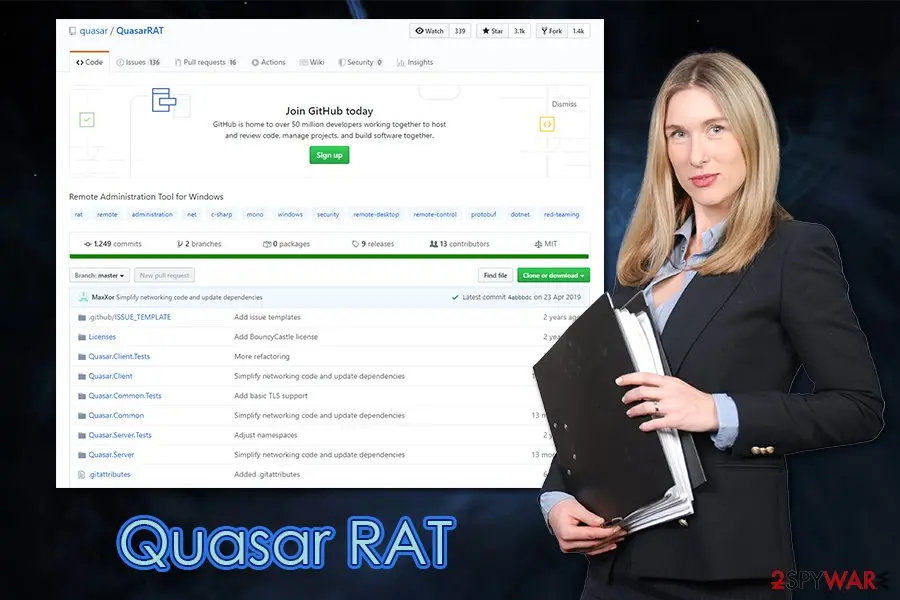
From our 2020 guide: the project's GitHub page as it looked then (1,249 commits, last commit by MaxXor on 23 April 2019). The woman is a stock photo. The repository is now quasar/Quasar and archived. 8 May 2020
Our first guide
The 2020 guide treated Quasar as a virus and described its groups and features.
September and October 2023
Seen on company networks
Darktrace found several cases that looked like a campaign: files fetched from rare sources, then calls to a command server on port 4782 with a self-signed certificate named Quasar Server CA. In some cases the PCs also ran BitTorrent or cryptocurrency mining.
March 2024
Project archived
The owner archived the repository on 17 March 2024. The code stays public, with about 2,700 forks, so copies and edited versions keep circulating.
2024 and 2025
Still in use
MITRE lists Kaspersky's August 2024 report on the BlindEagle group and Recorded Future's 26 August 2025 report on TAG-144, which describe a customised build called BlotchyQuasar used by the APT-C-36 group. A June 2025 analysis describes a DLL side-loading chain in which a legitimate Valve program loads a trojanised library.
What Quasar can do on a PC
One person, from one window, controls many PCs. These are the functions the project lists and the ones MITRE and CISA documented; an edited build may have more or fewer.
| Function | What it means for you | Where documented |
|---|---|---|
| Remote Desktop | The controller sees your screen and can move the mouse and type | Project page, MITRE |
| Remote Shell and Remote Execution | Commands run on your PC; files can be downloaded to it and started, including other malware | Project page, MITRE |
| Keylogger (Unicode) | Everything typed is recorded, passwords included | Project page, MITRE |
| Password Recovery | Passwords saved in common browsers and in FTP clients can be read | Project page, MITRE |
| File Manager | Files can be browsed, downloaded and uploaded | Project page, CISA |
| Registry Editor, Startup Manager, Task Manager | Windows settings, startup entries and running programs can be changed or stopped | Project page |
| Reverse Proxy (SOCKS5) | Your PC can be used to relay someone else's traffic | Project page, MITRE |
| Webcam viewing, screenshots | The controller can look through the camera; MITRE documents the webcam function | MITRE |
| System power commands | Restart, shut down and standby on command | Project page |
| Privilege prompt | If the client lacks administrator rights it can start a command prompt with the runas verb, which shows a User Account Control prompt on your screen | CISA, MITRE |
| Hidden files and windows | The client file and its folder can be hidden in File Explorer, and requests can run without a window | CISA, MITRE |
Our 2020 guide listed banking, digital-wallet and FTP passwords. The project page names browsers and FTP clients; the bank-window watching that MITRE describes belongs to a customised build used by the APT-C-36 group, not to the base tool.
What Quasar RAT can steal or download
What a hidden Quasar can cost you
The risk is a person, not a program: whatever the controller decides to do. These are the documented functions turned into outcomes.
- High
Stolen passwords and accounts
The keylogger and password recovery read what you type and what browsers and FTP clients have saved. Treat email, banking and work accounts as exposed from the day the file first ran.
- High
Other malware, including ransomware
Quasar can download and run files. Our old guide named ransomware as a possible payload, and that stays a risk, though we found no source for a particular Quasar to ransomware case.
- High
Your screen, camera and files
Remote desktop, webcam viewing and the file manager show and take what is on the PC.
- Medium
A way into the rest of your network
Our old guide said Quasar infects an entire network. CISA says Quasar has no exploits of its own; but a controller who sits on one work PC can look for other machines and shares with other tools. On a business network, tell IT before you clean anything.
- Medium
Your connection used for someone else
The reverse proxy lets the controller route traffic through your PC, so crime can be traced to your address.
- Low
Damaged Windows files
Our old guide said it may damage system files. None of the sources we read lists that as a function of Quasar, so we do not claim it.
What you may notice, and why you often notice nothing
CISA says client execution is invisible to the user: no window and no notification, and the process shows only in Task Manager or a similar tool. That is why the 2020 guide said most victims do not know.
| Sign | What we found |
|---|---|
| A security alert naming Quasar | The most common sign. Microsoft lists Backdoor:Win32/QuasarRAT.A and others; other products use their own names |
| A program you did not install in AppData, Program Files or SysWOW64 | Matches the default install folders CISA lists; the name can be anything |
| An unknown startup entry or scheduled task | Both are how Quasar restarts after a reboot, but so are many harmless programs |
| Connections to an unknown address on port 4782 | The default port; with Darktrace's 2023 cases it was the main sign in company networks |
| A slow PC, freezing or filling storage | Microsoft's page for this detection lists these as general symptoms of such a threat; they have many other causes |
| Nothing at all | Common. Quasar is built to be quiet, and a scan alone can miss an edited build |
How to check the PC for Quasar RAT
Where Quasar leaves traces on a PC
These are the defaults of version 1.3.0.0 from CISA's analysis. Whoever builds a client can change names, folders and ports, so use them as places to look, not as a test that clears you.
- Program file
- Default name
Client.exe(the builder allows any name ending in .exe); size about 349 KB in the build CISA tested - Install folders
%AppData%,Program FilesorWindows\SysWOW64, plus a subfolder named in the builder; the last two need administrator rights- Startup, no admin rights
- A value under
HKCU\Software\Microsoft\Windows\CurrentVersion\Run(default value nameQuasar Client Startup) - Startup, with admin rights
- A scheduled task started at log on with the highest run level, named in the builder
- Mutex
QSR_MUTEX_followed by 18 letters and digits, a marker stopping a PC from being infected twice- Network
- TCP 4782 by default; the first server packet has a 68-byte payload starting
40 00 00 00; an IP lookup toip-api[.]com/json/with a Firefox 48 on Windows 8.1 user-agent - Certificate
- Darktrace saw a self-signed certificate named
Quasar Server CAin 2023 - Keylog folder
- Microsoft's entry lists a
%AppData%\Logsfolder holding files named by date as the default place for keylog files
Examples of names seen in reports
- Client.exe
- Quasar Client Startup
- QSR_MUTEX_
- port 4782
- ip-api[.]com
- Quasar Server CA
- WindowsCalculator
- Calc.exe
- ctfmon.exe
- MsCtfMonitor.dll
- vstdlib_s64.dll
The last five names come from edited chains: Uptycs described a Run value named WindowsCalculator pointing at a copy of Calc.exe in the Public Pictures folder, and a ctfmon.exe loading a fake MsCtfMonitor.dll. Neither file is a program of yours just because the name is a Windows one: check the folder it runs from.
Which name will your scanner show?
Microsoft's name for Quasar virus is Backdoor:Win32/QuasarRAT.A.
Defender sorts threats by category first, so the word before the colon tells you what kind of program was found, even if the family name means nothing to you.
Do not search for a removal tool by the detection name alone; fake "removal tools" use the same keywords. How the naming works is explained in our guide to antivirus detection names.
How Quasar gets onto a PC
Quasar does not spread by itself and has no exploits. Someone has to deliver the file, and the sources show these routes.
- 1
A phishing email with a document
Cofence's 2019 campaign sent fake resumes as password-protected Word files and asked the reader to enable macros. Volexity's 2018 cases linked to documents that tried to exploit CVE-2017-8570. Our old guide added that the email can look like it came from a colleague; spoofed sender addresses are a common phishing trick, though the reports above do not describe one for Quasar.
- 2
A downloader or dropper
Unit 42's 2016 attacks used a dropper that started the Downeks downloader, which installed Quasar. The dropper came by email or web, and had a name like a government meeting document.
- 3
A trusted program that loads a fake library
Uptycs described an ISO file with a renamed ctfmon.exe, a fake MsCtfMonitor.dll and a second stage using calc.exe. A June 2025 analysis of BlotchyQuasar describes a legitimate Valve program, the Steam error reporter, loading a trojanised library in campaigns against Latin America.
- 4
Downloads from file-sharing and unsafe sites
Darktrace noted BitTorrent and cryptocurrency mining on several affected PCs, and said Quasar may have come as a second payload from such a download. It did not prove that route.
- 5
Browser and software flaws
Our old guide named CVE-2018-8373 together with browser redirects. We did not find that pairing in any source we read; the documented exploit is CVE-2017-8570, in Office. Keep Windows and Office updated anyway.
Our old guide also named Drupal and other content management systems. Those are about companies' websites; no source we read shows them delivering Quasar to a home PC.
Check your PC before you clean it
Look first, delete later. The program's folder and the name of its startup entry are what a helper or your IT team will want.
- 1
Write down the alert
If an antivirus named Quasar, take a screenshot with the exact name, the file path and the time.
- 2
Open Task Manager
Press Ctrl + Shift + Esc, choose Details, and look for
Client.exeor any program you do not know. Right-click it and choose Open file location. A path underAppData,PublicorTempfor a program that is not yours is more worrying than one under a program you installed. - 3
Check startup apps
In Task Manager choose Startup apps and note entries you do not know. Entries made with a Run key show up here.
- 4
Look at scheduled tasks
Press Windows logo + R, type
taskschd.mscand press Enter. Open Task Scheduler Library and look for tasks that start At log on with names you do not know. Quasar creates one with the highest run level when it has administrator rights. - 5
Look at the Run key, without changing it
Press Windows logo + R, type
regedit, openHKEY_CURRENT_USER\Software\Microsoft\Windows\CurrentVersion\Runand read the values. Note any that point to AppData or Public folders. Leave them until the scans are finished. - 6
Look at the connections
Open Command Prompt and run
netstat -ano. An ESTABLISHED line to an address you do not know, especially on port 4782, is worth noting; then runtasklist /fi "PID eq 1234"with the number from the last column to see which program owns it. The controller can change the port, so a clean list proves nothing. - 7
Ask where it came from
A file from an email attachment, a cracked program or a download just before the first alert is the likely route. A PC at work is a case for your IT team, not for a clean-up on your own.
How to remove Quasar RAT
How to remove Quasar virus and lock the attacker out
Someone may have had remote control of the PC.
Cut the connection first, then remove the trojan and secure your accounts.
Step 1: Remove remote access tools and lock the attacker out
Attackers keep access through remote control tools and extra user accounts. Disconnect the PC from the internet, then remove every remote access program you did not install yourself from the installed apps list in Windows 11 or Windows 10.
Look for a user account you do not know and delete it, and switch off Remote Desktop in Settings > System. Reconnect only for the scan.
Full procedure with screenshots: Uninstall a program or app in Windows On uGetFix
Step 2: Delete scheduled tasks that bring it back
Programs like Quasar virus add a scheduled task so they return after an uninstall or reopen a page at every sign-in. Start Task Scheduler, open Task Scheduler Library and sort by Last Run Time to see what ran recently.
On the Actions tab, a program in a user folder, a script or a web address is a warning sign; right-click such a task and choose Delete.
Tasks with names copying Google, Edge or Windows updaters but pointing to an odd folder are typical. The tool looks the same in Windows 11 and Windows 10.

Windows 11: Task Scheduler Library, the task selected, the Actions tab shows the file it runs. Full procedure with screenshots: Remove what malware leaves behind in Windows
Step 3: Remove it from startup
Press Ctrl + Shift + Esc to open Task Manager and select Startup apps (Windows 11) or the Startup tab (Windows 10). Disable entries you do not recognise, especially ones with no publisher or with a name that copies a Windows component.
Right-click an entry and choose Open file location to see where it runs from: programs in
%AppData%or%Temp%deserve a closer look. Some entries are not listed there but in the registry Run keys, which the procedure below shows how to check.Full procedure with screenshots: Stop apps from opening at startup On uGetFix
Step 4: Scan the PC, then run the offline scan
A scan finds the parts of Quasar virus that the manual steps cannot see. In Windows Security > Virus & threat protection > Scan options, start a Full scan and quarantine what it reports.
Follow it with Microsoft Defender Antivirus (offline scan) > Scan now, which restarts the PC and checks the disk while Windows and the malware are not running.
It takes about 15 minutes and works the same in Windows 11 and Windows 10. If either scan finds something, run the full scan again after removal until it comes back clean.

Windows 11: Windows Security > Virus & threat protection > Scan options. Full procedure with screenshots: Run a Microsoft Defender Offline scan
Step 5: Change passwords from another device and sign out other sessions
Quasar virus can copy saved passwords, cookies and session tokens and send them out in seconds, so cleaning the PC does not undo the theft.
Change your passwords on a device that was never infected, starting with the e-mail account, since every other reset goes through it. On each account, end all other sessions and check the recovery e-mail, phone number and forwarding rules.
Then turn on two-step verification. Sign in on the Windows 11 or Windows 10 PC again only after the offline scan is clean.
Full procedure with screenshots: Turn on two-step verification / secure a hacked account
Remove Quasar from Windows 11 and Windows 10
Do the steps in order. We did not run them against a live infection; they follow Microsoft's pages and CISA's description of how Quasar installs itself. Because a person may have been in control of the PC, the account steps in the next chapter are not optional.
- 1
Disconnect the PC from the network
Turn off Wi-Fi or unplug the cable. Our old guide said to cut the machine off from the network before the scan, and for a remote access trojan that cuts the controller off too. On a work network, call IT first so that other PCs can be checked.
- 2
Change your passwords from another device
Use a phone or another PC that has never been near the infected one. Change your email first, then banking and everything else, and turn on two-step sign-in. If the PC logged your keys, new passwords typed on it go to the controller.
- 3
Back up documents only
Copy documents and photos, not programs, to an external drive that you unplug afterwards. Files can carry the infection and programs can too.
- 4
Start in Safe Mode with Networking
Open Settings > System > Recovery, click Restart now beside Advanced startup, then choose Troubleshoot > Advanced options > Startup Settings > Restart and press 5 for Safe Mode with Networking. Microsoft says Safe Mode loads only the essential drivers and services, so a program that starts with Windows may not run there. Our old guide told readers to scan from Safe Mode.
- 5
Update the definitions and run a full scan
Open Windows Security > Virus & threat protection > Protection updates and choose Check for updates. Then go to Scan options, select Full scan and click Scan now. Microsoft says full scans and up-to-date definitions help with the files and changes that an infection leaves behind. Follow what the scan finds; do not restore anything it quarantines.
- 6
Run Microsoft Defender Offline
In the same Scan options choose Microsoft Defender Offline scan and Scan now. Microsoft says it restarts the PC and scans before Windows loads, so malware that hides inside Windows has a harder time. Review the result under Protection history.
- 7
Check the traces again
Repeat the check chapter: Task Manager, Startup apps, Task Scheduler and the Run key. A leftover startup entry that points to a file that no longer exists can be removed; one that still points to a file you do not know is not clean.
- 8
Update Windows and your programs
Open Settings > Windows Update and install everything offered, and update Office, your browsers and PDF readers.
- 9
Reset Windows if you cannot be sure
A remote access trojan gives someone a chance to change many things, and edited builds are made to be missed. If the PC holds banking, work or private data, or the alert came back, back up documents and use Settings > System > Recovery > Reset this PC and choose Remove everything. Restore documents only.
Our old guide said that a powerful security program installed from a download will do this. A removal program is not the answer to a message in a pop-up. Use the tools in Windows, and never pay or call a number shown in an alert.
After removal: passwords, accounts and prevention
Your passwords after Quasar virus
Removing Quasar virus does not undo what it may already have sent out while the PC showed A security alert naming Quasar RAT, or an unknown Client.exe-type program in AppData in the list of installed apps. Treat saved browser passwords and logged-in sessions on this PC as known to the attacker.
From another device, change the e-mail password first and end all its sessions. Then do the same for the bank, PayPal, Microsoft, Google and Apple accounts. Stolen session cookies keep working after a password change until you sign out everywhere.
Move crypto to a new wallet created on a clean device. A step-by-step order for every kind of account is in our guide to account security after an infection.
If it was real: what to do about your accounts
The scans deal with the PC. These steps deal with what the controller may have seen, and they matter most if you ran the file.
- 1
Sign out everywhere
Use the sign out of all sessions option in your Google, Microsoft, social and work accounts so that stolen cookies stop working.
- 2
Look at your email rules and recovery details
In your email account, check forwarding rules, the recovery email and the phone number, and the list of signed-in devices. Remove what you did not set.
- 3
Check your money
Look at card statements and any wallets for payments you did not make, and ask your bank if you typed card or login details on that PC.
- 4
Look for other malware and ransomware
Check whether documents were renamed or a note file appeared. If so, do not pay and do not reinstall yet; identify the family first.
- 5
Tell the people who may be affected
If the PC is used for work, tell your employer. If you used saved passwords for a shared account, tell its other users.
- 6
Scan again in a week
Run a full scan and a Microsoft Defender Offline scan again, and look at the startup entries once more.
Could Quasar be there on purpose?
Possibly, in a lab or by an administrator. The project says it is for user support, administrative work and employee monitoring, and its GitHub topics include red-team. What matters is who installed it and whether you were told.
| Points to a legitimate use | Points to an intruder |
|---|---|
| Your IT team or you set it up, and a record of the install exists | You never installed it and nobody told you |
| It runs on a test PC or lab machine that holds no private data | It sits on a PC with banking, work or private accounts |
| The file is in a folder your administrator chose and is signed by a known maker | The file is in AppData, Public or Temp with an odd name, or was hidden |
| The employer's policy says staff PCs are monitored, and you were told | The software came from an attachment, a download or a crack |
Our old guide said an employer can use such a tool to watch staff. That depends on the laws of your country, and a tool that hides itself and that you were not told about is not a monitoring policy. If you cannot find who put it there, treat it as an intruder.
Keep a remote access trojan off your PC
Our 2020 advice was to patch, distrust attachments and protect Remote Desktop. It still holds; here it is with current details.
Do
- Keep Microsoft Defender or another security product with Real-time protection on, and keep it up to date.
- Install Windows Update monthly and update Office, browsers and PDF readers, so that known flaws like CVE-2017-8570 are closed.
- Open attachments only when you expected them, and do not enable macros in a file you did not ask for.
- If you use Remote Desktop, do not expose it to the internet; put it behind a VPN, let only the people who need it use it, and give those accounts strong passwords.
- Download programs from their makers' sites or the Microsoft Store.
- Keep a backup of documents on a disk you unplug (File History or OneDrive), so that you can reset Windows without losing them.
- Use a password manager and two-step sign-in so one stolen password does not open every account.
Don't
- Do not open a resume, invoice or form from someone you do not know, even if it asks for a password you were given.
- Do not run cracked programs or files from torrents, which Darktrace saw on PCs that had Quasar.
- Do not leave Remote Desktop open to the world.
- Do not run a remote access tool you do not need; if you need one, take a supported one and tell your security team.
- Do not run two antivirus programs with live protection at once.
- Do not add an exclusion for a file until its maker has confirmed that it is clean.
Questions about Quasar RAT
What is Quasar RAT?
Quasar RAT is a free, open-source remote administration tool for Windows, written in C#, that attackers also use as a remote access trojan. Its author, GitHub user MaxXor, says it is meant for user support, administrative work and employee monitoring.
CISA describes it as a publicly available remote access tool and says it is aware of APT actors using it for cybercrime and cyber espionage. It first appeared in July 2014 as xRAT and was renamed Quasar in August 2015.
It has no exploits of its own, so someone must get the file onto a PC first. On a PC you do not manage yourself, it is an intruder.
Is Quasar RAT a virus?
It is a trojan when it is used against you, although the program itself is not malicious by design. Quasar is a legitimate-looking admin tool that anyone can build into a client file. When that file runs on your PC without your knowledge, it gives the person in control the screen, the keyboard and your files.
That is why security products detect it: Microsoft lists Backdoor:Win32/QuasarRAT.A. It does not copy itself to other PCs like a worm; it must be delivered each time, for example by a phishing email or a download.
How do I know if Quasar RAT is on my PC?
You may not, because CISA says the client runs without any window or notification. The signs are a security alert naming Quasar, a program you did not install in AppData, Program Files or SysWOW64, an unknown startup entry or scheduled task, and a connection to an unknown address on port 4782.
Open Task Manager, check Startup apps and Task Scheduler, and run netstat -ano. A clean look proves nothing, because builds are edited and the port can be changed. If you suspect it, scan with Windows Security and a Defender Offline scan.
How do I remove Quasar RAT from Windows 11 or 10?
Disconnect the PC, change your passwords from another device, and start in Safe Mode with Networking. Then update the definitions in Windows Security and run a full scan, followed by a Microsoft Defender Offline scan.
Afterwards look at Task Manager, Startup apps, Task Scheduler and the Run key for entries that point to a file you do not know. Because a person may have controlled the PC, back up documents and reset Windows with the Remove everything option if it holds banking or work data or the alert returns. Do not restore quarantined files.
What can Quasar RAT see and steal?
Everything the person in control chooses to look at. The project lists remote desktop, a remote shell, a file manager, a keylogger and password recovery for common browsers and FTP clients, and MITRE documents webcam viewing.
So your screen, your typing, your saved browser passwords and your files are all in reach. The base tool does not watch bank windows, though a customised build used by the APT-C-36 group does. Treat every account you used on that PC as exposed and change the passwords from a clean device.
How does Quasar RAT get onto a computer?
It arrives because someone delivers it; it cannot spread by itself. The sources show phishing emails with password-protected Word documents (Cofence, 2019), documents that exploit CVE-2017-8570 (Volexity, 2018), droppers and downloaders such as Downeks (Unit 42, 2016) and fake libraries loaded by trusted programs (Uptycs).
Darktrace saw it on PCs that also used BitTorrent in 2023. Keep Windows and Office updated, do not enable macros in files you did not ask for, and avoid cracked programs.
Can antivirus detect Quasar RAT?
Yes, usually. CISA says commercial antivirus programs detect most Quasar client builds as malicious, and Microsoft lists Backdoor:Win32/QuasarRAT.A, Trojan:Win32/Quasar.A!MTB and Trojan:MSIL/Quasar.MG!MTB. That holds less well for edited builds: Unit 42 found attackers changing the source and using packers and obfuscators to stay hidden, and groups keep making new versions.
So a clean scan does not clear a PC. Run a full scan, a Microsoft Defender Offline scan, look at the startup entries yourself and, if you cannot be sure, reset Windows.
Does Quasar work on Mac or Android?
No. Quasar is written for Windows and needs the .NET Framework; the project page and MITRE list Windows only. CISA noticed that one of its hidden web requests claims to be Safari on a Mac, but that is only a disguise in the request, because the tool runs only on Windows.
If you saw Quasar on a Mac or phone, it is a different program or a wrong label. Check what the alert says and where it came from, and use the Mac or Android guides on this site, not these Windows steps.
Is it safe or legal to use Quasar to control my own computers?
Using it on computers you own, or that their owners agreed to, is the use the author describes, but it comes with problems. Security products detect Quasar, so your own copy can be blocked or can set off alerts for your colleagues.
The project was archived in March 2024, so it gets no fixes. Controlling someone else's PC without their agreement is a crime in most countries. For help desk work, choose a supported commercial remote support tool, and tell your IT team before you install anything.
Will Fortect remove Quasar virus?
Fortect scans Windows for malware and unwanted programs and repairs the system files and settings they change, and its free scan shows what it finds on your PC before you decide anything.
For Quasar virus, follow the plan above as well: the browser steps take back permissions and settings that no scanner treats as a threat, and uninstalling the program that brought it removes the source.
Run Microsoft Defender's full scan and, if anything was found, its offline scan as a second opinion. If the symptoms are gone after the plan and both scans are clean, there is nothing more to do.
Sources
- MITRE ATT&CK: QuasarRAT, software S0262 (last modified 12 May 2026) (read October 6, 2026)
- GitHub: quasar/Quasar, project page (archived 17 March 2024) (read October 6, 2026)
- CISA: Quasar Open-Source Remote Administration Tool, AR18-352A (read October 6, 2026)
- Unit 42: Downeks and Quasar RAT Used in Recent Targeted Attacks Against Governments (30 January 2017) (read October 6, 2026)
- Unit 42: The Gorgon Group: Slithering Between Nation State and Cybercrime (2 August 2018) (read October 6, 2026)
- Volexity: Patchwork APT Group Targets US Think Tanks (7 June 2018) (read October 6, 2026)
- Security Affairs: Experts uncovered advanced phishing campaign delivering Quasar RAT (27 August 2019, on Cofence's research) (read October 6, 2026)
- Uptycs: Double Trouble: QuasarRAT's Dual DLL Sideloading in Focus (search-result excerpt) (read October 6, 2026)
- Under the Hood of BlotchyQuasar: DLL-Based RAT Campaigns Against Latin America (June 2025, ResearchGate abstract and excerpt) (read October 6, 2026)
- Darktrace: Quasar Remote Access Tool and Its Security Risks (late 2023 cases) (read October 6, 2026)
- Microsoft Security Intelligence: Backdoor:Win32/QuasarRAT.A (read October 6, 2026)
- Microsoft Security Intelligence: Trojan:Win32/Quasar.A!MTB (search-result excerpt) (read October 6, 2026)
- Microsoft Security Intelligence: Trojan:MSIL/Quasar.MG!MTB (read October 6, 2026)
- Microsoft Support: Windows startup settings (Safe Mode) (read October 6, 2026)
- Microsoft Learn: Microsoft Defender Offline scan in Windows (read October 6, 2026)
- Microsoft Support: Virus and threat protection in the Windows Security app (read October 6, 2026)