
Puttheph.club ads: what it is and how to remove it
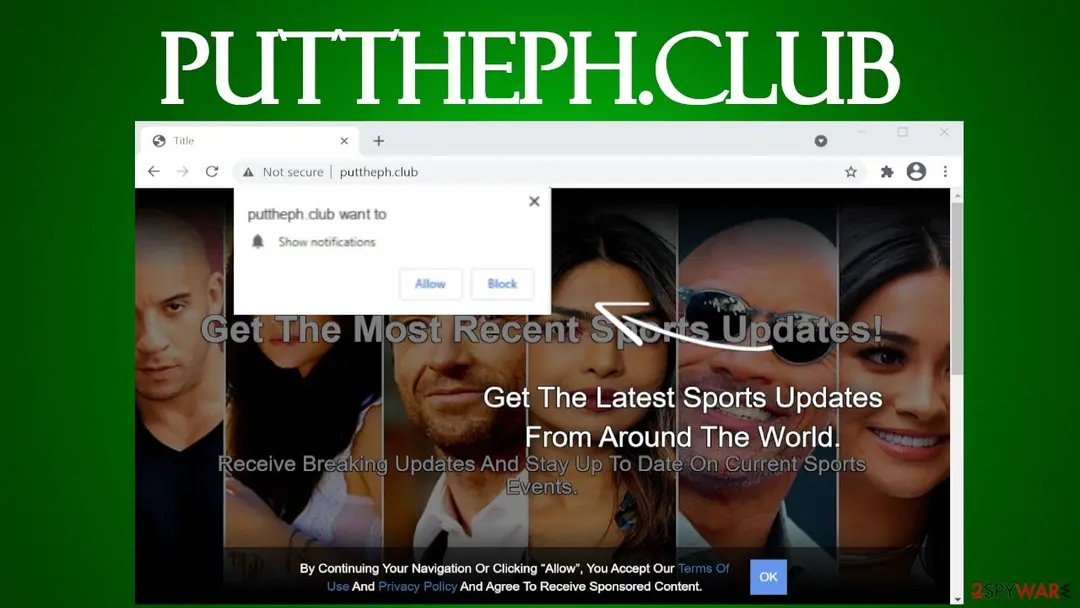
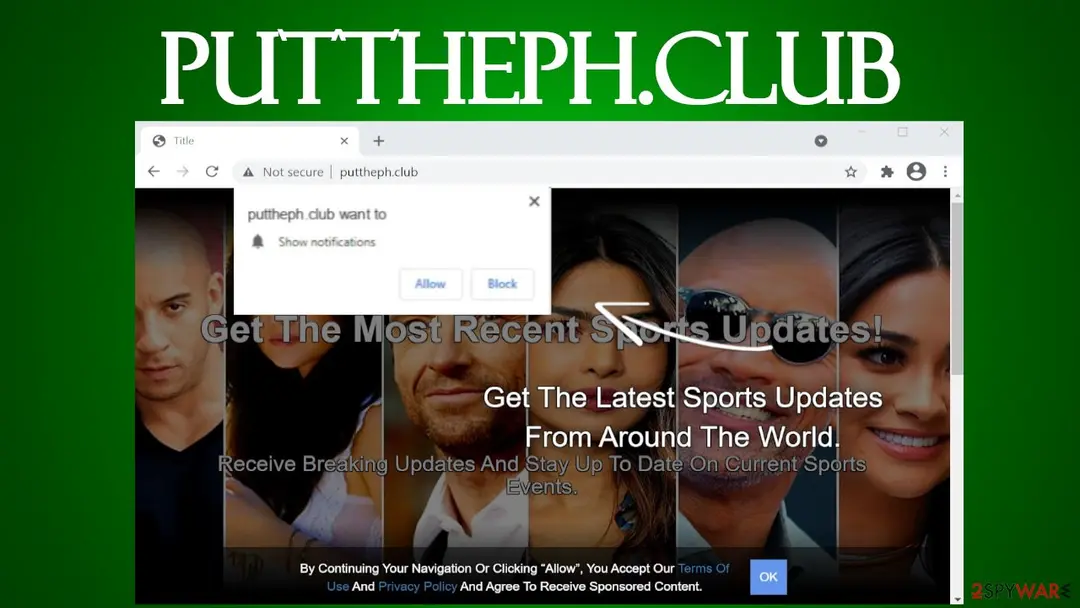
Puttheph.club is a treacherous page that seeks to trick visitors into accepting its notification by showing misleading website backgrounds. It may show different backgrounds depending on your geolocation.
Facts checked October 6, 2026. Removal steps tested on Windows 11 (26H2) and checked against Microsoft's and the browser makers' current documentation. Sections marked as our earlier report are the original text: they describe the threat as it was then and have not been reviewed since. The 2026 status, the removal steps and the questions are current.
Automatic
Get a free scan and check if your PC is infected.
Fortect finds malware, unwanted programs and the Windows damage they leave behind, and repairs it in one pass.
A quick scan confirms that the puttheph.club notifications did not lead to anything being installed.
Do it yourself · free Remove Puttheph.club ads yourself 2 steps, about 6 minutes, no software needed.
Puttheph.club ads: summary
| Distribution | Fake Flash Player updates, software bundles, freeware, deceptive ads |
|---|---|
| Damage | Malware infections, PUP installation, identity theft |
| name | Puttheph.club |
| Type | Push notification virus, adware, PUP |
| Purpose | Generate income by increasing traffic to affiliated sites |
| symptoms | Untrustworthy pages open out of the blue; ads directly on the screen/desktop; both the internet connection and the device are running visibly slower |
| Removal | Scan the PC with security software to find and remove the malware and anything installed with it. Fortect scans Windows for malware and repairs the system files and settings it damaged. Remove it nowTo use the full-featured product, you have to purchase a license for Fortect. The scan is free. |
Show 10 more facts
| Detection names | No Microsoft detection name is known |
|---|---|
| Name | Puttheph.club |
| Symptoms | Notification spam from a website |
| Evidence | 4 write-ups by security sites; details still limited |
| Domains | puttheph.club |
| Ads shown as | Desktop notifications |
| Browsers | Chrome, Edge and Firefox |
| Installed on the PC | Nothing; a browser notification permission only |
| First seen | 23 April 2021 |
| Facts checked | 6 October 2026 |
Is Puttheph.club ads dangerous?
From our report of Apr 2021 · not reviewed since
Puttheph.club – a website usually opened by an adware infection
Puttheph.club is a treacherous page that seeks to trick visitors into accepting its notification by showing misleading website backgrounds.
It may show different backgrounds depending on your geolocation. During our research, the push notification virus urged us to press the Allow button to get the latest sports updates from around the world. Although there pictures of well-known celebrities, not athletes.
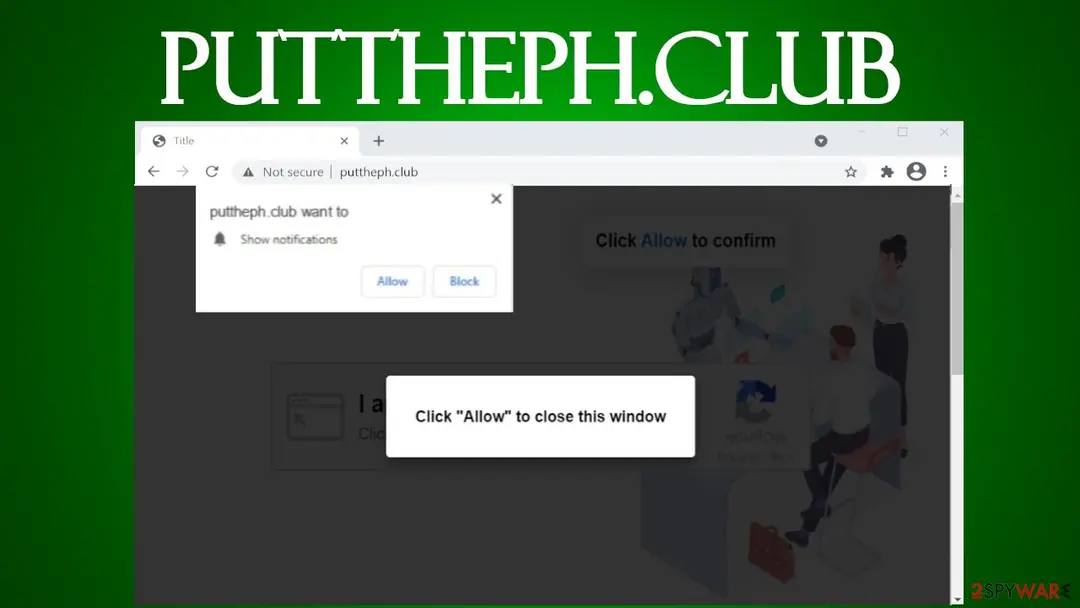
Warning: Please don't accept notifications from this website, or you will start receiving ads in the form of notifications directly to your screen or desktop.
They're not just annoying but can be impossible to close as the "X" button is programmed to either do nothing or open an affiliated site.
Puttheph.club virus isn't hazardous itself, but its sponsored pages might be. Typically, people are redirected to such sites if adware is installed on their devices. We're going to explain how this potentially unwanted program functions, how to remove it and get your phone/computer back on its feet.
There are many push notification sites like Puttheph.club, Beastclick.biz, Wordbazar1.xyz, and new ones are created each and every day. That's why you have to very cautious when accepting notifications. Do that only from legitimate pages that you frequently visit.
These dubious portals are created to generate revenue by increasing internet traffic to affiliated sites, which consequently increases their sales, popularity, etc. Push notification viruses can do that by showing deceptive ads and causing sudden redirects.
Displayed ads are considered deceptive as their contents don't match the sites you'll end up on if you click on them. In other words, an ad for a breaking news story might lead you to a page that tries to sell you some worthless software. Thus please refrain from clicking them.
But what's worse, as mentioned before, Puttheph.club virus could force you to visit any of its affiliated sites if a sudden redirect is triggered, which could happen at any time, on-demand. Then a new tab is opened and a website displayed with questionable, untrustworthy, or even malicious content, including but not limited to:
That's why such infections are dangerous and should be removed immediately. You can use a reliable security tool such as or for adware removal. These free tools are capable of detecting, isolating, and eliminating practically any cyber threat.
To remove Puttheph.club notifications along with its ads, use our free instructions displayed at the bottom of the article. Once your system is virus-free, experts highly recommend using the system diagnostics tool to repair any system-related irregularities automatically.
- gambling,
- other push notification viruses,
- PUPs,
- malware,
- tech support scams, etc.
From our report of Apr 2021 · not reviewed since
More from our earlier report on Puttheph.club
- You can remove adware and any other cyber threat by scanning your infected device with a reliable security tool
- After an infection is removed, devices might exhibit abnormal behavior, such as severe lag, crashing, etc.
- Resolve all system-related issues by running system diagnostics with the powerful system tune-up tool
How Puttheph.club ads got into your browser
From our report of Apr 2021 · not reviewed since
Fake anti-malware software, non-operational driver updaters, browser hijackers, adware, and other PUPs can be spread in a myriad of ways.
For a limited time, some of these useless tools can be advertised on official marketplaces and their own websites.
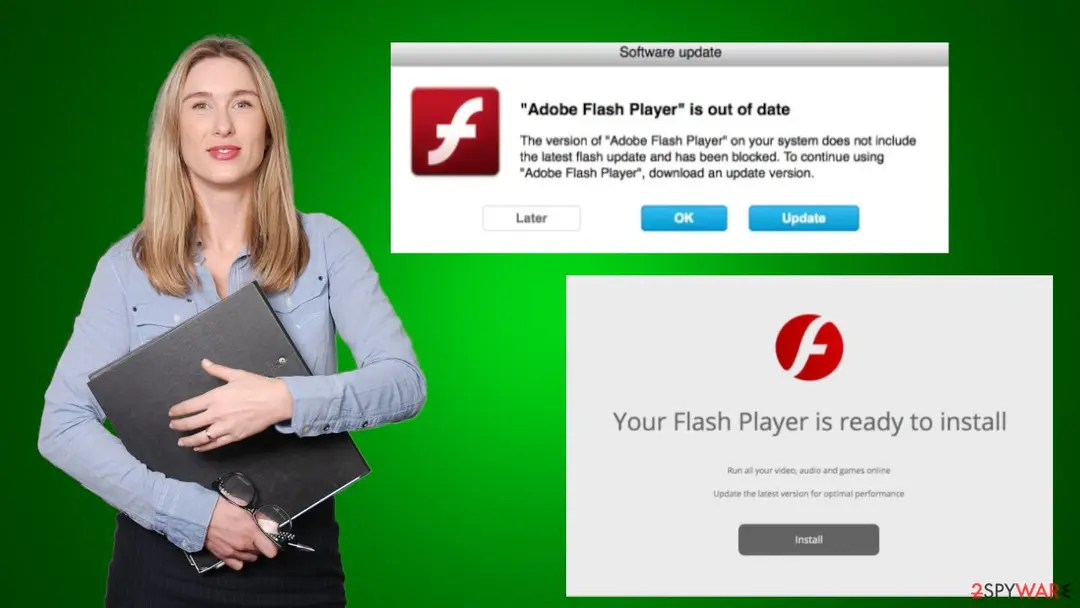
But more commonly, people install these threats unknowingly through software bundles and fake Flash Player updates. The former is usually downloaded from third-party software vendors and contains installers for multiple apps. Please download all new apps directly from their manufacturers to avoid PUPs.
Fake Flash Player updates is another very popular PUP spreading technique as people don't know that support for this software has been discontinued. These fake updates could carry not only the abovementioned PUPs but also hazardous malware infections, such as ransomware, keyloggers, etc.
Check your browser and PC
- Address:
puttheph.club
How to remove Puttheph.club ads
How to stop Puttheph.club notifications
Do this in every browser you use, and in every profile inside it: each keeps its own list of sites allowed to send notifications.
Nothing has to be uninstalled for the notifications themselves.
Which browser shows the ads?
Step 1: Remove puttheph.club from Chrome's notification list
Chrome keeps a list of every site you once allowed to send notifications, and
puttheph.clubis on it. Pastechrome://settings/content/notificationsinto the address bar, find puttheph.club under Allowed to send notifications, open the three-dot menu next to it and pick Remove.Then click Add next to Not allowed to send notifications and type puttheph.club, so the site cannot ask a second time. Repeat it in every Chrome profile you use on Windows 11 or Windows 10, since each profile has its own list.
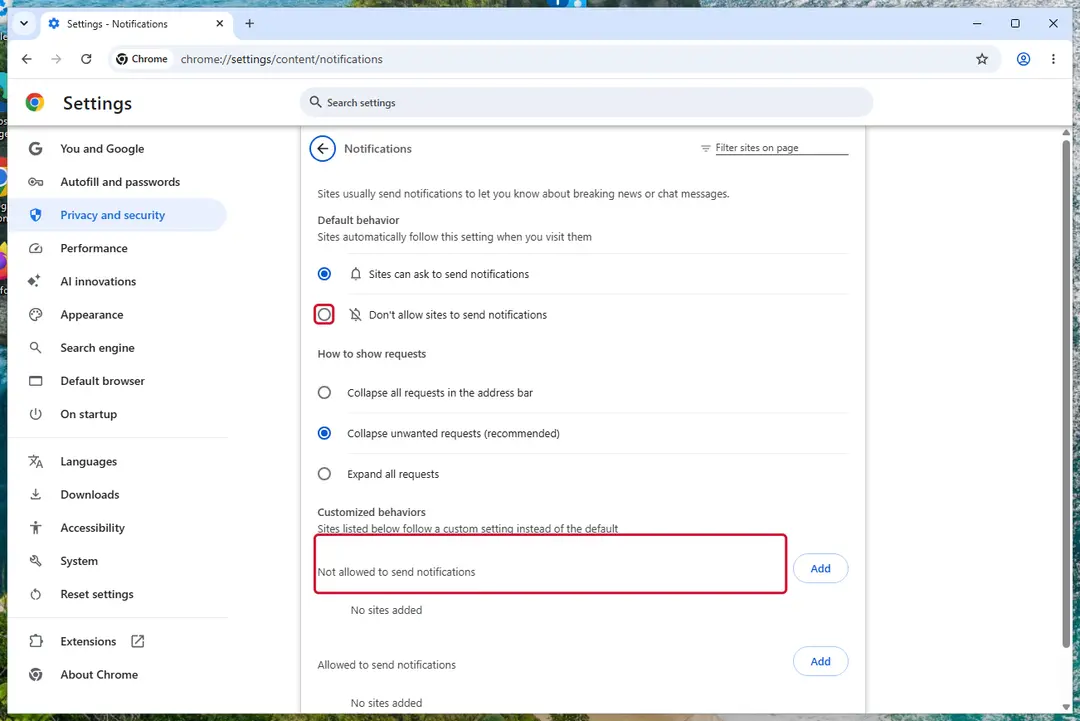
Chrome on Windows 11: Settings > Privacy and security > Site settings > Notifications. Full procedure with screenshots: Stop website notifications and pop-ups
Instructions for Google Chrome
Remove from Google Chrome
Delete malicious extensions from Google Chrome:
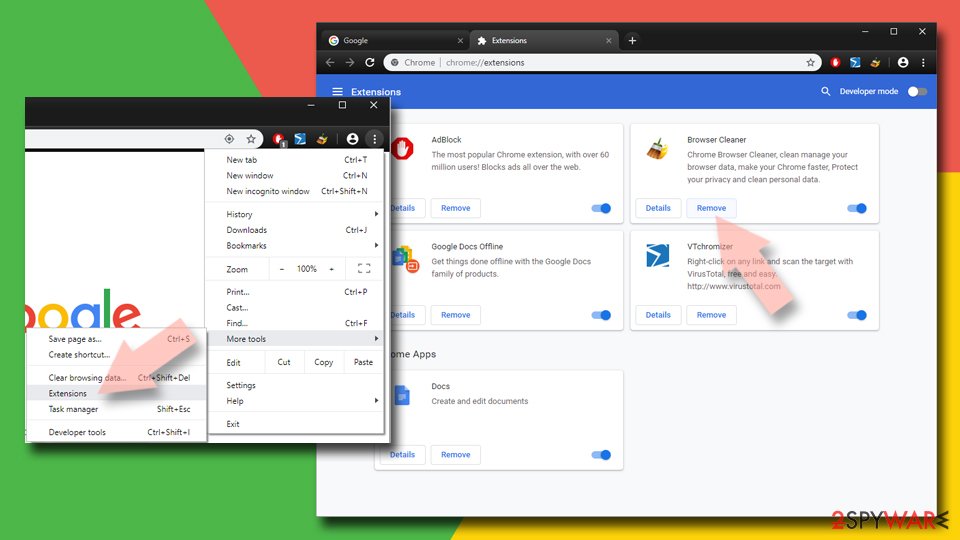
- Open Google Chrome, click on the Menu (three vertical dots at the top-right corner) and select More tools > Extensions.
- In the newly opened window, you will see all the installed extensions. Uninstall all suspicious extensions related to the unwanted program by clicking Remove.
Clear cache and web data from Chrome:
- Click on Menu and pick Settings.
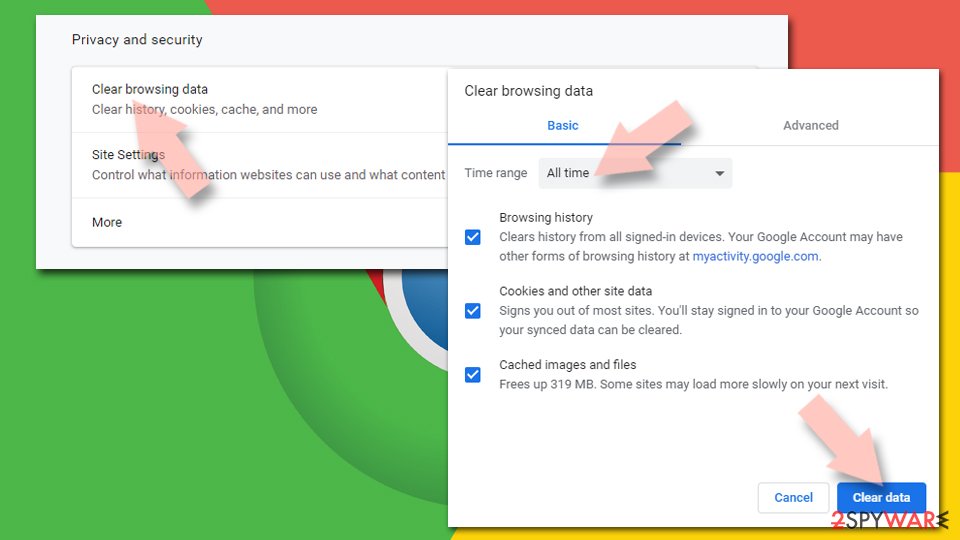
- Under Privacy and security, select Clear browsing data.
- Select Browsing history, Cookies and other site data, as well as Cached images and files.
- Click Clear data.
Change your homepage:
- Click menu and choose Settings.
- Look for a suspicious site in the On startup section.
- Click on Open a specific or set of pages and click on three dots to find the Remove option.
Reset Google Chrome:
If the previous methods did not help you, reset Google Chrome to eliminate all the unwanted components:
- Click on Menu and select Settings.
- In the Settings, scroll down and click Advanced.
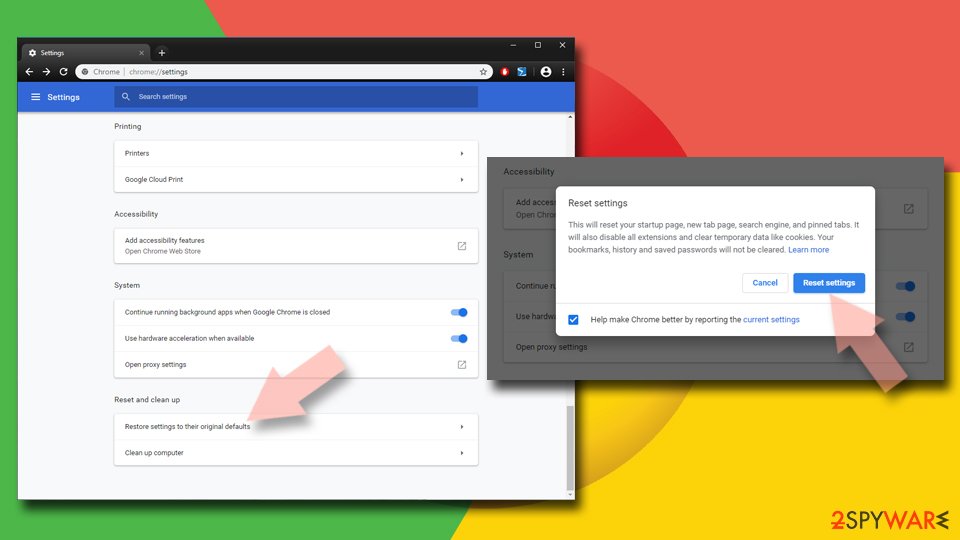
- Scroll down and locate Reset and clean up section.
- Now click Restore settings to their original defaults.
- Confirm with Reset settings.
Step 1: Remove puttheph.club from Edge's notification list
Open Settings and more (the three dots) > Settings > Privacy, search, and services > Site permissions > All permissions > Notifications. Remove
puttheph.clubfrom the Allowed list, then click Add site next to Not allowed to send notifications and enter it there.Edge is built into both Windows 11 and Windows 10, so check it even if you normally use another browser. If the notifications came with the Edge logo, this is the browser that holds the permission.
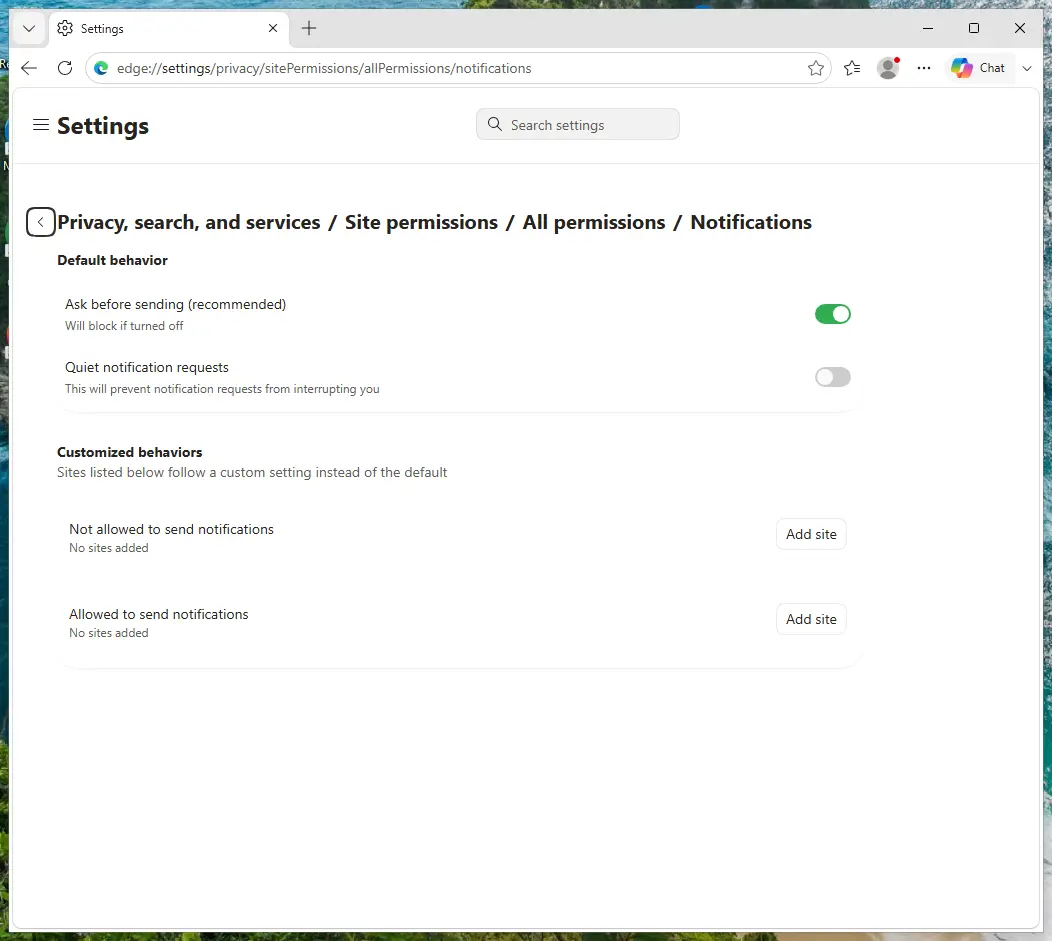
Edge on Windows 11: Site permissions > All permissions > Notifications. Full procedure with screenshots: Stop website notifications and pop-ups
Instructions for Microsoft Edge
Remove from Microsoft Edge
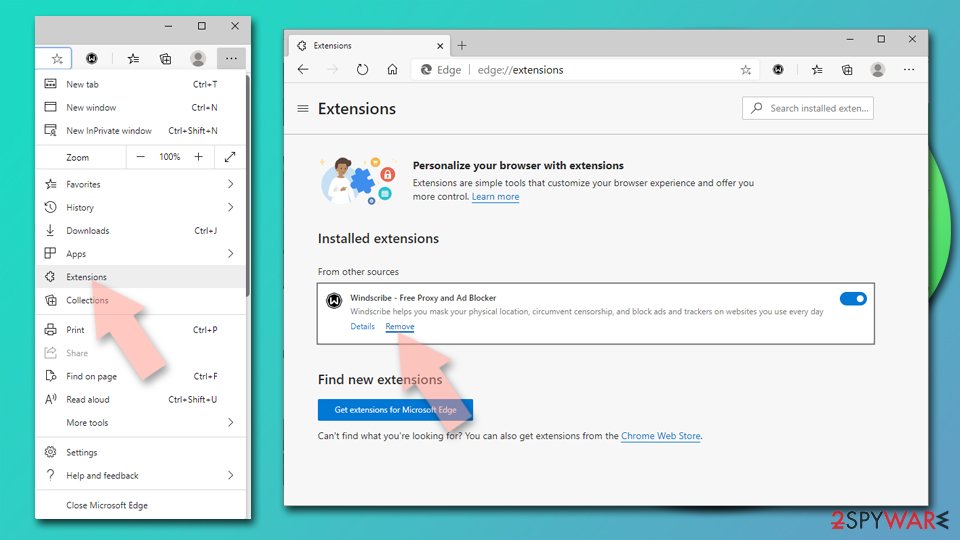
Delete unwanted extensions from MS Edge:
- Select Menu (three horizontal dots at the top-right of the browser window) and pick Extensions.
- From the list, pick the extension and click on the Gear icon.
- Click Remove.
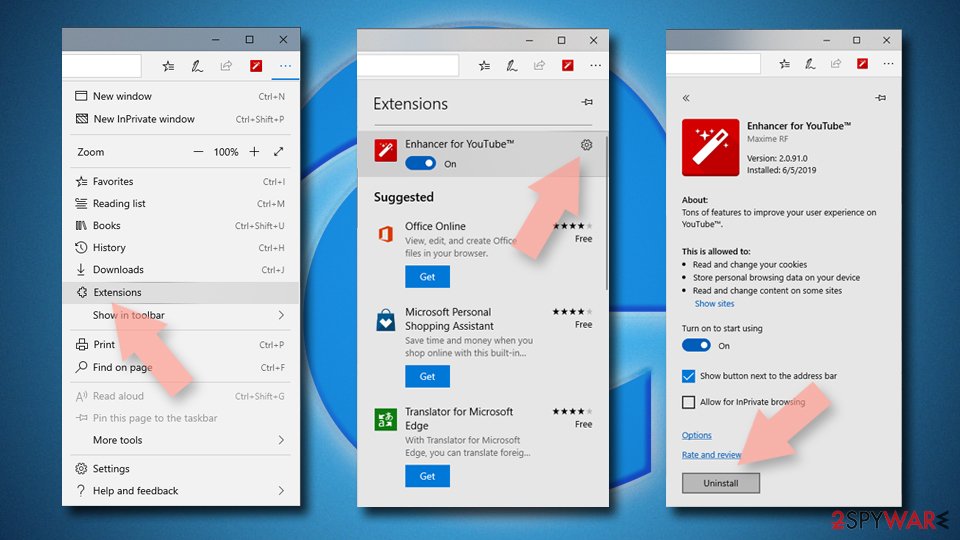
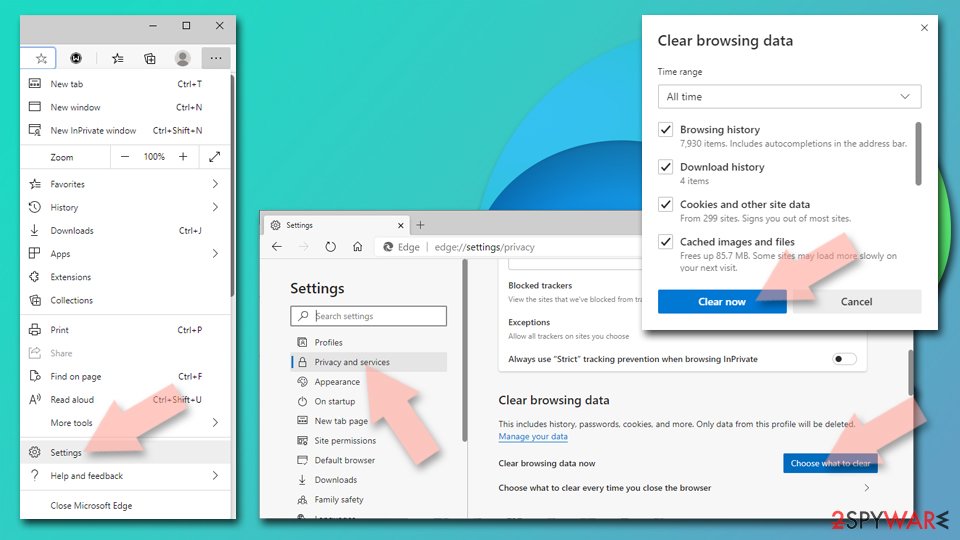
Clear cookies and other browser data:
- Click on the Menu (three horizontal dots at the top-right of the browser window) and select Settings > Privacy, search, and services..
- Under Clear browsing data, pick Choose what to clear.
- Select Cookies and other site data and Cached images and files. (apart from passwords, although you might want to include Media licenses as well, if applicable) and click on Clear.
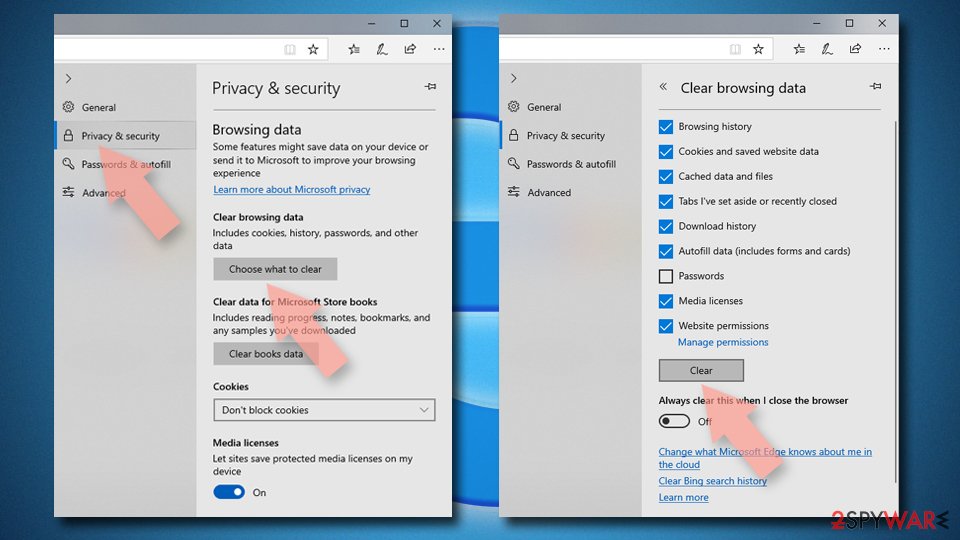
Restore new tab and homepage settings:
- Click the menu icon and choose Settings.
- Then find On startup section.
- Click Remove next to any suspicious startup page.
Reset MS Edge if the above steps did not work:
- Press on Ctrl + Shift + Esc to open Task Manager.
- Click on More details arrow at the bottom of the window.
- Select Details tab.
- Now scroll down and locate every entry with Microsoft Edge name in it. Right-click on each of them and select End Task to stop MS Edge from running.
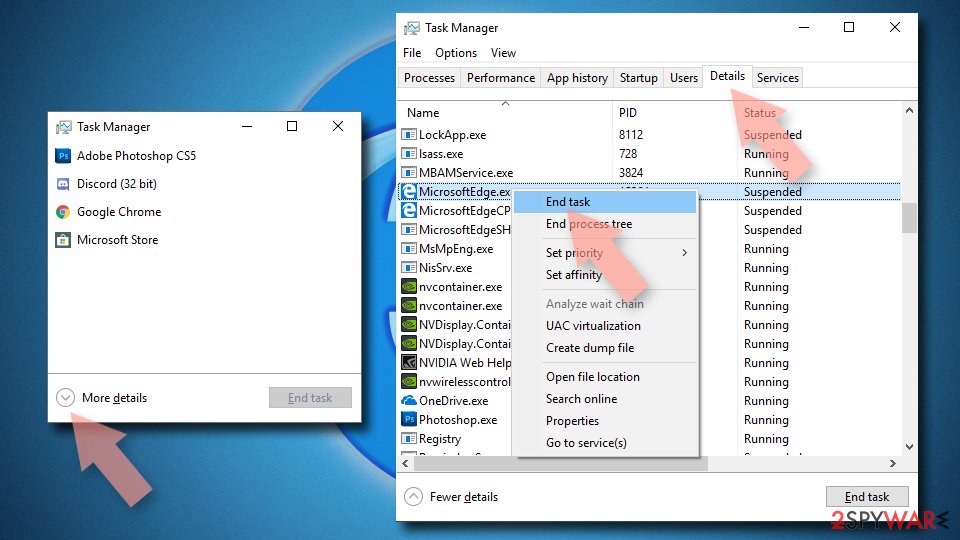
Delete extensions from MS Edge (Chromium):
- Open Edge and click select Settings > Extensions.
- Delete unwanted extensions by clicking Remove.
Clear cache and site data:
- Click on Menu and go to Settings.
- Select Privacy, search and services.
- Under Clear browsing data, pick Choose what to clear.
- Under Time range, pick All time.
- Select Clear now.
Reset Chromium-based MS Edge:
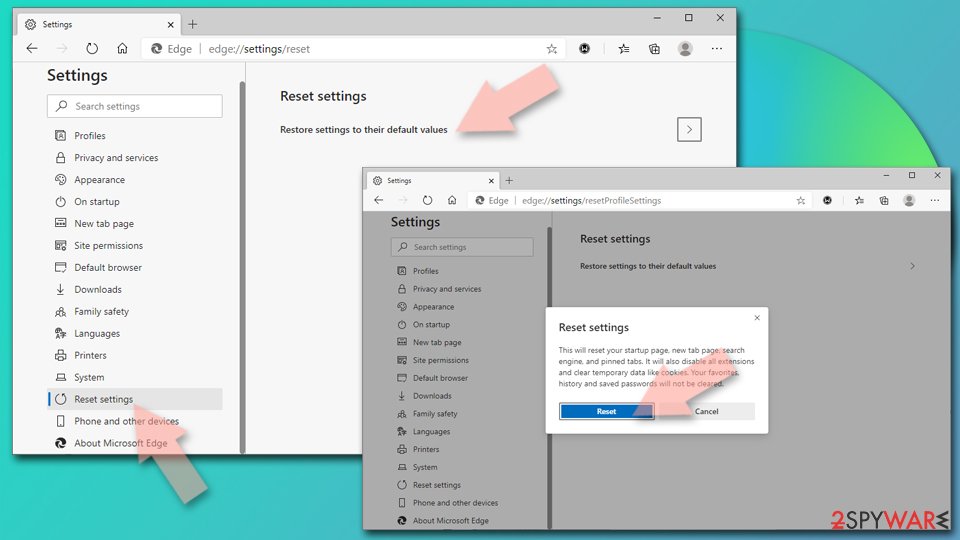
- Click on Menu and select Settings.
- On the left side, pick Reset settings.
- Select Restore settings to their default values.
- Confirm with Reset.
- This will disable extensions and reset startup pages but will not delete bookmarks, saved passwords, or browsing history.
Step 1: Remove puttheph.club from Firefox's notification permissions
Open the menu (three lines) > Settings and click Permissions and data in the left list, then Notifications. Select
puttheph.club, click Remove Website and confirm with Save Changes.In versions older than Firefox 152 the same list sits under Privacy & Security, behind a Settings button next to Notifications. Firefox shows these notifications only while it is running, on Windows 11 and Windows 10 alike.
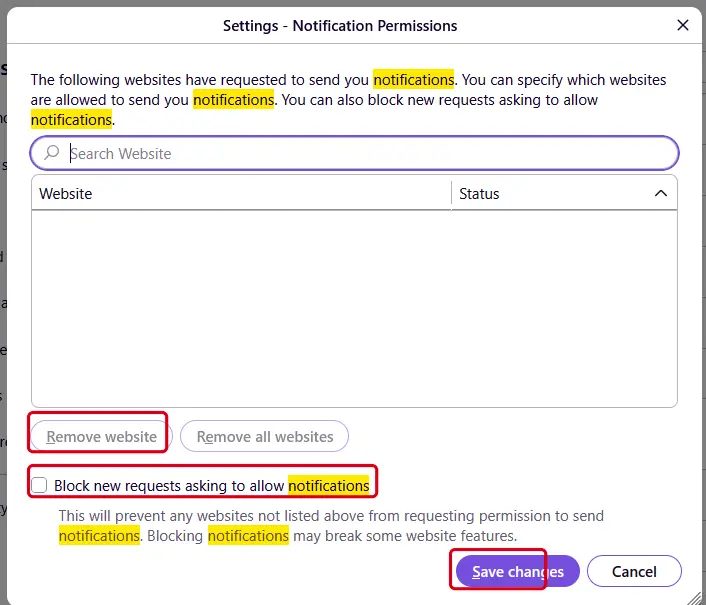
Firefox on Windows 11: the Notification Permissions window. Full procedure with screenshots: Stop website notifications and pop-ups
Instructions for Mozilla Firefox
Remove from Mozilla Firefox (FF)
Remove dangerous extensions:
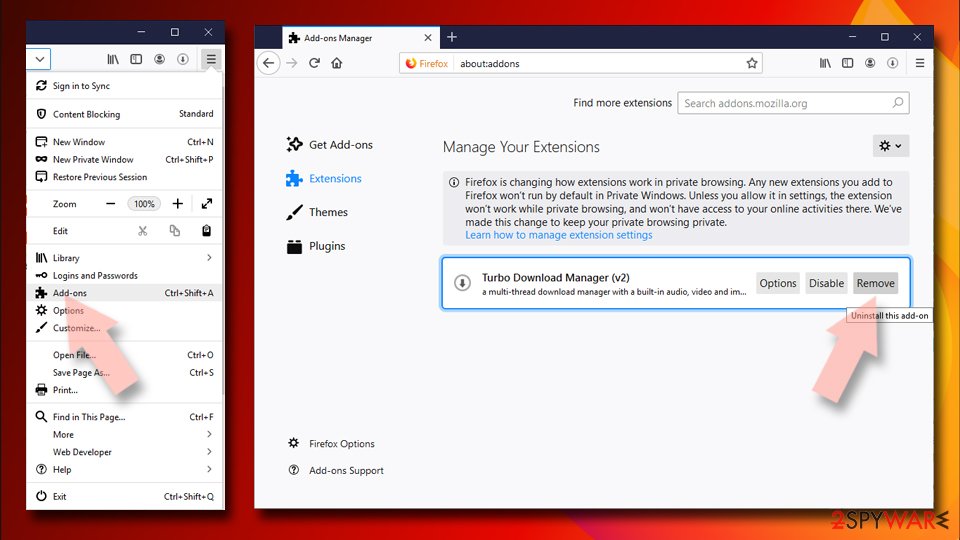
- Open Mozilla Firefox browser and click on the Menu (three horizontal lines at the top-right of the window).
- Select Add-ons.
- In here, select the unwanted extension and click Remove.
Reset the homepage:
- Click three horizontal lines at the top right corner to open the menu.
- Choose Settings.
- Under Home, set your preferred homepage and new tab settings.
Clear cookies and site data:
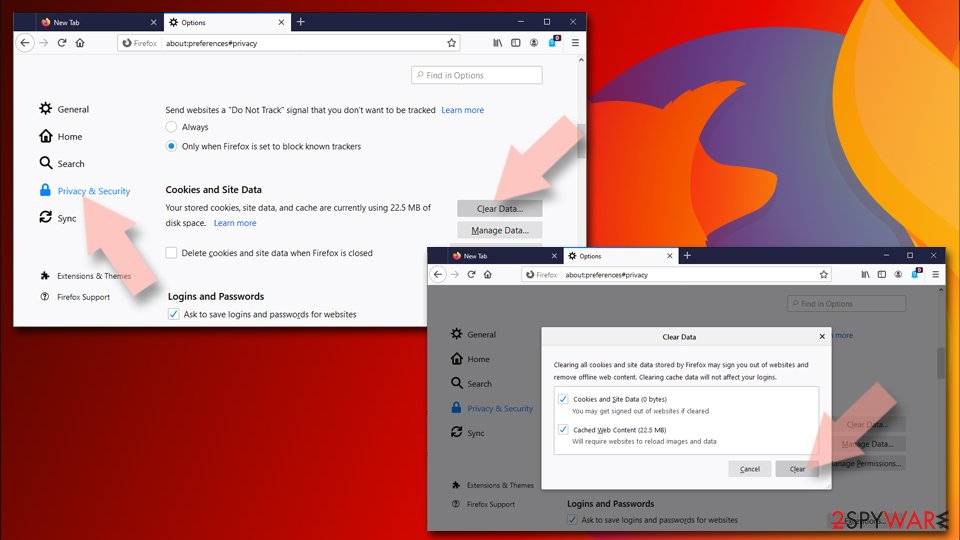
- Click Menu and pick Settings.
- Go to Privacy & Security section.
- Scroll down to locate Cookies and Site Data.
- Click on Clear Data...
- Select Cookies and Site Data and Temporary cached files and pages, then click Clear.
Reset Mozilla Firefox
If clearing the browser as explained above did not help, reset Mozilla Firefox:
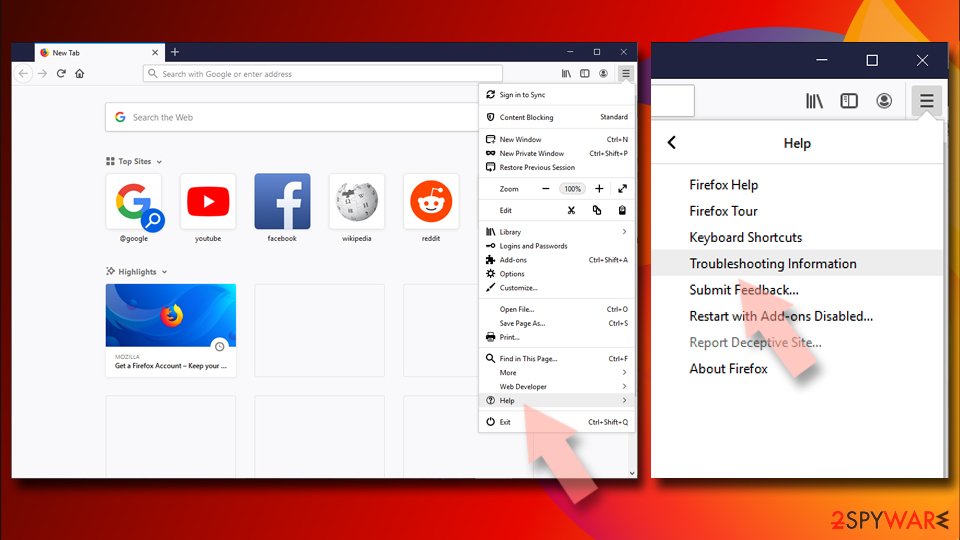
- Open Mozilla Firefox browser and click the Menu.
- Go to Help and then choose Troubleshooting Information.
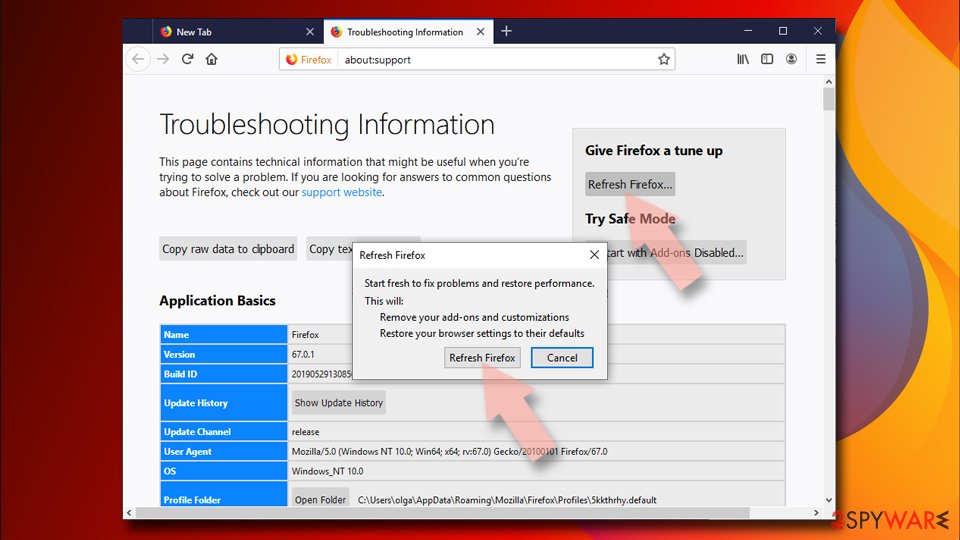
- Under Give Firefox a tune up section, click on Refresh Firefox...
- Once the pop-up shows up, confirm the action by pressing on Refresh Firefox.
Our tested steps are for Windows 11 and 10. For Safari (Mac), use the instructions below.
Instructions for Safari (Mac)
Delete from Safari
Remove dangerous extensions:
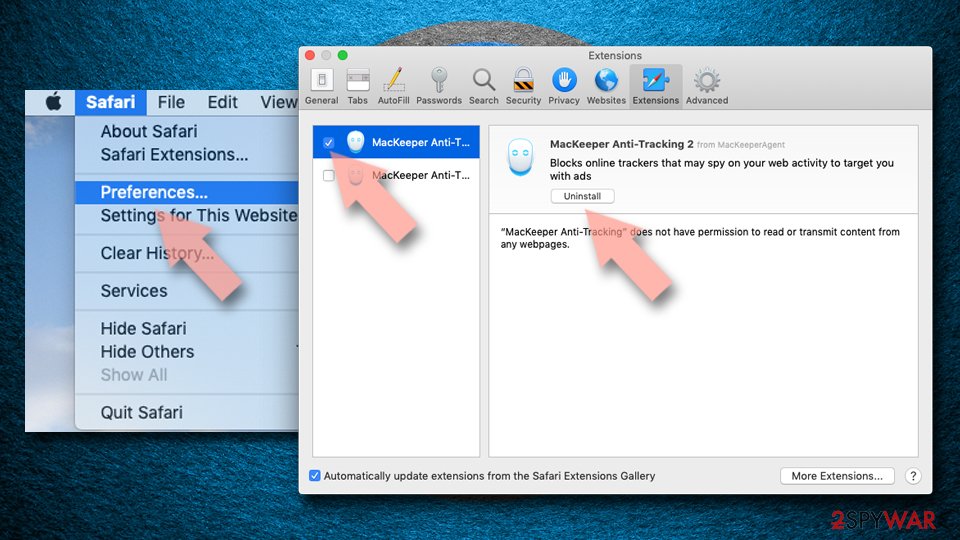
- Open Safari, click Safari in the menu at the top-left of the screen, and select Preferences.
- Go to the Extensions tab, look for any suspicious entries, and click Uninstall to remove them.
Clear history and website data:
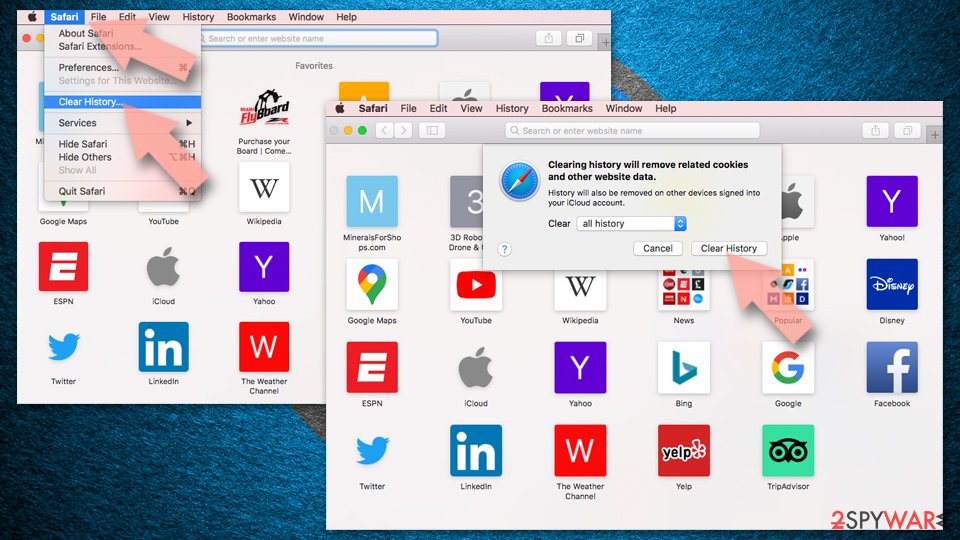
- Click Safari in the menu and pick Clear History.
- Set Clear to all history and confirm with Clear History.
Reset Safari:
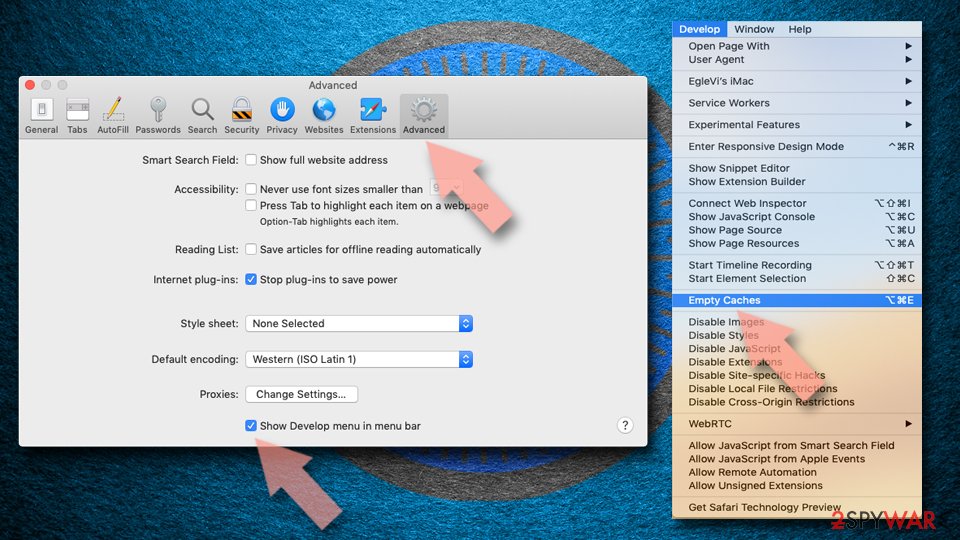
- Click Safari in the menu and select Preferences > Advanced.
- Enable Show Develop menu in menu bar.
- From the menu bar, click Develop and select Empty Caches.
Delete from macOS
Remove the unwanted application:
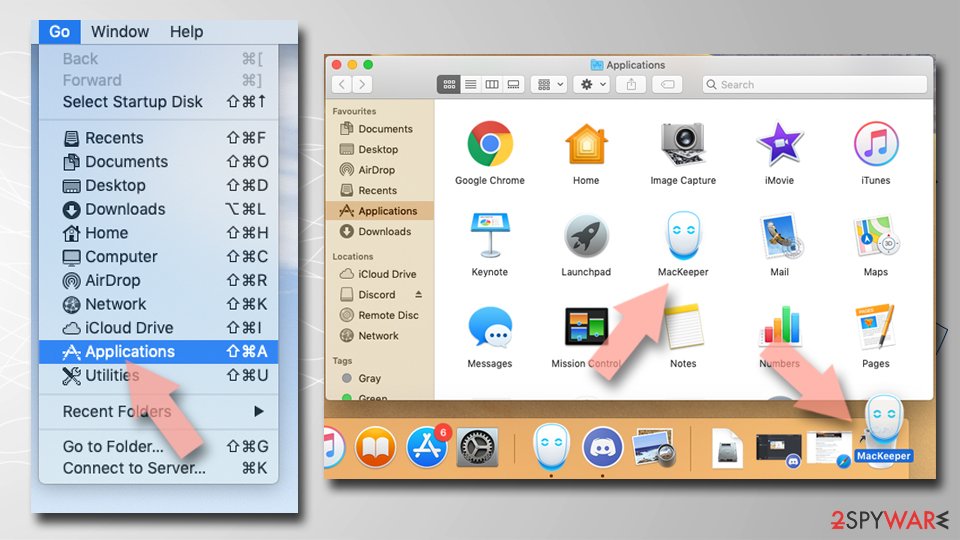
- From the menu bar, select Go > Applications.
- In the Applications folder, look for any suspicious entries, then drag them to Trash (or right-click and pick Move to Trash).
Delete leftover files and folders:
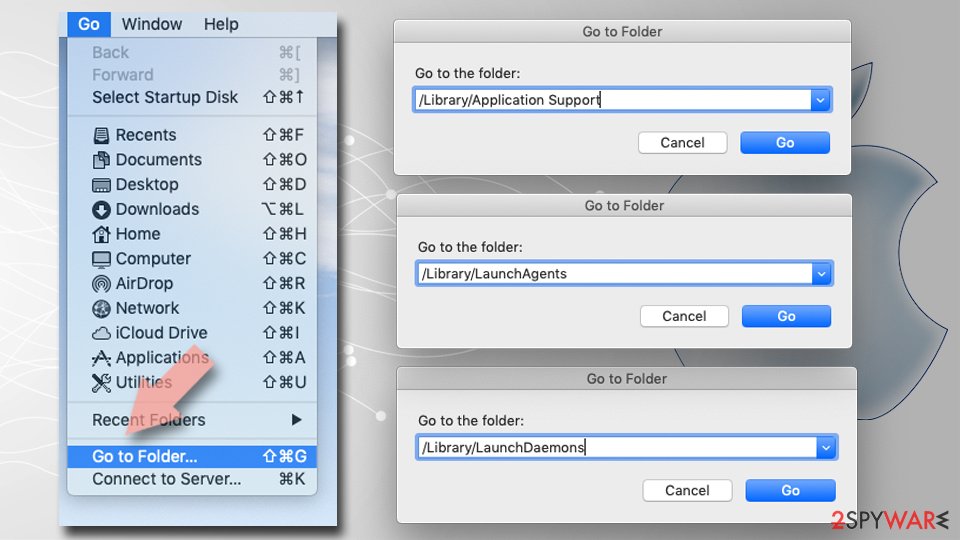
- Select Go > Go to Folder.
- Enter /Library/Application Support and remove any suspicious folders related to the unwanted program.
- Repeat the same check in the /Library/LaunchAgents and /Library/LaunchDaemons folders, deleting any suspicious entries.
- Finally, empty the Trash to permanently remove the leftovers.
Then, whichever browser you use
Step 2: Scan the PC if you downloaded anything from the ads
If you only saw the notifications and clicked nothing, you can stop before this step. If a notification led you to download or run something, delete that file, then scan Windows.
In Windows Security > Virus & threat protection > Scan options, run a Full scan, then choose Microsoft Defender Antivirus (offline scan) and Scan now. The offline scan restarts the PC and takes about 15 minutes on Windows 11 and Windows 10.

Windows 11: Windows Security > Virus & threat protection > Scan options. Full procedure with screenshots: Run a Microsoft Defender Offline scan
More removal instructions
For programs installed on the PC and older browsers. Open the one you need.
Remove adware and Puttheph.club notifications with a few simple steps
Both adware and Puttheph.club virus can cause a lot of problems, from additional PUP installation to a serious malware infection.
If you, or anyone else, that might have been using your device in question, have clicked on the Allow button when redirected to Puttheph.club, you have to get rid of those notifications immediately. For your convenience, we've posted free guides below to help you with that.
When all is said and done, you have to take care of the overall health of your phone/computer because each infection leaves its mark. Restore changes made to your system core system files and settings by running system diagnostics with time-proven software.
Uninstall from Windows
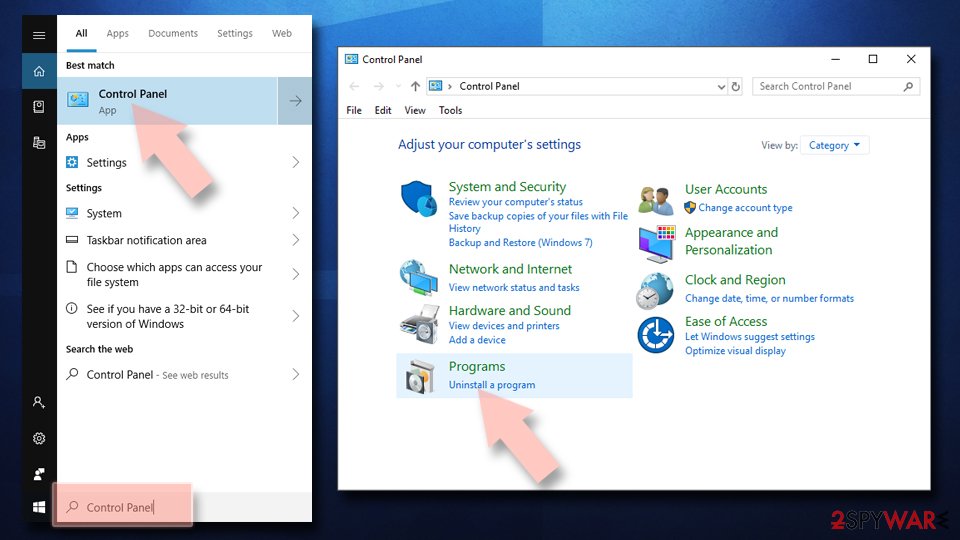
Uninstall from Windows 10/8:
- Type Control Panel into the Windows search box and open the result.
- Under Programs, select Uninstall a program.
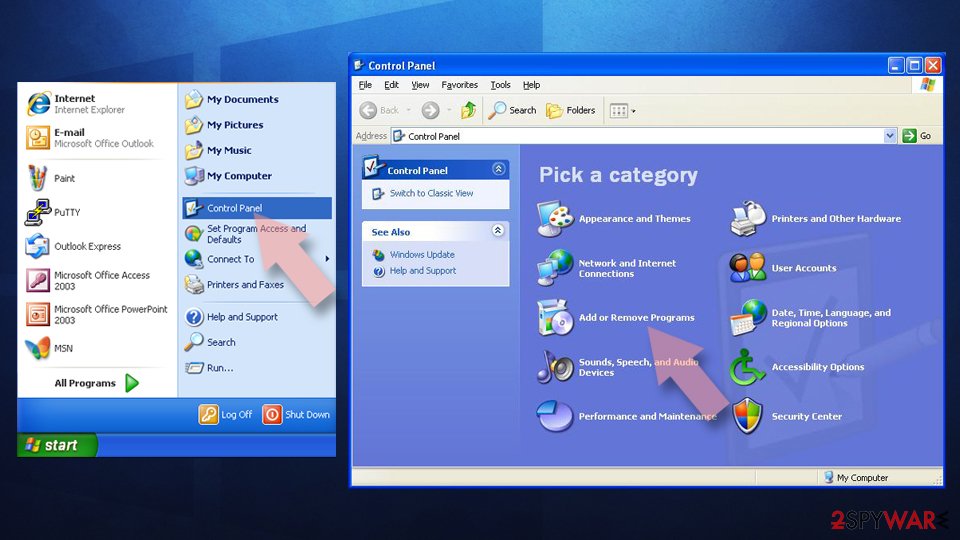
Uninstall from Windows 7/XP:
- Click on Windows Start > Control Panel (Windows XP users should click on Add/Remove Programs).
- In Control Panel, select Programs > Uninstall a program.
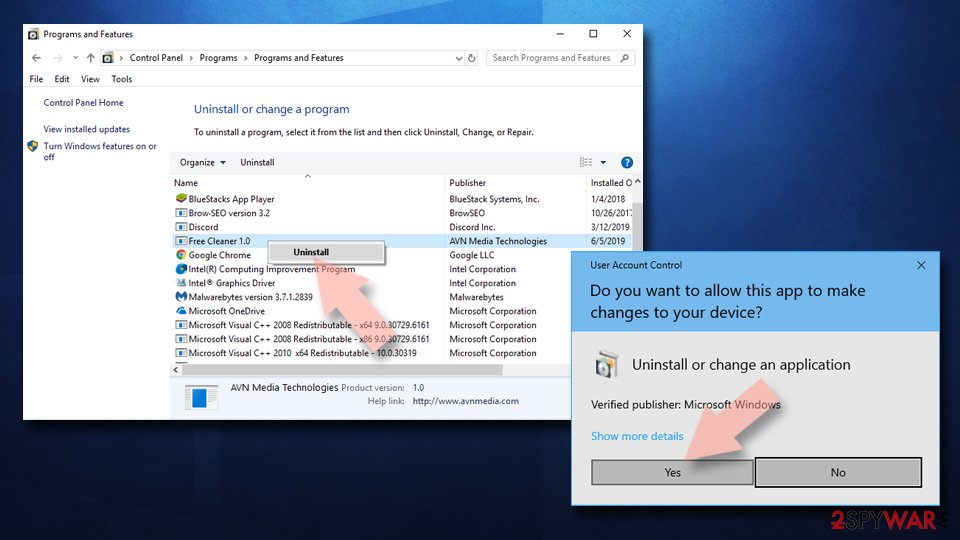
Remove the unwanted program:
- In the Programs and Features window, look for any recently installed suspicious entries, select them, and click Uninstall.
- If User Account Control appears, click Yes to confirm, then complete the removal.
Uninstall from Android
Uninstall unwanted programs from Android device:
- Go to Settings -> Apps/Applications.
- Expand the full list of the installed apps.
- Scroll through the list and tap on a suspicious application once.
- Tap on it and select Uninstall.
- If the Uninstall option is unavailable, the app may require additional permissions to be revoked first.
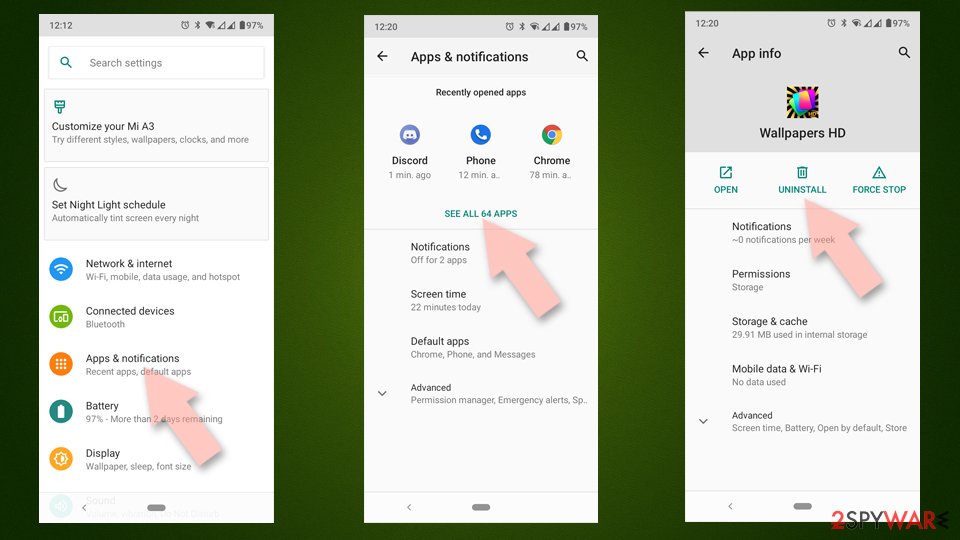
- Reboot the device.
Clear storage and cache for Google Chrome or other apps::
- Go to Settings > Apps/Applications.
- Expand the full list of the installed apps.
- Tap on Chrome and select Storage & cache.
- Clear storage and clear cache of the app.
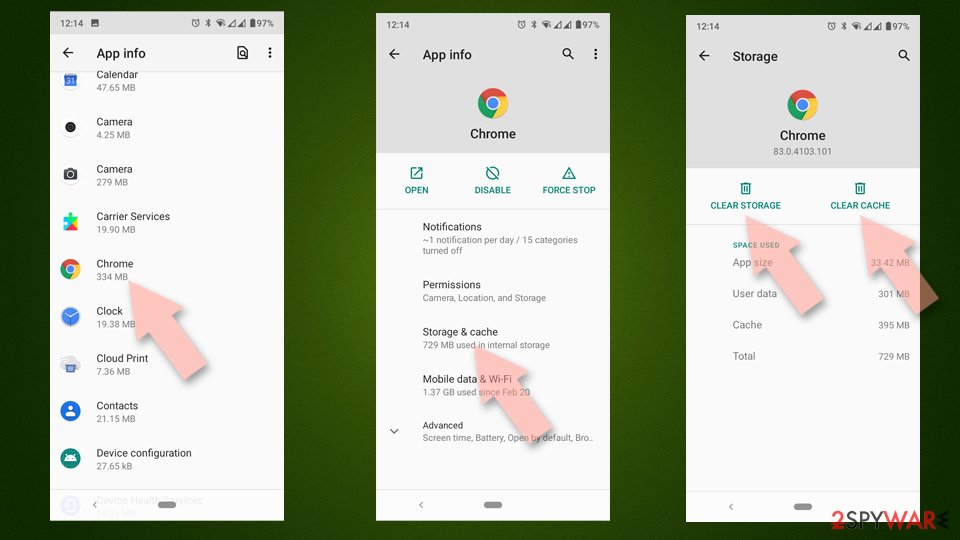
If you are seeing ads on top of other apps but are not sure what is causing it, perform the following steps:
- Go to Apps/Applications.
- Select Special App access.
- Tap on Display over other apps.
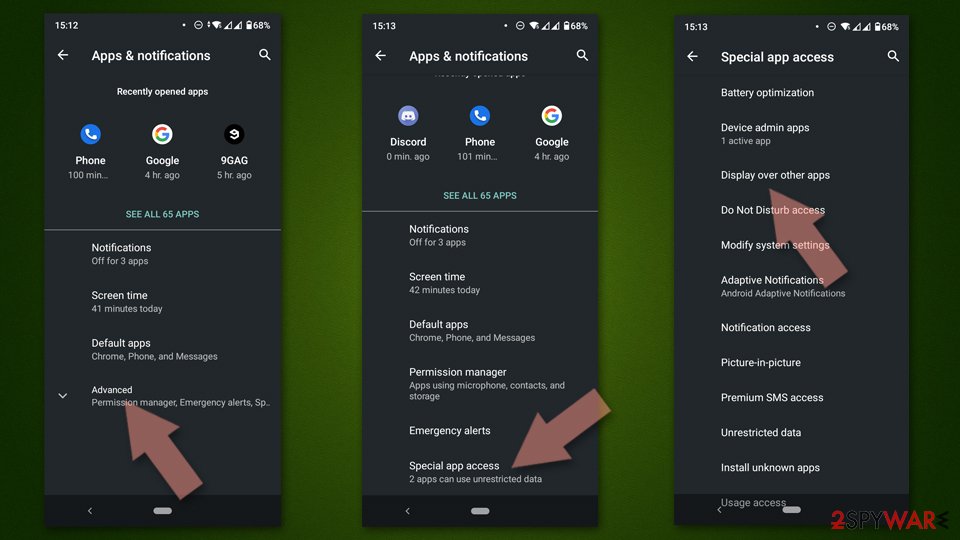
- Eliminate apps with these access rights enabled.
Stop browser notifications
Protect your privacy - employ a VPN
There are several ways how to make your online time more private - you can access an incognito tab.
However, there is no secret that even in this mode, you are tracked for advertising purposes. There is a way to add an extra layer of protection and create a completely anonymous web browsing practice with the help of VPN. This software reroutes traffic through different servers, thus leaving your IP address and geolocation in disguise.
Besides, it is based on a strict no-log policy, meaning that no data will be recorded, leaked, and available for both first and third parties. The combination of a secure web browser and VPN will let you browse the Internet without a feeling of being spied or targeted by criminals.
No backups? No problem. Use a data recovery tool
If you wonder how data loss can occur, you should not look any further for answers - human errors, malware attacks, hardware failures, power cuts, natural disasters, or even simple negligence.
In some cases, lost files are extremely important, and many straight out panic when such an unfortunate course of events happen. Due to this, you should always ensure that you prepare proper data backups on a regular basis.
If you were caught by surprise and did not have any backups to restore your files from, not everything is lost. is one of the leading file recovery solutions you can find on the market - it is likely to restore even lost emails or data located on an external device.
Questions about Puttheph.club ads
puttheph.club keeps sending notifications. Is it a virus?
No. Notifications from puttheph.club come from a permission stored in the browser, not from a program installed in Windows. Someone clicked Allow on a prompt from that site, usually without realising what it meant, and the site now sends ads through the browser's notification system.
Antivirus scans often find nothing because there is nothing to find on the disk. Removing puttheph.club from the browser's list of allowed sites stops the messages for good. A scan is still useful if you clicked a notification and downloaded or ran something from the page it opened, because those downloads can be unwanted programs.
Did a notification from puttheph.club infect my computer?
A notification cannot infect a PC. It is a short text with a link that the browser displays. Clicking it opens a page, and a page cannot install anything unless you agree to a download and run the file.
So the answer depends on what you did after clicking. Looked and closed: you are fine. Downloaded but did not open: delete the file.
Opened a downloaded file: uninstall what it added and scan the PC. Typed card or login details: contact the bank and change the password. In every case, remove puttheph.club from the browser's allowed notifications so the messages stop.
Why does Puttheph.club show me ads?
Because that is its whole purpose. Puttheph.club is a push-notification spam site, and its operators are paid for every ad it displays and every click it gets. In this case the ads take the form of desktop notifications.
They are chosen by ad networks that accept almost any advertiser, which is why so many look like warnings or prizes. The ads are not a sign that your PC is broken or infected with something worse; they are a sign that something on it, or in the browser, has permission to advertise. Removing that permission or program stops them.
Is puttheph.club safe to visit?
No. The site puttheph.club exists to push visitors towards ads, and the pages it leads to include fake virus warnings, fake updates, prize scams and notification prompts. Visiting it once does not infect an up-to-date PC, but anything you click or download there is a gamble.
Do not enter personal details, do not allow notifications and do not call phone numbers it shows. If it opens by itself, close the tab and check the browser's extensions and notification permissions. Blocking the single domain helps little, because the operators register new names regularly.
Which browser is sending the puttheph.club notifications?
Each notification shows the name of the browser and the site in its small print. In the cases we saw, the messages from puttheph.club came through Chrome, Edge and Firefox. Permissions are stored per browser and per profile, so removing the site in one browser does not affect another.
If you use several Chrome or Edge profiles, check each one. If you sync the browser with an account, remove the permission while signed in, otherwise another computer may still hold it and keep receiving the same messages.
How do I know the ads come from Puttheph.club?
Look for notifications from puttheph.club. That is the trace Puttheph.club leaves, and it shows up as desktop notifications. Ads that appear on every site, including ones that never carried ads before, point to something on your PC or in the browser rather than to the sites themselves.
A quick test is a private window, where extensions are off by default: if the ads disappear there, an extension is responsible. If they appear even with the browser closed, the source is a notification permission or a program in Windows.
Why didn't my antivirus catch Puttheph.club?
Many security products do not block adware or notification sites by default, because users often agreed to them, even through a misleading prompt. Notification spam installs nothing at all, so there is no file to detect.
In Windows 11 you can make Microsoft Defender block potentially unwanted apps: open Windows Security > App & browser control > Reputation-based protection settings and turn on Potentially unwanted app blocking. If notifications caused the pop-ups, no scanner will report them; the fix is in the browser's site settings.
Will Focus or Do not disturb stop the notifications?
Only for as long as it is on. Do not disturb in Windows 11 holds back notifications from all apps, including browsers, and releases them to the notification centre later. The site still has permission and the messages still arrive.
Use the browser's notification settings to remove the site instead: once its permission is gone, it cannot send anything, whatever Windows is set to. Keep Do not disturb for what it is meant for, such as meetings, presentations and quiet hours.
Did clicking Allow install anything on my PC?
No. Allowing notifications stores a permission in the browser and nothing else. No file is downloaded and no program is added to Windows, which is also why antivirus scans find nothing. The risk comes later, from the notifications themselves: they lead to scam pages, fake updates and phishing forms.
Remove the permission in each browser where you allowed it. If you clicked a notification and downloaded something afterwards, delete that file and run a Microsoft Defender full scan and offline scan.
Will Fortect remove Puttheph.club?
No program removes Puttheph.club itself, because there is nothing on the PC to remove: the notifications come through a permission saved in the browser, and only the browser's settings take it away, as the steps above show.
What Fortect can do is check the rest of Windows. Its free scan looks for malware, unwanted programs and damaged system files, which is useful if you clicked the ads, downloaded something from the pages they opened, or are not sure what else changed on the PC.
If the scan finds nothing and the notifications stopped after you removed the permission, this problem is solved. Use Microsoft Defender as a second opinion whenever you have downloaded files from pages like these.
Sources
- Wikipedia: Browser hijacking (read October 6, 2026)
- Google Chrome Help: Use notifications to get alerts (no longer online) (read October 6, 2026)
- FTC: How to recognize, remove and avoid malware (read October 6, 2026)
- Microsoft Learn: Microsoft Defender Offline (read October 6, 2026)
- Microsoft Learn: How Microsoft names malware (read October 6, 2026)