
service@paypal scam: fake PayPal invoices with a callback number, and what to do
The service@paypal scam is a fake invoice or money request that a scammer creates in PayPal, so a real PayPal address delivers it. The note claims you will be charged and gives a phone number to cancel. That number leads to the scammer, who wants remote access to your PC or your bank login. Do not call and do not pay.
Facts checked October 10, 2026. Removal steps tested on Windows 11 (26H2) and checked against Microsoft's and the browser makers' current documentation.
Automatic
Get a free scan and check if your PC is infected.
Fortect finds malware, unwanted programs and the Windows damage they leave behind, and repairs it in one pass.
Do it yourself · free Remove service@paypal scam (fake PayPal invoice) yourself 2 steps, about 6 minutes, no software needed.
Start the steps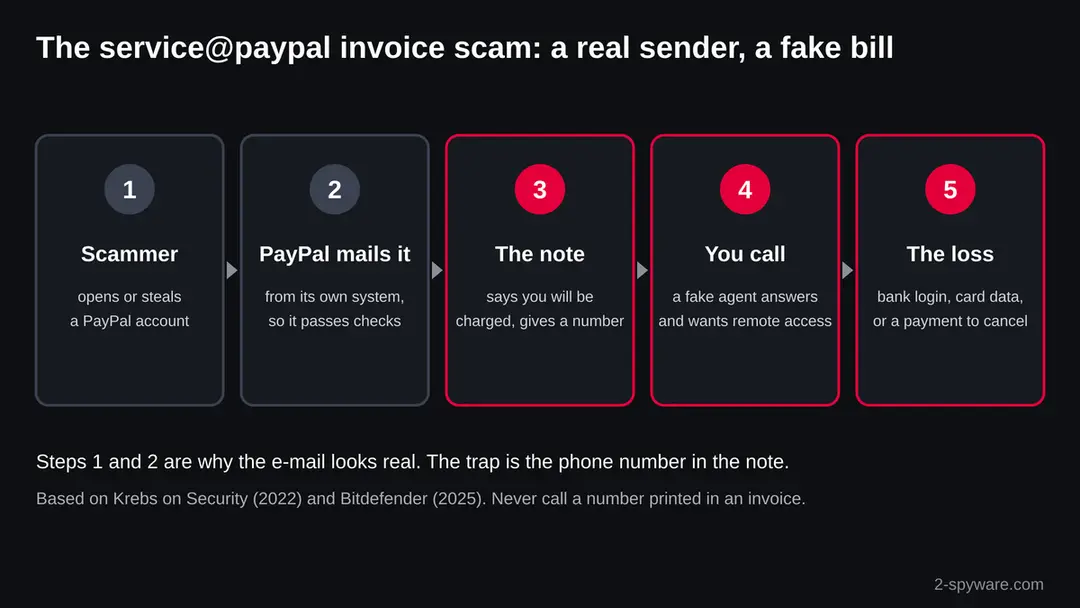
Service@paypal scam (fake PayPal invoice): summary
| Type | Fake invoice and callback scam sent through PayPal's own invoicing; not a virus and not a bill from PayPal |
|---|---|
| Risk | High if you called, let a caller into your PC or paid; low if you only read the e-mail |
| Symptoms | A PayPal invoice or money request for something you did not buy, with a note that tells you to call the callback number to cancel |
| How to get rid of it | Do not call or pay; report the invoice to PayPal; if a caller had access, uninstall the remote tool, scan, and change passwords from another device |
| Our check (10 October 2026) | A desk check: no web address to test, no sample, facts from PayPal, Krebs on Security, Bitdefender, Microsoft and the FTC |
| Sender | A real PayPal address; readers reported service@paypal.com (not confirmed by PayPal's pages) |
| Removal | Scan the PC with security software to find and remove the malware and anything installed with it. Fortect scans Windows for malware and repairs the system files and settings it damaged. Remove it nowTo use the full-featured product, you have to purchase a license for Fortect. The scan is free. |
Show 12 more facts
| Amounts seen | Several hundred dollars (Krebs on Security, 2022); about $1,000 (Bitdefender, 2025) |
|---|---|
| Damage | Remote access to the PC, bank and card fraud, PayPal account takeover and identity theft |
| Name | Service@paypal scam |
| Evidence | One report; details still limited |
| Arrives as | |
| Pretends to be | PayPal |
| Claim | You were charged for an order or subscription you did not make |
| Sender domain | service@paypal.com |
| Asks for | A phone call |
| Phone number | the callback number |
| First seen | 10 October 2026 |
| Facts checked | 10 October 2026 |
Facts checked on 10 October 2026 against PayPal, Krebs on Security, Bitdefender, Microsoft and the FTC. We had no sample invoice and did not call any number; reader reports are marked as such.
What the service@paypal scam is
The service@paypal scam is an invoice or a money request that a scammer creates inside PayPal, so PayPal's own system delivers it to you. The e-mail can come from a real PayPal address and pass every mail check. The bill is fake. Its note says you will be charged hundreds of dollars and gives the callback number, which leads to the scammer, not to PayPal.
- What arrives
- A PayPal invoice or money request for something you never bought, often a few hundred dollars and sometimes about $1,000, with a note that says to call a number to cancel or dispute it
- Why it looks real
- Krebs on Security found that such invoices came from paypal.com, passed PayPal's mail checks and linked to a real invoice page on paypal.com
- The sender address
- Readers who wrote to Krebs on Security reported the sender as service@paypal.com. We could not confirm the exact address from PayPal's own pages. A real address does not make the bill real
- The trap
- The callback number. The person who answers asks you to install a remote access program, to sign in to your bank or to pay to cancel
- Is it a virus
- No. The e-mail installs nothing. The risk starts when you call, pay or let a stranger control your PC
- What to do
- Do not call and do not pay. Open the PayPal app or type paypal.com yourself and look at your activity. Report the invoice to PayPal
What the service@paypal scam (fake PayPal invoice) message looks like
| Form | What you see | What to do |
|---|---|---|
| An invoice | A bill from a seller you do not know, with an amount due and a note with a phone number. | Do not pay it. Do not call. Report the invoice to PayPal from inside your account. |
| A money request | A request for money from a name you do not know, sometimes with a note about a refund or a mistake. | Ignore it or decline it in the app. A request takes nothing unless you send the money, in our reading of how requests work. |
| A fake receipt from a look-alike address | An e-mail that says you paid for crypto, a game console or a subscription, sent from an address that is not paypal.com. | Check the sender. PayPal says a real e-mail uses your full name, not "Dear user". |
| A phone call or a text | An automated call or text about a charge, asking you to call back. | PayPal says not to return automated calls that ask you to call back. Use only the Help Center or 1-888-221-1161. |
| A note sent to a business | An invoice to a shared address like finance@ or info@ in a company or school. | Bitdefender advises clear payment approval rules and staff training, because a neat invoice is not proof. |
How to tell the service@paypal scam (fake PayPal invoice) message is fake
Do
- Check every unexpected invoice by opening the PayPal app or typing paypal.com yourself.
- Contact PayPal only through the Help Center Contact page or 1-888-221-1161, the number PayPal gives.
- Use a unique password for PayPal and for the e-mail linked to it, and turn on two-step verification.
- Close old PayPal accounts you no longer use, as Bitdefender advises.
- In a company, set a rule that no invoice is paid without a check by a second person.
Don't
- Do not call a phone number printed in an invoice, a note or a money request.
- Do not install a remote access program because a caller asks you to.
- Do not sign in to your bank while a stranger watches your screen.
- Do not pay to cancel a charge, and do not send back a "refund" that was too large.
- Do not trust an e-mail only because it comes from a paypal.com address.
Is service@paypal scam (fake PayPal invoice) dangerous? What the senders want
What we checked on 10 October 2026, and what we could not
service@paypal scam · desk check · 10 October 2026 · no page or number tested
- A web address to testNone. The subject is an e-mail name, not a web address, so our server sent no request. The invoice pages sit on paypal.com, which is PayPal's real site.
- Reports in our dataNo URLhaus entries and no registration record. The job came from search data: about 880 security searches a month for the phrase, with no page on our site to answer them.
- A sample invoiceWe had no sample of our own. The facts here come from Krebs on Security, Bitdefender, PayPal, Microsoft and the FTC. We did not call any callback number.
- The patternDocumented by Krebs on Security in August 2022 and by Bitdefender in August 2025: real PayPal invoices with fake charges and a phone number to call.
- PayPal's own addressAn invoice that reaches you through PayPal does not mean PayPal sent you a bill. Anyone with a PayPal account can send one, and PayPal mails it on their behalf.
Do not call the number in the invoice The invoice is a lure for a phone call. Any request to install remote access software, to sign in to your bank while on the phone, or to pay to cancel a charge is the scam. This is a desk check, not a test of a live invoice.
How a real PayPal e-mail carries a fake bill
Most fake PayPal e-mails come from look-alike addresses. This one is harder, because the message really comes from PayPal. The scammer writes the invoice, and PayPal delivers it. Only the words inside the invoice are the scammer's.
| Part of the e-mail | What is really going on |
|---|---|
| Sender: a paypal.com address such as service@paypal.com | PayPal mails invoices and money requests for its users. Krebs on Security saw such messages sent from a PayPal address and IP, passing PayPal's mail checks. |
| A seller name you do not know, or a small shop's name | Bitdefender found the name of Palomino Bazaar, a closed Connecticut furniture shop, on more than 200 fake invoices. The shop's owner thought an old e-mail account with a reused password had been broken into. |
| An amount for something you did not buy | Krebs on Security describes charges of several hundred dollars. Bitdefender saw invoices for about $1,000, sent even to a Pennsylvania school district. |
| A note: "Call now to cancel" or "Dispute within 24 hours" | These are lines Bitdefender quotes. The urgency is there so you call before you think. The callback number in the note belongs to the scammer. |
| A View and Pay Invoice button | The button opens a real invoice page on paypal.com. That is why it feels safe. Do not pay it, and do not follow any phone number on it. |
| "Your account is compromised" | Another line Bitdefender quotes. PayPal says it never asks for passwords, validation codes or account details by e-mail, text or phone. |
How the PayPal invoice scam was reported over time
The scam is not new and it is not tied to one wave. The dates below show the public reports we read. Many more waves were likely never written up.
18 August 2022
Krebs on Security reports invoices sent through PayPal
Brian Krebs described invoices that claimed the account was about to be charged several hundred dollars. The callback number led to a person who asked the victim to install remote administration software. All links pointed to paypal.com.
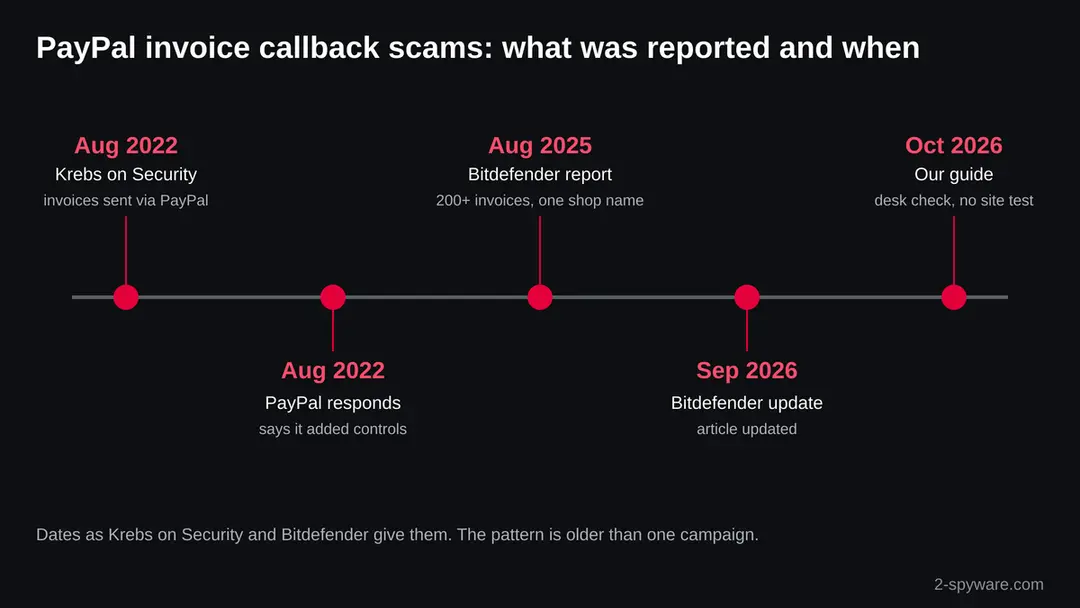
What was reported and when, with dates as Krebs on Security and Bitdefender give them. August 2022
PayPal responds
PayPal told Krebs on Security it has a zero tolerance policy for fraud, was aware of this phishing scam and had added controls against it. It asked customers to stay alert and contact Customer Service directly.
August and September 2022
Readers report more of the same
Readers of the article wrote that the e-mails came from service@paypal.com and asked for amounts from $398 to about $2,000. Some said callers wanted QuickSupport or TeamViewer installed. These are reader reports, not checked facts.
19 August 2025
Bitdefender reports a shop's name on 200+ invoices
Bitdefender described fake invoices sent through PayPal's own invoicing system under the name of Palomino Bazaar. Callers posing as PayPal staff asked for payment, account details or remote access, or a payment to cancel.
24 September 2026
Bitdefender updates its article
The article was listed as updated on this date. The advice stays the same: verify an invoice by signing in to PayPal yourself, never through the message.
10 October 2026
Our desk check
No sample and no live test. Search interest in the phrase is steady at about 880 security searches a month, which tells us people keep receiving these e-mails.
The real risks, from most to least serious
- High
Remote access to your PC
The caller asks you to install a remote tool. Krebs on Security describes this step, and readers named QuickSupport and TeamViewer. With it the caller sees your screen, opens your bank and can leave other programs behind.
- High
Bank and card loss
While connected, the caller may ask you to sign in to your bank to get a "refund", then claim too much was sent and ask you to send it back. Any payment to "cancel" a charge is the theft.
- High
Your PayPal account
If you give your password or a validation code, the caller can take over the account. PayPal says even its own customer service should never ask for these.
- Medium
Personal details
One reader of Krebs on Security said a caller asked for a Social Security number. With it a stranger can open accounts in your name.
- Medium
More calls
Once you call, your number is known to be live. Expect calls about refunds or about recovering the money you lost; those are scams too.
- Low
Paying the invoice itself
If you press Pay, the money goes to the scammer's PayPal account. Report it to PayPal at once and ask for help with a reversal.
If you called the number, paid or let them in
Speed matters. The FTC says to act right away, whatever way you paid. Use another device for passwords if the caller had control of your PC.
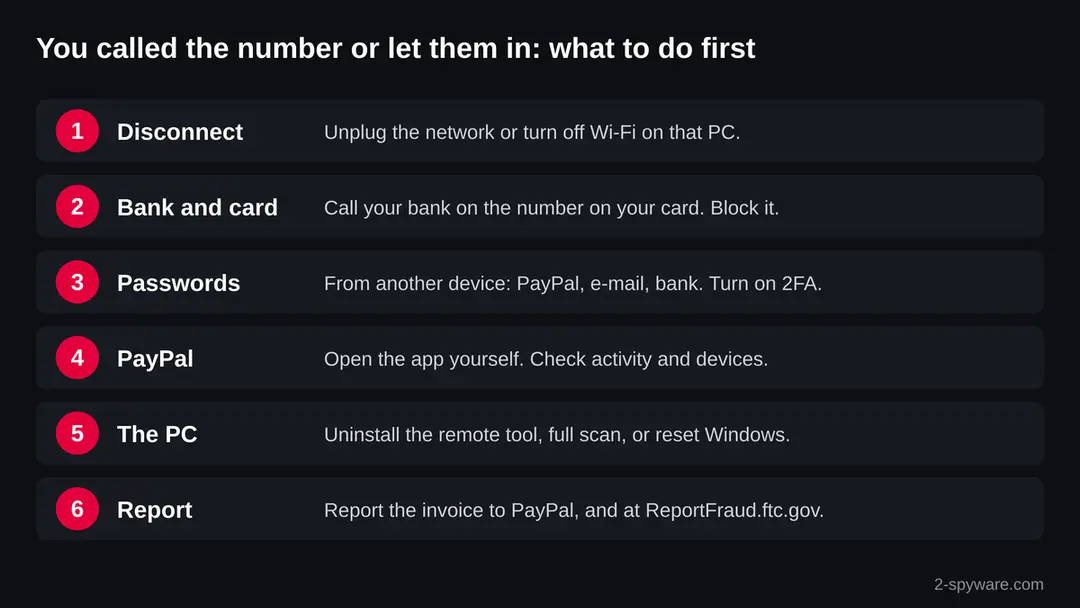
- 1
Disconnect the PC
If a caller had remote access, unplug the network cable or turn off Wi-Fi on that PC first. That cuts the connection while you deal with the rest.
- 2
Card or bank
Call your bank or card issuer on the number on the back of the card, or use its app. Ask them to stop and reverse the payment. The FTC says federal law protects you from unauthorized credit and debit card use (What to do after paying a scammer).
- 3
Zelle, a transfer or a gift card
Report a bank transfer or Zelle payment to your bank right away and ask for a reversal. For a gift card, call the issuer, say a scammer tricked you and keep the card and receipt.
- 4
Passwords
From another device, change the passwords of PayPal, your e-mail and your bank, and of any account that used the same password. Turn on two-step verification (Turn on two-step verification / secure a hacked account).
- 5
Check PayPal yourself
Open the PayPal app or type paypal.com into a new window, as PayPal says. Look at recent activity, linked cards and banks. Bitdefender also advises checking the linked e-mail for unknown logins, forwarding rules and reset e-mails.
- 6
Your Social Security number
If you gave it, go to IdentityTheft.gov. The FTC gives a recovery plan if it was used, and steps at IdentityTheft.gov/databreach if you are not sure.
If you called the number or paid
- 1
You only read the e-mail
There is nothing to undo. Do not call, do not pay, and report the invoice. Opening an e-mail does not install anything.
- 2
Uninstall the remote tool
Microsoft says to uninstall any application the scammers asked you to install. Open Start > Settings > Apps > Installed apps (Windows 10: Apps & features), sort by install date and remove the tool, for example QuickSupport, TeamViewer or AnyDesk ().
- 3
Run a full scan
Open Windows Security > Virus & threat protection > Scan options and run a Full scan, as Microsoft advises. Then run Run a Microsoft Defender Offline scan, which starts before Windows and finds what hides while it runs.
- 4
Install updates
Open Settings > Windows Update and install everything offered. Microsoft lists security updates among the steps after a scammer had access.
- 5
Consider a reset
Microsoft says to consider resetting the device if you gave scammers access. Back up your documents, then use Settings > System > Recovery > Reset this PC. It takes time, but it removes anything the caller left.
- 6
Report it
Report the invoice to PayPal with its invoice ID and a screenshot, as Bitdefender advises. Report the scam at ReportFraud.ftc.gov, and to Microsoft at microsoft.com/reportascam if the caller used a Microsoft name (Report a phishing e-mail).
What to do about service@paypal scam
Do not call the number in the message.
If you already called or let someone connect, follow every step.
Step 1: Stop replying and keep the evidence
Service@paypal scam works only while you keep answering. Stop the conversation, block the sender, and save the evidence first:
- screenshots of the messages
- the addresses used and any account
- wallet numbers
Do not follow up with a "recovery service" that contacts you later, since those are usually the same people. On Windows 11 and Windows 10, Windows + Shift + S takes the screenshots.
Full procedure with screenshots: What to do after paying a scammer
Step 2: Report it
Report the scam where it reaches the people who can act: in the US to the FTC at ReportFraud.ftc.gov and to ic3.gov if you lost money, in the UK to Action Fraud, and in the EU to the national police or consumer authority.
Include the sender, the addresses, the amounts and screenshots. Mark the message as phishing or spam in your mail or messaging app as well, which trains the filter for everyone.
The mail apps on Windows 11 and Windows 10 have the same report buttons as their web versions.
Full procedure with screenshots: Report a cyber attack or scam to the authorities
Questions about service@paypal scam (fake PayPal invoice)
Is service@paypal.com a real PayPal address?
Readers who wrote to Krebs on Security reported scam invoices sent from service@paypal.com, and Krebs found the messages came from paypal.com and passed PayPal's mail checks. So the address can be real while the bill is fake.
Anyone with a PayPal account can send an invoice, and PayPal delivers it. The sender proves nothing. Check the invoice by opening the PayPal app or typing paypal.com yourself.
Why did I get a PayPal invoice for something I did not buy?
Because a scammer sent it to many people at once from a PayPal account. Bitdefender found one small shop's name on more than 200 such invoices. The aim is to scare you into calling the callback number in the note.
You owe nothing for an invoice you did not agree to. Do not pay it and do not call. Report it to PayPal from inside your account.
Will PayPal charge me if I ignore the invoice?
In our reading of how invoices work, an invoice is a request: nothing is paid unless you press Pay. The note says you will be charged only to make you call.
To be sure, open the PayPal app or type paypal.com yourself and look at your activity and linked cards. If you see a real charge you did not make, contact PayPal through its Help Center.
I called the number in the PayPal invoice. What now?
If you only talked, hang up and do not call back. Change your PayPal password from the app if you said anything about your account.
If you installed a program for the caller, disconnect the PC, uninstall it, run a full scan, and change your passwords from another device. If you paid or signed in to your bank, call your bank today on the number on your card.
The caller asked me to install TeamViewer or QuickSupport. Is my PC infected?
Treat it as possibly compromised. Readers of Krebs on Security named these tools in this scam. A remote tool lets the caller see and control your PC, and they can leave other programs behind.
Microsoft says to uninstall what scammers asked you to install, run a full Windows Security scan, install updates and consider resetting the device. Change passwords from another device.
How do I report a fake PayPal invoice?
Report it to PayPal from inside your account, with the invoice ID and a screenshot, as Bitdefender advises. PayPal points to its Help Center for reporting suspicious messages, and you can call 1-888-221-1161, the number PayPal gives.
Also report the scam at ReportFraud.ftc.gov. Do not reply to the invoice and do not use any number printed in it.
How can I tell a real PayPal e-mail from a fake one?
PayPal says a real e-mail uses your full name, not "Dear user", and shows its logo with a checkmark in your inbox view. Be wary of urgent demands, odd links and attachments.
With invoices that is not enough, because the e-mail can be real while the seller is a scammer. The safest test is always the same: open the PayPal app yourself and look.
Does PayPal ever ask for my password or a code by phone?
No. PayPal says it never asks for passwords, validation codes or account information by e-mail, text or phone, and that even a customer service rep should not ask for them.
It also says not to return automated calls that ask you to call back. A caller who asks for a code is not PayPal. Hang up.
I paid the fake PayPal invoice. Can I get my money back?
Act at once. Contact PayPal through the app or the Help Center and report the payment as fraud.
If a card or bank account paid, call the issuer on the number on the card and ask for a reversal; the FTC says federal law protects you from unauthorized card use. Keep screenshots of the invoice and of the payment.
Will Fortect remove service@paypal scam?
Fortect scans Windows for malware and unwanted programs and repairs the system files and settings they change, and its free scan shows what it finds on your PC before you decide anything.
For service@paypal scam, follow the plan above as well: the browser steps take back permissions and settings that no scanner treats as a threat, and uninstalling the program that brought it removes the source.
Run Microsoft Defender's full scan and, if anything was found, its offline scan as a second opinion. If the symptoms are gone after the plan and both scans are clean, there is nothing more to do.
Sources
- PayPal: Learn about fake messages (phishing, what PayPal never asks for, how to contact PayPal) (read October 10, 2026)
- Krebs on Security: PayPal phishing scam uses invoices sent via PayPal (18 August 2022) (read October 10, 2026)
- Bitdefender: How scammers use small business names to send fake PayPal invoices (2025, updated 2026) (read October 10, 2026)
- Microsoft Support: Protect yourself from tech support scams (read October 10, 2026)
- FTC Consumer Advice: What to do if you were scammed (read October 10, 2026)