
How-to
How to report a phishing email
Reporting a phishing email in your mail service trains its filter and gets the sender flagged. Forwarding it to the national reporting address helps take the fake website down. Do both, then delete the message. Do not click its links or open its attachments while you do it.
When you need this
- An email asks you to sign in, pay, confirm details or open an attachment, and you did not expect it.
- The sender pretends to be your bank, a delivery company, Microsoft, Google, a government office or someone you know.
- Your security software or mail service warns that a message is dangerous.
Gmail
Written for Gmail on the web in a desktop browser on Windows (2026-10-03). Steps checked against Gmail Help on October 3, 2026.
Open Gmail and open the message.
Next to Reply, click More (the three dots).
Click Report phishing.
Google receives a copy of the message and its attachments when you report it or move it to Spam.
Reported a real message by mistake? Open it, click More > Report not phishing.
If a security email that looks like Google's worries you, check myaccount.google.com/notifications directly instead of clicking anything in the email.
Sources
- Gmail Help: Avoid & report phishing emails (Computer) (read October 3, 2026)
Outlook
Written for Outlook.com / Outlook on the web in a desktop browser on Windows (2026-10-03); the Report button is the same in the new Outlook for Windows. Steps checked against Microsoft Support on October 3, 2026.
In the message list, select the message.
Above the reading pane, click Report > Report phishing.
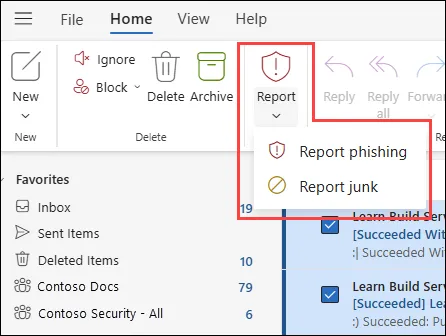
New Outlook for Windows and Outlook on the web: Report > Report phishing. In classic Outlook for Windows, select the message, then Home > Report > Report Phishing.
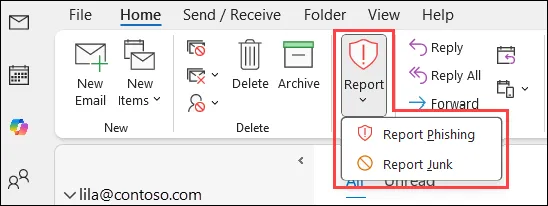
Classic Outlook for Windows (Microsoft 365): Home > Report > Report Phishing.
Reporting does not block the sender. To stop further mail from them, add the address to your blocked senders.
In a work or school mailbox, the report may go to your IT department as well as to Microsoft, depending on the organisation's settings.
Fake Microsoft support messages or pop-ups can also be reported at microsoft.com/reportascam.
Sources
- Microsoft Support: Phishing and suspicious behavior in Outlook (read October 3, 2026)
- Microsoft Learn: Report phishing and suspicious emails in Outlook for admins (read October 3, 2026)
Report it in the US
Written for US reporting addresses, any email program (2026-10-03). Steps checked against FTC Consumer Advice on October 3, 2026.
Forward the phishing email to
reportphishing@apwg.org(the Anti-Phishing Working Group).Report it to the FTC at ReportFraud.ftc.gov.
Delete the email.
If the email impersonates a company you deal with, tell that company too, using a phone number or website you know is real, not the contact details in the email.
Sources
- FTC Consumer Advice: How To Recognize and Avoid Phishing Scams (read October 3, 2026)
- ReportFraud.ftc.gov (read October 3, 2026)
Report it in the UK
Written for UK reporting address, any email program (2026-10-03). Steps checked against NCSC guidance on October 3, 2026.
Forward the email to
report@phishing.gov.uk(the National Cyber Security Centre).Delete the email.
You do not need to forward emails that are already in your spam or junk folder.
If forwarding fails, the link may already be known; you can also submit a single link with the NCSC's suspicious website form.
The NCSC does not take crime reports. If you lost money or were hacked, report it to Report Fraud (England, Wales and Northern Ireland) or Police Scotland on 101: see report a cyber attack or scam.
Sources
- NCSC: Report a scam email (read October 3, 2026)
If the steps did not help
You already clicked the link or replied
- You typed a password: change it at once on the real site, and on every other site that used the same password. Then turn on two-step verification.
- You gave card or bank details: call the number on the back of your card. See what to do after paying a scammer.
- You gave your Social Security number: follow the steps at IdentityTheft.gov and consider a credit freeze.
- You opened an attachment or downloaded a file: update your security software and run a full scan, for example a Microsoft Defender Offline scan.
Scam text messages
In the US, forward a phishing text to 7726 (SPAM) and report it at ReportFraud.ftc.gov.
Questions
Is marking an email as spam the same as reporting phishing?
Not quite. Spam is unwanted mail; phishing tries to steal passwords, money or data. Use Report phishing for the latter, so the mail service treats it as an attack, not just junk.
Will reporting a phishing email block the sender?
In Outlook.com, no: the sender is reported but not blocked. Block the address separately if the messages keep coming.
I opened a phishing email. What now?
Report and delete it. The risk comes mainly from clicking its links, opening its attachments or entering details; if you did any of these, follow the steps under You already clicked the link or replied.