
xiangduck.sld.tw: a server that handed out Mirai bot files for routers and cameras, and what to do if a device fetched them
xiangduck.sld.tw is a web address that URLhaus listed eleven times on 2 October 2026 for files named violet.x86, violet.arm, violet.mips and eight more, six of them tagged Mirai. Mirai is a bot for routers, cameras and video recorders, not for a Windows PC or a phone.
All eleven files were offline by our check on 8 October, and the name no longer resolved. If you only saw the name in a log, find the device that asked for it; if it is a router or camera, restart it offline, change its password and update or replace it.
Facts checked October 8, 2026. Removal steps tested on Windows 11 (26H2) and checked against Microsoft's and the browser makers' current documentation.
Automatic
Get a free scan and check if your PC is infected.
Fortect finds malware, unwanted programs and the Windows damage they leave behind, and repairs it in one pass.
If a router, camera or other device that asked for files from xiangduck.sld.tw keeps coming back after uninstalling, a scan can find what reinstalls it.
Do it yourself · free Remove xiangduck.sld.tw (Mirai bot files) yourself 4 steps, about 12 minutes, no software needed.
Start the steps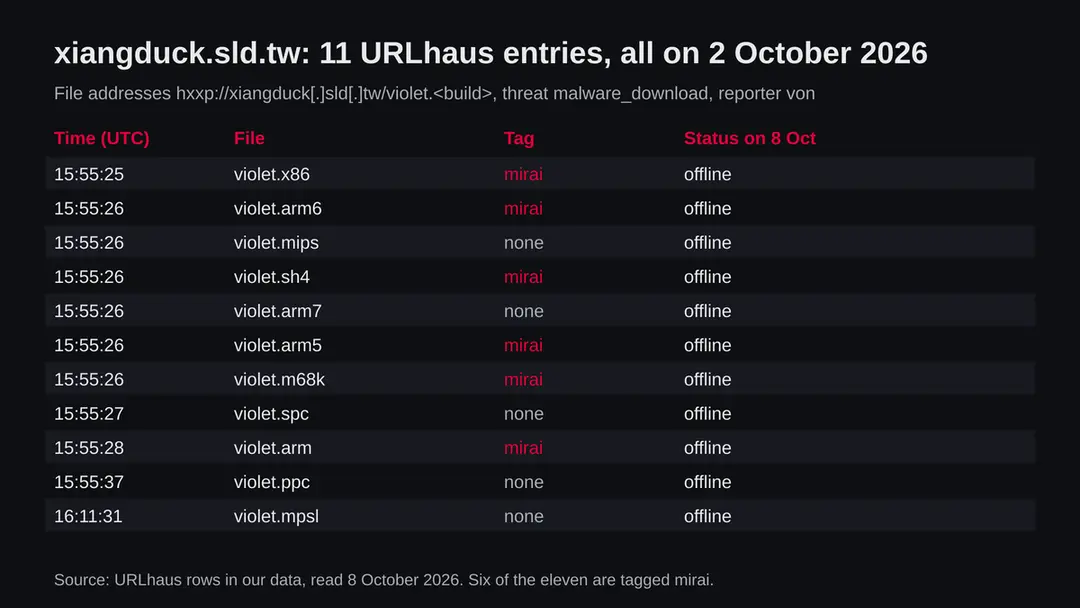
Xiangduck.sld.tw (Mirai bot files): summary
| Type | A malware download server: eleven builds named violet.* for different processors, six tagged Mirai, a bot for routers and cameras |
|---|---|
| Risk | High for a router, camera or recorder that fetched the files: it becomes part of a botnet. Low if you only saw the name |
| Symptoms | Often none. Slow or dropping internet, a hot router and settings you did not change are the signs the FBI names |
| How to get rid of it | Unplug the device, restart it offline, set a new password, update the firmware, turn off remote admin, and replace it if it gets no updates |
| Our check (8 October 2026) | One plain request from our server: the name did not resolve. A dead name clears nothing; the danger rating comes from URLhaus |
| Running since / first seen | First and only reports on 2 October 2026; registration date not known (no RDAP record) |
| Removal | Scan the PC with security software to find and remove the malware and anything installed with it. Fortect scans Windows for malware and repairs the system files and settings it damaged. Remove it nowTo use the full-featured product, you have to purchase a license for Fortect. The scan is free. |
Show 8 more facts
| Platform | Linux routers, IP cameras, video recorders and other small devices. Not Windows, macOS, iPhone or ordinary Android phones |
|---|---|
| Detection names | No detection name is known for these files, because we did not open them. For Mirai on Linux Microsoft uses Backdoor:Linux/Mirai.B |
| Name | Xiangduck.sld.tw |
| Evidence | 11 write-ups by security sites; details still limited |
| First seen | 2 October 2026 |
| Distribution | Typically loaders, free VPN or "earn money" apps and cracked programs |
| Damage | Your internet connection used by others for attacks or fraud, blocklisting, slower internet |
| Facts checked | 8 October 2026 |
Facts checked on 8 October 2026 against the URLhaus data for xiangduck.sld.tw held in our database, an RDAP query that returned no record, one plain request from our server, and published material from CISA, the FBI, HKCERT, Microsoft, the USENIX Security 2017 Mirai study, SecurityWeek and the SANS Internet Storm Center.
We did not download the files and infected no device; the steps follow those sources and were not tried on a live infection.
What xiangduck.sld.tw is, and what we know about it
xiangduck.sld.tw is not a program on your PC. It is a web address that the abuse.ch project URLhaus lists as a place where malware files were offered for download. We found no public write-up of this one address, so what follows is what URLhaus shows, what our own request found, and what CISA, the FBI, HKCERT, Microsoft and researchers have published about Mirai, the family six of the files are tagged with.
- 1
What URLhaus lists
Eleven file addresses at the top of xiangduck.sld.tw, all over plain http, all named violet followed by a dot and a short code: x86, arm, arm5, arm6, arm7, mips, mpsl, ppc, sh4, m68k and spc. All were added on 2 October 2026 between 15:55 and 16:11 UTC by the same reporter, and all carry the threat type malware_download.
- 2
What the endings mean
The endings are processor families. x86 is the family of most PCs, arm and mips are common in home routers and cameras, mpsl is little endian MIPS, ppc is PowerPC, sh4 is SuperH, m68k is Motorola 68000 and spc is most likely SPARC. One build per chip is the classic pattern of a Mirai download server.
- 3
What the tags say
Six of the eleven entries are tagged mirai: x86, arm, arm5, arm6, sh4 and m68k. The other five have no tag in our copy. That does not make them harmless; it only means nobody labelled them. Files offered side by side with the same name are almost always builds of the same program.
- 4
What we could not confirm
We did not download any of the files, so we cannot tell you which Mirai variant they are, which controller they report to or which flaw was used to plant them. The name violet does not match any family name we found in vendor reports, so we do not treat it as one.
- 5
What this means for you
If you only saw the name in a firewall, DNS or router log, nothing is infected by that alone. It does mean that a device on your network asked for it, and the device that asks for Mirai files is usually a router, camera or recorder that someone already got into.
- Kind of threat
- A download server for Mirai, a bot that turns routers, IP cameras and video recorders into a network used for denial of service attacks
- Where the files were
- hxxp://xiangduck[.]sld[.]tw/violet.<build>: eleven builds, one per processor family
- Name registration
- Not known. RDAP returned no record for the name, and we found no public page that says who runs sld.tw or how its names are given out
- URLhaus entries
- 11 file addresses, all added on 2 October 2026; all 11 offline in our copy of the data on 8 October 2026
- Our check
- 8 October 2026: a plain request from our server failed because the name did not resolve (ENOTFOUND)
- Platform
- Linux based routers, cameras, recorders and other small devices. Mirai builds do not run on Windows, macOS, iPhone or ordinary Android phones
What xiangduck.sld.tw (Mirai bot files) does on an infected PC
What we checked on 8 October 2026, and what we could not
We made one plain request to the address from our server on 8 October 2026.
There is no screenshot, because there was nothing to load: the name did not turn into an internet address at all.
Our check, 8 October 2026
- The name did not resolveOur request ended with getaddrinfo ENOTFOUND xiangduck.sld.tw. The name had no address in DNS when we asked, so no server answered.
- Why that is not a clean resultDownload servers for bots are often switched off or renamed within days, and the same files appear on a new name. A dead name tells you the old address stopped working, not that the devices it infected were cleaned.
- URLhaus listingEleven files for eleven processor families, six tagged mirai, all reported on 2 October 2026 and all offline by 8 October 2026.
- RegistrationRDAP gave no record for the name, so we cannot tell you when it was created or by whom.
- The files themselvesWe did not download or run any file. We cannot tell you what each one contains or where it reports to.
Dangerous: treat it as a malware server Our check proves nothing either way because the name was gone. The danger rating comes from the eleven URLhaus reports, their mirai tags and the one per processor naming that matches published Mirai download servers.
What happened to xiangduck.sld.tw, from the first report to our check
Everything we know about this address fits into one week.
The dates come from URLhaus and from our own request; nothing older is on public record that we could find.
Before 2 October 2026
No record
We found no public report, no RDAP record and no vendor page about xiangduck.sld.tw from before the URLhaus entries. When the name was set up is not known.
2 October 2026, 15:55 UTC
Ten files are reported within a few seconds
violet.x86 is added at 15:55:25 UTC, then arm5, arm6, arm7, mips, sh4 and m68k at 15:55:26, spc at 15:55:27, arm at 15:55:28 and ppc at 15:55:37. Five of them carry the tag mirai.
2 October 2026, 16:11 UTC
The eleventh file
violet.mpsl, the little endian MIPS build, is added at 16:11:31 UTC. It has no tag in our copy.
By 8 October 2026
All files offline
Our copy of the URLhaus data marks all eleven file addresses offline.
8 October 2026
Our check
A plain request from our server finds no DNS address for xiangduck.sld.tw. We publish this guide with what is known and what is not.
All eleven URLhaus entries for xiangduck.sld.tw. One name, one folder, one build per processor family.
What the pattern suggests, and what it does not: a full set of builds reported within seconds looks like an automated scan of one download folder, which is how researchers usually find these servers. It does not tell us how many devices fetched the files before the name went dark.
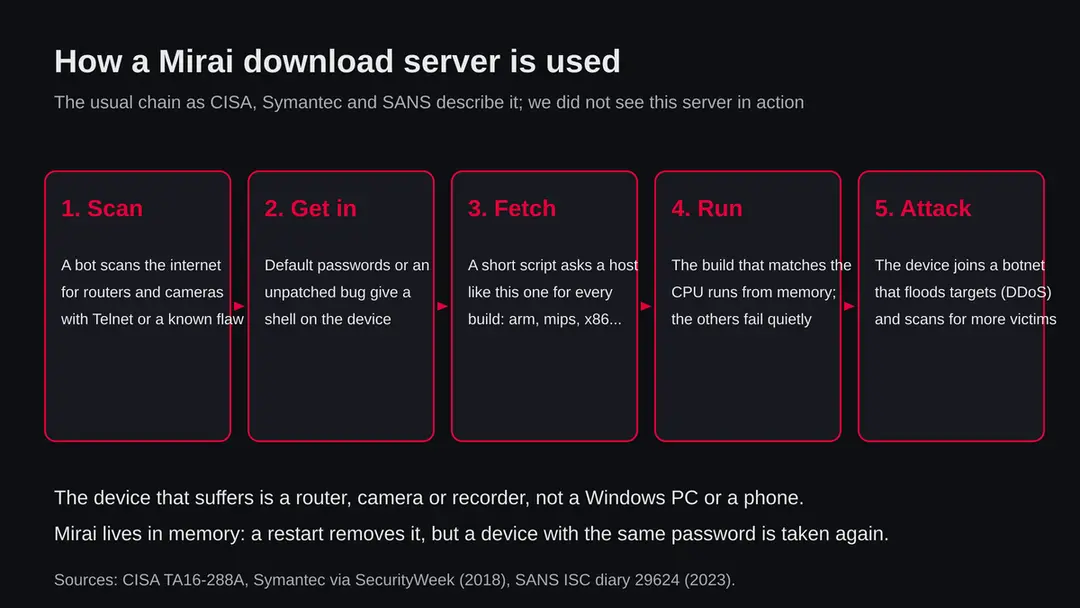
How a Mirai download server is used
A download server like this one is only one link in a chain.
The victim is not a person who clicks; it is a device with a weak password or an old flaw that a bot found on its own.
- 1
A bot scans the internet
CISA describes Mirai as malware that keeps scanning the internet for vulnerable devices. Its original version tried a list of 62 common default user names and passwords, and CISA says that alone gave it hundreds of thousands of devices.
- 2
It gets a command line on the device
With a default password, or with a known flaw in old router software, the attacker gets a shell on the device. CISA names Telnet on ports 23 and 2323, and a later variant used a flaw on port 7547 of broadband routers.
- 3
A short script fetches the builds
Symantec, as reported by SecurityWeek in August 2018, found that the infection starts with a shell script that downloads and runs each build in turn until one matches the device. The SANS Internet Storm Center showed the same pattern in 2023 with ten files named after processor families.
- 4
The matching build runs from memory
Only the build for the right chip starts; the rest fail. CISA says Mirai lives in memory, which is why a restart removes the running copy.
- 5
The device works for someone else
The device now takes orders from a controller. It floods targets with traffic and scans for the next devices to infect, while it keeps doing its normal job for you.
What Mirai is
Mirai is not new.
Its source code became public in 2016, and since then many groups have built their own versions under new names. That is why the same file pattern keeps showing up on new addresses.
| Question | What the sources say | Source |
|---|---|---|
| What is it? | Self spreading malware that turns home routers, network cameras and digital video recorders into a botnet | CISA alert TA16-288A |
| How old is it? | Its source code was published online at the end of September 2016 | CISA alert TA16-288A |
| How big did it get? | About 600,000 infected devices at its peak, mostly embedded and internet of things devices | Antonakakis and others, USENIX Security 2017 |
| What does it do? | Distributed denial of service attacks; CISA cites one of more than 620 Gbps and one of at least 1.1 Tbps in 2016 | CISA alert TA16-288A |
| How does it get in? | Default user names and passwords over Telnet, and known flaws in old router software | CISA; HKCERT |
| Is it still active? | Yes. HKCERT reported on 23 April 2026 a Mirai variant called tuxnokill that attacks end of life D-Link DIR-823X routers through CVE-2025-29635, and end of life TP-Link and ZTE routers through other flaws | HKCERT, 23 April 2026 |
| How does Microsoft name it? | Microsoft lists Backdoor:Linux/Mirai.B, a Linux threat, published 28 May 2017 | Microsoft Security Intelligence |
| Which variant is on this server? | Not known. URLhaus gives only the mirai tag on six files, and the file name violet matches no family we found | Our reading |
What xiangduck.sld.tw (Mirai bot files) can steal or download
What a Mirai infection takes from you
Mirai is not built to read your files or your passwords.
What it takes is your device and your connection. That is still a real cost.
Reported as possible
- Your internet upload capacity
- Your public IP address used in attacks
- Your router or camera used to infect others
- A slower or dropping connection
- Your IP address on block lists
- A device that an outsider can command
| What it uses | What that means for you | Source |
|---|---|---|
| Your bandwidth | Floods sent from your line can slow your own internet and use up a data cap | CISA; FBI |
| Your public address | Sites and providers may block your address after it is seen in attacks | Our reading of how block lists work |
| The device itself | Someone else can send it commands; the FBI lists overheating, connection problems and changed settings as signs for routers | FBI I-050725-PSA |
| Your other devices | A router that an outsider controls sits between every device and the internet; Mirai itself scans outward, but the access stays open | Our reading |
What this can cost you
The risk depends on which device asked for the files.
- High
A router you rely on
An infected router carries all your traffic. Even when Mirai only attacks others, the same open door that let it in is open to anyone.
- High
An old device with no more updates
The FBI and HKCERT both say end of life routers should be replaced, because their flaws will never be fixed and they are taken again after every restart.
- Medium
A camera or recorder
A camera that someone else controls is a privacy question too. Mirai does not watch video, but the access that let it in might.
- Medium
Your connection and your address
Slow internet, a full data cap and an IP address on block lists are the everyday costs of a device in a botnet.
- Low
A Windows PC, a Mac or a phone
Mirai builds are made for Linux on small devices. A Windows PC that only appears in a log next to this name is not running them.
- Low
Nothing, if you only saw the name
A name in a block list, a log or a warning is not an infection.
What you may notice, and what you may not
Most owners of an infected router or camera notice nothing.
The signs below come from CISA and the FBI.
| Sign | What it can mean |
|---|---|
| Nothing at all | The most common case. Mirai keeps the device working so its owner has no reason to restart it. |
| Internet slows down or drops at random | The device may be sending flood traffic or scanning; the FBI lists connectivity problems as a sign. |
| The router is hot | The FBI names overheating as a sign of a compromised router. |
| Settings you did not change | The FBI names settings changes the owner does not recognise, such as new port forwards or remote access turned on. |
| A firewall or DNS log shows xiangduck.sld.tw | A device on your network asked for the files. Note which one and when. |
| Your provider or a site warns about your address | Your line may have been seen sending attack traffic. Ask the provider which device or time it was. |
How to check the PC for xiangduck.sld.tw (Mirai bot files)
How a device ends up asking for these files
A person rarely meets this address by clicking.
The device does, after someone got into it.
- 1
A default or weak password
CISA says Mirai's first version used 62 common default user names and passwords. Cameras and recorders that were never given a new password are still the easiest target.
- 2
An unpatched or end of life router
HKCERT reported Mirai attacks in 2026 on D-Link DIR-823X routers through CVE-2025-29635, and on old TP-Link and ZTE routers. A router that no longer gets updates keeps such flaws forever.
- 3
Remote management or Telnet open to the internet
The FBI found router malware on devices with remote administration turned on, and CISA says to watch ports 23 and 2323 for Telnet attempts. Any login page reachable from the internet is a door.
- 4
Port forwarding and UPnP
CISA advises turning off UPnP on routers unless it is needed, because it lets devices open ports to the internet on their own.
Check your devices before you change anything
Start with the question that matters: which device asked for xiangduck.sld.tw? If you saw the name in a router, firewall or DNS log, the device and the time are in that log. Only that device is in question, not every device you own.
If the log points at a Windows PC rather than a router or camera, the PC is not running these Linux files, but something on it made the request. Check that PC with the plan further down this page.
- 1
Find the device by its address
Most router pages have a list of connected devices with their local IP and MAC address. Match the address in the log to a name. A camera, a recorder or the router itself is the likely answer.
- 2
Look at the router's settings
Sign in to the router's admin page and look at remote management, port forwarding, UPnP and DNS servers. The FBI names changed settings as a sign; write down anything you did not set.
- 3
Check the firmware date and the model's support status
Find the model on the maker's site. If the maker says the model is end of life or there is no update from the last few years, plan to replace it.
- 4
Ask your provider
If your provider warned you about attack traffic, ask for the time and kind of traffic. It helps you match it to one device.
- 5
A clean look proves little
Mirai lives in memory and hides in normal looking processes. A router page that looks normal is one data point, not a clean result.
How to remove xiangduck.sld.tw (Mirai bot files)
How to remove xiangduck.sld.tw
The PC was working for someone else, using your connection.
These steps remove the program and close what it changed.
Step 1: Uninstall a router, camera or other device that asked for files from xiangduck.sld.tw
Open Settings > Apps > Installed apps in Windows 11, or Settings > Apps > Apps & features in Windows 10.
Sort the list by install date and find a router, camera or other device that asked for files from xiangduck.sld.tw, then choose Uninstall from the three-dot menu next to it (in Windows 10, click the entry and then Uninstall).
Remove anything else installed on the same day that you do not recognise, because such programs usually arrive together in one installer. If the uninstaller opens a browser page with an offer or a survey, close it: the program is removed either way.
Full procedure with screenshots: Uninstall a program or app in Windows On uGetFix
Step 2: Delete scheduled tasks that bring it back
Open Task Scheduler from the Start menu and click Task Scheduler Library. Select each task you do not recognise and read the Actions tab:
- a task that starts a file in
%AppData%or%Temp% - runs
powershellwith a long encoded line - opens a web address belongs to xiangduck.sld.tw or a similar program
Right-click such a task and choose Delete, and check the subfolders too. Leave tasks from Microsoft, your PC's maker and programs you use. Task Scheduler is the same in Windows 11 and Windows 10.

Windows 11: Task Scheduler Library, the task selected, the Actions tab shows the file it runs. Full procedure with screenshots: Remove what malware leaves behind in Windows
- a task that starts a file in
Step 3: Remove it from startup
Whatever xiangduck.sld.tw installed usually starts with Windows. Open Task Manager with Ctrl + Shift + Esc, go to Startup apps in Windows 11 or the Startup tab in Windows 10, and disable what you do not know, starting with entries that have an empty Publisher column.
Open file location on the right-click menu shows the file, which helps you decide and tells you what to delete later. Disabling is safe: if something you need stops working, switch it back on.
Full procedure with screenshots: Stop apps from opening at startup On uGetFix
Step 4: Scan the PC, then run the offline scan
Open Windows Security > Virus & threat protection > Scan options, run a Full scan and remove everything it finds. Then select Microsoft Defender Antivirus (offline scan) and click Scan now: the PC restarts and scans before Windows loads, which finds files that hide while Windows runs.
Save your work first, because the offline scan takes about 15 minutes. Both scans are built into Windows 11 and Windows 10, and a second scanner from another vendor is a useful extra opinion.

Windows 11: Windows Security > Virus & threat protection > Scan options. Full procedure with screenshots: Run a Microsoft Defender Offline scan
Which of your devices can run these files
The eleven files are builds for small Linux devices.
This table says what each kind of device you own has to fear from them.
| Device | Can it run these builds? | What to do |
|---|---|---|
| Home router, mesh node, modem | Yes, if it runs Linux on ARM or MIPS, which most do | Restart offline, new password, update, turn off remote admin; replace if end of life |
| IP camera, video recorder, smart device | Yes, this is Mirai's main target | Restart offline, new password, update; keep it off the open internet |
| Windows PC | No. The x86 build is a Linux program | If a PC made the request, check it with the plan below |
| Mac, iPhone, ordinary Android phone | We found nothing that says so | Nothing for this address; keep the system updated |
After removal: passwords, accounts and prevention
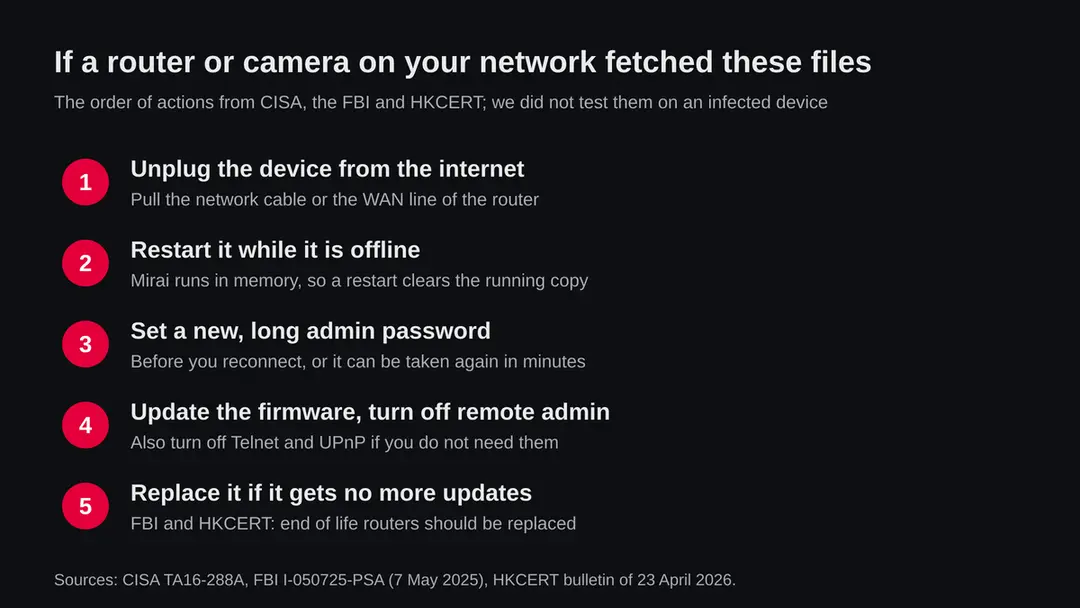
If a router or camera fetched these files
These steps follow CISA, the FBI and HKCERT.
We did not try them on an infected device.
- 1
Take the device off the internet
CISA says to disconnect the device from the network first. For a camera, pull its cable or remove it from Wi-Fi. For a router, unplug the line from the modem.
- 2
Restart it while it is offline
CISA explains that Mirai lives in memory, so a restart clears the running copy. Reconnecting first with the old password can get the device taken again within minutes.
- 3
Set a new, long admin password
Change the default or old admin password before you reconnect. The FBI advises unique, random passwords of 16 to 64 characters that you do not reuse.
- 4
Update the firmware
Install the newest firmware from the maker's own site or from the router's update page. HKCERT and the FBI both put updates first after replacement.
- 5
Turn off what you do not use
Turn off remote management, Telnet and UPnP, as the FBI, CISA and HKCERT advise. Remove port forwards you do not recognise.
- 6
Reset to factory settings if settings were changed
If you found changes you did not make, a factory reset followed by the steps above gives you a known starting point. Set it up by hand rather than from a saved backup of the old settings.
- 7
Replace a device that gets no more updates
The FBI says end of life routers should be replaced, and HKCERT lists replacement as its first advice. A restart does not fix a flaw that the maker will never patch.
- 8
Watch the log for a while
Keep an eye on your router or DNS log for a few days. If the same device asks for new odd names again, it was taken again or something else on it is wrong.
Keep routers and cameras out of a botnet
Most Mirai infections are prevented by a few settings that take minutes.
Do
- Give every router, camera and recorder its own long admin password on day one.
- Install firmware updates, and turn on automatic updates if the device offers them.
- Turn off remote management, Telnet and UPnP unless you need them.
- Buy devices from makers that publish updates and support dates.
- Replace routers the maker no longer supports.
- Put cameras and smart devices on a guest network if your router can do that.
Don't
- Do not leave default user names and passwords on any device.
- Do not forward ports to a camera or recorder so you can watch it from outside; use the maker's app or a VPN instead.
- Do not keep using a router from 2010 or earlier; the FBI says such routers are likely end of life.
- Do not restore an old settings backup onto a cleaned router.
- Do not treat a dead address as proof that your device is clean.
Questions about xiangduck.sld.tw (Mirai bot files)
What is xiangduck.sld.tw?
It is a web address that URLhaus, the malware tracking project run by abuse.ch, listed on 2 October 2026 for eleven files named violet.x86, violet.arm, violet.mips and so on. Six are tagged mirai.
It looks like a download server for Mirai, a bot for routers and cameras. We found no vendor report about this one address, so the guide relies on the URLhaus rows and on what CISA and others say about Mirai.
Is xiangduck.sld.tw safe to open?
No. Do not request files from it. On 8 October 2026 the name did not resolve and all eleven files were marked offline, but that only means this address stopped working. Builds like these usually move to new names.
There is nothing useful there for a person, and a browser visit would not help you check anything. The question that matters is whether a device on your network fetched the files.
What is Mirai?
Mirai is malware that turns routers, network cameras and video recorders into a botnet used for denial of service attacks. Its code became public in 2016, and new variants still appear; HKCERT reported one attacking old D-Link routers in April 2026.
A study presented at USENIX Security 2017 counted about 600,000 infected devices at its peak. It gets in mostly through default passwords and known flaws in old router software.
What do the endings x86, arm, mips, mpsl, ppc, sh4, m68k and spc mean?
They are processor families. The server offers one build per chip so that a script can try them all and run the one that fits.
Symantec and the SANS Internet Storm Center describe the same pattern. x86 is the chip family of most PCs, arm and mips are common in routers and cameras, and spc is most likely SPARC. Only the build that matches the chip starts.
I saw xiangduck.sld.tw in my router or DNS log. Am I infected?
Not necessarily. It means a device on your network asked for the address. Find which one from the log.
If it is a router or camera, unplug it, restart it offline, change its password and update it before you reconnect. If it is a Windows PC, check that PC with the plan on this page, because something on it made the request.
Can these files infect my Windows PC?
No. The x86 build is a Linux program and does not run on Windows. If your log shows a Windows PC asking for the address, something on that PC made the request, so check the PC with the plan on this page.
Microsoft names Mirai on Linux Backdoor:Linux/Mirai.B, a Linux threat. A Windows PC is not the device Mirai is built for.
How do I remove Mirai from a router or camera?
CISA says Mirai lives in memory, so restarting the device while it is offline clears the running copy. Then set a new long password, update the firmware and turn off remote admin before reconnecting, or it can be taken again.
If the device has settings you did not make, reset it to factory settings and set it up again by hand. Replace it if the maker no longer sends updates.
Should I replace my router?
If the maker no longer updates it, yes. The FBI and HKCERT both advise replacing end of life routers, and the FBI says routers from 2010 or earlier are likely in that group.
A restart clears a running Mirai copy, but a flaw that the maker will never patch lets the bot back in. Check the maker's support page for your exact model.
Does xiangduck.sld.tw affect Mac, iPhone or Android?
We found nothing that says so. The builds are for small Linux devices. An ordinary Mac, iPhone or Android phone does not run them.
Keep those devices updated as usual. The danger at home is a router, a camera or a video recorder on the same network. If one of them asked for the address, follow the steps for routers and cameras on this page.
Will Fortect remove xiangduck.sld.tw?
Fortect scans Windows for malware and unwanted programs and repairs the system files and settings they change, and its free scan shows what it finds on your PC before you decide anything.
For xiangduck.sld.tw, follow the plan above as well: the browser steps take back permissions and settings that no scanner treats as a threat, and uninstalling the program that brought it removes the source.
Run Microsoft Defender's full scan and, if anything was found, its offline scan as a second opinion. If the symptoms are gone after the plan and both scans are clean, there is nothing more to do.
Sources
- CISA: Heightened DDoS Threat Posed by Mirai and Other Botnets, alert TA16-288A (14 October 2016, revised 17 October 2017) (read October 8, 2026)
- FBI IC3: Cyber Criminal Proxy Services Exploiting End of Life Routers, I-050725-PSA (7 May 2025) (read October 8, 2026)
- HKCERT: Botnet Alert, Mirai Botnet Targets End-of-Life D-Link Routers (23 April 2026) (read October 8, 2026)
- Microsoft Security Intelligence: Backdoor:Linux/Mirai.B (published 28 May 2017) (read October 8, 2026)
- Antonakakis and others: Understanding the Mirai Botnet, USENIX Security Symposium 2017 (read October 8, 2026)
- SecurityWeek: Cross-Platform Mirai Variant Leverages Open Source Project (23 August 2018, on Symantec research) (read October 8, 2026)
- SANS Internet Storm Center: Overview of a Mirai Payload Generator, Xavier Mertens (11 March 2023) (read October 8, 2026)