
FBI MoneyPak virus: what the fake FBI lock screen is and how to remove it
FBI MoneyPak is a screen locker that covers your PC with a fake FBI notice and demands $200 paid with a MoneyPak code. It does not encrypt your files and the fine is not real, so do not pay:
- Safe Mode
- Microsoft Defender Offline
- boot media gets you past it
Facts checked October 5, 2026. Removal steps tested on Windows 11 (26H2) and checked against Microsoft's and the browser makers' current documentation.
Automatic
Get a free scan and check if your PC is infected.
Fortect finds malware, unwanted programs and the Windows damage they leave behind, and repairs it in one pass.
After unlocking, an automatic scan is a quick way to confirm the FBI locker left nothing behind.
Do it yourself · free Remove FBI MoneyPak virus yourself 4 steps, about 12 minutes, no software needed.
Start the steps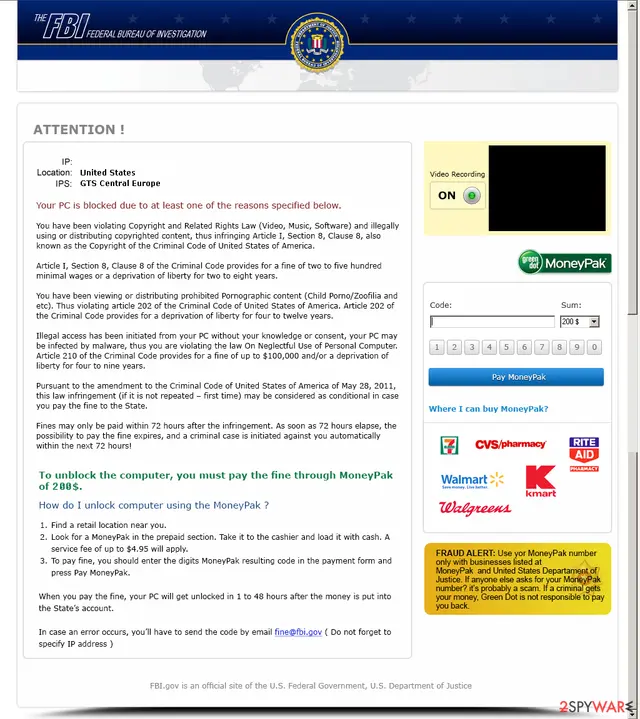
FBI MoneyPak virus: summary
| Type | Screen locker, a ransomware subtype that locks the screen and does not encrypt files |
|---|---|
| Risk | Medium: a scam you can remove, but possibly installed with password-stealing malware (FBI, 2012) |
| Symptoms | A full-screen FBI notice with a $200 MoneyPak box and a 72-hour deadline; Task Manager may be blocked |
| How to get rid of it | Safe Mode or Microsoft Defender Offline, then a full scan; never pay |
| Our check | Desk check on 5 October 2026: official records, Microsoft's entry and our screenshot; no live sample run |
| First seen | 2011 (FBI); IC3 warning May 2012; our guide 26 April 2021 |
| Removal | Scan the PC with security software to find and remove the malware and anything installed with it. Fortect scans Windows for malware and repairs the system files and settings it damaged. Remove it nowTo use the full-featured product, you have to purchase a license for Fortect. The scan is free. |
Show 14 more facts
| Name | FBI MoneyPak (FBI virus, FBI Green Dot MoneyPak virus) |
|---|---|
| Encrypted file extension | None: the locker does not rename or encrypt files |
| Ransom note | Not a file: a full-screen web page. The wording is quoted below |
| Decryptor | Not needed: nothing is encrypted |
| Contact | No e-mail address to write to: the payment code is typed into the lock screen |
| Detection names | Microsoft: Ransom:Win32/Reveton.C, Trojan:Win32/Reveton |
| Distribution | Compromised websites (drive-by), spam e-mail, repacked installers, cracks |
| Damage | PC unusable until the lock is removed; possible data theft; paid money lost |
| Versions | FBI MoneyPak; FBI Green Dot MoneyPak virus; FBI virus Black Screen; DHS-branded lock ($300) |
| Evidence | One write-up by a security site; details still limited |
| Lock screen claims to be | FBI |
| Free decryptor | No free decryptor is known (checked 5 October 2026) |
| Microsoft Defender name | Ransom:Win32/Reveton.C |
| Facts checked | 5 October 2026 |
Desk check on 5 October 2026 against the FBI's 2012 warning, the IC3 alert, Europol, Microsoft's detection entry and our 2021 screenshot. No live sample was run.
What FBI MoneyPak is and how the lock works
FBI MoneyPak is a screen locker, not a file encryptor: a program or booby-trapped page that covers the screen with a fake FBI notice and demands $200 as a "fine", paid with a MoneyPak prepaid code. The fine is not real, and paying unlocks nothing.
- 1
It arrives without a file you opened
The FBI calls the Reveton family behind these locks drive-by malware: it can install when you simply visit a compromised website. Our 2021 guide also named spam e-mail, software vulnerabilities, repacked installers and cracks.
- 2
It covers the screen
A full-screen page with an FBI banner and the Department of Justice seal hides the desktop. On many versions Task Manager and the Registry Editor stop opening too.
- 3
It accuses you
The text says you broke copyright law or viewed prohibited content, and gives 72 hours before a "criminal case" starts.
- 4
It asks for a MoneyPak code
You are told to buy a MoneyPak card at a shop such as Walmart or Walgreens, load it with cash and type the code into the lock screen.
- Kind of threat
- Screen locker (police ransomware); it blocks the screen and does not encrypt files
- Typical demand
- $200 through MoneyPak (FBI, 2012, and our screenshot); a DHS-branded version asked $300 on a prepaid card (IC3, July 2012)
- Earliest records
- The FBI says Reveton first came to its attention in 2011; the IC3 warned in May 2012
- Systems hit
- Windows
Our 2021 guide called FBI MoneyPak "one of the earlier versions" of ransomware. That is right for the screen-locker kind: it extorts by locking, not by scrambling documents, so your files are normally intact.
A short history of the FBI MoneyPak lock
2011
Reveton reaches the FBI
The FBI says Reveton first came to its attention in 2011. Europol dates the first detections of police ransomware to May 2011.
May 2012
The IC3 warns
The Internet Crime Complaint Center posted its first alert, naming the Citadel malware platform as the carrier.
August 2012
"Inundated with complaints"
The IC3 reported dozens of complaints a day and quoted a victim told to pay $200 via a MoneyPak order.
February 2013
Operation Ransom
Spanish police and Europol arrested 11 people and shut down a network that earned over a million euros a year. Victims had paid with Ukash, Paysafecard and MoneyPak vouchers.
February 2015
Green Dot closes MoneyPak
Green Dot said in mid-2014 it would discontinue MoneyPak because fraudsters had flocked to it, and closed it in February 2015.
April 2021
Our original guide
We published a short guide with the screenshot below; this rewrite is based on records, not a live sample.
The FBI MoneyPak lock page as our 2021 guide showed it: an FBI banner, a 72-hour deadline, a $200 MoneyPak code box with store logos, a "Video Recording ON" box (black in the picture) and a fake fraud alert copied from MoneyPak's own wording.
What we checked for this update
FBI MoneyPak is not a website we can open, so there was no live site test. We say what we checked and what we could not.
FBI MoneyPak · desk check · 5 October 2026
- Official recordsThe FBI (August 2012) and the IC3 (July 2012) describe the same scheme and advise not to pay.
- Microsoft detectionMicrosoft Defender detects the family as Ransom:Win32/Reveton.C and Trojan:Win32/Reveton.
- Our screenshotOpened and read: $200 MoneyPak box, 72-hour deadline, black "Video Recording" box.
- Live sampleNot run. Behaviour comes from 2012-2021 sources.
- Recent reader reportsNone. Our reader questions date from 2012-2013.
Scam, usually removable The lock is a bluff and can usually be removed without paying. This desk check does not show that a given PC is clean, and some versions arrived with data-stealing malware.
FBI MoneyPak detection names
If Windows Security shows Ransom:Win32/Reveton.C, it has found FBI MoneyPak or a file that belongs to it.
Write the name down before you click Remove: it is the most useful search term later, and you will need it if you report the incident.
A family name in the label is more informative than a heuristic one. Our page on why one threat has many antivirus names lists the common formats and what each part means.
How FBI MoneyPak virus behaves
Why the FBI screen cannot be real
Every claim on the screen fails a simple check.
| What the screen says | What is true |
|---|---|
| "The FBI has locked your computer" | The FBI says the message is bogus and tells victims not to pay or give personal information. |
| "You pirated copyrighted files" | The same accusation is shown to everyone. Our 2021 guide listed it with child abuse material, "illegal access" and sending spam; none is checked against your PC. |
| "Pay within 72 hours" | A deadline is a pressure tool. No agency locks a computer and takes a fine through a code typed into a box. |
| "Pay with MoneyPak" | MoneyPak codes work like cash: ESET noted in 2012 that such funds cannot be traced and recovered like a bank transfer. |
| "Video Recording: ON" | The picture box in our screenshot is black. The FBI does say some Reveton variants can turn on the webcam and show your picture, so cover the camera if in doubt. |
The effect the criminals want is a frightened person who pays before thinking. Photograph the screen with your phone for a report and do not type any code.
Versions of the FBI MoneyPak lock
The name covers look-alike screens. Brand, amount and sound change.
| Name people use | What it shows | What we can confirm |
|---|---|---|
| FBI MoneyPak, FBI virus | FBI banner, copyright accusation, 72-hour deadline, $200 box | FBI 2012 warning and our screenshot |
| FBI Green Dot MoneyPak virus | The same screen with the Green Dot logo | Name used by readers who wrote in 2012 and 2013 |
| FBI virus Black Screen | Our 2021 guide: no video recording but an audio warning that asks for cash and a code | Not confirmed: no source for the audio detail |
| DHS-branded lock | Homeland Security wording, $300 on a prepaid card | IC3 alert, 29 July 2012 |
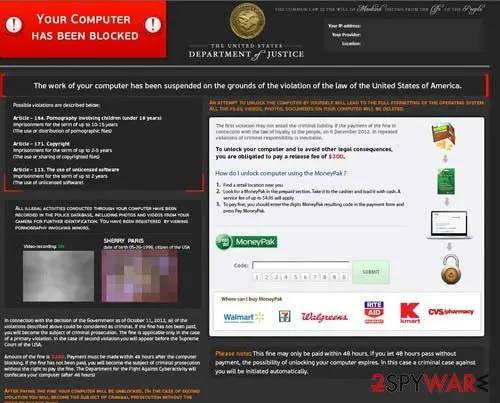
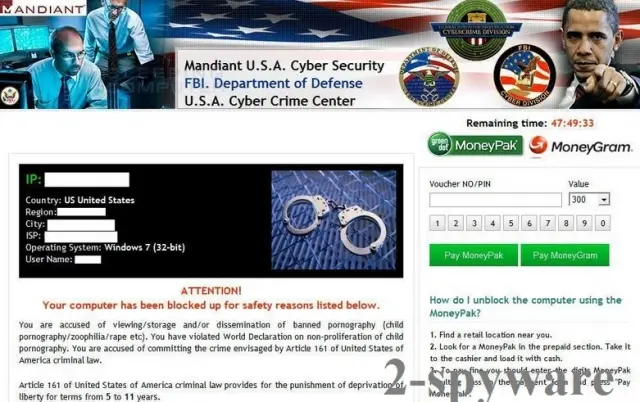
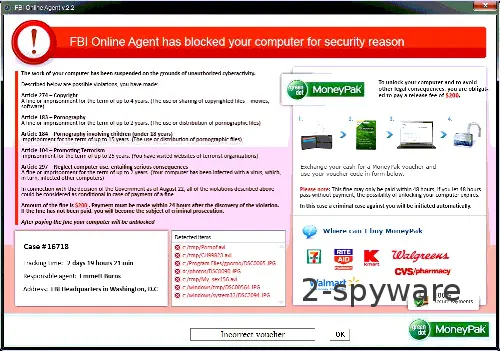
Our 2021 guide said other versions demand "$200, not $100". The sources and screenshots show $200 as the common amount and $300 for the DHS and Department of Justice versions.
When Safe Mode will not start or the lock comes back
The most common question readers sent us: the FBI screen returns in every Safe Mode. Work through these in order.
- 1
Try each Safe Mode choice
In Troubleshoot > Advanced options > Startup Settings > Restart, press 4, 5 or 6 (Safe Mode, with Networking, with Command Prompt).
- 2
Run a Microsoft Defender Offline scan
Open Windows Security > Virus & threat protection > Scan options, choose Microsoft Defender Offline scan and Scan now. Windows restarts and scans for about 15 minutes outside the normal system.
- 3
Boot from media made on a clean PC
Our 2021 guide said to put a scanner on a USB drive from another computer and boot the locked one from it. Microsoft documents this for Windows Defender Offline: build the media on an uninfected PC (the drive is erased), then restart the locked PC from it.
- 4
Scan again in Windows
Start Windows normally, run a full scan and Microsoft Safety Scanner. Do not hunt for files by hand: the tool should find them.
- 5
System Restore or a repair shop
A restore point from before the lock is worth a try. Otherwise the IC3's 2012 advice was to contact a computer professional.
It wont let me go into any type of safe mode, any type! No command prompt safe mode, no networking safe mode, no regular safe mode!
One of the eight questions readers sent us; steps 2 and 3 answer it.
What the FBI lock can really do to you
The accusations are invented. The real risks are paying and what came in with the lock.
- High
Paying the fine
MoneyPak codes work like cash and cannot be recalled. Europol described a network that cashed out victims' vouchers and laundered the money, and Microsoft says paying guarantees nothing.
- High
Stolen passwords and card numbers
The FBI said Reveton was used with Citadel and warned that, even after you unfreeze the PC, malware may keep running in the background with keystroke loggers that capture passwords and card numbers.
- Medium
A PC you cannot use
Task Manager, the Registry Editor and sometimes Safe Mode are blocked; the FBI said the average user could not easily remove it.
- Low
Your files
A screen locker does not encrypt documents. A new file extension means a second, different ransomware.
The FBI MoneyPak virus ransom note
Your PC is blocked due to at least one of the reasons specified below.
You have been violating Copyright and Related Rights Law (Video, Music, Software) and illegally using or distributing copyrighted content.
Fines may only be paid within 72 hours after the infringement.
To unblock the computer, you must pay the fine through MoneyPak of 200$.
When you pay the fine, your PC will get unlocked in 1 to 48 hours after the money is put into the State's account.
Can FBI MoneyPak virus files be decrypted?
Act today: a code that has not been spent may still be blocked.
- 1
Contact Green Dot or the shop
Give them the code and say what happened. We could not confirm a refund procedure for 2026, so treat recovery as unlikely; Green Dot closed MoneyPak in February 2015.
- 2
Change passwords from a clean device
Start with e-mail and online banking. The FBI warned about keystroke loggers.
- 3
Watch your accounts
Check statements, and tell your bank if you typed a card number on the PC.
- 4
Report it
File a complaint with the IC3 at ic3.gov, as the FBI advises, or use your national cyber-crime site.
How to remove FBI MoneyPak virus
Tools you'll need
All of these are free except where noted. Download them on a clean device if the infected PC is offline.
- A USB stick: to keep the ransom note, two or three encrypted files and screenshots off the infected PC.
- Microsoft Defender Offline: built into Windows 11 and Windows 10; scans before Windows starts, so running malware cannot hide.
- Microsoft Safety Scanner: a second, portable scanner with current signatures; each download works for 10 days.
- ID Ransomware: identifies the family from the note and one encrypted file and says whether a decryptor exists.
- No More Ransom: the free decryptors from police and security companies; check it again every few months.
- Fortect (optional): scans Windows for malware and repairs the system files and settings it damaged. The free scan is in the box above.
How to remove the FBI MoneyPak lock screen
Your files are not encrypted.
The steps get you past the lock screen first, then remove what starts it.
Step 1: Get past the lock screen
FBI MoneyPak only blocks the screen, so your files are still there. Start Windows in Safe Mode with Networking from the sign-in screen: Shift + Restart, then Troubleshoot > Advanced options > Startup Settings > Restart > 5.
In Safe Mode the locker stays off, which lets you remove its startup entry, delete its file and run the scan.
The message claims to come from FBI, but it is fake, and the code it asks you to buy unlocks nothing on Windows 11 or Windows 10.
Full procedure with screenshots: Start Windows or a Mac in Safe Mode On uGetFix
Step 2: Remove it from startup
Whatever FBI MoneyPak installed usually starts with Windows. Open Task Manager with Ctrl + Shift + Esc, go to Startup apps in Windows 11 or the Startup tab in Windows 10, and disable what you do not know, starting with entries that have an empty Publisher column.
Open file location on the right-click menu shows the file, which helps you decide and tells you what to delete later. Disabling is safe: if something you need stops working, switch it back on.
Full procedure with screenshots: Stop apps from opening at startup On uGetFix
Step 3: Delete the folders left behind
What the uninstaller leaves behind is usually in the user folders. Open File Explorer, switch on View > Show > Hidden items (in Windows 10 View > Hidden items), and go through
%LocalAppData%,%AppData%, %ProgramData% and the two Program Files folders.Sort by Date modified and delete folders that appeared together with the problem and belong to no program you use. Folders with random names that hold
.exe,.dll, .js or .ps1 files are the strongest sign.Full procedure with screenshots: Remove what malware leaves behind in Windows
Step 4: Scan the PC, then run the offline scan
Open Windows Security > Virus & threat protection > Scan options, run a Full scan and remove everything it finds. Then select Microsoft Defender Antivirus (offline scan) and click Scan now: the PC restarts and scans before Windows loads, which finds files that hide while Windows runs.
Save your work first, because the offline scan takes about 15 minutes. Both scans are built into Windows 11 and Windows 10, and a second scanner from another vendor is a useful extra opinion.

Windows 11: Windows Security > Virus & threat protection > Scan options. Full procedure with screenshots: Run a Microsoft Defender Offline scan
Report it and recover your files
Report the attack even if you do not expect the files back: insurers and banks ask for the report number, and police use the contacts in the note to link cases.
- United States
- FBI IC3 · FTC ReportFraud
- United Kingdom
- Report Fraud (formerly Action Fraud) · NCSC
- Australia
- ReportCyber (ASD)
- EU countries
- Europol: national reporting sites
Give the victim ID, the note and the date the files were encrypted. A business that holds personal data may also have to notify its data protection authority, in the EU within 72 hours.
How to prevent FBI MoneyPak virus and the next attack
Every route in is a habit you can change.
Do
- Keep Windows and the browser updated: the FBI called Reveton drive-by malware
- Check the sender and grammar before opening an e-mail attachment
- Download software only from the maker's own site
- Follow the 3-2-1 backup rule: three copies, two kinds of storage, one kept offline
- Use a VPN on public networks to hide your address; it does not stop malware
Don't
- Install freeware from unknown sites
- Use cracks, keygens or repacked installers
- Believe a screen that says the FBI can see you
- Type any code or password into a lock screen
- Pay
Questions about FBI MoneyPak virus
How do I open my .docx and .jpg files after the FBI MoneyPak virus locked my PC?
Open them as you always did, because FBI MoneyPak does not encrypt files. Documents, photos and other files keep their names and extensions such as .docx and .jpg; the lock only covers the screen.
Get past it first with Safe Mode, Microsoft Defender Offline or boot media, and the files open normally. If a file does carry a new extension and will not open, a different, file-encrypting ransomware is on the PC, and No More Ransom (nomoreransom.org) may list a decryptor for it.
Is there a decryptor for the FBI MoneyPak virus?
No decryptor is needed, because nothing on the disk is scrambled. FBI MoneyPak locks the screen and shows a threat. What you need is a removal method:
- Safe Mode
- Microsoft Defender Offline
- boot media made on a clean PC
If your files do carry an odd new extension, that is a different ransomware, and No More Ransom is the place to check for a free decryptor. Do not download tools from pages that promise to unlock the FBI screen for money.
Should I pay the FBI MoneyPak ransom?
No, never pay the fine. The FBI's advice is to pay no money and give no personal information, and Microsoft says paying guarantees nothing. MoneyPak codes work like cash and cannot be recalled; Europol described a network that cashed out victims' vouchers and laundered the money.
The fine is also not real, because no agency locks a PC to take a code typed into a box. Green Dot closed MoneyPak in February 2015, so a screen asking for it today is old malware or a copy.
Do paid decryption services or data recovery companies work for FBI MoneyPak?
You do not need either, because a screen locker leaves files readable. A company that offers to decrypt or recover your data for a fee is solving a problem you do not have, so be careful with ads that promise to unlock the FBI screen.
A local repair shop is a fair use of money if you cannot reach Safe Mode, which the IC3 advised in 2012. Ask for the work to be described first, and never give remote access to a stranger who contacted you.
How did the FBI MoneyPak virus get on my PC?
Most often by visiting a compromised website. The FBI calls Reveton drive-by malware, which can install itself when you only click on a compromised page, with no file opened.
Our 2021 guide also named spam e-mail attachments, software vulnerabilities, repacked installers and cracks. A fully updated Windows and browser close most routes, and the Citadel platform named in the IC3 alert delivered other malware the same way.
Did the FBI MoneyPak virus steal my data?
Possibly, but the lock alone does not prove it. The FBI said Reveton was used with Citadel malware, and that certain malware captures user names, passwords and card numbers through keystroke logging; Europol said the criminals stole data from victims' computers.
The "Video Recording" box on the screen is only a picture, though the FBI says some variants show the victim's webcam image. Change your passwords from another device, watch your bank statements and run a Defender Offline scan.
Is FBI MoneyPak the same as other ransomware or different?
It is different in the way that matters most: it locks the screen instead of scrambling files. Families that rename your files and leave a note are not removed by the steps here and need a decryptor.
FBI MoneyPak is called ransomware only because it extorts money. It is one of many look-alike locks, the FBI virus, the DHS version and the Police virus, which share a method but change the badge and the amount. Microsoft detects the best-known family as Reveton.
What if Safe Mode will not start or the FBI screen comes back?
Try Safe Mode, Safe Mode with Networking and Safe Mode with Command Prompt one at a time, because some versions blocked only one. If all fail, run a Microsoft Defender Offline scan, or boot from Defender Offline media made on a clean PC.
The screen returns because Microsoft's entry for Reveton.C says it copies itself and adds a ctfmon.lnk shortcut in the Startup folder, so deleting one file is not enough. We could not confirm a safe manual route; let the scanner clean it.
Will Fortect remove FBI MoneyPak?
Fortect scans Windows for malware and unwanted programs and repairs the system files and settings they change, and its free scan shows what it finds on your PC before you decide anything.
For FBI MoneyPak, follow the plan above as well: the browser steps take back permissions and settings that no scanner treats as a threat, and uninstalling the program that brought it removes the source.
Run Microsoft Defender's full scan and, if anything was found, its offline scan as a second opinion. If the symptoms are gone after the plan and both scans are clean, there is nothing more to do.
Sources
- FBI: New Internet Scam (Reveton ransomware locks computers, demands payment), 9 August 2012 (read October 5, 2026)
- IC3: Updated Alert, Citadel malware continues to deliver Reveton ransomware, 29 July 2012 (read October 5, 2026)
- ESET WeLiveSecurity: FBI Ransomware, Reveton seeks MoneyPak payment in the name of the law, 20 August 2012 (read October 5, 2026)
- Digital Transactions: Green Dot Continues Clawing Back From Its MoneyPak Closure, 5 November 2015 (read October 5, 2026)
- Europol: Police dismantle prolific ransomware cybercriminal network (read October 5, 2026)
- Microsoft Security Intelligence: Ransom:Win32/Reveton.C (read October 5, 2026)
- Microsoft Learn: Run and review the results of a Microsoft Defender Offline scan (read October 5, 2026)
- Microsoft Support: Windows startup settings (read October 5, 2026)
- No More Ransom (read October 5, 2026)