
PC Optimizers
Fortect Review 2026: Free Scan, Repair, Prices and Safety
Fortect is a Windows repair and security suite that scans your PC for free, then fixes damaged system files, broken registry entries, junk and malware leftovers. This review covers what it does, what it costs, how renewal and refunds work, and how to remove it.
9.2/10
Our pick for Windows repair
Fortect turns a free, clearly explained scan into a one-click repair of crashes, broken files, registry errors and malware damage.
Ad: partner link. We may earn a commission if you buy.
- Our score
- 9.2 / 10
- Price from
- 30.95 euros first year
- Platforms
- Windows 10 and later (Fortect for Mac is a separate security product)
- Type
- PC Optimizers
Verdict in short
- Free scan and free one-by-one repair let you see results on your own PC before paying.
- Repairs damaged Windows files, broken registry entries and the leftovers malware leaves behind.
- Yearly plans for 1, 3 or 5 PCs include antivirus and driver updates, with a 60-day refund window on the first purchase.
What we liked
- Six-stage scan with plain-language explanations
- Free scan and free manual repair before you buy
- Restores system files damaged by malware
- Antivirus and driver updates included in every plan
- 60-day refund window, refunds usually within 12 hours
What we did not
- Yearly subscription: set a reminder to review it before renewal
- For third-party apps it identifies the failing program; updating that app completes the fix
Score breakdown
- Repair coverage9.4System files, crashes, malware leftovers, junk, registry and privacy traces in one scan.
- Ease of use9.6One button for full repair, View and Fix for item-by-item control.
- Transparency9.2Free scan shows every issue and category before any change is made.
- Features9.1Plans now bundle antivirus, driver updates and restore points with repair.
- Value8.9Multi-Device covers three PCs for a few euros more than one.
- Support and refunds9.0Email support, 48-hour ticket response and a 60-day refund window.
Fortect at a glance
Fortect is a PC repair tool for Windows 10 and later, made by Fortect Ltd., a company registered in Tel Aviv, Israel [1][4]. It looks for damaged or missing Windows files, crashing programs, malware leftovers, junk files, broken registry entries and privacy traces, then repairs what it finds [1].
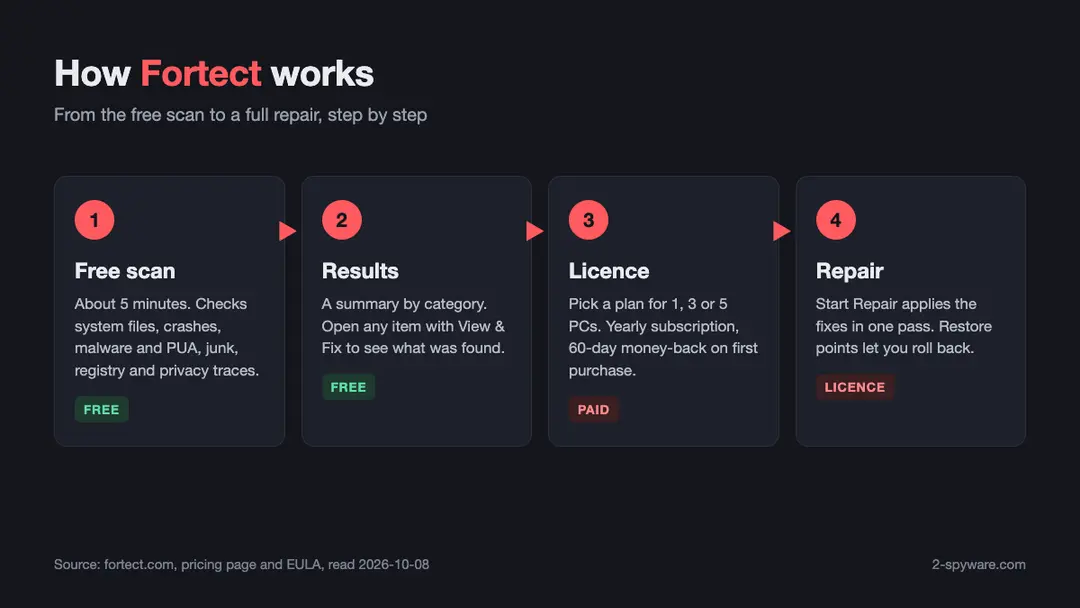
The scan takes roughly five minutes and costs nothing [1]. Automated one-click repair needs a paid licence. The licence is a yearly subscription that renews on its own, and first purchases come with a 60-day money-back policy [2][4].
Current plans also bundle an antivirus module, a driver updater and junk file clearance, so one licence now covers repair, cleanup and protection on one, three or five PCs [2].
- Best for: Windows users who want crashes, error messages, leftover malware damage and clutter fixed without technical menus.
- Platforms: Windows 10 and up for the PC Suite; separate Fortect products exist for Mac, iOS, Android and Chrome [1].
- Price: from 30.95 euros for the first year on one PC, as shown on Fortect's pricing page on 2026-10-08 [2].
- Refunds: full refund within 60 days of the first purchase [4].
How we tested Fortect and how we earn money
We installed Fortect on a Windows test PC with an AMD Ryzen 5 5600X, 16 GB of memory and a used system with several months of normal activity. The screenshots in this review come from that test with a Premium licence.
For this 2026 update we checked every fact against Fortect's own website, pricing page, help centre and end user licence agreement. Each source is listed at the bottom with the date we read it.
2-spyware.com is reader supported. We earn a commission when a reader buys Fortect through our link. That does not change the price you pay, and it does not change what we write about refunds, renewal or limits.
What is Fortect?
Fortect describes itself as an all-in-one security, privacy and OS health suite [1]. Its core product, the PC Suite, is a repair tool. It compares the state of your Windows installation with a database of healthy files and replaces what is damaged or missing.
Fortect's help centre sums up its job in one line: it repairs stability, performance and security issues, including outdated drivers [3]. That is the clearest answer to the common question of what Fortect is used for.
The brand has grown beyond one app. The Fortect homepage lists an antivirus for Windows, a Mac security suite, mobile security for iOS and Android, a Chrome browsing protection extension, a VPN with more than 2,400 servers and a driver updater [1].
Fortect is a legitimate company product, not a random program that appeared on your PC. The licence agreement names Fortect Ltd., registration number 51-657207-0, at 14 Weizmann St., Tel Aviv-Yafo, with Israeli law governing the contract [4].
What problems can Fortect help with?
- Programs that crash again and again, and Windows components that log recurring errors.
- Damaged or missing system files and DLLs, often left behind after malware or a failed update.
- Broken or orphaned registry entries left by uninstalled software.
- Temporary files, caches and old logs that take up disk space.
- Browser caches and cookies that store traces of your activity.
- Outdated drivers, through the bundled driver update feature [2][3].
Fortect is honest about its scope. Its FAQ notes that a slow PC can also come from hardware limits or heavy background apps, which software repair cannot change [3]. The PC Profile stage helps here, because it shows your hardware so you can see whether memory or disk space is the real bottleneck.
What Fortect does: the six scan stages
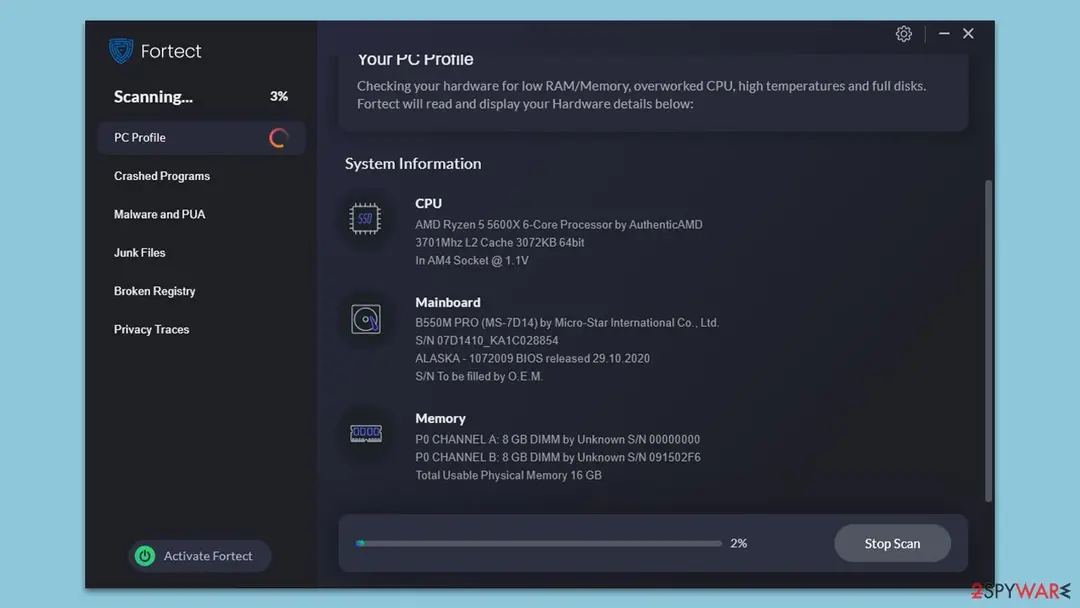
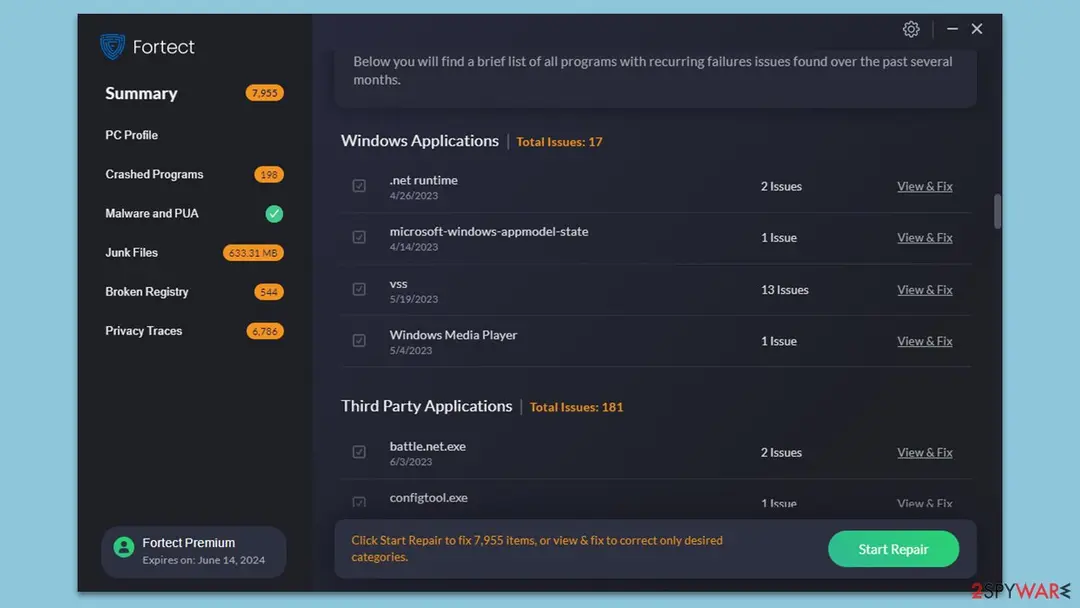
In our test, the Fortect scan ran through six stages, each shown in the left panel of the app. The summary counted 7,955 items to repair on a PC that had been in daily use. Here is what each stage checks.
1. PC Profile
The scan starts by reading your hardware. It lists the processor, motherboard, memory and disks, and it checks for low memory, an overworked CPU, high temperatures and full disks. This profile gives the later stages context about your system.
2. Crashed Programs
Next, Fortect looks at programs with recurring failures over the past several months. It splits them into Windows applications and third-party applications. On our test PC it found 17 issues in Windows components and 181 in third-party programs.
Fortect repairs the Windows side directly. For third-party programs, the report shows which app keeps crashing, which tells you what to update or reinstall.
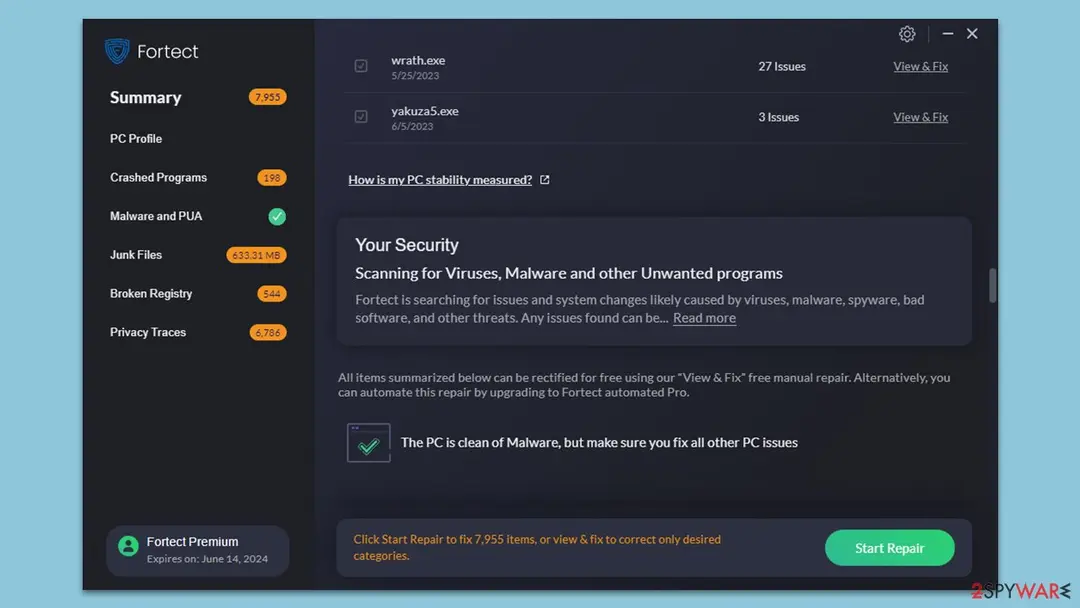
3. Malware and PUA
This stage searches for viruses, spyware and potentially unwanted applications, and for system changes that such software tends to leave behind. Those changes include modified settings and corrupted or missing system files.
That focus on damage is what sets Fortect apart from a plain scanner. An antivirus can delete a threat but leave Windows files broken. Fortect restores clean copies of those files. Our guide to removing malware leftovers explains why this cleanup step matters.
Fortect does not delete potentially unwanted programs on its own. It flags them, because some have legitimate uses, and leaves the choice to you.
4. Junk Files
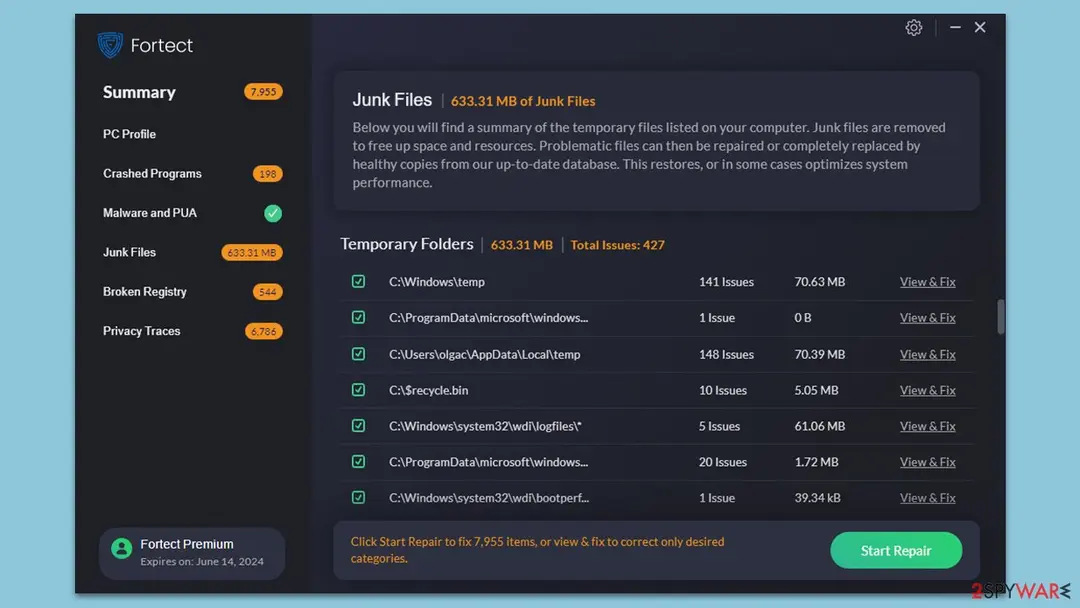
Fortect then lists temporary folders, Windows logs, the recycle bin and similar clutter. Our test PC held 633.31 MB of junk in 427 entries. Each folder appears with its size, so you can see what will be cleared.
5. Broken Registry
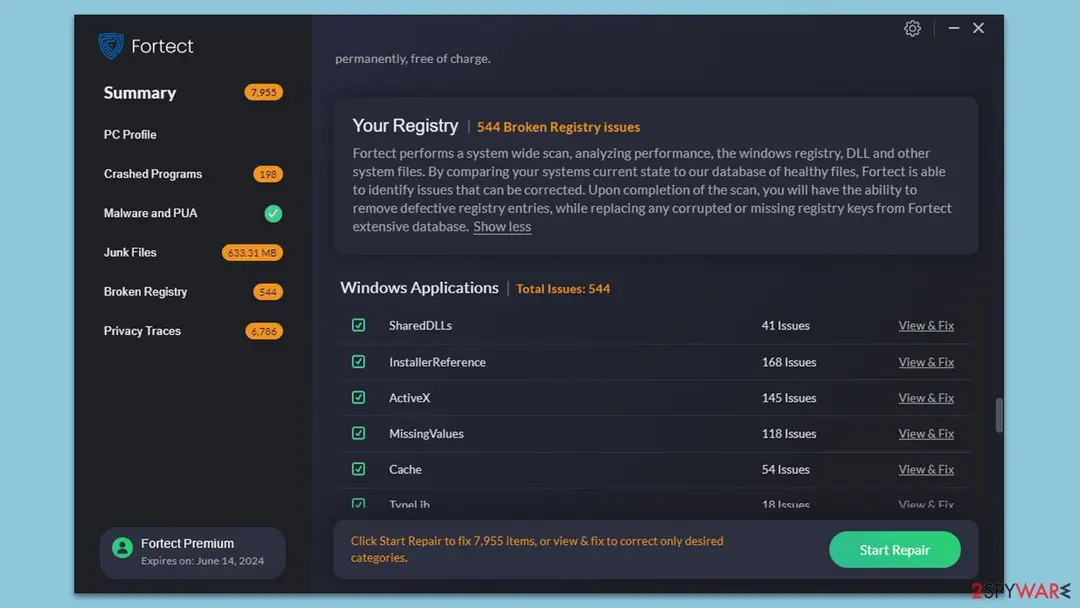
The registry stage checks shared DLL references, installer references, ActiveX entries, missing values, caches and type libraries. Our test found 544 broken entries. The app explains that it removes defective entries and replaces corrupted or missing keys from its database.
If you prefer to understand what changes, our article on malicious registry entries shows how malware uses the registry and what manual cleanup involves.
6. Privacy Traces
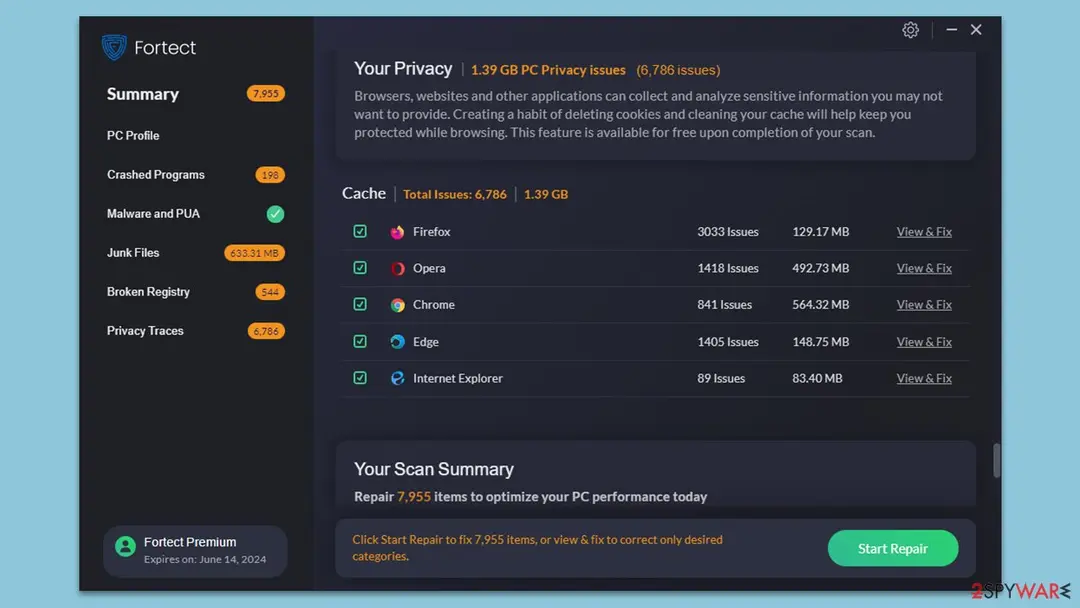
The last stage collects browser caches and cookies from Firefox, Opera, Chrome, Edge and Internet Explorer. On our PC that came to 6,786 items and 1.39 GB. Fortect states in the app that this cleanup is available for free once the scan is complete.
Start Repair or View and Fix
When the scan ends, you have two options. Start Repair applies the fixes across every category in one pass. View and Fix opens one item or category at a time, so you can review and correct only what you choose.
What is free in Fortect and what needs a licence
This is the question most readers ask, so here is the plain answer. The scan is free. You can run it, read the full report and see every issue without paying [1].
Fortect also offers a free Pick and Choose option on its homepage, which lets you repair items one by one [1]. In our test build, the app showed the same idea as View and Fix free manual repair, with the automated repair offered as the paid upgrade.
The paid licence adds fully automated repair, the antivirus module, driver updates, restore points and unlimited use on the number of PCs in your plan [1][2].
Fortect's FAQ also mentions a free trial that lasts 24 hours and cannot be extended [3]. Under the licence agreement, a trial that asks for payment details turns into a paid subscription when it ends, unless you cancel before it expires [4].
| Feature | Free | Paid licence |
|---|---|---|
| Full diagnostic scan and report | Yes | Yes |
| Repair items one at a time | Yes (Pick and Choose) | Yes |
| One-click automated repair | No | Yes |
| Antivirus module | No | Yes |
| Driver updates | No | Yes |
| Restore points | No | Yes |
| Email support | No | Yes |
| Share with family and friends | No | Multi-Device and Ultimate |
Fortect prices and plans in 2026
Fortect sells three yearly plans. They differ in the number of PCs, not in features, apart from family sharing [2]. Prices change with your region and with current offers, so treat these as the figures we saw on 2026-10-08 in euros.
| Plan | PCs | First year | Also listed on page | Family sharing |
|---|---|---|---|---|
| Essential | 1 | 30.95 euros | 65.95 euros | No |
| Multi-Device (Most Popular) | 3 | 37.95 euros | 95.95 euros | Yes |
| Ultimate (Best Value) | 5 | 53.95 euros | 125.95 euros | Yes |
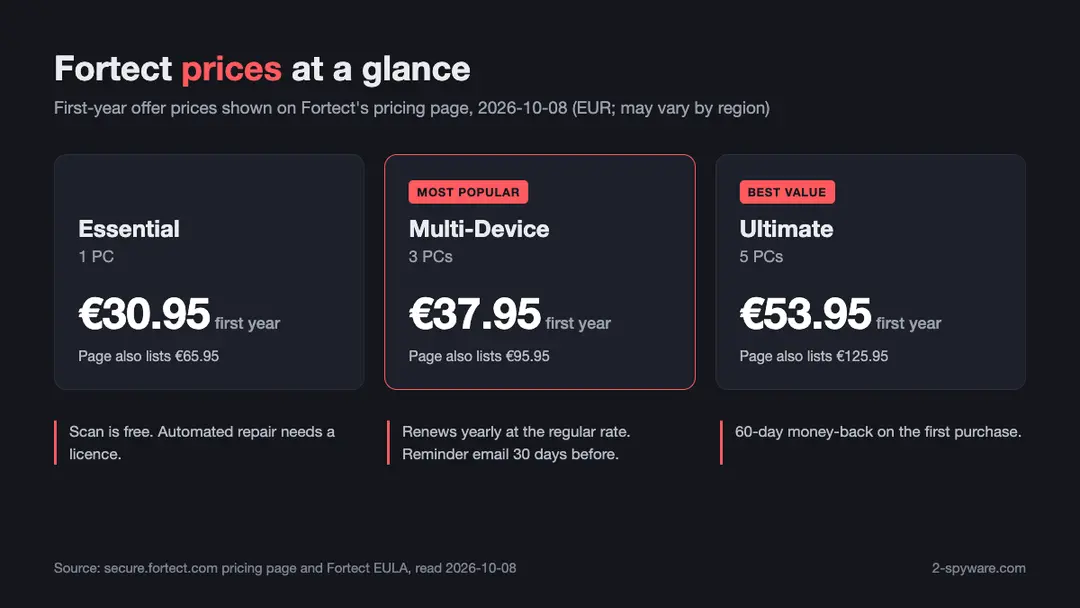
Every plan includes the system repair and optimization suite, the antivirus, one-click driver updates, the full diagnostic scan and report, malware removal, junk file clearance, restore points, no usage limit and email support [2].
Fortect notes that it sometimes offers promotional prices for a customer's first year, and that the subscription then renews at the regular rate [2]. The pricing page shows a second, higher figure beside each offer. It does not label that figure, so check the renewal amount at checkout.
The Multi-Device plan is the sweet spot for most households. It costs only a few euros more than the single-PC plan and covers three computers.
Subscription, renewal, cancelling and refunds
A Fortect licence is a subscription. Fortect's pricing page says it charges your stored payment method for the next period, the same length as before, until you cancel [2]. It sends a reminder email 30 days before each payment [2].
How to turn off automatic renewal
You can cancel at any time to stop future renewals [3][4]. Cancelling does not refund the current period, and you keep the licence until it ends [4]. The quickest route is the Manage Your Subscription form [5]:
- Open the Manage Your Subscription page in Fortect's support section.
- Enter the email address of your Fortect account.
- Enter the subscription or reference number from your confirmation email. If you do not have it, enter 0.
- Choose the option to cancel automatic renewal.
- Describe your request briefly, tick the confirmation box and submit. Fortect says it will contact you within 48 hours [5].
You can also email Fortect support and ask them to cancel for you [3]. The licence agreement asks for written notice at least 30 days before a renewal, and email counts [4]. The simplest habit is to decide early and cancel well before the reminder date if you do not want another year.
If you bought Fortect through a third party, such as an app store, cancel through that store instead [4].
How to get a refund
Fortect offers a full refund within 60 days of your purchase [2][4]. You request it by email, and Fortect's FAQ says refunds usually arrive within 12 hours of the request [3].
The policy has three conditions in the licence agreement. It covers initial purchases only, so renewals are not refundable unless the law requires it. Refunds can be refused for breaches of the licence terms. If you buy the same service again after a refund, the money-back policy does not apply a second time [4].
Uninstalling Fortect does not cancel the subscription, and cancelling does not uninstall the program [4]. If you want both, do both.
Is Fortect safe, legit or a virus?
Fortect is not a virus. It is commercial software from a registered company with a public licence agreement, a privacy policy, a support desk and a data request form for GDPR requests [3][4][7].
Readers often find Fortect after an aggressive pop-up or a fake browser warning. Those come from rogue ad pages, not from Fortect's own app. If a web page shows an infection alarm and pushes you to buy something, close it. Our browser reset guide shows how to stop such pop-ups.
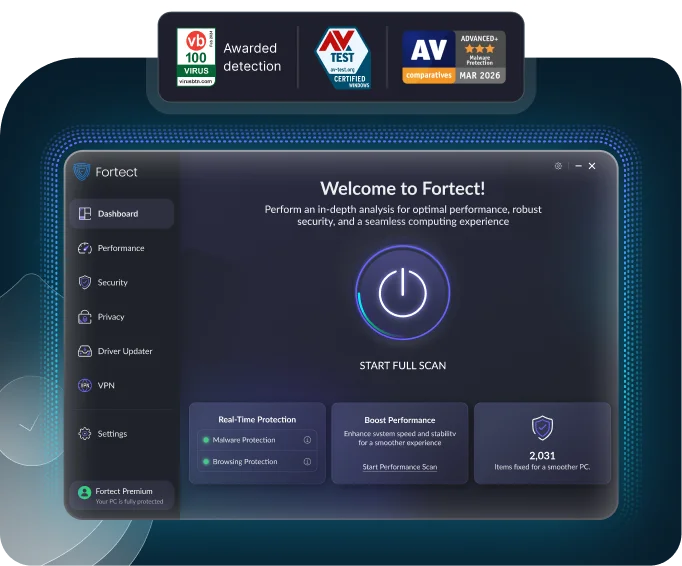
The Fortect homepage displays badges from VB100, AV-TEST, AV-Comparatives and AppEsteem, among others [1]. Those badges belong to Fortect's security products. You can verify each listing on the testing body's own site.
In our own test, Fortect asked before every change. It shows each issue and its category before repair, it does not delete flagged programs on its own, and its restore points let you roll back [2].
Is it safe to download Fortect?
Yes, when you get it from Fortect's official website or the official app stores. Copies from download portals, torrent sites or repacks are a different matter, as the section on cracks below explains.
Fortect antivirus and real-time protection
Older Fortect versions were pure repair tools with no real-time protection. That has changed. The current Windows plans include an antivirus module, and Fortect's homepage describes it as monitoring new downloads, installs and files in real time [1][2].
The homepage also lists ransomware protection, safe browsing and cloud-based threat detection, with quick, full and custom scans [1]. For Chrome, a separate extension blocks malicious websites and alerts you to data leaks [1].
Fortect's repair side works well next to any antivirus. If you already rely on Microsoft Defender, keep it on and use Fortect to repair what malware or crashes leave behind. Our Defender offline scan guide helps with threats that hide while Windows runs.
Fortect setup and fortect.exe
Many readers search for fortect.exe after spotting it in Task Manager, the startup list or a downloads folder. It is the program file of the Fortect app or its installer. A copy you installed from Fortect's website is legitimate.
If you did not install Fortect yourself, check where the file lives. A genuine install sits in its own folder under Program Files. Right-click the file, open Properties and look at the Digital Signatures tab to see who signed it.
A Fortect-named file in a temp folder or bundled with a cracked download needs a closer look. Malware sometimes borrows the names of real programs. Scan it with your antivirus before you trust it.
Setup itself is short. Fortect states that it runs on Windows 10 and newer [1]. After install, the app starts the free scan, and you can activate a licence later from the Activate Fortect button in the lower left corner of the window.
What is the Fortect 'system test of hijacking'?
Readers ask about a Fortect 'system test of hijacking'. In the build we tested, no stage carried that exact name. The closest match is the Malware and PUA stage, which looks for system changes likely caused by viruses, malware, spyware and other unwanted programs.
Hijacking in this sense means unwanted changes to browser or system settings, such as a new home page or search engine. That is the typical work of browser hijackers. A case like News Searcher Pro shows what such a hijack looks like and how to undo it.
If Fortect reports a hijack-related issue, review it in View and Fix to see which setting changed. Then remove the extension or program that caused it, so the change does not return.
Fortect on Mac
Fortect for Mac is a different product from the Windows PC Suite. Fortect presents it as real-time malware defense built for Mac, with browsing and phishing protection, cloud-based security and a VPN [6].
The Mac page focuses on security, not on system repair [6]. Fortect's knowledge base has a separate Mac Suite section for setup and account questions [9]. Mac prices were not listed on the product page when we checked.
How to uninstall Fortect
Removing Fortect works like removing any Windows program. First, if you no longer want to pay, cancel automatic renewal as described above, because uninstalling does not stop billing [4].
- Close the Fortect window and, if it shows an icon in the system tray, right-click it and exit.
- Open Settings, then Apps, then Installed apps. On Windows 10, open Apps and features.
- Find Fortect in the list, click the three dots or the entry itself, and choose Uninstall.
- Follow the uninstaller to the end and restart the PC.
- If you also installed the Fortect browser extension, remove it from Chrome under Extensions.
- To delete your account and personal data, use Fortect's data request form or email support [3][4].
Fortect's FAQ also points to a step-by-step uninstallation guide in its help centre [3]. If you want to remove a stubborn browser extension as well, our guide to removing browser extensions covers every major browser.
German-speaking readers search for 'Fortect deinstallieren' and 'Fortect kündigen'. The same two steps apply: uninstall the program in Windows settings, and cancel the subscription through the Manage Your Subscription form [5].
Fortect crack, torrent, repack and licence keys
Searches for a Fortect crack, full version, torrent, repack or free licence key are common. We do not link to any of them, and we advise against using them. A cracked repair tool is one of the riskiest programs you can install, because it runs with full rights over your system files.
The risk is measured, not guessed. Researchers from the National University of Singapore tested 750 pirated software samples from hard drives, discs and peer-to-peer downloads with seven antivirus engines [8].
They found adware and Trojans in pirated samples at average rates of 34% and 35%. Installing the pirated software most often weakened the firewall and User Account Control settings [8]. Our news report on cracked Windows 11 copies shows the same pattern in practice.
- Malware: a crack or keygen is an easy wrapper for Trojans, stealers and miners.
- No updates: a cracked copy cannot fetch the latest repair database, so it fixes less over time.
- No support or refund: you lose the 60-day money-back policy and email support.
- Legal risk: using a cracked copy breaks the licence agreement and copyright law in most countries [4].
The legitimate route costs nothing to start. Run the free scan, read the report and repair individual items with Pick and Choose [1]. If the results are useful, buy a licence, and you still have 60 days to ask for your money back [4].
Who Fortect is for and how to get the most out of it
Fortect suits Windows users who want stability problems fixed without learning registry editors or system file commands. It also fits households that help relatives with their PCs, since the Multi-Device and Ultimate plans allow sharing [2].
It is a strong second step after a malware infection. Your antivirus removes the threat, and Fortect repairs the system files and settings the threat damaged. Our ransomware recovery guide shows where a repair tool fits in a full recovery plan.
- Run the free scan first and read each category before you repair anything.
- Use View and Fix for anything you are unsure about, such as a flagged program you still use.
- Keep restore points on, so you can roll back a change.
- Update or reinstall third-party apps that the Crashed Programs stage keeps listing.
- Note your renewal date and decide well before the reminder email whether you want another year.
Fortect pros and cons
- Clear six-stage scan that explains every category in plain language.
- Free scan and free one-by-one repair, so you see real results before paying.
- Repairs the system damage that antivirus tools leave behind.
- One licence now covers repair, antivirus, driver updates and junk cleanup.
- Fair refund window of 60 days and refunds that usually arrive within 12 hours [3][4].
The points to plan for are simple. Fortect is a yearly subscription, so decide before each renewal whether you still need it. Repairs to third-party programs are limited to identifying the app that fails. And hardware faults, such as a failing disk, need a hardware fix.
Verdict: is Fortect worth it?
Fortect does what a repair tool should. It finds real problems, explains them without jargon and fixes them in one pass. The free scan and free manual repair let you judge it on your own PC before paying anything.
The 2026 plans add an antivirus and driver updates to the same licence, which makes the price easier to justify. With a 60-day refund window and a reminder before each renewal, the risk of trying it is low [2][4]. For Windows users with crashes, errors or post-malware damage, Fortect earns its place.
Features
Free diagnostic scan
About five minutes; checks system files, crashes, malware and PUA, junk, registry and privacy traces.
One-click repair
Start Repair applies every fix in one pass; View and Fix lets you choose items one by one.
System file restoration
Replaces damaged or missing Windows files and DLLs with healthy copies from Fortect's database.
Registry repair
Removes defective entries and replaces corrupted or missing keys.
Malware and PUA scan
Finds threats and the system changes they leave; flags unwanted programs without deleting them on its own.
Antivirus
Included in the Windows plans, with real-time monitoring of downloads, installs and files.
Driver updates
One-click multi-driver update included in every plan.
Junk and privacy cleanup
Clears temp folders, logs and browser caches, with sizes shown before removal.
Pricing
Essential30.95 euros first year
1 PC · renews at Yearly at the regular rate; page also lists 65.95 euros
- Full scan and report
- Automated repair
- Antivirus
- Driver updates
- Junk file clearance
- Restore points
- Email support
- 60-day refund on first purchase
Multi-Device37.95 euros first year
3 PCs · renews at Yearly at the regular rate; page also lists 95.95 euros
- Everything in Essential
- Share with family and friends
- 60-day refund on first purchase
Ultimate53.95 euros first year
5 PCs · renews at Yearly at the regular rate; page also lists 125.95 euros
- Everything in Multi-Device
- Covers five PCs
- 60-day refund on first purchase
Prices as recorded in the review on October 8, 2026. Check the vendor's site for current prices.
Frequently asked questions
What is Fortect?
Fortect is a Windows repair and security suite from Fortect Ltd., a company registered in Israel. It scans your PC for damaged system files, crashing programs, malware leftovers, junk, broken registry entries and privacy traces, then repairs them. Current plans also include an antivirus and a driver updater.
Is Fortect safe?
Yes. Fortect is commercial software from a registered company with a public licence agreement, privacy policy and support desk. It asks before changes and offers restore points. Download it only from Fortect's official site, not from portals, torrents or repacks.
Is Fortect a virus or a scam?
No. Fortect is a legitimate repair tool. Fake infection pop-ups come from rogue ad pages, not from Fortect's app. If a Fortect file appears in a temp folder or came with a cracked download, scan it, because malware can borrow real program names.
Is Fortect free?
The scan is free, and you can repair items one at a time with the free Pick and Choose option. Automated one-click repair, the antivirus, driver updates and support need a paid licence, which is a yearly subscription.
How much does Fortect cost?
On 2026-10-08 the pricing page showed 30.95 euros for one PC, 37.95 euros for three PCs and 53.95 euros for five PCs for the first year. Prices vary by region and offer. First-year promotional prices renew at the regular rate.
Does Fortect renew automatically?
Yes. The licence is a subscription that renews for the same period until you cancel. Fortect emails a reminder 30 days before each payment. You can turn off renewal at any time through the Manage Your Subscription form or by emailing support.
How do I cancel Fortect and get a refund?
Use the Manage Your Subscription form on Fortect's support site and choose to cancel automatic renewal. For a refund, email support within 60 days of your first purchase. Fortect says refunds usually arrive within 12 hours. Renewals are not covered by the money-back policy unless the law requires it.
How do I uninstall Fortect?
Close Fortect, open Settings, Apps, Installed apps, select Fortect and choose Uninstall, then restart. Uninstalling does not cancel your subscription, so turn off renewal separately if you no longer want to pay.
What is fortect.exe?
It is the program file of the Fortect app or its installer. A genuine copy sits in its own folder under Program Files. Check the Digital Signatures tab in the file's Properties to see who signed it, and scan any copy found in an unusual folder.
Is there a Fortect version for Mac?
Yes. Fortect for Mac is a security product with real-time malware protection, browsing and phishing protection, cloud security and a VPN. The repair features described in this review belong to the Windows PC Suite.
Does Fortect replace an antivirus?
The current Windows plans include an antivirus module with real-time monitoring. Fortect's repair side also works well alongside Microsoft Defender or another antivirus, fixing the system damage that threats leave behind.
Is there a Fortect crack or free licence key?
We do not link to cracks, torrents, repacks or keys. A study of 750 pirated software samples found adware and Trojans at average rates of 34% and 35%. Cracked copies also get no updates, support or refunds. Run the free scan first and buy a licence if it helps.
Sources
- Fortect homepage: All-in-One Security, Privacy and OS Health Suite
- Fortect pricing and checkout page (plans, renewal and money-back terms)
- Fortect Frequently Asked Questions
- Fortect End User License Agreement (EULA)
- Fortect: Manage Your Subscription
- Fortect for Mac product page
- Fortect Support centre
- Iqbal, Aman, Rejendran, Sikdar: Unveiling the Connection Between Malware and Pirated Software in Southeast Asian Countries: A Case Study, IEEE Open Journal of the Computer Society
- Fortect Knowledge Base
Questions and experiences
Ask about this page: members and our editors answer. Reading is open; writing needs a free account.
…