
PC Optimizers
Restoro Review 2026: FTC Case, PUP Flag, Uninstall, Refund
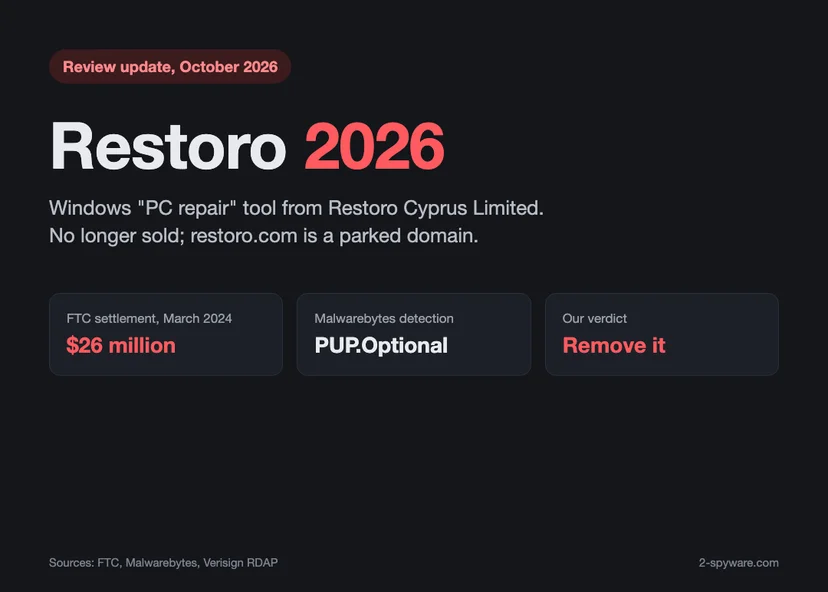
Restoro was a paid Windows repair tool, and it is no longer sold. In 2024 its makers and the sister brand Reimage agreed to pay $26 million to settle FTC charges over fake alerts and inflated scans. This review explains what Restoro did, why Malwarebytes flags it, how to remove it and how to deal with charges and refunds.
1.0/10
Discontinued and flagged: remove it
Restoro was a Windows repair tool whose sales the FTC called deceptive; it is no longer sold, and Malwarebytes removes it as a PUP.
- Our score
- 1.0 / 10
- Price from
- $27 to $58 (FTC, June 2022) first year
- Platforms
- Windows only; discontinued, no official download
- Type
- PC Optimizers
Verdict in short
- The FTC says Restoro scans found problems on healthy PCs and fed a phone upsell.
- Restoro and Reimage agreed to pay $26 million in March 2024; refunds went out in 2025 and 2026.
- restoro.com is a parked domain, so there is no support, update or official installer.
What we liked
- Free scan before paying
- Standard Windows uninstaller
- Junk, registry and malware checks in one window
What we did not
- FTC case over fake pop-ups and inflated scans
- Phone upsell to technician plans up to $499.99
- Detected by Malwarebytes as PUP.Optional.Restoro
- Discontinued: no website, updates or support
Score breakdown
- Availability0.0Not sold; restoro.com is a parked domain.
- Scan accuracy1.0FTC test PC with no problems was shown 552 issues.
- Ease of use5.0Simple scan and repair window, normal uninstaller.
- Transparency0.5FTC alleged fake Windows pop-ups and misleading claims.
- Value0.5Paid plans fixed issues Windows handles for free.
- Support and refunds1.0No vendor support; refunds only through the FTC program.
Restoro in 2026: the short answer
Restoro was a paid Windows repair program. It offered a free scan, reported problems with the registry, junk files, crashed programs and privacy, and asked you to buy a licence to repair them [2].
In March 2024 the US Federal Trade Commission sued the companies behind Restoro and its sister brand Reimage. The FTC said they used fake Windows pop-ups and scans that found problems on healthy computers to sell software and technician services [1][2]. The companies agreed to pay $26 million to settle the charges [1].
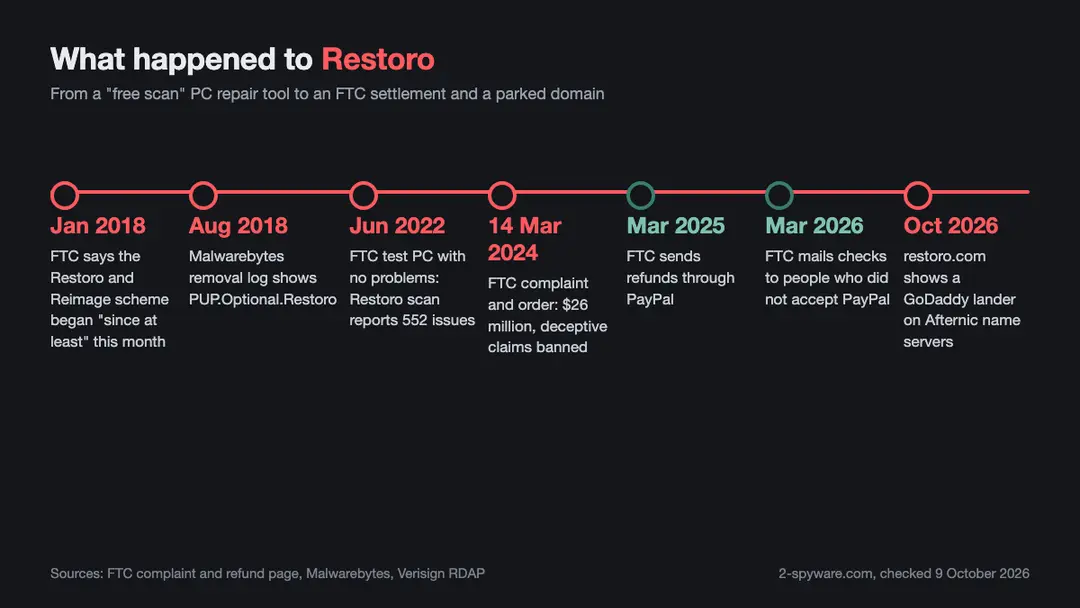
Restoro is not sold any more. On 9 October 2026, restoro.com only redirected to a GoDaddy lander page, and the domain's name servers pointed to Afternic, GoDaddy's domain marketplace [5][6]. There is no official website, download, support desk or renewal page left.
So if you still have Restoro on your PC, or a charge from it on your card, this page is for you. It explains what Restoro did, why Malwarebytes removes it, how to uninstall it on Windows 11 and Windows 10, how to deal with charges and the FTC refunds, and what to use today.
- Status: no longer sold; restoro.com is a parked domain with no product page [5][6].
- Maker: Restoro Cyprus Limited, earlier the Isle of Man company Restoro Limited [2].
- Sister brand: Reimage, run by Reimage Cyprus Limited; the FTC says the two worked as a common enterprise [2].
- FTC case: complaint and settlement on 14 March 2024, $26 million for consumer refunds [1].
- Detection: Malwarebytes flags it as PUP.Optional.Restoro, a potentially unwanted program [4].
- Our advice: uninstall it, keep Windows Security on, and check your card and PayPal statements for repeat charges.
How we reviewed Restoro and how we earn money
Our older Restoro review, and our Reimage pages, were positive. Readers who bought a licence after reading them wrote to us when Malwarebytes started to quarantine the program. One reader said they had bought the professional version for two computers. Those readers deserve a straight answer, and this update is it.
The old 2-spyware.com recommended Restoro and Reimage and earned a commission when readers bought them. Given what the FTC later found about how the products were sold, that recommendation does not hold up. We no longer promote either product, and we have no deal with their makers.
Today 2-spyware earns a commission only from partner products, such as the Fortect offer on our Fortect review. This page has no affiliate button for Restoro, because the product cannot be bought and we would not recommend it if it could.
For this 2026 update we could not install Restoro, because no official installer exists. We read the FTC press release, the full FTC complaint and the FTC refund page, the Malwarebytes detection page, Microsoft's uninstall instructions and the current domain record for restoro.com [1][2][3][4][5][7]. We also visited restoro.com ourselves on 9 October 2026 [6]. Each source is listed at the bottom with the date we read it.
What is Restoro?
Restoro was sold as a tool that repairs Windows. Its website claimed that it "securely and safely repairs any PC to an optimized state" and would "Remove malware threats", according to a copy of restoro.com from 24 May 2023 quoted in the FTC complaint [2].
In practice it worked like many PC optimizers. You ran a free scan, it listed hundreds of issues, and the repair button led to a payment page [2]. Malwarebytes describes it as a system optimizer [4].
Who made Restoro?
The FTC complaint names Restoro Cyprus Limited as the company behind Restoro. The complaint says it was earlier an Isle of Man company named Restoro Limited, with its address at Sovereign House, 4 Christian Road, Douglas [2].
The restoro.com domain itself was registered on 4 May 2015 through GoDaddy, according to the Verisign registry record [5]. The record was last changed on 26 September 2026 [5].
Restoro and Reimage: how they are linked
Reimage, sold through reimageplus.com, was the older brand. The FTC complaint says Reimage Cyprus Limited was earlier the Isle of Man company Reimage Limited, at the same Douglas address as Restoro Limited [2].
The FTC goes further. It says Restoro and Reimage operated as a common enterprise, through an interrelated network of companies with common ownership, business functions, employees, officers, managers or office locations [2]. It also says restoro.com offered a scan download that was powered by Reimage [2].
So Restoro and Reimage were two brands of one operation, in the FTC's words. The 2024 settlement covers both [1].
Is Restoro now Fortect?
Many people search for this, and some comparison sites list Restoro, Reimage and Fortect side by side. We looked for a primary source that ties Fortect to Restoro. The FTC press release and complaint name two companies, Restoro Cyprus Limited and Reimage Cyprus Limited [1][2]. We found no FTC, court or vendor document in our research that names Fortect in connection with Restoro.
Fortect is sold today by Fortect Ltd, as our Fortect review explains. We do not say Fortect is Restoro under a new name, because we could not confirm it from an authoritative source.
What happened to Restoro: the FTC case
On 14 March 2024 the FTC announced that two tech support companies would pay $26 million to settle charges that they deceived consumers, particularly older consumers, into buying computer repair services [1]. The two companies were Restoro Cyprus Limited and Reimage Cyprus Limited [1].
The FTC filed its complaint and a stipulated order in the US District Court for the District of Columbia [1]. The case number on the complaint is 1:24-cv-00735 [2]. The Commission voted 3 to 0 to file it [1].
What the FTC complaint says
According to the complaint, the scheme ran since at least January 2018 [2]. The FTC says it broke the FTC Act and the Telemarketing Sales Rule [1].
- Pop-ups warned that the computer was damaged or infected and told people to scan or update within a couple of minutes [2].
- On numerous occasions the pop-ups carried the Microsoft Windows logo, which the FTC says was not permitted [2].
- Regardless of the computer's real health, the scan found performance or security issues that needed repair [1][2].
- On an FTC test computer that had no problems, a Restoro scan on 29 June 2022 reported 552 issues, and a Reimage scan on 3 August 2022 reported 1,244 [2].
- After buying, people were told to call a number to activate the software, where telemarketers sold technician services costing hundreds of dollars more [1][2].
The FTC Director of the Bureau of Consumer Protection, Samuel Levine, said the companies "used scare tactics and lies about threats to consumers' personal computers" [1].
What the settlement requires
Under the signed order, Restoro and Reimage had to pay $26 million, which the FTC said it would use for refunds [1]. The order also bans them from misrepresenting security or performance issues, or any other material issue, when they sell, market or distribute any product or service [1]. It also bans deceptive telemarketing [1].
A settlement is not a court finding of guilt. The FTC itself notes that it files a complaint when it has reason to believe the law is being broken, and that a stipulated order has the force of law once the judge signs it [1].
FTC refunds to Restoro and Reimage buyers
The FTC sent the first refunds as PayPal payments in March 2025 [3]. Its refund page says those payments resulted in more than $13.1 million in refunds [3].
The page was updated in March 2026. It says the FTC is now mailing checks to people who did not accept their PayPal payment, and asks you to cash a check within 90 days [3]. For questions, the FTC lists its refund administrator at 1-844-590-1102 [3].
The FTC never asks for money to send a refund [1]. If someone calls about a Restoro refund and wants a fee, card details or remote access, it is a scam. Hang up and call the number on the FTC page yourself.
How Restoro worked: free scan, paid repair, activation call
The FTC made four undercover purchases in 2022, two of Restoro in May and June and two of Reimage in July and August [2]. The test computer was free of performance and security problems [2]. The steps were the same each time [2].
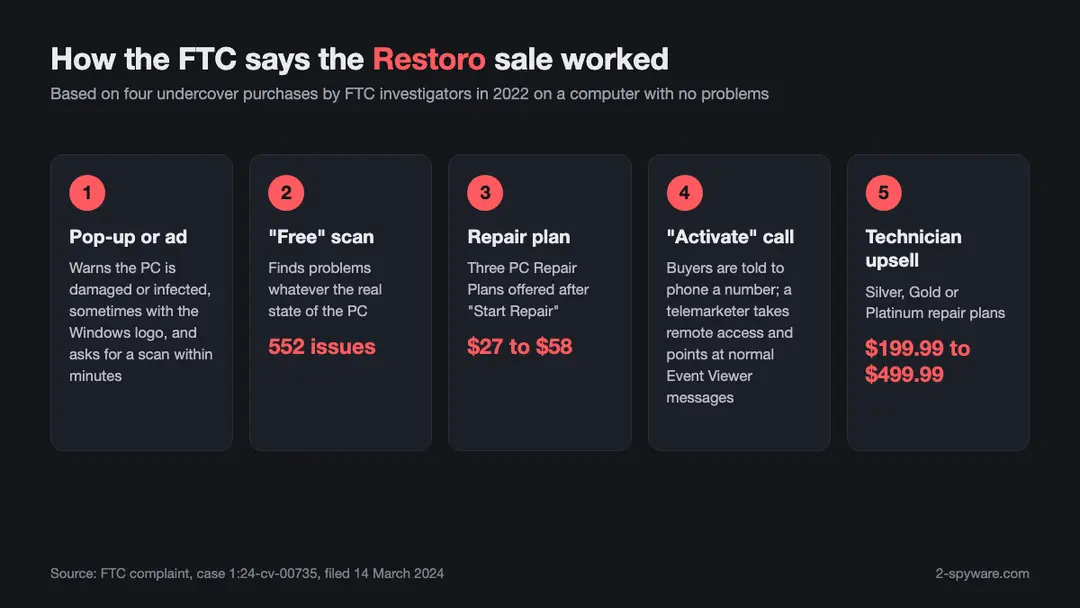
1. The free scan
Ads and pop-ups offered a free scan or an "update". One ad promised to "Restore & Repair Windows Systems in 2 Mins" [2]. The scan then listed PC privacy issues, junk files, crashed programs and broken registry issues [2].
A long list of issues on a PC that runs fine is a warning sign in any repair tool. Junk files and old registry entries are normal on a Windows PC and rarely cause real problems.
2. The repair plan
After you clicked Start Repair, Restoro showed three PC Repair Plans. The FTC says these cost from $27 to $58 [1][2].
3. The activation call
After payment, buyers were told to call a number to "Instantly Activate Your Software" [2]. On that call, telemarketers asked people to install a remote access tool [2].
They then opened Windows Event Viewer and pointed at errors and warnings as proof of damage [2]. The FTC notes that such messages appear during normal use, for example after a mistyped password or a finished antivirus scan [2].
4. The technician upsell
The telemarketers said the software alone could not fix the problems. They offered repair plans by a technician at $199.99 for Silver, $299.99 for Gold and $499.99 for Platinum [2].
Payments went through PayPal or a card, often through billing companies. The complaint names Nuvei and Paddle as billing aggregators [2]. That is useful if you are trying to find an old Restoro charge on a statement, because the line may not say Restoro.
Restoro prices and plans (last known)
Restoro had a free scan, but the repair needed a paid plan. These are the prices the FTC recorded during its 2022 test purchases. They are no longer on offer [2].
| What | Price | How it was sold |
|---|---|---|
| Free scan | Free | Download from an ad, pop-up or restoro.com |
| PC Repair Plan (three options) | $27 to $58 | Online checkout after Start Repair |
| Silver technician plan | $199.99 | Phone upsell after the activation call |
| Gold technician plan | $299.99 | Phone upsell after the activation call |
| Platinum technician plan | $499.99 | Phone upsell after the activation call |
We could not confirm the exact names, device counts or renewal terms of the three PC Repair Plans from a source we could read in 2026. If you were charged again a year after your first purchase, treat it as a renewal and follow the steps in the refund section below.
Is Restoro safe, legit or a virus?
Restoro is not a virus in the technical sense. It did not spread by itself or steal files, and no security vendor page we read calls it malware. But it is not a program we would call safe to keep either.
The honest summary is this. The software was a real program you installed yourself. The way it was sold, with fake alerts, inflated scans and phone upsells, is what the FTC sued over [1][2]. And there is no vendor left to update it or support it.
Why Malwarebytes flags Restoro
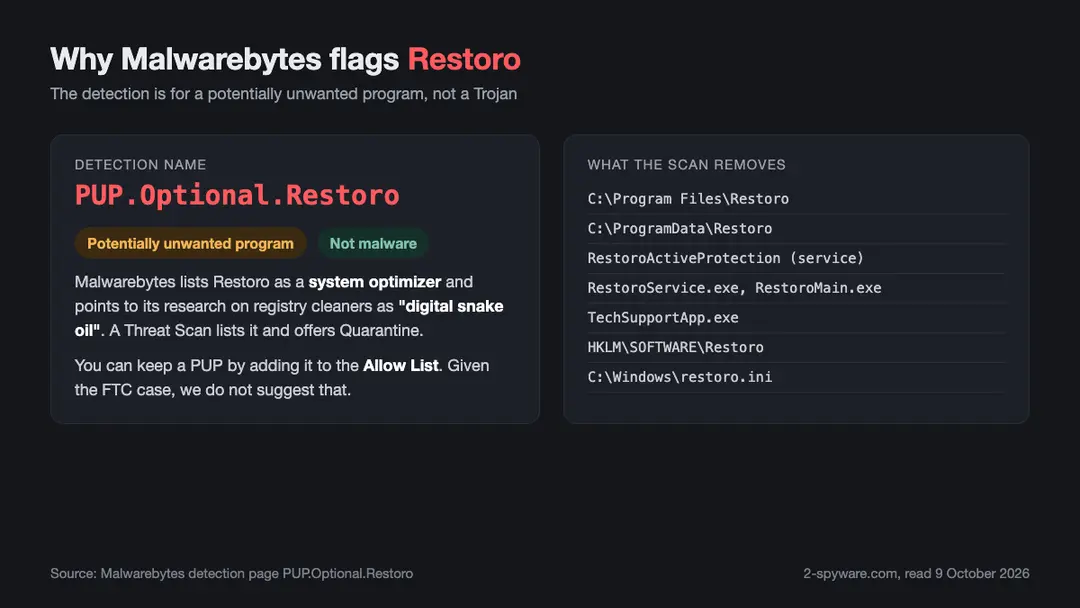
Malwarebytes detects Restoro as PUP.Optional.Restoro and calls it a system optimizer [4]. PUP means potentially unwanted program. It is a category for software that is not malware but that the vendor thinks most people do not want, such as aggressive optimizers and bundled tools.
The Malwarebytes page links to its own research on registry cleaners, titled Registry Cleaners: Digital Snake Oil [4]. Its sample removal log, dated 17 August 2018, shows the Restoro folders, the RestoroActiveProtection service, RestoroMain.exe, TechSupportApp.exe and the Restoro registry keys being quarantined [4].
That answers the reader who asked why Malwarebytes quarantines a program he paid for. Malwarebytes made a judgment about the product type and how it was promoted. Your licence does not change that judgment.
Malwarebytes does let you keep a PUP. Open Detection History, then Allow List, then Add, and choose the program folder [4]. Given the FTC findings and the lack of support, we do not suggest doing that for Restoro.
PUP or Trojan?
One reader wrote that Malwarebytes showed Restoro as a PUP and a Trojan. The Malwarebytes detection page for Restoro is a PUP detection only [4].
If you see a Trojan name, it belongs to a different file. That could be a fake Restoro installer from a download site, or something unrelated on the same PC. Open the scan report, read the full detection name and file path, and treat a Trojan detection as real malware. Our list of the best malware removal tools can help with a second opinion.
What about Microsoft Defender?
We could not find a Microsoft Defender detection name for Restoro in Microsoft's public pages during this update. The only Microsoft link in this case is the FTC finding that Restoro pop-ups misused the Microsoft Windows logo [2]. Microsoft had nothing to do with Restoro.
Windows Security can still block programs of this type. Its potentially unwanted app blocking setting is explained in our guide to potentially unwanted apps.
Was the Restoro website safe?
Not today. restoro.com now redirects to a GoDaddy lander page and its name servers belong to Afternic, a domain marketplace [5][6]. Whoever buys the domain next can put anything on it. Do not download a "Restoro" installer from that address or from any download portal.
Restoro licence keys, activation codes and renewals
Several readers asked us about a missing activation code or a licence that would not renew. There is no way to fix that now, because there is no Restoro company website or support desk to issue codes [6].
The FTC complaint shows that the activation step itself was part of the sales funnel. Buyers were sent to a phone number to activate the software, and the call became a technician sales pitch [2]. If you never got a code, you did not miss much.
- Do not call an old Restoro activation or support number. The FTC says those calls were used to sell services you did not need [1][2].
- Do not give remote access to anyone who calls about Restoro, a refund or a licence.
- Do not search for a Restoro licence key, crack or keygen. Those files come from unknown sources and often carry malware.
- Do not buy a renewal from any site that still uses the Restoro name. The product is gone.
If a pop-up on your screen says it is from Microsoft and asks you to call a number, it is a tech support scam. Our guide to the Microsoft Warning Alert scam shows how to close such pages and clean up the browser.
Restoro refunds and cancelling the subscription
With the vendor gone, you cannot cancel through Restoro. You can still stop charges and check whether you are owed money.
1. Check the FTC refund program
If you bought Restoro or Reimage software or services, the FTC may already have sent you a refund. The first round went out by PayPal in March 2025, and checks followed for people who did not accept the PayPal payment [3].
If you received a check, cash it within 90 days [3]. If you think you should have received a payment and did not, call the FTC refund administrator at 1-844-590-1102 [3]. You never have to pay to get an FTC refund [1].
2. Stop repeat charges
- Search your card and PayPal history for Restoro, Reimage, Paddle or Nuvei; the FTC names Paddle and Nuvei as billing companies in this case [2].
- In PayPal, open your settings and look for automatic payments; cancel any active one tied to these names.
- For a card, call your card issuer, say the merchant no longer exists, and ask them to block future charges.
- If a recent charge was for a renewal you did not agree to, ask the card issuer about a chargeback. Each bank has its own time limits.
3. Report it
If you were pressured on the phone, or paid for a technician plan, you can report it to the FTC at ReportFraud.ftc.gov [1]. Reports help the FTC track tech support scams.
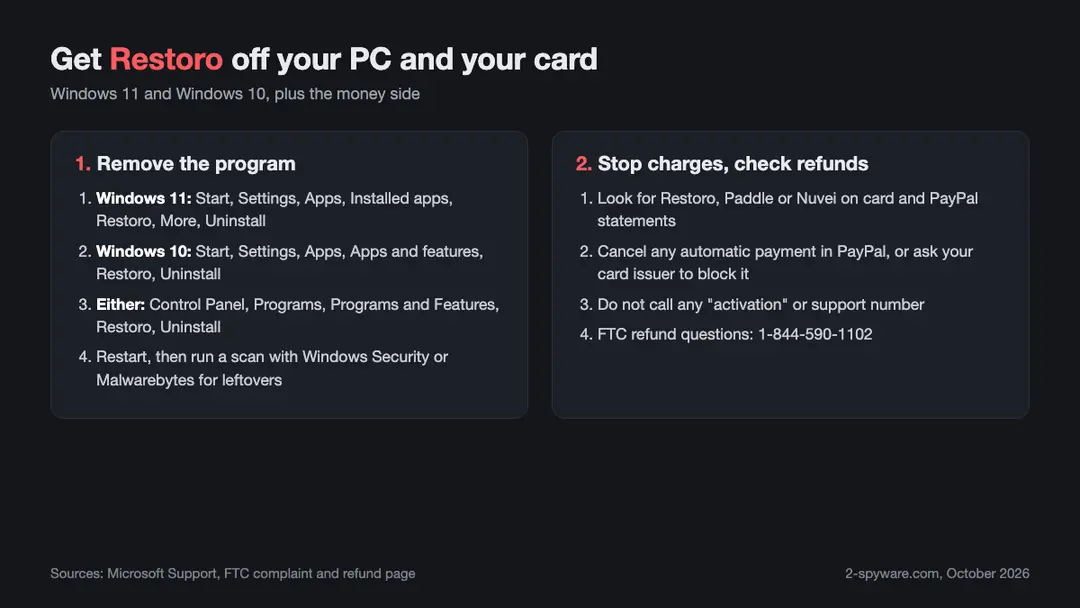
How to uninstall Restoro on Windows 11 and Windows 10
Restoro installs like a normal Windows program, so the standard Windows uninstall works. Malwarebytes lists an uninstaller, uninst.exe, inside the Restoro folder [4]. Microsoft documents three ways to remove a program [7].
Uninstall Restoro on Windows 11
- Select Start, then Settings, then Apps, then Installed apps [7].
- Find Restoro in the list.
- Select More, the three dots next to it, then Uninstall [7].
- Confirm, and follow the Restoro uninstaller to the end.
Uninstall Restoro on Windows 10
- Select Start, then Settings, then Apps.
- Under Apps and features, find Restoro.
- Select it, then Uninstall, and confirm.
Uninstall Restoro from Control Panel
This works on both Windows 11 and Windows 10, and Microsoft suggests it when an app will not uninstall from Settings [7].
- In search on the taskbar, type Control Panel and open it [7].
- Select Programs, then Programs and Features [7].
- Right click Restoro and select Uninstall or Uninstall/Change [7].
- Follow the directions on the screen [7].
Remove what is left
Restart the PC after the uninstall. Then check that these folders are gone, and delete them if they are not: C:\Program Files\Restoro and C:\ProgramData\Restoro [4]. Also check for a Restoro shortcut on the desktop and a Restoro folder in the Start menu [4].
The simplest way to catch leftovers, such as the RestoroActiveProtection service and registry keys, is a scan with Malwarebytes or another scanner that detects PUPs [4]. Windows Security covers malware, and a full scan there is worth running too. If you cannot uninstall Restoro at all, Microsoft points to its Program Install and Uninstall troubleshooter [7].
If Restoro came back after removal
Restoro does not reinstall itself. If it returns, another program, a browser extension or a fake update page is bringing it back. Check recently installed programs in Settings, remove anything you do not know, and reset your browser settings.
What to use instead of Restoro
Most of what Restoro promised is built into Windows or available for free. You do not need a paid repair tool to keep a Windows PC healthy.
- Windows Security: the built-in antivirus in Windows 11 and Windows 10, with real time protection and an option to block potentially unwanted apps.
- Windows Update: the safe source for Windows fixes and most drivers. Our DriverFix review explains how to update drivers without a paid tool.
- Storage settings: Windows has its own tools to clear temporary files and free space.
- A second opinion scanner: Microsoft's free on-demand scanner is covered in our Microsoft Safety Scanner review.
- Built-in repair: if Windows files are damaged, Windows Update and the built-in recovery options can repair them.
If you want one program that scans for damaged Windows files, junk and malware and repairs them in one place, we recommend Fortect. It is sold by Fortect Ltd, the scan is free, repairs need a paid licence, and it comes with a 60-day money-back period. We earn a commission if you buy it through our page.
Whatever you pick, apply one rule that the Restoro case makes clear. A program that finds hundreds of urgent problems on a PC that works fine, and then asks you to phone someone, is a red flag. Our section on system tools lists other optimizers that use the same tactics.
Restoro pros and cons
For balance, here is what Restoro did offer and where it fell short.
- Pro: one window for junk files, registry entries and a malware scan [4].
- Pro: a free scan before you paid [2].
- Pro: a normal uninstaller that Windows can run [4][7].
- Con: the FTC says the scans found problems on healthy computers [1][2].
- Con: activation calls were used to sell technician plans of up to $499.99 [2].
- Con: detected as PUP.Optional.Restoro by Malwarebytes [4].
- Con: no website, updates or support since the domain was parked [5][6].
Verdict: should you use Restoro in 2026?
No. Restoro cannot be bought, its website is a parked domain, and no one supports or updates it [5][6]. More important, the FTC says the program was the front end of a sales process built on fake alerts and inflated scans [1][2].
If Restoro is still on your PC, uninstall it and scan for leftovers. If you paid for it, check your statements for repeat charges and the FTC refund program [3]. And to the readers who bought it after reading our old review: we are sorry. We should have looked harder at how it was sold.
Features
Free scan
Listed PC privacy issues, junk files, crashed programs and registry issues.
PC Repair Plans
Three paid plans from $27 to $58 to run the repair.
Malware scan
Claimed to remove malware threats; installed its own antivirus engine files.
Active protection
Installed a background service called RestoroActiveProtection.
Tech support app
Installed TechSupportApp.exe and pointed buyers to an activation phone line.
Pricing
PC Repair Plans$27 to $58 (FTC, June 2022)
Not confirmed · renews at No longer sold
- Repair of issues found by the scan
- Activation by phone call
Technician plans$199.99, $299.99 or $499.99 (FTC, 2022)
Remote session · renews at No longer sold
- Silver, Gold or Platinum plan
- Remote access repair by a telemarketer
Prices as recorded in the review on October 9, 2026. Check the vendor's site for current prices.
Frequently asked questions
What is Restoro?
Restoro was a paid Windows repair program made by Restoro Cyprus Limited. It offered a free scan that listed registry, junk file, crash and privacy issues, and it asked you to buy a plan to repair them. It is no longer sold.
Is Restoro still available in 2026?
No. On 9 October 2026, restoro.com only redirected to a GoDaddy lander page, and its name servers belonged to the Afternic domain marketplace. There is no official site, download, support desk or renewal page.
Is Restoro a virus?
No. Restoro is not malware, but Malwarebytes detects it as PUP.Optional.Restoro, a potentially unwanted program. In 2024 the FTC said the companies behind Restoro and Reimage used fake pop-ups and scans that found problems on healthy computers to sell repairs.
Why does Malwarebytes detect Restoro as a PUP?
Malwarebytes classes Restoro as a system optimizer and lists it as PUP.Optional.Restoro. Its scan quarantines the Restoro folders, services and registry keys. You can keep it with the Allow List, but given the FTC case we suggest removing it.
Malwarebytes said Restoro is a Trojan. Is that right?
The Malwarebytes detection page for Restoro is a PUP detection, not a Trojan. If you see a Trojan name, it belongs to a different file, such as a fake installer. Read the full detection name and path, and treat a Trojan as real malware.
What did the FTC say about Restoro?
On 14 March 2024 the FTC said Restoro Cyprus Limited and Reimage Cyprus Limited used fake Windows pop-ups, misleading scans and phone upsells to sell repair services, especially to older people. The companies agreed to pay $26 million to settle.
Are Restoro and Reimage the same company?
They were two brands of one operation, according to the FTC. Its complaint says the two companies worked as a common enterprise with common ownership, staff, officers or offices, and that restoro.com offered a scan powered by Reimage.
Is Restoro now Fortect?
We found no FTC, court or vendor document that links Fortect to Restoro. The FTC case names only Restoro Cyprus Limited and Reimage Cyprus Limited. Fortect is sold by Fortect Ltd.
How do I uninstall Restoro on Windows 11?
Open Start, Settings, Apps, Installed apps, find Restoro, select More and then Uninstall. You can also use Control Panel, Programs, Programs and Features. Restart afterwards and scan for leftovers.
How do I get a refund for Restoro?
The vendor no longer exists, so check the FTC refund program instead. The FTC paid refunds by PayPal in March 2025 and later mailed checks. For questions, call the FTC refund administrator at 1-844-590-1102. Ask your card issuer about any recent charge.
How do I cancel a Restoro subscription?
Look for Restoro, Reimage, Paddle or Nuvei on your card and PayPal statements. Cancel any automatic payment in PayPal, and ask your card issuer to block further charges from these merchants.
I never got my Restoro activation code. What now?
There is no support desk left to send one. The FTC says the activation phone call was used to sell technician plans, so do not call an old Restoro number. Uninstall the program and check the FTC refund program.
How much did Restoro cost?
The FTC recorded three PC Repair Plans from $27 to $58 in 2022. On the activation call, buyers were offered technician plans at $199.99, $299.99 and $499.99. None of these is sold today.
Sources
- FTC press release: Tech Support Firms Will Pay $26 Million to Settle FTC Charges That They Deceived Consumers into Buying Repair Services (14 March 2024)
- FTC v. Restoro Cyprus Limited and Reimage Cyprus Limited: Complaint for Permanent Injunction, Monetary Judgment, and Other Relief, case 1:24-cv-00735, U.S. District Court for the District of Columbia, filed 14 March 2024
- FTC: Restoro-Reimage Refunds (updated March 2026)
- Malwarebytes: PUP.Optional.Restoro detection page (last changed 3 October 2023)
- Verisign RDAP registration record for restoro.com
- restoro.com live visit (redirects to a GoDaddy lander page)
- Microsoft Support: Uninstall or remove apps and programs in Windows
Questions and experiences
Ask about this page: members and our editors answer. Reading is open; writing needs a free account.
…