
Anti-Malware
a-squared Anti-Malware Review 2026: Now Emsisoft Anti-Malware
a-squared Anti-Malware was an Austrian anti-spyware and anti-trojan scanner from Emsi Software. It lives on as Emsisoft Anti-Malware Home, which is still sold in 2026. This review explains what a-squared was, what it became, how the current product works, what it costs, and which free Emsisoft tools are worth keeping.
7.2/10
Renamed, still sold: solid but untested lately
a-squared lives on as Emsisoft Anti-Malware Home, a light layered malware blocker with great free tools but no current consumer lab scores.
- Our score
- 7.2 / 10
- Price from
- 59.95 US dollars a year for 3 PCs (19.98 per PC)
- Platforms
- Windows 10 (64 bit) and newer; macOS 11 Big Sur and newer
- Type
- Anti-Malware
Verdict in short
- a-squared was renamed Emsisoft Anti-Malware around 2010; the home edition is still sold and updated in 2026.
- Dual scanner, File Guard, Behavior Blocker, Anti-Ransomware and web protection for 59.95 US dollars a year for 3 PCs.
- Free Emergency Kit and ransomware decryptors are worth keeping even if you use another antivirus.
What we liked
- Still sold and updated in 2026, for Windows and Mac
- Dual-engine scanner with behaviour and ransomware layers
- Free portable Emergency Kit
- Free decryptors for more than 80 ransomware families
- Opt-out switches for optional data
- 30-day trial and 30-day refund
What we did not
- No current independent consumer lab results
- No permanent free edition with real-time protection
- No VPN, password manager or parental controls
Score breakdown
- Protection7.0Layered design described by the vendor; latest consumer lab series listed is from 2018.
- Features7.0Scanner, File Guard, Behavior Blocker, Anti-Ransomware, web protection and console; no extras.
- Free tools9.0Emergency Kit and decryptors for more than 80 ransomware families.
- Price and refunds7.059.95 US dollars a year for 3 PCs, 30-day trial and 30-day refund, also on renewals.
- Privacy7.5Required data is limited; optional data can be turned off; uploads need your permission.
a-squared Anti-Malware in 2026: the short answer
a-squared Anti-Malware was a Windows security program made by Emsi Software, a small company from Austria. It started as a scanner for trojans, spyware and adware, and later grew into a full real-time protection product.
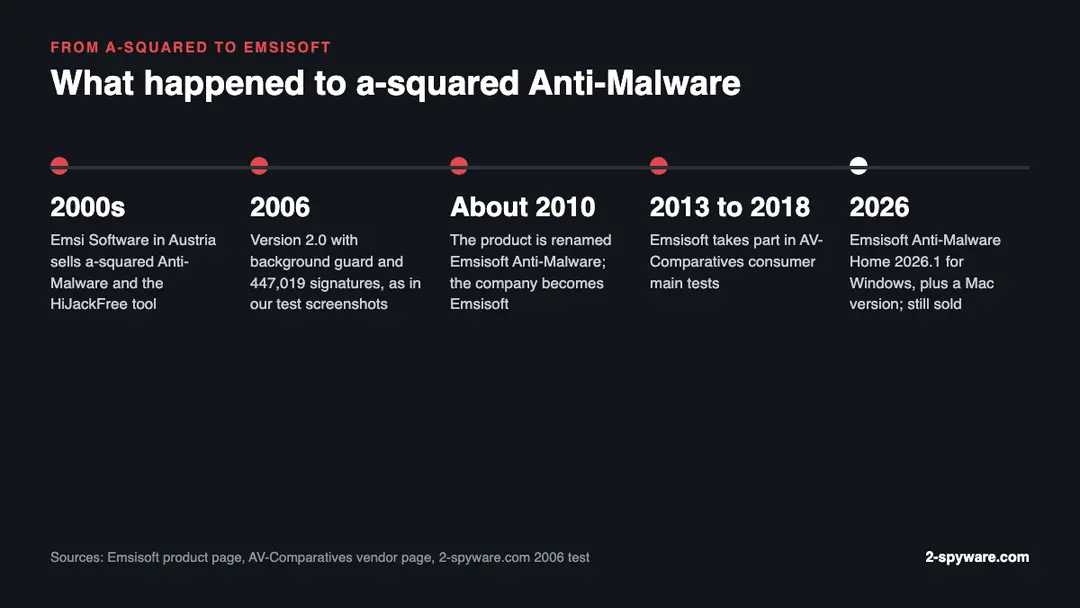
The a-squared name is gone. Around 2010 the product was renamed Emsisoft Anti-Malware, and the company now trades as Emsisoft. The home edition is sold today as Emsisoft Anti-Malware Home [1].
So if you came here looking for a-squared, the product you want is Emsisoft Anti-Malware Home. You will not find a current a-squared download on the vendor's site, and any file still sold under the old name is years out of date.
- Status: renamed, not discontinued. The successor, Emsisoft Anti-Malware Home, is still sold and updated [1][2].
- Current version: 2026.1.0.12700 for Windows, released on 20 February 2026 [1].
- Systems: Windows 10 (64 bit) and newer, and macOS 11 Big Sur and newer on Intel and Apple silicon, with Mac version 2026.2.0.939 [1].
- Price: US$59.95 a year for 3 PCs, which Emsisoft shows as US$19.98 per PC, with plans for 1 to 5 devices [2].
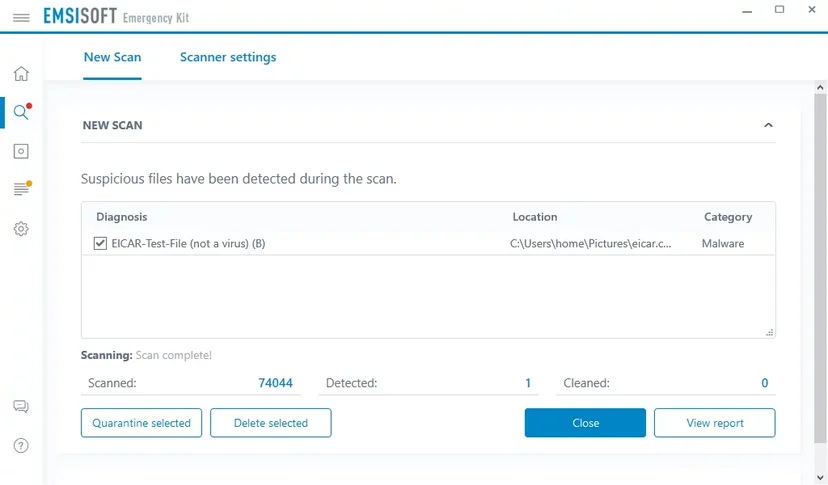
- Free options: a 30-day trial, the portable Emsisoft Emergency Kit scanner and free ransomware decryptors [1][3][4].
- Company: Emsisoft, now based in New Zealand with staff around the world, according to AV-Comparatives [6].
How we reviewed it and how we earn money
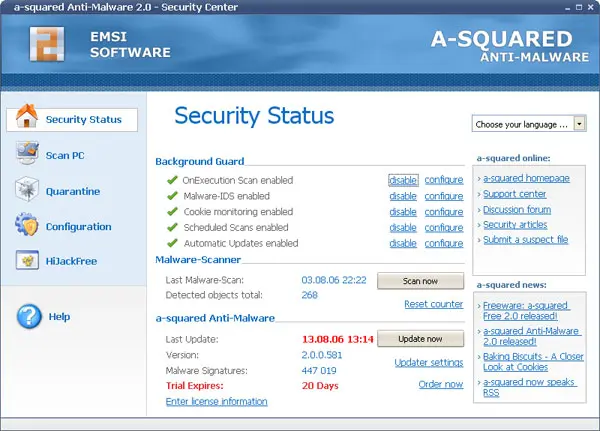
Our first a-squared review is from 2006. Our team installed a-squared Anti-Malware 2.0 on clean and badly infected Windows PCs and took the screenshots you see on this page. Those pictures show the real program from that test, and each caption gives the year.
For this 2026 update we read Emsisoft's current product, pricing, Emergency Kit, decryptor and privacy pages, and AV-Comparatives' vendor page and 2025 reports [1][2][3][4][5][6][7][8]. Each source is listed at the bottom with the date we read it. We did not run a new hands-on malware test for this update, so the protection part rests on the vendor's description and the lab record.
2-spyware.com is reader supported. We earn a commission only from partner products, such as the Fortect offer shown on this page. We have no affiliate deal with Emsisoft, we earn nothing if you buy Emsisoft, and this page has no Emsisoft download link.
What was a-squared Anti-Malware?
a-squared came from Emsi Software GmbH in Austria. The name a-squared, often written a2, appeared on the scanner and its tools. In 2006 the company also offered a-squared Free, a scan-only version, next to the paid Anti-Malware product with a background guard.
The version we tested in 2006 was a-squared Anti-Malware 2.0. Its Security Center showed four guard parts: OnExecution Scan, Malware-IDS, Cookie monitoring and Scheduled Scans, plus automatic updates. The database held 447,019 malware signatures at the time.
a-squared looked for trojans, backdoors, keyloggers, rootkits, worms, dialers, spyware and adware. It scanned the registry, running processes, browser cookies and the whole file system. It also looked inside Zip, RAR and Cab archives and in NTFS Alternate Data Streams, a hiding place rootkits used at the time.
It offered four scan types. Quick Scan checked only running malware and took about 2 minutes. Smart Scan checked the key system folders in up to 40 minutes. Deep Scan checked everything and could run for more than an hour, and Custom Scan let you choose the targets yourself.
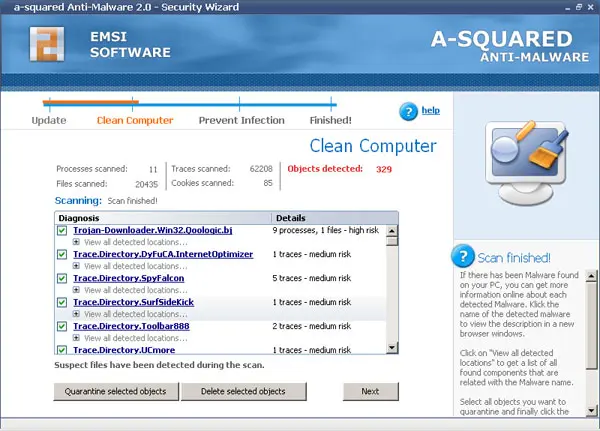
In our 2006 test, a-squared found and removed most of the parasites we had installed and missed only a few minor objects. That was a strong result for an anti-spyware tool of that era, since many rivals did not scan archives or alternate data streams at all.
HiJackFree, the tool that came with it
a-squared shipped with HiJackFree, a system tool for advanced users. It listed running processes, open network ports, startup entries and services, and let you stop a process or delete its file. It worked like the HijackThis logs that malware removal forums used at the time.
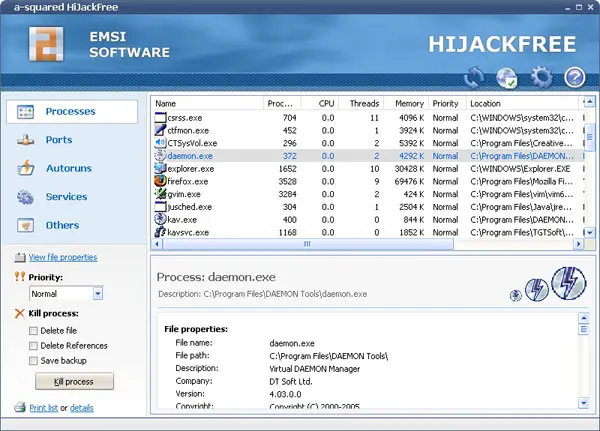
HiJackFree is not part of the current Emsisoft product line, and its 2000s builds were made for Windows XP era systems. You should not install it on Windows 10 or 11 today. Microsoft's own Task Manager, Startup apps and Services cover most of what it did.
What a-squared became: Emsisoft Anti-Malware
The rename to Emsisoft Anti-Malware came around 2010. The company took the Emsisoft name. Today the role of the old free a-squared scanner is filled by the Emsisoft Emergency Kit. The core idea stayed the same: a dual scanner plus behaviour monitoring that watches what programs do.
One trace of the old name survives. The Emergency Kit's command line scanner is still called a2cmd.exe, where a2 stands for a-squared [3].
Today Emsisoft sells three products: Anti-Malware Home for households, Business Security for small and medium organizations, and Enterprise Security + EDR for larger ones [2]. All three use the same protection layers and the same cloud console, with more management tools at each level.
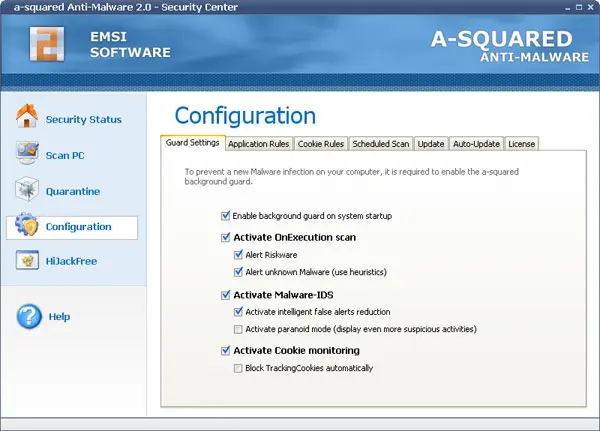
Emsisoft Anti-Malware Home features in 2026
Emsisoft describes Anti-Malware Home as layered protection against malware, ransomware, phishing and potentially unwanted programs [1]. These are the parts the vendor lists, checked against its product and pricing pages.
- Dual-engine scanner: two scan engines, with quarantine and cleaning, to find viruses, spyware and other malware [2].
- Real-time File Guard: scans files you download or change, with AI-supported detection [1].
- Behavior Blocker: watches running processes and alerts you to suspicious actions [1].
- Anti-Ransomware: looks for ransomware-like actions, such as mass file encryption, and stops them [1].
- Web Protection and browser security: blocks known malicious and phishing websites [1].
- PUP detection: finds and blocks potentially unwanted programs, such as bundled toolbars and adware [1].
- Emergency Kit Maker: builds a portable scanner you can use to clean a friend's PC [2].
- MyEmsisoft console: basic remote management through a web console and apps for Android and iOS [1][2].
- Support: email and live chat [2].
The plan table also lists scheduled scans, scan exclusions, Windows Explorer integration and hourly automatic updates [2]. Emsisoft says a quick system scan takes 1 to 2 minutes [2].
There is no VPN, password manager, firewall of its own or parental control in the home product. Emsisoft builds a lean malware blocker and leaves the extras to other tools. If you want a full suite with those parts, look elsewhere.
The Management Console
Every home licence comes with the Emsisoft Management Console [1]. You can see your devices, read alerts and change protection settings from a browser or a phone. The home version is a simplified console that keeps logs and reports for 30 days [2].
This is useful if you look after the PCs of parents or children in another house. You can see from your phone that their protection is on and that the last scan was clean.
Detection results and independent tests
AV-Comparatives lists Emsisoft as a vendor that joined its Main Test Series in 2013 [6]. Its vendor page, however, shows the latest consumer main tests with Emsisoft as the 2018 series, such as the Real-World Protection Test July to November 2018 [6].
Emsisoft does not appear in the consumer Real-World Protection Test for July to October 2025 [7]. In that test, 18 products were named, with protection rates from 94.2 to 100 percent [7]. The 2025 Summary Report covered 19 consumer products for Windows, and its award lists do not name Emsisoft [8].
This means there is no current independent consumer lab score for Emsisoft Anti-Malware Home. Older results were good, and Emsisoft shows badges from Virus Bulletin and other test bodies on its site [1][2]. But a badge from 2021 or 2022 tells you little about protection in 2026.
We do not count this as a failure. Lab tests cost vendors money, and some smaller companies pick which ones they enter. It does mean you have to trust Emsisoft's own description more than with brands like Bitdefender, ESET or Norton, which were tested through 2025 [7][8].
Prices, trial and refunds
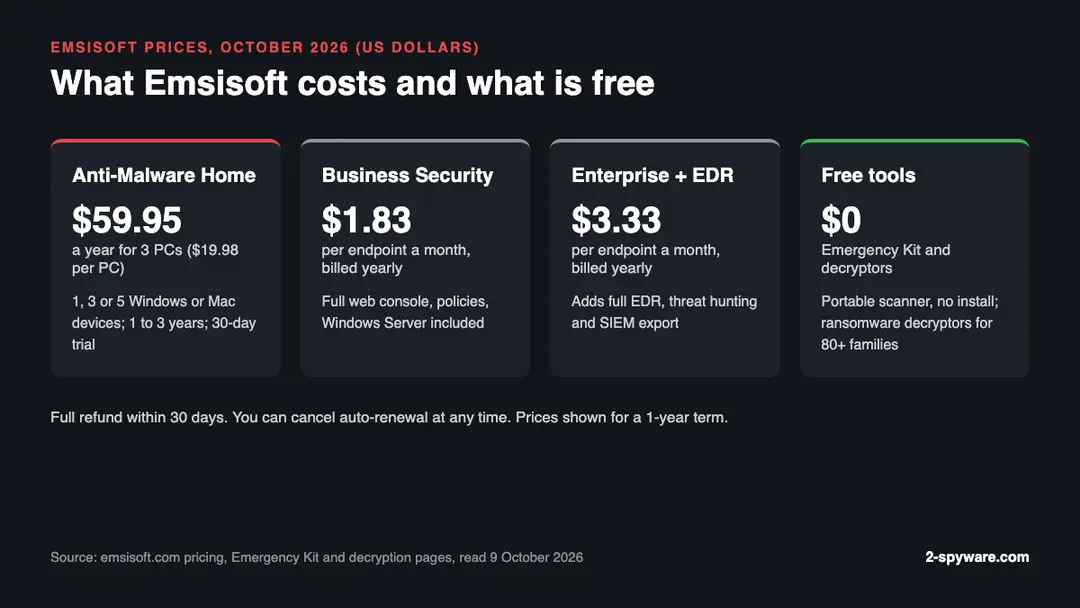
Emsisoft sells Anti-Malware Home as a yearly subscription. On 9 October 2026 the pricing page showed US$59.95 a year for 3 PCs, or US$19.98 per PC [2]. You can choose 1, 3 or 5 devices and terms of 1, 2 or 3 years, and the devices can be Windows PCs or Macs [2].
| Plan | Price shown | Who it is for |
|---|---|---|
| Anti-Malware Home | US$59.95 a year for 3 PCs (US$19.98 per PC) | Homes and home offices, 1 to 5 Windows or Mac devices |
| Business Security | US$1.83 per endpoint a month, billed yearly | Small and medium organizations, Windows servers included |
| Enterprise Security + EDR | US$3.33 per endpoint a month, billed yearly | Medium and large organizations that need EDR and SIEM export |
| Emergency Kit | Free download | Scanning and cleaning a PC without installing anything |
| Ransomware decryptors | Free | Restoring files locked by supported ransomware families |
There is a free 30-day trial of the full home product [1]. There is no permanent free edition of Anti-Malware Home with real-time protection. If you want free real-time protection, Microsoft Defender is already built into Windows.
Payments go through 2Checkout, which handles the order and card data. Emsisoft says it stores no card data itself [2]. Licences renew automatically, and you can cancel auto-renewal at any time [2].
Emsisoft offers a full refund within 30 days of a purchase, and it says the same 30-day refund applies to unwanted renewal charges [2]. Its Technology Promise also gives you every new major version free while your subscription runs [2]. Schools, students, charities and government bodies can ask sales for special prices [2].
The free Emsisoft Emergency Kit
The Emsisoft Emergency Kit fills the role the free a-squared scanner once had. It is a portable toolkit that scans and cleans an infected Windows PC without installing anything [3]. You copy it to a folder or a USB stick, update it, scan, and delete it after use.
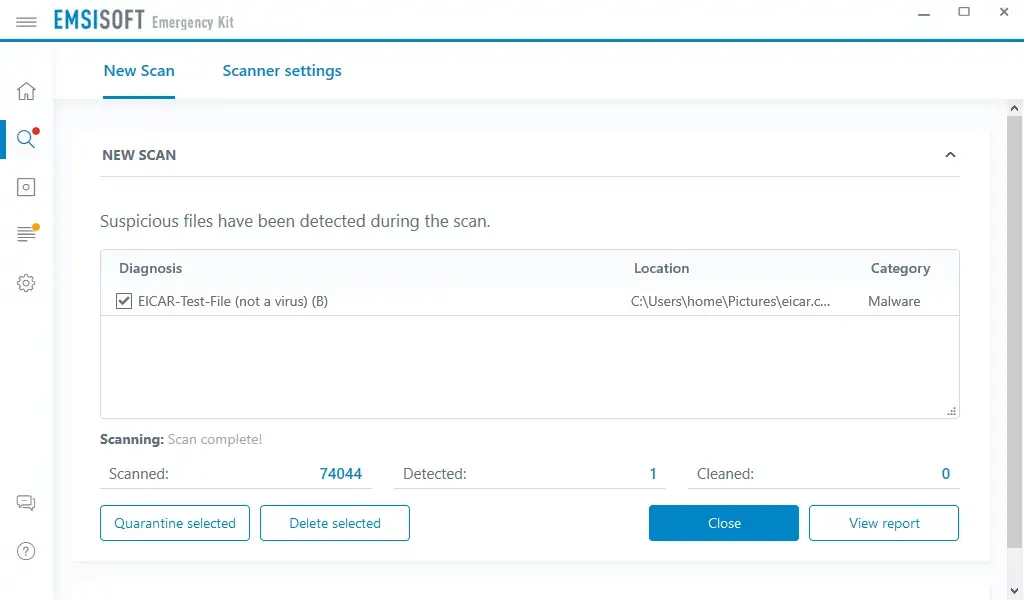
The current version is 2025.7.0.12683, released on 27 June 2025, for Windows 10 (64 bit), Windows Server 2016 and newer [3]. It uses the same dual-scanner technology as the paid product [3]. It moves detected items to quarantine or removes them, and it restores damaged system settings [3].
The kit has two scanners. The Emergency Kit Scanner has a normal window with buttons. The Commandline Scanner, a2cmd.exe, does the same work from a command prompt and suits scripts and helpdesk jobs [3].
Emsisoft's own page title calls it a free portable malware scanner, but the page also pitches the kit to helpdesk departments [3]. If you plan to use it for paid work on client PCs, read the licence terms first.
The kit is a second-opinion tool, not protection. It does not run in the background, so it cannot stop the next infection. Use it when you think a PC is already infected, for example next to a Microsoft Defender Offline scan or the Microsoft Safety Scanner.
Emsisoft's free ransomware decryptors
Emsisoft is one of the best known makers of free ransomware decryptors. Its decryption page offers free tools that restore files locked by specific ransomware families without paying the ransom [4]. The page lists more than 80 families, among them Avaddon, Diavol, GlobeImposter, Jigsaw, Maze, Paradise, STOP Djvu and Ziggy [4].
A decryptor only works for the family and version it was built for. If the criminals used a key that was never leaked or cracked, no tool can restore the files. For STOP Djvu, the most common home ransomware, the Emsisoft tool helps only in some cases, mostly with older variants and offline keys. Read our STOP Djvu ransomware guide before you try it.
To find the right tool, start from our list of free ransomware decryptors, which collects tools from Emsisoft and other vendors. Then follow our ransomware recovery steps. Keep a copy of the encrypted files before you run any decryptor, in case it fails halfway.
Privacy: what Emsisoft collects
Emsisoft's privacy policy was last updated on 4 March 2024 [5]. It splits what the software sends into required and optional data.
- Required: your account data and computer name to check your licence, your public IP address, your operating system and a hardware ID hash that identifies your PC [5].
- Optional, and can be turned off in settings: checksums of detected files, names of detected malware and blocked hosts, crash reports, and settings and logs when you link to MyEmsisoft [5].
- File uploads: when the software finds a suspicious file, it asks your permission before it sends it to the Emsisoft Lab [5].
- Storage: the main user database sits on Emsisoft's own servers in a Hetzner data center in Germany, with listed subprocessors in other countries [5].
That is a modest amount of data for a security product, and the opt-out switches are a plus. Note that the Emsisoft website itself uses advertising cookies, including Google and Facebook ad tools, which you can reject in the cookie banner [5]. That is about the website, not the installed program.
Installation, use and removal
To try the product, start the 30-day trial from the Emsisoft Anti-Malware Home page [1]. You create a MyEmsisoft account, then download and run the installer. Emsisoft also lists alternative installation options on its help pages [1].
After installation, the program updates itself and runs a first scan. The interface shows the protection layers, the scan options, quarantine, logs and settings. Since the console mirrors each device, you can also check the same screens from the web console [1].
Emsisoft Anti-Malware Home replaces Microsoft Defender's real-time protection on Windows. Do not run two real-time antivirus programs at once. An on-demand scanner like the Emergency Kit is fine next to it, because it only runs when you start it.
To uninstall it on Windows 11, open Settings, then Apps, then Installed apps, find Emsisoft Anti-Malware, click the three dots and choose Uninstall. On Windows 10 the path is Settings, then Apps, then Apps and features. Our Windows uninstall guide shows each step, and Defender turns back on after removal.
If you still have an old a-squared program from the 2000s on an old PC, remove it the same way. Then check for leftover files and startup entries, since old programs often leave services behind.
Is Emsisoft Anti-Malware safe and legit?
Yes. Emsisoft is a long-standing security vendor, and its product is a real antivirus, not a fake one. It is sold through its own website with a 2Checkout checkout, it has a 30-day refund, and it takes part in the security community through its free decryptors [2][4].
The risk is not the product but fake copies. Download only from emsisoft.com. Old a-squared installers on download portals are outdated, and some repackaged ones carry adware. If a site offers a cracked Emsisoft licence, the file is far more likely to infect you than to protect you.
Alternatives to Emsisoft Anti-Malware
If you want real-time protection with recent lab results, the products that topped AV-Comparatives' 2025 consumer tests include Norton, Bitdefender, ESET, Avast, AVG, G Data and Kaspersky [8]. Microsoft Defender, which costs nothing, scored a 99.1 percent protection rate in the July to October 2025 Real-World test [7].
If you need a second-opinion scanner, the Emsisoft Emergency Kit, SpyHunter and the free Microsoft Safety Scanner are options. For a veteran anti-spyware tool from the same era as a-squared, see our Spybot Search and Destroy review.
If your PC still feels slow or unstable after malware is gone, the cause is often damaged system files or leftover junk. Fortect is a Windows repair tool that scans your PC for free, then repairs damaged system files, registry problems and malware leftovers with a paid licence. It works well next to an antivirus like Emsisoft.
Pros and cons
Pros
- Still sold and updated, with a 2026 version for Windows and a Mac version
- Dual-engine scanner plus Behavior Blocker and Anti-Ransomware layers
- Free Emergency Kit for cleaning PCs without installing anything
- Free ransomware decryptors for more than 80 families
- Clear privacy policy with opt-out switches for optional data
- 30-day trial and a 30-day refund, also on renewals
- Remote console in a browser and on phones
Cons
- No current consumer results from AV-Comparatives since its 2018 series
- No permanent free edition with real-time protection
- No VPN, password manager or parental controls
- The old a-squared product and HiJackFree are gone, so old guides no longer match
Verdict: is Emsisoft Anti-Malware worth it in 2026?
a-squared Anti-Malware was a strong anti-spyware scanner in its day, and it did not die. It became Emsisoft Anti-Malware Home, a lean, well-built malware blocker with a dual scanner, behaviour monitoring and ransomware protection, at US$59.95 a year for 3 PCs [2].
Its weak point is proof. Without current independent consumer tests, you rely on the vendor's word and older results [6][7]. For most home users, Microsoft Defender or a suite with fresh lab scores is the safer bet on paper.
Emsisoft makes most sense if you value a quiet, light program, good support and a remote console for family PCs. Whatever you choose, keep the free Emergency Kit and the decryptor list in your toolbox. We rate Emsisoft Anti-Malware Home 7.2 out of 10.
Features
Dual-engine scanner
Two scan engines with quarantine and cleaning.
File Guard
Real-time scanning of downloaded and changed files.
Behavior Blocker
Watches running processes for suspicious actions.
Anti-Ransomware
Stops mass file encryption and similar ransomware actions.
Web Protection
Blocks known malicious and phishing websites.
Emergency Kit Maker
Builds a portable scanner for cleaning other PCs.
Management Console
Web and mobile console to watch and manage home devices.
Pricing
Anti-Malware Home59.95 US dollars a year for 3 PCs (19.98 per PC)
1, 3 or 5 Windows or Mac devices · renews at Renews automatically; cancel any time; 30-day refund
- Dual-engine scanner
- Real-time layered protection
- Emergency Kit Maker
- Basic remote console
- Email and live chat support
Business Security1.83 US dollars per endpoint a month, billed yearly
Endpoints, Windows and Mac, servers included · renews at Yearly, 2-year or 3-year billing
- Everything in Home
- Full remote management
- Protection and permission policies
- Command line scanner
Enterprise Security + EDR3.33 US dollars per endpoint a month, billed yearly
Endpoints, Windows and Mac · renews at Yearly, 2-year or 3-year billing
- Everything in Business
- Full EDR and threat hunting
- SIEM export via Syslog
- Priority support
Prices as recorded in the review on October 8, 2026. Check the vendor's site for current prices.
Frequently asked questions
What is a-squared Anti-Malware?
a-squared Anti-Malware was a Windows anti-spyware and anti-trojan program from Emsi Software in Austria. It scanned files, the registry, processes and cookies, and later added a background guard. Around 2010 it was renamed Emsisoft Anti-Malware.
Is a-squared Anti-Malware still available?
Not under that name. The product continues as Emsisoft Anti-Malware Home, which is still sold and updated in 2026. Version 2026.1.0.12700 for Windows came out on 20 February 2026.
Who makes Emsisoft Anti-Malware now?
Emsisoft, the company that grew out of Emsi Software. AV-Comparatives describes it as based in New Zealand with staff around the world.
How much does Emsisoft Anti-Malware Home cost?
On 9 October 2026 the pricing page showed 59.95 US dollars a year for 3 PCs, or 19.98 dollars per PC. You can pick 1, 3 or 5 devices and 1 to 3 years. There is a 30-day free trial and a 30-day refund.
Is there a free version of Emsisoft Anti-Malware?
There is no permanent free edition with real-time protection. The free options are the 30-day trial, the portable Emsisoft Emergency Kit scanner and the free ransomware decryptors.
Is the Emsisoft Emergency Kit free?
Emsisoft calls it a free portable malware scanner. It runs without installation on Windows 10 (64 bit), Server 2016 and newer. Emsisoft also pitches it to helpdesks, so check the licence terms before paid business use.
Does Emsisoft Anti-Malware work on Mac?
Yes. Emsisoft lists a Mac version for macOS 11 Big Sur and newer, on Intel and Apple silicon Macs. Home licences cover Windows and Mac devices.
How good is Emsisoft at detecting malware?
Older lab results were good, but AV-Comparatives lists 2018 as Emsisoft's latest consumer main test series. Emsisoft is not in the 2025 consumer Real-World test, so there is no current independent score.
Is Emsisoft safe to use?
Yes, when you download it from emsisoft.com. It is a genuine security product from a long-standing vendor. Avoid old a-squared installers and cracked licences from download portals, which can carry adware or malware.
Can Emsisoft decrypt my ransomware files?
Only if your ransomware family has a working decryptor. Emsisoft offers free tools for more than 80 families, including some STOP Djvu cases. If no decryptor matches, keep a copy of the encrypted files in case one appears later.
What happened to HiJackFree?
HiJackFree was a system tool that came with a-squared in the 2000s. It is no longer offered. Use Task Manager, Startup apps and Services in Windows instead.
What data does Emsisoft collect?
To check your licence it needs your account data, computer name, public IP, operating system and a hardware ID. File checksums, malware names, crash reports and logs are optional and can be turned off. Suspicious files are sent only with your permission.
How do I uninstall Emsisoft Anti-Malware?
On Windows 11 open Settings, Apps, Installed apps, find Emsisoft Anti-Malware, click the three dots and choose Uninstall. On Windows 10 use Settings, Apps, Apps and features. Microsoft Defender turns back on after removal.
Sources
- Emsisoft: Emsisoft Anti-Malware Home product page
- Emsisoft: Pricing and plan comparison
- Emsisoft: Emsisoft Emergency Kit
- Emsisoft: Free ransomware decryption tools
- Emsisoft: Privacy Policy (last updated 4 March 2024)
- AV-Comparatives: Emsisoft vendor page
- AV-Comparatives: Real-World Protection Test July-October 2025
- AV-Comparatives: Summary Report 2025
Questions and experiences
Ask about this page: members and our editors answer. Reading is open; writing needs a free account.
…