
c--617b5f35-...-prod.lovable.cloud: fake Minecraft cheat-client .jar files tagged SilentNet, and what to do on a Windows PC
c--617b5f35-a107-4800-9047-a429934c0483-prod[.]lovable[.]cloud is a storage address on Lovable's hosting that URLhaus lists three times on 12 October 2026 for Minecraft client files (KryptonPlus.jar, meteor-client-1.21.11-86.jar and opsec-1.21.11+v1.1.7.1.jar), all tagged SilentNet.
Seeing the name in a log proves nothing, but running one of these .jar files on a Windows PC can hand your Minecraft sessions, passwords and files to a stranger, so treat that PC as exposed: change your passwords from another device, then scan and clean or reset Windows.
Facts checked October 13, 2026. Removal steps tested on Windows 11 (26H2) and checked against Microsoft's and the browser makers' current documentation.
Automatic
Get a free scan and check if your PC is infected.
Fortect finds malware, unwanted programs and the Windows damage they leave behind, and repairs it in one pass.
If a Minecraft client or mod .jar file downloaded from a lovable.cloud address keeps coming back after uninstalling, a scan can find what reinstalls it.
Do it yourself · free Remove lovable.cloud (SilentNet, Minecraft .jar files) yourself 5 steps, about 15 minutes, no software needed.
Start the steps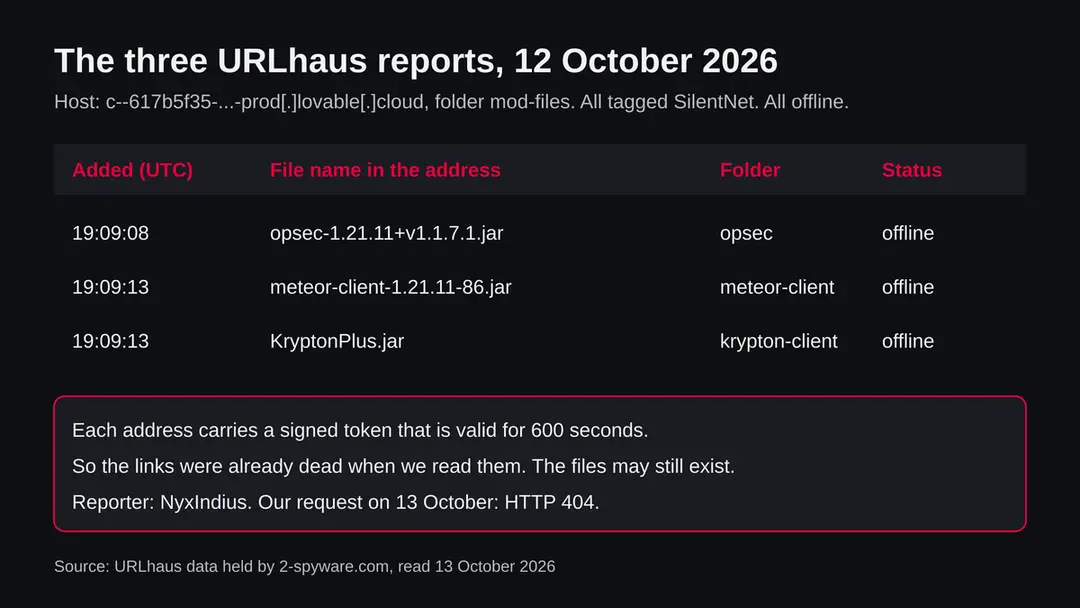
Lovable.cloud (SilentNet, Minecraft .jar files): summary
| Type | A malware download address: three Minecraft client .jar files tagged SilentNet on a lovable.cloud storage path |
|---|---|
| Risk | High if you ran one of the files: game, Discord and browser logins and files may be taken. Low if you only saw the name |
| Symptoms | Often none. An unknown mod in the mods folder, a hidden javaw.exe and alerts from your accounts are the signs in the reports |
| How to get rid of it | Change passwords from another device, run Microsoft Defender Offline, delete unknown mods, and reset Windows if you are not sure |
| Our check (13 October 2026) | One plain request from our server: HTTP 404 from Cloudflare. Signed links expire, so this clears nothing |
| Running since / first seen | First reported 12 October 2026; parent domain lovable.cloud registered 12 September 2025 |
| Removal | Scan the PC with security software to find and remove the malware and anything installed with it. Fortect scans Windows for malware and repairs the system files and settings it damaged. Remove it nowTo use the full-featured product, you have to purchase a license for Fortect. The scan is free. |
Show 9 more facts
| Platform | Windows in the reports we read. Minecraft Java runs .jar mods on Mac and Linux too, but we found no source for those |
|---|---|
| Detection names | No Microsoft detection name is known for these files, because we did not open them. The family tag is SilentNet |
| Name | C--617b5f35-a107-4800-9047-a429934c0483-prod.lovable.cloud |
| Domain registered | 12 September 2025 |
| Evidence | 3 write-ups by security sites; details still limited |
| First seen | 12 October 2026 |
| Distribution | Typically fake installers, cracked programs, e-mail attachments, fake "verify you are human" pages and ads for popular apps |
| Damage | Installs other malware, often several programs at once |
| Facts checked | 13 October 2026 |
Facts checked on 13 October 2026 against the URLhaus data for this address held in our database (the abuse.ch host page was not fetched), RDAP, one plain request from our server, and published material by MalwareBazaar, CyberInsider on Check Point, Rankiteo, the Prism Launcher project and Microsoft Learn.
We did not download the files and we infected no PC; the removal steps follow Microsoft's pages and were not tried on a live infection.
What this address is, and what we know about it
This is not a program on your PC. It is a web address in the lovable.cloud domain that the abuse.ch project URLhaus lists as a place where malware was downloaded from. We found no public write-up of this one address, so this page separates what URLhaus shows, what we checked ourselves, and what researchers have published about the malware family named in the tags.
- 1
What URLhaus lists
Three file addresses under a storage path called mod-files, in three folders: krypton-client, meteor-client and opsec. They were added on 12 October 2026 between about 19:09:08 and 19:09:13 UTC by the reporter NyxIndius. All three carry the threat label malware_download, the tag SilentNet, and are marked offline.
- 2
What the file names suggest
Meteor Client is a well known cheat client for Minecraft Java Edition, and 1.21.11 is a Minecraft version number. Krypton and opsec read like names of similar add-ons. The names are what the uploader chose, so they prove nothing about the content. Fake copies of popular Minecraft clients are the pattern the researchers below describe.
- 3
What we could not confirm
We did not download any of the files, so we cannot say what is inside them or where they send data. URLhaus shows tags, not a proof. We also do not know who runs the page that handed out these links or how visitors were led to it.
- 4
What this means for you
If you only saw the name in a firewall log, a browser warning or an alert, you are not infected by that alone. The risk is for a PC where someone downloaded one of these .jar files and started Minecraft with it. If the name came from a log, find the device that asked for it.
- Kind of threat
- Download address for Minecraft client .jar files tagged SilentNet, a family that MalwareBazaar samples describe as a stealer
- Where the files were
- hxxps://c--617b5f35-a107-4800-9047-a429934c0483-prod[.]lovable[.]cloud/storage/v1/object/sign/mod-files/... (signed download links; the long token is left out here on purpose)
- Parent domain registered
- lovable.cloud was registered on 12 September 2025 through Cloudflare (RDAP, read 12 October 2026). That is the platform's domain, not the age of this one project address
- URLhaus entries
- 3 file addresses, all added 12 October 2026, all offline when we read them
- Link lifetime
- Each link carries a signed token. Its readable part gives the file path, the scope download and a lifetime of 600 seconds (10 minutes)
- Platform
- Windows is the main case: Minecraft Java Edition runs .jar mods on every desktop system, but the vendor write-ups we read describe Windows. We found no source for Mac or Linux behaviour of these files
What lovable.cloud (SilentNet, Minecraft .jar files) does on an infected PC
What we checked on 13 October 2026, and what we could not
Our check was one plain request from our server to the address, with no browser and no clicks. It returned HTTP 404 from a Cloudflare server. That clears nothing: a signed download link stops working after its lifetime, so a 404 is what any such link gives later.
Our check, 13 October 2026
- The address answered 404A plain request returned status 404 with no redirect and no page title, from a server identified as cloudflare. This means there was nothing to show at that path for us at that moment. It does not say the files were deleted.
- Why 404 is not a clean resultThe reported links carry a token valid for 10 minutes. After that, a request fails whether the file is still stored or not. Someone who holds a fresh link could still download the file.
- Notification request, pop-ups, redirects, ad networksNot tested. We made no browser visit, so there was nothing to observe.
- URLhaus listingThree .jar files tagged SilentNet, reported on 12 October 2026, all offline when we read them.
- Downloads and the files themselvesWe downloaded nothing. We cannot tell you what the files contain.
Dangerous if you ran one of the files Our check was one request that returned 404, so it proves nothing either way. The rating comes from the three URLhaus reports and their tag. Do not look for these files, and do not run a Minecraft client you cannot trace to its official site.
Timeline: from the parent domain to the reports
The reports are one day old at the time of writing. The dates come from RDAP and the URLhaus data we hold; the times are UTC.
12 September 2025
lovable.cloud is registered
RDAP shows the domain lovable.cloud registered on 12 September 2025 through Cloudflare, with the status client transfer prohibited. This is the platform's domain that many separate projects use as a hosting address, so it says nothing about who made this particular project.
12 October 2026, about 19:07 UTC
The download links are issued
The tokens in the three links carry issue times of a few minutes before the reports, and each expires 600 seconds later. This is our reading of the token's readable part, not something URLhaus states.
12 October 2026, 19:09 UTC
Three files are reported
At 19:09:08 the opsec file is added, and at 19:09:13 the meteor-client and krypton-client files. All three are tagged SilentNet and marked offline.
The three entries as we hold them. Only the file names and folders are shown; the signed tokens are left out. 13 October 2026
Our check
A plain request from our server gets HTTP 404 from Cloudflare. We make no claim beyond that.
What the pattern suggests, and what it does not: three differently named clients stored in one bucket and reported within five seconds looks like one collection of fake clients, not three accidents. That is our reading of the dates and names. No report says who is behind it.
What SilentNet is, according to the researchers
SilentNet is a label that abuse.ch's MalwareBazaar puts on Java samples that pose as Minecraft cheat clients and mods. We did not open the files from this address, so the table says what the published samples show, not what these three files contain.
| Question | What the sources say | Source |
|---|---|---|
| What are SilentNet samples? | MalwareBazaar lists Java files tagged SilentNet. One is a fake Meteor Client build for Minecraft 1.21.11 served from a lookalike site. Another is a supposed Meteor Rejects add-on that does not exist in the official add-on list | MalwareBazaar |
| What do they do? | The sandbox notes on these samples describe a Fabric mod that takes the Minecraft session data, downloads and runs more code, and restarts itself as a hidden javaw.exe process | MalwareBazaar |
| How do they hide? | One sample is said to look up its controller through a blockchain contract (a technique called EtherHiding), so the address it calls can be changed without touching the file | MalwareBazaar |
| Is it a wider operation? | A secondary summary links the fake Meteor, Aristois, LiquidBounce and Impact clients to a malware service called WeedHack. We could not check that link ourselves | Rankiteo summary |
| Is this a new kind of attack? | No. Check Point described fake Minecraft cheat mods on GitHub in June 2025 that fetched a Java stealer and then a .NET stealer. Many security tools look at Java archives only lightly | CyberInsider on Check Point |
| Are these three files the same? | Not known. The tag matches, the files may differ | Not available |
How a fake client file ends up running on a PC
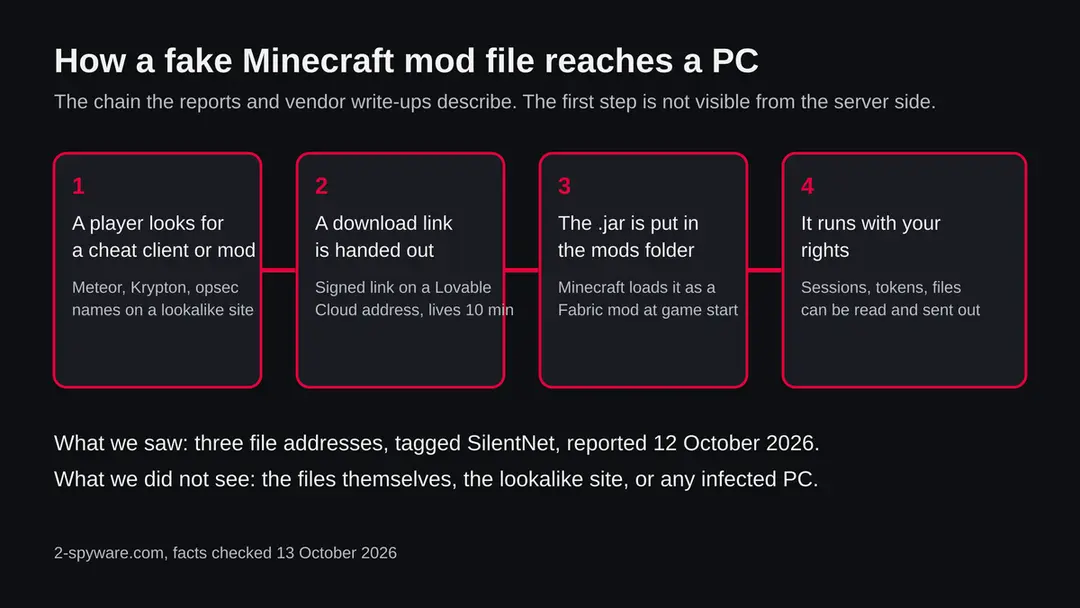
A .jar file is a Java program. It does nothing while it sits in your Downloads folder; it works when Minecraft loads it as a mod or when you start it with Java. That is the step a victim takes themselves, and it is why the stories always begin with someone looking for a free cheat client.
- 1
The lure
Check Point, as summarised by CyberInsider, found fake cheat mods that copied real names and were hosted in GitHub repositories padded with fake star accounts. The MalwareBazaar notes for a fake Meteor Client point to a lookalike website that imitates the real one. Either way the victim chooses to download.
- 2
The download link
The links reported here are signed storage links. A signed link works only for a short time, so the page that hands it out can create a new one for every visitor. This also makes the file harder to find afterwards, which is why URLhaus shows them offline.
- 3
The mods folder
The player puts the .jar into the mods folder or runs it as a launcher. Fabric then loads it when the game starts. Nothing needs administrator rights, because the file runs as the player.
- 4
Loader checks
The Check Point loader exits if it sees virtual machines or analysis tools such as Wireshark, and runs only where Minecraft is installed. That helps it avoid sandboxes. Whether SilentNet files do the same is not known.
- 5
The theft
The stealers in the reports collect session tokens, saved logins and more, then send them out by HTTP or a Discord webhook. The next section lists what the sources name.
Because the whole chain runs inside a trusted program (Java and Minecraft), a quiet game window means nothing. The theft takes seconds.
What lovable.cloud (SilentNet, Minecraft .jar files) can steal or download
What a Minecraft stealer can take from a PC
The list below comes from Check Point's June 2025 campaign and from the SilentNet sample notes. We do not know that these three files do all of it. It shows what to protect.
Reported as possible
- Your Minecraft session token
- Feather, Essential and Lunar client logins
- Discord and Telegram tokens
- Passwords saved in browsers
- Cryptocurrency wallet files
- VPN configuration files
- Steam account data
- Screenshots and clipboard text
- Files from your desktop
- More malware downloaded later
| Data | Detail | Source |
|---|---|---|
| Game accounts | Authentication tokens from Feather, Essential and Lunar clients; Minecraft session data in the SilentNet notes | CyberInsider; MalwareBazaar |
| Chat accounts | Discord and Telegram tokens | CyberInsider |
| Browser logins | Credentials stored in browsers, plus desktop files | CyberInsider |
| Crypto and VPN | Electrum, Exodus and Zcash wallet data; NordVPN and ProtonVPN configurations | CyberInsider |
| Screen and clipboard | Screenshots, clipboard contents and system details | CyberInsider |
| More code | Download and run further payloads; hidden relaunch as javaw.exe | MalwareBazaar |
What this can cost you
Reading this name costs nothing. The risks below apply to a PC where one of these .jar files was started.
- High
Accounts taken over
A stolen Discord or Microsoft token can be used without your password. The attacker can then message your friends from your account with the same bait.
- High
Passwords typed or saved on the PC
Saved browser logins are on the list of stolen items. Changing them from the infected PC does not help if something is still watching.
- High
Crypto wallets
Wallet files and data are named by Check Point. Money sent from a stolen wallet cannot be taken back.
- Medium
More malware on the same PC
The SilentNet notes describe downloading and running further code, so the first file may only be the door.
- Medium
Children and teenagers
Cheat clients are mostly sought by younger players, who often use the family PC with the parents' browser logins. Check the whole PC, not only the game.
- Low
Nothing, if you only saw the name
A name in a log, a block list or a warning is not an infection.
What you may notice, and what you may not
Stealers are built to be quiet. The signs below follow from the sources; none is certain and many victims notice nothing.
| Sign | What the reports show |
|---|---|
| A mod in the Minecraft mods folder you cannot trace | The files in the reports have names that copy real clients, so a copy from an unofficial site looks normal. Compare with the official site before trusting it |
| A hidden javaw.exe process | The SilentNet sample notes describe a relaunch as a hidden javaw.exe. Java runs legitimately for Minecraft, so one running with the game closed is the point to look at |
| Discord or Microsoft sign-in alerts | New location emails, sessions you did not open and messages you did not send follow from stolen tokens. This is our reading, not a quote |
| Crypto or Steam changes | Transfers or trades you did not make follow from stolen wallet and Steam data |
| Nothing at all | A quiet game and a normal PC are what a stealer aims for |
How to check the PC for lovable.cloud (SilentNet, Minecraft .jar files)
Who can meet this, and how
Almost nobody opens such an address by hand, and the links last ten minutes. The people at risk are those who went looking for a Minecraft cheat client, a performance mod or a free copy of a paid one, and downloaded from a source that was not the official site.
- 1
You downloaded a client or mod from a search result, video link or Discord invite
Lookalike sites copy the real one. The real Meteor Client is distributed from its own site, and the MalwareBazaar notes name a lookalike. Check the address you came from.
- 2
A friend or server sent a file
A hacked Discord account sends the same files to friends. A .jar sent in a chat is the most common way the next victim is reached. We have no number for how often this happens.
- 3
You only saw the name in a log
A device on your network asked for this address. That device, not every device, is the one to check. If it was a child's gaming PC, start there.
If you own a Lovable project, or you think your own site was used
The address is a Lovable Cloud project address, which means an account holder, or someone who took over an account, stored these files there. Lovable Cloud is built on Supabase technology, and the path in the links (storage/v1/object/sign) is the usual storage path for signed downloads. That is a platform fact, not an accusation against Lovable or its customers.
- 1
Look in the storage of your project
If this project is yours, open its storage and look for a bucket named mod-files with folders krypton-client, meteor-client or opsec. If you did not create them, treat the project as taken over.
- 2
Change the keys and the sign-in
Reset your Lovable password, turn on two step sign-in, and rotate any API keys and database keys that were shown in the project. We could not find Lovable's own abuse page in our research, so we give no link; look in your account and help pages.
- 3
Delete the files and report
Remove the files, check who has access, and tell the platform. If you are not the owner and you found these links, report the address to URLhaus and to the platform's support.
- 4
What we do not know
We do not know if the project is a throwaway made for this, or a real project that was abused. The public record is silent on both.
Check your PC before you delete anything
Start with one question: did you or anyone on this PC download a Minecraft client, add-on or .jar file from outside the official site, and start the game after? If yes or not sure, do the checks below. None of them deletes anything.
While you check, stop using the PC for banking, email, Discord or crypto. Disconnect it from the network if you can.
- 1
Close Minecraft and disconnect
Quit the game and the launcher, then turn off Wi-Fi or unplug the cable. A stealer that is still running needs the connection to send data.
- 2
Read the mods folder
Press Windows key + R, type %appdata%\.minecraft\mods and press Enter. Write down every .jar you do not recognise and where it came from. Do not run them. Launchers such as Prism keep their own folders, so check there too.
- 3
Open Protection history
In Windows Security > Virus & threat protection > Protection history, look for anything blocked or quarantined around the time you downloaded the file. Microsoft says Defender Offline results also appear there.
- 4
Look at Task Manager
Open Task Manager and the Processes tab with Minecraft closed. A javaw.exe (Java) entry still running is worth a look; right-click it and choose Open file location. Java is a real program, so this is a hint, not proof.
- 5
Check what starts with Windows
Open Settings > Apps > Startup and look for names you did not install. The SilentNet notes describe a hidden relaunch; we found no source that names a startup entry for these files, so a clean list does not clear the PC.
- 6
Check your accounts from another device
Open the sign-in activity of your Microsoft, Discord, email and Steam accounts, and look at crypto balances. This is quicker than any file check.
- 7
A scan helps, but it does not clear the PC
Microsoft Defender or another scanner can find known files, but Java archives are not always flagged. Treat a clean result as one data point. We infected no PC, so the order of this plan is our judgement from Microsoft's pages and the community notices, not a tested result.
How to remove lovable.cloud (SilentNet, Minecraft .jar files)
How to remove c--617b5f35-a107-4800-9047-a429934c0483-prod.lovable.cloud
A loader's job is to install other malware, so treat the PC as infected with more than one program until the scans are clean.
Step 1: Delete scheduled tasks that bring it back
Open Task Scheduler from the Start menu and click Task Scheduler Library. Select each task you do not recognise and read the Actions tab:
- a task that starts a file in
%AppData%or%Temp% - runs
powershellwith a long encoded line - opens a web address belongs to c--617b5f35-a107-4800-9047-a429934c0483-prod.lovable.cloud or a similar program
Right-click such a task and choose Delete, and check the subfolders too. Leave tasks from Microsoft, your PC's maker and programs you use. Task Scheduler is the same in Windows 11 and Windows 10.

Windows 11: Task Scheduler Library, the task selected, the Actions tab shows the file it runs. Full procedure with screenshots: Remove what malware leaves behind in Windows
- a task that starts a file in
Step 2: Remove it from startup
Whatever c--617b5f35-a107-4800-9047-a429934c0483-prod.lovable.cloud installed usually starts with Windows. Open Task Manager with Ctrl + Shift + Esc, go to Startup apps in Windows 11 or the Startup tab in Windows 10, and disable what you do not know, starting with entries that have an empty Publisher column.
Open file location on the right-click menu shows the file, which helps you decide and tells you what to delete later. Disabling is safe: if something you need stops working, switch it back on.
Full procedure with screenshots: Stop apps from opening at startup On uGetFix
Step 3: Delete the folders left behind
What the uninstaller leaves behind is usually in the user folders. Open File Explorer, switch on View > Show > Hidden items (in Windows 10 View > Hidden items), and go through
%LocalAppData%,%AppData%, %ProgramData% and the two Program Files folders.Sort by Date modified and delete folders that appeared together with the problem and belong to no program you use. Folders with random names that hold
.exe,.dll, .js or .ps1 files are the strongest sign.Full procedure with screenshots: Remove what malware leaves behind in Windows
Step 4: Scan the PC, then run the offline scan
Open Windows Security > Virus & threat protection > Scan options, run a Full scan and remove everything it finds. Then select Microsoft Defender Antivirus (offline scan) and click Scan now: the PC restarts and scans before Windows loads, which finds files that hide while Windows runs.
Save your work first, because the offline scan takes about 15 minutes. Both scans are built into Windows 11 and Windows 10, and a second scanner from another vendor is a useful extra opinion.

Windows 11: Windows Security > Virus & threat protection > Scan options. Full procedure with screenshots: Run a Microsoft Defender Offline scan
Step 5: Change passwords from another device and sign out other sessions
Assume that the passwords saved in this PC's browsers, and the accounts that were open in them, are known to the attacker. From a phone or a clean computer, change the e-mail password first, then banking, shopping, social and gaming accounts.
Use each service's option to sign out of all other sessions, because stolen cookies keep a session open even after a password change. Turn on two-step verification on each account. Wait with the infected Windows 11 or Windows 10 PC until the scans are clean.
Full procedure with screenshots: Turn on two-step verification / secure a hacked account
If you use a Mac, Linux, an iPhone or an Android phone
Minecraft Java Edition runs on Mac and Linux, and a .jar mod is not tied to Windows. The sources we read describe Windows though, and we found nothing on these three files for other systems.
| Your device | What we know | What to do |
|---|---|---|
| Mac or Linux with Minecraft Java Edition | A .jar mod runs there too, but no source we read tests these files on those systems | If you ran one, treat the account passwords as exposed and change them from another device. Do not follow the Windows menu steps |
| iPhone or iPad | Minecraft Bedrock Edition does not load .jar mods | Nothing to remove for this threat. If you typed a password on a suspicious page, change it |
| Android | No source mentions these files on Android | Nothing to remove for this threat; change passwords if you entered any |
After removal: passwords, accounts and prevention
If you ran one of the files: clean up and protect what was taken
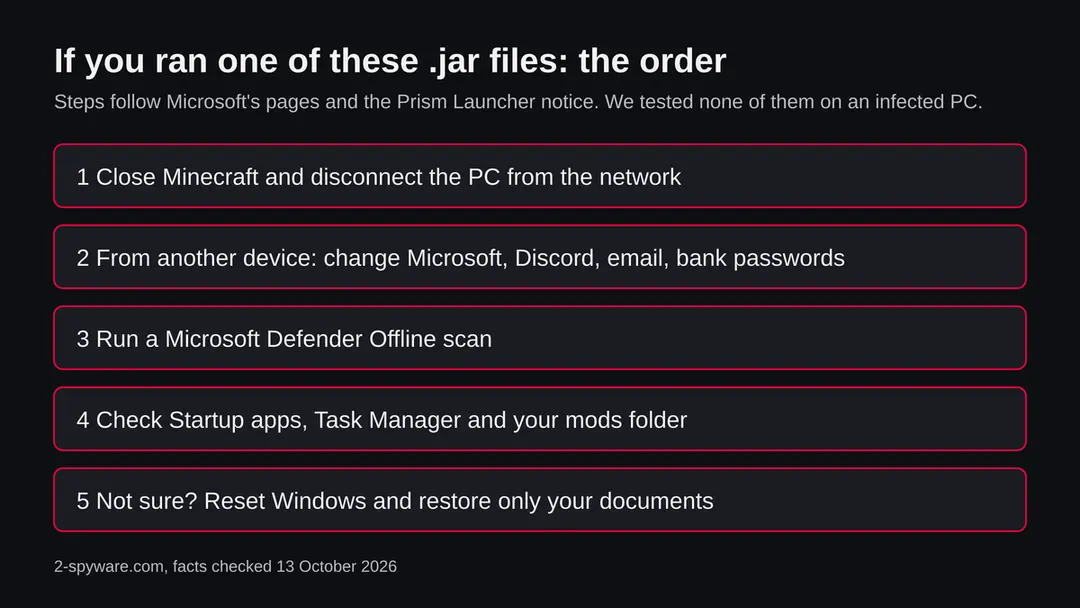
The PC is one half. The other half is everything you typed or saved on it while the stealer could see it. The order matters: another device first, then the PC.
- 1
Change passwords from a clean device
The Prism Launcher notice about the earlier fractureiser malware says to change all passwords after removing an infection, because browser-saved logins were likely taken. Start with email, then Microsoft, Discord, Steam, bank and crypto exchanges.
- 2
Sign out all sessions
A stolen token keeps working after a password change on some services unless you sign out everywhere. Use the option to sign out of all devices in each account, and turn on two step sign-in.
- 3
Move crypto if a wallet was on the PC
If a seed phrase or a wallet file was ever on the PC, assume it is known. Create a new wallet on a clean device and move the funds.
- 4
Run Microsoft Defender Offline
Microsoft says to open Windows Security > Virus & threat protection > Scan options, choose Microsoft Defender Offline scan and select Scan now. Save your work first: Windows restarts and the scan takes several minutes. Results appear under Protection history, and a clean scan leaves no record.
- 5
Delete the unknown mods
Remove the .jar files you could not trace from the mods folder and from every launcher folder. Download the mods you want again only from the client's own site, CurseForge or Modrinth.
- 6
If you are not sure, reset Windows
Open Settings > System > Recovery > Reset this PC. Keep my files removes apps but keeps personal files; Remove everything wipes the PC. For a PC where a stealer may have run and fetched more code, the full wipe does not depend on finding every piece. The Fyra Labs notice on fractureiser also called a full reinstall the safest option after that earlier malware.
- 7
Restore only documents by hand
Copy back documents and screenshots, not programs and not the old mods folder. Install apps from their makers' own sites.
- 8
Rebuild your logins
Use a password manager and an authenticator app instead of letting the browser save passwords on a PC that was watched.
- 9
Warn your friends
If your Discord sent the file or a link, tell the people who got it. They are the next likely victims.
Keep fake clients off your PC
The theft starts with a download you choose. Most of the protection is in where you download from.
Do
- Download Minecraft mods from CurseForge or Modrinth, as the Check Point advice says, or from the client's own site that you reached by typing its address.
- Check who made a mod and how old the page is before trusting it.
- Keep Windows and Microsoft Defender updated, and run a scan before first start of any new mod.
- Use a different password for Minecraft and Discord than for your email, with two step sign-in on all three.
- Keep a backup of important documents on a disk that you unplug.
Don't
- Do not download cheat clients from video descriptions, Discord invites or search ads.
- Do not run a .jar sent by a friend without asking them by another route whether they sent it.
- Do not trust a repository because it has many stars; Check Point found fake star accounts.
- Do not let a young player use the family PC with your saved browser logins for this.
- Do not rely on a quiet scan to say that you are safe.
Questions about lovable.cloud (SilentNet, Minecraft .jar files)
What is this lovable.cloud address?
It is a storage address in the lovable.cloud domain that URLhaus, the malware tracking project run by abuse.ch, lists for three Minecraft client files on 12 October 2026. The files are KryptonPlus.jar, meteor-client-1.21.11-86.jar and opsec-1.21.11+v1.1.7.1.jar, all tagged SilentNet.
It is not a program on your PC and not a website anyone is meant to visit. We did not download the files, so what they contain is not confirmed by us.
Is lovable.cloud itself a virus or a scam?
No source we read says so. Lovable.cloud is the domain that Lovable Cloud projects use as a hosting address, and many separate projects live under it. URLhaus lists one project address, not the whole platform.
Someone stored files in that project, and we do not know whether the project was made for this or taken over. Judge the file you were given, not the platform name.
Is it safe to open this address?
No. Do not look for these files or try to download them. Our own request returned HTTP 404, which proves nothing: the reported links carry a token that works for ten minutes, so any such link fails later whether the file still exists or not.
The rating comes from the three URLhaus reports and their SilentNet tag, not from our request.
What does SilentNet mean?
It is a family label that abuse.ch's MalwareBazaar puts on Java samples posing as Minecraft cheat clients and mods. The notes on those samples describe a Fabric mod that takes Minecraft session data, downloads and runs more code and relaunches as a hidden javaw.exe.
One sample is said to find its controller through a blockchain contract. We did not open the files from this address, so we cannot say they behave the same.
I saw this address in a log. Am I infected?
Not necessarily, and the name alone proves nothing. It does mean that a device on your network, or a page it opened, asked for it, and a person rarely does that by hand.
Find which device it was, ask whether anyone downloaded a Minecraft client or mod lately, and check the mods folder, Protection history and Startup apps. Do any account changes from another device.
I ran a fake Meteor Client or similar .jar. What should I do?
Close Minecraft, disconnect the PC and change your passwords from another device, starting with email, then Microsoft, Discord, Steam, bank and crypto. Sign out of all sessions and turn on two step sign-in.
Then run a Microsoft Defender Offline scan and delete unknown mods. If you are not sure the PC is clean, reset Windows with Remove everything and restore only documents. We followed Microsoft's pages and did not test this on an infected PC.
What can a Minecraft stealer take?
According to Check Point's June 2025 campaign, as summarised by CyberInsider:
- Minecraft client tokens
- Discord and Telegram tokens
- browser credentials
- crypto wallet data
- VPN configurations
- Steam data
- screenshots
- clipboard contents
The SilentNet notes add session data and further downloads. We do not know that these three files do all of it, so treat every login on the PC as known and change it.
Does this affect Mac, iPhone or Android?
We found no source that tests these files outside Windows. Minecraft Java Edition runs .jar mods on Mac and Linux, so a Mac player who ran one should treat the account passwords as exposed and change them from another device.
Bedrock Edition on iPhone and Android does not load .jar mods, so there is nothing to remove there. If you typed a password on a suspicious page, change it.
Will resetting Windows remove it, and are my accounts safe afterwards?
A reset with Remove everything wipes the programs, mods and startup entries, which is the answer that does not depend on finding every piece. It does not undo what was already taken.
Passwords, session tokens and crypto seed phrases that the stealer saw stay exposed until you change them, from another device, and sign out of all sessions. Restore documents by hand, not a full system image.
Will Fortect remove c--617b5f35-a107-4800-9047-a429934c0483-prod.lovable.cloud?
Fortect scans Windows for malware and unwanted programs and repairs the system files and settings they change, and its free scan shows what it finds on your PC before you decide anything.
For c--617b5f35-a107-4800-9047-a429934c0483-prod.lovable.cloud, follow the plan above as well: the browser steps take back permissions and settings that no scanner treats as a threat, and uninstalling the program that brought it removes the source.
Run Microsoft Defender's full scan and, if anything was found, its offline scan as a second opinion. If the symptoms are gone after the plan and both scans are clean, there is nothing more to do.
Sources
- MalwareBazaar (abuse.ch): sample tagged SilentNet, fake Meteor Client for Minecraft 1.21.11 (read October 13, 2026)
- CyberInsider: Fake Minecraft mods deliver data stealing malware to players (18 June 2025, on Check Point Research) (read October 13, 2026)
- Rankiteo: Minecraft and Impact Client, WeedHack MaaS targets Minecraft players (a secondary summary) (read October 13, 2026)
- Prism Launcher: malware warning about fractureiser in Minecraft mods (read October 13, 2026)
- Microsoft Learn: Microsoft Defender Offline scan in Windows (read October 13, 2026)