
Ghost RAT (Gh0st RAT): what this remote access trojan does to a Windows PC and how to remove it
Ghost RAT, written by researchers as Gh0st RAT, is a remote access trojan: a program that lets a stranger watch and control a Windows PC. Its source code is public, so many groups run their own versions, and the abuse.ch project ThreatFox listed indicators under the name Ghost RAT on four days between 10 and 13 October 2026.
If you only saw the name in a log or an alert, nothing is proven; if a program you did not trust ran on your PC, treat the PC as watched, change your passwords from another device, then scan and clean or reset Windows.
Facts checked October 13, 2026. Removal steps tested on Windows 11 (26H2) and checked against Microsoft's and the browser makers' current documentation.
Automatic
Get a free scan and check if your PC is infected.
Fortect finds malware, unwanted programs and the Windows damage they leave behind, and repairs it in one pass.
An automatic scan checks installed programs, startup items and browser extensions for anything that came with a program or loader that installs Gh0st RAT, often named after a genuine application.
Do it yourself · free Remove Ghost RAT (Gh0st RAT remote access trojan) yourself 5 steps, about 15 minutes, no software needed.
Start the steps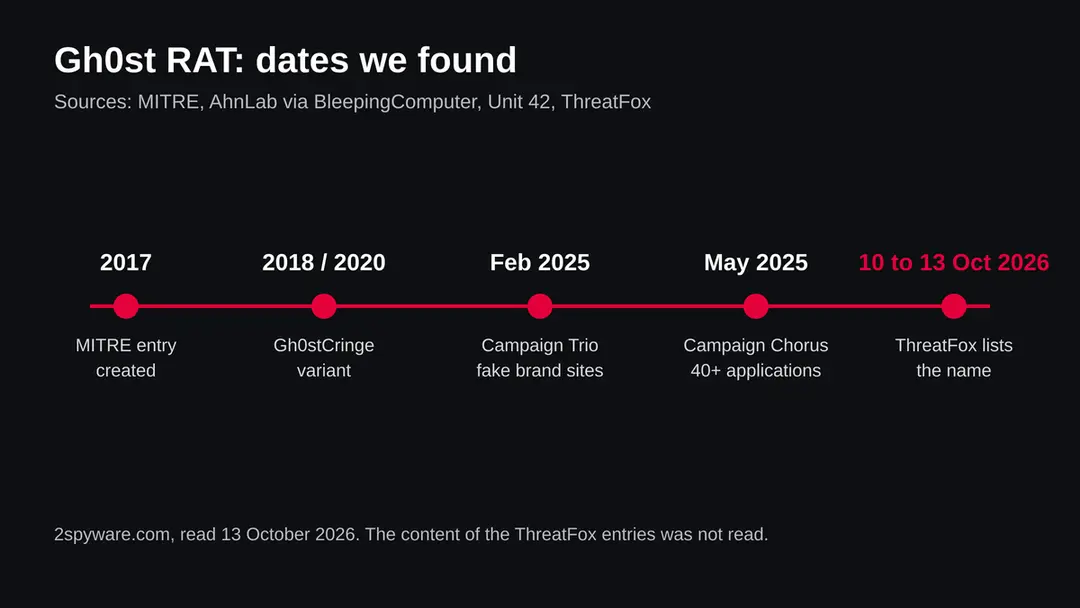
Ghost RAT (Gh0st RAT remote access trojan): summary
| Type | A remote access trojan for Windows (Gh0st RAT family); its source code is public and many groups run their own versions |
|---|---|
| Risk | High if it ran on your PC: keystrokes, screen and files may be seen or taken. Low if you only saw the name |
| Symptoms | Often none. A Run key entry or service you did not create, unknown traffic, Defender exclusions you did not add |
| How to get rid of it | Change passwords from another device, run Microsoft Defender Offline, check startup entries and services, and reset Windows if you are not sure |
| Our check (13 October 2026) | Not a web address, so no site test. ThreatFox listed indicators under the name on four days; we did not read the entries |
| Running since / first seen | MITRE entry created 31 May 2017; ThreatFox listings for the name seen 10 to 13 October 2026 |
| Removal | Scan the PC with security software to find and remove the malware and anything installed with it. Fortect scans Windows for malware and repairs the system files and settings it damaged. Remove it nowTo use the full-featured product, you have to purchase a license for Fortect. The scan is free. |
Show 8 more facts
| Platform | Windows. MITRE also lists macOS; we found no analysis of a Mac build |
|---|---|
| Detection names | Microsoft Security Intelligence has entries named Trojan:Win32/Gh0stRat!rfn (updated 29 May 2025) and Trojan:Win32/GhostRAT (published 7 August 2020), seen in its search results; we did not match them to the October 2026 listings. Check Protection history for the name your product used |
| Name | Ghost RAT |
| Evidence | 4 write-ups by security sites; details still limited |
| First seen | 10 October 2026 |
| Distribution | Typically fake installers, cracked programs, e-mail attachments, fake "verify you are human" pages and ads for popular apps |
| Damage | Installs other malware, often several programs at once |
| Facts checked | 13 October 2026 |
Facts checked on 13 October 2026 against MITRE ATT&CK, Microsoft Learn and Microsoft Support pages that we read, and against search summaries of Palo Alto Unit 42, Hive Pro and BleepingComputer (AhnLab) reports. We did not open the ThreatFox entries, did not download any sample and infected no PC; the removal steps follow Microsoft's pages and were not tried on a live infection.
What Ghost RAT is, and what we know about it
Ghost RAT is not one program from one author. It is a family of remote access trojans built on Gh0st RAT, a tool whose source code became public. MITRE ATT&CK describes it as a remote access tool that multiple groups have used, listed for Windows and macOS. Because anyone can change the code, two samples that carry the same name can behave differently.
This page answers the question people type: is Ghost RAT a virus, and what do I do. It is a name, not a web address, so there is no site to test. Our evidence is the ThreatFox listing that brought the name to us, and the published work of MITRE, Palo Alto Unit 42 and BleepingComputer.
- Kind of threat
- A remote access trojan (RAT): it gives a person remote control of the PC, with a keylogger, screen capture and file access
- Also written as
- Gh0st RAT, Gh0stRAT. MITRE lists the associated names Mydoor and Moudoor. Variants include PCrat/Gh0st and Gh0stCringe
- ThreatFox listing
- Indicators filed under the malware name Ghost RAT on 10, 11, 12 and 13 October 2026 (four days). We did not open the entries, so we do not know what the indicators are
- Platform
- Windows first. MITRE also lists macOS for the Gh0st RAT entry; we found no detail on a Mac build and say so below
- Source code
- Public, which is why many groups use their own modified copies (MITRE ATT&CK S0032, last modified 12 May 2026)
- Groups named by MITRE
- Kimsuky, APT41, APT18, Andariel, Higaisa, TA459, Leviathan, Axiom, APT5, Threat Group-3390 and PittyTiger
- 1
What we can confirm
The name Ghost RAT appeared in ThreatFox on four consecutive days. MITRE documents Gh0st RAT as a remote access tool with persistence, keylogging, screen capture and file theft. Unit 42 describes 2025 campaigns that delivered Gh0st RAT variants through fake download sites.
- 2
What we could not confirm
We did not read the individual ThreatFox entries, so we cannot tell you which servers, ports or file hashes they hold, or which build of the trojan they belong to. We also cannot say how the people who triggered those reports were infected.
- 3
What this means for you
A name in a block list is not an infection. The danger is for a PC where a program already ran and installed the trojan. Because the family is old and widely copied, antivirus products know many builds, but a new build can be missed.
What Ghost RAT (Gh0st RAT remote access trojan) does on an infected PC
What Gh0st RAT does on a PC
The list below comes from MITRE ATT&CK's entry for Gh0st RAT. It describes the original family and the variants that groups have documented, so a given sample may do only part of it.
| Area | What MITRE records | What it means for you |
|---|---|---|
| Staying on the PC | Adds a Registry Run key, and creates or runs a Windows service | It can start again after every restart, so deleting one file may not end it |
| Talking to its controller | Encrypts TCP traffic with RC4 and XOR, compresses it with Zlib, and has used fast flux DNS to hide the servers | The traffic does not look like a web page, and the server addresses change often |
| Running commands | Opens a remote shell, loads DLL files into memory, has used DLL side loading and rundll32 | The controller can run commands as if sitting at the keyboard |
| Watching you | Keylogger, screen capture, collection of system information | Every key you type and what is on your screen can be seen |
| Files and processes | Lists processes, injects code into processes, downloads and deletes files, wipes event logs | Your documents can be taken, and traces of the intrusion can be erased |
| Hiding | Decrypts its DLL in memory after the dropper runs, changes registry values such as InstallTime | The file that you could find on disk may be only the first stage |
One more point from the sandbox reports that our search returned: several run reports of Gh0st RAT samples show a sample adding Windows Defender exclusion paths or switching off real time protection. We only saw this in search summaries of third party sandbox pages, not in a vendor analysis, so treat it as a hint to check your exclusions, not as a rule for every build.
How long Gh0st RAT has been around, and the campaigns we found
The family is old, and it keeps returning because the code is free to copy. MITRE created its entry on 31 May 2017 and does not say when the malware was first seen in the wild. The dates below are the ones the sources give.
31 May 2017
MITRE creates its Gh0st RAT entry
The entry lists many state linked groups and a campaign called Operation Dust Storm. The page does not say when the code first appeared.
2018 and 2020
Gh0stCringe, a variant
BleepingComputer, summarising AhnLab, describes Gh0stCringe, also called CirenegRAT, as a Gh0st RAT variant that dates back to 2018 and was deployed in 2020 Chinese espionage operations. AhnLab found it on poorly secured database servers with weak account passwords.
February to March 2025
Campaign Trio
Palo Alto Unit 42 describes a campaign that impersonated three brands across more than 2,000 domains to deliver Gh0st RAT variants to Chinese speaking users.
From May 2025
Campaign Chorus
Unit 42 describes a second campaign that grew the impersonation to more than 40 applications. A summary of the work by Hive Pro says the installer was built with the Nullsoft Scriptable Install System and a multi stage loader named RONINGLOADER delivered the modified Gh0st RAT.
10 to 13 October 2026
ThreatFox lists the name on four days
Our radar saw indicators filed as Ghost RAT on 10, 11, 12 and 13 October 2026. We do not know their content. Four days of listings show that someone is still sharing indicators for the family, nothing more.
How Gh0st RAT gets onto a PC
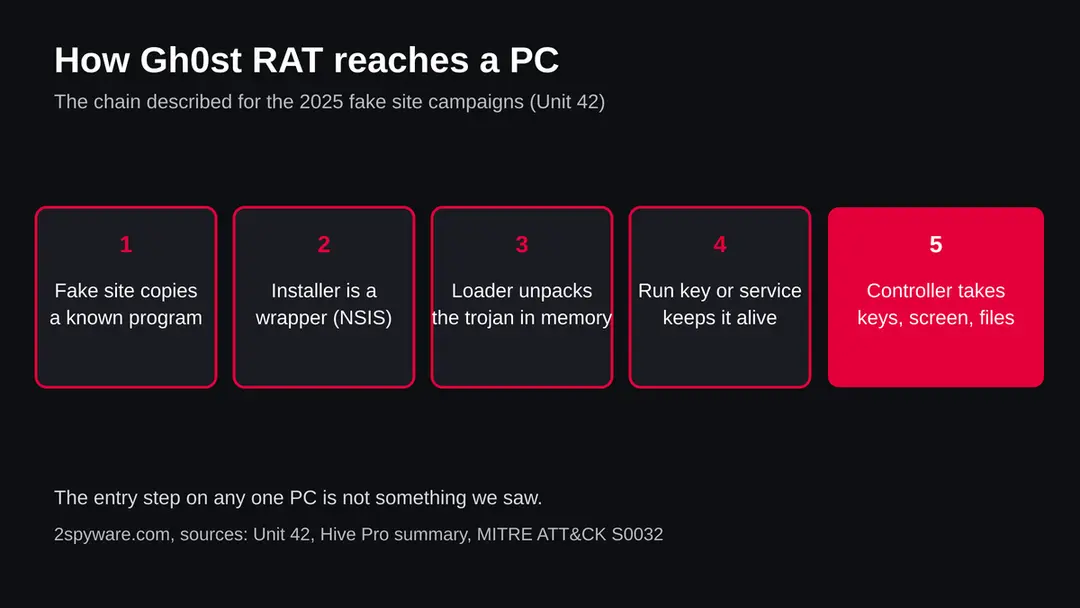
Nobody installs Ghost RAT on purpose. The sources we read show two main routes: a fake download that looks like a genuine program, and a weakly protected server. We cannot say which route the October 2026 listings follow.
- 1
A fake site offers a real looking program
Unit 42 describes impersonation of well known software brands on thousands of look alike domains. A person who searches for a program and clicks the wrong result downloads the installer from the copy.
- 2
The installer is a wrapper
The Hive Pro summary names an installer built with the Nullsoft Scriptable Install System. It can show a normal looking setup while it unpacks other files in the background.
- 3
A loader prepares the trojan
The same summary names RONINGLOADER as the multi stage loader. MITRE records that Gh0st RAT decrypts its DLL in memory after the dropper runs, which is why the file you can find may not be the whole malware.
- 4
The trojan calls home
From then on, the PC opens an encrypted connection to the controller. MITRE records RC4 and XOR encryption and fast flux DNS for this.
- 5
Weak servers are another door
BleepingComputer, summarising AhnLab, says the Gh0stCringe variant was put on Microsoft SQL and MySQL servers that had weak passwords. This route is for servers, not for a home PC that only browses.
What Ghost RAT (Gh0st RAT remote access trojan) can steal or download
What a remote access trojan can take
A remote access trojan gives a person a seat at your computer, so the list is what such a person can do rather than what one build does on its own. Each item rests on the MITRE entry or on the behaviour that follows from it.
Reported as possible
- Every key you type
- A live view of your screen
- System information about your PC
- A command shell on your PC
- Files searched, downloaded and deleted
- Running programs listed and injected into
- Event logs wiped to hide traces
- Extra code loaded into memory
MITRE does not list a camera or browser password module for the original entry. Other families that borrow from Gh0st RAT may have them, but we did not read a source for that and do not claim it. A keylogger alone is enough to capture a typed password, so the practical advice is the same.
What this can cost you
Seeing the name costs nothing. The risks below apply to a Windows PC where a program installed Gh0st RAT and it then ran.
- High
Passwords and accounts
A keylogger records what you type into every site, including the new passwords you choose. Changing passwords from the infected PC does not help, because the person watching sees the new ones too.
- High
Someone using your PC live
A remote shell and screen capture mean the controller can act while you are signed in, and can come back later.
- Medium
Your files
MITRE records file download and deletion. Private documents on the PC can be copied away.
- Medium
Traces erased
The entry records wiping of event logs, so a missing log is itself a sign worth noting, and an empty log does not clear you.
- Medium
Business exposure
Several of the groups MITRE names target organisations. If the PC is a work machine, tell your IT or security team before you change anything.
- Low
Nothing, if you only saw the name
A name in a block list, a log or an alert is not an infection.
What you may notice, and what you may not
Remote access trojans are built to be quiet, and most victims notice nothing. The signs below come from the MITRE entry and from what it implies; none is certain.
| Sign | What the reports show |
|---|---|
| A Run key entry or Windows service you did not create | MITRE records both ways of starting again after a restart |
| A rundll32.exe process with no reason | MITRE records use of rundll32 and DLL side loading. The program is genuine Windows, so judge by what started it and what it connects to |
| Defender exclusions you did not add, or real time protection off | Seen in sandbox reports of samples, not confirmed in a vendor analysis. Our reading: worth a check |
| Unknown network traffic to an odd address | MITRE records encrypted TCP traffic and fast flux DNS |
| Accounts you did not touch | Logins from new places or reset emails follow from a keylogger. This is our reading, not a quote |
| Nothing at all | Stealth is the point of a trojan that runs in memory |
How to check the PC for Ghost RAT (Gh0st RAT remote access trojan)
Start with the question that matters: did you run a program from a source you do not fully trust, such as a download from a search result, a cracked program or an email attachment? If you only saw the name in an alert, find which device raised it and check that one. None of the checks below deletes anything.
While you check, stop using the PC for banking, email, work or crypto, and disconnect it from the network if you can.
- 1
Disconnect first
Turn off Wi-Fi or unplug the network cable. A remote access trojan needs the connection to be used.
- 2
Look at Startup apps
Open Settings > Apps > Startup and look for names you did not install. This shows programs that start at sign in, though not every Run key entry or service.
- 3
Look at Services
Press Start, type Services and open it. MITRE says Gh0st RAT creates or runs a Windows service, so look for services with odd names, no description or a program path in a user folder. Write the name and path down; do not delete yet.
- 4
Look at Task Manager
Open Task Manager and the Processes tab. Sort by network or CPU and look for programs you cannot place. Right-click an unknown one and choose Open file location. The presence of rundll32.exe is not proof, it is a normal program.
- 5
Open Protection history
In Windows Security > Virus & threat protection > Protection history, look for a detection around the time you ran the suspect program. Microsoft says the results of an offline scan also appear there.
- 6
Check Defender exclusions
In Windows Security > Virus & threat protection > Manage settings > Exclusions, look for folders you did not add, and check that real time protection is on. A clean list does not clear the PC.
- 7
Check your accounts from another device
Look at the sign in activity of your email, bank and exchange accounts. This is quicker than any file check.
- 8
A scan helps, but it does not clear the PC
A scan with Microsoft Defender or another product finds known files. Treat a clean result like a clean site test: one data point. We did not infect a PC, so the order of this plan is our judgement from Microsoft's pages, not a tested result.
How to remove Ghost RAT (Gh0st RAT remote access trojan)
How to remove Ghost RAT
A loader's job is to install other malware, so treat the PC as infected with more than one program until the scans are clean.
Step 1: Delete scheduled tasks that bring it back
Programs like Ghost RAT add a scheduled task so they return after an uninstall or reopen a page at every sign-in. Start Task Scheduler, open Task Scheduler Library and sort by Last Run Time to see what ran recently.
On the Actions tab, a program in a user folder, a script or a web address is a warning sign; right-click such a task and choose Delete.
Tasks with names copying Google, Edge or Windows updaters but pointing to an odd folder are typical. The tool looks the same in Windows 11 and Windows 10.

Windows 11: Task Scheduler Library, the task selected, the Actions tab shows the file it runs. Full procedure with screenshots: Remove what malware leaves behind in Windows
Step 2: Remove it from startup
Press Ctrl + Shift + Esc to open Task Manager and select Startup apps (Windows 11) or the Startup tab (Windows 10). Disable entries you do not recognise, especially ones with no publisher or with a name that copies a Windows component.
Right-click an entry and choose Open file location to see where it runs from: programs in
%AppData%or%Temp%deserve a closer look. Some entries are not listed there but in the registry Run keys, which the procedure below shows how to check.Full procedure with screenshots: Stop apps from opening at startup On uGetFix
Step 3: Delete the folders left behind
Uninstalling often leaves the program's folders, and some threats reinstall themselves from them.
Press Windows + R, type
%LocalAppData%and press Enter, then do the same for%AppData%and %ProgramData%, and look for folders named after Ghost RAT, its publisher or created on the day the problem started.Delete those folders, and check
C:\Program FilesandC:\Program Files (x86)too.If Windows says a file is in use, end it in Task Manager or delete the folder after a restart in Safe Mode. The folders are the same in Windows 11 and Windows 10.
Full procedure with screenshots: Remove what malware leaves behind in Windows
Step 4: Scan the PC, then run the offline scan
A scan finds the parts of Ghost RAT that the manual steps cannot see. In Windows Security > Virus & threat protection > Scan options, start a Full scan and quarantine what it reports.
Follow it with Microsoft Defender Antivirus (offline scan) > Scan now, which restarts the PC and checks the disk while Windows and the malware are not running.
It takes about 15 minutes and works the same in Windows 11 and Windows 10. If either scan finds something, run the full scan again after removal until it comes back clean.

Windows 11: Windows Security > Virus & threat protection > Scan options. Full procedure with screenshots: Run a Microsoft Defender Offline scan
Step 5: Change passwords from another device and sign out other sessions
Ghost RAT can copy saved passwords, cookies and session tokens and send them out in seconds, so cleaning the PC does not undo the theft.
Change your passwords on a device that was never infected, starting with the e-mail account, since every other reset goes through it. On each account, end all other sessions and check the recovery e-mail, phone number and forwarding rules.
Then turn on two-step verification. Sign in on the Windows 11 or Windows 10 PC again only after the offline scan is clean.
Full procedure with screenshots: Turn on two-step verification / secure a hacked account
If you use a Mac, an iPhone or an Android phone
The family is a Windows threat in everything we read, with one exception: MITRE lists macOS for its Gh0st RAT entry.
| Your device | What we know | What to do |
|---|---|---|
| Mac | MITRE lists macOS on its entry. The page text we read describes Windows techniques (Run key, services, rundll32) and we found no analysis of a Mac build | Do not follow the Windows steps. Install apps only from the App Store or the maker, and change a password if you ran something unknown |
| iPhone or iPad | No source we read describes Gh0st RAT on iOS | Nothing to remove for this threat |
| Android | No source we read describes it on Android | Nothing to remove for this threat; change passwords if you entered any on a suspicious page |
After removal: passwords, accounts and prevention
Remove it and protect what was taken
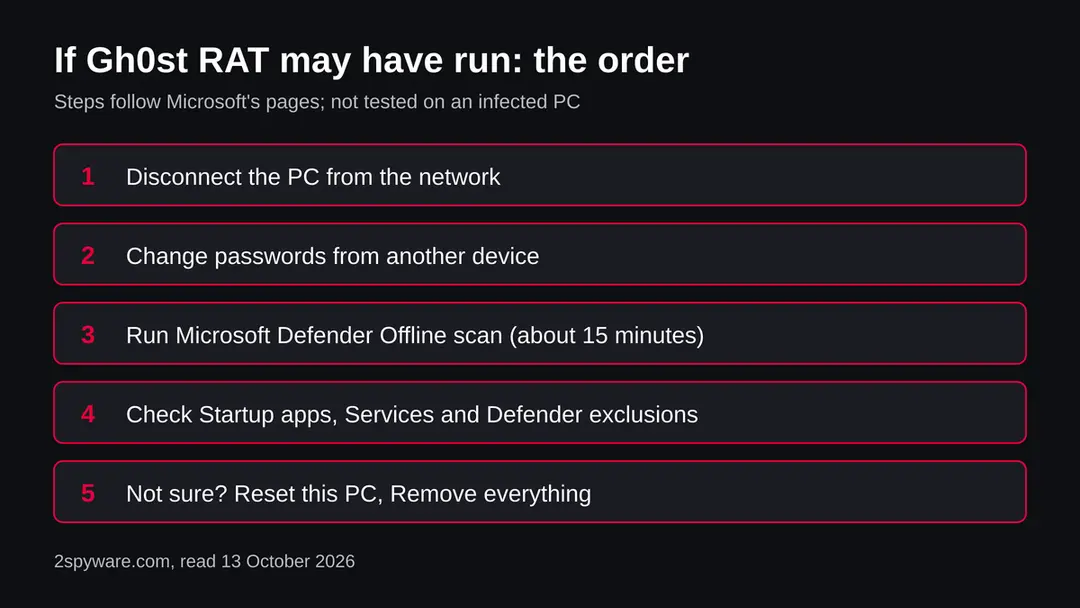
The PC is one half. The other half is everything you typed or stored on it while the trojan was there. The order matters: another device first, then the PC.
- 1
Change passwords from a clean device
Start with email, because it resets everything else, then bank, work, cloud storage and crypto. Anything typed on the PC while it was watched is already known.
- 2
Sign out other sessions and turn on two step sign in
Sign out of your accounts on all devices and turn on two step sign in where it is offered, so a password alone does not let anyone in. Update the recovery email and phone.
- 3
Move crypto first if a wallet was on the PC
If a seed phrase or wallet file was ever on the PC, assume it is known. Create a new wallet on a clean device and move the funds there.
- 4
Run Microsoft Defender Offline
Open Windows Security > Virus & threat protection > Scan options, choose Microsoft Defender Offline scan and select Scan now. Save your work first: Windows signs you out and restarts, and Microsoft says the scan takes about 15 minutes. If BitLocker is on the system drive, Microsoft says to suspend it first or the restart may ask for the recovery key. Results are under Protection history. Microsoft notes the scan does not apply to ARM Windows PCs.
- 5
Remove only what you can tie to the malware
If the check showed a service or startup entry that you can tie to the trojan, note its path before you remove it. If you cannot tell, do not guess: the safe answer is the reset below.
- 6
If you are not sure, reset Windows
Open Settings > System > Recovery > Reset this PC. Microsoft says Keep my files removes apps and settings but keeps personal files, and Remove everything removes files, apps and settings. For a PC that may have been under remote control, the full wipe does not depend on finding every piece. Microsoft calls the reset the most disruptive option, says to back up first and to have the BitLocker recovery key ready.
- 7
Restore only documents by hand
Copy back documents and photos, not programs, and not a full system image made after the first contact. Install apps from their makers' own sites.
- 8
Rebuild logins in a password manager
Do not let the browser save passwords again on a PC that was watched. Use a password manager and an authenticator app or security key.
- 9
Watch your money and your accounts
Check card statements and exchange logs for a few weeks and turn on alerts. If this was a work PC, tell your security team.
Keep a PC out of this kind of chain
The fake download is the weak point in the 2025 campaigns. Most of the advice below is about where a program comes from.
Do
- Type the address of a software maker yourself, or use the Microsoft Store, instead of clicking a search result or an ad.
- Keep Windows and Microsoft Defender updated; the offline scan uses the latest definitions.
- Use strong, different passwords on database servers and remote desktop, and do not expose them to the internet without need.
- Use a password manager and two step sign in, so one stolen password is not enough.
- Keep a backup of documents on a disk that you unplug.
Don't
- Do not run installers from look alike sites, cracked programs or unexpected email attachments.
- Do not change your passwords on the PC you suspect.
- Do not rely on one quiet scan to say that you are safe.
- Do not delete files you cannot identify before you have noted their names and paths.
Questions about Ghost RAT (Gh0st RAT remote access trojan)
What is Ghost RAT?
Ghost RAT, usually written Gh0st RAT, is a remote access trojan for Windows. MITRE ATT&CK describes it as a remote access tool whose source code is public, used by many groups. It can log keys, capture the screen, run commands and take files.
It is not a single program from one author, so builds differ. It has to be installed first, usually by a fake download or a weakly protected server, and does not infect you by merely showing its name in a list.
Is Ghost RAT a virus?
It is a trojan, not a virus in the strict sense: it does not copy itself from PC to PC. A person or a loader has to install it, and then a controller elsewhere uses the PC.
MITRE records that it keeps itself running with a Registry Run key or a Windows service. The result for you is the same as a serious infection, so treat a PC that ran it as watched and follow the checks on this page.
Is Ghost RAT dangerous?
Yes, if it ran on your PC. A remote access trojan gives a stranger a seat at your computer. MITRE lists a keylogger, screen capture, a remote shell, file download and deletion, and wiping of event logs.
Passwords you type are exposed, and the controller can come back later. If you only saw the name in a log or an alert, nothing is proven, but find the device that raised it and check that one.
How do I know if I have Ghost RAT on my PC?
Often you will not notice anything. Check Settings, Apps, Startup, the Services list, Task Manager and Windows Security Protection history for items you did not create. MITRE says the trojan uses a Run key or a service to start again.
Also check for Defender exclusions you did not add and for strange sign in alerts on your accounts. A clean result is one data point, not a clearance, because the trojan runs in memory and hides.
How do I remove Ghost RAT?
Disconnect the PC, then change your passwords from another device. Run a Microsoft Defender Offline scan under Windows Security, Virus and threat protection, Scan options. Check Startup apps and Services for entries you can tie to the trojan.
If you are not sure, use Settings, System, Recovery, Reset this PC with Remove everything and restore only documents by hand. We followed Microsoft's pages and did not test the steps on an infected PC.
What does Ghost RAT steal?
MITRE records a keylogger, screen capture, system information, process listing and injection, file download and deletion, and a remote shell. In practice that means what you type, what is on your screen and files on the PC.
The controller decides what to take. We found no source in this research that lists a camera or browser password module for the original entry, so we do not claim one, but treat every password as known.
How does Ghost RAT spread?
Palo Alto Unit 42 describes 2025 campaigns that impersonated well known software on thousands of look alike domains, so people who downloaded from the copy received a trojanized installer. BleepingComputer, summarising AhnLab, reports that the Gh0stCringe variant was put on Microsoft SQL and MySQL servers with weak passwords. We do not know the route behind the October 2026 listings.
Does Ghost RAT affect Mac, iPhone or Android?
MITRE lists macOS on its Gh0st RAT entry, but the techniques on that page (Run key, services, rundll32) are Windows ones and we found no analysis of a Mac build.
We found nothing that places it on iPhone or Android. Do not follow the Windows steps on those devices. Install apps only from official stores or the maker, and change passwords if you entered them on a suspicious page.
Will resetting Windows remove it, and are my accounts safe afterwards?
A reset with Remove everything wipes programs, services and startup entries, which does not depend on finding every piece. It does not undo what was already taken.
Passwords, session logins and crypto seed phrases that the trojan saw stay exposed until you change them from another device and turn on two step sign in. Restore documents by hand, not a full system image, and back up first, as Microsoft advises.
Will Fortect remove Ghost RAT?
Fortect scans Windows for malware and unwanted programs and repairs the system files and settings they change, and its free scan shows what it finds on your PC before you decide anything.
For Ghost RAT, follow the plan above as well: the browser steps take back permissions and settings that no scanner treats as a threat, and uninstalling the program that brought it removes the source.
Run Microsoft Defender's full scan and, if anything was found, its offline scan as a second opinion. If the symptoms are gone after the plan and both scans are clean, there is nothing more to do.
Sources
- MITRE ATT&CK: Gh0st RAT, S0032 (modified 12 May 2026) (read October 13, 2026)
- Palo Alto Unit 42: Digital doppelgangers, impersonation campaigns distributing Gh0st RAT (read as a search summary) (read October 13, 2026)
- BleepingComputer: Unsecured Microsoft SQL and MySQL servers hit by Gh0stCringe malware (read as a search summary of the AhnLab report) (read October 13, 2026)
- Microsoft Learn: Microsoft Defender Offline scan in Windows (updated 25 August 2026) (read October 13, 2026)
- Microsoft Support: Recovery options in Windows (Reset this PC) (read October 13, 2026)