
Computer virus removal near me: how to get real help and avoid fake repair offers
"Computer virus removal near me" is a search for a person or shop that will clean an infected Windows PC, and the same search is used by tech support scammers to reach worried people. Try the free Microsoft steps below first; if you want local help, choose a shop you can visit in person and never let an unsolicited caller or pop-up number connect to your PC.
Facts checked October 13, 2026. Removal steps tested on Windows 11 (26H2) and checked against Microsoft's and the browser makers' current documentation.
Automatic
Get a free scan and check if your PC is infected.
Fortect finds malware, unwanted programs and the Windows damage they leave behind, and repairs it in one pass.
An automatic scan checks installed programs, startup items and browser extensions for anything that came with a fake virus alert or an unwanted remote support program.
Do it yourself · free Remove computer virus removal near me yourself 5 steps, about 15 minutes, no software needed.
Start the steps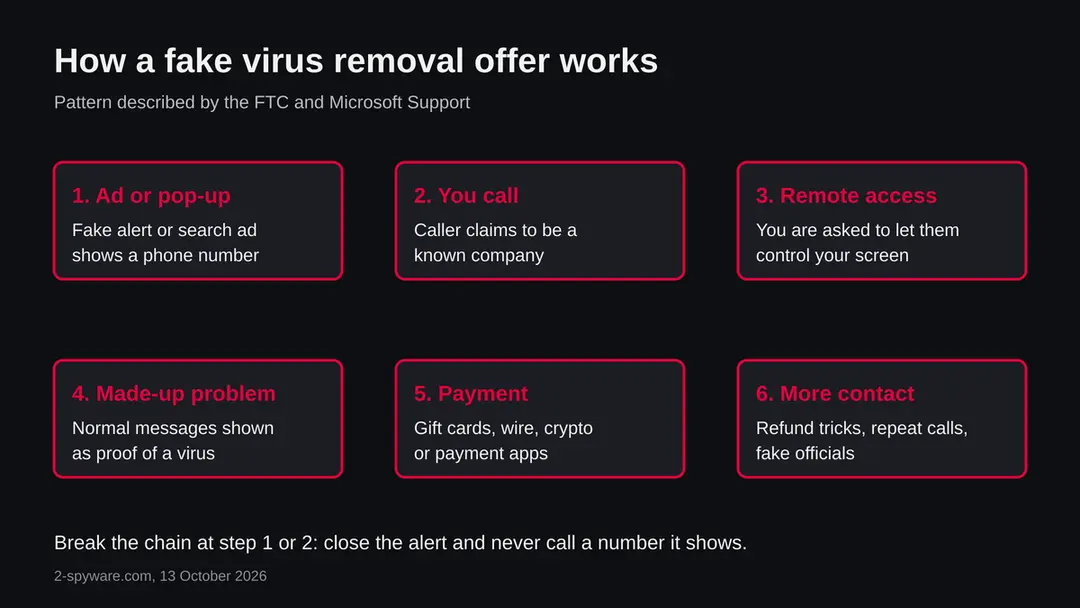
Computer virus removal near me: summary
| Type | A local-service search used by real infection victims and targeted by tech support scammers; not a malware name |
|---|---|
| Risk | Medium: fake support offers can cost money and give a stranger remote access to the PC |
| Symptoms | A slow or odd PC, browser pop-ups, a full-screen warning with a phone number, a fake renewal notice |
| How to get rid of it | Close the alert, scan with Windows Security, remove unknown programs, update, change passwords, then choose a shop you can visit if you still need one |
| Our check (13 October 2026) | No address to test; we read the FTC and Microsoft pages on tech support scams. No business is rated |
| Running since | Not applicable. The radar saw the search in October 2026 |
| Removal | Scan the PC with security software to find and remove the malware and anything installed with it. Fortect scans Windows for malware and repairs the system files and settings it damaged. Remove it nowTo use the full-featured product, you have to purchase a license for Fortect. The scan is free. |
Show 8 more facts
| Installed on the PC | Nothing, unless a caller had you install remote access software |
|---|---|
| Detection | No single name applies to this search. A remote support tool is not itself malware, but in a scam it is misused. If a real infection is found, Defender often reports a generic trojan name such as Trojan:Win32/Wacatac.B!ml, which Microsoft describes as a family of related strains, not one program |
| Damage | Money paid, stolen logins, possible malware installed during remote access |
| Distribution | Search and display ads, fake pop-ups, cold calls, texts and fake renewal notices, according to the FTC and Microsoft |
| Evidence | FTC and Microsoft Support pages, our topic radar record |
| Name | Computer virus removal near me |
| First seen | 13 October 2026 |
| Facts checked | 13 October 2026 |
Facts checked on 13 October 2026 against the FTC consumer advice page and Microsoft Support pages. No website, shop or phone number was tested, because the subject is a search phrase. Full scan and offline scan paths come from our own Windows 11 screenshots, not from a Microsoft page we read.
What people mean by computer virus removal near me, and the short answer
Computer virus removal near me is a search for someone local who will find and remove malware from a PC. The safe answer has two parts: do the free checks that Windows already has, and if you still want a person, pick a business you can walk into, not a number that appeared on your screen.
This page is not about one program or one website. Our topic radar showed the phrase as a security search of about 590 searches a month, and we had no page for it. We have no reported address, no sample file and no site test for this subject, so nothing below describes a specific piece of malware. It describes the situation of the person typing the search:
- a PC that behaves badly
- a worry that it is infected
- a results page where honest shops and scammers pay for the same words
Two facts shape everything that follows. First, the FTC says scammers buy search placement and display ads so that their phone numbers appear when you look for tech help. Second, Microsoft says its own error and warning messages never include phone numbers, so a pop-up that tells you to call is not from Microsoft. Both are explained further down, with the sources.
- What it is
- A local-service search, not a malware name. Many of the people searching have a real infection; some have only a slow PC or a scary pop-up
- Who can meet the problem
- Anyone with a Windows PC, Mac, phone or tablet that shows odd behaviour, plus anyone who got a fake virus alert in the browser
- The main risk
- Paying for a cleaning that was never needed, or giving a stranger remote control of the PC. The virus is often not the biggest problem
- What we could not check
- We have no particular shop, number or website to test, so we do not rate any business. Check each one yourself with the list below
What computer virus removal near me does on an infected PC
What we checked for this page, and what we could not
There was no address to test, so our usual site test did not apply. We say that plainly instead of filling the space with invented results.
computer virus removal near me · radar record and official pages · 13 October 2026
- Search demandAbout 590 security-minded searches a month for this phrase, according to our topic radar on 13 October 2026.
- How tech support scams workRead on the FTC consumer page and on Microsoft Support. Both describe fake pop-ups, cold calls, remote access and payment by gift card, wire, crypto or payment apps.
- Registered address or URLhaus reportsNone. The subject is a phrase, not a domain, so there is no registration record and no reported URL to show.
- Our own request to a serverNot made. The worker marked the probe as not requested because the subject is not a plain domain name.
- Any named shop or companyNone assessed. We do not call any real business a scam, and we do not recommend one. Local shops differ, and we cannot know yours.
Medium risk The risk is in the situation, not in a file. Searching for local help is normal and often works out, but the search results and phone numbers on a fake alert are where scammers operate. Nothing here clears or condemns any particular business.
Is it really a virus? Signs that point to malware and signs that do not
Many PCs that people take to a shop have no virus at all. A slow start, a full disk, an old browser and too many start-up programs look like an infection but are ordinary problems. Decide which one you have before you pay anyone.
| What you see | Often means | What to do first |
|---|---|---|
| A full-screen warning in the browser with a phone number, loud sound, or a message that you must call now | A fake alert from a malicious ad or site, not a scan of your PC | Do not call. Close the browser with Task Manager (Ctrl + Shift + Esc), then reopen it without restoring the tabs |
| Home page, new tab or search engine changed, many pop-ups, ads on pages that had none | A browser extension or an unwanted program such as a hijacker or adware | Remove unknown extensions and check Settings > Apps > Installed apps |
| A program you did not install starts with Windows, fans run hard while you do nothing | Unwanted software, a miner, or a legitimate update running | Open Task Manager and check Startup apps; scan with Windows Security |
| Files renamed, a note demanding payment | Ransomware. This needs different steps than a normal cleaning | Disconnect from the network, do not pay, keep the note and a photo of it, and get help from a trusted source |
| Slow PC with nothing else odd | Full disk, low memory, pending updates, old hardware | Free space, install Windows updates, restart; a shop may be unnecessary |
| Friends receive messages you did not send, or accounts you use send alerts about new sign-ins | A stolen password or an infostealer on the PC | Change passwords from a different, clean device and scan the PC |
What computer virus removal near me can steal or download
The dangers differ for the infected PC and for the person looking for help. Both matter.
- High
Remote access in the wrong hands
Microsoft says that at worst scammers steal personal or financial information or damage the device through malware installed during remote access.
- High
Money paid by methods that are hard to reverse
The FTC says gift cards, wires, cryptocurrency and payment apps work like cash, so a payment can rarely be taken back.
- Medium
A real infection left in place
Someone who pays a scammer may feel safe while the actual cause, an unwanted program or a stolen password, is still there.
- Medium
Follow-up scams
The FTC describes repeat contacts, including a fake government official who tells the victim to move money. No real official asks for this.
- Low
Cost for a problem that did not exist
A slow or cluttered PC can be fixed with the free steps above, or with a modest service. The risk is paying a lot for a fault that a restart or an update would have cured.
What a stranger with remote access could reach
- Your screen and keyboard
- Files on the PC
- Saved passwords in browsers
- Signed-in email and bank pages
- Programs they install for later use
Not every scammer does all of this. It is what the access makes possible.
How computer virus removal near me got on your PC
How the fake virus removal offers work
The FTC describes the same pattern again and again: a warning that looks like it comes from a known company, a number to call, remote access, a made-up diagnosis, and a payment that is hard to reverse. Search ads are one way the number reaches you.
The FTC consumer page lists four ways in. A pop-up that looks like it comes from a well-known company tells you to call. A caller or texter says they are a technician from a known company. Scammers pay for search placement or display ads so that their numbers show up when you look for help.
And fake renewal notices claim that hundreds of dollars were charged to you for a security subscription, often using names such as Geek Squad, McAfee or Norton, and give you a short deadline to call. That last variant ties directly to this search: someone who just got a fake charge notice often searches for help in a hurry.
Once you call, the pattern is the same. The person asks to control your computer, says they found malware and offers to remove it for a fee. They may ask you to pay by gift card, wire or bank transfer, cryptocurrency or a payment app, which the FTC says work like cash.
Microsoft adds that scammers may show normal system messages as signs of trouble, and that the pop-up variant can fill the screen, loop, play audio or try to disable Task Manager so that the alert seems real.
- 1
You search or you see a warning
Either you type a phrase like this one, or an ad or site shows a fake blue screen, an error with a number or a charge notice.
- 2
You call a number that was shown to you
The number is on the ad, the pop-up or the message. You did not look it up in an independent source, so you cannot know who answers.
- 3
The caller asks for remote access
You are told to install a remote support program or to type an address. From that moment the caller can see and control your screen.
- 4
A problem is found for you
Normal Windows messages, such as lists of harmless warnings, are presented as proof of infection.
- 5
A fee or a subscription is asked
Payment by gift card, wire, crypto or a payment app is pushed, and sometimes a bank login page that is a copy is used to collect your details.
- 6
More follows
Some victims are told they were refunded too much and must send money back. Others are called again later by someone posing as a government official.
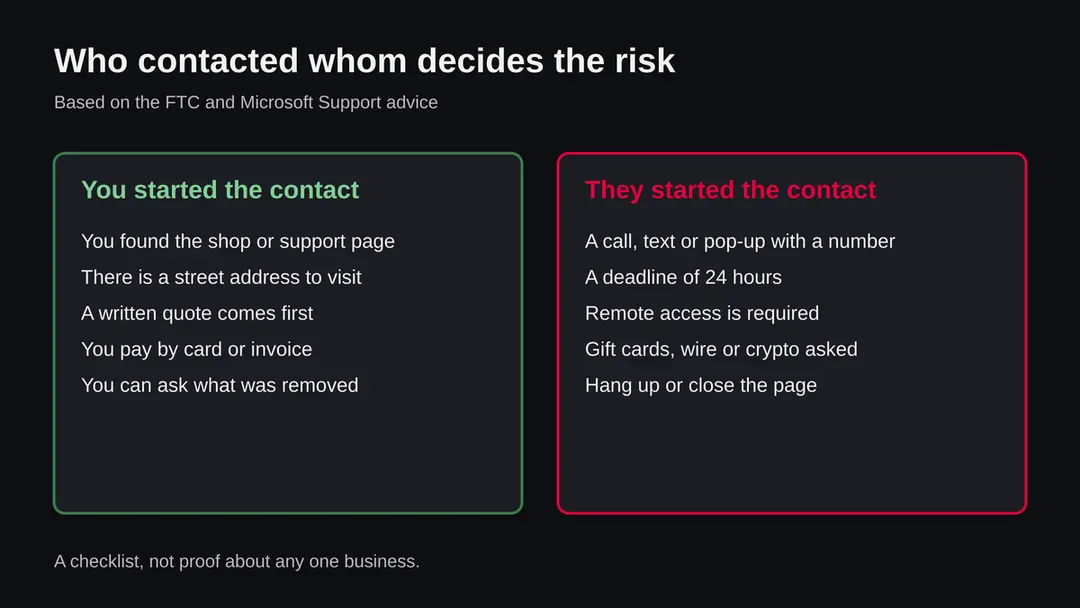
Five rules that separate real help from a scam
These rules come from what Microsoft and the FTC say about tech support scams. A business that breaks even one of them is not one to let near your PC.
Do
- Look up a shop yourself, on a map service or in a phone book, and check that it has a street address you can visit.
- Ask for a written quote and a description of the work before anything is started, and ask what will be done with your files.
- Prefer to hand the machine over in person, or go through the maker's own support page if the PC is under warranty.
- Pay by a method that you can dispute, such as a card, and keep the receipt.
- Change your important passwords from another, clean device after the work is done.
Don't
- Call a number that appeared in a pop-up, a warning page, a text or an unexpected email. Microsoft says its error and warning messages never include phone numbers.
- Accept a call from a company that says it found a problem on your computer. Microsoft says it will not call you unless you asked for support.
- Install remote access software for someone you did not choose yourself.
- Pay with gift cards, wire transfers, cryptocurrency or payment apps. The FTC and Microsoft both name these as scammer favourites.
- Pay in a hurry because a deadline of 24 hours was announced.
Where to find help near you, without trusting the first ad
There are five kinds of help. Four of them are legitimate in principle, though quality varies, and one is the scam described above. Which you choose depends on what you have.
| Option | Good for | Watch for |
|---|---|---|
| Independent computer repair shop | In-person checks, data rescue, a clean reinstall of Windows | Very cheap offers with unclear work, no street address, and pressure to buy a long subscription on the spot |
| Store of the PC maker or a retail chain with a service desk | PCs under warranty and clear price lists | Upselling of security subscriptions you did not ask for |
| Microsoft Support or the support page of your PC maker | Windows problems, activation, reset help | Go to the official page yourself; do not use a number from a search ad |
| A friend, relative or local volunteer group you know | Simple cleaning, a reset, a second opinion | Make a backup first; a helper with good intentions can still delete files |
| A company that phones you or a number on a pop-up | Nothing | This is the pattern the FTC and Microsoft warn about. Hang up or close the page |
Questions to ask a shop before you hand over the PC
- Will you tell me in writing what you found?A real cleaning has a report: names of programs removed, scan results, and what was changed.
- Do you need remote access?A shop that works on the bench does not need it. If remote work is offered, you must have started the contact yourself.
- What happens to my files?The answer should be that they are copied before any reset, and returned to you.
- Do I have to pay now, with a gift card or crypto?A yes is a reason to leave.
- Can I see the old and the new state?If they cannot show what was removed, you cannot tell whether anything was wrong.
Your judgement These questions do not prove a shop honest. They make it harder for a dishonest one to work unnoticed.
How to remove computer virus removal near me
How to remove Computer virus removal near me
A loader's job is to install other malware, so treat the PC as infected with more than one program until the scans are clean.
Step 1: Delete scheduled tasks that bring it back
Open Task Scheduler from the Start menu and click Task Scheduler Library.
Select each task you do not recognise and read the Actions tab: a task that starts a file in
%AppData%or%Temp%, runs powershell with a long encoded line, or opens a web address belongs to Computer virus removal near me or a similar program.Right-click such a task and choose Delete, and check the subfolders too. Leave tasks from Microsoft, your PC's maker and programs you use. Task Scheduler is the same in Windows 11 and Windows 10.

Windows 11: Task Scheduler Library, the task selected, the Actions tab shows the file it runs. Full procedure with screenshots: Remove what malware leaves behind in Windows
Step 2: Remove it from startup
Whatever Computer virus removal near me installed usually starts with Windows.
Open Task Manager with Ctrl + Shift + Esc, go to Startup apps in Windows 11 or the Startup tab in Windows 10, and disable what you do not know, starting with entries that have an empty Publisher column.
Open file location on the right-click menu shows the file, which helps you decide and tells you what to delete later. Disabling is safe: if something you need stops working, switch it back on.
Full procedure with screenshots: Stop apps from opening at startup On uGetFix
Step 3: Delete the folders left behind
What the uninstaller leaves behind is usually in the user folders. Open File Explorer, switch on View > Show > Hidden items (in Windows 10 View > Hidden items), and go through
%LocalAppData%,%AppData%, %ProgramData% and the two Program Files folders.Sort by Date modified and delete folders that appeared together with the problem and belong to no program you use. Folders with random names that hold
.exe,.dll, .js or .ps1 files are the strongest sign.Full procedure with screenshots: Remove what malware leaves behind in Windows
Step 4: Scan the PC, then run the offline scan
Open Windows Security > Virus & threat protection > Scan options, run a Full scan and remove everything it finds. Then select Microsoft Defender Antivirus (offline scan) and click Scan now: the PC restarts and scans before Windows loads, which finds files that hide while Windows runs.
Save your work first, because the offline scan takes about 15 minutes. Both scans are built into Windows 11 and Windows 10, and a second scanner from another vendor is a useful extra opinion.

Windows 11: Windows Security > Virus & threat protection > Scan options. Full procedure with screenshots: Run a Microsoft Defender Offline scan
Step 5: Change passwords from another device and sign out other sessions
Assume that the passwords saved in this PC's browsers, and the accounts that were open in them, are known to the attacker. From a phone or a clean computer, change the e-mail password first, then banking, shopping, social and gaming accounts.
Use each service's option to sign out of all other sessions, because stolen cookies keep a session open even after a password change. Turn on two-step verification on each account. Wait with the infected Windows 11 or Windows 10 PC until the scans are clean.
Full procedure with screenshots: Turn on two-step verification / secure a hacked account
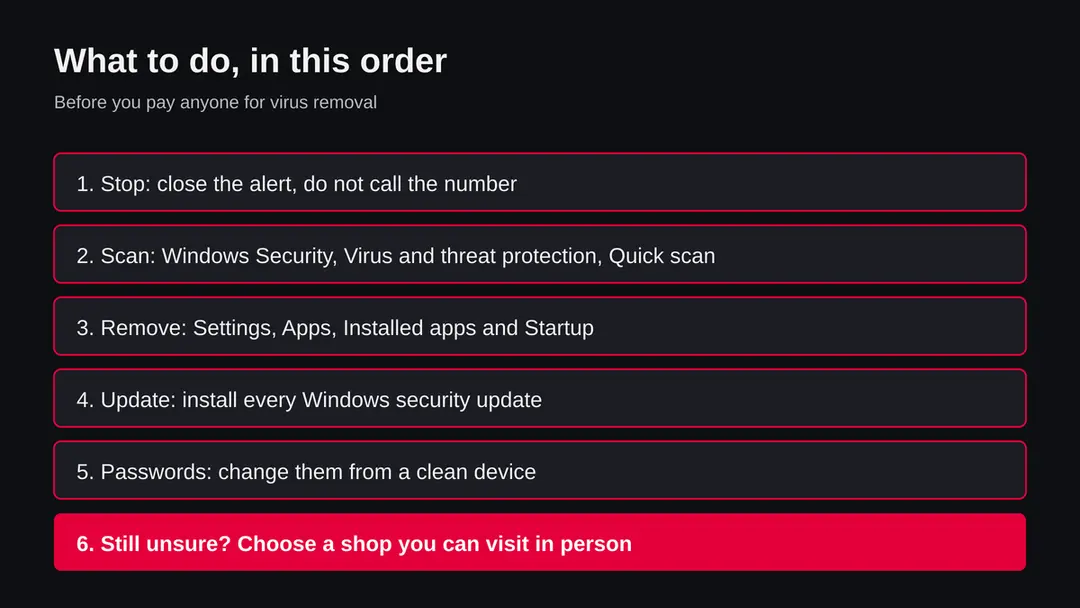
What to try yourself before paying anyone
Windows 11 and 10 include Microsoft Defender, which is free and is enough to check most home PCs. Microsoft's own page confirms the quick scan path: open Windows Security, then Virus & threat protection, then Quick scan.
Work in this order. If anything on the way shows a ransom note or demands payment, stop and treat it as ransomware instead.
- 1
Disconnect from the call or the pop-up
Close the browser with Task Manager (Ctrl + Shift + Esc, select the browser, End task). When you reopen it, do not restore the old tabs. Do not call any number from the alert.
- 2
Run a quick scan
Open Windows Security from the Start menu, choose Virus & threat protection and click Quick scan. This path is from Microsoft Support. A scan that finds nothing does not prove a PC is clean, only that Defender found nothing it knows.
- 3
Check what Defender already did
In the same app, open Protection history to see what was found, blocked or quarantined and when. The picture below is from our own Windows 11 test machine.
- 4
Go through Scan options and run the offline scan
Under Virus & threat protection open Scan options. Our own Windows 11 screen lists Quick scan, Full scan, Custom scan and Microsoft Defender Antivirus (offline scan). The offline scan restarts the PC and checks before most programs load, which helps against software that hides while Windows runs.
- 5
Remove programs you did not choose
Open Settings > Apps > Installed apps, sort by install date and uninstall what you do not recognise, especially any remote support program that a caller had you install.
- 6
Look at start-up apps and busy processes
Open Settings > Apps > Startup and switch off what you do not recognise. In Task Manager, Processes tab, sort by CPU and memory and right-click an unknown entry to open its file location.
- 7
Install updates and change passwords
Run Windows Update and install every security update. Microsoft recommends this after a scam. Then change your passwords from another, clean device, starting with your email and your Microsoft account.
After removal: passwords, accounts and prevention
Accounts come next
Because the PC showed A fake virus alert or an unwanted remote support program in the list of installed apps, a sign of a program that could read browser data, the clean-up is only half of the work. The other half happens in your online accounts.
Change passwords from a clean device, beginning with e-mail; sign out of all sessions; check forwarding rules and recovery phone numbers; and turn on two-step verification with an authenticator app or a passkey. Ask your bank to replace cards saved in the browser.
Why the order matters and what to check in each account: secure your accounts after malware.
If you already called, paid or gave someone access
Act in this order. Microsoft's guidance for people whose information a scammer already has is to uninstall what they had you install, consider resetting the device if you gave access, run a full scan, install updates, change passwords and dispute any payment with the card provider.
- 1
Stop contact and disconnect
Hang up. Do not answer calls from the same number. Turn off Wi-Fi or unplug the network cable if remote access is still open.
- 2
Uninstall what they had you install
Use Settings > Apps > Installed apps and remove any remote support or unknown program, sorted by install date.
- 3
Scan, then think about a reset
Run a full scan with Windows Security. If you gave a stranger control of the PC, Microsoft says to consider resetting the device, particularly if fake alerts keep blocking normal use. A reset removes programs and, if you choose, your files, so copy documents you need first and check them before you copy them back.
- 4
Change passwords from a clean device
Change the password of every account you used on that PC, your bank and email first, and any account that shares the same password. The FTC gives the same advice.
- 5
Call your card issuer or bank
If you paid by card, ask the issuer to dispute the charge. Microsoft says they will likely cancel and replace the card. If you paid by gift card, wire, crypto or payment app, tell the provider at once; we cannot promise that money can be recovered.
- 6
Check your statements
If a renewal notice arrived, look for the real charge on your card or bank statement. The FTC says that if there is no such charge, the message was likely a scam.
- 7
Report it
Report to the FTC at ReportFraud.ftc.gov and to Microsoft at microsoft.com/reportascam (Microsoft takes reports whether or not the scammer claimed to be Microsoft). Outside the United States use your national consumer or police reporting service.
Macs, iPhones and Android phones
The same scam works on any device, because it relies on fear and a phone number, not on a flaw in Windows. A fake alert in Safari on a Mac or in a phone browser is the same pattern, and a shop visit is no more or less safe.
For a Mac, close the browser window, quit Safari with Force Quit, reopen it without restoring tabs, and remove any extension or app you did not choose. For a phone, close the browser tab, clear the browser's site data, and remove apps you do not recognise.
We have not written full steps for each system on this page, and a guide specific to your device is a better route. The rule about phone numbers on alerts does not change by device.
How to make the next scare easier to handle
Do
- Write down in advance the real support page for your PC maker and for Microsoft, so you do not need to search in a panic.
- Keep Microsoft Defender running and Windows Update on.
- Keep a current backup of your files (File History or OneDrive), so that an infection or a reset does not cost you your documents.
- Download programs from their makers' sites or the Microsoft Store, not from download portals.
- Tell older relatives about this pattern. The FTC suggests talking a message over with someone you trust.
- A VPN hides your IP address on public networks; it does not remove malware or stop a fake alert.
Don't
- Type a phone number from a pop-up into your phone.
- Keep a pop-up that fills the screen open to see what it says next.
- Install a remote tool because a caller asked.
- Search for support in a hurry and click the first sponsored result.
Questions about computer virus removal near me
How do I find computer virus removal near me that I can trust?
Look up the business yourself on a map service or in a phone book, check that it has a street address you can visit, and ask for a written quote before work starts. Prefer to hand the PC over in person. Pay by a method you can dispute, such as a card, and keep the receipt.
Do not use a number from a pop-up or a text, and do not accept a call from someone who says they found a problem on your computer. We have not tested any shop, so judge each one by these checks and not by its ads.
Is a virus removal pop-up with a phone number real?
Almost certainly not. Microsoft says its error and warning messages never include phone numbers, and the FTC says real security pop-ups do not ask you to call. Fake alerts can fill the screen, loop, play sound or try to block Task Manager.
Close the browser with Task Manager (Ctrl + Shift + Esc, End task), reopen it without restoring tabs, and do not call. Then run a Windows Security scan. Seeing the pop-up does not by itself mean that your PC is infected; it often means that you visited a malicious ad or site.
Can I remove a virus for free without going to a shop?
Often yes. Open Windows Security, choose Virus and threat protection and run a Quick scan, which is the path Microsoft Support gives. Under Scan options you can also run a full scan and the Microsoft Defender Antivirus offline scan.
Then uninstall programs you did not choose in Settings, Apps, Installed apps, switch off unknown start-up apps and install Windows updates. These steps do not guarantee a clean PC, and ransomware or stolen passwords need extra care, but they handle many cases without paying anyone.
What does legitimate computer virus removal usually involve?
We have not audited any business, so this is our reading and not a standard. A careful service checks the PC with scanning tools, looks at start-up programs and installed software, removes what does not belong, installs updates and tells you in writing what it found.
If the system seems badly damaged, it copies your files and reinstalls Windows. You should be able to ask what was removed. A service that cannot say what it found, or that insists on remote access you did not start, is a warning sign.
I called a number and let them connect. What should I do now?
Hang up and disconnect the PC from the network. Uninstall any program they had you install, run a full scan with Windows Security and install all updates. Microsoft says to consider resetting the device if you gave access, especially if fake alerts keep blocking normal use.
Change your passwords from another device, starting with email, banking and your Microsoft account. If you paid by card, ask the issuer to dispute the charge. Report the call to ReportFraud.ftc.gov and microsoft.com/reportascam if you are in the United States.
Is a virus removal service that calls me legitimate?
No. The FTC says a legitimate tech company does not contact you by phone, email or text about a computer problem, and Microsoft says that it will not call you unless you asked for support.
Treat an unsolicited call or text as a scam, hang up, and do not give remote access, card details or passwords. If you worry that the claim could be true, run a Windows Security scan yourself or go to your PC maker's support page through an address you type in, not one the caller reads out.
A text says I was charged for McAfee, Norton or Geek Squad. Is that real?
Probably not. The FTC describes fake renewal notices that claim hundreds of dollars were charged for a subscription, often using those names, and demand a call within 24 hours. The scammer may send you to a copy of a bank or card page, then claim you were overpaid and must send money back by gift card, wire or crypto.
Check your own card or bank statement. If the charge is not there, the message was likely a scam. If it is there, contact your card issuer using the number on the card.
What payment methods should make me stop?
Gift cards, wire or bank transfers, cryptocurrency and payment apps. The FTC says scammers push these because they work like cash and are hard to reverse, and Microsoft says it does not request payment by cryptocurrency or gift cards.
A real repair business can accept a card or an invoice that you can dispute. If anyone asks you to buy gift cards and read out the numbers, end the conversation. If you already did, contact the card issuer or the payment provider immediately and report it.
Do Macs, iPhones and Android phones need virus removal near me too?
The scam works on any device, because it depends on a fake alert and a phone number. On a Mac, close the browser window, reopen Safari without restoring tabs, and remove extensions or apps you did not choose. On a phone, close the tab, clear the browser's site data and remove unfamiliar apps.
A real infection on these systems is less common than a fake alert, but it exists. Do not call a number from an alert on any device, and see a guide for your system for the exact menu paths.
Will Fortect remove Computer virus removal near me?
Fortect scans Windows for malware and unwanted programs and repairs the system files and settings they change, and its free scan shows what it finds on your PC before you decide anything.
For Computer virus removal near me, follow the plan above as well: the browser steps take back permissions and settings that no scanner treats as a threat, and uninstalling the program that brought it removes the source.
Run Microsoft Defender's full scan and, if anything was found, its offline scan as a second opinion. If the symptoms are gone after the plan and both scans are clean, there is nothing more to do.
Sources
- FTC Consumer Advice: How to spot, avoid, and report tech support scams (read October 13, 2026)
- Microsoft Support: Protect yourself from tech support scams (read October 13, 2026)
- Microsoft Security Intelligence: Trojan:Win32/Wacatac.B!ml (read October 13, 2026)
- Microsoft Support: Stay protected with Windows Security (read October 13, 2026)