
FTX scam: what it is, how the fake FTX claim e-mails work and what to do
"FTX scam" is used for two different things: the fraud that brought down the FTX exchange, which a US court has ruled on, and the fake FTX and Kroll e-mails that promise payouts and are still sent to people with a claim. The first needs no action from you; the second is how people lose money today, so never click a link in such a message and type claims.ftx.com yourself.
Facts checked October 11, 2026. Removal steps tested on Windows 11 (26H2) and checked against Microsoft's and the browser makers' current documentation.
Automatic
Get a free scan and check if your PC is infected.
Fortect finds malware, unwanted programs and the Windows damage they leave behind, and repairs it in one pass.
Do it yourself · free Remove FTX scam (fake FTX claim and payout e-mails) yourself 4 steps, about 12 minutes, no software needed.
Start the steps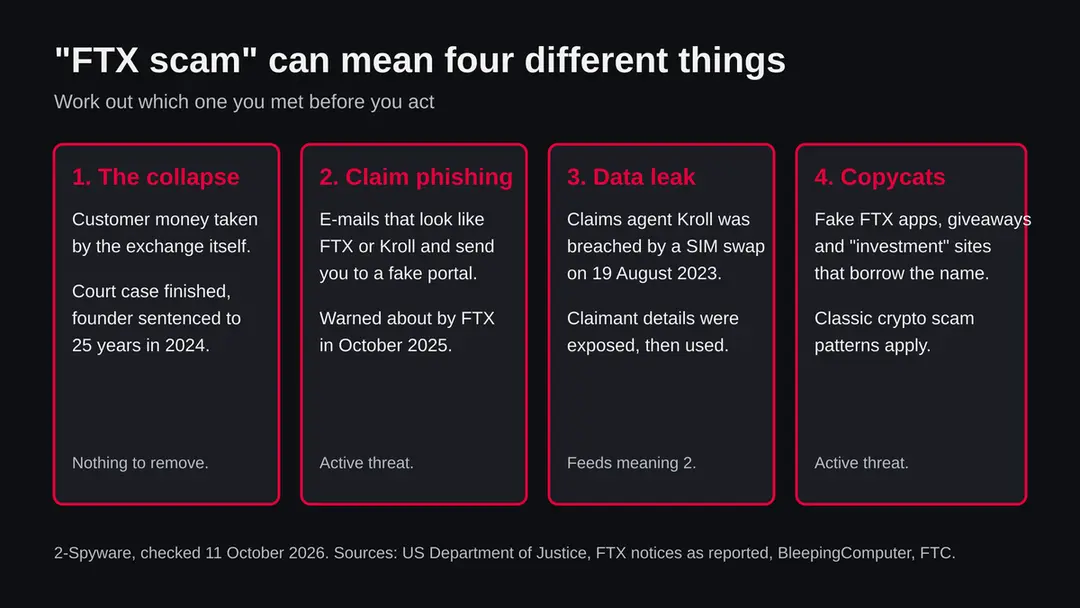
FTX scam (fake FTX claim and payout e-mails): summary
| Type | Phishing and impersonation scam that uses the FTX and Kroll names; the exchange's own collapse is a separate matter decided in court |
|---|---|
| Risk | High for anyone with an FTX claim who clicks a link, enters a seed phrase or connects a wallet. Low if you only read the message |
| Symptoms | An e-mail or text about an FTX payout, a verification step, a "trusted partner" you do not know, a lookalike web address or a request to connect a wallet |
| How to get rid of it | Nothing is installed by the message itself. Delete it, check your claim at claims.ftx.com typed by hand, and move funds to a new wallet if you gave a seed phrase |
| Our check (11 October 2026) | No address to test. Official warnings and court facts found; fake pages not opened by us |
| Running since / first seen | Unauthorized withdrawals reported in November 2022; phishing after the Kroll leak of August 2023; official warnings in October 2025 and 2026 |
| Removal | Scan the PC with security software to find and remove the malware and anything installed with it. Fortect scans Windows for malware and repairs the system files and settings it damaged. Remove it nowTo use the full-featured product, you have to purchase a license for Fortect. The scan is free. |
Show 6 more facts
| Platform | Any device with e-mail or a browser. Nothing to uninstall |
|---|---|
| Detection | No Microsoft detection name: the threat is a fake page and a message, not a program we know of |
| Name | FTX scam |
| Evidence | 0 write-ups by security sites; details still limited |
| First seen | 12 November 2022 |
| Facts checked | 11 October 2026 |
Facts checked on 11 October 2026 against the US Department of Justice page on the sentence, press reports of the FTX phishing alerts and of the 2023 Kroll breach, press coverage of the November 2022 withdrawals and the FTC's crypto scam advice. We tested no website and opened no fake portal. We could not confirm the current state of payouts or of the founder's appeal.
What people mean by "FTX scam", and what is confirmed
There is no single FTX scam page, program or file to remove. The phrase covers four separate things, and the right action depends on which one you ran into. This page was written from a name, not from a reported web address, so we have no site test; we say below what we could and could not confirm.
- 1. The collapse of the exchange
- Confirmed by a court. The US Attorney's Office for the Southern District of New York says the founder, Samuel Bankman-Fried, was convicted by a jury on seven counts and sentenced to 25 years in prison. News coverage dates the sentence to 28 March 2024
- 2. Fake claim and payout e-mails
- Active. FTX warned on 3 October 2025, as reported, about phishing e-mails that look like they come from Kroll or the FTX Recovery Trust and lead to fake portals
- 3. The Kroll data leak
- Confirmed by the company and by press reports. On 19 August 2023 an attacker took over a Kroll employee's phone number by a SIM swap and reached files with claimant details
- 4. Copycat apps, sites and giveaways
- Not tied to one address in our facts. Scammers reuse well known brand names, and a famous failed exchange is an easy name to borrow. Treat any unsolicited FTX offer as fake until you have checked it yourself
If you searched for "FTX scam" because you lost money when the exchange failed, that is meaning 1, and no message, tool or website can reverse it. If you are waiting for a payout and received an e-mail, that is meaning 2, and it is the one to act on now.
How to tell the FTX scam (fake FTX claim and payout e-mails) e-mail is fake
Do
- Type the official claims address yourself and keep it as a bookmark.
- Treat every e-mail about your claim as unverified until the same news is on the official site.
- Use a unique password and an authenticator app for the claims account.
- Ask your mobile carrier about a number lock or port-out PIN, because of the 2023 SIM swap.
- Keep seed phrases offline and never type them into a website.
- Tell relatives who have a claim, because they are the people most likely to be targeted.
Don't
- Do not click links in a message about your claim, even if it quotes your balance.
- Do not connect a wallet to a claims page.
- Do not pay a fee to "release" a payout.
- Do not trust a message because it names Kroll, BitGo, Kraken or Payoneer.
- Do not hire a "recovery agent" who contacted you first.
Is FTX scam (fake FTX claim and payout e-mails) dangerous? What the senders want
Our check: what we did and did not do
This guide came from a search topic, not from a reported address, so there was no page for us to open and no file to scan.
FTX scam · name only · 11 October 2026
- Reported addressesNone in our database for this name. Our own server did not make a request, because there is no single address to test.
- Official warningFound, as reported by the press: FTX alerts of October 2025 and early 2026 about phishing that imitates the Recovery Trust and Kroll.
- Court factsFound on the Department of Justice page: conviction on seven counts and a 25 year sentence.
- Fake pagesWe did not open any fake portal. The one lookalike domain we name is a reported example.
- Current payout statusNot confirmed. Our search returned nothing newer than the early 2026 distribution notice.
Medium risk The scam exists and FTX itself has warned about it, so any unsolicited FTX e-mail deserves distrust. We cannot say how many fake messages or sites are live today. A page we did not test is not a page we cleared.
What you can lose
The danger here is money and identity, not a virus. Nothing in the sources we read says the fake e-mails install a program, but a link can lead to a download, so do not open attachments either.
- High
Your crypto wallet
A seed phrase, a private key or a wallet connection gives the scammer control of the coins. Crypto transfers cannot be called back like a card payment.
- High
Your claim payout
If you enter your claim details and bank or wallet details on a fake portal, the money can be sent to the scammer instead of you.
- Medium
Your identity
Name, address, date of birth and claim number are enough for a convincing second attempt, or for fraud in your name.
- Medium
Your phone number
The 2023 breach began with a SIM swap. If your number controls your accounts, losing it can mean losing the accounts.
What a fake FTX page asks for
- Login and password
- Seed phrase
- Private key
- Wallet connection
- Photo of your ID
- A fee to release your payout
A real recovery process does not need a seed phrase from you and does not charge a fee to pay you.
If you clicked the link or replied
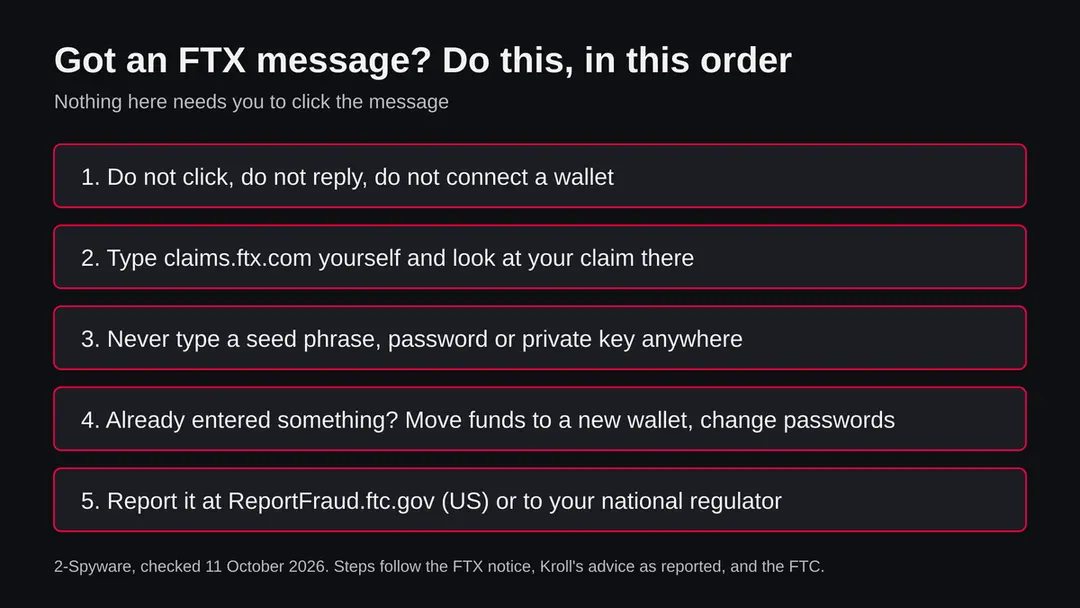
Act in this order. Speed matters most for a wallet, because a connected or exposed wallet can be emptied in minutes.
- 1
Only clicked, entered nothing
Close the page. Nothing was taken by looking at it. Do not open any file it offered. Then check your claim by typing claims.ftx.com into the address bar yourself.
- 2
Entered a seed phrase or private key
Treat the wallet as lost. Create a new wallet on a clean device with a new recovery phrase and move what is left there at once. The old wallet stays dangerous even if it looks empty.
- 3
Connected a wallet or approved something
Revoke the approval with the wallet's own permissions tool or a revoke service you trust, and move the funds to a fresh wallet. Do this before anything else, because an approval lets the scammer take coins later.
- 4
Typed a password
Change it on the real site, from a device you trust, and anywhere else you used the same password. Turn on two step sign in with an authenticator app, not text messages.
- 5
Sent an ID photo or personal details
The FTC runs IdentityTheft.gov, which gives a recovery plan for stolen personal information. Consider a credit freeze where your country offers one.
- 6
Paid a fee or sent crypto
Stop paying. Report it to your exchange, your bank or card issuer if one was used, and the police. Do not trust anyone who offers to recover the money for an upfront fee, because that is a common second scam.
- 7
Report the message
In the US, report at ReportFraud.ftc.gov. Elsewhere use your national fraud reporting service. Forward the phishing e-mail to the organisation it imitates only through the contact details on its official site.
What to do after the FTX scam e-mail
If you only received the message and clicked nothing, step 3 is all you need.
If you clicked the link or typed anything on the page it opened, do every step, starting with the password.
Step 1: Change the password you typed on the fake page
If you entered a password after clicking the link in the FTX scam message, treat that account as known to the sender.
Open the provider's real site by typing its address yourself, not through any link in the e-mail, and change the password there. Choose a new one you have never used before, and change it on every other account that shared the old one.
Then use the option to sign out of all other sessions or devices, if the provider has one. This works the same in any browser on Windows 11 and Windows 10.
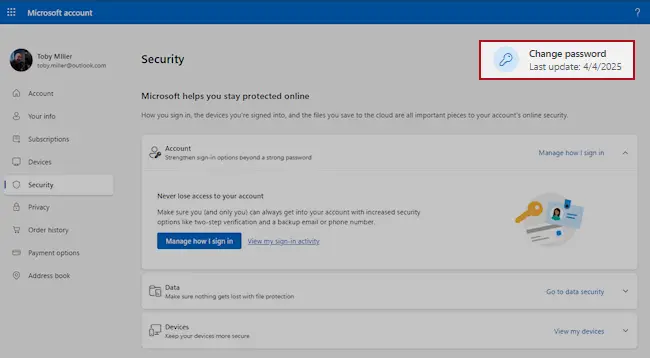
Microsoft account, Security page (account.microsoft.com/security): Change password. Full procedure with screenshots: Turn on two-step verification / secure a hacked account
Step 2: Turn on two-step verification
Two-step verification asks for a code from your phone or an authenticator app whenever someone signs in from a new device. A stolen password alone is then not enough to open the mailbox.
Turn it on in the security settings of the e-mail account first, then for the bank, shop and social accounts that send their reset links to that address.
While you are there, check the recovery e-mail and phone number and the forwarding rules, which attackers sometimes change to keep access. The settings pages look the same on Windows 11 and Windows 10.
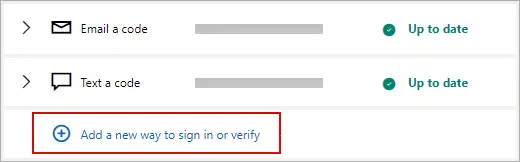
Microsoft account: Manage how I sign in, where two-step verification and the sign-in methods are. Full procedure with screenshots: Turn on two-step verification / secure a hacked account
Step 3: Report the e-mail and delete it
Report the message instead of only deleting it. In Outlook choose Report > Report phishing, in Gmail the three-dot menu > Report phishing; the provider then blocks the same message for other people.
Do not reply and do not click anything else in it. On a work account, forward it to your IT team as an attachment first. Web mail and the mail apps on Windows 11 and Windows 10 offer the same options.
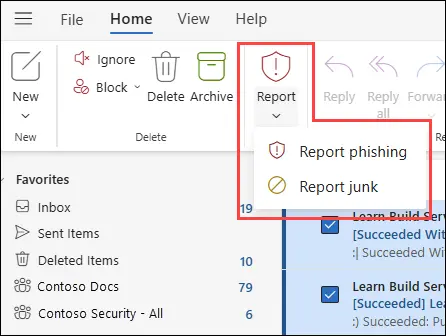
New Outlook for Windows and Outlook on the web: Report > Report phishing. Full procedure with screenshots: Report a phishing e-mail
Step 4: Scan the PC if you opened a file from the message
A page that only asked for a password installs nothing, so most readers can skip this step.
If the FTX scam e-mail or the page it opened made you download or open a file, delete it and run a full scan, then a Microsoft Defender Offline scan.
In Windows 11 and Windows 10 open Windows Security > Virus & threat protection > Scan options, select Microsoft Defender Antivirus (offline scan) and click Scan now. The PC restarts and the scan takes about 15 minutes, so save your work first.

Windows 11: Windows Security > Virus & threat protection > Scan options. Full procedure with screenshots: Run a Microsoft Defender Offline scan
Questions about FTX scam (fake FTX claim and payout e-mails)
Is FTX a scam?
The exchange's collapse involved fraud that a US court has ruled on. The Department of Justice says a jury convicted founder Samuel Bankman-Fried on seven counts and that he misappropriated billions of dollars of customer money, and he was sentenced to 25 years in March 2024 according to news coverage.
That is about the old company. The FTX Recovery Trust, which pays creditors, is a different thing, and the claims process is real. What is a scam is the set of fake messages that borrow the name to steal claim payouts and wallets, covered on this page.
Is the FTX payout e-mail I received real?
Do not decide from the e-mail itself. FTX warned in October 2025, as reported, that phishing e-mails look like they come from Kroll or the FTX Recovery Trust. Close the message without clicking and type claims.ftx.com into the address bar yourself.
If your claim and the news are not there, the e-mail is not reliable. A real notice will be on the official site. Personal detail proves nothing, because claimant data was exposed in the Kroll breach of August 2023.
How do the fake FTX claim e-mails work?
They promise a recovery, in the reported October 2025 wave 118 to 142 percent of your claim value, and send you to a site that copies the FTX customer portal. The page asks you to log in, verify your identity or connect a wallet.
The reported pages used lookalike domains such as clientid-ftxclaims[.]com and a supposed partner called Digital Disbursements. The Trust says it will never ask you to connect your wallets. What you type or approve goes to the scammer.
I clicked a link in an FTX e-mail. What should I do?
If you only opened the page and entered nothing, close it and do not open any file it offered; nothing was taken by looking. If you entered a password, change it from a trusted device and turn on two step sign in with an authenticator app.
If you entered a seed phrase or connected a wallet, move your funds to a new wallet at once, because the old one is no longer safe. Report it at ReportFraud.ftc.gov if you are in the US.
Was my data stolen in the Kroll breach?
If you had an FTX claim in 2023, some of your details may have been. Kroll said an attacker took over an employee's phone number by a SIM swap on 19 August 2023 and reached files with claimant information.
FTX said these held names, addresses, e-mail addresses and balances; Kroll's later letters, as reported, added phone numbers, claim numbers, account IDs and, for some, dates of birth. Check any letter you received, and treat messages that quote your balance with care.
Will the fake e-mail infect my computer?
Nothing in the sources we read says these messages install a program. The harm described is stolen logins, seed phrases and wallet permissions. A link can still lead to a download on a bad page, and we did not open the fake pages, so we cannot say none of them do.
Do not open attachments and do not install anything a claims page asks for. If you did, run a full scan with the security software built into your device and keep your seed phrases off it.
Can I get my money back from an FTX scam?
Often not, and crypto transfers cannot be cancelled like a card payment. Report the loss to your exchange, to your bank if a card or transfer was used, and to the police, and file a report with ReportFraud.ftc.gov if you are in the US.
Be careful of anyone who contacts you offering to recover the money for an upfront fee: that is a known second scam. Your genuine FTX claim is separate, and only the official claims site can tell you its status.
How can I check that a message about my FTX claim is genuine?
Do not use anything inside the message. Type claims.ftx.com into your browser yourself, sign in there and look for the same notice. FTX names BitGo, Kraken and Payoneer as distribution partners for payouts, according to coverage of the 2026 notice, so a different partner is a warning sign.
The Trust says it never asks you to connect a wallet. Anyone asking for a seed phrase, a fee or an urgent verification is not the Trust.
Who can I report an FTX scam to?
In the US, report at ReportFraud.ftc.gov, the FTC's reporting site, and if personal information was taken use IdentityTheft.gov for a recovery plan. Outside the US, use your national fraud or cybercrime reporting service or your financial regulator.
Also report the loss to your exchange or bank. Include the sender address, the link text (do not click it) and the date. This helps others, but we cannot promise that a report will lead to getting money back.
Will Fortect remove FTX scam?
Fortect scans Windows for malware and unwanted programs and repairs the system files and settings they change, and its free scan shows what it finds on your PC before you decide anything.
For FTX scam, follow the plan above as well: the browser steps take back permissions and settings that no scanner treats as a threat, and uninstalling the program that brought it removes the source.
Run Microsoft Defender's full scan and, if anything was found, its offline scan as a second opinion. If the symptoms are gone after the plan and both scans are clean, there is nothing more to do.
Sources
- US Attorney's Office, Southern District of New York: Samuel Bankman-Fried sentenced to 25 years in prison (read October 11, 2026)
- Cryptopolitan: FTX issues alert over phishing scams targeting creditors (read October 11, 2026)
- BleepingComputer: Kroll reveals FTX customer info exposed in August data breach (read October 11, 2026)
- Fortune: A hacker stole $400M from FTX this weekend, here is what we know so far (read October 11, 2026)
- Federal Trade Commission: Cryptocurrency scams, how to spot and report them (read October 11, 2026)