
Is Prime Day a scam? What we found
Prime Day is not a scam: it is a real Amazon sale for Prime members, held June 23 to 26 in 2026. The scams are the texts, e-mails, calls and fake deal sites that use its name. Check any order or refund claim in your Amazon account yourself, never through the message.
Facts checked October 11, 2026. Removal steps tested on Windows 11 (26H2) and checked against Microsoft's and the browser makers' current documentation.
Automatic
Get a free scan and check if your PC is infected.
Fortect finds malware, unwanted programs and the Windows damage they leave behind, and repairs it in one pass.
Do it yourself · free Remove Prime Day scams yourself 4 steps, about 12 minutes, no software needed.
Start the steps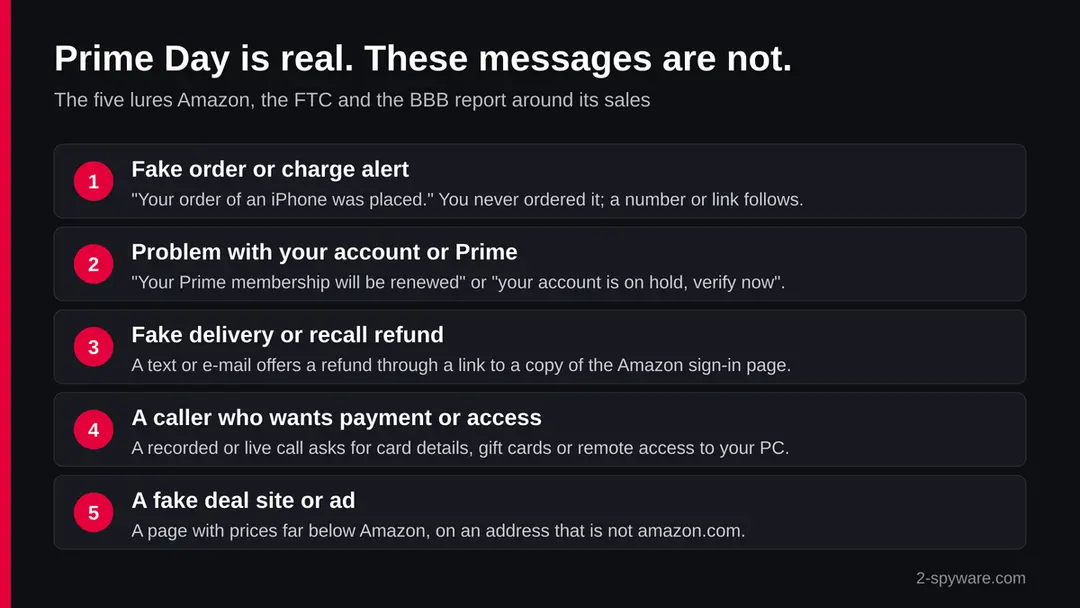
Prime Day scams: summary
| Is Prime Day a scam? | No. Prime Day is a real Amazon sale for Prime members (June 23 to 26 in 2026) |
|---|---|
| What is a scam | Texts, e-mails, calls, social media replies and deal sites that use the sale or Amazon's name |
| Type | Brand impersonation and phishing; not a virus |
| Risk | High if you pay, sign in on a fake page or allow remote access; none if you only read the message |
| Symptoms | Unexpected order, refund, recall, delivery or account messages with a link, a number or a deadline |
| Distribution | E-mail, SMS, phone calls with spoofed caller ID, social media, ads leading to fake shops |
| Removal | Scan the PC with security software to find and remove the malware and anything installed with it. Fortect scans Windows for malware and repairs the system files and settings it damaged. Remove it nowTo use the full-featured product, you have to purchase a license for Fortect. The scan is free. |
Show 11 more facts
| Damage | Card charges, lost gift card money, a taken-over Amazon account, remote access to your PC, identity theft |
|---|---|
| How to check | Your Orders and Message Center on amazon.com or in the Amazon app |
| Where to report | Amazon's Report a scam tool, reportascam@amazon.com, ReportFraud.ftc.gov, BBB Scam Tracker |
| Name | Prime Day scam |
| Evidence | Write-ups by security sites; details still limited |
| Arrives as | |
| Pretends to be | Amazon |
| Claim | Your account needs urgent attention |
| Asks for | Card details, Amazon sign-in, gift cards, payment outside Amazon or remote access |
| First seen | 10 October 2026 |
| Facts checked | 11 October 2026 |
Facts checked on 11 October 2026 against Amazon's scam trend reports and tips, the FTC, the BBB and NBC News. Prime Day is a name, not an address, so we ran no site test.
Is Prime Day a scam? The short answer
No. Prime Day is a real sale that Amazon runs for its Prime members. In 2026 it ran from June 23 to 26, four days in a row {5}. What is not real are the messages, calls and sites that use the Prime Day name to get your card number, your Amazon password or a payment.
The confusion is easy to understand. During and after a big Amazon sale, people expect order e-mails, delivery texts and refund notes. Scammers send the same kind of messages at the same time, so a fake one looks normal. Amazon says phishing texts rise in the days right after Prime Day {1}.
So the honest answer has two parts. The sale on amazon.com and in the Amazon Shopping app is genuine. A message that tells you to act on a Prime Day deal, order, refund or account problem through its own link, number or button may be a scam, and you check it on Amazon itself before you do anything.
- Prime Day itself
- A real Amazon sale for Prime members; June 23 to 26 in 2026
- October sale
- Amazon has also held a fall sale, usually in October and often called October Prime Day, since 2022
- What is fake
- Texts, e-mails, calls, social media replies and sites that use the sale or Amazon's name to ask for money, card details or access
- How to check
- Open amazon.com or the Amazon app yourself and look at Your Orders and the Message Center
What the real Prime Day looks like
Knowing what the genuine sale looks like makes the fakes easier to spot.
Only Prime members can buy the Prime Day deals {5}. Amazon offers a free 30-day Prime trial, and it charges for the membership automatically when the trial ends unless you cancel it {5}.
The deals live on Amazon's own Prime Day page and in the Amazon Shopping app. During the 2026 sale, Lightning Deals and Today's Big Deals were refreshed at midnight, 8 a.m. and 1 p.m. Pacific time, and new deals could appear every few minutes {5}. You never need a code from a text, a link from a stranger or a phone call to get them.
Amazon takes payment only in its app, on its website or in its own stores {2}. A real Prime Day deal is paid at the normal Amazon checkout with the card already on your account. Anything that asks you to pay another way, on another site or over the phone is not part of the sale.
What the Prime Day scams message looks like
Your order of an iPhone was placed
There is a problem with your Amazon account
Confirm if your recall order qualifies for a refund
Your Prime membership will be renewed
How to tell the Prime Day scams message is fake
How to tell a Prime Day message is fake
You do not need to judge the message by its look.
Copies of Amazon's logo and layout are easy to make. The reliable test is to leave the message alone and check your account on Amazon yourself.
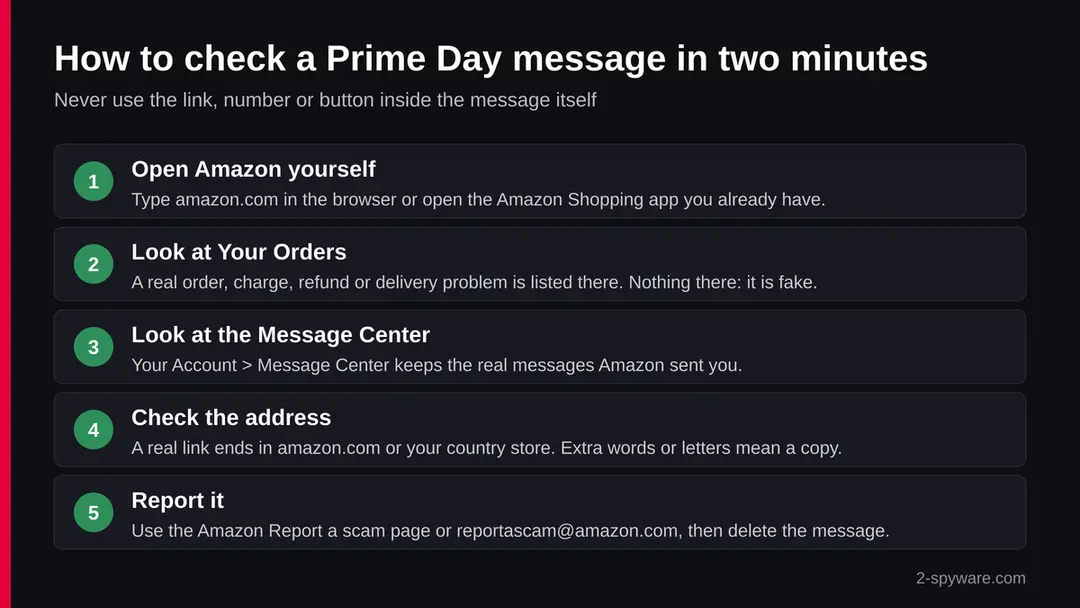
Amazon says a real purchase shows up in Your Orders on the website or in the app, and real messages from Amazon show up in the Message Center under Your Account {1}. If the order, refund, delivery problem or account warning is not there, the message did not come from Amazon. For recall notices, look at Your Recalls and Product Safety Alerts in your account or at CPSC.gov {1}.
Then look at the warning signs Amazon and the BBB name. False urgency comes first: "act within 24 hours", "your account will be closed" {2}{4}.
Next is a request for payment by gift card, wire transfer, prepaid debit card or a payment app; the BBB says such requests are almost always a sign of fraud {4}. A link that does not point to amazon.com, or to your own country's Amazon store, is a third sign {1}.
What Amazon says it never does
- Payment by phone or e-mailAmazon never asks you to pay over the phone or by e-mail, or to pay or transfer money on another website {2}.
- Gift cardsAmazon never asks you to buy gift cards, and no real transaction needs them {2}.
- Software or remote accessAmazon never asks you to install software to reach customer service, or to give remote access to your device {2}.
- Paid supportAmazon never charges for customer service support {2}.
- Where real messages areYour Orders and Message Center on amazon.com or in the Amazon app {1}.
Check on Amazon, not in the message Any message that breaks one of these rules is a scam, however real it looks. A message that breaks none can still be fake, so the account check on amazon.com stays the final test.
How to shop on Prime Day without falling for a scam
Do
- Shop only on amazon.com, your country's Amazon store or the Amazon Shopping app you installed yourself.
- Turn on push notifications in the Amazon app, so you can compare any text with what the app shows {1}.
- Turn on two-step verification for your Amazon account and use a password you use nowhere else.
- Check every order, refund or delivery claim in Your Orders before you react to it {1}.
- Pay only at Amazon's own checkout, with the card saved in your account {2}.
Don't
- Do not tap links in texts about orders, deliveries, refunds or recalls; open Amazon yourself instead {1}.
- Do not call numbers from messages or search results to reach Amazon {2}.
- Do not buy gift cards, send money by wire or a payment app, or pay "support" fees for anyone who calls you {2}{4}.
- Do not install software or allow remote access because someone says your account has a problem {2}.
- Do not trust a deal page because it shows a Prime logo; check the address first.
More on similar tricks: our topic on fake prize and gift card scams, the iPhone help forum and the Android help forum for questions about phone messages, and the Windows help forum if a caller installed something on your PC.
If you clicked the link or replied
Act today.
Card disputes and account recovery work best when they start early. Do the steps in this order, and skip the ones that do not apply to you.
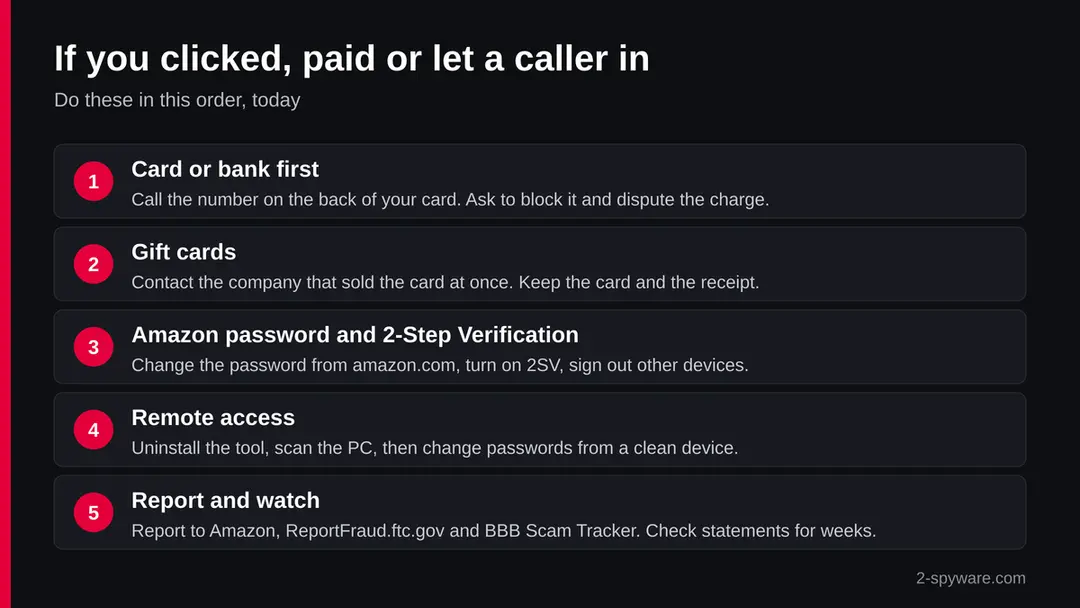
- 1
You typed card or bank details
Call the number on the back of your card or in your bank's app, not a number from the message. Ask the bank to block the card and dispute any charge you did not make. Then watch your statements for several weeks, because small test charges often come first.
- 2
You paid with a gift card
Contact the company that sold the gift card at once and tell it the card was used in a scam. Keep the card and the receipt. Amazon and the FTC both say a real company never asks you to pay with gift cards {2}{3}.
- 3
You signed in on a fake page
Open amazon.com yourself and change your password. Turn on two-step verification in the Login & Security settings of your account, and change the same password anywhere else you used it. Then check Your Orders, your addresses and your saved cards for changes you did not make.
- 4
You let a caller connect to your computer
Disconnect from the internet and uninstall the remote tool. On Windows 11 or 10, open Settings > Apps > Installed apps, find the program the caller asked you to install and choose Uninstall. Run a full scan, then change your passwords from a different, clean device.
- 5
You shared personal details
If you gave a Social Security number, ID or date of birth, the FTC's IdentityTheft.gov site gives a recovery plan {3}. Consider a credit freeze with the three US credit bureaus.
- 6
You only clicked, nothing else
Close the page without typing anything. Clear the browser's recent history and check that no unknown extension or download appeared. Our guide on what to do after paying a scammer covers the money side if anything changes later.
What to do after the Prime Day scam e-mail
If you only received the message and clicked nothing, step 3 is all you need.
If you clicked the link or typed anything on the page it opened, do every step, starting with the password.
Step 1: Change the password you typed on the fake page
If you entered a password after clicking the link in the Prime Day scam message, treat that account as known to the sender.
Open the provider's real site by typing its address yourself, not through any link in the e-mail, and change the password there. Choose a new one you have never used before, and change it on every other account that shared the old one.
Then use the option to sign out of all other sessions or devices, if the provider has one. This works the same in any browser on Windows 11 and Windows 10.
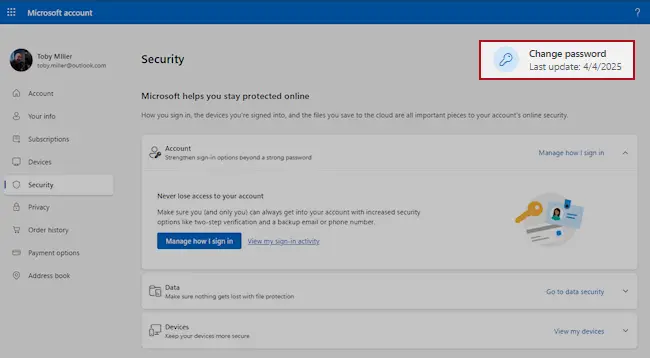
Microsoft account, Security page (account.microsoft.com/security): Change password. Full procedure with screenshots: Turn on two-step verification / secure a hacked account
Step 2: Turn on two-step verification
Two-step verification asks for a code from your phone or an authenticator app whenever someone signs in from a new device. A stolen password alone is then not enough to open the mailbox.
Turn it on in the security settings of the e-mail account first, then for the bank, shop and social accounts that send their reset links to that address.
While you are there, check the recovery e-mail and phone number and the forwarding rules, which attackers sometimes change to keep access. The settings pages look the same on Windows 11 and Windows 10.
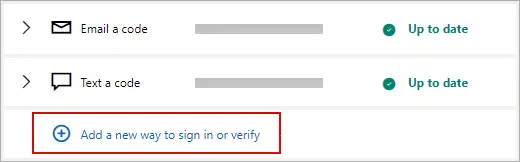
Microsoft account: Manage how I sign in, where two-step verification and the sign-in methods are. Full procedure with screenshots: Turn on two-step verification / secure a hacked account
Step 3: Report the e-mail and delete it
Report the message instead of only deleting it. In Outlook choose Report > Report phishing, in Gmail the three-dot menu > Report phishing; the provider then blocks the same message for other people.
Do not reply and do not click anything else in it. On a work account, forward it to your IT team as an attachment first. Web mail and the mail apps on Windows 11 and Windows 10 offer the same options.
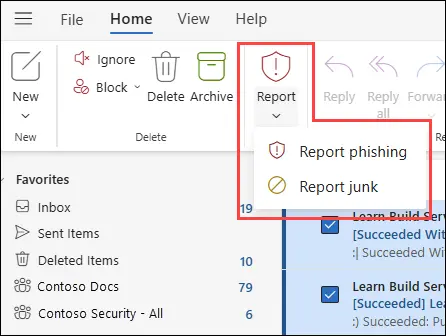
New Outlook for Windows and Outlook on the web: Report > Report phishing. Full procedure with screenshots: Report a phishing e-mail
Step 4: Scan the PC if you opened a file from the message
A page that only asked for a password installs nothing, so most readers can skip this step.
If the Prime Day scam e-mail or the page it opened made you download or open a file, delete it and run a full scan, then a Microsoft Defender Offline scan.
In Windows 11 and Windows 10 open Windows Security > Virus & threat protection > Scan options, select Microsoft Defender Antivirus (offline scan) and click Scan now. The PC restarts and the scan takes about 15 minutes, so save your work first.

Windows 11: Windows Security > Virus & threat protection > Scan options. Full procedure with screenshots: Run a Microsoft Defender Offline scan
How to report Prime Day scams
Report it
A report gives you a reference number for your bank and insurer and helps police link cases.
Include the dates, an e-mail with the subject "Messages that use Amazon's Prime Day sale to ask for card details,…", any payment details, addresses and phone numbers the attackers used, and screenshots.
In the US, report to the FBI at ic3.gov and scams to ReportFraud.ftc.gov. In the UK, use Report Fraud (reportfraud.police.uk); in Canada, the Canadian Anti-Fraud Centre; in Australia, ReportCyber at cyber.gov.au. EU residents report to their national police: Report a cyber attack or scam to the authorities.
Every agency, with what to send and when businesses must notify regulators, is listed in where to report cybercrime by country.
Report it
A report gives you a reference number for your bank and insurer and helps police link cases.
Include the dates, an e-mail with the subject "Messages that use Amazon's Prime Day sale to ask for card details,…", any payment details, addresses and phone numbers the attackers used, and screenshots.
In the US, report to the FBI at ic3.gov and scams to ReportFraud.ftc.gov. In the UK, use Report Fraud (reportfraud.police.uk); in Canada, the Canadian Anti-Fraud Centre; in Australia, ReportCyber at cyber.gov.au. EU residents report to their national police: Report a cyber attack or scam to the authorities.
Every agency, with what to send and when businesses must notify regulators, is listed in where to report cybercrime by country.
Questions about Prime Day scams
Is Prime Day a scam?
No. Prime Day is a real sale run by Amazon for its Prime members. In 2026 it ran for four days, from June 23 to 26, and Amazon has also held a fall sale, usually in October, since 2022.
The scams are the messages, calls and websites that borrow the Prime Day name to get your money, your card number or your Amazon password. The safe rule is simple: buy only on amazon.com or in the Amazon app, and check any order or refund claim there yourself.
Is the Prime Day text message I got real?
Probably not, if it asks you to tap a link, call a number or act fast. Amazon says phishing texts rise in the days right after Prime Day. Do not use the link.
Open the Amazon app or type amazon.com yourself and look at Your Orders and the Message Center under Your Account. If the order, refund or delivery problem is not shown there, the text is fake. Report it to Amazon and delete it.
I got a call about a Prime Day order I did not place. What should I do?
Hang up. The BBB describes recorded calls about a Prime card charge, a lost parcel or an iPhone order, and the caller ID can be faked. Do not press 1 and do not call back the number.
Check Your Orders on amazon.com or in the app. If nothing is there, there is no order. Amazon says it never asks for payment by phone and never asks for remote access to your device, so any caller who does is not Amazon.
Does Amazon ever ask for gift cards or payment over the phone?
No. Amazon says it never asks you to buy gift cards, never asks for payment over the phone or by e-mail, and never asks you to pay on another website. It also never charges for customer service.
The FTC puts it the same way: anyone who asks you to pay with a gift card is a scammer. If someone using the Amazon name asks for gift cards, stop, keep any card you already bought and contact the company that sold it.
Is a Prime Day deal site that is not amazon.com safe?
Treat it as unsafe. Amazon takes payment only in its app, on its website and in its own stores, so a Prime Day deal is never paid on a different domain.
Fake shops copy the logo, add a countdown timer and show prices far below normal. Close the page, then search for the item on amazon.com. If you already paid on such a site, call your card issuer, ask for a dispute and watch your statements.
I clicked a Prime Day link but did not type anything. Am I hacked?
Very likely not. A phishing page needs you to type a password or card number to steal it. Close the page, clear the browser's recent history and check that no file was downloaded and no unknown extension was added.
If you are worried, change your Amazon password from amazon.com and turn on two-step verification. Watch your Amazon orders and card statements for a few days for anything you do not recognise.
I entered my Amazon password on a fake page. What now?
Change it at once on amazon.com, which you open yourself. Turn on two-step verification, sign out of other devices where Amazon offers it and change the same password on any other site that used it.
Then check Your Orders, your saved addresses and your payment methods for changes. If you also typed card details, call your bank, block the card and dispute any charge you did not make.
How do I report a Prime Day scam?
Amazon customers can use the Report a scam tool in Amazon's help pages. Anyone can forward a suspicious message to reportascam@amazon.com.
In the United States, also report it to the FTC at ReportFraud.ftc.gov and add it to the BBB Scam Tracker so others can find it. If you lost money, tell your bank or card issuer first, because disputes work best when they start early.
Is the Amazon Prime free trial a scam?
No, the free 30-day Prime trial is a real Amazon offer, and it is how many people get into Prime Day. Read the terms, though: Amazon charges for the membership automatically when the trial ends unless you cancel it.
A trial is only real when you start it on amazon.com or in the Amazon app. A text or e-mail that offers a free Prime membership through its own link is a lure, not the real trial.
Will Fortect remove Prime Day scam?
Fortect scans Windows for malware and unwanted programs and repairs the system files and settings they change, and its free scan shows what it finds on your PC before you decide anything.
For Prime Day scam, follow the plan above as well: the browser steps take back permissions and settings that no scanner treats as a threat, and uninstalling the program that brought it removes the source.
Run Microsoft Defender's full scan and, if anything was found, its offline scan as a second opinion. If the symptoms are gone after the plan and both scans are clean, there is nothing more to do.
Sources
- Amazon Trustworthy Shopping: The latest scam trends from Amazon US (read October 11, 2026)
- About Amazon: 6 tips to help you spot and avoid scams impersonating Amazon (read October 11, 2026)
- FTC Consumer Alert: Amazon impersonators, what you need to know (read October 11, 2026)
- BBB Scam Alert: Amazon impostors are phishing for your info (read October 11, 2026)
- NBC News Select: When is Amazon Prime Day 2026? The official dates (read October 11, 2026)