
iloveanal.work.gd: a download server for Mirai botnet files, and what to do if your router or camera fetched them
iloveanal.work.gd is a web address that URLhaus lists 31 times on 3 October 2026 for Linux program files (ELF) tagged mirai and botnetdomain, one file for each kind of processor used in routers, cameras and small servers. These files do nothing on a Windows PC or a Mac; they are the next stage that an already hacked device, or a break in through a weak password, fetches.
If you only saw the name in a log, nothing is proven; if a router, camera, recorder or Linux server of yours may have fetched them, reboot it, change its password, update its firmware and check it as described below.
Facts checked October 13, 2026. Removal steps tested on Windows 11 (26H2) and checked against Microsoft's and the browser makers' current documentation.
Automatic
Get a free scan and check if your PC is infected.
Fortect finds malware, unwanted programs and the Windows damage they leave behind, and repairs it in one pass.
Programs like a device, script or program that downloads files from iloveanal.work.gd usually arrive in groups; a free scan lists the companions that are easy to miss.
Do it yourself · free Remove iloveanal.work.gd (Mirai botnet, ELF files) yourself 5 steps, about 15 minutes, no software needed.
Start the steps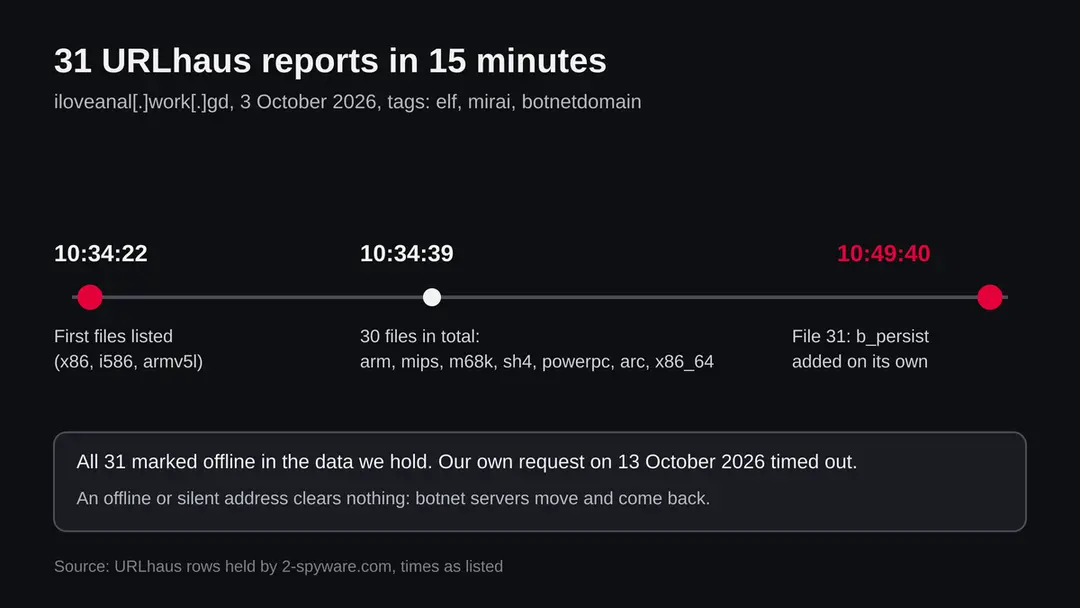
Iloveanal.work.gd (Mirai botnet, ELF files): summary
| Type | A malware server: URLhaus lists 31 ELF files on it, tagged mirai and botnetdomain |
|---|---|
| Risk | High for a router, camera, recorder or Linux server that fetched the files; none for a normal PC or Mac that only saw the name |
| Symptoms | Often none. A slow device, heavy traffic, an abuse notice from the provider, or an unknown login open to the internet |
| How to get rid of it | Disconnect, restart, set a new password, update the firmware, close remote login, then reconnect and watch |
| Our check (13 October 2026) | One plain request from our server timed out. That clears nothing; the rating comes from URLhaus |
| Running since / first seen | Parent domain work.gd registered 18 June 2022; the 31 files reported on 3 October 2026 |
| Removal | Scan the PC with security software to find and remove the malware and anything installed with it. Fortect scans Windows for malware and repairs the system files and settings it damaged. Remove it nowTo use the full-featured product, you have to purchase a license for Fortect. The scan is free. |
Show 9 more facts
| Platform | Linux based devices (ELF files). Not Windows, not Mac |
|---|---|
| Detection names | None known for these exact files because we did not open them. Microsoft names Mirai samples Backdoor:Linux/Mirai.<letters> |
| Name | Iloveanal.work.gd |
| Domain registered | 18 June 2022 |
| Evidence | 31 write-ups by security sites; details still limited |
| First seen | 3 October 2026 |
| Distribution | Typically fake installers, cracked programs, e-mail attachments, fake "verify you are human" pages and ads for popular apps |
| Damage | Installs other malware, often several programs at once |
| Facts checked | 13 October 2026 |
Facts checked on 13 October 2026 against the URLhaus data for iloveanal.work.gd held in our database (we did not fetch the abuse.ch site), the RDAP record of work.gd, one plain request of our own that timed out, a general description of Mirai and two Trend Micro entries for Mirai variants.
We did not download the files and we infected no device; the cleaning steps follow public descriptions of Mirai and were not tried on a live infection.
What iloveanal.work.gd is, and what we know about it
iloveanal.work.gd is not a program on your computer. It is a web address, a subdomain of work.gd, that the abuse.ch project URLhaus lists as a place where Mirai botnet files were served. We found no public write-up of this one address, so what follows is what URLhaus shows, what our own request found, and what is published about Mirai in general.
- 1
What URLhaus lists
Thirty-one file addresses on iloveanal.work.gd, all on plain http and all in the root folder of the site. They were added within about fifteen minutes on 3 October 2026: 30 between 10:34:22 and 10:34:39 and the last one, b_persist, at 10:49:40. All carry the threat label malware_download and the tags botnetdomain, elf and mirai. The reporter is a single account named burger. At the time we read the data, every one of the 31 was marked offline.
- 2
What the tags mean
ELF is the program file format of Linux and of the many small systems built on it, such as routers, IP cameras, video recorders and set-top boxes. Mirai is the name of a botnet family whose source code became public in 2016, so many people run their own copies. Botnetdomain is a tag that says the address belongs to the infrastructure of a botnet. The three tags together say: this host serves programs for a Mirai type botnet.
- 3
What the file names suggest
Most names are processor types: x86_64, i486, i586, i686, armv4l, armv5l, armv6l, armv7l, mips, mipsel, m68k, sh4, powerpc, powerpc-440fp and arc. Others carry a suffix such as dbg, ns, sr, nsr, nowd, nl, fin, t8, v2, new, clean, lt, kt, wt or persist. We did not open the files, so what the suffixes mean is our reading: variants of the same program for different devices or settings. A script on a hacked device picks the one that matches its processor.
- 4
What we could not confirm
We did not download any file, so we cannot tell you which Mirai build it is, which address it reports to or what attacks it can start. URLhaus shows tags, not a proof. We also do not know how the attacker got onto the first devices. That step happens elsewhere and is not visible from a download server.
- 5
What this means for you
If the name only turned up in a firewall log, a DNS block list or a warning, you are not infected by that alone. The risk is for a device on which something already ran and then went to this address to fetch a matching file. A person with a browser has no reason to request these files.
- Kind of threat
- A server serving Linux ELF files tagged mirai, a botnet that turns routers, cameras and other devices into attack machines
- Where it is listed
- URLhaus (abuse.ch), 31 URLs, all added on 3 October 2026, all offline when we read the data
- Shape of the address
- A subdomain of work.gd. work.gd was registered on 18 June 2022 through the registrar Key-Systems GmbH. That date is for the parent domain, not for this subdomain
- Who can meet it
- Owners of Linux based devices with a weak or default password, an old firmware or an open remote login. Not a normal Windows PC or Mac
- On a Windows PC or Mac?
- An ELF file does not run there. A PC in the same network is not infected by these files, but it may be used to reach a hacked device
- On a phone?
- Android is built on Linux, but these files are listed as ELF programs for routers and small systems, and nothing we read says phones are a target
What iloveanal.work.gd (Mirai botnet, ELF files) does on an infected PC
What we checked on 13 October 2026, and what we could not
Our check was one plain request from our server to the address. It did not answer before the time limit. That is the whole result of our own test, and it clears nothing.
Our check of iloveanal.work.gd, 13 October 2026
- A plain request from our serverTimeout on 13 October 2026. We do not know why: the host may be switched off, filtered by country or by the kind of visitor, or the record may have been removed.
- URLhaus reports31 URLs, all tagged elf and mirai, added on 3 October 2026 by one reporter. All marked offline in the data we hold.
- Registration of the parent domainwork.gd is registered since 18 June 2022 with Key-Systems GmbH and carries the status client transfer prohibited, which is a normal lock. It tells nothing about this subdomain.
- Who runs the subdomainUnknown. We could not reach the page of the work.gd service, so we do not state its rules or who it lets create subdomains.
- The filesNot downloaded and not run. We cannot say what is inside.
- An offline addressDoes not clear anything. A botnet server moves, comes back under another name, and devices that already fetched the file keep running it.
Treat it as a botnet server until the facts say otherwise Thirty-one files tagged mirai are a clear signal about the address itself, whether or not it answers today. For your own devices the question is not whether the page loads, but whether anything of yours ever asked for it.
How the reports came in, on 3 October 2026
All 31 reports fall into one quarter of an hour. That pattern is typical of one automated collector finding an open folder and listing everything in it.
18 June 2022
work.gd is registered
The registration record of work.gd shows 18 June 2022 as the creation date, with Key-Systems GmbH as registrar. Nothing links this date to the later reports.
3 October 2026, 10:34:22
The first files are listed
Within the first second, URLhaus lists x86, i586, b_wt, armv5l and x86_64_new. The folder looks like a directory of ready made builds.
3 October 2026, 10:34:33 to 10:34:39
The rest of the folder follows
Over the next seconds the list grows with armv4l, armv6l, armv7l, mips, mipsel, m68k, sh4, powerpc, arc and the x86_64 variants. By 10:34:39 there are 30 entries.
3 October 2026, 10:49:40
b_persist appears
A last file, b_persist, is added fifteen minutes later. It is the only one that arrived separately. We do not know what its name stands for; the word is our hint that it may be a build meant to stay on the device, but we have not seen the file.
13 October 2026
No answer to our request
A plain request from our server timed out. At the time we read the data, URLhaus marked all 31 addresses offline.
What Mirai is, in plain words
Mirai is a family of malware for Linux based devices. It was first found in August 2016 by the research group MalwareMustDie, and its source code was published on a hacker forum in October 2016. After that, anyone could build a botnet of their own, which is why the tag mirai covers many unrelated operators.
- 1
How it finds devices
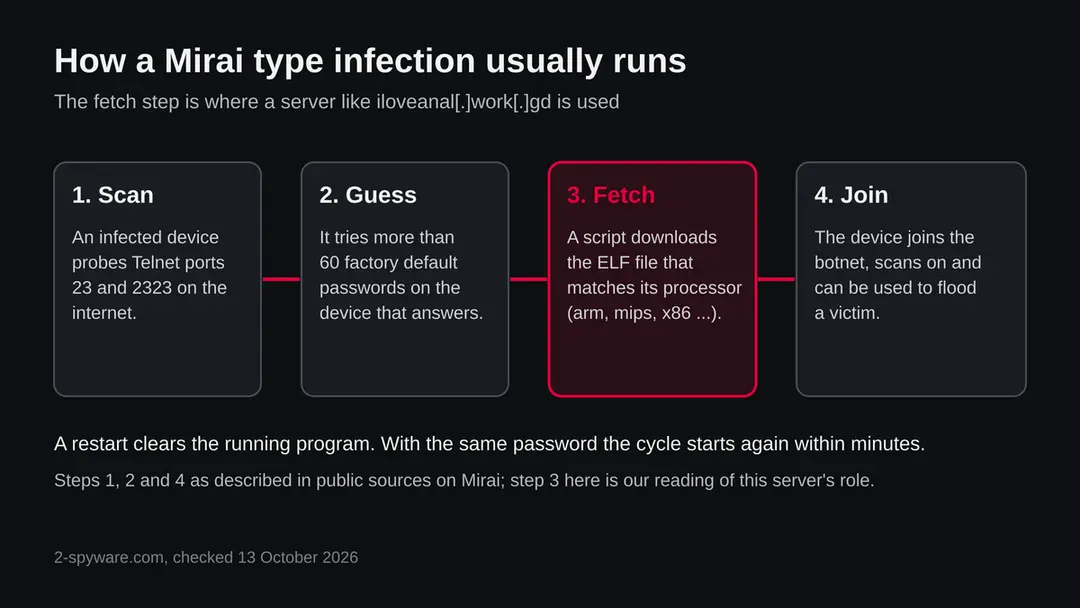
An infected device scans the internet for others, probing the remote login ports Telnet 23 and 2323. When a device answers, the malware tries a list of more than 60 factory default user name and password pairs. When one works, the device is reported to a collection server and then infected.
- 2
Which devices
It mainly targets consumer devices that run Linux: IP cameras, home routers, video recorders. Later copies were built for ARM, MIPS, x86 and PowerPC processors, and one variant, Okiru, was the first to target ARC based devices. That range is why a download server keeps a file for every processor type, as this one does.
- 3
What an infected device does
It usually keeps working, perhaps slower, with more network traffic. It joins the botnet and takes part in floods of traffic against a victim chosen by the operator. It also removes competing malware and blocks the remote login ports, so that nobody else takes the device.
- 4
Why a reboot is not enough
A restart removes the running program, because it lives in memory. If the password has not been changed, the device is usually infected again within minutes, since scanners are always looking. That is why the order of the steps below matters.
- 5
Descendants
Later botnets reused its code, among them Satori in December 2017, Okiru and Masuta in January 2018, and Aisuru from 2024. Some added exploits for particular routers and recorders, so a strong password helps, but updates matter as well.
What security products call files like these
We did not scan the files, so we have no detection name for them. The names below are the ones the Trend Micro encyclopedia lists for other Mirai samples, and they show the pattern, not the result for this server.
| Name | Vendor | What it tells you |
|---|---|---|
| Backdoor:Linux/Mirai.B | Microsoft (as listed by Trend Micro for a Backdoor.Linux.Mirai sample) | A Linux backdoor of the Mirai family that can run commands from a remote user, with DDoS and download routines |
| Backdoor:Linux/Mirai.E!xp | Microsoft (alias on a Trend Micro entry) | A backdoor that arrives as a file dropped by other malware or downloaded by visiting a malicious site |
| Backdoor:Linux/Mirai.AY!xp | Microsoft (alias on a Trend Micro entry) | An ELF file that connects to addresses and restarts the system |
| Backdoor.Linux.Mirai.AR and similar | Trend Micro | The same family under the vendor's own naming; the letters at the end are variants |
What iloveanal.work.gd (Mirai botnet, ELF files) can steal or download
The danger is mostly to the device and to other people, and less to your files. A hacked router or camera is usually used as a tool, not read like a diary.
- High
A device in a botnet
An infected device sends floods of traffic at victims chosen by someone else. Your address may then be reported for attacks you did not know about.
- High
A router that someone else controls
If the router itself is infected, every device behind it passes through it. Check its DNS settings and admin account after cleaning.
- Medium
A slow connection
Heavy traffic from the device can slow the home network or push up the bill of a metered line.
- Medium
Reinfection
While the default password is still in place and the login port is open, scanners find the device again within minutes.
- Low
The files themselves on a PC
An ELF file does not run on Windows or macOS. Downloading one by mistake does not infect the computer.
How to check the PC for iloveanal.work.gd (Mirai botnet, ELF files)
How a device ends up asking for these files
No source tells how this server was used. These are the routes public sources describe for Mirai in general.
- 1
A default or weak password on Telnet or SSH
The classic route. A device with remote login open to the internet and a factory password is found by scanners and logged into. The malware then runs a short command that downloads and starts the file for its processor.
- 2
A known flaw in the web interface
Later botnets added exploits for particular routers, recorders and web frameworks. A device without recent firmware can be taken over with no password guessing.
- 3
A device that was already infected
Infected devices scan others and push the download command. A device behind a router with an open port is exposed whatever its own settings are.
- 4
A server you run yourself
A Linux server with a weak password or an old web application can receive the same command. Cloud servers show up in reports as well, not only home devices.
Often the only visible sign is a device that is slow or a provider warning about abuse from your connection.
Check your devices before you change anything
Start with the question of whether any of your devices ever contacted this name. Your router or DNS log is the best place to look, not the PC.
- 1
Search your logs for the name
Open the admin page of your router, then its log or DNS history, and search for iloveanal and work.gd. Some routers, Pi-hole and similar tools keep such a list. No entry means this check found nothing. It does not clear a device, because many routers keep no log.
- 2
List what is on the network
In the router's page of connected devices, write down every name and address. Look for devices you do not know, and for cameras and recorders you forgot.
- 3
Look at open remote login
In the router, look for Remote management, Telnet, SSH or port forwarding to a device. If you did not turn them on, switch them off. Telnet on the internet has no good reason today.
- 4
Look at unusual load
A device that is hot, slow, or sends much more data than usual is worth a closer look. The router's traffic page often shows it.
- 5
On a Linux device you can log into
List running processes and check the folders /tmp, /var/tmp and /dev/shm for files you did not put there; Mirai type programs are known to run from such places. We did not test this against these files, so a clean listing proves nothing.
- 6
Ask your provider
If your internet provider sent an abuse notice, it names the date and the target. That helps to find which device was the source.
How to remove iloveanal.work.gd (Mirai botnet, ELF files)
How to remove iloveanal.work.gd
A loader's job is to install other malware, so treat the PC as infected with more than one program until the scans are clean.
Step 1: Delete scheduled tasks that bring it back
Programs like iloveanal.work.gd add a scheduled task so they return after an uninstall or reopen a page at every sign-in. Start Task Scheduler, open Task Scheduler Library and sort by Last Run Time to see what ran recently.
On the Actions tab, a program in a user folder, a script or a web address is a warning sign; right-click such a task and choose Delete.
Tasks with names copying Google, Edge or Windows updaters but pointing to an odd folder are typical. The tool looks the same in Windows 11 and Windows 10.

Windows 11: Task Scheduler Library, the task selected, the Actions tab shows the file it runs. Full procedure with screenshots: Remove what malware leaves behind in Windows
Step 2: Remove it from startup
Press Ctrl + Shift + Esc to open Task Manager and select Startup apps (Windows 11) or the Startup tab (Windows 10). Disable entries you do not recognise, especially ones with no publisher or with a name that copies a Windows component.
Right-click an entry and choose Open file location to see where it runs from: programs in
%AppData%or%Temp%deserve a closer look. Some entries are not listed there but in the registry Run keys, which the procedure below shows how to check.Full procedure with screenshots: Stop apps from opening at startup On uGetFix
Step 3: Delete the folders left behind
Uninstalling often leaves the program's folders, and some threats reinstall themselves from them.
Press Windows + R, type
%LocalAppData%and press Enter, then do the same for%AppData%and %ProgramData%, and look for folders named after iloveanal.work.gd, its publisher or created on the day the problem started. Delete those folders, and check C:\Program Files and C:\Program Files (x86) too.If Windows says a file is in use, end it in Task Manager or delete the folder after a restart in Safe Mode. The folders are the same in Windows 11 and Windows 10.
Full procedure with screenshots: Remove what malware leaves behind in Windows
Step 4: Scan the PC, then run the offline scan
A scan finds the parts of iloveanal.work.gd that the manual steps cannot see. In Windows Security > Virus & threat protection > Scan options, start a Full scan and quarantine what it reports.
Follow it with Microsoft Defender Antivirus (offline scan) > Scan now, which restarts the PC and checks the disk while Windows and the malware are not running.
It takes about 15 minutes and works the same in Windows 11 and Windows 10. If either scan finds something, run the full scan again after removal until it comes back clean.

Windows 11: Windows Security > Virus & threat protection > Scan options. Full procedure with screenshots: Run a Microsoft Defender Offline scan
Step 5: Change passwords from another device and sign out other sessions
Iloveanal.work.gd can copy saved passwords, cookies and session tokens and send them out in seconds, so cleaning the PC does not undo the theft.
Change your passwords on a device that was never infected, starting with the e-mail account, since every other reset goes through it. On each account, end all other sessions and check the recovery e-mail, phone number and forwarding rules.
Then turn on two-step verification. Sign in on the Windows 11 or Windows 10 PC again only after the offline scan is clean.
Full procedure with screenshots: Turn on two-step verification / secure a hacked account
How to clean a router, camera or Linux server
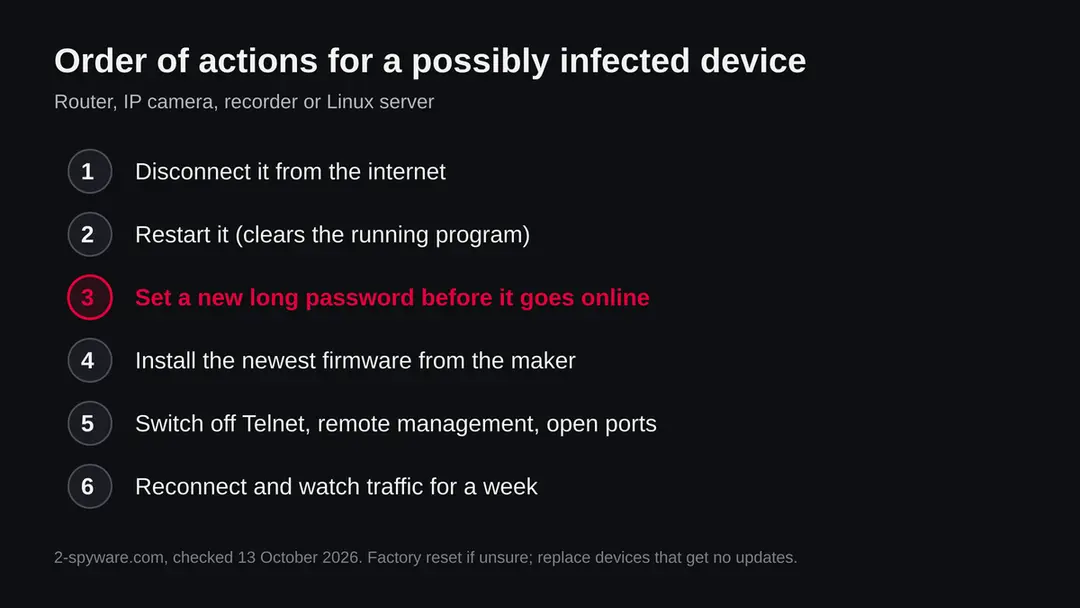
The order matters: cut it off from the internet, change the password, update, only then reconnect. We did not run these steps against a live infection; they follow the public descriptions of Mirai and the makers' own help pages for your device.
- 1
Unplug it from the internet
Pull the network cable of the camera or recorder, or switch off the router's internet connection. This stops it from taking part in attacks while you work.
- 2
Restart it
A power cycle removes the running malware, because it sits in memory. Do not reconnect yet, since a restart without the next step usually ends in a new infection.
- 3
Set a new, long password
Sign in on the local network and change the admin password to a long one that you use nowhere else. Change the password of any other account the device has, and delete accounts you do not know.
- 4
Update the firmware
Download the newest firmware from the maker's own site and install it. If the device is no longer updated by its maker, it is a long term risk and should be replaced.
- 5
Do a factory reset if you are unsure
A factory reset wipes settings, so set the password first, then restore only what you need. Write the settings down before you reset.
- 6
Turn off what you do not use
Disable Telnet, remote management, UPnP and port forwards you did not make. Put cameras and recorders behind the router without a direct path from the internet.
- 7
On a Linux server
Rebuild from a known clean image if you can. If not, find and remove the unknown files and cron jobs, change every password and SSH key, update the packages and close the open ports. We cannot give exact steps for your distribution; use its own documentation.
- 8
Watch it for a week
Check the router's traffic page and log. If the device behaves badly again, it was infected again or the cause is still there. Replace it.
What to do on a Windows PC or a Mac
The files on this server are ELF files, which do not run on Windows or on macOS. A PC does not need removal steps for them, but it may have been the way in, or sit on a network with a hacked device.
- 1
If you clicked or downloaded one
Delete the file. It cannot start by itself on Windows or macOS. Run a normal scan with the built in protection, Windows Security or the Mac's own checks, as a precaution.
- 2
If the PC logs into devices
Change passwords you keep for routers, cameras or servers if they were saved on that PC, in case the PC was the source of a leak.
- 3
If your PC is slow
The cause is more likely something else. A Mirai file would not run on it. Use the usual checks for Windows or Mac and look at the router in parallel.
After removal: passwords, accounts and prevention
If you run a site on work.gd or think a subdomain is abused
A subdomain of a shared parent domain can be used by someone other than the owner of the parent. We could not read the page of the service, so this section is general.
- 1
If it is your subdomain
Check the DNS records of the name and the web server behind it. Look for files you did not upload, remove them, change the passwords and keys of the host and find out how someone got in.
- 2
If it is not yours
You can report the address to the service that provides the subdomain, to the registrar of the parent domain, and to the hosting provider of the server behind it. URLhaus also accepts reports.
- 3
If a legitimate site shares the parent
A bad subdomain does not make the rest of work.gd malicious. We did not review other subdomains.
Keep your devices out of a botnet
The same few habits stop most of this.
Do
- Change the default password of every router, camera and recorder on the day you install it.
- Update the firmware regularly, or turn on automatic updates if the device offers them.
- Turn off Telnet, remote management and UPnP unless you need them.
- Replace devices that the maker no longer updates.
- Put cameras and smart devices on a separate guest network if the router can do it.
Don't
- Do not open ports on your router to the internet for a camera without a strong password and current firmware.
- Do not reuse one password on all devices.
- Do not rely on a reboot as a cure.
- Do not download unknown files from addresses seen in logs to look at them.
Questions about iloveanal.work.gd (Mirai botnet, ELF files)
What is iloveanal.work.gd?
It is a web address that URLhaus, the malware tracking project of abuse.ch, lists 31 times for Linux program files tagged mirai, elf and botnetdomain. All 31 were added on 3 October 2026 by one reporter.
It is a subdomain of work.gd, not a program on your computer and not a site anyone is meant to visit. We did not download the files, so what they contain is not confirmed by us. A Mirai type botnet fetches such files onto hacked routers, cameras and servers, one file for each processor type.
Is iloveanal.work.gd a virus?
The address itself is not a virus, it is a place that served files. The files are listed as malware for Mirai type botnets. Visiting the address with a browser does not infect a Windows PC or a Mac, because ELF files do not run on them.
The danger is for Linux based devices, such as a router, an IP camera, a recorder or a server, that were hacked and then asked the address for a file. Its page timed out for us on 13 October 2026, which clears nothing.
Is iloveanal.work.gd safe to open?
We advise against it. Even if a browser visit does not harm a PC, there is no reason to open an address that URLhaus lists for 31 botnet files. Our own plain request from 13 October 2026 got no answer, and URLhaus marks all of its addresses offline at the time we read them.
An offline address can return, and a clean looking page proves nothing. If you need to check a file or a link, use a scanning service instead of opening it yourself.
I saw iloveanal.work.gd in my router or firewall log. Am I infected?
Not by that alone. A log line can come from a block list, a scanner, or a device that asked the name.
What matters is which device asked. If a router, camera or recorder of yours made the request, treat it as possibly infected:
- disconnect it
- restart it
- set a new long password
- update the firmware
- switch off Telnet and remote management
- watch it for a week
If the request came from a PC browser, check how you got there. Do not conclude that your network is clean because the log is empty, since many routers keep none.
What is Mirai and why does it use files for many processors?
Mirai is a family of malware for Linux based devices. It was first found in August 2016, and its source code was published in October 2016, so many groups run their own copies.
Devices differ: routers and cameras use ARM, MIPS, x86, PowerPC and other processors. The attacker therefore keeps a build for each, and a script on the hacked device fetches the matching one. That is why this server lists names like armv7l, mipsel, m68k, sh4 and x86_64.
How do I remove Mirai from my router or camera?
Unplug it from the internet, restart it, and set a new long admin password before it goes back online. Then install the newest firmware from the maker's own site and switch off Telnet, remote management and port forwards you do not use. A factory reset is a good step if you are unsure.
A restart alone is not enough, since the device is usually infected again within minutes while the default password is in place. If the maker no longer updates the device, replace it. We did not test these steps on a live infection.
Can iloveanal.work.gd infect a Windows PC or a Mac?
Not through the files listed. They are ELF programs, the format of Linux, and neither Windows nor macOS runs them.
A PC can still be part of the story: if you log into routers or servers from it, a stolen password might be how a device was reached, and a PC on a network with a hacked camera is exposed to what that device does.
If you downloaded one of the files by mistake, delete it and run a normal scan as a precaution. Slowness on a PC has a more ordinary cause.
Why does a name like this end in work.gd?
work.gd is a parent domain registered on 18 June 2022 through the registrar Key-Systems GmbH, and the address is a name under it. We could not read the page of the service behind work.gd, so we do not know who may create subdomains or what its rules are.
A bad subdomain does not make the whole parent domain bad, and we did not review the others. If you think a subdomain is abused, report it to the service, the registrar and the hosting provider of the server.
Should I report iloveanal.work.gd, and where?
It is already listed on URLhaus, so another report there adds little. If one of your devices contacted it, write down the time and the device. Then tell your internet provider if it sent an abuse notice, and the maker of the device if its firmware may be at fault.
If a site of yours sits under work.gd, check it for files you did not upload. Reporting an offline address is most useful when you add what you saw, since the operator may move to another name.
Will Fortect remove iloveanal.work.gd?
Fortect scans Windows for malware and unwanted programs and repairs the system files and settings they change, and its free scan shows what it finds on your PC before you decide anything.
For iloveanal.work.gd, follow the plan above as well: the browser steps take back permissions and settings that no scanner treats as a threat, and uninstalling the program that brought it removes the source.
Run Microsoft Defender's full scan and, if anything was found, its offline scan as a second opinion. If the symptoms are gone after the plan and both scans are clean, there is nothing more to do.
Sources
- Wikipedia: Mirai (malware) (read October 13, 2026)
- Trend Micro Threat Encyclopedia: Trojan.Linux.Mirai.E (read October 13, 2026)
- Trend Micro Threat Encyclopedia: Backdoor.Linux.Mirai.AR (read October 13, 2026)
- URLhaus (abuse.ch): 31 reported URLs for iloveanal.work.gd, as held in the 2-Spyware database (read October 13, 2026)
- RDAP registration record of work.gd (rdap.org lookup) (read October 13, 2026)