
OpenDrive virus: why web.opendrive.com shows up in malware alerts, and what to do if a file from it installed Remcos
OpenDrive is a legitimate cloud storage service, not a virus, but criminals upload files to it that hide malware and point their loaders at them. On 9 and 10 September 2026 URLhaus listed eight such file addresses on web.opendrive.com, all tagged RemcosRAT and stego. Here is what that means, how to tell a bad OpenDrive file from a normal one, and how to clean a Windows PC if one ran.
Facts checked October 8, 2026. Removal steps tested on Windows 11 (26H2) and checked against Microsoft's and the browser makers' current documentation.
Automatic
Get a free scan and check if your PC is infected.
Fortect finds malware, unwanted programs and the Windows damage they leave behind, and repairs it in one pass.
If a script or loader that downloaded a file from web.opendrive.com keeps coming back after uninstalling, a scan can find what reinstalls it.
Do it yourself · free Remove OpenDrive virus (Remcos RAT delivered through web.opendrive.com) yourself 5 steps, about 15 minutes, no software needed.
Start the steps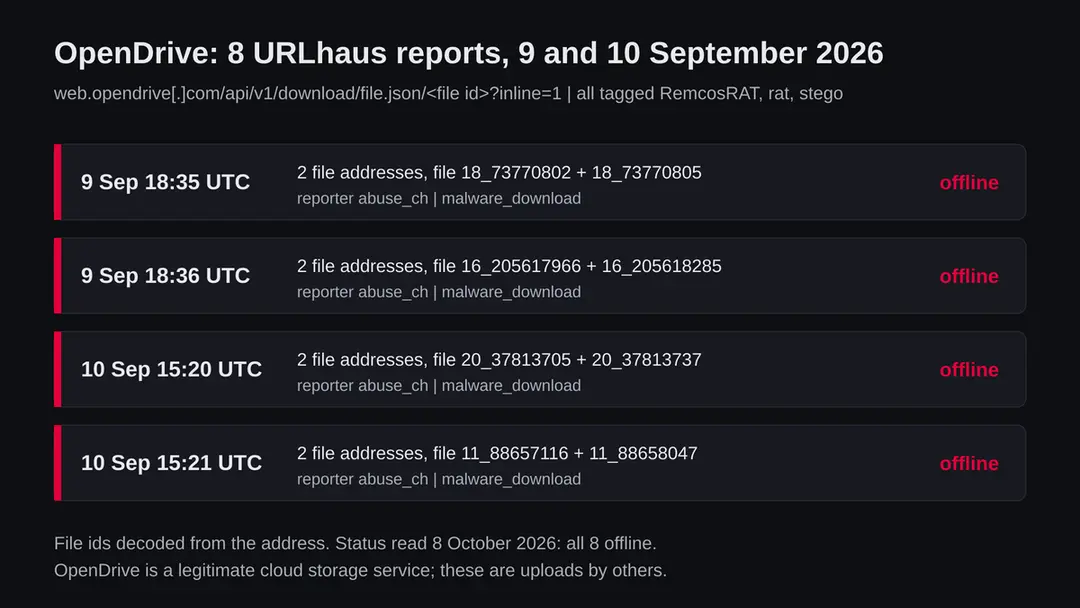
OpenDrive virus (Remcos RAT delivered through web.opendrive.com): summary
| Type | A legitimate cloud storage service abused to deliver malware: eight files tagged RemcosRAT, rat and stego |
|---|---|
| Risk | High if a script or attachment you opened fetched one of the files. None if you only saw opendrive.com in a log or use the service yourself |
| Symptoms | Often none. Unknown startup entries, a Defender detection named Remcos, accounts opened elsewhere |
| How to get rid of it | Change passwords and sign out sessions from another device, run Microsoft Defender Offline, remove startup entries, reset Windows if unsure |
| Our check (8 October 2026) | Plain request from our server: HTTP 404 at the bare host name. Reported files not requested; all eight offline |
| Running since / first seen | Domain registered 13 April 2003; first files reported 9 September 2026 |
| Removal | Scan the PC with security software to find and remove the malware and anything installed with it. Fortect scans Windows for malware and repairs the system files and settings it damaged. Remove it nowTo use the full-featured product, you have to purchase a license for Fortect. The scan is free. |
Show 9 more facts
| Platform | Windows. Nothing we read says Mac or phones are affected |
|---|---|
| Detection names | Microsoft uses Backdoor:Win32/Remcos and variants such as Backdoor:Win32/Remcos.PDD!MTB. We found no published name for these eight exact files; we did not scan them |
| Name | OpenDrive virus (malware delivered through web.opendrive.com) |
| Domain registered | 13 April 2003 |
| Evidence | 8 write-ups by security sites; details still limited |
| First seen | 9 September 2026 |
| Distribution | Typically fake installers, cracked programs, e-mail attachments, fake "verify you are human" pages and ads for popular apps |
| Damage | Installs other malware, often several programs at once |
| Facts checked | 8 October 2026 |
Facts checked on 8 October 2026 against the URLhaus data for web.opendrive.com in our job record, RDAP, one plain request from our server (no browser), OpenDrive's own terms and site, and reports by Microsoft, MITRE ATT&CK, Cofense, LevelBlue SpiderLabs and Check Point. We did not download the reported files and infected no PC; the removal steps follow Microsoft's pages and were not tried on a live infection.
What OpenDrive is, and why a security tool may call it a virus
OpenDrive is not a virus. It is a cloud storage service from OpenDrive, LLC in Palo Alto, California, where people store, sync, back up and share files. Its own site says the idea started in 2007 and that nearly 2 million people have used it. Like any storage service that lets you share a file by link, it can also be used by criminals to keep a file that their malware downloads later. The service is safe; some of the files people upload to it are not.
In September 2026 the abuse.ch project URLhaus listed eight such file addresses on web.opendrive.com. All eight are tagged RemcosRAT, rat and stego: a remote access trojan for Windows, hidden inside another file. All eight were offline when we read the data on 8 October 2026.
OpenDrive's own terms forbid this. Section 10 says users may not store or send material that contains viruses, trojan horses or other harmful code, and section 12 lets OpenDrive close the account and destroy the data of anyone who breaks the rules.
- 1
What URLhaus lists
Eight file addresses on web.opendrive.com, all through the service's download interface, /api/v1/download/file.json/ followed by a file id and ?inline=1. Four were added on 9 September 2026 and four on 10 September 2026. Every entry has the threat label malware_download, the reporter abuse_ch and the status offline.
- 2
What the tags mean
RemcosRAT and rat name Remcos, a remote control program for Windows that criminals use as a remote access trojan. stego is short for steganography: data hidden inside another file, often a picture, so that the file looks harmless to a filter. Together they describe a file that carries a hidden part for a loader that is already running.
- 3
What we could not confirm
We did not download the files, so we cannot show what is inside them, which Remcos build they carry or where it reports to. URLhaus tags are reports from automated systems and analysts, not a full analysis. We also do not know which emails or pages pointed at these files or how many people met them.
- 4
What this means for you
If your browser, antivirus or firewall only showed the name opendrive.com, nothing is proven: almost every visit to that address is someone opening their own files. The risk is for a person who opened an attachment, script or installer that then fetched one of these files in the background.
- Kind of threat
- Malware delivered through a legitimate cloud storage service: eight files tagged RemcosRAT, rat and stego
- The service
- OpenDrive, cloud storage, backup and file sharing from OpenDrive, LLC. The domain opendrive.com was registered on 13 April 2003 through Wild West Domains, LLC (RDAP, read 8 October 2026)
- Where the files were
- hxxps://web.opendrive[.]com/api/v1/download/file.json/<file id>?inline=1, eight different file ids
- URLhaus entries
- 8 file addresses, added 9 and 10 September 2026; all 8 offline on 8 October 2026
- Delivery trick
- A file hidden inside another file (stego), fetched by a script or loader that a person already ran
- Platform
- Windows. Remcos is a Windows program; nothing we read says Mac, iPhone or Android
What OpenDrive virus (Remcos RAT delivered through web.opendrive.com) does on an infected PC
What we checked on 8 October 2026, and what we could not
We sent one plain request from our server to https://web.opendrive.com/ on 8 October 2026, with no browser and no clicks. It answered HTTP 404 Not Found. For a storage service, a bare host name that serves only a web app or an interface often has nothing at its root, so this answer says nothing about safety either way. It does not test the eight reported files, and a quiet answer clears nothing.
Our check, 8 October 2026
- The service answersHTTP 404 with the page title 404 Not Found at the bare address. No redirect, no notification request.
- Domain registrationopendrive.com, registered 13 April 2003, registrar Wild West Domains, LLC, with delete, renew, transfer and update locks. A registration of more than 23 years is what a real service looks like.
- URLhaus listingEight file addresses under /api/v1/download/file.json/, all tagged RemcosRAT, rat and stego, added on 9 and 10 September 2026.
- Are the files still served?All eight are marked offline by URLhaus. That usually means the files or the account were removed.
- What we did not doWe did not request or download the reported files and did not run them. Other files of the same kind may appear under new accounts at any time.
Safe service, abused by some uploaders web.opendrive.com itself belongs to a legitimate and long running storage service. The danger is in specific files that criminals upload and then point their loaders at. Judge how the file reached you, not the domain.
The eight reports, in order
The reports cover two afternoons. Dates and tags come from the URLhaus data in our job record; the times are UTC. The file id at the end of each address is base64 text, and decoded it reads as two numbers and a short code, for example 18_73770802_i8bTZ.
13 April 2003
opendrive.com is registered
RDAP shows the domain registered on 13 April 2003 through Wild West Domains, LLC. OpenDrive says the idea for the service started in 2007.
9 September 2026, 18:35
First pair of files
abuse_ch adds two file addresses whose ids begin with 18 and differ only in the last digits, 73770802 and 73770805. Tags: RemcosRAT, rat, stego.
9 September 2026, 18:36
Second pair, one minute later
Two more addresses are added, with ids beginning 16, numbered 205617966 and 205618285. Same three tags.
10 September 2026, 15:20
Third pair
About 21 hours later abuse_ch adds two ids beginning 20, numbered 37813705 and 37813737. Same tags.
10 September 2026, 15:21
Fourth pair
One minute after that, two ids beginning 11, numbered 88657116 and 88658047. Same tags. No further reports follow.
8 October 2026
All offline, and our check
All eight entries are marked offline. Our plain request to the bare host name gets HTTP 404.
Our reading of the pattern: the files come in four pairs, and each pair shares the first number of its id. That fits two files uploaded together each time, for example a script and the picture it decodes, in four places or accounts. It is an inference from the decoded ids, not something a report states.
How criminals use cloud storage like OpenDrive, and why it works for them
A storage service does not run the files it keeps, in the same way a warehouse does not open every box. Criminals take advantage of the trust that mail filters, firewalls and people give to a well known address.
- 1
Any account can share a file by link
OpenDrive lists file and folder sharing and hotlinking among its features, and its free Basic account gives at least 5 GB. A direct download link to an uploaded file is exactly what a loader needs.
- 2
The address looks trusted
Cofense wrote on 20 May 2026 that image hosting and cloud collaboration services are abused because security tools find it hard to tell normal traffic from a malicious picture. Blocking a whole storage service would break normal work for its users.
- 3
The hidden part does not look like a program
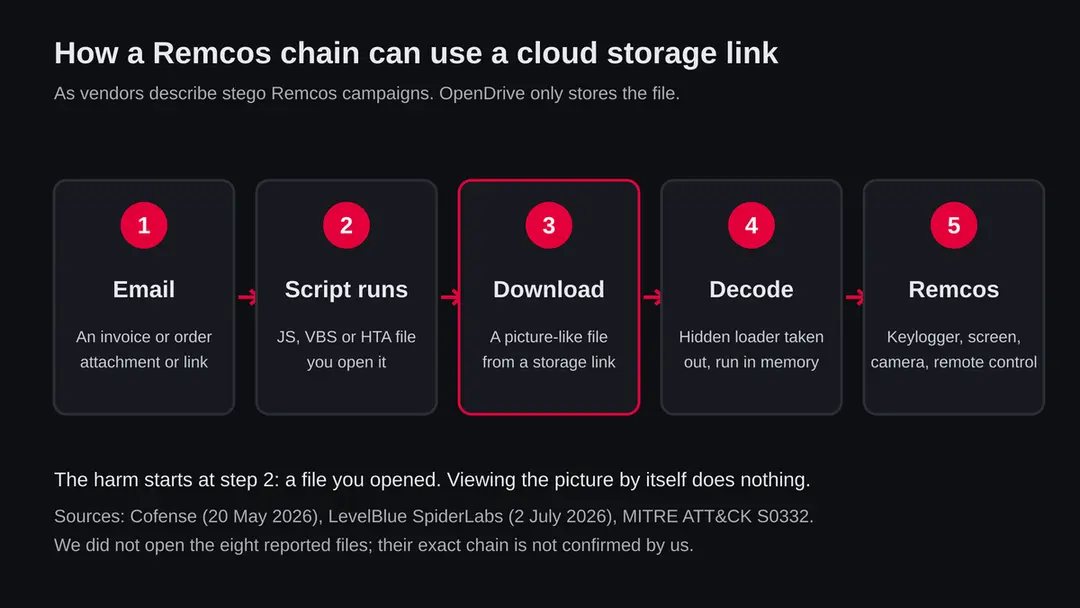
In the campaigns Cofense describes, a picture that looks like a desktop background carries a .NET loader that a script decodes. LevelBlue SpiderLabs found PNG files with an executable appended between text markers, which had to be reversed and base64 decoded before it could run.
- 4
Files are replaced faster than they are removed
The pairs in our data appear in a few minutes and are reported as a group. When one account is closed, a campaign simply uploads to the next. That is why these eight entries going offline does not mean the campaign has ended.
What Remcos is
Remcos is sold as remote control software, which is why its own features are the danger: whoever runs it can use your PC as if sitting at it.
| Question | What the sources say | Source |
|---|---|---|
| What is it? | A closed source tool marketed as remote control and surveillance software by a company called Breaking Security, used in malware campaigns | MITRE ATT&CK S0332, modified 23 April 2026 |
| What can it do? | Log keystrokes, take screenshots, record the microphone, use the webcam, read and change the clipboard, upload, download and delete files, run commands | MITRE; Microsoft, Backdoor:Win32/Remcos |
| How does it arrive? | Phishing emails with documents or archives posing as invoices and orders; in stego campaigns a script fetches a picture that hides the loader | Check Point; Cofense, 20 May 2026 |
| How does it hide? | Injects itself into a legitimate process such as Windows Explorer or a browser and runs from memory | Cofense; Check Point; MITRE |
| How does it stay? | A registry Run key under HKCU\Software\Microsoft\Windows\CurrentVersion\Run | MITRE; LevelBlue SpiderLabs |
| How common is it? | Cofense counted Remcos in 27% of the steganography campaigns it tracked, the largest share of any family | Cofense, 20 May 2026 |
What OpenDrive virus (Remcos RAT delivered through web.opendrive.com) can steal or download
What Remcos can take from a Windows PC
A remote access trojan gives a person a seat at your computer, so the list below is what such a person can do, not what one build does on its own. Each item is named by at least one source.
Reported as possible
- Every key you type
- Screenshots of your screen
- Your webcam
- Your microphone
- Clipboard contents
- Saved passwords
- Files searched for and taken
- Files deleted or uploaded
- Your PC used as a proxy
- Extra malware downloaded
| Data | Detail | Source |
|---|---|---|
| Keystrokes | A keylogger that records what you type, including new passwords | MITRE; Microsoft |
| Screen, camera, sound | Automatic screenshots, webcam pictures and microphone recording | MITRE; Microsoft |
| Clipboard | Reads and changes what you copy, which matters for copied wallet addresses | MITRE |
| Files | Search, upload, download, delete and zip files for sending | MITRE |
| Control | Remote command line, process control, shutdown and restart | MITRE |
| Network | Turns the PC into a SOCKS5 proxy for other traffic | MITRE |
What this can cost you
Seeing opendrive.com in a log costs nothing. The risks below are for a Windows PC where a script or loader fetched one of these files and Remcos then ran.
- High
Passwords and accounts
A keylogger records what you type into every site, including the new passwords you set. Changing passwords from the infected PC does not help.
- High
Someone using your PC live
Remcos is not a one off theft. The controller can come back at any time, watch the screen and act while you are signed in.
- High
Money and crypto
A watched bank session, a changed wallet address on the clipboard or a stolen wallet file can all lead to payments that cannot be reversed.
- Medium
Private files, camera and microphone
Documents, photos and anything said near the PC are exposed while the trojan runs.
- Medium
Your employer's network
Check Point says a Remcos infection can lead to follow on attacks, including ransomware, through stolen logins.
- Low
Nothing, if you only saw the name
A blocked request or a log line with opendrive.com is not an infection. Most such requests are people opening their own files.
What you may notice, and what you may not
Remote access trojans are built to be quiet. Most victims notice nothing; the signs below come from the sources and are not certain.
| Sign | What the reports show |
|---|---|
| A startup entry you did not make | MITRE says Remcos can add itself to the HKCU Run key so it starts at every sign in |
| A Defender detection named Remcos | Microsoft uses Backdoor:Win32/Remcos and variants such as Backdoor:Win32/Remcos.PDD!MTB |
| A file or registry key named Remcos | Microsoft's sample created a registry key HKEY_CURRENT_USER\SOFTWARE\Remcos-YTPKR1; names vary by build |
| Webcam light on, odd mouse moves | The tool can use the camera and the screen. This follows from the features; it is our reading |
| Accounts you did not touch | New sign ins, reset emails, messages you did not send. This follows from stolen logins |
| Nothing at all | Running in memory inside a trusted process is the point of the loader |
How to check the PC for OpenDrive virus (Remcos RAT delivered through web.opendrive.com)
How to tell a bad OpenDrive link or file from a normal one
Look at how the file reached you and what opened it. The domain alone tells you nothing either way.
| Sign | Normal use | Abuse in the reports |
|---|---|---|
| How you met it | A colleague or friend shared a folder you expected | An unexpected email about an invoice, order or payment |
| What you opened | A document, photo or video you can preview | A .js, .vbs, .hta, .lnk or a zipped file that you had to run |
| Who downloads it | You, in the browser, with a visible download | A script or program in the background, with no window |
| The address | A share page you can view in the browser | A raw /api/v1/download/file.json/ link with ?inline=1, called by a program |
| What happens next | You see the file | Nothing visible, or a decoy document opens while something runs |
The single rule that covers all eight reports: a file that only works after you run a script, enable content or open an attachment you did not expect is the dangerous part, wherever it is stored.
Check your PC before you delete anything
The question that matters: did you open an unexpected attachment, script or archive around 9 or 10 September 2026, or any time after? If you only saw the name opendrive.com in a log, you can stop here. If yes or you are not sure, do these checks. None of them deletes anything.
Use another device for banking, email and work until you finish.
- 1
Disconnect first
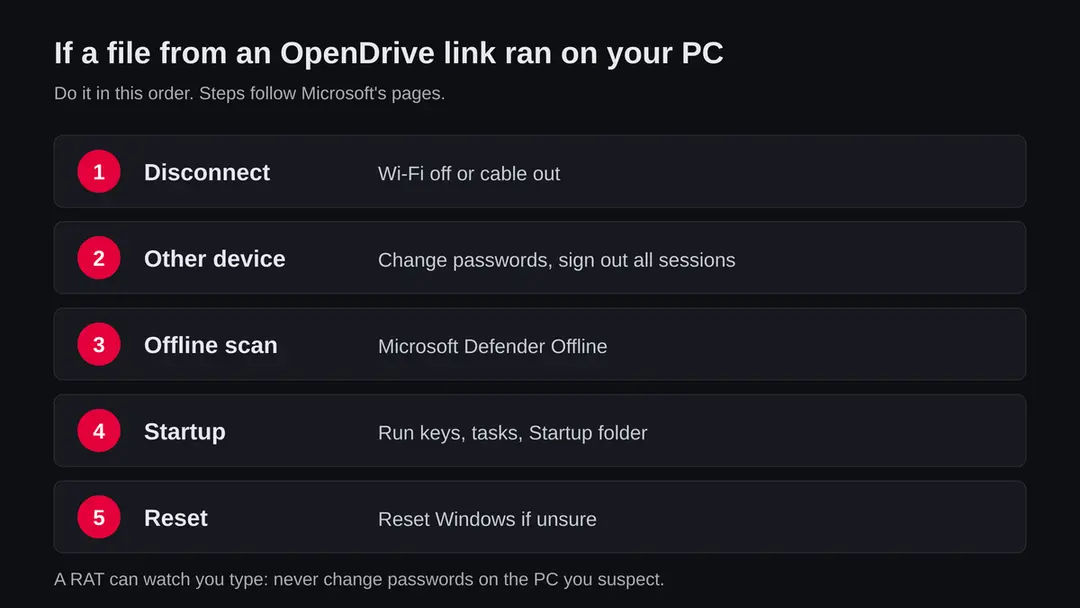
Turn off Wi-Fi or unplug the cable. A remote access trojan needs the connection to be used.
- 2
Look at Protection history
Open Windows Security > Virus & threat protection > Protection history. Write down any detection with Remcos in its name and the date.
- 3
Look at what starts with Windows
Open Settings > Apps > Startup and Task Manager's Startup apps. An entry with no publisher or a random name that runs from a user folder is worth a note.
- 4
Open Task Scheduler
Press Start, type Task Scheduler, open Task Scheduler Library and look for tasks that run a script from a user folder. Note them; do not delete yet.
- 5
Find the file you opened
Look in Downloads and your email for the attachment from that time. A .js, .vbs, .hta or an archive that held one is the likely start.
How to remove OpenDrive virus (Remcos RAT delivered through web.opendrive.com)
How to remove OpenDrive virus (malware delivered through web.opendrive.com)
A loader's job is to install other malware, so treat the PC as infected with more than one program until the scans are clean.
Step 1: Delete scheduled tasks that bring it back
Open Task Scheduler from the Start menu and click Task Scheduler Library.
Select each task you do not recognise and read the Actions tab: a task that starts a file in
%AppData%or%Temp%, runs powershell with a long encoded line, or opens a web address belongs to OpenDrive virus (malware delivered through web.opendrive.com) or a similar program.Right-click such a task and choose Delete, and check the subfolders too. Leave tasks from Microsoft, your PC's maker and programs you use. Task Scheduler is the same in Windows 11 and Windows 10.

Windows 11: Task Scheduler Library, the task selected, the Actions tab shows the file it runs. Full procedure with screenshots: Remove what malware leaves behind in Windows
Step 2: Remove it from startup
Whatever OpenDrive virus (malware delivered through web.opendrive.com) installed usually starts with Windows.
Open Task Manager with Ctrl + Shift + Esc, go to Startup apps in Windows 11 or the Startup tab in Windows 10, and disable what you do not know, starting with entries that have an empty Publisher column.
Open file location on the right-click menu shows the file, which helps you decide and tells you what to delete later. Disabling is safe: if something you need stops working, switch it back on.
Full procedure with screenshots: Stop apps from opening at startup On uGetFix
Step 3: Delete the folders left behind
What the uninstaller leaves behind is usually in the user folders. Open File Explorer, switch on View > Show > Hidden items (in Windows 10 View > Hidden items), and go through
%LocalAppData%,%AppData%, %ProgramData% and the two Program Files folders.Sort by Date modified and delete folders that appeared together with the problem and belong to no program you use. Folders with random names that hold
.exe,.dll, .js or .ps1 files are the strongest sign.Full procedure with screenshots: Remove what malware leaves behind in Windows
Step 4: Scan the PC, then run the offline scan
Open Windows Security > Virus & threat protection > Scan options, run a Full scan and remove everything it finds. Then select Microsoft Defender Antivirus (offline scan) and click Scan now: the PC restarts and scans before Windows loads, which finds files that hide while Windows runs.
Save your work first, because the offline scan takes about 15 minutes. Both scans are built into Windows 11 and Windows 10, and a second scanner from another vendor is a useful extra opinion.

Windows 11: Windows Security > Virus & threat protection > Scan options. Full procedure with screenshots: Run a Microsoft Defender Offline scan
Step 5: Change passwords from another device and sign out other sessions
Assume that the passwords saved in this PC's browsers, and the accounts that were open in them, are known to the attacker. From a phone or a clean computer, change the e-mail password first, then banking, shopping, social and gaming accounts.
Use each service's option to sign out of all other sessions, because stolen cookies keep a session open even after a password change. Turn on two-step verification on each account. Wait with the infected Windows 11 or Windows 10 PC until the scans are clean.
Full procedure with screenshots: Turn on two-step verification / secure a hacked account
If you use a Mac, an iPhone or an Android phone
The tags and every source we read describe a Windows threat. OpenDrive is just as reachable from any device, but nothing we read says these files run on anything else.
| Your device | What we know | What to do |
|---|---|---|
| Mac | MITRE lists Remcos for Windows only | Nothing to remove for this threat. Do not follow the Windows steps on a Mac |
| iPhone or iPad | No source describes these files on iOS | Nothing to remove. Change passwords you typed into a strange page |
| Android | No source mentions them on Android | Nothing to remove for this threat |
After removal: passwords, accounts and prevention
After a clean PC: protect what was taken
The PC is one half. The other half is everything you typed or stored on it while the trojan was there. Another device first, then the PC.
- 1
Change passwords from a clean device
Start with email, because it resets everything else, then bank, work, cloud storage and crypto. Anything typed on the PC while it was watched is already known.
- 2
Sign out every session
Use each account's option to sign out of all devices, and turn on two step sign in so a password alone is not enough.
- 3
Tell your employer
If the PC had work accounts or you opened the file at work, tell IT the same day. A remote access trojan on one PC can be the start of a wider attack.
- 4
Move crypto
If a wallet was on the PC, make a new wallet on a clean device and move the funds.
Keep a PC out of this kind of chain
The storage link is the middle of the chain. Every write-up we read starts with a person opening a file.
Do
- Treat an unexpected invoice, order or payment email with an attachment as an attack until proven otherwise.
- Show file endings in File Explorer so a script posing as a document is visible.
- Keep Windows and Microsoft Defender updated.
- Use a password manager and two step sign in.
- Report a bad OpenDrive file to support@opendrive.com with the full link, and to URLhaus.
Don't
- Do not block the whole of opendrive.com if people in your company use it.
- Do not trust a file just because it is stored on a known service.
- Do not run .js, .vbs or .hta files from email.
- Do not change passwords on the PC you suspect.
- Do not treat a clean quick scan as proof after you ran an unknown script.
Questions about OpenDrive virus (Remcos RAT delivered through web.opendrive.com)
Is OpenDrive a virus?
No. OpenDrive is a cloud storage, backup and file sharing service run by OpenDrive, LLC in California, and its domain has been registered since 2003.
It is reported only because some people upload malicious files to it and point their malware at them. Its own terms forbid storing viruses and trojans. The service is safe; specific files can be dangerous.
Why did my antivirus block web.opendrive.com?
Most likely it blocked one file address, not the service. Look at the full link in the alert. If you were opening a folder someone shared with you on purpose, it may be a block on that one file.
If the alert came after you opened an unexpected attachment or script, treat it as an attack and follow the checks on this page.
What files were reported on OpenDrive?
URLhaus lists eight file addresses on web.opendrive.com, added on 9 and 10 September 2026 in four pairs. All eight are tagged RemcosRAT, rat and stego, and all eight were offline on 8 October 2026.
We did not download them, so their exact content is not confirmed by us. Each pair shares the first number of its decoded file id.
What is Remcos?
Remcos is a remote control program for Windows sold by a company called Breaking Security and widely used by criminals as a remote access trojan. MITRE ATT&CK and Microsoft say it can log keystrokes, take screenshots, use the webcam and microphone, read the clipboard and move files. Microsoft detects it as Backdoor:Win32/Remcos and related names.
What does stego mean in these reports?
It is short for steganography, hiding data inside another file. Cofense describes pictures that look like desktop backgrounds but carry a hidden .NET loader, and LevelBlue SpiderLabs found PNG files with a program appended between text markers. Looking at such a picture does nothing; a script that is already running decodes it.
I opened an attachment that may have used an OpenDrive link. What now?
Disconnect the PC, change your passwords from another device and sign out all sessions, then run Microsoft Defender Offline and check what starts with Windows.
If you are unsure, reset Windows. Tell your employer if work accounts were on the PC. Do not type new passwords on the PC you suspect.
Is it safe to use OpenDrive?
Yes, as a service. Storing and sharing your own files there carries the same risk as any other cloud storage.
What matters is a file someone else sends you and how you open it. Never run a script or an attachment you did not expect, wherever its download link points.
How do I report a malicious OpenDrive file?
Send the full link to OpenDrive at support@opendrive.com, the address its terms give for questions and notices. You can also submit the link to URLhaus at abuse.ch, which shares reports with security vendors and network operators who block such files.
Include the date you received it and, if you can, the email or page that pointed to it. Do not send the file itself as an attachment.
Does this affect my iPhone, Android phone or Mac?
Nothing we read says these files run on a phone or a Mac. Remcos is a Windows program, and MITRE lists Windows as its only platform.
If you typed a password into a strange page on any device, change it from a device you trust. The scripts that fetch the files are Windows scripts too.
Will Fortect remove OpenDrive virus (malware delivered through web.opendrive.com)?
Fortect scans Windows for malware and unwanted programs and repairs the system files and settings they change, and its free scan shows what it finds on your PC before you decide anything.
For OpenDrive virus (malware delivered through web.opendrive.com), follow the plan above as well: the browser steps take back permissions and settings that no scanner treats as a threat, and uninstalling the program that brought it removes the source.
Run Microsoft Defender's full scan and, if anything was found, its offline scan as a second opinion. If the symptoms are gone after the plan and both scans are clean, there is nothing more to do.
Sources
- URLhaus (abuse.ch): eight entries for web.opendrive.com, 9 and 10 September 2026, from our job data (read October 8, 2026)
- OpenDrive: Terms of Service (last updated 3 April 2026) (read October 8, 2026)
- OpenDrive: home page and features (read October 8, 2026)
- MITRE ATT&CK: Remcos, S0332 (modified 23 April 2026) (read October 8, 2026)
- Microsoft Security Intelligence: Backdoor:Win32/Remcos (updated 25 September 2023) (read October 8, 2026)
- Cofense: Steganography Secrets, Malware Hidden in Plain Sight (20 May 2026) (read October 8, 2026)
- LevelBlue SpiderLabs: AsyncRAT and Remcos Delivered in Multi-Stage Phishing Campaign (July 2026) (read October 8, 2026)
- Check Point: Remcos Malware (read October 8, 2026)
- Microsoft Support: Virus and threat protection in the Windows Security app (offline scan) (read October 8, 2026)