
Phishing pronunciation: how to say it, what the word means and how to stay safe
Phishing is pronounced "FISH-ing", exactly like the word fishing, because the letters ph stand for the sound f. It names a scam in which a message pretends to come from a bank, shop or colleague to get your password, card number or money, and the safe answer is to never use the link or number in the message and to go to the real service yourself.
Facts checked October 13, 2026. Removal steps tested on Windows 11 (26H2) and checked against Microsoft's and the browser makers' current documentation.
Automatic
Get a free scan and check if your PC is infected.
Fortect finds malware, unwanted programs and the Windows damage they leave behind, and repairs it in one pass.
Do it yourself · free Remove phishing (the word and the scam) yourself 4 steps, about 12 minutes, no software needed.
Start the steps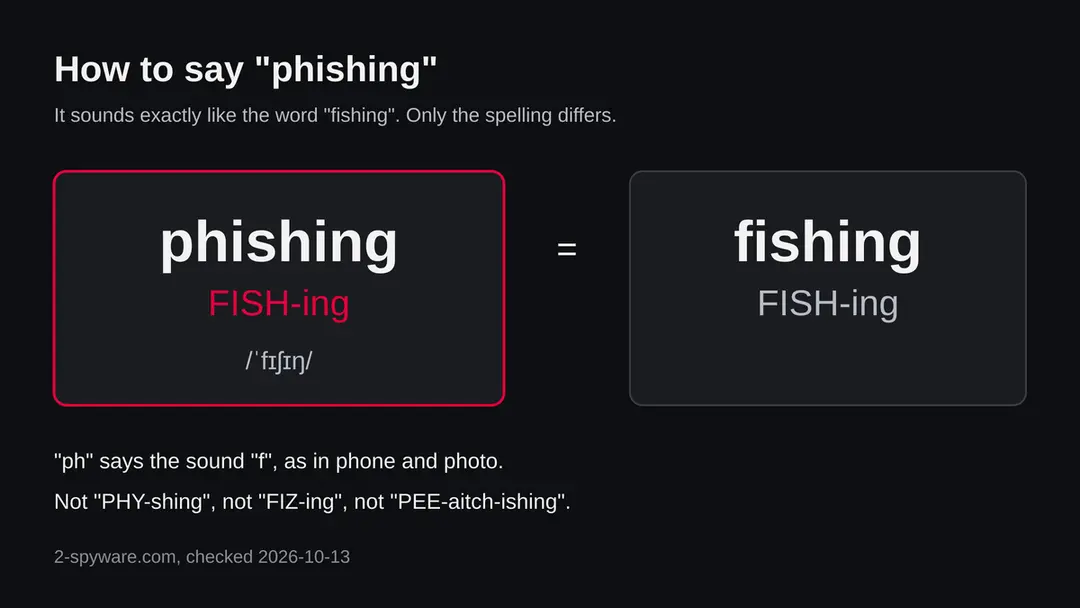
Phishing (the word and the scam): summary
| Type | A word for a scam technique: messages that pretend to be a trusted sender to steal information, money or access |
|---|---|
| Pronunciation | FISH-ing, the same as fishing; ph is read as f |
| Risk | High if you click, pay or sign in through a phishing message; none from the word itself |
| Symptoms | An unexpected message that urges you to click, pay or confirm details, with a lookalike sender or link |
| How to get rid of it | Do not use the message's link or number, report it and delete it; if you responded, change passwords and call your bank |
| Our check (13 October 2026) | No website to test. Facts read from FTC and Microsoft pages and three pages on the word's history |
| Removal | Scan the PC with security software to find and remove the malware and anything installed with it. Fortect scans Windows for malware and repairs the system files and settings it damaged. Remove it nowTo use the full-featured product, you have to purchase a license for Fortect. The scan is free. |
Show 9 more facts
| Running since | The word appears in January 1996 in secondary sources; the technique was already used on AOL |
|---|---|
| Installed on the PC | Nothing by the message itself. A file you open or a program you install from it can add malware |
| Detection | No Microsoft detection name: phishing is a method, not one program |
| Damage | Stolen passwords, card numbers or money; hacked accounts reused to reach your contacts |
| Distribution | E-mail, text, phone calls, chat and social media messages |
| Name | Phishing |
| Evidence | 0 write-ups by security sites; details still limited |
| First seen | 13 October 2026 |
| Facts checked | 13 October 2026 |
Facts checked on 13 October 2026 against the FTC's phishing guide and Microsoft Support's phishing page. The origin of the word comes from three secondary sources that differ on details. We could not read a dictionary entry or the CISA page, so the pronunciation rests on standard English spelling rules and common usage.
How to pronounce phishing, and what the word means
Say "FISH-ing". The first sound is f, because ph is read as f in many English words such as phone, photo and pharmacy. Phishing and fishing are two different spellings of the same sound, so a listener cannot tell them apart without context.
This page has no website to test and no program to remove. People search for the pronunciation of phishing, usually while looking up a suspicious message or a work training course, and the word is only useful if you also know what it describes. So the page answers both: how to say it, and how to recognise and handle the thing it names.
- How to say it
- FISH-ing, one stress on the first syllable, the same as the word fishing. Phonetic form: /ˈfɪʃɪŋ/
- What it means
- Sending a message that pretends to come from someone you trust, to trick you into giving away information, money or access
- Why the odd spelling
- Secondary sources link the ph to phone phreaking, an early hacker scene, and to the idea of fishing for victims. The exact origin is not settled
- Related words
- Phisher (the criminal), phish (one attempt or one stolen account), spear phishing, smishing and vishing (phishing by text and by voice)
How to tell the phishing (the word and the scam) message is fake
Prevention is a habit more than a tool: you make the decision to trust a message yourself, not the message.
Do
- Use a unique password for every account and turn on multifactor authentication.
- Open your bank, shop or delivery service by typing the address or using a saved bookmark.
- Keep the browser, the operating system and Microsoft Defender or your security software up to date.
- Use the report button in your mail program so the provider can block the sender.
- Keep a current backup of your files, so that a program installed by a phishing file does not cost you your documents.
- At work, ask your IT team before opening a document you did not expect, even from a colleague.
Don't
- Enter a password on a page you reached from a message.
- Read out a one-time code to a caller.
- Scan a QR code from an unexpected letter or message without checking it.
- Reuse the same password on several services.
What to do after the phishing e-mail
If you only received the message and clicked nothing, step 3 is all you need.
If you clicked the link or typed anything on the page it opened, do every step, starting with the password.
Step 1: Change the password you typed on the fake page
If you typed a password on the page the phishing message opened, assume the sender has it. Go to the real site by typing its address yourself and change the password there, choosing one you have never used.
Change it anywhere else the same password was used, and sign out all other sessions if the service offers it. Any browser on Windows 11 or Windows 10 will do, as long as you do not follow the e-mail's link.
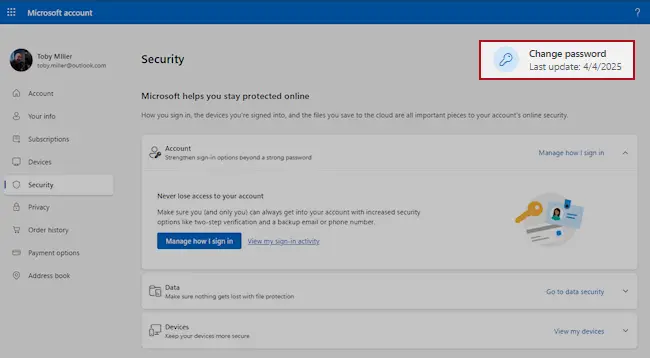
Microsoft account, Security page (account.microsoft.com/security): Change password. Full procedure with screenshots: Turn on two-step verification / secure a hacked account
Step 2: Turn on two-step verification
With two-step verification on, a stolen password alone no longer opens the account, because a sign-in from a new device also needs a code from your phone.
Switch it on for the e-mail account first, then for banking, shopping and social accounts that use that address.
Check the recovery phone, the recovery e-mail and any forwarding rules while you are in the settings, since attackers change them to come back. The pages are the same on Windows 11 and Windows 10.
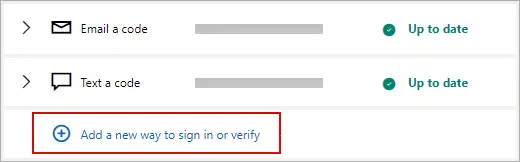
Microsoft account: Manage how I sign in, where two-step verification and the sign-in methods are. Full procedure with screenshots: Turn on two-step verification / secure a hacked account
Step 3: Report the e-mail and delete it
Do not reply and do not click anything else in the message. In Outlook select the e-mail and choose Report > Report phishing; in Gmail open the three-dot menu next to Reply and pick Report phishing.
That trains the filter for everyone on the service, and the message goes to the junk folder. If the e-mail came to a work address, forward it to your IT team as an attachment first.
The steps are the same in the web mail and the mail apps on Windows 11 and Windows 10.
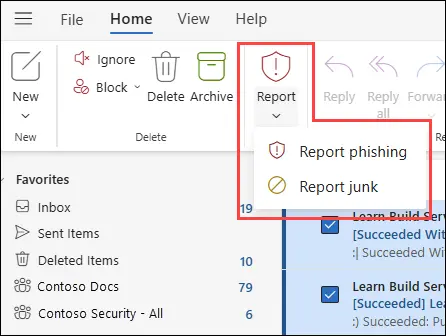
New Outlook for Windows and Outlook on the web: Report > Report phishing. Full procedure with screenshots: Report a phishing e-mail
Step 4: Scan the PC if you opened a file from the message
A fake sign-in page only steals what you type, so most readers can skip this step. If the phishing e-mail made you download or open a file, delete it and scan the PC.
In Windows Security > Virus & threat protection > Scan options, run a Full scan and then Microsoft Defender Antivirus (offline scan) > Scan now. The offline scan restarts Windows 11 or Windows 10 and takes about 15 minutes.

Windows 11: Windows Security > Virus & threat protection > Scan options. Full procedure with screenshots: Run a Microsoft Defender Offline scan
How to report phishing (the word and the scam)
Report it
A report gives you a reference number for your bank and insurer and helps police link cases.
Include the dates, an e-mail, text, call or chat message that pushes you to click, pay or sign in in the list of installed apps, any payment details, addresses and phone numbers the attackers used, and screenshots.
In the US, report to the FBI at ic3.gov and scams to ReportFraud.ftc.gov. In the UK, use Report Fraud (reportfraud.police.uk); in Canada, the Canadian Anti-Fraud Centre; in Australia, ReportCyber at cyber.gov.au. EU residents report to their national police: Report a cyber attack or scam to the authorities.
Every agency, with what to send and when businesses must notify regulators, is listed in where to report cybercrime by country.
What we checked, and what we did not
This is an owner-ordered guide about a word, not a test of a website. Our server made no plain request because the subject is not a web address, and there are no URLhaus reports for it.
- Read on 13 October 2026
- The FTC guide to recognising and avoiding phishing scams, Microsoft's page on protecting yourself from phishing, and three pages on the origin of the word
- Could not read
- A dictionary entry (Merriam-Webster refused the request) and CISA's page on phishing (refused the request). The pronunciation therefore rests on standard English spelling rules and common usage, not a quoted dictionary
- Not settled
- The exact first use of the word and who coined it; the sources differ
- Not covered
- National reporting channels outside the US, and the details of any one phishing campaign
Questions about phishing (the word and the scam)
How do you pronounce phishing?
Phishing is pronounced "FISH-ing", exactly like the word fishing. The letters ph stand for the sound f, as in phone, photo and pharmacy, so there is no separate p sound at the start.
The vowel is short, as in the word fish, and the stress falls on the first syllable. Phonetically it is written /ˈfɪʃɪŋ/. People sometimes say "PHY-shing" or "FIZ-ing" because they read the letters one by one, but those are not the usual forms.
In speech, you can add "with a ph" or "the scam kind" if the listener might think you mean the sport. We checked the pronunciation against standard English spelling rules, not a quoted dictionary entry.
What does phishing mean?
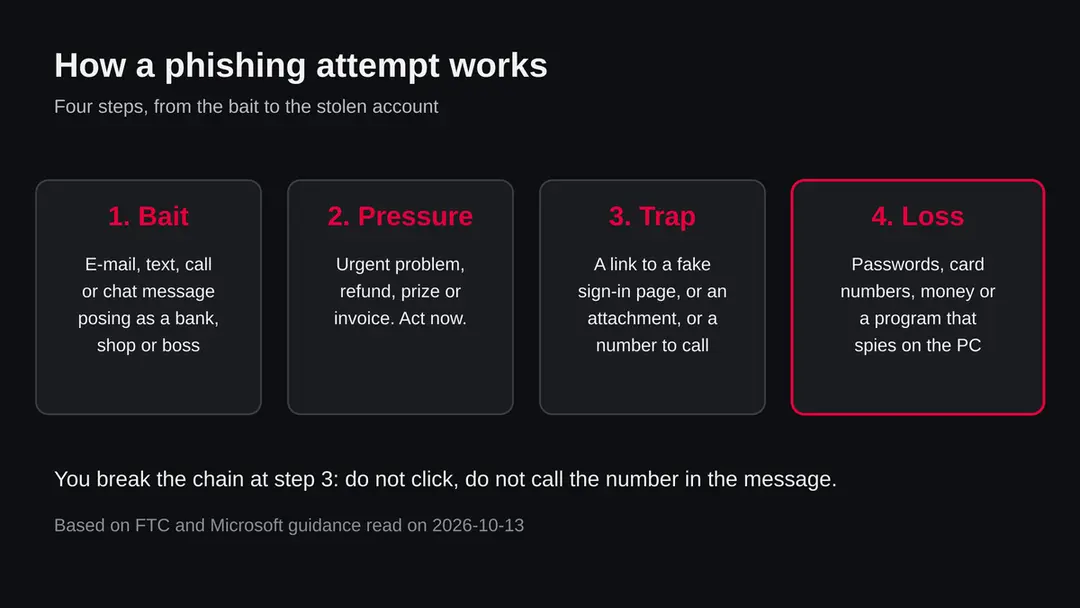
Phishing means sending a message that pretends to come from a trusted sender, such as a bank, a delivery company, a government office or a colleague, to trick you into giving away information, money or access.
The FTC describes the usual message as an unexpected e-mail or text claiming suspicious activity, an account problem or a refund, and asking you to confirm details or click a link.
Microsoft adds that it can arrive through Teams, social media, texts and phone calls. The word names the method, not one program. The harm comes from what you do next: sign in on a fake page, pay, read out a code or open a file.
Why is phishing spelled with ph?
The spelling is usually traced to phone phreaking, the early hacker scene that played with telephone systems and wrote ph for f. Computerworld links it to that, and also to the picture of fishing for victims with a message as bait.
The word appears in January 1996 in discussion groups about stealing accounts on AOL, according to the sources we read, but they differ on the first mention and on who coined it. Some credit a toolkit called AOHell from 1995. These are secondary accounts, so treat the origin as likely, not proven.
Is phishing the same as fishing?
They sound the same, but they mean different things. Fishing is catching fish. Phishing is the scam, and the name plays on the idea that a criminal throws out bait, a message, and waits to see who bites.
The ph spelling separates the two in writing, which matters when you search or report something. In speech, context decides, or you can say "phishing with a ph". The criminal is called a phisher, one attempt is a phish, and a successful victim is said to have been phished.
What are the signs of a phishing message?
Look for an unexpected message that creates urgency, a generic greeting such as Dear customer, a request to confirm personal or financial details, a link to pay or update payment information, a sender address or link that is slightly wrong such as micros0ft.com, and offers like free coupons or refunds.
The FTC points out that legitimate companies do not send e-mails or texts with links to update payment information. Microsoft suggests hovering over a link to see its real address, and being careful with first-time senders.
One sign is not proof, and a well written message can still be a phish, so check through the real website or a known number.
What should I do if I clicked a phishing link?
Close the page, do not enter anything, and change the password of any account you might have used from a device you trust. If you typed a password, change it everywhere it was used and turn on multifactor authentication.
If you only clicked and nothing was typed, the risk is lower, but the FTC advises updating your security software, running a scan and removing what it flags, because a link or file may have installed a harmful program.
If it was a work account, tell your IT team. Then report the message and delete it. We cannot say from here whether a particular click caused harm.
What if I gave my card or bank details?
Call the bank or card company right away, using the number printed on your card or on its official website, not the one in the message. Ask them to block the card and check recent transactions. Microsoft advises writing down every detail of what you shared and where.
If you gave a Social Security, card or bank account number, the FTC sends people in the US to IdentityTheft.gov for steps based on what was lost. If money left your account, report it to local police and keep the records. Anyone who offers to recover money for a fee is likely a second scam.
How do I report a phishing e-mail or text?
For e-mail, the FTC asks you to forward it to the Anti-Phishing Working Group at reportphishing@apwg.org. For a text, forward it to 7726, which spells SPAM. Any phishing attempt can be reported to ReportFraud.ftc.gov in the US.
In Outlook, select the message and choose Report > Report phishing. In Teams, use More options > More actions > Report this message. In Edge, report a suspicious website under Help and feedback > Report unsafe site.
After reporting, delete the message. Outside the US your national fraud authority is the right place; we did not read those pages, so we do not list them.
Can antivirus stop phishing?
It can help, but it is not enough alone. Security software and browser warnings can block known phishing sites and flag harmful attachments, and keeping them updated is part of the FTC's advice.
A new phishing page or a message that only asks you to call a number or read out a code may not be caught, because no file is involved. The strongest protection is your own check:
- do not use the link or number in the message
- go to the real site yourself
- use a unique password per account
- turn on multifactor authentication
We have not tested any product against phishing for this guide.
Will Fortect remove phishing?
Fortect scans Windows for malware and unwanted programs and repairs the system files and settings they change, and its free scan shows what it finds on your PC before you decide anything.
For phishing, follow the plan above as well: the browser steps take back permissions and settings that no scanner treats as a threat, and uninstalling the program that brought it removes the source.
Run Microsoft Defender's full scan and, if anything was found, its offline scan as a second opinion. If the symptoms are gone after the plan and both scans are clean, there is nothing more to do.
Sources
- Federal Trade Commission: How to Recognize and Avoid Phishing Scams (read October 13, 2026)
- Microsoft Support: Protect yourself from phishing (read October 13, 2026)
- Computerworld: Sidebar, the origins of phishing (read October 13, 2026)
- KnowBe4 blog: Did you know how the word Phishing came to be? (read October 13, 2026)
- historyofinformation.com: First logo of America Online (entry on the first recorded use of phishing) (read October 13, 2026)