
RAT virus: what a remote access trojan is, how to tell if one is on your Windows PC and how to remove it
A RAT virus is a remote access trojan: a program that lets a stranger see and use your Windows PC from far away, watching the screen, logging keys and taking files. It is dangerous because it is built to stay quiet, and you cannot judge a PC clean by how it feels.
If you only read the word, nothing is wrong; if you opened an odd file or Defender named a RAT, treat the PC as watched, change your passwords from another device, then run a Defender Offline scan and reset Windows if you are not sure.
Facts checked October 14, 2026. Removal steps tested on Windows 11 (26H2) and checked against Microsoft's and the browser makers' current documentation.
Automatic
Get a free scan and check if your PC is infected.
Fortect finds malware, unwanted programs and the Windows damage they leave behind, and repairs it in one pass.
An automatic scan checks installed programs, startup items and browser extensions for anything that came with a program on your PC that gives a stranger remote control (a remote access trojan).
Do it yourself · free Remove RAT virus (remote access trojan) yourself 5 steps, about 15 minutes, no software needed.
Start the steps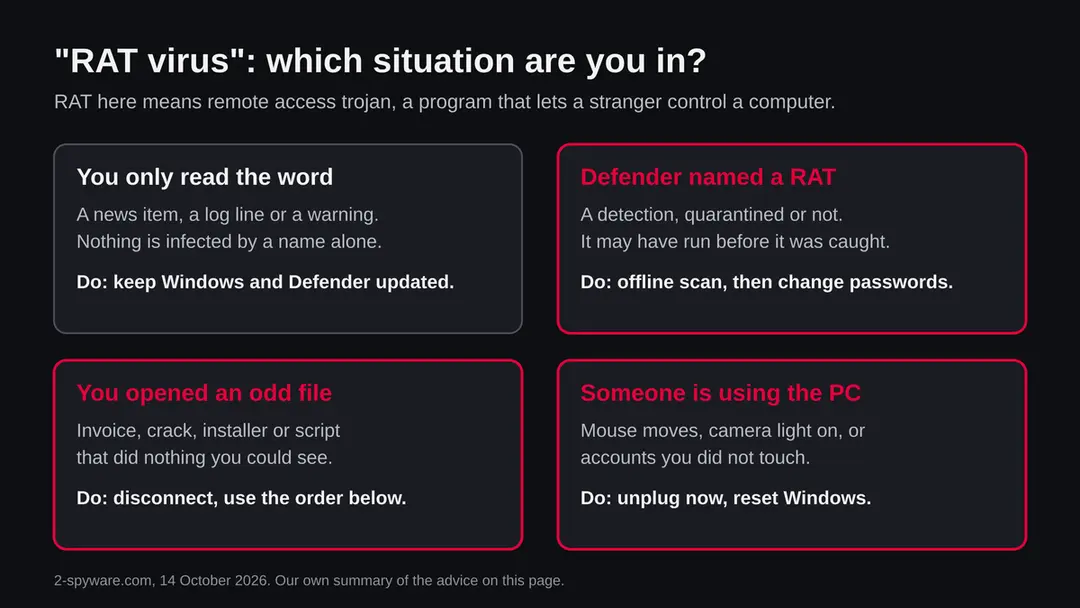
RAT virus (remote access trojan): summary
| Type | Remote access trojan (RAT): malware that lets another person control a PC from a distance |
|---|---|
| Risk | High if one is really running: keystrokes, passwords, screen, camera and files may be seen or taken. None if you only read the word |
| Symptoms | Often none. Unknown scheduled tasks or startup entries, odd processes with steady network use, and a Defender detection are the signs in the sources |
| How to get rid of it | Disconnect, change passwords from another device, run Microsoft Defender Offline, check Task Scheduler and Startup apps, reset Windows if you are not sure |
| Our check (14 October 2026) | No address or file to test; we read MITRE, Proofpoint, Microsoft Learn and the FTC once. Nothing here clears or condemns a PC |
| Running since / first seen | Not applicable: RAT is a type, with many programs. AsyncRAT is the documented example in this guide |
| Removal | Scan the PC with security software to find and remove the malware and anything installed with it. Fortect scans Windows for malware and repairs the system files and settings it damaged. Remove it nowTo use the full-featured product, you have to purchase a license for Fortect. The scan is free. |
Show 8 more facts
| Platform | Windows. Other systems are not covered by our sources |
|---|---|
| Detection names | Depend on the family. Read the exact name in Windows Security > Protection history; Microsoft's name for AsyncRAT builds is Backdoor:MSIL/AsyncRAT!MTB |
| Name | RAT virus |
| Evidence | 0 write-ups by security sites; details still limited |
| First seen | 14 October 2026 |
| Distribution | Typically fake installers, cracked programs, e-mail attachments, fake "verify you are human" pages and ads for popular apps |
| Damage | Installs other malware, often several programs at once |
| Facts checked | 14 October 2026 |
Facts checked on 14 October 2026 against MITRE ATT&CK (AsyncRAT, modified 12 May 2026), Proofpoint's explainer on remote access trojans, Microsoft Learn (Defender Offline, updated 25 August 2026), Microsoft Support (recovery options) and the FTC. There was no address or file to test. We infected no PC; the removal steps follow Microsoft and FTC pages and were not tried on a live infection.
What a RAT virus is, and what we know about it
RAT stands for remote access trojan. It is a program that pretends to be harmless, or arrives hidden inside something harmless, and then gives another person remote control of your computer. This page is about that computer threat. It is not about animals, and it is not about one single program: RAT is a type, and many different programs belong to it.
Searches for "rat virus" mix up a few things, so here is the plain version. Most people who search for it have seen a warning, a news item or a Defender message, or they fear someone is controlling their PC.
We have no address or file to test here, so this guide rests on published research and on Microsoft and FTC pages, and we say where the public record is silent.
- 1
What the word means
A trojan is malware that gets in by pretending to be something else. A remote access trojan is one whose job is to give an outsider a seat at your computer. Proofpoint describes it as malware that gives an outsider admin level control of the device once it runs.
- 2
Is it a virus?
In everyday speech people say virus for any malware, so "RAT virus" is understood. Strictly it is a trojan, not a virus. A virus copies itself into other files; a RAT usually does not spread by itself. Proofpoint says RATs generally do not self propagate and rely on tricking a person into installing them.
- 3
What it can do
The sources we read list keylogging, screen and video capture, file search and download, remote camera and microphone use, and downloading more malware. Which of these happens depends on the program and on the person controlling it.
- 4
What we could not confirm
We did not test a live infection, so we do not tell you what any particular sample does. We also have no count of how many PCs are infected today. Where a number or a name is not in a source we read, we do not give one.
- Kind of threat
- Remote access trojan: malware that lets another person control a PC from a distance
- How it gets in
- Mostly by a person starting a file: email attachments, bundled installers, fake remote admin tools (Proofpoint); AsyncRAT is described by MITRE as delivered by malicious attachments and user opened files
- Does it spread alone?
- Generally no (Proofpoint). Each PC needs a person to start the first file, or a flaw that someone used to start it
- How it stays
- A scheduled task is the documented example for AsyncRAT (MITRE); Proofpoint adds autorun entries that start random named programs from user folders
- Platform
- Windows for the example we read (MITRE says AsyncRAT runs only on Windows). We found no source in this research for other systems, so we do not claim any
- Microsoft detection names
- Many, depending on the family. For AsyncRAT builds Microsoft uses Backdoor:MSIL/AsyncRAT!MTB (taken from Microsoft's published entry, which we did not re-read for this page); read the name in your own Protection history
What RAT virus (remote access trojan) does on an infected PC
What we checked on 14 October 2026, and what we could not
There is no website or file here that we could test. Our check was to read published research and the Microsoft and FTC pages on this page, once, on 14 October 2026. A plain request from our server to an address was not possible, because "rat virus" is a name, not an address. That is not a verdict on anyone's PC.
Our check, 14 October 2026
- No address, no file, no sampleThe topic is a type of malware, so there was nothing to open, download or probe. We did not run any RAT and we did not infect a PC.
- Documented behaviourMITRE ATT&CK (page modified 12 May 2026) documents one open source RAT, AsyncRAT, with keylogging, screen capture, file download and a scheduled task for persistence.
- Removal stepsThe Defender Offline scan steps come from Microsoft Learn (page updated 25 August 2026). The account steps come from the FTC. We did not run them on an infected PC.
- What is unknownWe cannot tell you whether your PC is infected. Only a check of your own PC can show signs, and even then a quiet result does not clear it.
Serious if it is really on your PC The word alone is harmless. A real RAT on your PC is serious, because the person behind it sees what you do. Nothing here clears or condemns a particular PC; it tells you how to find out and what to do.
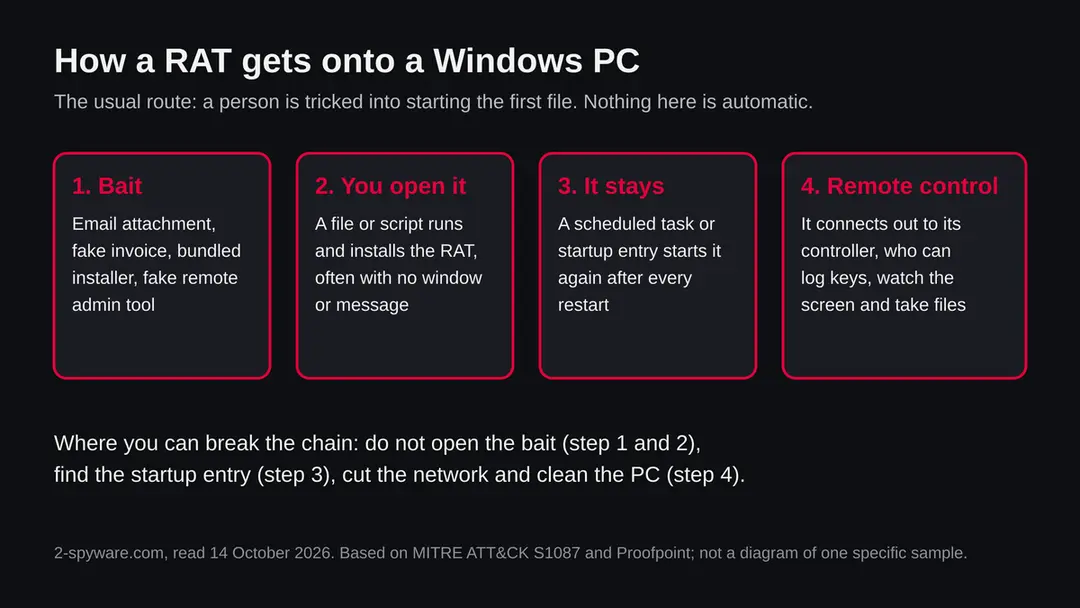
How a RAT works, step by step
A RAT has two halves. One half sits on your PC. The other half is a control panel used by a person somewhere else. The program on your PC connects out to that person, so it usually works through a normal home router without any hole being opened.
- 1
The bait
Proofpoint lists email attachments pretending to be invoices or delivery notices, bundled installers and fake remote admin tools. All of them need a person to start the file. A RAT that rides inside a cracked program or a fake update works the same way.
- 2
The start
Opening the file runs a script or a program. Often nothing visible happens, or a harmless looking document opens, while the real work goes on in the background. This is why people say afterwards that they opened a file and nothing happened.
- 3
Staying after a restart
MITRE says AsyncRAT can create a scheduled task so it starts with the PC, and can hide that task with a hidden window. Proofpoint names autorun entries that launch random named programs from user folders. Both are places you can look.
- 4
Hiding from you and from tools
MITRE lists debugger checks and checks for virtual machines and sandboxes for AsyncRAT. These help it avoid the automatic analysis that security companies use, and so it may not be caught by every scan on the first day.
- 5
Calling its controller
MITRE says AsyncRAT can reach its controller through a Tor client or through dynamic DNS and generated domain names. Proofpoint advises watching for unfamiliar processes that make steady outgoing connections to dynamic DNS names or odd ports.
One documented example: AsyncRAT
No single page can list every RAT, and we will not invent a list. We use AsyncRAT because MITRE documents it in detail, so you can see what the abstract word means in practice. Other RATs differ in their details.
| Question | What MITRE says | Source |
|---|---|---|
| What is it? | An open source remote access tool that has been used in malicious campaigns, and that runs only on Windows | MITRE ATT&CK S1087 |
| What can it do? | Keylogging, screen and video capture, file downloads including over SFTP, proxying of its traffic through a Tor client | MITRE ATT&CK S1087 |
| How does it find its controller? | Through dynamic DNS or generated domain names, as well as Tor | MITRE ATT&CK S1087 |
| How does it stay? | By creating a scheduled task that runs at start up; the task can run in a hidden window | MITRE ATT&CK S1087 |
| How does it avoid analysis? | It checks for debuggers, virtual machines and sandboxes | MITRE ATT&CK S1087 |
| How is it delivered? | By malicious email attachments and by files a user opens | MITRE ATT&CK S1087 |
| Who uses it? | Groups named by MITRE include TA2541, APT-C-36 (also called Blind Eagle) and MirrorFace | MITRE ATT&CK S1087 |
| Is this the RAT on your PC? | Not known. It is only one example of the type | Not available |
What RAT virus (remote access trojan) can steal or download
What a RAT can take from a Windows PC
A RAT gives a person a seat at your computer, so the list below is what such a person can do rather than what every RAT does automatically. Each item is named by at least one of the two sources; no single RAT is shown to do all of them.
Reported as possible
- Every key you type
- A live view or recording of your screen
- Your webcam and microphone
- Files searched for and downloaded
- Extra malware dropped on the PC
- Admin level control of the device
- Your connection used as a relay for its traffic
| Data | Detail | Source |
|---|---|---|
| Keystrokes and screen | Keylogging and screen or video capture | MITRE (AsyncRAT); Proofpoint |
| Camera and microphone | Turning on the camera or microphone | Proofpoint |
| Files | Browsing and downloading files | MITRE (AsyncRAT); Proofpoint |
| More malware | Dropping further payloads on the device | Proofpoint |
| Control | Admin level control once the RAT runs | Proofpoint |
What this can cost you
Reading about RATs costs nothing. The risks below apply to a Windows PC where one actually ran.
- High
Passwords and accounts
A keylogger records what you type into every site, including the new passwords you choose. Changing passwords on the infected PC does not help; the person watching sees the new ones too. Do it from another device.
- High
Someone using your PC live
A RAT is not a one off theft. The controller can come back whenever the PC is on and online, watch the screen and act while you are signed in.
- High
Banking and crypto
A banking session opened on a watched PC can be seen. Crypto sent out of a wallet whose seed phrase was on the PC cannot be called back. This follows from the screen and file access in the sources; it is our reading, not a case we saw.
- Medium
Private files, camera and microphone
Proofpoint names camera and microphone access, and both sources name file access. Private documents and images on the PC are exposed.
- Medium
More malware on the same PC
Proofpoint says a RAT can drop more payloads. Cleaning only the RAT may leave something else behind, which is why a full reset is the safest answer when you are unsure.
- Low
Nothing, if you only read the word
A news item, a log line or a warning is not an infection.
How to tell if a RAT is on your PC
RATs are built to be quiet, and Proofpoint says they can be hard for an ordinary user to identify. The signs below come from the sources and from what they imply. None is certain, and many victims notice nothing at all.
| Sign | What the sources show |
|---|---|
| A scheduled task you did not make | MITRE documents a scheduled task as the way AsyncRAT stays after a restart |
| A startup entry that runs a random named program | Proofpoint names autoruns that launch random named programs from user folders as a red flag |
| A process with a name that looks official but is not | Proofpoint says malware writers name processes so that they look official, so look at where the file is, not only its name |
| Steady outgoing connections to odd places | Proofpoint names unfamiliar processes that make steady outbound connections to dynamic DNS names or odd ports |
| A Defender detection that names a RAT or backdoor | Protection history shows what was found, blocked or quarantined, and when. A detection can mean it ran before it was caught |
| Webcam light on, mouse moving, accounts you did not touch | These follow from camera, screen and password access. They are our reading, not a quote from a source |
| Nothing at all | Staying quiet is the point; a PC that feels normal is not proof of a clean PC |
How to check the PC for RAT virus (remote access trojan)
How a person ends up with a RAT
Nobody installs a RAT on purpose. The program arrives wrapped in something that looks useful or urgent. The routes below are the ones named in the sources we read.
- 1
An email attachment
Proofpoint names attachments that pretend to be invoices or delivery notifications. MITRE names malicious email attachments for AsyncRAT. The message creates urgency so that you open the file before you think.
- 2
A bundled installer
A free tool, a cracked program or a game cheat can carry a RAT inside the installer. Proofpoint lists bundled installers as a common route.
- 3
A fake remote admin tool
Proofpoint says some RATs imitate a trustworthy remote application. A caller who talks you into installing a remote support program is a different scam, but the result is the same: a stranger controls your PC.
- 4
A file you open yourself
MITRE lists user opened files as a delivery route for AsyncRAT. This is why the advice to be careful with attachments and downloads is the first line of defence.
Do not confuse a RAT with these
Several things share the name or the look of a RAT. The table says which is which, so you do not remove the wrong thing or ignore the right one.
| It could be | How it differs | What to do |
|---|---|---|
| A remote support tool you installed yourself | It is the same kind of software as a RAT, but you chose it and know who can connect. Proofpoint says some RATs imitate such tools | Keep it only if you installed it and know its owner. Remove it if you do not |
| A remote support caller | A person who phoned you and asked you to install something. The tool may be genuine, the caller is not | Treat as a live compromise: disconnect and follow the order on this page |
| A virus in the strict sense | A virus copies itself into other files. A RAT generally does not spread by itself | The same cleaning steps apply |
| Animal disease | The phrase "rat virus" can also mean a virus carried by rats. That has nothing to do with computers and this page does not cover it | Ask a doctor or a public health service |
| A false alarm | A strange process or a high network use can be a normal Windows program. Look at the file location before deciding | Check, do not guess |
Check your PC before you delete anything
Start with one question: did you open an unexpected attachment, installer or script, or did Defender name a RAT? If yes, or if you are not sure, do the checks below. None of them deletes anything. While you check, stop using the PC for banking, email, work or crypto.
The steps follow Microsoft's screens and Proofpoint's advice on what to look at. We did not run them on an infected PC, so a clean result is one data point, not a clearance.
- 1
Disconnect first
Turn off Wi-Fi or unplug the network cable. A RAT needs the connection to be used. Do your account changes from another device.
- 2
Look at Protection history
Open Windows Security > Virus & threat protection > Scan options > Protection history. Look for a detection named as a RAT, a backdoor or a trojan, or anything blocked or quarantined at the time you opened the file. Microsoft says the results of an offline scan also appear there.
- 3
Open Task Scheduler
Press Start, type Task Scheduler and open it. In Task Scheduler Library look for tasks you do not know, with random names, or that run a script or a program from a user folder. MITRE documents a scheduled task as the way AsyncRAT stays. Write down the name and the program it runs. Do not delete yet.
- 4
Look at Startup apps
Open Settings > Apps > Startup. Look for names you did not install, especially random ones. Proofpoint names such autorun entries as a red flag.
- 5
Look at Task Manager
Press Ctrl + Shift + Esc and open the Processes tab. Sort by CPU and by Network. Right-click a process you do not know and choose Open file location. A process whose name looks official but whose file sits in a user folder is worth a closer look. Proofpoint warns that names are chosen to look official.
- 6
Check your accounts from another device
The FTC lists warning signs: alerts that your email, phone number or password changed without you, login attempts you do not recognise, and messages sent from your account that you did not write. Also look for forwarding rules you did not create. This is quicker than any file check.
- 7
A scan helps, but it does not clear the PC
A scan with Microsoft Defender or another product can find known files. Treat a clean result the way you treat a quiet test: one data point. If the PC may have been under remote control, the reset described below is the answer that does not depend on finding every piece.
How to remove RAT virus (remote access trojan)
How to remove RAT virus
A loader's job is to install other malware, so treat the PC as infected with more than one program until the scans are clean.
Step 1: Delete scheduled tasks that bring it back
Programs like RAT virus add a scheduled task so they return after an uninstall or reopen a page at every sign-in. Start Task Scheduler, open Task Scheduler Library and sort by Last Run Time to see what ran recently.
On the Actions tab, a program in a user folder, a script or a web address is a warning sign; right-click such a task and choose Delete.
Tasks with names copying Google, Edge or Windows updaters but pointing to an odd folder are typical. The tool looks the same in Windows 11 and Windows 10.

Windows 11: Task Scheduler Library, the task selected, the Actions tab shows the file it runs. Full procedure with screenshots: Remove what malware leaves behind in Windows
Step 2: Remove it from startup
Press Ctrl + Shift + Esc to open Task Manager and select Startup apps (Windows 11) or the Startup tab (Windows 10). Disable entries you do not recognise, especially ones with no publisher or with a name that copies a Windows component.
Right-click an entry and choose Open file location to see where it runs from: programs in
%AppData%or%Temp%deserve a closer look. Some entries are not listed there but in the registry Run keys, which the procedure below shows how to check.Full procedure with screenshots: Stop apps from opening at startup On uGetFix
Step 3: Delete the folders left behind
Uninstalling often leaves the program's folders, and some threats reinstall themselves from them.
Press Windows + R, type
%LocalAppData%and press Enter, then do the same for%AppData%and %ProgramData%, and look for folders named after RAT virus, its publisher or created on the day the problem started.Delete those folders, and check
C:\Program FilesandC:\Program Files (x86)too.If Windows says a file is in use, end it in Task Manager or delete the folder after a restart in Safe Mode. The folders are the same in Windows 11 and Windows 10.
Full procedure with screenshots: Remove what malware leaves behind in Windows
Step 4: Scan the PC, then run the offline scan
A scan finds the parts of RAT virus that the manual steps cannot see. In Windows Security > Virus & threat protection > Scan options, start a Full scan and quarantine what it reports.
Follow it with Microsoft Defender Antivirus (offline scan) > Scan now, which restarts the PC and checks the disk while Windows and the malware are not running.
It takes about 15 minutes and works the same in Windows 11 and Windows 10. If either scan finds something, run the full scan again after removal until it comes back clean.

Windows 11: Windows Security > Virus & threat protection > Scan options. Full procedure with screenshots: Run a Microsoft Defender Offline scan
Step 5: Change passwords from another device and sign out other sessions
RAT virus can copy saved passwords, cookies and session tokens and send them out in seconds, so cleaning the PC does not undo the theft.
Change your passwords on a device that was never infected, starting with the e-mail account, since every other reset goes through it. On each account, end all other sessions and check the recovery e-mail, phone number and forwarding rules.
Then turn on two-step verification. Sign in on the Windows 11 or Windows 10 PC again only after the offline scan is clean.
Full procedure with screenshots: Turn on two-step verification / secure a hacked account
If you use a Mac, an iPhone or an Android phone
The sources we read for this page describe Windows. MITRE says AsyncRAT runs only on Windows. We did not research other systems for this page, so we do not say they are safe or affected.
| Your device | What we know | What to do |
|---|---|---|
| Mac | Nothing in our sources covers a Mac. Do not follow the Windows steps on a Mac | If you gave a stranger remote access or typed passwords on a suspicious page, change those passwords from another device |
| iPhone or iPad | Not covered by our sources | Same: change passwords you may have exposed and turn on two step sign in |
| Android | Not covered by our sources | Same: change passwords you may have exposed, and remove apps you did not install |
After removal: passwords, accounts and prevention
Clean the PC and protect what was taken
The PC is one half. The other half is everything you typed or stored on it while the RAT was there. The order matters: another device first, then the PC.
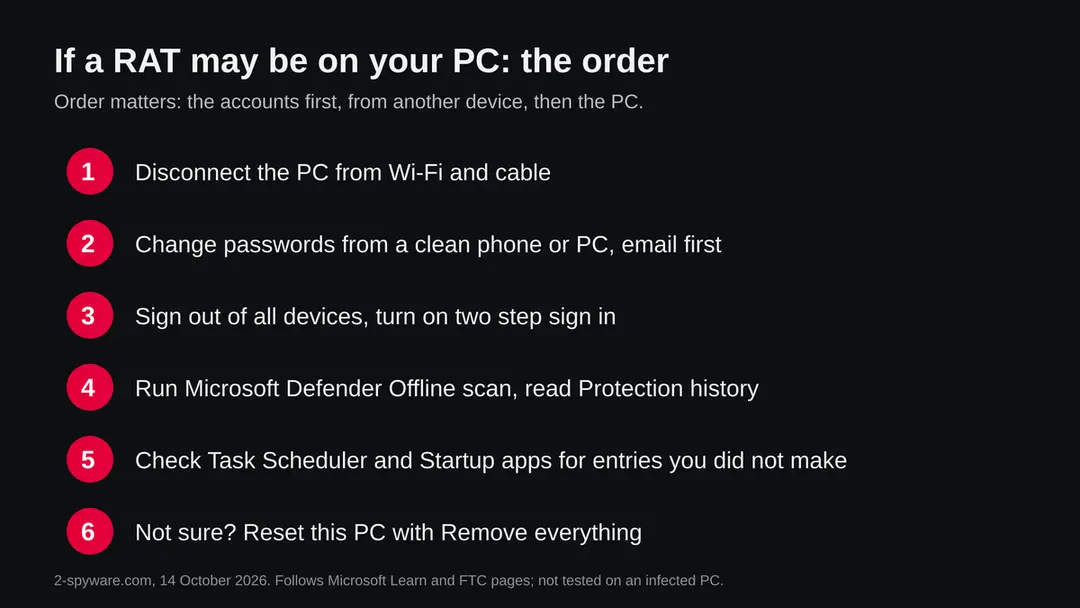
- 1
Change passwords from a clean device
The FTC says that if you can still log in you should change the password to a unique, strong one or a passphrase, then sign out of all devices. Start with email, because it resets everything else, then bank, work, cloud storage and crypto. Anything typed on the PC while it was watched is already known.
- 2
Turn on two factor sign in and update recovery details
The FTC says to turn on two factor authentication so a password alone is not enough, and to check that the recovery email address and phone number on the account are yours.
- 3
Move crypto first if a wallet was on the PC
If a seed phrase or wallet file was ever on the PC, assume it is known. Create a new wallet and recovery phrase on a clean device and move the funds there. This is our judgement from the screen and file access in the sources.
- 4
Run Microsoft Defender Offline
Microsoft Learn says to open Windows Security > Virus & threat protection > Scan options, select Microsoft Defender Offline scan and choose Scan now. Save your work first: Windows signs you out and restarts, and the scan takes about 15 minutes. If BitLocker is on, Microsoft says to suspend it first or you may be asked for the recovery key. Results appear in Protection history. The offline scan needs Windows Recovery Environment to be enabled; if it is off, Microsoft says nothing happens and no error is shown. You can check with the command
reagentc /info. - 5
Remove what the check found, with care
If Task Scheduler or Startup apps showed an entry that you can tie to the malware, remove it. If you cannot tell, do not guess: the safe answer is the reset below.
- 6
If you are not sure, reset Windows
Microsoft's recovery page says Reset this PC lets you keep personal files or remove everything, and that apps and settings are removed either way. In Windows 11 the entry is at Settings > System > Recovery (as in our screenshot); from the recovery environment it is Troubleshoot > Reset this PC. For a PC that may have been under remote control, choose Remove everything, because it does not depend on finding every piece. Back up important files first, and have your BitLocker recovery key ready if BitLocker is on.
- 7
Restore only documents by hand
Copy back documents and photos, not programs, and not a full system image from after the first contact. Install apps from their makers' own sites.
- 8
Watch your money and your accounts
Check card statements and logins for the next weeks and turn on alerts. The FTC says that if you think your personal information was stolen you can report it at IdentityTheft.gov and get a personalised recovery plan.
Keep a RAT off your PC
Every route in the sources starts with a file or program that a person ran. That is the point where you have the most control.
Do
- Treat an unexpected attachment, especially an invoice or a delivery notice, as suspect until you have checked it with the sender another way.
- Keep Windows and Microsoft Defender updated; the offline scan uses the latest definitions.
- Use a password manager and two step sign in, so one stolen password is not enough.
- Get programs from their makers' own sites or from the Microsoft Store.
- Use a normal account for daily work, not an administrator account; Proofpoint advises restricting local admin rights.
- Keep a backup of documents on a disk that you unplug.
Don't
- Do not run cracked programs or installers from sites that promise free versions of paid software.
- Do not install a remote support tool because a caller asks you to.
- Do not enable macros in an Office file that came from the internet; Proofpoint advises blocking them.
- Do not change your passwords on the PC you suspect.
- Do not rely on a quiet scan to say that you are safe.
Questions about RAT virus (remote access trojan)
What is a RAT virus?
A RAT virus is a remote access trojan, a program that lets another person control your computer from far away. Proofpoint describes it as malware that gives an outsider admin level control of the device once it runs.
Strictly it is a trojan, not a virus, because it usually does not copy itself. It gets in when a person starts a file, and it can log keys, capture the screen and take files. This page is about the computer threat, not about animals.
Is a RAT dangerous?
Yes, if one is really running on your PC. The sources list keylogging, screen and video capture, file download, camera and microphone use, and dropping more malware. That means passwords, banking sessions and private files can be exposed, and the person controlling it can come back later.
The word alone is not dangerous: reading about RATs, or seeing the name in a log, does not infect anything. The risk is a PC where a file ran.
How do I know if I have a RAT on my computer?
You often cannot tell by feel, because RATs are built to be quiet. Check Windows Security Protection history for a detection, Task Scheduler for tasks you did not make, Settings, Apps, Startup for random names, and Task Manager for processes with steady network use.
Check your accounts from another device for logins you do not know. A quiet result is one data point and does not clear the PC, so if you are unsure, follow the cleaning order on this page.
How do I remove a RAT from Windows?
Disconnect the PC, change your passwords from another device, then run a Microsoft Defender Offline scan under Windows Security, Virus and threat protection, Scan options. Check Task Scheduler and Startup apps for entries you did not make.
If you cannot be sure it is gone, reset Windows with Remove everything and restore only documents. We followed Microsoft and FTC pages for this and did not test the steps on an infected PC.
How does a RAT get onto a PC?
Mostly because a person starts a file. Proofpoint names email attachments pretending to be invoices or delivery notices, bundled installers and fake remote admin tools. MITRE says AsyncRAT is delivered by malicious email attachments and by files a user opens.
Proofpoint says RATs generally do not spread by themselves. We cannot say how it reached your PC; the date and place you first opened an odd file is the best clue.
Can a RAT see my webcam and passwords?
It can, according to the sources. Proofpoint names camera and microphone access, and both Proofpoint and MITRE name keylogging, screen capture and file access. What a given RAT does depends on the program and on the person using it.
Treat every password you typed, every logged in session and every wallet on the PC as known, and change them from another device. Cover the webcam only as a comfort measure, since it does not stop the other access.
Will Microsoft Defender find a RAT?
It may, and it is the first thing to use. Microsoft Defender Offline runs outside the normal Windows, which Microsoft says helps with malware that tries to bypass the Windows shell. It takes about 15 minutes and restarts the PC.
But no scan can promise a PC is clean, and RATs check for analysis tools. If the PC may have been under remote control, a reset with Remove everything is the answer that does not depend on a detection.
Can a RAT infect a Mac or a phone?
We do not know from the sources we read for this page. They describe Windows, and MITRE says AsyncRAT runs only on Windows. We did not research other systems, so we do not say they are safe.
On a Mac or phone, do not follow the Windows steps. If you gave someone remote access or typed passwords on a suspicious page, change those passwords from another device and turn on two step sign in.
Will resetting Windows remove a RAT, and are my accounts safe afterwards?
A reset with Remove everything wipes programs and startup entries, which is the answer that does not depend on finding every piece. Microsoft says the Keep my files option still removes apps and settings.
A reset does not undo what was already taken: passwords, signed in sessions and crypto seed phrases stay exposed until you change them from another device and turn on two step sign in. Restore documents by hand, not a full system image.
Will Fortect remove RAT virus?
Fortect scans Windows for malware and unwanted programs and repairs the system files and settings they change, and its free scan shows what it finds on your PC before you decide anything.
For RAT virus, follow the plan above as well: the browser steps take back permissions and settings that no scanner treats as a threat, and uninstalling the program that brought it removes the source.
Run Microsoft Defender's full scan and, if anything was found, its offline scan as a second opinion. If the symptoms are gone after the plan and both scans are clean, there is nothing more to do.
Sources
- MITRE ATT&CK: AsyncRAT, S1087 (modified 12 May 2026) (read October 14, 2026)
- Proofpoint: What Is a Remote Access Trojan (RAT)? (read October 14, 2026)
- Microsoft Learn: Microsoft Defender Offline scan in Windows (updated 25 August 2026) (read October 14, 2026)
- Microsoft Support: Recovery options in Windows (Reset this PC) (read October 14, 2026)
- FTC: Email or social media hacked? Here's what to do (read October 14, 2026)